1. 프로젝트 생성.
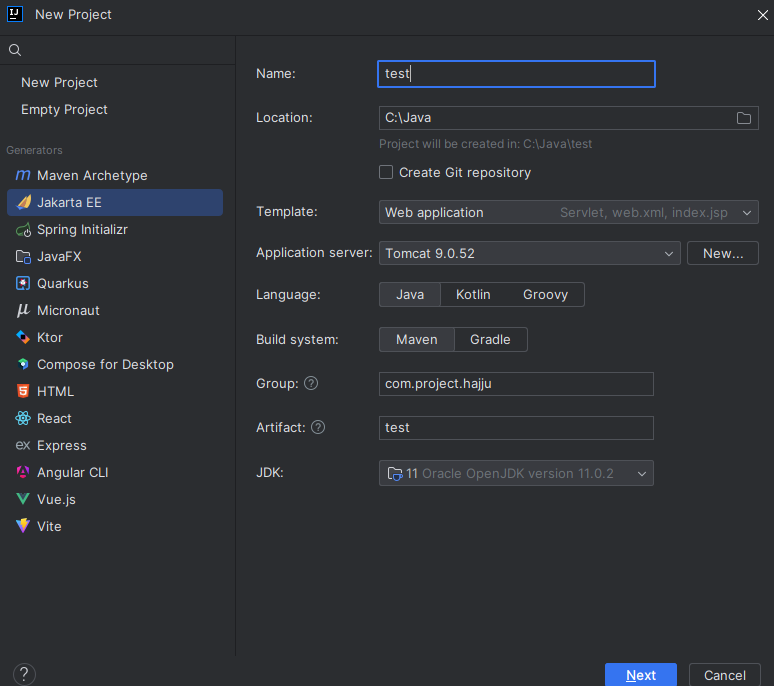
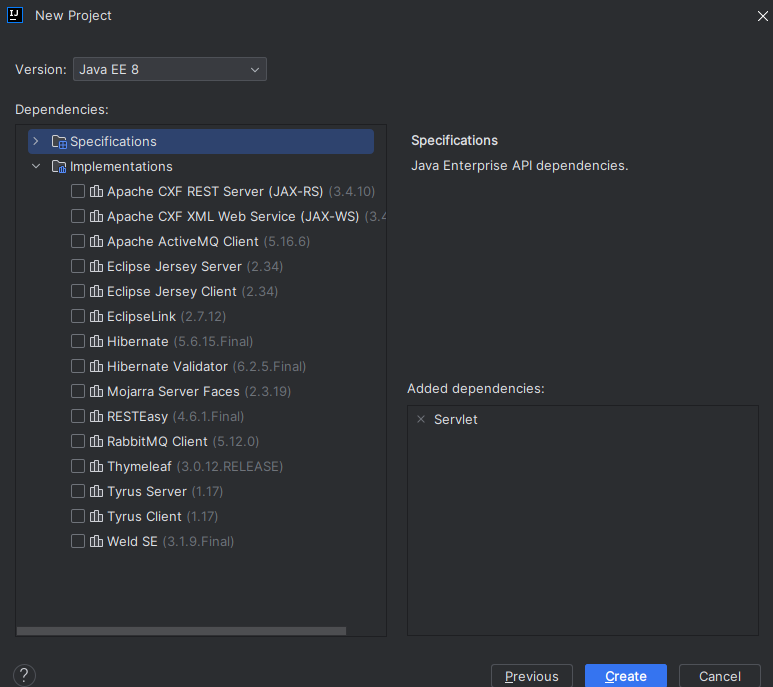
2. pom.xml
  <properties>
    <project.build.sourceEncoding>UTF-8</project.build.sourceEncoding>
    <maven.compiler.target>11</maven.compiler.target><!-- 프로젝트 자바 버전과 동일하게 수정 -->
    <maven.compiler.source>11</maven.compiler.source><!-- 프로젝트 자바 버전과 동일하게 수정 -->
    <junit.version>5.9.2</junit.version>
    <springframework.version>5.3.27</springframework.version>
    <log4j.version>2.23.1</log4j.version>
  </properties>

    <dependencies>
      <!-- Spring 라이브러리 -->
      <dependency>
        <groupId>org.springframework</groupId>
        <artifactId>spring-context</artifactId>
        <version>${springframework.version}</version>
      </dependency>
      <dependency>
        <groupId>org.springframework</groupId>
        <artifactId>spring-webmvc</artifactId>
        <version>${springframework.version}</version>
      </dependency>
      <dependency>
        <groupId>org.springframework</groupId>
        <artifactId>spring-test</artifactId>
        <version>${springframework.version}</version>
        <scope>test</scope>
      </dependency>
      <!-- Servlet, JSP, JSTL 라이브러리-->
      <dependency>
        <groupId>javax.servlet</groupId>
        <artifactId>javax.servlet-api</artifactId>
        <version>4.0.1</version>
        <scope>provided</scope>
      </dependency>
      <dependency>
        <groupId>javax.servlet.jsp</groupId>
        <artifactId>javax.servlet.jsp-api</artifactId>
        <version>2.3.3</version>
        <scope>provided</scope>
      </dependency>
      <dependency>
        <groupId>jstl</groupId>
        <artifactId>jstl</artifactId>
        <version>1.2</version>
      </dependency>
      <!-- Logging 라이브러리 -->
      <dependency>
        <groupId>org.apache.logging.log4j</groupId>
        <artifactId>log4j-api</artifactId>
        <version>${log4j.version}</version>
      </dependency>
      <dependency>
        <groupId>org.apache.logging.log4j</groupId>
        <artifactId>log4j-core</artifactId>
        <version>${log4j.version}</version>
      </dependency>
      <dependency>
        <groupId>org.apache.logging.log4j</groupId>
        <artifactId>log4j-slf4j-impl</artifactId>
        <version>${log4j.version}</version>
      </dependency>
      <dependency>
        <groupId>org.projectlombok</groupId>
        <artifactId>lombok</artifactId>
        <version>1.18.34</version>
      </dependency>
      <!-- Lombok --><!-- JUnit Test 라이브러리 -->
      <dependency>
        <groupId>org.junit.jupiter</groupId>
        <artifactId>junit-jupiter-api</artifactId>
        <version>${junit.version}</version>
        <scope>test</scope>
      </dependency>
      <dependency>
        <groupId>org.junit.jupiter</groupId>
        <artifactId>junit-jupiter-engine</artifactId>
        <version>${junit.version}</version>
        <scope>test</scope>
      </dependency>
    </dependencies>

  <build>
    <finalName>spring-framework</finalName>
  </build>
</project>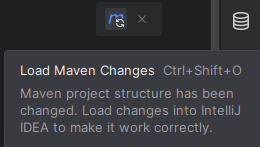
- 우측 상단에
Load Maven Change버튼을 반드시 클릭 해주기.
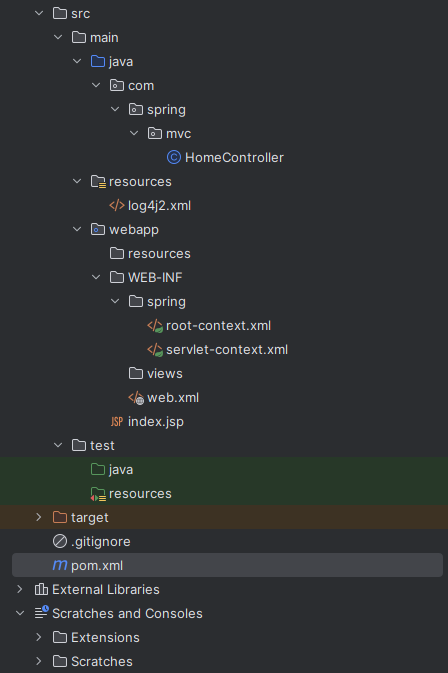
3. 디렉토리.
- 스프링 구조에 맞게 디렉토리 생성.
4. root-context.xml
src/main/webapp/WEB-INF/spring/root-context.xml
<?xml version="1.0" encoding="UTF-8"?>
<beans xmlns="http://www.springframework.org/schema/beans"
       xmlns:xsi="http://www.w3.org/2001/XMLSchema-instance"
       xsi:schemaLocation="http://www.springframework.org/schema/beans http://www.springframework.org/schema/beans/spring-beans.xsd">

</beans>
5. servlet-context.xml
src/main/webapp/WEB-INF/spring/servlet-context.xml
<?xml version="1.0" encoding="UTF-8"?>
<beans xmlns="http://www.springframework.org/schema/beans"
       xmlns:xsi="http://www.w3.org/2001/XMLSchema-instance"
       xmlns:mvc="http://www.springframework.org/schema/mvc"
       xmlns:context="http://www.springframework.org/schema/context"
       xsi:schemaLocation="http://www.springframework.org/schema/beans http://www.springframework.org/schema/beans/spring-beans.xsd http://www.springframework.org/schema/mvc https://www.springframework.org/schema/mvc/spring-mvc.xsd http://www.springframework.org/schema/context https://www.springframework.org/schema/context/spring-context.xsd">
    <mvc:annotation-driven />
    <mvc:resources mapping="/**" location="resources" />

    <bean class="org.springframework.web.servlet.view.InternalResourceViewResolver">
        <property name="prefix" value="/WEB-INF/views/" />
        <property name="suffix" value=".jsp" />
    </bean>

    <context:component-scan base-package="com.spring.mvc" />
</beans>
6. web.xml
- 추가된
root-context.xml과servlet-context.xml에 맞게web.xml도 아래와 같이 수정.
<?xml version="1.0" encoding="UTF-8"?>
<web-app xmlns="http://xmlns.jcp.org/xml/ns/javaee"
         xmlns:xsi="http://www.w3.org/2001/XMLSchema-instance"
         xsi:schemaLocation="http://xmlns.jcp.org/xml/ns/javaee http://xmlns.jcp.org/xml/ns/javaee/web-app_4_0.xsd"
         version="4.0">
    <listener>
        <listener-class>org.springframework.web.context.ContextLoaderListener</listener-class>
    </listener>

    <context-param>
        <param-name>contextConfigLocation</param-name>
        <param-value>/WEB-INF/spring/root-context.xml</param-value>
    </context-param>

    <servlet>
        <servlet-name>appServlet</servlet-name>
        <servlet-class>org.springframework.web.servlet.DispatcherServlet</servlet-class>
        <init-param>
            <param-name>contextConfigLocation</param-name>
            <param-value>/WEB-INF/spring/servlet-context.xml</param-value>
        </init-param>
        <load-on-startup>1</load-on-startup>
    </servlet>
    <servlet-mapping>
        <servlet-name>appServlet</servlet-name>
        <url-pattern>/</url-pattern>
    </servlet-mapping>
</web-app>
7. log4j2.xml
src/main/resource/log4j2.xml
<?xml version="1.0" encoding="UTF-8"?>
<Configuration>
    <!-- Appender, Layout 설정 -->
    <Appenders>
        <Console name="console" target="SYSTEM_OUT">
            <PatternLayout/>
        </Console>
        <File name="file" fileName="./logs/file/logout.log" append="false">
            <PatternLayout pattern="%d %5p [%c] %m%n"/>
        </File>
    </Appenders>

    <!-- Logger 설정 -->
    <Loggers>
        <Logger name="com.fastcampus.ch01" level="TRACE" additivity="false">
            <AppenderRef ref="console"/>
        </Logger>
        <Logger name="javax.sql" level="TRACE" additivity="false">
            <AppenderRef ref="console"/>
        </Logger>
        <Root level="INFO">
            <AppenderRef ref="console"/>
        </Root>
    </Loggers>
</Configuration>
8. 톰캣 설정.
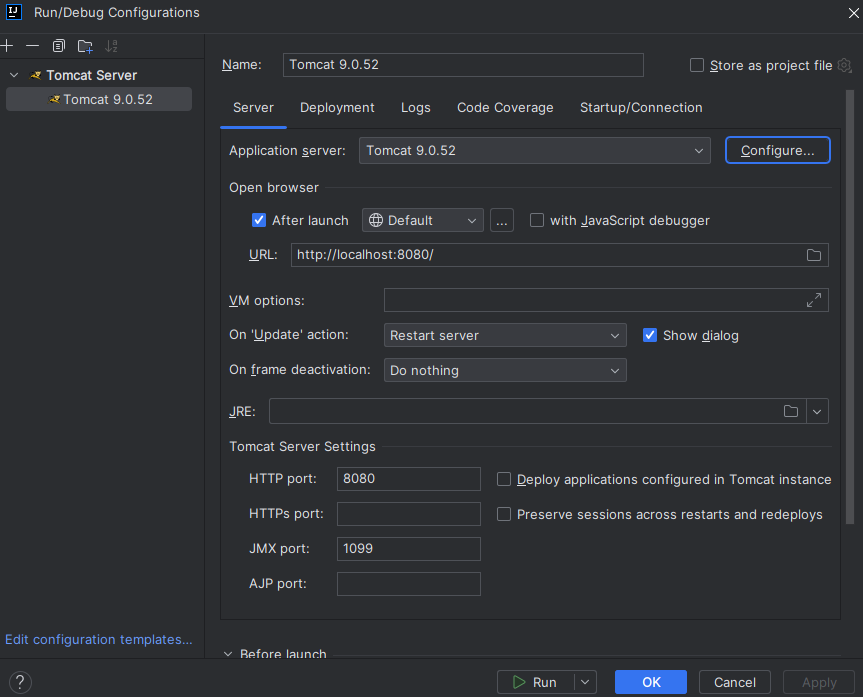
9. 테스트 해보기.
src/main/java/com/spring/mvc/HomeController
package com.spring.mvc;

import org.springframework.stereotype.Controller;
import org.springframework.web.bind.annotation.GetMapping;

@Controller
public class HomeController {
    @GetMapping("/")
    public String home() {
        return "home";
    }
}
src/main/webapp/WEB-INF/views/home.jsp
<%@ page language="java" contentType="text/html; charset=UTF-8" pageEncoding="UTF-8"%>
<!DOCTYPE html>
<html lang="ko">
<head>
    <meta charset="UTF-8">
    <title>Insert title here</title>
</head>
<body>
<h1>Welcome to My Spring Framework Project!!</h1>
</body>
</html>

Every cloud has a silver lining.ㅤㅤㅤㅤㅤㅤㅤㅤㅤhttps://www.instagram.com/ha_jju