JQuery Event
1)학습내용
Form 태그
- Form : 태그 내부의 입력에 관련된 태그들에 대한 선택자
- :input : 모든 입력에 관련 된 태그들을 선택
Form 태그 선택자
-:text : type 속성이 text인 input 태그를 선택
-:password : type 속성이 password 인 input 태그를 선택
-:radio : type 속성이radio인input 태그를 선택
-:checkbox : type 속성이submit인input 태그를 선택
-:submit : type 속성이submit인input 태그를 선택
-:reset : type 속성이rese 인input 태그를 선택
-:button : type 속성이button인input 태그를 선택
-:image : type 속성이image인input 태그를 선택
-:file : type 속성이file인input 태그를 선택
등이 있다.
<!DOCTYPE html>
<html>
<head>
<meta charset="UTF-8">
<title>Insert title here</title>
<script src="https://code.jquery.com/jquery-3.6.0.min.js"></script>
<script>
	(function(){
	$(":text").css("background-color", "yellow");
	$(":password").css("background-color", "red");

		});
</script>
</head>
<body>
		<input type="text"/><<br/>
		<input type="password"/><<br/>

</body>
</html>
결과

이벤트함수
•click : 클릭
•Dblclick: 더블클릭
•Mouseenter: 마우스 커서가 들어왔을때
•Mouseleave: 마우스커서가 나갔을때
•Mousedown: 마우스키를 눌렀을때
•Mouseup:마우스키를 떼었을때
•Hover :마우스 커서가 들어왔을때,나갔을때
<!DOCTYPE html>
<html>
<head>
<meta charset="UTF-8">
<title>Insert title here</title>
<script src="https://code.jquery.com/jquery-3.6.0.min.js"></script>
<script>
$(function(){
	$("#a1").click(function(){
		$("#a1").css("background-color", "black");
	$("#a1").css("color", "white");
	});
});

$(function(){
	$("#a2").dblclick(function(){
		$("#a2").css("background-color", "black");
		$("#a2").css("color", "white");
	});
});

$(function(){
	$("#a3").mouseenter(function(){
		$("#a3").css("background-color", "black");
		$("#a3").css("color", "white");
	});
});

$(function(){
	$("#a3").mouseleave(function(){
		$("#a3").css("background-color", "white");
		$("#a3").css("color", "black");
	});
});

$(function(){
	$("#a4").mousedown(function(){
		$("#a4").css("background-color", "black");
		$("#a4").css("color", "white");
	});
});

$(function(){
	$("#a4").mouseup(function(){
		$("#a4").css("background-color", "white");
		$("#a4").css("color", "black");
	});
});

$("#a5").hover(function() {
	$("#a5").css("background-color", "black");
	$("#a5").css("color", "white");
}, function() {
	$("#a5").css("background-color", "white");
	$("#a5").css("color", "black");
} )


$(function(){
	$("#a7").on("click", function()
			{alert('a7');
			});
	});

$(function(){
	$("#a8").one("click", function(){
		alert('a8');
		});
});

$("#a9").on({click : function(){
	alert('click');
	},
	mouseenter:  function(){
		$("#a9").css("background-color","black");
		},
		mouseleave: function(){
			$("#a9").css("background-color","white");
			}
		});


			function remove_event(){
				$("#a7").off("click");
				};


</script>

</head>

<body>
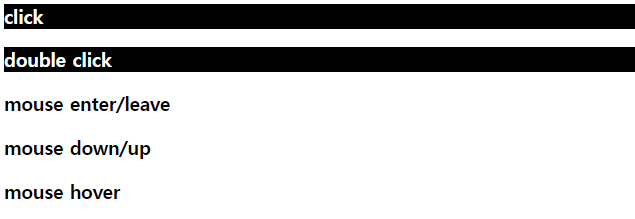
 	<h3 id="a1">click</h3>
  	<h3 id="a2">double click</h3>
   <h3 id="a3">mouse enter/leave</h3>
    <h3 id="a4">mouse down/up</h3>
     <h3 id="a5">mouse hover</h3>


     <h3 id="a7">on</h3>
     <button type="button" onclick="remove_event()">이벤트 제거</button>
     <br/>

     <h3 id="a8">one</h3>

     <h3 id="a9">event setting</h3>
</body>
</html>
결과
focus , Blur
-focus : 포커스가 주어졌을때
-Blur: 포커스를 잃었을때
<script>
$(function(){
	$("#a6").focus(function(){
		$("#a6").css("background-color", "blue");
});
	$("#a6").blur(function(){
		$("#a6").css("background-color", "red");
		});
	});

</script>
<body>
<input id="a6" type="text"/>
</body>
결과

포커스가 주워졌을때
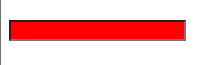
blur 상태일때
on off one
-on : 이벤트를설정하는함수
-off :설정된이벤트를제거하는함수
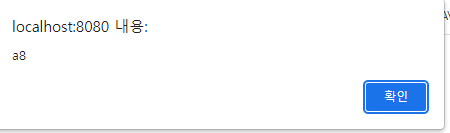
-one :이벤트를설정하고이벤트가발생했을때자동으로제거
$(function(){
	$("#a7").on("click", function()
			{alert('a7');
			});
	});

$(function(){
	$("#a8").one("click", function(){
		alert('a8');
		});
});
결과
2)어려웠던점
이벤트 명령어 mouseenter 랑 mouseup가 비슷한거같아서 잘못쓴점
3)해결방법
pdf파일의 강의내용 요약을 정리하여 해결
4) 소감
제이쿼리의 이벤트에 대해서 알아보았는데 다양한 명령어를 알게되어서 손에익히느라 고생좀 할거같다...
이벤트 용어가 너무많아서 어디에서 써야할지 혼동이 오기도하는데 잘극복해야겠다..