제가 작성하는 이 글은 제가 공부하기 위해 작성하고 제 학교 후배들에게 조금이라도 ros에 대해서 접하게 하고자 작성하게 되었습니다. 그러니 만약 틀린내용이나 그러니 제가 부족한 부분이 있을수 있으니 주의해주면서 봐주시면 감사하겠습니다 -Happy Lee-
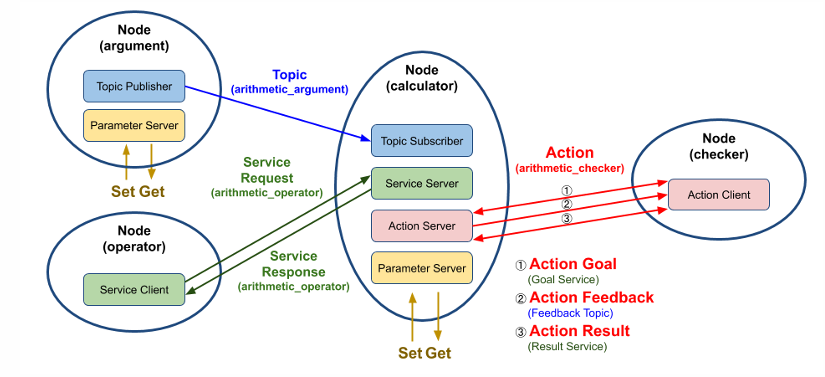
실습패키지 설계
- 계산기 개발
- 현재 시간과 변수 a,b를 받아 연산하여 결과값 도출
- 연산 결과값을 누락하여 목표치에 도달했을때 이 결과값을 표시
그래서 지금 제작해야할것은
1. 토픽, 서비스, 액션 메시지 인터페이스 작성
2. 패키지 수정
3. 각 노드들간에 코드 작성
이순서로 진행할것이다.
토픽, 서비스, 액션 인터페이스 작성
- 토픽은 msg 파일, 서비스는 srv 파일, 액션은 action 파일에 인터페이스가 정의
- 일반적으로 std_msgs나 geometry_msgs와 같은 미리 선언된 인터페이스를 바로 사용 가능하나, 필요에 따라 커
스텀 인터페이스 생성 가능 - 단일 패키지를 가진 프로그램에서 사용 시, 해당 패키지 포함시키기도 하지만, 일반적으로 단일 패키지를 가지는 프로그램을 만드는 경우는 거의 없음
중요 - Service, action, msg를 담는 인터페이스 폴더 역시 하나의 패키지로 생성
- 개발 언어가 python이라도 build-type을 ament_cmake로 설정이 필요
- ament_cmake에는 메시지를 include하거나 import할 수 있게 하는 기능이 있지만, ament_python에는 없음
1-1. 토픽, 서비스, 액션 메시지 작성
ros2 pkg create --build-type ament_cmake study_msghappy@happy-900X5N:~/june_ws/src/study_msg$ tree
.
├── CMakeLists.txt
├── include
│ └── study_msg
├── package.xml
└── src
이런식으로 나온다.
그리고 각각의 디렉터리를 이렇게 제작하면 된다.
happy@happy-900X5N:~/june_ws/src/study_msg$ tree
.
├── action
│ └── ArithmeticChecker.action
├── CMakeLists.txt
├── include
│ └── study_msg
├── msg
│ └── ArithmeticArgument.msg
├── package.xml
├── src
└── srv
└── ArithmeticOperator.srv
새로운 srv, action, msg 부분이다.
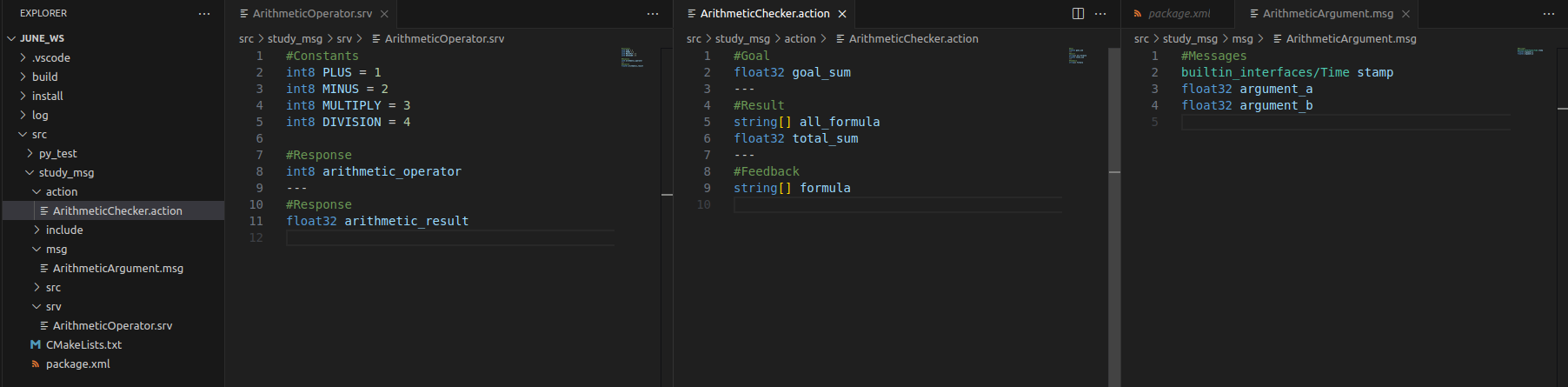
이 메시지 부분은 각각의 action, msg, srv 부분으로 나누어지게 된다.
각각의 기능은 그것의 특징이라고 생각하면된다.
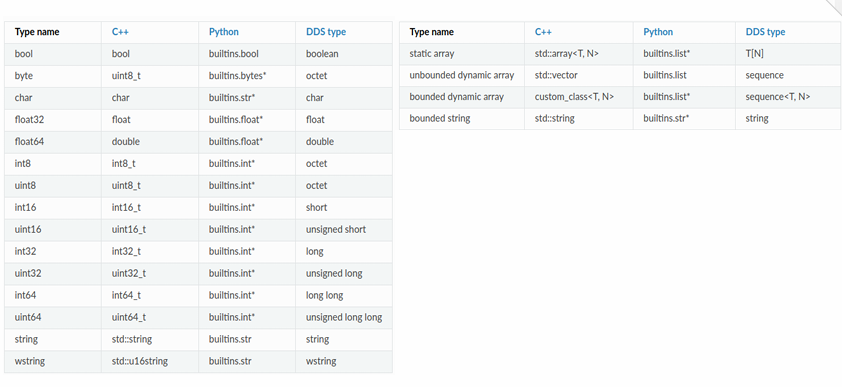
msg
#Messages
builtin_interfaces/Time stamp
float32 argument_a
float32 argument_b
메시지는 그냥 간단하게
stamp: 메시지에 시간 정보를 추가합니다 (builtin_interfaces/Time 타입)
argument_a, argument_b: 두 개의 실수형 숫자 값을 포함
srv
#Constants
int8 PLUS = 1
int8 MINUS = 2
int8 MULTIPLY = 3
int8 DIVISION = 4

#Response
int8 arithmetic_operator
---
#Response
float32 arithmetic_result
Constants: PLUS, MINUS, MULTIPLY, DIVISION 상수를 정의합니다.
Request: arithmetic_operator 변수로 연산자 값을 전달합니다.
Response: arithmetic_result로 계산된 결과를 반환합니다.
즉 요청을 받으면 그 요청에 반환을 하는 것이다. 그래서 P, M, Mult, Div로 나누게 된다.
action
#Goal
float32 goal_sum
---
#Result
string[] all_formula
float32 total_sum
---
#Feedback
string[] formula
Goal part
: goal_sum으로 목표 합계를 정의합니다.
Result part
all_formula : 전체 계산 공식을 문자열 배열로 반환합니다.
total_sum : 최종 계산된 합계를 반환합니다.
Feedback part
formula : 계산 과정에서의 중간 공식 문자열 배열을 반환합니다.
목표의 합계를 설정하고 중간마다 피드백 제공후 최종 결과를 보여준다.
1-2. 토픽, 서비스, 액션 메시지 패키지 작성
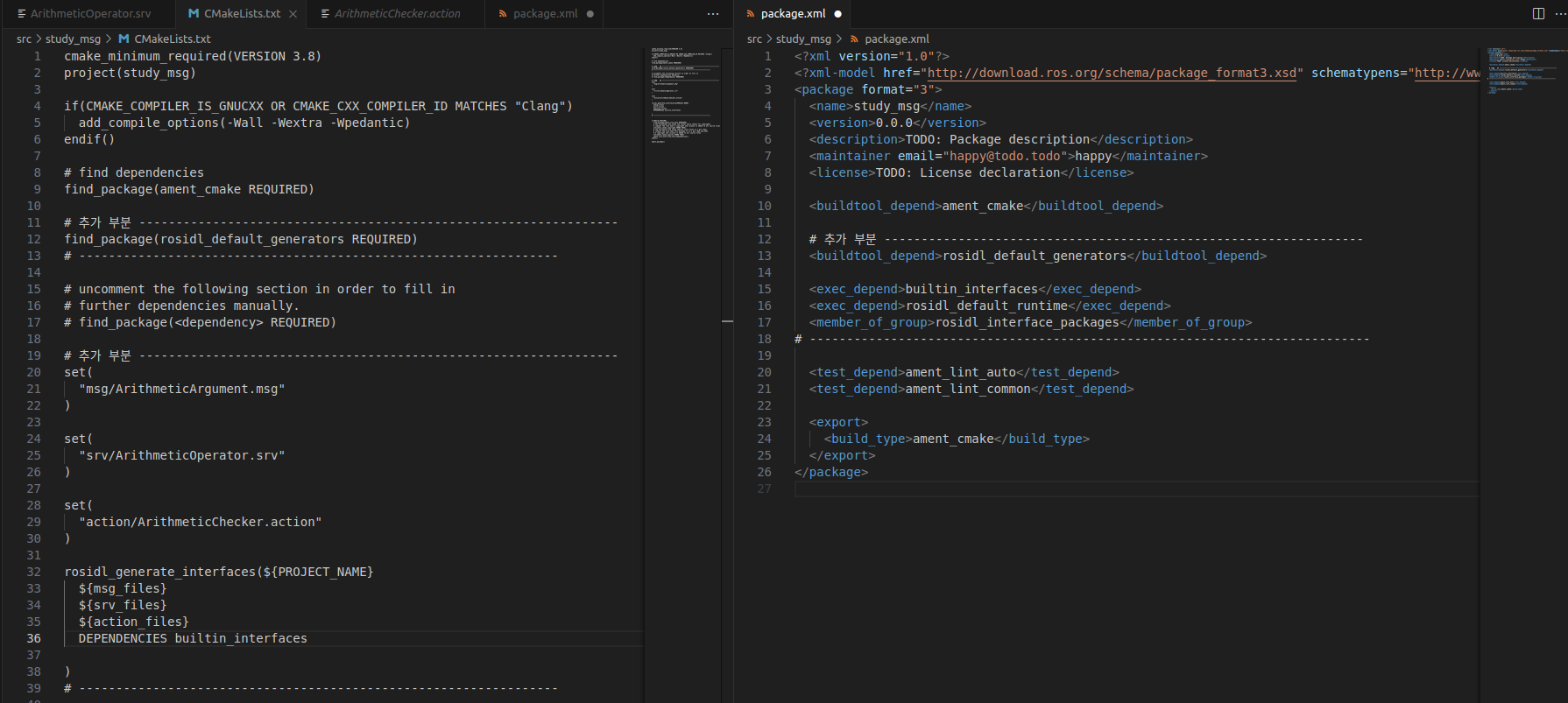
CMakeLists.txt
cmake_minimum_required(VERSION 3.8)
project(study_msg)

if(CMAKE_COMPILER_IS_GNUCXX OR CMAKE_CXX_COMPILER_ID MATCHES "Clang")
  add_compile_options(-Wall -Wextra -Wpedantic)
endif()

# find dependencies
find_package(ament_cmake REQUIRED)
# ROS 2 빌드 시스템에서 ament_cmake 패키지를 찾고, 해당 빌드 도구를 사용할 수 있도록 설정

# 추가 부분 -----------------------------------------------------------------
find_package(rosidl_default_generators REQUIRED)
# -----------------------------------------------------------------

# 메시지, 서비스, 액션 파일 정의
set(msg_files
  "msg/ArithmeticArgument.msg"
)

set(srv_files
  "srv/ArithmeticOperator.srv"
)

set(action_files
  "action/ArithmeticChecker.action"
)

# 인터페이스 빌드 설정
rosidl_generate_interfaces(${PROJECT_NAME}
  ${msg_files}
  ${srv_files}
  ${action_files}
  DEPENDENCIES builtin_interfaces
)
# -----------------------------------------------------------------

if(BUILD_TESTING)
  find_package(ament_lint_auto REQUIRED)
  # the following line skips the linter which checks for copyrights
  # comment the line when a copyright and license is added to all source files
  set(ament_cmake_copyright_FOUND TRUE)
  # the following line skips cpplint (only works in a git repo)
  # comment the line when this package is in a git repo and when
  # a copyright and license is added to all source files
  set(ament_cmake_cpplint_FOUND TRUE)
  ament_lint_auto_find_test_dependencies()
endif()

ament_package()
find_package(rosidl_default_generators REQUIRED) : 이것은 ROS IDL파일을 처리하는 것으로 시지, 서비스, 액션 파일을 C++/Python 코드로 변환해 줍니다
set : 명령어는 변수를 설정하는 역할로써 현재 예로 msg_files를 변수로 두고 파일을 msg/ArithmeticArgument.msg이걸로 설정
rosidl_generate_interfaces : rosidl 도구를 사용하여 메시지, 서비스, 액션 파일을 C++ 및 Python 코드로 생성
{msg_files} 위에 변수임
{action_files} 위에 변수임
여기에있는 것들을 다 빌드하게 된다.
DEPENDENCIES builtin_interfaces : ROS 2에서 제공하는 기본 메시지 타입에 대한 의존성 선언
package.xml
<?xml version="1.0"?>
<?xml-model href="http://download.ros.org/schema/package_format3.xsd" schematypens="http://www.w3.org/2001/XMLSchema"?>
<package format="3">
  <name>study_msg</name>
  <version>0.0.0</version>
  <description>TODO: Package description</description>
  <maintainer email="happy@todo.todo">happy</maintainer>
  <license>TODO: License declaration</license>

  <buildtool_depend>ament_cmake</buildtool_depend>

  # 추가 부분 -----------------------------------------------------------------
  <buildtool_depend>rosidl_default_generators</buildtool_depend>

  <exec_depend>builtin_interfaces</exec_depend>
  <exec_depend>rosidl_default_runtime</exec_depend>
  <member_of_group>rosidl_interface_packages</member_of_group>
# ----------------------------------------------------------------------------

  <test_depend>ament_lint_auto</test_depend>
  <test_depend>ament_lint_common</test_depend>

  <export>
    <build_type>ament_cmake</build_type>
  </export>
</package>
buildtool_depend>ament_cmake</buildtool_depend : 빌드 시스템이 ament_cmake를 사용해서 패키지를 빌드하도록 지시합니다.
buildtool_depend>rosidl_default_generators</buildtool_depend : ROS 2 인터페이스 파일(msg, srv, action)을 C++ 및 Python 코드로 변환하는 빌드 도구입니다.
exec_depend>rosidl_default_runtime</exec_depend : 메시지, 서비스, 액션 파일을 빌드한 후 런타임에 필요한 종속성입니다.
exec_depend>builtin_interfaces</exec_depend : ROS 2의 기본 메시지 타입(예: Time, Duration)을 제공하는 패키지로 태그를 통해 시간, 나노초, 기본 데이터 타입이 포함된 메시지를 사용할 수 있음 (builtin_interfaces/Time)
member_of_group>rosidl_interface_packages</member_of_group : rosidl_interface_packages 그룹에 속함을 선언하여 인터페이스 패키지임을 명시적으로 나타냄
colcon build --packages-select study_msgs 이제 이것을 진행하고
basg 해주고 빌드가 되면 된다.