테스트용 DB 설계
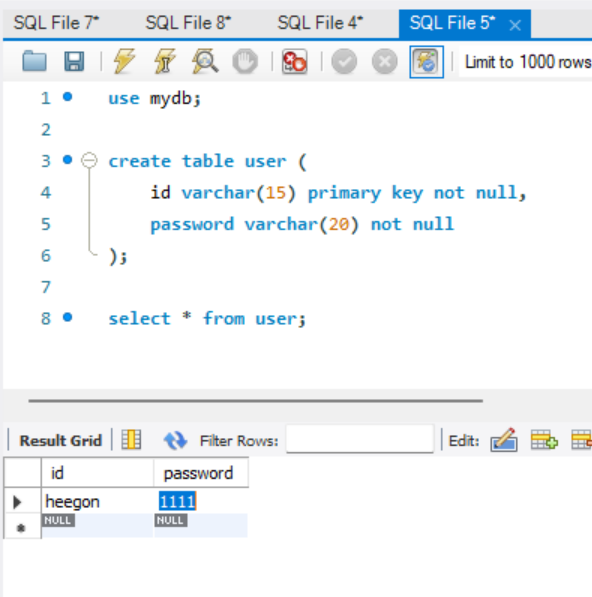
소스 코드
context.xml
커넥션풀 : DB 연동을 소스 코드 파일에 하드코딩 하지 않고,
다음과 같이 정리해서 context.xml 파일에 따로 보관하는 방법이다.
<Context>
	<Resource name="jdbc/MySQLDB"
	auth="Container"
	driverClassName="com.mysql.cj.jdbc.Driver"
	type="javax.sql.DataSource"
	url="jdbc:mysql://localhost:3306/mydb"
	username="root"
	password="1234"
	maxActive="20"
	maxIdle="10"
	maxWait="-1" />
</Context>
web.xml
<web-app xmlns="http://java.sun.com/xml/ns/j2ee" xmlns:xsi="http://www.w3.org/2001/XMLSchema-instance" xsi:schemaLocation="http://java.sun.com/xml/ns/j2ee http://java.sun.com/xml/ns/j2ee/web-app_2_4.xsd" version="2.4" id="WebApp_ID">

	<resource-ref>
	<description>Connection</description>
	<res-ref-name>jdbc/MySQLDB</res-ref-name>
	<res-type>javax.sql.DataSource</res-type>
	<res-auth>Container</res-auth>
	</resource-ref>

	<display-name>ServletTask</display-name>
	<welcome-file-list>
		<welcome-file>index.html</welcome-file>
		<welcome-file>index.htm</welcome-file>
		<welcome-file>index.jsp</welcome-file>
		<welcome-file>index.xhtml</welcome-file>
		<welcome-file>default.html</welcome-file>
		<welcome-file>default.htm</welcome-file>
		<welcome-file>default.jsp</welcome-file>
		<welcome-file>default.xhtml</welcome-file>
	</welcome-file-list>
</web-app>
loginMainPage.jsp
<%@ page language="java" contentType="text/html; charset=UTF-8"
    pageEncoding="UTF-8"%>
<!DOCTYPE html>
<html>
<head>
<meta charset="UTF-8">
<title>로그인 페이지</title>
</head>
<body>
<h1>로그인 페이지</h1>
<hr>
<form method="post" action="loginProcess.jsp">
아이디: <input type="text" name="userid"> <br>
비밀번호: <input type="password" name="userpw"> <br>
<input type="submit" value="로그인">
</form>
</body>
</html>
loginProcess.jsp
<%@ page language="java" contentType="text/html; charset=UTF-8"
    pageEncoding="UTF-8"%>
<%@ page import="java.sql.*" %>
<%@ page import="javax.sql.*" %>
<%@ page import="javax.naming.*" %>
<% request.setCharacterEncoding("UTF-8"); %>

<%
String userid = request.getParameter("userid");
String userpw = request.getParameter("userpw");

Connection conn = null;
PreparedStatement pstmt = null;
ResultSet rs = null;

String loginSQL = "Select * from user where id=? and password=?";

try {
	Context init = new InitialContext();
	DataSource ds = (DataSource) init.lookup("java:comp/env/jdbc/MySQLDB");
	conn = ds.getConnection();

	pstmt = conn.prepareStatement(loginSQL);
	pstmt.setString(1, userid);
	pstmt.setString(2, userpw);

	rs = pstmt.executeQuery();

	if(rs.next()) {
		response.sendRedirect("MainPage.jsp");
	}
	else {
		out.println("<script>alert('아이디 또는 비밀번호가 틀립니다.'); history.back(); </script>");
	}
}

catch(Exception e) {
	e.printStackTrace();
}

finally {
    if (rs != null) rs.close();
    if (pstmt != null) pstmt.close();
    if (conn != null) conn.close();
}

%>

<!DOCTYPE html>
<html>
<head>
<meta charset="UTF-8">
<title>로그인 백엔드 코드 페이지</title>
</head>
<body>

</body>
</html>
MainPage.jsp
<%@ page language="java" contentType="text/html; charset=UTF-8"
    pageEncoding="UTF-8"%>
<!DOCTYPE html>
<html>
<head>
<meta charset="UTF-8">
<title>Insert title here</title>
</head>
<body>
로그인 성공! 메인페이지입니다.
</body>
</html>
❤️