react-data-table-component pagenation custom
📌REACT-DATA-TABLE-COMPONENT NPM CUSTOM 해서 사용하기!
CUSTOM을 진행하게 된 이유.
- 해당 라이브러리에서 제공하는 PAGEING의 경우 페이지가 번호로 나오지 않는다.
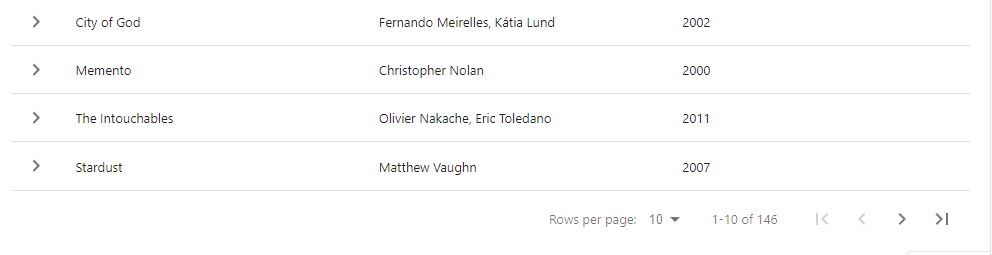
제가 원하는 pagenation 의 조건은 다음과 같았습니다.
- 페이지별 번호가 숫자로 다 나왔으면 좋겠다.
- 둥근 버튼으로 으로 point 컬러를 입히고 싶다.
- page size 선택하는걸 더 보기 좋은 모양으로 만들고 싶다.
적용한 pagenaction 화면.

선행 작업
- npm i react-data-table-component 설치
- css랑 typescript에 대한이해도가 높으면 작업하기 편합니다.
테이블 사용 .tsx에 DataTable import 하여 사용.
  <DataTable
  	data={filteredItems}			// 데이터 넣는 배열
    customStyles={custormStyleds}	// 데이터 테이블 해더 컬러 바꾸는데 사용
    columns={columns}				// 테이블 해더 구성
    pagination						// pagination 을 사용하겠다는 의미
    paginationComponent={Pagination}// custom한 pagination component

    // 테이블 페이지 size 변경시 리턴받는 함수
    onChangeRowsPerPage={(page: any) => {
    	setPageInfo({nowPage: 1, perPage: page});
   }}

   // 테이블 페이지 변경시 리턴받는 함수
   onChangePage={(page: any) => {
   		setPageInfo({...pageinfo, nowPage: page});
   }}
  />
pagenation.tsx
import React from "react";
import { PaginationComponentProps } from "react-data-table-component";
export const Pagination = ({
  rowsPerPage,
  rowCount,
  onChangePage,
  onChangeRowsPerPage,
  currentPage,
}: PaginationComponentProps): JSX.Element => {

  // 페이지 number component
  const pageNumbers = (): JSX.Element => {
    const rendering = () => {
      const pageCount: number = Math.ceil(rowCount / rowsPerPage);
      const result: JSX.Element[] = [];

      for (let i = 0; i < pageCount; i++) {
        result.push(
          <button
            type="button"
            key={i}
            className={
              currentPage === i + 1
                ? `page page-${i + 1} current selected`
                : `page page-${i + 1}`
            }
            onClick={() => {
              onChangePage(i + 1, rowCount);
            }}
          >
            <span>{i + 1}</span>
          </button>
        );
      }

      const showPage = Math.floor(currentPage / 10);
      let showBtn: JSX.Element[] = [];
      if (currentPage % 10 === 0) {
        showBtn = result.slice(10 * (showPage - 1), 10 * showPage);
      } else {
        showBtn = result.slice(10 * showPage, 10 * (1 + showPage));
      }

      return showBtn;
    };

    return <>{rendering()}</>;
  };

  return (
    <>
      <div className="select-box show-items">
        <label htmlFor="select-items">Show items</label>
        <select
          id="select-items"
          onChange={(e) => {
            const perPage = Number(e.target.value);
            onChangeRowsPerPage(perPage, currentPage);
          }}
        >
          <option value={10}>10</option>
          <option value={20}>20</option>
          <option value={30}>30</option>
        </select>
      </div>

      <div className="pagination long-pagination">
        <button
          type="button"
          className="page go-before"
          onClick={() => {
            onChangePage(1, rowCount);
          }}
        >
          <span className="ir">first page</span>
        </button>
        <button
          type="button"
          className="page go-prev"
          onClick={() => {
            onChangePage(currentPage - 1, rowCount);
          }}
          disabled={currentPage === 1}
        >
          <span className="ir">prev page</span>
        </button>

        <div className="pager">{pageNumbers()}</div>

        <button
          type="button"
          className="page go-next"
          onClick={() => {
            onChangePage(currentPage + 1, rowCount);
          }}
        >
          <span className="ir">next page</span>
        </button>
        <button
          type="button"
          className="page go-after"
          onClick={() => {
            const pageCount: number = Math.ceil(rowCount / rowsPerPage);
            onChangePage(pageCount, rowCount);
          }}
        >
          <span className="ir">last page</span>
        </button>
      </div>
    </>
  );
};
마무리
- typescript는 진짜 뭔가를 새로 만들때는 제약이 많다고 느껴지지만 오히려 제약이 있어서 문서를 찾아서 type을 찾는 재미가 있는 언어 인거 같다. (이제는 typescript아니면 개발하기 힘들다..)
- 참고로 css 소스는 첨부하지 않았는데 이건 클래스에 맞춰서 쉽게 만들수 있을거 같아서 첨부하지 않았다 만약 필요한분이 말씀해주시면 보내드리겠습니다.

Front-end 개발자입니다.