이제 프로젝트를 어느정도 수정하고자 다시 코드를 살펴보다 에러를 발견했다.

해당 에러를 그대로 해석하면 fixedDate에서 serialization되지 않은 값을 발견했다는 에러였다.
우선 에러에 대해 상세히 살펴보기전에 fixedDate가 어떻게 사용되는지 알아볼 필요가 있다.
fixedDate이 사용된 곳은 아래 이미지의 화면이다.
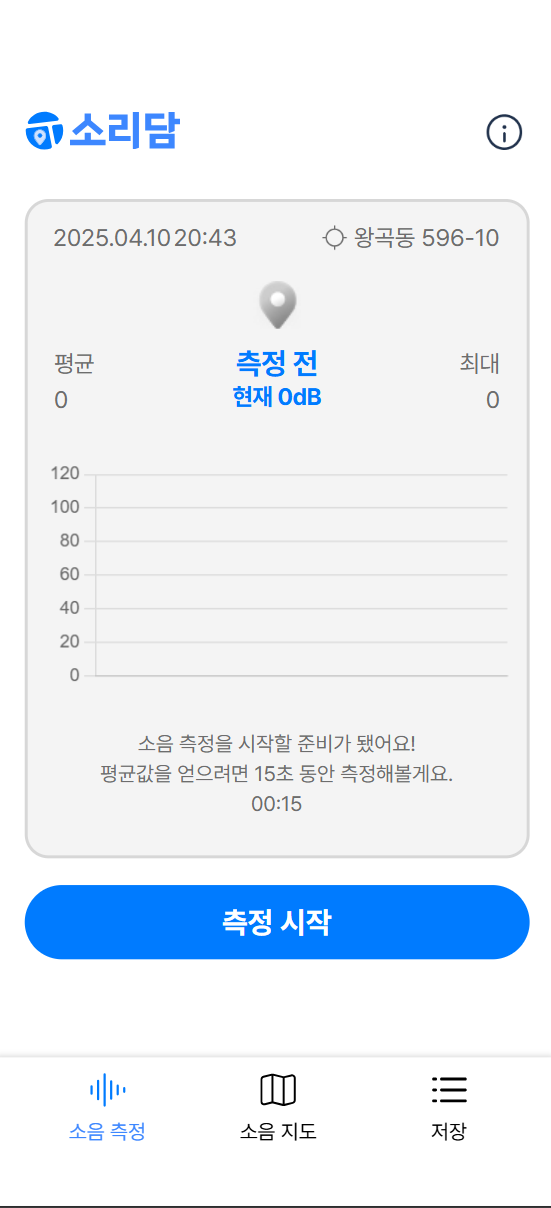
이와 관련된 코드는 Noise.tsx 컴포넌트 코드에 해당한다.
import { useEffect, useState } from 'react';
import Logo from '../../assets/logo/logo.svg';
import Info from '../../assets/icons/ico_Info.png';
import { useDispatch } from 'react-redux';
import { ChartContainer, Container, DescriptionWrapper, Header, InfoHeader, InfoWrapper, LogoWrapper, StyledToastContainer } from './Noise.styles';
import { toggleInfoModal } from '../../store/menu/menuSlice';
import DateTimeDisplay from '../../component/time/DateTimeDisplay';
import useCurrentLocation from '../../hook/useCurrentLocation';
import useCoordinateToAddress from '../../hook/useCoordinateToAddress';
import AddressDisplay from '../../component/currentLocate/AddressDisplay';
import useResetStateOnPath from '../../hook/useResetStateOnPath';
import { useAppSelector } from '../../util/redux';
import { RootState } from '../../store';
import Marker from '../../component/marker/Marker';
import { setFixedDate, toggleRecording } from '../../store/dateTime/dateTimeSlice';
import useRecordWithDecibel from '../../hook/useRecordWithDecibel';
import { DecibelDataPoint } from '../../types/DecibelDataPoint';
import DecibelChart from '../../component/decibelChart/DecibelChart';
import Timer from '../../component/timer/Timer';
import MeasureBtn from '../../component/measureBtn/MeasureBtn';
import { toast } from 'react-toastify';
import 'react-toastify/dist/ReactToastify.css'
import { setNoiseData } from '../../store/noise/noiseSlice';
import { useNavigate } from 'react-router-dom';

const Noise = () => {
    const [currentDate, setCurrentDate] = useState(new Date());
    const [isCompleted, setIsCompleted] = useState(false);
    const { startMeasuringDecibel, stopMeasuringDecibel, decibel } = useRecordWithDecibel();
    const [currentDecibel, setCurrentDecibel] = useState<number>(0);
    const [measuredMaxDecibel, setMeasuredMaxDecibel] = useState<number>(0);
    const [measuredAverageDecibel, setMeasuredAverageDecibel] = useState<number>(0);
    const [totalDecibelSum, setTotalDecibelSum] = useState<number>(0); // 누적 합계
    const [totalDataPoints, setTotalDataPoints] = useState<number>(0); // 데이터 포인트 수
    const [dataPoints, setDataPoints] = useState<DecibelDataPoint[]>([]);
    const { coords, error: locationError } = useCurrentLocation();
    const { address, error: addressError } = useCoordinateToAddress(coords);

    const { isRecording, fixedDate } = useAppSelector((state: RootState) => state.dateTime);
    const { maxDecibel, averageDecibel } = useAppSelector((state: RootState) => state.noise);
    useResetStateOnPath('/');

    useEffect(() => {
      if (!isRecording) {
        const intervalId = setInterval(() => {
          setCurrentDate(new Date());
        }, 1000);
        return () => clearInterval(intervalId);
      }
    }, [isRecording]);

    const displayDate = isRecording && fixedDate ? fixedDate : currentDate;

    const dispatch = useDispatch();
    const navigate = useNavigate();


    const handleStart = () => {
      dispatch(setFixedDate()); // 녹음 시작 시 현재 시간으로 fixedDate 설정
      dispatch(toggleRecording());
      startMeasuringDecibel();
      setIsCompleted(false); // 타이머 완료 상태 초기화
    };

    const handleCancel = () => {
      dispatch(toggleRecording());
      stopMeasuringDecibel();
      setIsCompleted(false); // 타이머 완료 상태 초기화
      setDataPoints([]); // 데이터 초기화
      setMeasuredMaxDecibel(0); // 최대 데시벨 초기화
      setMeasuredAverageDecibel(0); // 평균 데시벨 초기화
      setCurrentDecibel(0); // 현재 데시벨 초기화
      // Toast 메시지 표시
      toast.info('측정이 취소되었습니다.', {
          position: "bottom-center",
          autoClose: 3000,
          hideProgressBar: true,
          closeButton: false,
      });
    };

    const handleComplete = () => {
      setIsCompleted(true);
    };

    const handleRegister = () => {
      if (!coords) {
        toast.error('위치를 가져오는 데 실패했습니다.', { position: 'bottom-center' });
        return;
      }

      toast.success('저장 완료! 다음 단계로 이동합니다.', {
        position: 'bottom-center',
        autoClose: 3000,
        hideProgressBar: false,
        closeButton: true,
      });

      dispatch(
        setNoiseData({
          maxDecibel: measuredMaxDecibel,
          averageDecibel: measuredAverageDecibel,
          latitude: coords.latitude,
          longitude: coords.longitude,
        })
      );

      // 측정 상태 초기화
      dispatch(toggleRecording()); // 녹음 상태 초기화
      setIsCompleted(false); // 완료 상태 초기화
      setDataPoints([]); // 데이터 초기화
      setMeasuredMaxDecibel(0); // 최대 데시벨 초기화
      setMeasuredAverageDecibel(0); // 평균 데시벨 초기화
      setCurrentDecibel(0); // 현재 데시벨 초기화

      setTimeout(() => {
        navigate('/register');
      }, 1000);
    };

    useEffect(() => {
      if (!isRecording) {
        setIsCompleted(false); // 측정 중지 시 완료 상태 초기화
        setDataPoints([]); // 그래프 데이터 초기화
        setMeasuredMaxDecibel(0); // 최대 데시벨 초기화
        setMeasuredAverageDecibel(0); // 평균 데시벨 초기화
      }
    }, [isRecording]);

    useEffect(() => {
      if (isRecording) {
        const current = decibel === -Infinity ? 0 : decibel;
        setCurrentDecibel(current);

        // 로컬 최대 데시벨 업데이트
        if (current > measuredMaxDecibel) {
          setMeasuredMaxDecibel(current);
        }

        // 누적 합계 및 평균 계산
        const newTotalDecibelSum = totalDecibelSum + current;
        const newTotalDataPoints = totalDataPoints + 1;

        setTotalDecibelSum(newTotalDecibelSum); // 누적 합계 업데이트
        setTotalDataPoints(newTotalDataPoints); // 데이터 포인트 수 업데이트
        setMeasuredAverageDecibel(newTotalDecibelSum / newTotalDataPoints); // 평균 계산 및 업데이트

        // 데이터 포인트 추가
        setDataPoints((prevDataPoints) => [
          ...prevDataPoints,
          { x: new Date().toISOString(), y: current },
        ]);
      }
    }, [decibel, isRecording, totalDecibelSum, totalDataPoints, measuredMaxDecibel]);

    useEffect(() => {
      // 측정 중이 아니라면 /measure로 리다이렉트
      if (!maxDecibel && !averageDecibel) {
        navigate('/');
      }
    }, [maxDecibel, averageDecibel, navigate]);


  return (
    <Container>
      <Header>
        <LogoWrapper>
          <img src={Logo} alt='logo'/>
        </LogoWrapper>
        <InfoWrapper onClick={() => dispatch(toggleInfoModal(true))}>
          <img src={Info} alt='info'/>
        </InfoWrapper>
      </Header>
      <ChartContainer isRecording={isRecording}>
        <InfoHeader>
          <DateTimeDisplay date={displayDate}/>
          <AddressDisplay address={address} locationError={locationError} addressError={addressError} />
        </InfoHeader>
        <Marker averageDecibel={measuredAverageDecibel} isRecording={isRecording} />
        <DecibelChart
          decibel={currentDecibel}
          dataPoints={dataPoints}
          averageDecibel={measuredAverageDecibel}
          maxDecibel={measuredMaxDecibel}
        />
        <DescriptionWrapper>
          <p>소음 측정을 시작할 준비가 됐어요!</p>
          <p>평균값을 얻으려면 15초 동안 측정해볼게요.</p>
          <Timer
            initialCountdown={15}
            isActive={isRecording}
            onComplete={handleComplete}
          />
        </DescriptionWrapper>
      </ChartContainer>
      <MeasureBtn
          isRecording={isRecording}
          isCompleted={isCompleted}
          onStart={handleStart}
          onCancel={handleCancel}
          onRegister={handleRegister}
      />
      <StyledToastContainer />
    </Container>
  );
};

export default Noise;
굉장히 복잡하긴 하지만 주목해야 할 코드는 다음 두 구문이다.
const { isRecording, fixedDate } = useAppSelector((state: RootState) => state.dateTime);

const displayDate = isRecording && fixedDate ? fixedDate : currentDate;
redux를 통해 상태관리 중인 isRecording 상태면(즉, 측정 시작 버튼을 누른 상태면) fixedDate이란 값을 가져와서 표시해주는데
해당 reducer와 관련된 코드는 dateTimeSlice.ts파일에 존재한다.
const dateTimeSlice = createSlice({
  name: 'dateTime',
  initialState,
  reducers: {
    toggleRecording(state) {
      state.isRecording = !state.isRecording
    },

    setFixedDate: (state) => {
      state.fixedDate = new Date();
    },
이 setFixedDate에서 Date()함수를 사용해서 fixedDate의 값을 설정하고 있다.
이 부분에서 에러가 발생된 것으로 추정된다.
그렇다면 왜 redux에서 이런 에러를 발생했을까?
redux의 style guide 문서를 살펴보면 다음과 같다.
Do Not Put Non-Serializable Values in State or Actions
Avoid putting non-serializable values such as Promises, Symbols, Maps/Sets, functions, or class instances into the Redux store state or dispatched actions. This ensures that capabilities such as debugging via the Redux DevTools will work as expected. It also ensures that the UI will update as expected.
Exception: you may put non-serializable values in actions if the action will be intercepted and stopped by a middleware before it reaches the reducers. Middleware such as redux-thunk and redux-promise are examples of this.
참조문서: Redux_Style Guide
즉, non-serializable value인 Promise 객체, Symbol, Maps/Sets, 함수나 class 인스턴스를 state값이나 action에 넣지 말아야 한다고 한다.
여기서 serializable(직렬화)란 복잡한 구조의 데이터를 일렬로 쭉 늘어놓는 것을 의미한다고 보면 된다. 그렇다면 왜 직렬화가 필요한 것일까?
그 이유는 바로, Key/Value Storage에서는 값으로 문자열만 넣을 수 있기 때문이다.
하지만 지금 현재, fixedDate로 저장하려는 Redux의 데이터는 JavaScript 객체형태로 구성되어 있다. 이에 따라 객체 형태를 그대로 저장할 수 없기 때문에, Serialize 과정을 통해 Storage에 저장할 수 있는 문자열로 변환하는 과정이 필요하며, 이를 통해 에러를 해결할 수 있을 것으로 보인다.
참조자료 - 처음 만난 리덕스 (Redux): 데이터 저장 및 복원 과정
다른 객체 값을 사용했다면 JSON.stringify를 사용해서 Serialize를 진행하고, JSON.parse를 통해 Deserialize를 진행했을테지만, 현재 사용하고 있는 Date함수는 toISOString이라는 ISO형식의 문자열로 반환하는 메소드가 있기 때문에 이를 사용하여 Serialize를 해줄 것이다.
그렇다면 reducer에서 사용된 setFixedDate에서 설정한 fixedDate값은 아래와 같이 변경되게 되고
const dateTimeSlice = createSlice({
  name: 'dateTime',
  initialState,
  reducers: {
    toggleRecording(state) {
      state.isRecording = !state.isRecording
    },

    setFixedDate: (state) => {
      state.fixedDate = new Date().toISOString();
    },

    resetState: () => initialState,
  },
});
이를 사용하는 부분에서 Deserialize를 사용해야 되는데
- Noise.tsx
const displayDate = isRecording && fixedDate ? new Date(fixedDate) : currentDate;toISOString 메소드로 date 객체를 string으로 변환하였기 때문에 Date함수를 통해 다시 날짜/시간으로 변환할 수 있다.
이와 같이 변경하니 에러가 사라진 것을 확인할 수 있었고,
redux의 핵심 동자원리에 대해 알 수 있는 좋은 시간이었다.