소음 측정화면에서 또 다른 에러가 발생하였다.

|
|
에러 발생 원인
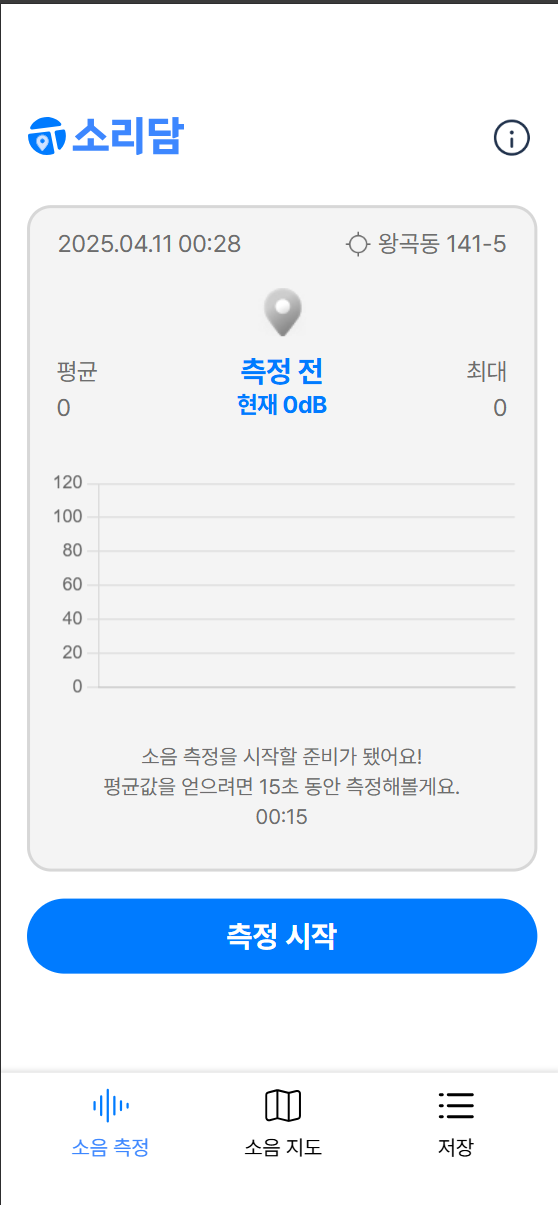
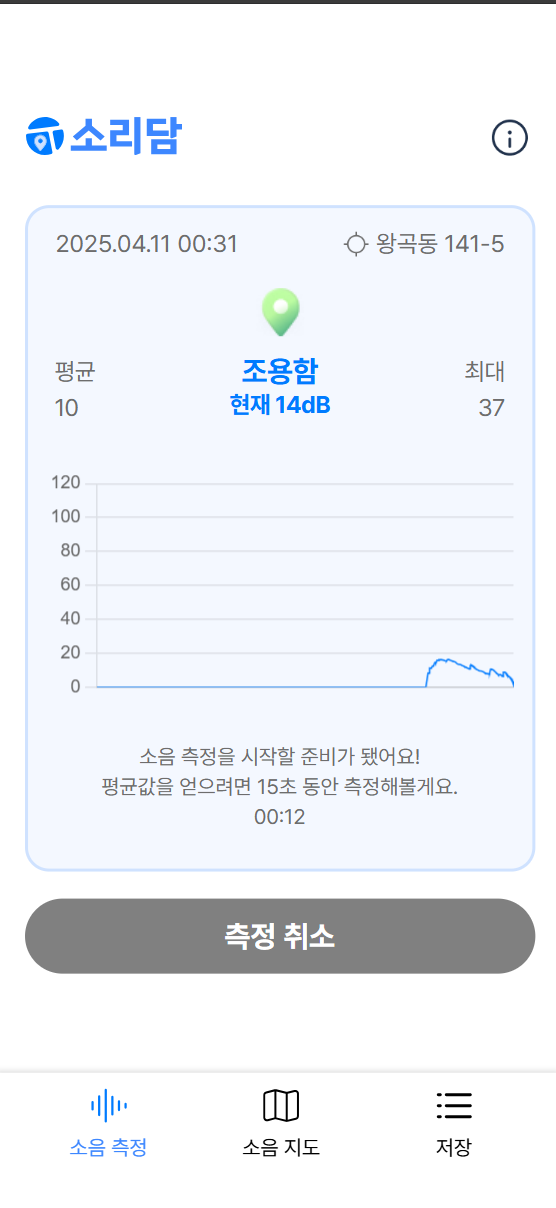
현재 isRecording이란 props는 위에서 왼쪽에 보이는 이미지와 같이 초기 상태에서 유저가 측정 시작 버튼을 클릭한 순간, div태그의 border와 background의 색상이 변화하게 되는데, 이때 모듈화된 css파일의 styled-component에 props로 isRecording을 전달함으로써 발생된 에러로 추정된다.
- Noise.tsx
import { useEffect, useState } from 'react';
import Logo from '../../assets/logo/logo.svg';
import Info from '../../assets/icons/ico_Info.png';
import { useDispatch } from 'react-redux';
import { ChartContainer, Container, DescriptionWrapper, Header, InfoHeader, InfoWrapper, LogoWrapper, StyledToastContainer } from './Noise.styles';
import { toggleInfoModal } from '../../store/menu/menuSlice';
import DateTimeDisplay from '../../component/time/DateTimeDisplay';
import useCurrentLocation from '../../hook/useCurrentLocation';
import useCoordinateToAddress from '../../hook/useCoordinateToAddress';
import AddressDisplay from '../../component/currentLocate/AddressDisplay';
import useResetStateOnPath from '../../hook/useResetStateOnPath';
import { useAppSelector } from '../../util/redux';
import { RootState } from '../../store';
import Marker from '../../component/marker/Marker';
import { setFixedDate, toggleRecording } from '../../store/dateTime/dateTimeSlice';
import useRecordWithDecibel from '../../hook/useRecordWithDecibel';
import { DecibelDataPoint } from '../../types/DecibelDataPoint';
import DecibelChart from '../../component/decibelChart/DecibelChart';
import Timer from '../../component/timer/Timer';
import MeasureBtn from '../../component/measureBtn/MeasureBtn';
import { toast } from 'react-toastify';
import 'react-toastify/dist/ReactToastify.css'
import { setNoiseData } from '../../store/noise/noiseSlice';
import { useNavigate } from 'react-router-dom';

const Noise = () => {
    const [currentDate, setCurrentDate] = useState(new Date());
    const [isCompleted, setIsCompleted] = useState(false);
    const { startMeasuringDecibel, stopMeasuringDecibel, decibel } = useRecordWithDecibel();
    const [currentDecibel, setCurrentDecibel] = useState<number>(0);
    const [measuredMaxDecibel, setMeasuredMaxDecibel] = useState<number>(0);
    const [measuredAverageDecibel, setMeasuredAverageDecibel] = useState<number>(0);
    const [totalDecibelSum, setTotalDecibelSum] = useState<number>(0); // 누적 합계
    const [totalDataPoints, setTotalDataPoints] = useState<number>(0); // 데이터 포인트 수
    const [dataPoints, setDataPoints] = useState<DecibelDataPoint[]>([]);
    const { coords, error: locationError } = useCurrentLocation();
    const { address, error: addressError } = useCoordinateToAddress(coords);

    const { isRecording, fixedDate } = useAppSelector((state: RootState) => state.dateTime);
    const { maxDecibel, averageDecibel } = useAppSelector((state: RootState) => state.noise);
    useResetStateOnPath('/');

    useEffect(() => {
      if (!isRecording) {
        const intervalId = setInterval(() => {
          setCurrentDate(new Date());
        }, 1000);
        return () => clearInterval(intervalId);
      }
    }, [isRecording]);

    const displayDate = isRecording && fixedDate ? new Date(fixedDate) : currentDate;

    const dispatch = useDispatch();
    const navigate = useNavigate();


    const handleStart = () => {
      dispatch(setFixedDate()); // 녹음 시작 시 현재 시간으로 fixedDate 설정
      dispatch(toggleRecording());
      startMeasuringDecibel();
      setIsCompleted(false); // 타이머 완료 상태 초기화
    };

    const handleCancel = () => {
      dispatch(toggleRecording());
      stopMeasuringDecibel();
      setIsCompleted(false); // 타이머 완료 상태 초기화
      setDataPoints([]); // 데이터 초기화
      setMeasuredMaxDecibel(0); // 최대 데시벨 초기화
      setMeasuredAverageDecibel(0); // 평균 데시벨 초기화
      setCurrentDecibel(0); // 현재 데시벨 초기화
      // Toast 메시지 표시
      toast.info('측정이 취소되었습니다.', {
          position: "bottom-center",
          autoClose: 3000,
          hideProgressBar: true,
          closeButton: false,
      });
    };

    const handleComplete = () => {
      setIsCompleted(true);
    };

    const handleRegister = () => {
      if (!coords) {
        toast.error('위치를 가져오는 데 실패했습니다.', { position: 'bottom-center' });
        return;
      }

      toast.success('저장 완료! 다음 단계로 이동합니다.', {
        position: 'bottom-center',
        autoClose: 3000,
        hideProgressBar: false,
        closeButton: true,
      });

      dispatch(
        setNoiseData({
          maxDecibel: measuredMaxDecibel,
          averageDecibel: measuredAverageDecibel,
          latitude: coords.latitude,
          longitude: coords.longitude,
        })
      );

      // 측정 상태 초기화
      dispatch(toggleRecording()); // 녹음 상태 초기화
      setIsCompleted(false); // 완료 상태 초기화
      setDataPoints([]); // 데이터 초기화
      setMeasuredMaxDecibel(0); // 최대 데시벨 초기화
      setMeasuredAverageDecibel(0); // 평균 데시벨 초기화
      setCurrentDecibel(0); // 현재 데시벨 초기화

      setTimeout(() => {
        navigate('/register');
      }, 1000);
    };

    useEffect(() => {
      if (!isRecording) {
        setIsCompleted(false); // 측정 중지 시 완료 상태 초기화
        setDataPoints([]); // 그래프 데이터 초기화
        setMeasuredMaxDecibel(0); // 최대 데시벨 초기화
        setMeasuredAverageDecibel(0); // 평균 데시벨 초기화
      }
    }, [isRecording]);

    useEffect(() => {
      if (isRecording) {
        const current = decibel === -Infinity ? 0 : decibel;
        setCurrentDecibel(current);

        // 로컬 최대 데시벨 업데이트
        if (current > measuredMaxDecibel) {
          setMeasuredMaxDecibel(current);
        }

        // 누적 합계 및 평균 계산
        const newTotalDecibelSum = totalDecibelSum + current;
        const newTotalDataPoints = totalDataPoints + 1;

        setTotalDecibelSum(newTotalDecibelSum); // 누적 합계 업데이트
        setTotalDataPoints(newTotalDataPoints); // 데이터 포인트 수 업데이트
        setMeasuredAverageDecibel(newTotalDecibelSum / newTotalDataPoints); // 평균 계산 및 업데이트

        // 데이터 포인트 추가
        setDataPoints((prevDataPoints) => [
          ...prevDataPoints,
          { x: new Date().toISOString(), y: current },
        ]);
      }
    }, [decibel, isRecording, totalDecibelSum, totalDataPoints, measuredMaxDecibel]);

    useEffect(() => {
      // 측정 중이 아니라면 /measure로 리다이렉트
      if (!maxDecibel && !averageDecibel) {
        navigate('/');
      }
    }, [maxDecibel, averageDecibel, navigate]);


  return (
    <Container>
      <Header>
        <LogoWrapper>
          <img src={Logo} alt='logo'/>
        </LogoWrapper>
        <InfoWrapper onClick={() => dispatch(toggleInfoModal(true))}>
          <img src={Info} alt='info'/>
        </InfoWrapper>
      </Header>
      <ChartContainer isRecording={isRecording}>
        <InfoHeader>
          <DateTimeDisplay date={displayDate}/>
          <AddressDisplay address={address} locationError={locationError} addressError={addressError} />
        </InfoHeader>
        <Marker averageDecibel={measuredAverageDecibel} isRecording={isRecording} />
        <DecibelChart
          decibel={currentDecibel}
          dataPoints={dataPoints}
          averageDecibel={measuredAverageDecibel}
          maxDecibel={measuredMaxDecibel}
        />
        <DescriptionWrapper>
          <p>소음 측정을 시작할 준비가 됐어요!</p>
          <p>평균값을 얻으려면 15초 동안 측정해볼게요.</p>
          <Timer
            initialCountdown={15}
            isActive={isRecording}
            onComplete={handleComplete}
          />
        </DescriptionWrapper>
      </ChartContainer>
      <MeasureBtn
          isRecording={isRecording}
          isCompleted={isCompleted}
          onStart={handleStart}
          onCancel={handleCancel}
          onRegister={handleRegister}
      />
      <StyledToastContainer />
    </Container>
  );
};

export default Noise;- Noise.styles.ts
import { ToastContainer } from "react-toastify";
import styled from "styled-components";

export const Container = styled.div`
    width: 23.4375rem;
    height: 44.5rem;
    padding: 4rem 0.75rem 1.3125rem 1.0625rem;
`

export const Header = styled.div`
    width: 100%;
    min-height: 3rem;
    display: flex;
    align-items: center;
    justify-content: space-between;
    margin-bottom: 1.375rem;
`

export const LogoWrapper = styled.div`
    width: 104px;
    height: 25px;
    display: flex;
    align-items: center;
    justify-content: center;
    margin-left: 0.0625rem;
    img {
        width: 100%;
        height: 100%;
        object-fit: cover;
    }
`

export const InfoWrapper = styled.div`
    width: 3rem;
    height: 3rem;
    display: flex;
    align-items: center;
    justify-content: center;
    img {
        width: 100%;
        height: 100%;
        object-fit: cover;
    }
`

export const ChartContainer = styled.div<{ isRecording: boolean }>`
    display: flex;
    flex-direction: column;
    align-items: center;
    width: 21.25rem;
    height: 27.75rem;
    margin-right: 0.375rem;
    margin-bottom: 1.125rem;
    padding: 0.75rem 0.75rem 0.8125rem;
    border-radius: 1rem;
    background-color: ${({ isRecording }) => (isRecording ? '#F4F8FF' : '#F4F4F4')};
    border: 2px solid ${({ isRecording }) => (isRecording ? '#CFE2FF' : '#D7D7D7')};
`

export const InfoHeader = styled.div`
    display: flex;
    align-items: center;
    justify-content: space-between;
    width: 19.25rem;
    margin-bottom: 1.0625rem;
    padding-right: 0.25rem;
    padding-left: 0.25rem;
`

export const DescriptionWrapper = styled.div`
    display: flex;
    flex-direction: column;
    align-items: center;
    justify-content: center;
    width: 15.125rem;
    height: 3.75rem;
    font-weight: 500;
    font-size: 0.875rem;
    line-height: 1.25rem;
    color: #6D6D6D;
`

export const StyledToastContainer = styled(ToastContainer)`
  .Toastify__toast {
    width: 21.8125rem;
    height: 2.75rem;
    padding: 0.625rem;
    gap: 0.625rem;
    margin: 0.4375rem 0.8125rem 2.25rem;
    background-color: #474747;
    text-align: center;
    color: white;
    font-size: 1rem;
    font-weight: 600;
    line-height: 1.5rem;
    opacity: 80%;
    border-radius: 0.5rem;
  }
`
위 코드 중 Noise.styles.ts파일에서 ChartContainer 관련 styled-component 코드를 살펴보면 isRecording을 props로 전달하고 있다.
현재 내가 사용하고 있는 isRecording이라는 props는 커스텀 props로써 HTML 표준 속성이 아니기 때문에 이해할 수 없는 속성이 DOM에 나타나기 때문에 경고를 하는 것이다.
Styled-component를 활용하여 동적으로 styling 주는 방법(3가지)
이를 해결할 수 있는 방법은 3가지가 있다.
1. className 변경
가장 직관적이면서 단순한 변경은 기존에 사용하고 있는 ChartContainer에 조건에 따른 className을 변경하여 style을 다르게 주는 방식이다.
예를 들어 Noise.tsx 컴포넌트의 일부 코드를 이렇게 준다.
- 예시
Noise.tsx
<ChartContainer className={isRecording ? "active" : ""}>
  <InfoHeader>
    <DateTimeDisplay date={displayDate}/>
    <AddressDisplay address={address} locationError={locationError} addressError={addressError} />
  </InfoHeader>
  <Marker averageDecibel={measuredAverageDecibel} isRecording={isRecording} />
  <DecibelChart
    decibel={currentDecibel}
    dataPoints={dataPoints}
    averageDecibel={measuredAverageDecibel}
    maxDecibel={measuredMaxDecibel}
  />
  <DescriptionWrapper>
    <p>소음 측정을 시작할 준비가 됐어요!</p>
    <p>평균값을 얻으려면 15초 동안 측정해볼게요.</p>
    <Timer
      initialCountdown={15}
      isActive={isRecording}
      onComplete={handleComplete}
    />
  </DescriptionWrapper>
</ChartContainer>
isRecording 상태, 즉 측정 상태일시 className을 active로 주고 아닐 때에는 빈문자열 ""을 할당한다.
Noise.styles.ts
import { ToastContainer } from "react-toastify";
import styled from "styled-components";

export const Container = styled.div`
    width: 23.4375rem;
    height: 44.5rem;
    padding: 4rem 0.75rem 1.3125rem 1.0625rem;

    & .active {
    	background-color: #F4F8FF;
        border: 2px solid #CFE2FF;
    }
`

export const ChartContainer = styled.div`
    display: flex;
    flex-direction: column;
    align-items: center;
    width: 21.25rem;
    height: 27.75rem;
    margin-right: 0.375rem;
    margin-bottom: 1.125rem;
    padding: 0.75rem 0.75rem 0.8125rem;
    border-radius: 1rem;
    background-color: #F4F4F4;
    border: 2px solid #D7D7D7;
`
이후 className이 active냐 아니냐에 따라 background-color와 border 색상을 다르게 주면 된다.
이 방법의 장점은 간단하며, 직관적이나 조건부 스타일이 복잡해지면 사용하기 어렵다.
2. transient props 전달
두번째 방법은 바로 $ 달러 기호를 이용한 props 전달이다.
transient props, 즉 $ 접두사는 styled-component로 사용된 props가 React Node로 전달되거나 DOM 요소로 랜더링되는 것을 방지하기 위해 사용된다.
styled-component 공식 문서에 사용된 예제를 살펴보면
const Button = styled.button<{ $primary?: boolean; }>`
  /* Adapt the colors based on primary prop */
  background: ${props => props.$primary ? "#BF4F74" : "white"};
  color: ${props => props.$primary ? "white" : "#BF4F74"};

  font-size: 1em;
  margin: 1em;
  padding: 0.25em 1em;
  border: 2px solid #BF4F74;
  border-radius: 3px;
`;

render(
  <div>
    <Button>Normal</Button>
    <Button $primary>Primary</Button>
  </div>
);
참조 자료: styled-components props 전달
이렇게 primary라는 boolean props를 이용하여 true일때와 false일때 각각의 background의 색상과 텍스트의 color를 다르게 주고 있다.
스타일 목적의 props임을 명확하게 전달하고, HTML 요소에 전달되지 않아 오류를 발생시키지 않는다는 장점이 있다.
3. shouldForwardProp
세번째 방법은 shouldForwardProp이란 방법으로 styled-component의 v5이상부터 등장한 문법이다. 이 방법의 특징은 transientProp보다 동적이고 특정 props를 필터링해서 HTML에 전달되지 않도록 제어할 수 있다는 장점을 지니고 있다.또한 공식문서에 따르면
"여러 상위 컴포넌트가 함께 구성되고 동일한 prop 이름을 공유하는 상황에서 유용합니다."
참조자료: styled-components: shouldForwardProp
라고 나와 있다.
실제 사용 예제를 살펴보면 withConfig를 사용하여 props를 활용해 filtering해주고, 속성을 부여하여 styling을 해주고 있다.
- 예제
const Comp = styled('div').withConfig({
  shouldForwardProp: (prop) =>
      !['hidden'].includes(prop),
}).attrs({ className: 'foo' })`
  color: red;
  &.foo {
    text-decoration: underline;
  }
`;

render(
  <Comp hidden>
    Drag Me!
  </Comp>
);
이 방법의 장점은 여러 개의 props를 세밀하게 제어한다는 점에서 유용하지만, 보다시피 복잡하고, 조건을 주어야하기 때문에 코드가 길어진다는 단점도 지니고 있다.
방법 3가지 중 하나를 활용하여 코드 수정하기
이 3가지 선택지 중 무엇을 적용할지 고민이 되었다.
하지만 유지보수성 측면에서 나중에 이 프로젝트가 어떻게 확장될지 모르겠기에 className을 달리 주기 보다는 transient props나 shouldForwardProps 이 2가지 선택지 중에서 골랐다.
현재 해당 ChartContainer 만이 isRecording 상태에서 styling이 변화하는 것이기 때문에 세밀한 제어를 하는 shouldForwardProps 보다는 transient props를 사용하는 것이 적절하다고 판단했다.
이에 따라 공식문서에 맞추어 코드를 다음과 같이 수정해보았다.
- 컴포넌트 코드(Noise.tsx) => 일부 발췌
      <ChartContainer $isRecording={isRecording}>
        <InfoHeader>
          <DateTimeDisplay date={displayDate}/>
          <AddressDisplay address={address} locationError={locationError} addressError={addressError} />
        </InfoHeader>
        <Marker averageDecibel={measuredAverageDecibel} isRecording={isRecording} />
        <DecibelChart
          decibel={currentDecibel}
          dataPoints={dataPoints}
          averageDecibel={measuredAverageDecibel}
          maxDecibel={measuredMaxDecibel}
        />
        <DescriptionWrapper>
          <p>소음 측정을 시작할 준비가 됐어요!</p>
          <p>평균값을 얻으려면 15초 동안 측정해볼게요.</p>
          <Timer
            initialCountdown={15}
            isActive={isRecording}
            onComplete={handleComplete}
          />
        </DescriptionWrapper>
      </ChartContainer>
      <MeasureBtn
          isRecording={isRecording}
          isCompleted={isCompleted}
          onStart={handleStart}
          onCancel={handleCancel}
          onRegister={handleRegister}
      />
      <StyledToastContainer />
    </Container>
isRecording을 transientProps를 활용하여 styled-component로 전달하였고
해당 props는 css 파일에 아래와 같이 사용되었다.
- styled-components 코드(Noise.styles.ts)
export const ChartContainer = styled.div<{ $isRecording?: boolean }>`
    display: flex;
    flex-direction: column;
    align-items: center;
    width: 21.25rem;
    height: 27.75rem;
    margin-right: 0.375rem;
    margin-bottom: 1.125rem;
    padding: 0.75rem 0.75rem 0.8125rem;
    border-radius: 1rem;
    background-color: ${props => props.$isRecording ? '#F4F8FF' : '#F4F4F4'};
    border: 2px solid ${props => props.$isRecording ? '#CFE2FF' : '#D7D7D7'};
`
isRecording이라는 boolean 값에 따라 background-color와 border의 색상에 변화를 주었다.
이후 에러가 사라지는 것을 확인할 수 있었다.
이번 기회를 통해 styled-component에 props를 전달하여 동적으로 styling 변화를 주는 방법에 대해 공부할 수 있는 기회였다.