시스템 프로그래밍 #03
Directories & Files
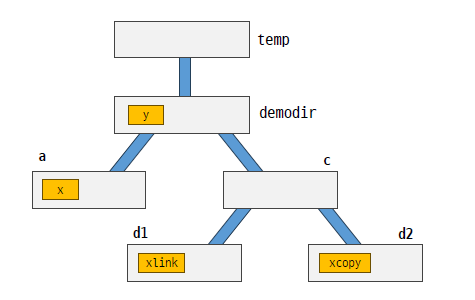
Directory Commands:
$ cd temp
$ mkdir demodir
$ cd demodir
$ pwd
/home/netprog/temp/demodir
$ mkdir oops
$ mkdir b
$ mv b c
$ rmdir oops
$ cd c
$ mkdir d1 d2
$ cd ../..
$ mkdir demodir/a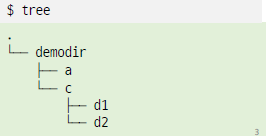
Directory 관련 명령어
mkdir[디렉토리]: 디렉토리 생성rmdir[디렉토리]: 디렉토리 삭제mv[src][dest]: 파일 이름 변경 또는 파일 이동cd[디렉토리]: 특정 디렉토리로 이동cd..: 상위(부모) 디렉토리로 이동pwd: 현재 작업 디렉토리 경로명 출력
$ pwd
/home/netprog/workspace_system/ch04
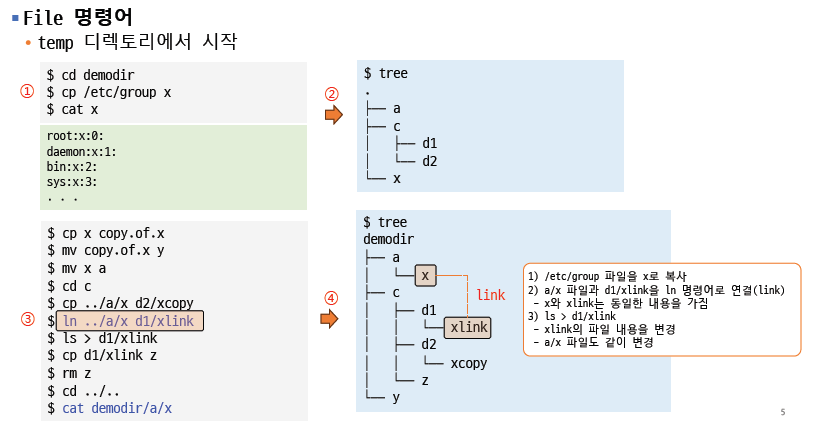
ln 명령어: hard link
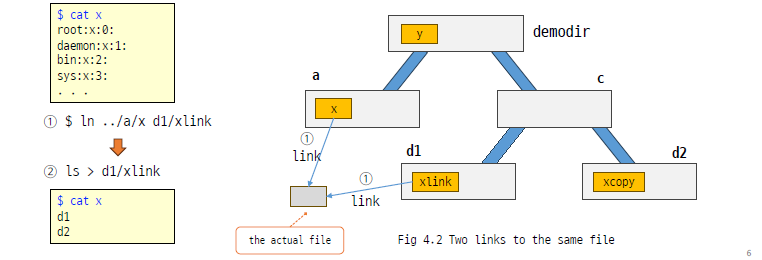
1) $ ln ../a/x d1/xlink
- 파일 x와 xlink를 연결(link) 시킴: called “links”
2) $ ls > d1/xlink
- d1/xlink 파일을 변경: a/x 파일도 동일한 내용으로 변경됨
- 두 파일이 hard link로 연결되어 있어서, 하나의 파일을 변경하면 link된 다른 파일도 변경됨
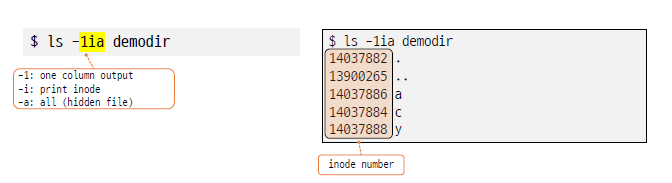
3) $ ls –il
-
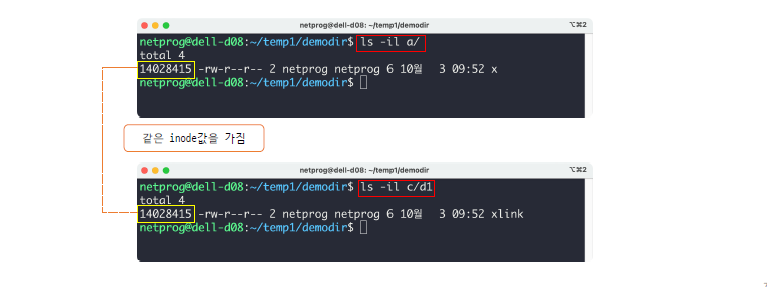
ls 명령어를 이용하여 실제 hard link 보기
-
-i옵션: inode 출력 -
demodir/a/x 파일과 demodir/c/d1/xlink 파일의 inode값은 동일(14028415)
Tree Commands
[ls –R]
- 전체 tree의 항목을 출력 (Directories + Subdirectories)
[chmod –R]
- 파일의 권한 설정changes permission bits of files.
- R 옵션: 하위 폴더의 모든 파일들의 속성 변경
[du]
- Disk usage: 디렉토리가 사용하고 있는 disk block의 수를 출력
- Disk Block -> 1024 Bytes
[find]
- 모든 하위 디렉토리의 파일 검색
File system의 3개 영역
• superblock
- 파일 시스템 자체의 구성에 대한 정보를 저장하는 영역
- 각 영역의 크기, 사용되지 않는 데이터 블록의 위치 등
• inode table
- 각 파일에는 파일 크기, 소유자의 ID, 마지막 수정된 시간 등의 속성들을 가짐
- 이런 속성들은 inode 구조체에 저장됨
- 모든 inode들은 동일한 크기이며, inode table은 inode 구조체의 배열
• data area
- 파일의 실제 데이터 영역

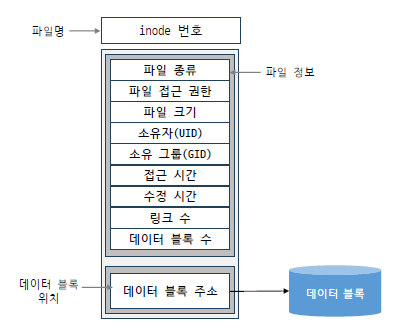
inode 구조
- 파일에 대한 정보를 저장, 실제로 디스크에 저장되어 있음
- inode는 외부적으로 번호로 표현, 내부적으로는 두 부분으로 나누어 정보를 저장
► inode 내에서도 파일정보와 데이터 블록 위치로 크게 둘로 나뉜다
파일 생성 과정
• $ who > userlist
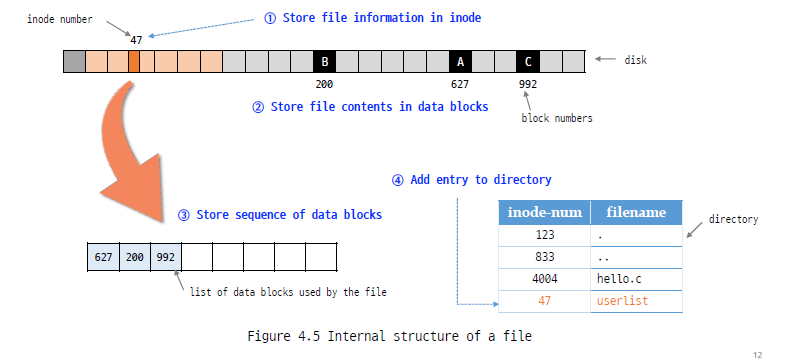
저장이 되면서 파일이름하고 inode number가 매칭이됨
2) inode table의 특정한 위치에 데이터가 저장이 됨
3)
4)
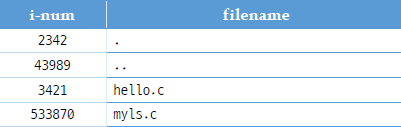
디렉토리 동작
-
디렉토리는 파일들의 이름 목록을 담고 있는 특별한 종류의 파일
-
디렉토리 내부 살펴 보기
기 타 등 등
swpd.c
#include <stdio.h>
#include <sys/types.h>
#include <sys/stat.h>
#include <dirent.h>
#include <unistd.h>
#include <stdlib.h>
#include <string.h>

ino_t get_inode(char *);
void print_path_to(ino_t);
void inode_to_name(ino_t, char *, int);

int main()
{
	print_path_to(get_inode("."));
	putchar('\n’);
	return 0;
}

void print_path_to(ino_t inode)
{
	ino_t my_inode = 0;
	char its_name[256];
	if (get_inode("..") != inode)
	{
		chdir("..");
		inode_to_name(inode, its_name, 256);
		my_inode = get_inode(".");
		print_path_to(my_inode);
		printf("/%s", its_name);
	}
}

void inode_to_name(ino_t inode_to_find, char *namebuf, int buflen)
{
	DIR *dir_ptr = NULL;
	struct dirent *dirent_ptr = NULL;

    if ((dir_ptr = opendir(".")) == NULL)
	{
		perror(NULL);
		exit(-1);
	}

	while ((dirent_ptr = readdir(dir_ptr)) != NULL)
	{
		if (dirent_ptr->d_ino == inode_to_find)
		{
			strncpy(namebuf, dirent_ptr->d_name, buflen);
			closedir(dir_ptr);
			namebuf[buflen - 1] = '\0’;
			return;
		}
	}

	fprintf(stderr, "error looking for inode: %ld\n",
	inode_node_to_find);
	exit(1);
}

ino_t get_inode(char *filename)
{
	struct stat info;
	if (stat(filename, &info) == -1)
	{
		fprintf(stderr, "cannot stat ");
		perror(NULL);
		exit(-1);
	}
	return info.st_ino;
}