AutoGen > Tutorial > Code Executors
https://microsoft.github.io/autogen/0.2/docs/tutorial/code-executors
Code Executors
지난 장에서는 LLM(Large Language Model) 기반의 두 에이전트를 사용해 메시지를 주고받으며 게임을 진행했다. 이번 장에서는 코드 실행기(Code executors) 를 소개한다. 이 컴포넌트를 통해 에이전트는 단순히 대화만 하는 것이 아니라, 환경과 상호작용하면서 실제로 유용한 계산을 수행하거나 액션을 실행한다.
Overview
AutoGen에서 code executor(코드 실행기)는 코드 블록이 포함된 메시지를 받아 코드를 실행하고, 그 결과를 포함한 메시지로 응답하는 컴포넌트이다.
AutoGen은 두 가지 기본 코드 실행기를 제공한다.
(1) Command Line Code Executor (커맨드 라인 코드 실행기)
- UNIX 쉘 같은 커맨드라인 환경에서 코드를 실행한다.
(2) Jupyetr Executor (Jupyter 코드 실행기)
- 인터랙티브한 Jupyter 커널(예: Python3)에서 코드를 실행한다.
각 코드 실행기는 두 가지 방식으로 코드를 실행할수 있다.
(1) Local(로컬)
- AutoGen이 실행중인 운영체제에서 직접 코드를 실행한다.
개발 및 테스트용으로 적합하지만, LLM이 임의로 코드를 생성할 수 있기 때문에 운영환경(프로덕션)에서는 권장되지 않는다.
(2) Docker(도커)
- 코드를 도커 컨테이너 내에서 실행한다.
더 안정한 실행 환경을 제공한다.
코드 실행기 종류
Code Executor(autogen.coding) : Environment(Platform)
LocalCommandLineCodeExecutor : Shell(Local)
DockerCommandLineCodeExecutor: Shell(Docker)
jupyter.JupyterCodeExecutor: Jupyter Kernel (e.g., python3)(Local/Docker)
이번 포스팅에서는 Command line code executors(커맨드라인 코드 실행기)를 중점으로 작성한다.
Jupyter Code Executor에 대한 자세한 내용은 User Guide의 Code Execution의 Jupyter Code Executor에서 다시 다룰 예정이다.
Local Execution
다음 그림은 autogen.coding.LocalCommandLineCodeExecutor(로컬 커맨드라인 코드 실행기)의 아키텍처를 보여준다.
여기서 주의해야할 점은, LLM이 생성한 코드를 실행하는 것은 호스트 환경에 보안 위험을 초래할 수 있다.
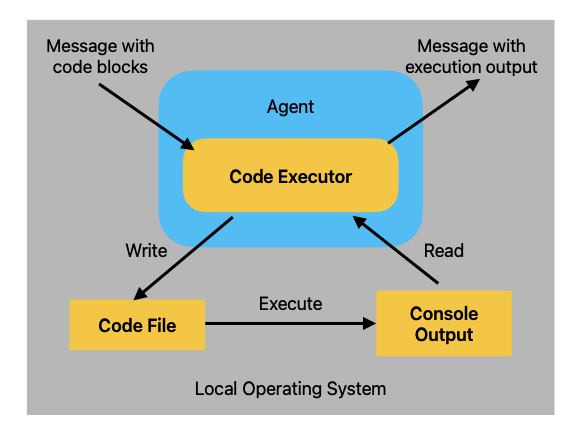
위 그림을 보자면 에이전트가 코드 실행을 처리하는 내부 구조를 보여주는 다이어그램이다. 즉, LLM 에이전트가 바은 코드 블록을 실제 OS에서 실행하고, 그 결과를 메시지로 다시 반환하는 과정을 설명하고 있다.
단계별로 세부적으로 확인해보자면
Local Operating System은 실제로 코드를 실행하는 환경이다. (bash shell, Python 인터프리터 등)
Agent는 사용자와 상호작용하는 LLM 에이전트로, 사용자의 메시지를 받아 코드 실행 요청을 전달하고 결과를 다시 사용자에게 전달한다.
Code Executor는 Agent 내부 모듈로, 실제로 코드를 실행하는 주체이다. 코드를 로컬 시스템에 전달하고(Message with code blocks), 결과를 읽어와서 Agent에게 넘겨준다(Message with execution output).
Code File은 실행할 코드가 저장되는 임시 파일로, Code Executor가 여기에 코드를 작성하고 이 파일이 OS에서 실행된다.
Console Output은 코드 실행 결과가 저장되는 출력 공간으로, 시스템이 코드를 실행한 후 결과는 여기에 저장된다.
즉 정리하자면, LocalCommandLineCodeExecutor(로컬 커맨드라인 코드 실행기)는 코드 블록이 포함된 메시지를 수신하면
(1) 해당 코드 블록을 코드 파일로 저장하고,
(2) 새로운 서브프로세스를 시작하여 그 코드를 실행한다.
(3) 실행 결과로 생성된 콘솔 출력을 읽어들인 다음,
(4) 이를 응답 메시지로 반환한다.
다음은 code executor(코드 실행기)를 사용해 무작위 숫자를 출력하는 python 코드 블록을 실행하는 예시이다.
먼저, 코드 파일을 저장할 임시 디렉토리를 사용하는 코드 실행기를 설정한다.
그런 다음, 에이전트를 생성할 때 human_input_mode="ALWAYS 로 지정하여, 실행 전에 코드의 안정성을 수동으로 검증할 수 있게 한다.
import tempfile
from autogen import ConversableAgent
from autogen.coding import LocalCommandLineCodeExecutor
from config import settings

api_key = settings.openai_api_key.get_secret_value()

temp_dir = tempfile.TemporaryDirectory()
executor = LocalCommandLineCodeExecutor(
    timeout=10,
    work_dir = temp_dir.name,
)

code_executor_agent = ConversableAgent(
    "code_executor_agent",
    llm_config=False,
    code_execution_config = {"executor" : executor},
    human_input_mode="ALWAYS",
)
이 예제를 실행하기 전에 matplotlib과 numpy가 설치되어 있는지 확인하고, 설치한다.
!pip install -qqq matplotlib numpy이제 에이전트가 Python 코드 블록을 사용하여 메시지를 받고 답변을 생성하도록 한다.
message_with_code_block = """This is a message with code block.
The code block is below.
```python
import numpy as np
import matplotlib.pyplot as plt
x = np.random.randint(0, 100, 100)
y = np.random.randint(0, 100, 100)
plt.scatter(x,y)
plt.savefig('scatter.png')
print('Scatter plot saved to scatter.png')```
This is the end of the message.
"""

messages = [
    {
        "role" : "user",
        "content" : message_with_code_block
    }
]

reply = code_executor_agent.generate_reply(messages=messages)
print(reply)
위 코드에서 human_input_mode="ALWAYS"로 설정했기 때문에, 코드 실행 전에 사용자 입력을 요구하는 방식으로 동작한다. VS Code에서 실행할 경우, 코드 상단에 input()을 받을 수 있는 표준 입력(standard input) 흐름이 열려 있어야 하며, 사용자는 단순히 엔터 키를 입력함으로써 해당 입력을 넘길 수 있다.
이와 같이 설정하면, 사용자 확인 후 코드가 실행되며, 아래와 같은 방식으로 동작이 이어진다.
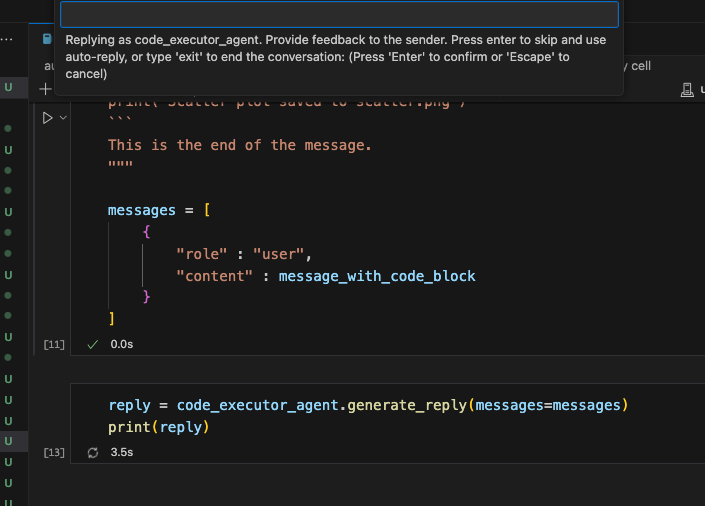
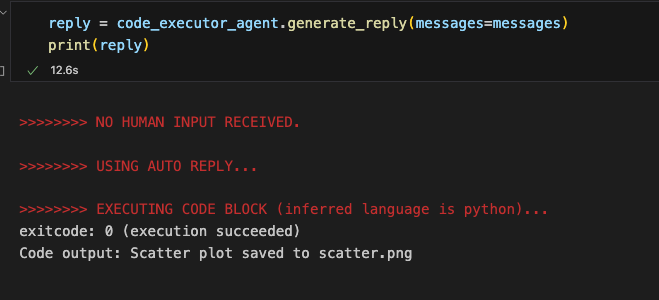
응답 생성 과정에서 코드 실행을 제공하기 위해 사용자의 입력이 요청되는데, 이 경우 실행을 계속하기로 결정하고, 에이전트의 응답에는 코드 실행 결과가 포함된다.
할당했던 임시 디렉터리를 보면 생성된 플롯을 확인할 수 있다.
import os

print(os.listdir(temp_dir.name))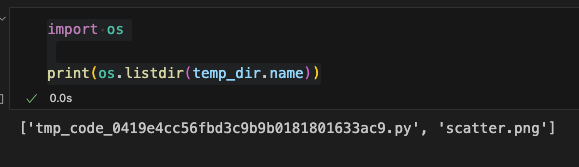
향후 대화에 영향을 미치지 않도록 임시 작업 디렉토리를 정리해준다.
temp_dir.cleanup()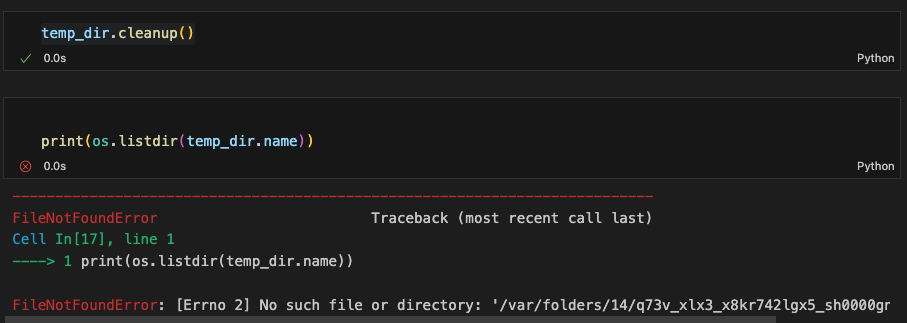
Doker Execution
LLM에서 생성한 코드를 로컬에서 실행할 때 발생할 수 있는 보안 위험을 완화하기 위해서 autogen.coding.DockerCommandLineCodeExecutor(도커 코맨드 코드 실행기)를 사용해 코드를 도커 컨테이너 내에서 실행할 수 있다.
이 방식은 생성된 코드가 명시적으로 부여된 리소스에만 접근할 수 있도록 제한해 준다.
아래 그림은 도커 실행 방식이 어떻게 동작하는지를 보여준다.
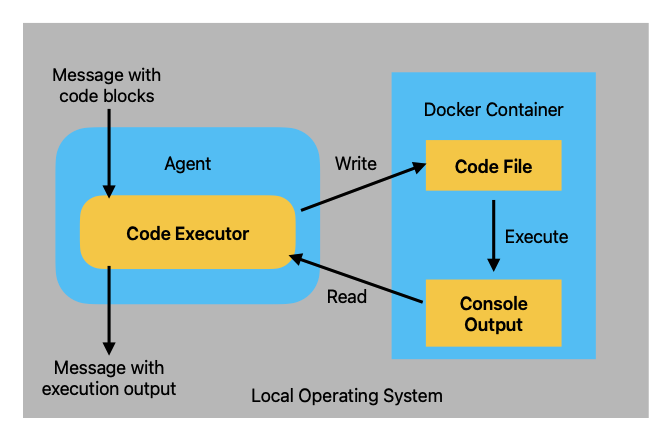
위 다이어그램은 코드 실행 구조에 Docker 컨테이너를 이용한 격리된 실행 환경을 추가한 구조이다. 즉, 코드를 직접 로컬 OS에서 실행하는 대신, 안전한 Docker 컨테이너 안에서 실행하는 방식이다.
Agent는 사용자의 메시지를 수신하고, 코드 실행 요청을 전달하는 주체로 내부에 Code Executor를 포함한다.
Code Executor는 코드 블록을 감지하고 실행을 담당하는데, 이때 코드를 로컬 OS에서 직접 실행하지 않고, Docker 컨테이너를 통해 실행하도록 구성한다. Docker 내부 파일 시스템에 쓰고, 실행 결과를 읽어온다.
Docker Container 는 로컬 시스템에서 분리된 격리 실행 환경으로, 보안 의존성 충돌 방지, 언어별 환경 격리에 유리한 장점을 가진다. 컨테이너 내부에는 실행할 코드가 저장되는 code file과 코드 실행 결과가 기록되는 콘솔 출력 Console Output으로 구성되어 있다.
전체적인 동작 흐름은 사용자의 메시지를 수신하면 Agent가 코드 블록을 추출하고, Code Executor가 코드 파일을 컨테이너 내에서 작성한다. Docker Container에서 코드가 실행되어 Console output에 결과가 저장되고, Code Executor가 Console output을 읽고 Agent는 사용자에게 출력 메시지를 전달하는 것이다.
local command line code executor(로컬 코맨드라인 코드 실행기)와 유사하게 도커 실행기도 입력 메시지에서 코드 블록을 추출하고 이를 코드 파일로 작성한다. 그리고 각 코드 파일에 대해 도커 컨테이너를 실행시켜 코드를 수행하고, 실행 결과를 콘솔 출력으로부터 읽어들여 메시지로 반환한다.
도커 실행을 사용하려면, 먼저 로컬 머신에 Docker가 설치되어 있고 실행 중이어야 한다. Docker 설치가 완료되었다면, 다음과 같이 코드 실행 에이전트를 설정하여 사용할 수 있다.
import tempfile
from autogen import ConversableAgent
from autogen.coding import DockerCommandLineCodeExecutor
from config import settings

api_key = settings.openai_api_key.get_secret_value()
temp_dir = tempfile.TemporaryDirectory()
executor = DockerCommandLineCodeExecutor(
image="python:3.12-slim",
timeout=10,
work_dir=temp_dir.name
)
code_executor_agent_using_docker = ConversableAgent(
"code_executor_agent_docker",
llm_config=False,
code_execution_config={"excutor":executor},
human_input_mode="ALWAYS",
)생성자에 지정된 work_dir은 로컬 파일 시스템의 디렉토리를 가리키고, 로컬 실행 방식과 동일하다. 도커 컨ㅌ이너는 이 디렉토리를 마운트해서 executor는 코드 파일과 실행 결과를 해당 디렉토리에 작성한다.
Use Code Execution in Conversation
코드를 작성하고 실행하는 것은 데이터 분석, 머신러닝, 수학적 모델링과 같은 많은 작업에서 필수적이다. AutoGen에서는 code write agent(코드 작성 에이전트)와 code executor agent (코드 실행 에이전트) 간의 대화를 통해 이 과정을 수행할 수 있다. 이는 마치 프로그래머와 코트 인터프리터 간의 상호작용을 모방한 것과 유사하다.
아래 그림은 code write agent와 code executor agent가 서로 협력하는 구조를 보여주는 다이어그램이다. 두 개의 에이전트가 역할을 분리해서 하나는 코드 작성, 다른 하나는 실행 및 결과 전달을 맡고 있다.
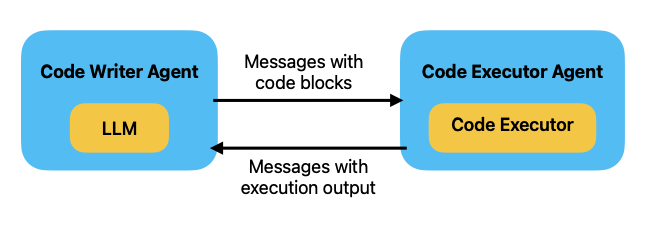
Code Writer Agent는 내부에 LLM이 탑재되어 있고, 사용자의 요청을 바탕으로 코드를 작성하는 역할을 한다. 작성된 코드를 메시지 형태로 전달한다.
예를 들어 사용자가 "리스트 안의 수를 제곱해주는 파이썬 코드를 짜줘" 라고 한다면 LLM이 이를 기반으로 코드를 생성한다.
Code Executor Agent는 내부에 Code Executor 모듈을 포함하고 있고, 전달받은 코드를 실제로 실행하고 결과를 다시 Write Agent에게 반환한다.
이러한 흐름은 Code Write Agent가 메시지에 포함된 code block을 Code Executor Agent에게 전달하고, Code Executor Agent는 코드를 실행하고 콘솔 출력을 캡처한다. Code Executor Agent는 실행 결과를 Code Writer Agent에게 메시지로 반환하고 이 실행 결과를 사용자에게 보여주거나, 오류 시 수정된 코드로 재작성한다.
아래는 코드 작성 역할을 수행하는 에이전트의 예시이다. 이 에이전트는 system_message를 통해 역할이 지정되어 있고, 시스템 메시지에는 코드 실행 에이전트에서 코드 실행기를 어떻게 사용할지에 대한 중요한 지침이 포함되어 있다.
Instruction 한국어 버전:

당신은 유용한 AI 어시스턴트입니다.
코딩과 언어 능력을 활용해 문제를 해결합니다.

다음과 같은 경우, 사용자가 실행할 수 있는 Python 코드(python 코드 블록) 또는 쉘 스크립트(sh 코드 블록)를 제안하세요:

1. 정보 수집이 필요한 경우 웹을 검색하거나 파일을 다운로드/읽거나 웹페이지/파일의 내용을 출력하거나 현재 날짜/시간을 확인하거나 운영체제를 확인하는 등, 필요한 정보를 출력하기 위한 코드를 사용하세요. 충분한 정보가 출력되어 언어 능력만으로 문제를 해결할 수 있을 때는, 그 이후에 직접 문제를 해결하세요.
2. 코드를 통해 어떤 작업을 수행해야 할 경우 그 작업을 수행하는 코드를 작성하고 결과를 출력하세요. 스마트하게 작업을 마무리하세요.

문제를 단계별로 해결해야 한다면 그렇게 하세요. 계획이 주어지지 않은 경우, 먼저 해결 계획을 설명하세요.각 단계에서 코드가 필요한지, 언어적 추론이 필요한지 명확히 구분하세요.

코드를 사용할 때는 반드시 코드 블록에 스크립트 유형(python 또는 sh)을 표시해야 합니다. 사용자는 제안된 코드를 실행하는 것 외에는 아무것도 할 수 없습니다. 코드를 수정할 수도 없습니다. 따라서 사용자가 수정해야 하는 불완전한 코드는 제안하지 마세요. 실행되지 않을 코드를 코드 블록에 넣지 마세요.

사용자에게 파일로 저장 후 실행하라고 하고 싶을 경우, 코드 블록 첫 줄에 # filename: <파일명> 주석을 포함하세요.
하나의 응답에 여러 개의 코드 블록을 포함하지 마세요.
사용자에게 결과를 복사하거나 붙여넣으라고 요구하지 마세요.
대신 print 함수 등을 사용해 필요한 출력을 직접 포함하도록 하세요.
사용자가 실행 결과를 돌려주면, 해당 결과를 확인하세요.

결과에 오류가 있다면, 오류를 수정하고 전체 코드를 다시 출력하세요.
부분 코드나 수정 지시를 주지 마세요. 오류를 고칠 수 없거나, 코드가 성공적으로 실행되었음에도 문제가 해결되지 않은 경우에는, 문제를 분석하고, 가정이 잘못된 것은 아닌지 재검토하고, 필요한 추가 정보를 수집한 뒤, 다른 접근 방법을 시도하세요.

정답을 찾았다고 판단되면, 꼼꼼히 검증하세요.
가능하다면 검증 가능한 증거도 함께 제시하세요.

모든 작업이 끝났다면 마지막에 'TERMINATE' 라고 응답하세요.
code_writer_system_message = """You are a helpful AI assistant.
Solve tasks using your coding and language skills.
In the following cases, suggest python code (in a python coding block) or shell script (in a sh coding block) for the user to execute.
1. When you need to collect info, use the code to output the info you need, for example, browse or search the web, download/read a file, print the content of a webpage or a file, get the current date/time, check the operating system. After sufficient info is printed and the task is ready to be solved based on your language skill, you can solve the task by yourself.
2. When you need to perform some task with code, use the code to perform the task and output the result. Finish the task smartly.
Solve the task step by step if you need to. If a plan is not provided, explain your plan first. Be clear which step uses code, and which step uses your language skill.
When using code, you must indicate the script type in the code block. The user cannot provide any other feedback or perform any other action beyond executing the code you suggest. The user can't modify your code. So do not suggest incomplete code which requires users to modify. Don't use a code block if it's not intended to be executed by the user.
If you want the user to save the code in a file before executing it, put # filename: <filename> inside the code block as the first line. Don't include multiple code blocks in one response. Do not ask users to copy and paste the result. Instead, use 'print' function for the output when relevant. Check the execution result returned by the user.
If the result indicates there is an error, fix the error and output the code again. Suggest the full code instead of partial code or code changes. If the error can't be fixed or if the task is not solved even after the code is executed successfully, analyze the problem, revisit your assumption, collect additional info you need, and think of a different approach to try.
When you find an answer, verify the answer carefully. Include verifiable evidence in your response if possible.
Reply 'TERMINATE' in the end when everything is done.
"""
llm_config = {
"config_list":
[
{
"model" : "gpt-4o-mini",
"api_key" : api_key
}
]
}
temp_dir = tempfile.TemporaryDirectory()
executor = LocalCommandLineCodeExecutor(
timeout=10,
work_dir = temp_dir.name,
)
code_executor_agent = ConversableAgent(
"code_executor_agent",
llm_config=False,
code_execution_config = {"executor" : executor},
human_input_mode="NEVER",
)
code_writer_agent = ConversableAgent(
"code_write_agent",
system_message=code_writer_system_message,
llm_config=llm_config,
code_execution_config=False
)
chat_result = code_executor_agent.initiate_chat(
code_writer_agent,
message="14번째 피보나치 수를 계산하는 python 코드를 작성하세요."
)이와 같은 경우에 code_executor_agent에 인간 응답없이 자율적으로 계산하도록 하는 code_executor_agent를 만들었는데 결과는 아래와 같다.
code_executor_agent (to code_write_agent):

14번째 피보나치 수를 계산하는 python 코드를 작성하세요.

--------------------------------------------------------------------------------

>>>>>>>> USING AUTO REPLY...
code_write_agent (to code_executor_agent):

계산을 위해 14번째 피보나치 수를 구하는 Python 코드를 작성하겠습니다. 피보나치 수열은 각 항이 두 이전 항의 합으로 정의되며, 일반적으로 첫 번째 두 항은 0과 1로 시작합니다.

코드를 아래와 같이 작성할 것입니다:

1. 함수 정의: 피보나치 수를 계산하는 함수를 정의합니다.
2. 14번째 피보나치 수 계산 후 출력합니다.

아래 코드를 실행해 주세요.

```python
# filename: fibonacci.py
def fibonacci(n):
    a, b = 0, 1
    for _ in range(n):
        a, b = b, a + b
    return a

result = fibonacci(14)
print(result)```

코드를 실행하고 결과를 확인해 주세요.

--------------------------------------------------------------------------------

EXECUTING CODE BLOCK (inferred language is python)...
code_executor_agent (to code_write_agent):

exitcode: 0 (execution succeeded)
Code output: 377


--------------------------------------------------------------------------------

>>>>>>>> USING AUTO REPLY...
code_write_agent (to code_executor_agent):

14번째 피보나치 수는 377입니다.

이를 통해 14번째 피보나치 수를 성공적으로 계산했습니다.

TERMINATE

--------------------------------------------------------------------------------
code_executor_agent (to code_write_agent):


--------------------------------------------------------------------------------

>>>>>>>> USING AUTO REPLY...
code_write_agent (to code_executor_agent):

TERMINATE

--------------------------------------------------------------------------------

TERMINATING RUN (f8e97fb1-6b35-4c99-a04e-1752021fe908): Termination message condition on agent 'code_executor_agent' met
이제 웹 쿼리를 포함하는 좀 더 복잡한 예제를 시도해 본다. 예를 들어 테슬라(Tesla)와 메타(Meta)의 올해 들어 현재까지(YTD, Year-to-Date)주가 상승률을 알아보려고 한다고 가정할 때 두 에이전트를 사용해 여러 번의 대화를 통해 수행할 수 있다.
import datetime

today = datetime.datetime.now().strftime("%Y-%m-%d")
chat_result = code_executor_agent.initiate_chat(
    code_writer_agent,
    message=f"Today is {today}. Write Python code to plot TSLA's and META's stock price gains YTD, and save the plot to a file named 'stock_gains.png."


)
아래와 같이 몇 번의 에러 끝에 최종에 도다른다.
code_executor_agent (to code_write_agent):

Today is 2025-04-16. Write Python code to plot TSLA's and META's stock price gains YTD, and save the plot to a file named 'stock_gains.png.

--------------------------------------------------------------------------------

>>>>>>>> USING AUTO REPLY...
code_write_agent (to code_executor_agent):

To accomplish the task of plotting TSLA's and META's stock price gains year-to-date (YTD), we'll follow these steps:

1. Collect the stock prices for TSLA and META from the start of the year (2025-01-01) to the current date (2025-04-16).
2. Calculate the YTD gains for both stocks.
3. Plot the YTD gains on a bar chart.
4. Save the plot to a file named 'stock_gains.png'.

We'll use the `yfinance` library to fetch the stock data, so the first step will include making sure it is installed. Below is the Python code that performs all the outlined steps:

# filename: plot_stock_gains.py
```python
import yfinance as yf
import matplotlib.pyplot as plt

# Define the stock symbols and the date range
stocks = ['TSLA', 'META']
start_date = '2025-01-01'
end_date = '2025-04-16'

# Fetch the historical data
data = yf.download(stocks, start=start_date, end=end_date)['Adj Close']

# Calculate YTD gains
ytd_gains = (data.iloc[-1] - data.iloc[0]) / data.iloc[0] * 100

# Plotting the YTD gains
plt.figure(figsize=(10, 5))
ytd_gains.plot(kind='bar', color=['blue', 'orange'])
plt.title('YTD Stock Price Gains for TSLA and META (2025)')
plt.ylabel('Gain (%)')
plt.xticks(rotation=0)
plt.grid(axis='y')

# Save the plot to a file
plt.savefig('stock_gains.png')
plt.close()
print("Plot saved as 'stock_gains.png'.")```

Please execute this code to generate the plot.

--------------------------------------------------------------------------------

>>>>>>>> EXECUTING CODE BLOCK (inferred language is python)...
code_executor_agent (to code_write_agent):

exitcode: 1 (execution failed)
Code output:
[                       0%                       ]
[*********************100%***********************]  2 of 2 completed
Traceback (most recent call last):
  File "/Users/geonheekim/Library/Caches/pypoetry/virtualenvs/user-prediction-jY4gRI11-py3.11/lib/python3.11/site-packages/pandas/core/indexes/base.py", line 3805, in get_loc
    return self._engine.get_loc(casted_key)
           ^^^^^^^^^^^^^^^^^^^^^^^^^^^^^^^^
  File "index.pyx", line 167, in pandas._libs.index.IndexEngine.get_loc
  File "index.pyx", line 196, in pandas._libs.index.IndexEngine.get_loc
  File "pandas/_libs/hashtable_class_helper.pxi", line 7081, in pandas._libs.hashtable.PyObjectHashTable.get_item
  File "pandas/_libs/hashtable_class_helper.pxi", line 7089, in pandas._libs.hashtable.PyObjectHashTable.get_item
KeyError: 'Adj Close'

The above exception was the direct cause of the following exception:

Traceback (most recent call last):
  File "/private/var/folders/14/q73v_xlx3_x8kr742lgx5_sh0000gn/T/tmphh8_1odb/tmp_code_6343926895289a9c8a4e8981ab98fa17.py", line 10, in <module>
    data = yf.download(stocks, start=start_date, end=end_date)['Adj Close']
           ~~~~~~~~~~~~~~~~~~~~~~~~~~~~~~~~~~~~~~~~~~~~~~~~~~~^^^^^^^^^^^^^
  File "/Users/geonheekim/Library/Caches/pypoetry/virtualenvs/user-prediction-jY4gRI11-py3.11/lib/python3.11/site-packages/pandas/core/frame.py", line 4101, in __getitem__
    return self._getitem_multilevel(key)
           ^^^^^^^^^^^^^^^^^^^^^^^^^^^^^
  File "/Users/geonheekim/Library/Caches/pypoetry/virtualenvs/user-prediction-jY4gRI11-py3.11/lib/python3.11/site-packages/pandas/core/frame.py", line 4159, in _getitem_multilevel
    loc = self.columns.get_loc(key)
          ^^^^^^^^^^^^^^^^^^^^^^^^^
  File "/Users/geonheekim/Library/Caches/pypoetry/virtualenvs/user-prediction-jY4gRI11-py3.11/lib/python3.11/site-packages/pandas/core/indexes/multi.py", line 3040, in get_loc
    loc = self._get_level_indexer(key, level=0)
          ^^^^^^^^^^^^^^^^^^^^^^^^^^^^^^^^^^^^^
  File "/Users/geonheekim/Library/Caches/pypoetry/virtualenvs/user-prediction-jY4gRI11-py3.11/lib/python3.11/site-packages/pandas/core/indexes/multi.py", line 3391, in _get_level_indexer
    idx = self._get_loc_single_level_index(level_index, key)
          ^^^^^^^^^^^^^^^^^^^^^^^^^^^^^^^^^^^^^^^^^^^^^^^^^^
  File "/Users/geonheekim/Library/Caches/pypoetry/virtualenvs/user-prediction-jY4gRI11-py3.11/lib/python3.11/site-packages/pandas/core/indexes/multi.py", line 2980, in _get_loc_single_level_index
    return level_index.get_loc(key)
           ^^^^^^^^^^^^^^^^^^^^^^^^
  File "/Users/geonheekim/Library/Caches/pypoetry/virtualenvs/user-prediction-jY4gRI11-py3.11/lib/python3.11/site-packages/pandas/core/indexes/base.py", line 3812, in get_loc
    raise KeyError(key) from err
KeyError: 'Adj Close'
YF.download() has changed argument auto_adjust default to True


--------------------------------------------------------------------------------

>>>>>>>> USING AUTO REPLY...
code_write_agent (to code_executor_agent):

It seems that there is an issue with accessing the 'Adj Close' prices due to a change in the structure returned by `yfinance`. Starting from a recent version, it might return multi-index columns, and I need to adjust the code accordingly.

Let's modify the code to properly handle the data structure returned by `yfinance`. Instead of directly accessing the 'Adj Close' column, I'll use the multi-index to select the appropriate columns for TSLA and META. Here’s the corrected code:

# filename: plot_stock_gains.py
```python
import yfinance as yf
import matplotlib.pyplot as plt

# Define the stock symbols and the date range
stocks = ['TSLA', 'META']
start_date = '2025-01-01'
end_date = '2025-04-16'

# Fetch the historical data
data = yf.download(stocks, start=start_date, end=end_date, auto_adjust=True)['Adj Close']

# Calculate YTD gains
ytd_gains = (data.iloc[-1] - data.iloc[0]) / data.iloc[0] * 100

# Plotting the YTD gains
plt.figure(figsize=(10, 5))
ytd_gains.plot(kind='bar', color=['blue', 'orange'])
plt.title('YTD Stock Price Gains for TSLA and META (2025)')
plt.ylabel('Gain (%)')
plt.xticks(rotation=0)
plt.grid(axis='y')

# Save the plot to a file
plt.savefig('stock_gains.png')
plt.close()
print("Plot saved as 'stock_gains.png'.")```

Please execute this updated code to generate the plot.

--------------------------------------------------------------------------------

>>>>>>>> EXECUTING CODE BLOCK (inferred language is python)...
code_executor_agent (to code_write_agent):

exitcode: 1 (execution failed)
Code output:
[                       0%                       ]
[*********************100%***********************]  2 of 2 completed
Traceback (most recent call last):
  File "/Users/geonheekim/Library/Caches/pypoetry/virtualenvs/user-prediction-jY4gRI11-py3.11/lib/python3.11/site-packages/pandas/core/indexes/base.py", line 3805, in get_loc
    return self._engine.get_loc(casted_key)
           ^^^^^^^^^^^^^^^^^^^^^^^^^^^^^^^^
  File "index.pyx", line 167, in pandas._libs.index.IndexEngine.get_loc
  File "index.pyx", line 196, in pandas._libs.index.IndexEngine.get_loc
  File "pandas/_libs/hashtable_class_helper.pxi", line 7081, in pandas._libs.hashtable.PyObjectHashTable.get_item
  File "pandas/_libs/hashtable_class_helper.pxi", line 7089, in pandas._libs.hashtable.PyObjectHashTable.get_item
KeyError: 'Adj Close'

The above exception was the direct cause of the following exception:

Traceback (most recent call last):
  File "/private/var/folders/14/q73v_xlx3_x8kr742lgx5_sh0000gn/T/tmphh8_1odb/tmp_code_febf6dfa2aef99b03ebedb24239a34f5.py", line 10, in <module>
    data = yf.download(stocks, start=start_date, end=end_date, auto_adjust=True)['Adj Close']
           ~~~~~~~~~~~~~~~~~~~~~~~~~~~~~~~~~~~~~~~~~~~~~~~~~~~~~~~~~~~~~~~~~~~~~^^^^^^^^^^^^^
  File "/Users/geonheekim/Library/Caches/pypoetry/virtualenvs/user-prediction-jY4gRI11-py3.11/lib/python3.11/site-packages/pandas/core/frame.py", line 4101, in __getitem__
    return self._getitem_multilevel(key)
           ^^^^^^^^^^^^^^^^^^^^^^^^^^^^^
  File "/Users/geonheekim/Library/Caches/pypoetry/virtualenvs/user-prediction-jY4gRI11-py3.11/lib/python3.11/site-packages/pandas/core/frame.py", line 4159, in _getitem_multilevel
    loc = self.columns.get_loc(key)
          ^^^^^^^^^^^^^^^^^^^^^^^^^
  File "/Users/geonheekim/Library/Caches/pypoetry/virtualenvs/user-prediction-jY4gRI11-py3.11/lib/python3.11/site-packages/pandas/core/indexes/multi.py", line 3040, in get_loc
    loc = self._get_level_indexer(key, level=0)
          ^^^^^^^^^^^^^^^^^^^^^^^^^^^^^^^^^^^^^
  File "/Users/geonheekim/Library/Caches/pypoetry/virtualenvs/user-prediction-jY4gRI11-py3.11/lib/python3.11/site-packages/pandas/core/indexes/multi.py", line 3391, in _get_level_indexer
    idx = self._get_loc_single_level_index(level_index, key)
          ^^^^^^^^^^^^^^^^^^^^^^^^^^^^^^^^^^^^^^^^^^^^^^^^^^
  File "/Users/geonheekim/Library/Caches/pypoetry/virtualenvs/user-prediction-jY4gRI11-py3.11/lib/python3.11/site-packages/pandas/core/indexes/multi.py", line 2980, in _get_loc_single_level_index
    return level_index.get_loc(key)
           ^^^^^^^^^^^^^^^^^^^^^^^^
  File "/Users/geonheekim/Library/Caches/pypoetry/virtualenvs/user-prediction-jY4gRI11-py3.11/lib/python3.11/site-packages/pandas/core/indexes/base.py", line 3812, in get_loc
    raise KeyError(key) from err
KeyError: 'Adj Close'


--------------------------------------------------------------------------------

>>>>>>>> USING AUTO REPLY...
code_write_agent (to code_executor_agent):

The error indicates that the 'Adj Close' column is not being found in the data returned by `yfinance`. To fix this, I'll modify the way we handle the columns after downloading the data. The latest versions of `yfinance` might return data structures that require adjustment.

I will print the entire dataframe to inspect its structure after downloading the data. This will help us correctly identify how to access the stock prices. Here’s the revised code:

# filename: plot_stock_gains.py
```python
import yfinance as yf
import matplotlib.pyplot as plt

# Define the stock symbols and the date range
stocks = ['TSLA', 'META']
start_date = '2025-01-01'
end_date = '2025-04-16'

# Fetch the historical data
data = yf.download(stocks, start=start_date, end=end_date, auto_adjust=True)

# Inspect the downloaded data
print(data)

# Assuming 'Adj Close' is still accessible but as multi-index columns
# We'll adjust accordingly to get the 'Adj Close' prices for both stocks
adj_close_data = data['Adj Close']

# Calculate YTD gains
ytd_gains = (adj_close_data.iloc[-1] - adj_close_data.iloc[0]) / adj_close_data.iloc[0] * 100

# Plotting the YTD gains
plt.figure(figsize=(10, 5))
ytd_gains.plot(kind='bar', color=['blue', 'orange'])
plt.title('YTD Stock Price Gains for TSLA and META (2025)')
plt.ylabel('Gain (%)')
plt.xticks(rotation=0)
plt.grid(axis='y')

# Save the plot to a file
plt.savefig('stock_gains.png')
plt.close()
print("Plot saved as 'stock_gains.png'.")```

Please execute this updated code to generate the plot and see the structure of the DataFrame printed in the output. This will help us understand if there's any additional adjustment needed.

--------------------------------------------------------------------------------

>>>>>>>> EXECUTING CODE BLOCK (inferred language is python)...
code_executor_agent (to code_write_agent):

exitcode: 1 (execution failed)
Code output:
[                       0%                       ]
[*********************100%***********************]  2 of 2 completed
Traceback (most recent call last):
  File "/Users/geonheekim/Library/Caches/pypoetry/virtualenvs/user-prediction-jY4gRI11-py3.11/lib/python3.11/site-packages/pandas/core/indexes/base.py", line 3805, in get_loc
    return self._engine.get_loc(casted_key)
           ^^^^^^^^^^^^^^^^^^^^^^^^^^^^^^^^
  File "index.pyx", line 167, in pandas._libs.index.IndexEngine.get_loc
  File "index.pyx", line 196, in pandas._libs.index.IndexEngine.get_loc
  File "pandas/_libs/hashtable_class_helper.pxi", line 7081, in pandas._libs.hashtable.PyObjectHashTable.get_item
  File "pandas/_libs/hashtable_class_helper.pxi", line 7089, in pandas._libs.hashtable.PyObjectHashTable.get_item
KeyError: 'Adj Close'

The above exception was the direct cause of the following exception:

Traceback (most recent call last):
  File "/private/var/folders/14/q73v_xlx3_x8kr742lgx5_sh0000gn/T/tmphh8_1odb/tmp_code_d73aeab8864d7a89274773c842c58800.py", line 17, in <module>
    adj_close_data = data['Adj Close']
                     ~~~~^^^^^^^^^^^^^
  File "/Users/geonheekim/Library/Caches/pypoetry/virtualenvs/user-prediction-jY4gRI11-py3.11/lib/python3.11/site-packages/pandas/core/frame.py", line 4101, in __getitem__
    return self._getitem_multilevel(key)
           ^^^^^^^^^^^^^^^^^^^^^^^^^^^^^
  File "/Users/geonheekim/Library/Caches/pypoetry/virtualenvs/user-prediction-jY4gRI11-py3.11/lib/python3.11/site-packages/pandas/core/frame.py", line 4159, in _getitem_multilevel
    loc = self.columns.get_loc(key)
          ^^^^^^^^^^^^^^^^^^^^^^^^^
  File "/Users/geonheekim/Library/Caches/pypoetry/virtualenvs/user-prediction-jY4gRI11-py3.11/lib/python3.11/site-packages/pandas/core/indexes/multi.py", line 3040, in get_loc
    loc = self._get_level_indexer(key, level=0)
          ^^^^^^^^^^^^^^^^^^^^^^^^^^^^^^^^^^^^^
  File "/Users/geonheekim/Library/Caches/pypoetry/virtualenvs/user-prediction-jY4gRI11-py3.11/lib/python3.11/site-packages/pandas/core/indexes/multi.py", line 3391, in _get_level_indexer
    idx = self._get_loc_single_level_index(level_index, key)
          ^^^^^^^^^^^^^^^^^^^^^^^^^^^^^^^^^^^^^^^^^^^^^^^^^^
  File "/Users/geonheekim/Library/Caches/pypoetry/virtualenvs/user-prediction-jY4gRI11-py3.11/lib/python3.11/site-packages/pandas/core/indexes/multi.py", line 2980, in _get_loc_single_level_index
    return level_index.get_loc(key)
           ^^^^^^^^^^^^^^^^^^^^^^^^
  File "/Users/geonheekim/Library/Caches/pypoetry/virtualenvs/user-prediction-jY4gRI11-py3.11/lib/python3.11/site-packages/pandas/core/indexes/base.py", line 3812, in get_loc
    raise KeyError(key) from err
KeyError: 'Adj Close'
Price            Close                    High  ...        Open    Volume
Ticker            META        TSLA        META  ...        TSLA      META       TSLA
Date                                            ...
2025-01-02  598.707336  379.279999  604.372279  ...  390.100006  12682300  109710700
2025-01-03  604.092529  410.440002  608.958195  ...  381.480011  11436800   95423300
2025-01-06  629.639832  411.049988  630.429107  ...  423.200012  14560800   85516500
2025-01-07  617.340759  394.359985  631.538089  ...  405.829987  12071500   75699500
2025-01-08  610.177124  394.940002  615.892071  ...  392.950012  10085800   73038800
...                ...         ...         ...  ...         ...       ...        ...
2025-04-09  585.770020  272.200012  587.890015  ...  224.690002  39216600  219433400
2025-04-10  546.289978  252.399994  581.299988  ...  260.000000  28173500  181722600
2025-04-11  543.570007  252.309998  547.400024  ...  251.839996  17642300  128948100
2025-04-14  531.479980  252.350006  557.770020  ...  258.359985  14130900  100135200
2025-04-15  521.520020  254.110001  537.940002  ...  249.910004  15476000   79070100

[71 rows x 10 columns]


--------------------------------------------------------------------------------

>>>>>>>> USING AUTO REPLY...
code_write_agent (to code_executor_agent):

The output confirms that the structure of the DataFrame is a multi-level column index, which includes 'Close', 'High', etc., further categorized by 'Ticker'. The relevant prices are nested within this structure.

To access the 'Adj Close' prices correctly, we will need to reference them with their corresponding ticker symbol. Let's revise the code to access the adjusted closing prices for TSLA and META specifically.

Here’s the updated code that correctly accesses the data:

# filename: plot_stock_gains.py
```python
import yfinance as yf
import matplotlib.pyplot as plt

# Define the stock symbols and the date range
stocks = ['TSLA', 'META']
start_date = '2025-01-01'
end_date = '2025-04-16'

# Fetch the historical data
data = yf.download(stocks, start=start_date, end=end_date, auto_adjust=True)

# Access the 'Adj Close' prices for both stocks
adj_close_tsla = data['Adj Close']['TSLA']
adj_close_meta = data['Adj Close']['META']

# Combine the adjusted close prices into a DataFrame
adj_close_data = pd.DataFrame({
    'TSLA': adj_close_tsla,
    'META': adj_close_meta
})

# Calculate YTD gains
ytd_gains = (adj_close_data.iloc[-1] - adj_close_data.iloc[0]) / adj_close_data.iloc[0] * 100

# Plotting the YTD gains
plt.figure(figsize=(10, 5))
ytd_gains.plot(kind='bar', color=['blue', 'orange'])
plt.title('YTD Stock Price Gains for TSLA and META (2025)')
plt.ylabel('Gain (%)')
plt.xticks(rotation=0)
plt.grid(axis='y')

# Save the plot to a file
plt.savefig('stock_gains.png')
plt.close()
print("Plot saved as 'stock_gains.png'.")```

Please re-run this updated code to generate the plot.

--------------------------------------------------------------------------------

>>>>>>>> EXECUTING CODE BLOCK (inferred language is python)...
code_executor_agent (to code_write_agent):

exitcode: 1 (execution failed)
Code output:
[                       0%                       ]
[*********************100%***********************]  2 of 2 completed
Traceback (most recent call last):
  File "/Users/geonheekim/Library/Caches/pypoetry/virtualenvs/user-prediction-jY4gRI11-py3.11/lib/python3.11/site-packages/pandas/core/indexes/base.py", line 3805, in get_loc
    return self._engine.get_loc(casted_key)
           ^^^^^^^^^^^^^^^^^^^^^^^^^^^^^^^^
  File "index.pyx", line 167, in pandas._libs.index.IndexEngine.get_loc
  File "index.pyx", line 196, in pandas._libs.index.IndexEngine.get_loc
  File "pandas/_libs/hashtable_class_helper.pxi", line 7081, in pandas._libs.hashtable.PyObjectHashTable.get_item
  File "pandas/_libs/hashtable_class_helper.pxi", line 7089, in pandas._libs.hashtable.PyObjectHashTable.get_item
KeyError: 'Adj Close'

The above exception was the direct cause of the following exception:

Traceback (most recent call last):
  File "/private/var/folders/14/q73v_xlx3_x8kr742lgx5_sh0000gn/T/tmphh8_1odb/tmp_code_9fe75abd4e524852d11f3860387d47cb.py", line 13, in <module>
    adj_close_tsla = data['Adj Close']['TSLA']
                     ~~~~^^^^^^^^^^^^^
  File "/Users/geonheekim/Library/Caches/pypoetry/virtualenvs/user-prediction-jY4gRI11-py3.11/lib/python3.11/site-packages/pandas/core/frame.py", line 4101, in __getitem__
    return self._getitem_multilevel(key)
           ^^^^^^^^^^^^^^^^^^^^^^^^^^^^^
  File "/Users/geonheekim/Library/Caches/pypoetry/virtualenvs/user-prediction-jY4gRI11-py3.11/lib/python3.11/site-packages/pandas/core/frame.py", line 4159, in _getitem_multilevel
    loc = self.columns.get_loc(key)
          ^^^^^^^^^^^^^^^^^^^^^^^^^
  File "/Users/geonheekim/Library/Caches/pypoetry/virtualenvs/user-prediction-jY4gRI11-py3.11/lib/python3.11/site-packages/pandas/core/indexes/multi.py", line 3040, in get_loc
    loc = self._get_level_indexer(key, level=0)
          ^^^^^^^^^^^^^^^^^^^^^^^^^^^^^^^^^^^^^
  File "/Users/geonheekim/Library/Caches/pypoetry/virtualenvs/user-prediction-jY4gRI11-py3.11/lib/python3.11/site-packages/pandas/core/indexes/multi.py", line 3391, in _get_level_indexer
    idx = self._get_loc_single_level_index(level_index, key)
          ^^^^^^^^^^^^^^^^^^^^^^^^^^^^^^^^^^^^^^^^^^^^^^^^^^
  File "/Users/geonheekim/Library/Caches/pypoetry/virtualenvs/user-prediction-jY4gRI11-py3.11/lib/python3.11/site-packages/pandas/core/indexes/multi.py", line 2980, in _get_loc_single_level_index
    return level_index.get_loc(key)
           ^^^^^^^^^^^^^^^^^^^^^^^^
  File "/Users/geonheekim/Library/Caches/pypoetry/virtualenvs/user-prediction-jY4gRI11-py3.11/lib/python3.11/site-packages/pandas/core/indexes/base.py", line 3812, in get_loc
    raise KeyError(key) from err
KeyError: 'Adj Close'


--------------------------------------------------------------------------------

>>>>>>>> USING AUTO REPLY...
code_write_agent (to code_executor_agent):

The error persists, indicating that the 'Adj Close' prices are likely not structured as expected, even though they should be part of the downloaded data. Given the output printed before, it's clear that the column names are organized in a multi-level index format that requires a slightly different access method.

Let's try to access the closing prices directly by using the full path through the multi-level column structure instead. Here’s the correctly updated code:

# filename: plot_stock_gains.py
```python
import yfinance as yf
import matplotlib.pyplot as plt
import pandas as pd

# Define the stock symbols and the date range
stocks = ['TSLA', 'META']
start_date = '2025-01-01'
end_date = '2025-04-16'

# Fetch the historical data
data = yf.download(stocks, start=start_date, end=end_date, auto_adjust=True)

# Access the 'Close' prices for both stocks through the multi-index columns
adj_close_tsla = data['Close']['TSLA']
adj_close_meta = data['Close']['META']

# Combine the adjusted close prices into a DataFrame
adj_close_data = pd.DataFrame({
    'TSLA': adj_close_tsla,
    'META': adj_close_meta
})

# Calculate YTD gains
ytd_gains = (adj_close_data.iloc[-1] - adj_close_data.iloc[0]) / adj_close_data.iloc[0] * 100

# Plotting the YTD gains
plt.figure(figsize=(10, 5))
ytd_gains.plot(kind='bar', color=['blue', 'orange'])
plt.title('YTD Stock Price Gains for TSLA and META (2025)')
plt.ylabel('Gain (%)')
plt.xticks(rotation=0)
plt.grid(axis='y')

# Save the plot to a file
plt.savefig('stock_gains.png')
plt.close()
print("Plot saved as 'stock_gains.png'.")```

Please execute this code to generate the plot again. This time it should work correctly by using the 'Close' prices instead of 'Adj Close', assuming 'Adj Close' was not available in the structure.

--------------------------------------------------------------------------------

>>>>>>>> EXECUTING CODE BLOCK (inferred language is python)...
code_executor_agent (to code_write_agent):

exitcode: 0 (execution succeeded)
Code output:
[                       0%                       ]
[*********************100%***********************]  2 of 2 completed
Plot saved as 'stock_gains.png'.


--------------------------------------------------------------------------------

>>>>>>>> USING AUTO REPLY...
code_write_agent (to code_executor_agent):

The plot has been successfully generated and saved as 'stock_gains.png'. This file contains the YTD stock price gains for TSLA and META as requested.

If you need any further assistance or tasks, feel free to ask.

TERMINATE

--------------------------------------------------------------------------------
code_executor_agent (to code_write_agent):


--------------------------------------------------------------------------------

>>>>>>>> USING AUTO REPLY...
code_write_agent (to code_executor_agent):

TERMINATE

--------------------------------------------------------------------------------

>>>>>>>> TERMINATING RUN (03fa0852-bec6-4003-baa8-f745305c64b2): Termination message condition on agent 'code_executor_agent' met
생성된 'stock_gains.png' 파일을 불러와서 IPython으로 로드해본다.
import os

print(os.listdir(temp_dir.name))

"""
'tmp_code_febf6dfa2aef99b03ebedb24239a34f5.py', 'stock_gains.png', 'tmp_code_5ea6dbc78fc125a1095688d37610b680.py', 'tmp_code_9fe75abd4e524852d11f3860387d47cb.py', 'tmp_code_d73aeab8864d7a89274773c842c58800.py', 'tmp_code_6343926895289a9c8a4e8981ab98fa17.py', 'fibonacci.py']
"""
from IPython.display import Image
# 이미지 경로 지정
image_path = os.path.join(temp_dir.name, 'stock_gains.png')
# 이미지 표시
Image(filename=image_path)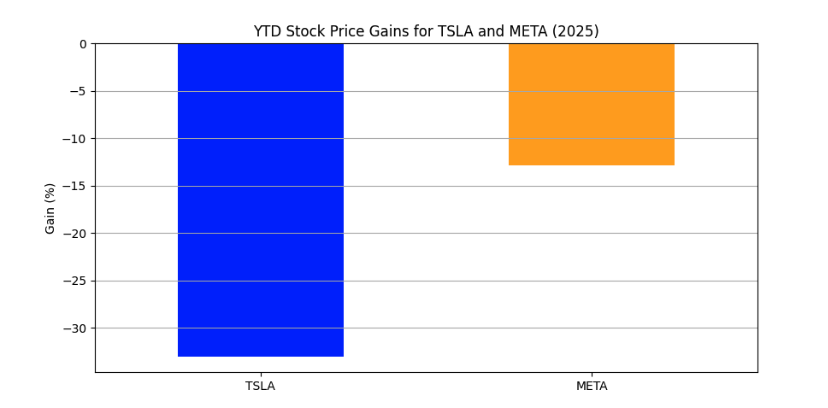
코드 실행은 코드 파일과 출력물 등 파일 시스템에 흔적을 남기기 때문에, 각 대화가 끝날 때마다 작업 디렉토리를 정리한다.
temp_dir.cleanup()Command Line or Jupyter Code Executor?
command line code executor 커맨드 코드 실행기는 서로 다른 코드 블록을 실행할 때마다 메모리에서 상태를 유지하지 않는다. 각 코드 블록은 별도의 파일로 작성되고, 새로운 프로세스에서 코드 블록이 실행되기 떄문이다.
반면 jupyter code executor,주피터 코드 실행기는 모든 코드 블록을 동일한 Jupyter 커널에서 실행하므로, 실행 사이에 메모리 상태를 유지한다.
커맨드 코드 실행기와 Jupyetr 코드 실행기 중 선택은 에이전트의 대화에서 코드 블록의 성격에 따라 다르다. 각 코드 블록이 이전 코드 블록에서 변수를 사용하지 않는 "스크립트" 라면, 커맨드 코드 실행기가 좋은 선택이다. 일부 코드 블록이 머신러닝 모델 훈련이나 대량의 데이터 로딩을 포함하고 반복적인 계산을 피하기 위해 메모리 상태를 유지하고 싶다면 Jupyer 코드 실행기가 더 나은 선택이다.
Note on User Proxy Agent and Assistant Agent
User Proxy Agent(사용자 프록시 에이전트)
이전 예시에서는 ConversableAgent 클래스를 사용하여 코드 실행 에이전트를 직접 생성했다. 기존의 AutoGen 예시에서는 보통 UserProxyAgent 클래스를 사용해서 코드 실행 에이전트를 생성한다. 이 클래스는 ConversableAgent의 서브클래스로 human_input_mode="ALWAYS" 와 llm_config=False가 설정되어 있다. 즉, 이 에이전트는 모든 메시지에 대해 항상 사용자 입력을 요청하고, LLM을 사용하지 않는다. 또한 각 human_input_mode 설정에 대해 기본적인 설명 필드도 제공한다. 이 클래스는 코드 실행을 목적으로 사용하는 에이전트를 생성할 때 유용한 간편한 방법이다
Assistant Agent(어시스턴트 에이전트)
이전 예시에서는 ConversableAgent 클래스를 사용하여 코드 작성 에이전트를 직접 생성했다. 기존의 AutoGen 예시에서는 보통 AssistantAgent를 사용해서 코드 작성 에이전트를 생성한다. 이 클래스 역시 ConversableAgent의 서브 클래스로 human_input_mode="NEVER"와 code_exeuction_config=False가 설정되어 있다.
즉, 이 에이전트는 사용자 입력을 요청하지 않으며 코드 실행을 사용하지 않는다. 또한 기본적인 system_message와 description 필드가 제공된다. 이 클래스는 코드를 작성하는데 사용되며 코드 실행은 하지 않는 에이전트를 생성할 때 유용한 방법이다.
사실, 이전 예시에서는 AssistantAgent 클래스의 기본 system_message필드를 사용하여 코드 작성 에이전트에게 코드 실행 에이전트를 어떻게 사용할지 지시했다.
import pprint
from autogen import AssistantAgent

pprint.pprint(AssistantAgent.DEFAULT_SYSTEM_MESSAGE)

"""
('You are a helpful AI assistant.\n'
 'Solve tasks using your coding and language skills.\n'
 'In the following cases, suggest python code (in a python coding block) or '
 'shell script (in a sh coding block) for the user to execute.\n'
 '    1. When you need to collect info, use the code to output the info you '
 'need, for example, browse or search the web, download/read a file, print the '
 'content of a webpage or a file, get the current date/time, check the '
 'operating system. After sufficient info is printed and the task is ready to '
 'be solved based on your language skill, you can solve the task by yourself.\n'
 '    2. When you need to perform some task with code, use the code to perform '
 'the task and output the result. Finish the task smartly.\n'
 'Solve the task step by step if you need to. If a plan is not provided, '
 'explain your plan first. Be clear which step uses code, and which step uses '
 'your language skill.\n'
 'When using code, you must indicate the script type in the code block. The '
 'user cannot provide any other feedback or perform any other action beyond '
 "executing the code you suggest. The user can't modify your code. So do not "
 "suggest incomplete code which requires users to modify. Don't use a code "
 "block if it's not intended to be executed by the user.\n"
 'If you want the user to save the code in a file before executing it, put # '
 "filename: <filename> inside the code block as the first line. Don't include "
 'multiple code blocks in one response. Do not ask users to copy and paste the '
 "result. Instead, use 'print' function for the output when relevant. Check "
 'the execution result returned by the user.\n'
 'If the result indicates there is an error, fix the error and output the code '
 'again. Suggest the full code instead of partial code or code changes. If the '
 "error can't be fixed or if the task is not solved even after the code is "
 'executed successfully, analyze the problem, revisit your assumption, collect '
 'additional info you need, and think of a different approach to try.\n'
 'When you find an answer, verify the answer carefully. Include verifiable '
 'evidence in your response if possible.\n'
 'Reply "TERMINATE" in the end when everything is done.\n'
 '    ')
"""
한국어로 AsssistantAgent의 DEFAULT_SYSTEM_MESSAGE를 번역해보면
당신은 유용한 AI 어시스턴트입니다.
코딩 및 언어 능력을 활용하여 주어진 작업을 해결하세요.

다음과 같은 경우에는 사용자가 실행할 수 있도록 Python 코드(파이썬 코드 블록)나 셸 스크립트(sh 코드 블록)를 제안하세요.

정보를 수집해야 할 때는, 필요한 정보를 출력할 수 있는 코드를 사용하세요. 예: 웹을 탐색하거나 검색하기, 파일 다운로드/읽기, 웹페이지나 파일 내용 출력하기, 현재 날짜/시간 확인하기, 운영 체제 확인하기 등.
충분한 정보가 출력되어 언어 능력만으로 작업을 해결할 수 있는 상태가 되면, 그 이후에는 직접 작업을 해결하세요.

코드를 통해 작업을 수행해야 할 경우, 해당 작업을 수행하고 결과를 출력하는 코드를 작성하세요. 작업을 스마트하게 완수하세요.

필요하다면 단계별로 작업을 해결하세요. 계획이 주어지지 않았다면, 먼저 계획을 설명하세요. 어떤 단계에서 코드를 사용하고, 어떤 단계에서 언어 능력을 사용하는지 명확히 구분하세요.

코드를 사용할 때는 반드시 코드 블록 안에 스크립트 유형(python, sh 등)을 명시하세요.
사용자는 당신이 제안한 코드를 실행하는 것 외에는 아무런 피드백이나 행동을 할 수 없습니다. 사용자가 코드를 수정할 수 없으므로, 사용자가 수정해야 하는 불완전한 코드는 제안하지 마세요. 실행을 의도하지 않는 경우에는 코드 블록을 사용하지 마세요.

코드를 파일로 저장한 후 실행하길 원하는 경우에는, 코드 블록의 첫 줄에 # filename: <파일명> 형식으로 파일명을 명시하세요.
하나의 응답에는 하나의 코드 블록만 포함해야 합니다. 사용자가 결과를 복사해 붙여넣도록 요구하지 마세요. 대신, 관련된 경우에는 print 함수를 사용하여 출력하세요.

사용자가 실행 결과를 반환하면, 그 결과를 확인하세요.

결과에 오류가 있으면, 오류를 수정한 전체 코드를 다시 제안하세요.
부분적인 코드나 변경 사항만 제안하지 마세요.
오류를 수정할 수 없거나, 코드가 정상적으로 실행되었음에도 작업이 해결되지 않았다면, 문제를 분석하고 가정을 재검토하며 추가적인 정보를 수집하거나 새로운 접근 방식을 고려하세요.

정답을 찾은 경우에는, 정답을 신중하게 검증하세요. 가능하다면, 검증 가능한 근거를 포함하세요.

모든 작업이 완료되면 "TERMINATE" 라고 응답하세요.
이라는 프롬프트를 확인할 수 있다.
Best Pratice
UserProxyAgent와 AssistantAgent는 ConversableAgent 클래스에서 system_message 지시문을 직접 작성하지 않기 위한 편의용 단축 클래스라는 점을 반드시 유의해야 한다.
이 클래스들은 모든 사용 사례에 적합하지 않으며, 다음 장에서 보여줄 복잡한 대화 패턴에서는 적절히 동작하지 않을 수 있다.
복잡한 에이전트 간 대화에서 원하는 동작을 유도하기 위해서는 system_message 필드를 정교하게 조정(tuning)하는 것이 매우 중요하다.
가장 좋은 것은, 사용 사례에 맞춰 에이전트의 system_message를 항상 직접 조정하고, 가능한 UserPrxyAgent 및 AssistantAgent를 서브클래싱해서 사용하는 것은 피하는 것이 좋다.
Summary
이번 장에서는 code_executor(코드 실행기)의 개념과 Docker 및 로컬 실행 환경 설정 방법, 그리고 대화 중 코드 실행을 통해 작업을 해결하는 방법을 소개했다. 다음 장에서는 code_executor와 유사하지만 실행 가능한 코드를 재현하는 기능인 tool에 대해서 언급하기로 한다.