AutoGen - Tutorial : Allowing Human Feedback in Agents (Human in the Loop)
AutoGen
AutoGen > Tutorial > Allowing Human Feedback in Agents
https://microsoft.github.io/autogen/0.2/docs/tutorial/human-in-the-loop
Allowing Human Feedback in Agents
지난 두 챕터에서는 ConversableAgent 클래스를 소개하면서 human_input_mode=NEVER 설정을 통해 자율적으로 작업을 수행하는 에이전트를 만드는 방법을 살펴봤다.
ConversableAgent & human_input_mode=NEVER :
https://velog.io/@heyggun/AutoGen-Getting-Started-v.0.2
또 에이전트 간의 대화를 어떻게 적절히 종료할 수 있는지에 대해서도 살펴봤다.
에이전트 간의 대화 종료 (chat termination) :
https://velog.io/@heyggun/AutoGen-Tutorial-Chat-Termination
하지만 많은 애플리케이션에는 에이전트에 **사람이 직접 개입(human-in-the-loop) 해야 하는 경우가 있다.
예를 들어
- 사람이 에이전트의 방향을 바로잡아 주거나
- 목표를 지정하거나
- 중간에 피드백을 주는 등의 역할이 필요한 경우 이다.
이번 챕터에서는 AutoGen이 이러한 인간 개입(human intervention)을 어떻게 지원하는지를 설명한다.
AutoGen의 ConversableAgent에서는 human-in-the-loop 컴포넌트가 자동 응답(auto-reply) 컴포넌트보다 앞에 위치해 있다.
이 컴포넌트는 들어오는 메시지를 가로채어, 자동 응답으로 넘길지, 아니면 사람의 피드백을 받을지를 결정할 수 있다.
아래 그림은 이 구조를 시각적으로 보여주는 것이다.
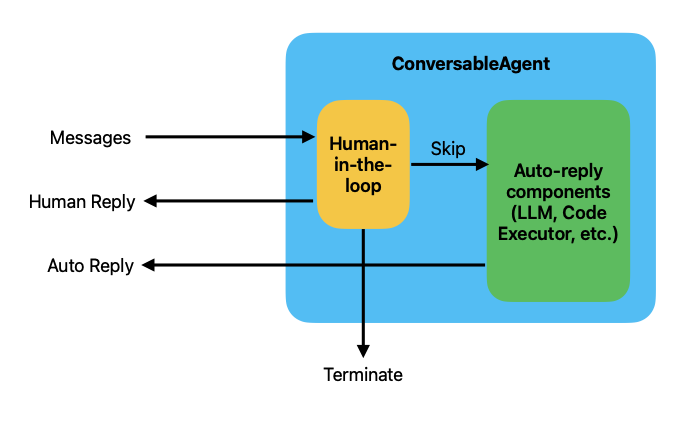
하나의 ConversableAgent 내부에서
(1) 사람이 개입하는 흐름 (Human-in-the-loop)
(2) 자동 응답 흐름(Auto-reply components)
를 동적으로 조정할 수 있게 설계되어 있다.
Human-in-the-loop 에서는 사람 또는 수동 개입이 필요한 시점에서 동작하는데, 외부에서 전달된 Messages가 먼저 이 컴포넌트에 들어온다.
이 경우 a. 사람이 직접 응답하거나 (Human Reply),
b. 자동(skip)으로 넘겨서 Auto components로 전달 할 수 있다.
c. 또는 사람이 직접 처리를 중단하고 종료시키킬 수도 있다(Terminate)
사용자가 '이건 민감한 이슈야. 사람이 먼저 확인해줘' 라고 요청할 경우 LLM이 먼저 응답하지 않고 Human-in-the-loop가 우선 처리 하는 것이다.
human-in-the-loop 컴포넌트는 human-input-mode 파라미터를 통해 사용자 정의할 수 있다. 이 챕터의 다음 섹션에서는 이 기능을 어떻게 활용하는지 다룬다.
Human Input Modes
현재 AutoGen은 세 가지 인간 개입 모드를 지원한다.
NEVER: 인간 입력을 절대 요청하지 않는다TERMINATE: 기본값, 종료 조건이 충족될 때만 인간의 입력을 요청한다. 이 모드에서 사람이 개입하여 응답하면, 대화는 계속 진행되며,max_consecutive_auto_reply카운터도 초기화 된다.ALWAYS: 항상 인간 입력을 요청 한다. 사용자는자동 응답 건너뛰기(skip),직접 응답(피드백 제공),대화 종료중 하나를 선택할 수 있다.
이 모드에서는max_consecutive_auto_reply에 따른 자동 종료는 무신된다.
이전 챕터들에서는 이미 human_input_mode가 NEVER인 예제들을 살펴봤는데, 아래에는 이 모드의 예제를 다시 보고 ALWAYS 및 TERMINATE 모드에서 어떻게 달라지는지 설명한다.
Human Input Mode = NEVER
human_input_mode="NEVER" 이 모드에서는 인간 입력이 요청되지 않으며, 사전에 정의한 종료 조건에 따라 대화가 종료된다. 이 모드는 에이전트가 완전히 자율적으로 작동해야 할 때 유용하다. 예를 들어 두 에이전트가 숫자를 추측하는 게임을 할 때 정답 숫자에 도달하면 대화가 종료되는 조건으로 이 모드를 사용할 수 있다.
먼저 필요한 설정을 해주고,
import os
from autogen import ConversableAgent
from config import settings

api_key = settings.openai_api_key.get_secret_value()

llm_config= {
    "config_list":
        [
            {
                "model" : "gpt-4o-mini",
                "api_key" : api_key
            }
        ]
}
숫자를 추측하고, 추측한 숫자가 맞는지 확인 하는 에이전트를 추가한다.
agent_with_number = ConversableAgent(
    "agent_with_number",
    system_message="""You are playing a game of guess-my-number.
You have the number 53 in your mind, and I will try to guess it.
If I guess too high, say 'too high', if I guess too low, say 'too low'. """,
llm_config=llm_config,
is_termination_msg = lambda msg : '53' in msg["content"],
human_input_mode="NEVER",
)

agent_guess_number = ConversableAgent(
    "agent_guess_number",
    system_message="""I have a number in my mind, and you will try to guess it.
If I say 'too hihg', you should guess a lover number. If I say 'too low',
you should guess a higher number.""",
llm_config=llm_config,
human_input_mode="NEVER",
)

result = agent_with_number.initiate_chat(
    agent_guess_number,
    message="I have a number between 1 and 100. Guess it!"
)
agent_with_number (to agent_guess_number):
I have a number between 1 and 100. Guess it!
--------------------------------------------------------------------------------
agent_guess_number (to agent_with_number):
Is it 50?
--------------------------------------------------------------------------------
agent_with_number (to agent_guess_number):
Too low!
--------------------------------------------------------------------------------
agent_guess_number (to agent_with_number):
Is it 75?
--------------------------------------------------------------------------------
agent_with_number (to agent_guess_number):
Too high!
--------------------------------------------------------------------------------
agent_guess_number (to agent_with_number):
Is it 65?
--------------------------------------------------------------------------------
agent_with_number (to agent_guess_number):
Too high!
--------------------------------------------------------------------------------
agent_guess_number (to agent_with_number):
Is it 60?
--------------------------------------------------------------------------------
agent_with_number (to agent_guess_number):
Too high!
--------------------------------------------------------------------------------
agent_guess_number (to agent_with_number):
Is it 55?
--------------------------------------------------------------------------------
agent_with_number (to agent_guess_number):
Too high!
--------------------------------------------------------------------------------
agent_guess_number (to agent_with_number):
Is it 52?
--------------------------------------------------------------------------------
agent_with_number (to agent_guess_number):
Too low!
--------------------------------------------------------------------------------
agent_guess_number (to agent_with_number):
Is it 53?
--------------------------------------------------------------------------------
>>>>>>>> TERMINATING RUN (e461622c-8db3-4434-bffa-e9acc6f21c0b): Termination message condition on agent 'agent_with_number' met'53' 이라는 숫자가 언급됐을 때 종료하라는 조건에 맞춰서 53이 나왔을 때 종료된다. 추측하는 에이전트가 이진 탐색을 사용하고 추측 에이전트가 정답 숫자를 말한 후 종료되었고, 이는 메시지 기반 종료 조건이 작동한 것이다.
Human Input Mode = ALWAYS
Human_input_mode="ALWAYS" 이 모드에서는 인간의 입력이 항상 요청되며, 사용자는 다음 중 하나를 선택할 수 있다.
- skip : 자동으로 응답 넘기기
- intercept: 직접 응답
- terminate : 대화종료
이 모드를 직접 실행해보면, 앞에서 봤던 숫자 추측 게임을 다시 하게 되지만, 이번에는 사람이 숫자를 추측하는 역할을 맡는다. 상대편은 숫자를 가지고 있는 에이전트이다. 코드를 실행하면, 말할 차례가 올 때마다 직접 입력을 요청받게 된다.
실제로 해보면 인간 쪽이 숫자를 잘 못 맞추는 경우도 많지만 에이전트가 숫자를 알려주기도 한다.
일단 기본적인 설정을 아래와 같이 하고,
import os
from autogen import ConversableAgent
from config import settings

api_key = settings.openai_api_key.get_secret_value()
human_proxy = ConversableAgent(
    "human_proxy",
    llm_config=False,
    human_input_mode="ALWAYS",
)

result = human_proxy.initiate_chat(
    agent_with_number,
    message="10",
)
실행하면
human_proxy (to agent_with_number):

10

--------------------------------------------------------------------------------
agent_with_number (to human_proxy):

Too low.

--------------------------------------------------------------------------------
human_proxy (to agent_with_number):

40

--------------------------------------------------------------------------------
agent_with_number (to human_proxy):

Too low.

--------------------------------------------------------------------------------
human_proxy (to agent_with_number):

60

--------------------------------------------------------------------------------
agent_with_number (to human_proxy):

Too high.

--------------------------------------------------------------------------------
human_proxy (to agent_with_number):

50

--------------------------------------------------------------------------------
agent_with_number (to human_proxy):

Too low.

--------------------------------------------------------------------------------
human_proxy (to agent_with_number):

55

--------------------------------------------------------------------------------
agent_with_number (to human_proxy):

Too high.

--------------------------------------------------------------------------------
human_proxy (to agent_with_number):

53

--------------------------------------------------------------------------------

>>>>>>>> TERMINATING RUN (abd19d33-9051-41d5-8d86-0007ef764851): Termination message condition on agent 'agent_with_number' met
계속해서 유저의 응답을 받고, 응답에 따라서 에이전트가 해당하는 답이 나올 때 까지 'Too low' 혹은 'Too high'로 대답한다. 유저의 응답에 해당하는 숫자가 나오면 종료 된다.
Human Input Mode = TERMINATE
Human Input Mode="TERMINATE" 이 모드에서는 종료 조건이 충족되었을 때만 인간의 입력이 요청된다.
- 만약 사용자가 개입해서 응답(
human chooses to intercept and reply) 하면, 카운터는 초기화된다. - 사용자가 건너뛰기(
skip)을 선택하면 자동 응답 매커니즘이 계속 작동한다. - 사용자가 종료(
terminate)를 선택하면 대화는 종료된다.
이 모드를 직접 확인해 보기 위해, 같은 숫자 맞히기 게임을 다시 실행해본다.
이번에는 숫자를 추축하는 에이전트가 두 번의 기회만을 갖고, 실패할 경우 사람이 개입해서 피드백을 주면, 에이전트는 다시 두 번의 기회를 갖는다.
결국 정답을 맞히면, 대화는 종료된다.
from autogen import ConversableAgent
from config import settings

api_key = settings.openai_api_key.get_secret_value()
llm_config = {
    "config_list":
        [
            {
                "model" : "gpt-4o-mini",
                "api_key" : api_key,
            }
        ]}
agent_with_number = ConversableAgent(
"agent_with_number",
system_message="You are playing a game of guess-my-number. "
"In the first game, you have the "
"number 53 in your mind, and I will try to guess it. "
"If I guess too high, say 'too high', if I guess too low, say 'too low'. ",
llm_config=llm_config,
max_consecutive_auto_reply=1, # maximum number of consecutive auto-replies before asking for human input
is_termination_msg=lambda msg: "53" in msg["content"], # terminate if the number is guessed by the other agent
human_input_mode="TERMINATE", # ask for human input until the game is terminated
)
agent_guess_number = ConversableAgent(
"agent_guess_number",
system_message="I have a number in my mind, and you will try to guess it. "
"If I say 'too high', you should guess a lower number. If I say 'too low', "
"you should guess a higher number. ",
llm_config=llm_config,
human_input_mode="NEVER",
)
result = agent_with_number.initiate_chat(
agent_guess_number,
message="I have a number between 1 and 100. Guess it!"
)아래의 에이전트의 답변의 흐름을 보면,
agent_with_number (to agent_guess_number):

I have a number between 1 and 100. Guess it!

--------------------------------------------------------------------------------
agent_guess_number (to agent_with_number):

Is the number 50?

--------------------------------------------------------------------------------

>>>>>>>> USING AUTO REPLY...
agent_with_number (to agent_guess_number):

Too low.

--------------------------------------------------------------------------------
agent_guess_number (to agent_with_number):

Is the number 75?

--------------------------------------------------------------------------------
agent_with_number (to agent_guess_number):

too high bro

--------------------------------------------------------------------------------
agent_guess_number (to agent_with_number):

Is the number 62?

--------------------------------------------------------------------------------

>>>>>>>> USING AUTO REPLY...
agent_with_number (to agent_guess_number):

Too high.

--------------------------------------------------------------------------------
agent_guess_number (to agent_with_number):

Is the number 56?

--------------------------------------------------------------------------------
agent_with_number (to agent_guess_number):

a bit high

--------------------------------------------------------------------------------
agent_guess_number (to agent_with_number):

Is the number 54?

--------------------------------------------------------------------------------

>>>>>>>> USING AUTO REPLY...
agent_with_number (to agent_guess_number):

Too low.

--------------------------------------------------------------------------------
agent_guess_number (to agent_with_number):

Is the number 55?

--------------------------------------------------------------------------------
agent_with_number (to agent_guess_number):

almost there

--------------------------------------------------------------------------------
agent_guess_number (to agent_with_number):

Is the number 56?

--------------------------------------------------------------------------------

>>>>>>>> USING AUTO REPLY...
agent_with_number (to agent_guess_number):

Too high.

--------------------------------------------------------------------------------
agent_guess_number (to agent_with_number):

Is the number 55?

--------------------------------------------------------------------------------
agent_with_number (to agent_guess_number):

too high

--------------------------------------------------------------------------------
agent_guess_number (to agent_with_number):

Is the number 53?

--------------------------------------------------------------------------------

>>>>>>>> NO HUMAN INPUT RECEIVED.

>>>>>>>> TERMINATING RUN (2fd25289-5d6c-412c-b67b-88734c7b2518): Termination message condition on agent 'agent_with_number' met and no human input provided- 에이전트가 '50' 으로 추측했을 때 자동응답으로 'too low' 라고 대답하고
- 에이전트가 '75'로 추측한다. 이 때는 인간의 응답을 기다리는데 'too high bro'로 대답해줬다.
- 그 응답을 보고 에이전트가 '62'로 추측해서 자동응답으로 'too high' 답변이 나왔고,
- 그 응답에 따라 에이전트가 '52'로 추측하고 인간의 응답을 기다려서 'A bit high' 라고 대답을 해줬다.
- . 그 응답에 따라 에이전트가 '54'로 추측해서 자동응답으로 'too low' 라는 답변을 받는다.
- 그 응답에 따라 '55'로 에이전트가 추측하고 인간의 응답으로 'almost there' 이라는 답변을 받는다.
- 그래서 에이전트가 다시 '56'으로 추측하고, 자동응답으로 'too high'를 답변을 받는다.
- 에이전트가 '55'로 추측하고 인간 응답으로 'too high'를 전달받는다.
- 마지막으로 '53'이라는 정답으로 에이전트가 추측한다.
Summary
이번 장에서는 human-in-the-loop 컴포넌트를 사용해서 에이전트에게 사람의 피드백을 제공하고 대화를 종료하는 방법을 소개했다. 또한 human_input_mode의 다양한 설정값들과 그것들이 human-in-the-loop 컴포넌트 동작에 어떤 영향을 미치는지도 살펴봤다.
다음 장에서는 LLM 다음으로 가장 강력한 컴포넌트인 코드 실행기(code executor)에 대해 알아본다.