AutoGen - Tutorial : Conversation Patterns
AutoGen
AutoGen > Tutorial > Conversation Patterns
https://microsoft.github.io/autogen/0.2/docs/tutorial/conversation-patterns
Conversation Patterns
이전 챕터에서는 두 개의 에이전트가 대화하는 Two-agent 대화 패턴을 사용했고, 이를 initiate_chat 메서드를 통해 시작했다.
Two-Agent 대화는 매우 유용한 대화 패턴이지만, AutoGen은 이보다 더 강력한 기능을 제공한다. 이번 챕터에서는 먼저 Two-Agent 대화 패턴과 그 결과(chat result)를 조금 더 자세히 살펴보고, 이후에 두 개 이상의 에이전트가 참여하는 다양한 대화 패턴을 소개한다.
An Overview
[1] Two-Agent chat
- 가장 기본적인 대화 패턴, 두 에이전트가 서로 메시지를 주고 받는 형태
[2] Sequential Chat
- 두 에이전트 간의 대화를 연속적으로 연결하는 패턴
이 때carryover 메커니즘을 통해 이전 대화의 요약(summary)를 다음 대화의 컨텍스트로 전달할 수 있다.
[3] Group Chat
- 두 명 이상의 에이전트가 동시에 참여하는 단일 대화
- Group Chat에서 중요한 포인트는 다음에 말할 에이전트를 어떻게 선택할 것인가? 이다. 이를 위해서 다양한 방식이 제공된다.
- 다음 발화자 선택 전략
round_robin: 순차적으로 에이전트 선택random: 무작위 선택manual: 사용자가 직접 선택auto: 기본값, LLM이 자동으로 판단하여 선택
- 다음 발화자에 대한 선택 조건 제한 : 특정 상황에 따라 말할 수 있는 에이전트를 제한할 수 있음 (예제 참고)
- 사용자 정의 발화자 선택 함수 제공 기능 : 이 기능을 사용하면
StateFlow모델을 구성할 수 있다. 즉, 에이전트 간의 결정적인(deterministric) 워크플로우를 만들 수 있다. 자세한 내용은 해당 가이드 및 StateFlow 관련 블로그 글 참고 (StateFlow는 추후 User Guide 에서 Customize Speaker Selection 파트에서 언급)
StateFlow
https://microsoft.github.io/autogen/0.2/blog/2024/02/29/StateFlow/
Two-Agent Chat and Chat Result
두 에이전트 채팅은 가장 간단한 형태의 대화 패턴이다.
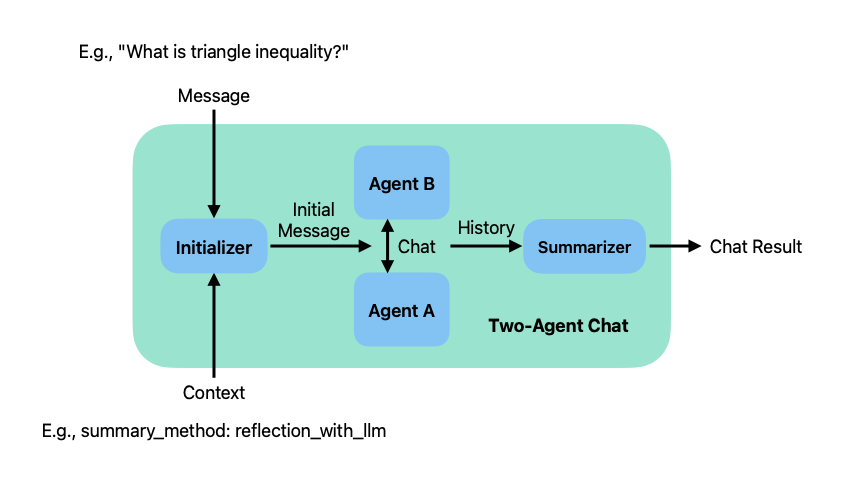
위의 그림은 Two-Agent 구조도를 보여주는 다이어그램이다.
이 구조는 LLM(대형 언어 모델)을 활용해서 두 개의 에이전트가 협업하여 질문에 대한 답변을 생성하는 시스템이다. 각 구성 요소는 아래와 같이 해석 할 수 있다.
사용자가 질문을 입력하면(Message : "What is triangle inequality?"), 이 질문과 질문을 처리하기 위한 배경 정보나 세부 설정인 컨텍스트(Context : "summary_method: reflection_with_llm") 가 시스템에 전달된다. 시스템 내부에는 Initializer(초기화기), Agent A(에이전트 A), Agent B(에이전트 B), Summarizer(요약기) 가 작동한다. 이 구조를 통해 두 에이전트가 대화하며 정보를 정제하고, 마지막에 요약된 답변을 생성한다.
Initilaizer 는 사용자 질문과 컨텍스트를 바탕으로 초기 메시지를 생성하여 Agent A에게 전달한다. Agent A와 Agent B는 서로 번갈아 대화하면서 질문에 대해 논의하고 정보를 확장한다. 이 대화를 통해 풍부한 내용의 히스토리를 생성한다. Summarizer는 Agent A와 Agent B의 대화 내용을 기반으로 핵심 정보를 추출하고 요약해 사용자에게 전달할 Chat Result를 생성한다.
즉 데이터의 흐름이 사용자 입력(Message) -> Initalizer -> Agent A <-> Agent B -> 대화 히스토리 -> Summarizer -> Chat result 인 셈이다.
이 구조는 일반적인 단일 LLM 응답보다 더 협업적이고 심화된 응답 생성을 목표로 한다. 특히 사고 기반 요약(reflection with LLM) 같은 고급 전략에 적합하다.
Two-Agent 대화는 두 가지 입력을 받는다.
message: 호출자가 제공하는 문자열 메시지context: 대화에 사용될 다양한 파라미터들을 정의하는 컨텍스트
보내는 에이전트(sender agent)는 chat initializer 메서드(ConversableAgent의 generate_init_message 메서드)를 사용해 입력값으로부터 초기 메시지를 생성하고, 이 메시지를 받는 에이전트(recipient agent)에게 전달함으로써 대화를 시작한다. 여기서 sender agent는 initiate_chat 메서드가 호출된 에이전트를 의미하며, recipient agent는 상대방 에이전트를 뜻한다.
대화가 종료되면 대화 기록(chat history)는 Chat Summarizer에 의해 처리된다. Summarizer는 전체 대화 내용을 요약하고, 토큰 사용량(token usage)을 계산한다. 요약 방식은 initiate_chat 메서드의 summary_method 파라미터를 통해 설정할 수 있으며, 기본값은 마지막 메시지를 요약으로 사용하는 방식이다. summary_method='last_msg')
아래 예시는 student agent(학생 에이전트)와 teacher agent(교사 에이전트) 간의 Two-agent 대화이다. 이 대화에서는 LLM 기반 요약 방식을 사용하는 summarizer가 설정되어 있다.
import os
from config import settings
from autogen import ConversableAgent

api_key = settings.openai_api_key.get_secret_value()

llm_config = {
    "config_list":
        [
            {
                "model" : "gpt-4o-mini",
                "api_key" : api_key
            }
        ]
}

student_agent = ConversableAgent(
    name="Student_Agent",
    system_message="You are a student willing to learn.",
    llm_config=llm_config

)

teacher_agent = ConversableAgent(
    name="Teacher_Agent",
    system_message="You are a math teacher.",
    llm_config = llm_config,
)

chat_result = student_agent.initiate_chat(
    teacher_agent,
    message="What is triangle inequlaity?",
    summary_method = "reflection_with_llm",
    max_turns=2
)student_Agent, teacher_agent 두 개의 에이전트로 Two-Agent chat을 수행한 결과이다.
Student_Agent (to Teacher_Agent):

What is triangle inequlaity?

--------------------------------------------------------------------------------

>>>>>>>> USING AUTO REPLY...
Teacher_Agent (to Student_Agent):

The triangle inequality is a fundamental theorem in geometry that describes a property of triangles. It states that for any triangle, the sum of the lengths of any two sides must be greater than the length of the remaining side.

This can be formulated mathematically as follows:

For any triangle with sides of lengths \( a \), \( b \), and \( c \):

1. \( a + b > c \)
2. \( a + c > b \)
3. \( b + c > a \)

If any of these inequalities do not hold, then the side lengths cannot form a triangle. The triangle inequality is important in various fields, including mathematics, physics, and computer science.

--------------------------------------------------------------------------------

>>>>>>>> USING AUTO REPLY...
Student_Agent (to Teacher_Agent):

Thank you for the explanation! Can you provide an example of how to use the triangle inequality in practice?

--------------------------------------------------------------------------------

>>>>>>>> USING AUTO REPLY...
Teacher_Agent (to Student_Agent):

Of course! Let's go through an example of using the triangle inequality.

Suppose we have three lengths: \( a = 5 \), \( b = 7 \), and \( c = 10 \). We want to determine if these lengths can form a triangle.

We will apply the triangle inequality by checking the three conditions:

1. **Check if \( a + b > c \)**:
   \[
   5 + 7 > 10 \\
   12 > 10 \quad \text{(True)}
   \]

2. **Check if \( a + c > b \)**:
   \[
   5 + 10 > 7 \\
   15 > 7 \quad \text{(True)}
   \]

3. **Check if \( b + c > a \)**:
   \[
   7 + 10 > 5 \\
   17 > 5 \quad \text{(True)}
   \]

Since all three inequalities hold true, the side lengths \( 5 \), \( 7 \), and \( 10 \) can indeed form a triangle.

Now, let's consider another scenario with lengths \( a = 3 \), \( b = 4 \), and \( c = 8 \).

We will check the triangle inequality again:

1. **Check if \( a + b > c \)**:
   \[
   3 + 4 > 8 \\
   7 > 8 \quad \text{(False)}
   \]

Since the first condition fails, we can stop here. The lengths \( 3 \), \( 4 \), and \( 8 \) cannot form a triangle.

This illustrates how the triangle inequality can be used to determine whether a given set of lengths can form a triangle.

--------------------------------------------------------------------------------

>>>>>>>> TERMINATING RUN (3e773a7d-0e5d-4b76-9b2b-afdf327c3309): Maximum turns (2) reached
이제 요약 결과가 어떻게 나오는지 살펴보자.
요약 결과는 initiate_chat 메서드가 변환한 ChatResult 타입의 chat_result 객체에 저장되어 있다.
from pprint import pprint

pprint(chat_result.summary)

"""
('The triangle inequality states that for any triangle with sides of lengths '
 '\\( a \\), \\( b \\), and \\( c \\), the following conditions must hold: \\( '
 'a + b > c \\), \\( a + c > b \\), and \\( b + c > a \\). If all conditions '
 'are satisfied, the lengths can form a triangle; if any condition fails, they '
 'cannot. Examples demonstrated this principle with both successful and '
 'unsuccessful cases of forming triangles.')
"""
('삼각형 부등식은 변의 길이가 \( a \), \( b \), 그리고 \( c \)인 모든 삼각형에 대해 다음 조건이 충족되어야 함을 나타냅니다. \(a + b > c \), \( a + c > b \), 그리고 \( b + c > a \). 모든 조건이 충족되면 변의 길이는 삼각형을 형성할 수 있으며, 어떤 조건이든 충족되지 않으면 삼각형을 형성할 수 없습니다. 다음 예시는 삼각형 형성의 성공 및 실패 사례에서 이 원리를 보여줍니다.')
라는 답변이 나오게 된다.
위 예제에서는 summary_method가 reflection_Wht_llm 으로 설정되어 있으며, 이 방법은 대화 메시지 리스트를 받아 LLM 호출을 통해 요약을 생성한다.
요약 방식은 다음과 같은 순서로 LLM을 사용한다.
(1) 먼저 받는 에이전트(recipient)의 LLM을 사용 시도 한다.
(2) 사용할 수 없는 경우 **보내는 에이전트(sender)의 LLM을 사용한다.
이 예제에서는 Teacher_Agent가 recipient, Studnet_Agent가 sender 이다.
print(ConversableAgent.DEFAULT_SUMMARY_PROMPT)

"""
Summarize the takeaway from the conversation. Do not add any introductory phrases.
"""
LLM에 전달되는 입력 프롬프트는 아래와 같은 default prompt(기본 프롬프트)이다. 원하는 경우 initiate_chat의 summary_prompt 인자를 사용해 커스텀 프롬프트를 설정할 수도 있다.
ChatResult 객체에는 요약 외에도 다음과 같은 유용한 정보들이 포함되어 있다.
(1) conversation history : 전체 대화 기록
(2) human input : 사용자 입력
(3) token cost : 토큰 비용
pprint(chat_result.chat_history)[{'content': 'What is triangle inequlaity?',
'name': 'Student_Agent',
'role': 'assistant'},
{'content': 'The triangle inequality is a fundamental theorem in geometry '
'that describes a property of triangles. It states that for any '
'triangle, the sum of the lengths of any two sides must be '
'greater than the length of the remaining side. \n'
'\n'
'This can be formulated mathematically as follows:\n'
'\n'
'For any triangle with sides of lengths \\( a \\), \\( b \\), and '
'\\( c \\):\n'
'\n'
'1. \\( a + b > c \\)\n'
'2. \\( a + c > b \\)\n'
'3. \\( b + c > a \\)\n'
'\n'
'If any of these inequalities do not hold, then the side lengths '
'cannot form a triangle. The triangle inequality is important in '
'various fields, including mathematics, physics, and computer '
'science.',
'name': 'Teacher_Agent',
'role': 'user'},
{'content': 'Thank you for the explanation! Can you provide an example of how '
'to use the triangle inequality in practice?',
'name': 'Student_Agent',
'role': 'assistant'},
{'content': "Of course! Let's go through an example of using the triangle "
'inequality.\n'
'\n'
'Suppose we have three lengths: \\( a = 5 \\), \\( b = 7 \\), and '
'\\( c = 10 \\). We want to determine if these lengths can form a '
'triangle.\n'
'\n'
'We will apply the triangle inequality by checking the three '
'conditions:\n'
'\n'
'1. **Check if \\( a + b > c \\)**:\n'
' \\[\n'
' 5 + 7 > 10 \\\\\n'
' 12 > 10 \\quad \\text{(True)}\n'
' \\]\n'
'\n'
'2. **Check if \\( a + c > b \\)**:\n'
' \\[\n'
' 5 + 10 > 7 \\\\\n'
' 15 > 7 \\quad \\text{(True)}\n'
' \\]\n'
'\n'
'3. **Check if \\( b + c > a \\)**:\n'
' \\[\n'
' 7 + 10 > 5 \\\\\n'
' 17 > 5 \\quad \\text{(True)}\n'
' \\]\n'
'\n'
'Since all three inequalities hold true, the side lengths \\( 5 '
'\\), \\( 7 \\), and \\( 10 \\) can indeed form a triangle.\n'
'\n'
"Now, let's consider another scenario with lengths \\( a = 3 \\), "
'\\( b = 4 \\), and \\( c = 8 \\).\n'
'\n'
'We will check the triangle inequality again:\n'
'\n'
'1. **Check if \\( a + b > c \\)**:\n'
' \\[\n'
' 3 + 4 > 8 \\\\\n'
' 7 > 8 \\quad \\text{(False)}\n'
' \\]\n'
'\n'
'Since the first condition fails, we can stop here. The lengths '
'\\( 3 \\), \\( 4 \\), and \\( 8 \\) cannot form a triangle.\n'
'\n'
'This illustrates how the triangle inequality can be used to '
'determine whether a given set of lengths can form a triangle.',
'name': 'Teacher_Agent',
'role': 'user'}]참고로, chat_result에 포함된 메시지들은 recipient 에이전트의 관점에서 정리되어 있다. 즉, sender는 assistant, recipient는 user로 간주된다.
pprint(chat_result.cost)

"""
{'usage_excluding_cached_inference': {'gpt-4o-mini-2024-07-18': {'completion_tokens': 628,
                                                                 'cost': 0.0005273999999999999,
                                                                 'prompt_tokens': 1004,
                                                                 'total_tokens': 1632},
                                      'total_cost': 0.0005273999999999999},
 'usage_including_cached_inference': {'gpt-4o-mini-2024-07-18': {'completion_tokens': 628,
                                                                 'cost': 0.0005273999999999999,
                                                                 'prompt_tokens': 1004,
                                                                 'total_tokens': 1632},
                                      'total_cost': 0.0005273999999999999}}
"""
Sequential Chats
이 패턴의 이름은 두 에이전트 간의 대화를 일련의 단계로 연결한 것이다.
carryover라는 메커니즘을 통해 이전 대화의 요약(summary)이 다음 대화의 컨텍스트로 전달된다.
이 패턴은 복잡한 작업을 상호 의존적인 하위 작업들로 나누어 처리 할 때 유용하다.
아래 그림은 이 패턴이 어떻게 동작하는지를 시작적으로 보여준다.
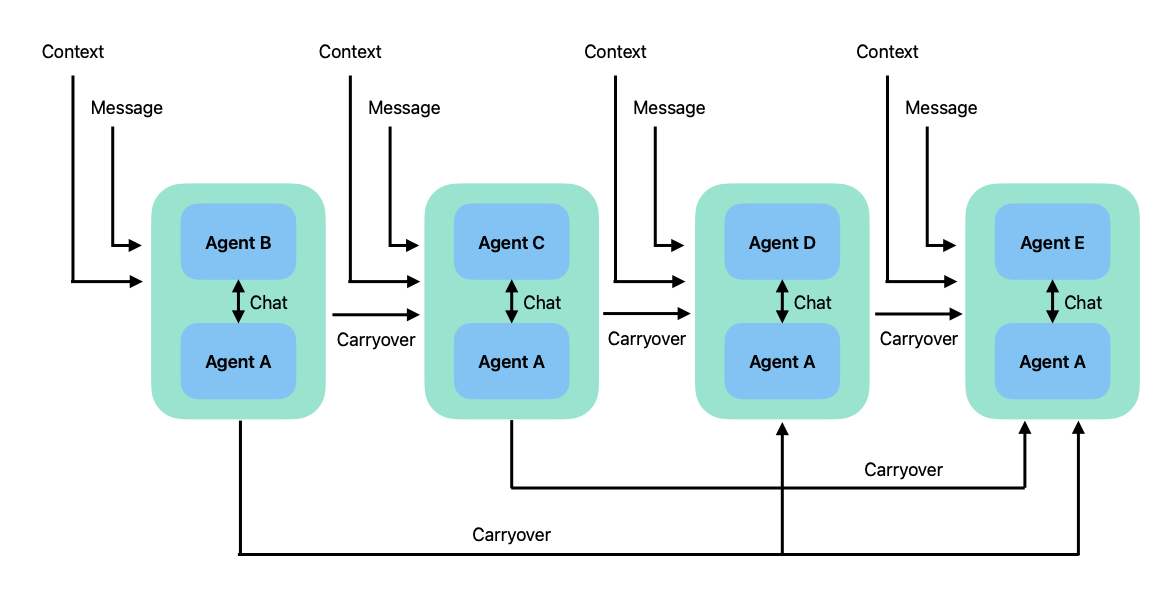
다단계 에이전트 협업 구조를 나타내는 그림으로 여러 개의 두 에이전트간 Chat Block(대화 블록)이 순차적으로 이어지며, 각 블록은 외부에서 주어진 Context(문맥)과 Message(메시지), 그리고 이전 블록의 결과물인 Carryover를 입력으로 받아 처리한다.
각 블록에는 두 개의 에이전트가 포함되어 있고, 이들은 내부적으로 서로 Chat(대화) 하면서 주어진 입력을 처리한다.
구성 요소를 간략하게 설명해보자면
- Context : 외부에서 주어진 상황 정보, 각 블록마다 독립적으로 주어짐
- Message : 각 단계에 주어진 입력 메시지
- Carryover : 이전 블록에서 생성된 결과. 다음 블록으로 전달되어 연속적인 문맥 유지를 가능하게 함
- Agent A : 모든 블록에 공통적으로 포함된 기본 에이전트. 핵심 역할을 담당할 가능성이 높음
- Agent B~E : 블록별로 상이한 역할을 수행하는 파트너 에이전트. 각각의 역할이 다를 수 있음
- Chat : 각 블록 내부에서 두 에이전트 간의 상호작용. 메시지와 문맥을 기반으로 논의하고 결과 도출.
으로 구성되어 있다.
흐름으로 context + message가 Agent A와 B에게 주어지면, 둘이 Chat을 통해 결과를 생성한다. 이 결과는 Carryover로 다음 블록으로 전달되고, 이후 블록들은 각 블록마다 새로운 Context와 Message가 주어지고 이전 블록의 Carryover가 함께 입력된다. Agent A는 동일하지만 Agent C, D, E로 변경되고 있고 내부에서 Chat -> 결과 생성 -> Carryover 전송을 반복한다.
이 패턴에서 두 에이전트가 먼저 Two-Agent Chat을 시작한 후, 해당 대화의 요약 내용이 다음 대화를 위한 carryover로 사용된다.
이 후의 대화는 context의 carryover 파라미터에 이 요약을 전달받아 초기 메시지를 생성하게 된다.
대화가 진행될수록 carryover는 누적되며, 각 후속 대화는 이전 모든 carryover 내용을 포함한 상태로 시작하게 된다.
위 그림에서는 각 대화마다 다른 recipient 에이전트가 등장하지만,
실제로는 **시퀀스 내에서 같은 recipient 에이전트가 반복적으로 등장해도 무방하다.
이 패턴을 설명하기 쉽게 간단한 예제로 산술 연산 에이전트를 생각해보자.
- 하나의 에이전트(예:
Number_Agent)는 숫자를 생성하는 역할을 맡고 - 다른 에이전트들은 해당 숫자에 대해 특정 연산(예: +1, x2 등)을 수행하는 역할을 한다.
from autogen import ConversableAgent
from config import settings

api_key = settings.openai_api_key.get_secret_value()

llm_config = {
    "config_list":
        [
            {
                "model" : "gpt-4o-mini",
                "api_key" : api_key,
            }
        ]
}

number_agent = ConversableAgent(
    name= "Number_Agent",
    system_message= "You return me the numbers I give you, one number each line.",
    llm_config = llm_config,
    human_input_mode="NEVER",
)

adder_agent = ConversableAgent(
    name="Adder_agent",
    system_message="You add 1 to each number I give you and return me the new numbers, one numb er each line.",
    llm_config=llm_config,
    human_input_mode="NEVER",
)

multiplier_agent= ConversableAgent(
    name="Multiplier_Agent",
    system_message="You mulitply each number I give you by 2 and return me the new numbers, one number each line.",
    llm_config=llm_config,
    human_input_mode="NEVER",
)

substarct_agent = ConversableAgent(
    name="Subtracter_Agent",
    system_message="You subtract 1 from each number I give you and return me the new number, one number each line.",
    llm_config = llm_config,
    human_input_mode="NEVER",
)

divider_agent = ConversableAgent(
    name="Divider_Agent",
    system_message="You divide each number I give you by 2 and return me the new numbers, one number each line.",
    llm_config =llm_config,
    human_input_mode="NEVER",
)
Number Agent는 첫 번째 연산자 에이전트와 대화를 나눈 뒤, 두 번째 연산자 에이전트와 대화를 이어가며 순차적으로 진행된다. 각 대화가 끝난 후에는 해당 대화의 마지막 메시지, 즉 operator agent(연산자 에이전트)로부터 전달받은 산술 연산 결과가 대화의 요약(summary)로 사용된다. 이 동작은 summay_method 파라미터를 통해 지정된다.
최종적으로는 이 과정을 통해 산술 연산이 순차적으로 적용된 결과값을 얻게 된다.
chat_result = number_agent.initiate_chats(
    [
        {
            "recipient" : adder_agent,
            "message" : "14",
            "max_turns" : 2,
            "summary_method" : "last_msg",
        },
        {
            "recipient" : multiplier_agent,
            "message" : "These are my numbers",
            "max_turns" : 2,
            "summary_method" : "last_msg",

        },
        {
            "recipient" : subtracter_agent,
            "message" : "These are my numbers",
            "max_turns" : 2,
            "summary_method" : "last_msg",

        },
        {
            "recipient" : divider_agent,
            "message" : "Thse are my numbers",
            "max_turns" : 2,
            "summary_method" : "last_msg",

        },
    ]
)
********************************************************************************
Starting a new chat....

********************************************************************************
Number_Agent (to Adder_agent):

14

--------------------------------------------------------------------------------
Adder_agent (to Number_Agent):

15

--------------------------------------------------------------------------------
Number_Agent (to Adder_agent):

15

--------------------------------------------------------------------------------
Adder_agent (to Number_Agent):

16

--------------------------------------------------------------------------------

>>>>>>>> TERMINATING RUN (03445f1d-f1a9-42ae-bfde-83ecd5dd75c7): Maximum turns (2) reached

********************************************************************************
Starting a new chat....

********************************************************************************
Number_Agent (to Multiplier_Agent):

These are my numbers
Context:
16

--------------------------------------------------------------------------------
Multiplier_Agent (to Number_Agent):

32

--------------------------------------------------------------------------------
Number_Agent (to Multiplier_Agent):

16
32

--------------------------------------------------------------------------------
Multiplier_Agent (to Number_Agent):

32
64

--------------------------------------------------------------------------------

>>>>>>>> TERMINATING RUN (81b2c196-1dba-406c-9d19-11bde776c323): Maximum turns (2) reached

********************************************************************************
Starting a new chat....

********************************************************************************
Number_Agent (to Subtracter_Agent):

These are my numbers
Context:
16
32
64

--------------------------------------------------------------------------------
Subtracter_Agent (to Number_Agent):

15
31
63

--------------------------------------------------------------------------------
Number_Agent (to Subtracter_Agent):

15
31
63

--------------------------------------------------------------------------------
Subtracter_Agent (to Number_Agent):

14
30
62

--------------------------------------------------------------------------------

>>>>>>>> TERMINATING RUN (7e255fea-f9db-4a55-ae85-bd2e47832529): Maximum turns (2) reached

********************************************************************************
Starting a new chat....

********************************************************************************
Number_Agent (to Divider_Agent):

Thse are my numbers
Context:
16
32
64
14
30
62

--------------------------------------------------------------------------------
Divider_Agent (to Number_Agent):

8
16
32
7
15
31

--------------------------------------------------------------------------------
Number_Agent (to Divider_Agent):

8
16
32
7
15
31

--------------------------------------------------------------------------------
Divider_Agent (to Number_Agent):

4
8
16
3.5
7.5
15.5

--------------------------------------------------------------------------------

>>>>>>>> TERMINATING RUN (4abc7282-9787-415b-a405-4640d3f1013d): Maximum turns (2) reached
첫 번째로 주목할 점은 initiate_chats 메서드는 딕셔너리들의 리스트를 인자로 받는 것이다. 각 딕셔너리는 initiate_chat 메서드에 전달될 개별 대화의 인자들을 담고 있다.
두 번째로, 시퀀스 내 각 대화는 max_turns=2로 설정되어 있어 최대 2번의 라운드로 진행된다. 이는 각 산술연산이 두 번씩 수행된다는 뜻이다.
예를 들어, 첫 번째 대화에서는 숫자 14가 15->16으로 바뀌고
두 번째 대화에서는 16->32->64가 되는 식이다.
Carryover는 대화가 진행될수록 누적된다.
print("First Chat", chat_result[0].chat_history[0]['content'])
print("Second Chat", chat_result[1].chat_history[0]['content'])
print("Third Chat", chat_result[2].chat_history[0]['content'])
print("Fourth Chat", chat_result[3].chat_history[0]['content'])

"""
First Chat 14
Second Chat These are my numbers
Context:
16
Third Chat These are my numbers
Context:
16
32
64
Fourth Chat Thse are my numbers
Context:
16
32
64
14
30
62
"""print("First Chat Summary", chat_result[0].summary)
print("Second Chat Summary", chat_result[1].summary)
print("Third Chat Summary", chat_result[2].summary)
print("Fourth Chat Summary", chat_result[3].summary)
"""
First Chat Summary 16
Second Chat Summary 32
64
Third Chat Summary 14
30
62
Fourth Chat Summary 4
8
16
3.5
7.5
15.5
"""마지막으로 initate_chat의 메서드는 시퀀스 내 각 대화에 해당하는 ChatResult 객체의 리스트를 반환한다.
chat_result

"""
[ChatResult(chat_id=None, chat_history=[{'content': '14', 'role': 'assistant', 'name': 'Number_Agent'}, {'content': '15', 'role': 'user', 'name': 'Adder_agent'}, {'content': '15', 'role': 'assistant', 'name': 'Number_Agent'}, {'content': '16', 'role': 'user', 'name': 'Adder_agent'}], summary='16', cost={'usage_including_cached_inference': {'total_cost': 2.2949999999999995e-05, 'gpt-4o-mini-2024-07-18': {'cost': 2.2949999999999995e-05, 'prompt_tokens': 129, 'completion_tokens': 6, 'total_tokens': 135}}, 'usage_excluding_cached_inference': {'total_cost': 0}}, human_input=[]),
 ChatResult(chat_id=None, chat_history=[{'content': 'These are my numbers\nContext: \n16', 'role': 'assistant', 'name': 'Number_Agent'}, {'content': '32', 'role': 'user', 'name': 'Multiplier_Agent'}, {'content': '16  \n32', 'role': 'assistant', 'name': 'Number_Agent'}, {'content': '32  \n64', 'role': 'user', 'name': 'Multiplier_Agent'}], summary='32  \n64', cost={'usage_including_cached_inference': {'total_cost': 3.6599999999999995e-05, 'gpt-4o-mini-2024-07-18': {'cost': 3.6599999999999995e-05, 'prompt_tokens': 196, 'completion_tokens': 12, 'total_tokens': 208}}, 'usage_excluding_cached_inference': {'total_cost': 0}}, human_input=[]),
 ChatResult(chat_id=None, chat_history=[{'content': 'These are my numbers\nContext: \n16\n32  \n64', 'role': 'assistant', 'name': 'Number_Agent'}, {'content': '15  \n31  \n63  ', 'role': 'user', 'name': 'Subtracter_Agent'}, {'content': '15  \n31  \n63  ', 'role': 'assistant', 'name': 'Number_Agent'}, {'content': '14  \n30  \n62  ', 'role': 'user', 'name': 'Subtracter_Agent'}], summary='14  \n30  \n62  ', cost={'usage_including_cached_inference': {'total_cost': 5.595e-05, 'gpt-4o-mini-2024-07-18': {'cost': 5.595e-05, 'prompt_tokens': 265, 'completion_tokens': 27, 'total_tokens': 292}}, 'usage_excluding_cached_inference': {'total_cost': 0}}, human_input=[]),
 ChatResult(chat_id=None, chat_history=[{'content': 'Thse are my numbers\nContext: \n16\n32  \n64\n14  \n30  \n62  ', 'role': 'assistant', 'name': 'Number_Agent'}, {'content': '8  \n16  \n32  \n7  \n15  \n31  ', 'role': 'user', 'name': 'Divider_Agent'}, {'content': '8  \n16  \n32  \n7  \n15  \n31  ', 'role': 'assistant', 'name': 'Number_Agent'}, {'content': '4  \n8  \n16  \n3.5  \n7.5  \n15.5  ', 'role': 'user', 'name': 'Divider_Agent'}], summary='4  \n8  \n16  \n3.5  \n7.5  \n15.5  ', cost={'usage_including_cached_inference': {'total_cost': 8.895e-05, 'gpt-4o-mini-2024-07-18': {'cost': 8.895e-05, 'prompt_tokens': 361, 'completion_tokens': 58, 'total_tokens': 419}}, 'usage_excluding_cached_inference': {'total_cost': 0}}, human_input=[])]
 """
Group Chat
지금까지는 두 개의 에이전트가 참여하는 대화 패턴이나 두 에이전트 간의 대화 스퀀스만 살펴보았다. 하지만 AutoGen은 이보다 더 일반적인 대화 패턴인 Group Chat을 제공한다.
Group Chat은 두 명 이상의 에이전트가 하나의 대화 스레드 함께 참여하는 방식이다.
모든 에이전트는 하나의 공유된 컨텍스트(context) 안에서 상호작용하며, 여러 에이전트 간의 협업이 필요한 복잡한 작업에 적합하다.
아래 그림은 Group Chat이 어떻게 동작하는지를 보여준다.
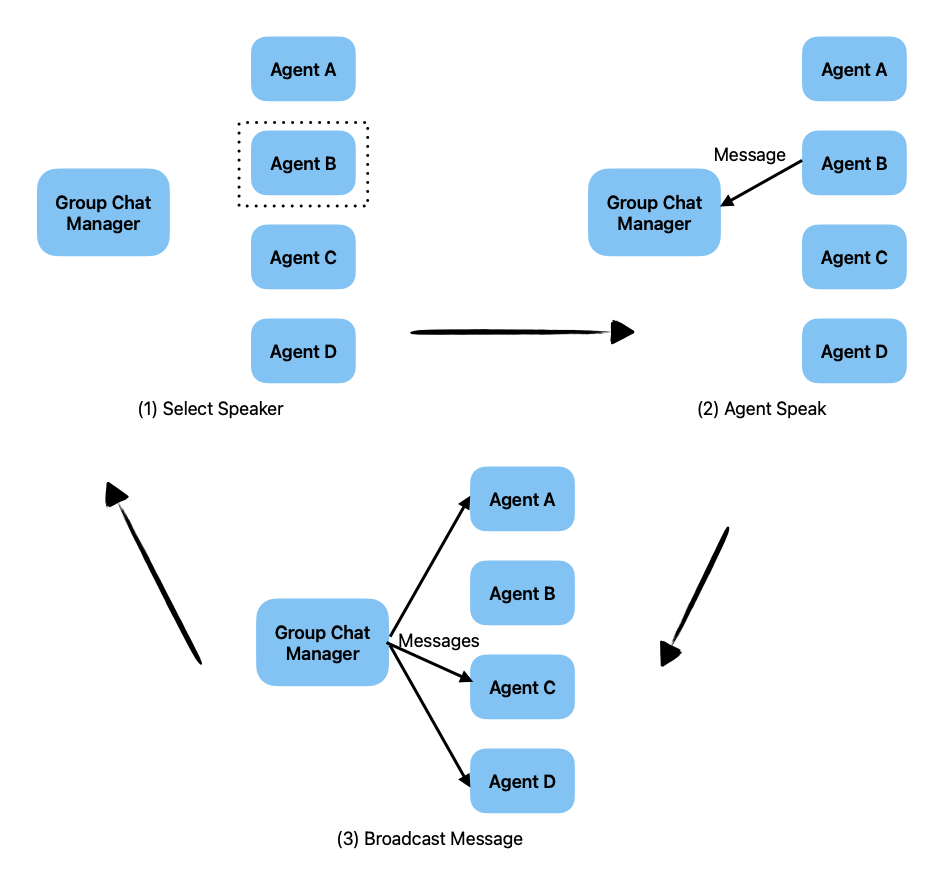
간략하게 그림을 설명해보면 Multi-Agent System(멀티 에이전트 시스템) 에서 Group Chat Manager(그룹 채팅 관리자)를 중심으로 에이전트 간 대화가 이루어진 과정을 3단계로 설명한 흐름도이다.
Agent A, Agent B, Agent C, Agent D는 발언 가능한 개별 AI 에이전트이고 Group Chat Manager는 발언 권한 관리 및 메시지 전달을 조율하는 중앙 관리자 역할이다.
단계별로 흐름을 보면 (1) Select Speaker : 발언자를 선정한다. Group Chat Manager는 네 명의 에이전트(A~D) 중에서 한 명의 발언자(Speaker)를 선택한다. 위 예시에서는 Agent B가 점선 박스로 강조되어 발언자로 선택된 것이다.
(2) Agent Speaker : 선택된 Agent B는 자신의 메시지를 Group Chat Manager에게 보낸다. 이 단계에서는 발언 자체가 Group Chat Manager에게 전달되고, 다른 에이전트는 아직 해당 메시지를 받지 못한 상태이다.
(3) Brodcast Message : 메시지 전파. Group Chat Manager는 받은 메시지를 모든 에이전트(A,B,C,D)dprp 브로드캐스트 방식으로 전달한다. 이로써 모든 에이전트가 동일한 정보를 공유하게 되어, 공동의 문맥(Context)가 유지된다.
Group Chat은 GroupChatManager 라는 특별한 타입의 에이전트에 의해 orchestrate(조율) 된다. Group Chat의 첫 단계는, Group Chat Manager가 발화할 에이전트를 선택한다. 선택된 에이트가 메시지를 생성하면, 그 메시지는 다시 Group Chat Manager에게 전달되고, Group Chat Manager는 해당 메시지를 그룹 내의 다른 에이전트들에게 broadcasts(브로드 캐스트, 공유) 한다. 이 과정은 대화가 종료될 때까지 반복된다.
Group Chat Manager는 다음 발화자를 선택하기 위해 여러 가지 전략을 사용할 수 있다. 현재 지원되는 전략은 다음과 같다.
round_robin: 에이전트들이 설정된 순서에 따라 순차적으로 돌아가며 선택random: 무작위로 에이전트 선택manual: 사용자(사람)이 직접 에이전트 선택auto: Group Chat Manager의 LLM이 자동으로 적절한 에이전트 선택
이 패턴을 설명하기 위한 예시로, 이전 예제에서 사용했던 산술 연산 에이전트들을 다시 활용한다. 목표는 하나의 숫자를 여러 에이전트의 산술 연산을 통해 원하는 타겟 숫자로 변환하는 것이다.
먼저, 위와 같이 필요한 인자들을 셋팅하고 agent들을 정의한다.
from autogen import ConversableAgent
from config import settings

api_key =settings.openai_api_key.get_secret_value()

llm_config = {
    "config_list":
        [
            {
                "model" : "gpt-4o-mini",
                "api_key" : api_key
            }
        ]
}

number_agent = ConversableAgent(
    name= "Number_Agent",
    system_message= "You return me the numbers I give you, one number each line.",
    llm_config = llm_config,
    human_input_mode="NEVER",
)

adder_agent = ConversableAgent(
    name="Adder_agent",
    system_message="You add 1 to each number I give you and return me the new numbers, one numb er each line.",
    llm_config=llm_config,
    human_input_mode="NEVER",
)

multiplier_agent= ConversableAgent(
    name="Multiplier_Agent",
    system_message="You mulitply each number I give you by 2 and return me the new numbers, one number each line.",
    llm_config=llm_config,
    human_input_mode="NEVER",
)

subtracter_agent = ConversableAgent(
    name="Subtracter_Agent",
    system_message="You subtract 1 from each number I give you and return me the new number, one number each line.",
    llm_config = llm_config,
    human_input_mode="NEVER",
)

divider_agent = ConversableAgent(
    name="Divider_Agent",
    system_message="You divide each number I give you by 2 and return me the new numbers, one number each line.",
    llm_config =llm_config,
    human_input_mode="NEVER",
)
add_agent의 타입은 <autogen.agentchat.conversable_agent.ConversableAgent at 0x11cba2310> 이다.
이 예제에서는 발화자 선택 전략으로 auto 전략을 선택한다
또한, Group Chat Manager가 적절한 에이전트를 선택할 수 있도록, 각 에이전트에 명확한 description(설명) 도 설정해준다.
설명이 없을 경우, 시스템은 에이전트의 system_message를 기반으로 판단하게 되며, 이것은 최선의 선택이 아닐 수 있다.
adder_agent.description = "Add 1 to each input numbers."
multiplier_agent.description = "Multiply each input number by 2"
subtracter_agent.description = "Subtract 1 from each input number."
divider_agent.description = "Divide each input number by 2."
number_agent.description = "Return the numbers given."

adder_agent.description

"""
'Add 1 to each input numbers.'
"""
먼저 GroupChat 객체를 생성하고, 여기에 참여할 에이전트들의 리스트를 전달한다. 만약 round_robin 전략을 사용할 경우, 이 리스트는 에이전트가 선택될 순서를 정의하게 된다. 이 예제에서는 대화를 초기화할 때 빈 메시지 리스트와 최대 다운드를 6회로 설정했다.
즉, 발화자 선택 -> 에이전트 발화 -> 메시지 브로드캐스트의 과정이 최대 6회 반복된다.
from autogen import GroupChat

group_chat = GroupChat(
    agents=[adder_agent, multiplier_agent, subtracter_agent,
            divider_agent, number_agent],
    messages=[],
    max_round=6
)
다음으로 GroupChatManager 객체를 생성하고 앞서 만든 GroupChat 객체를 전달한다. 또한 **다음 발화자를 선택하기 위해 LLM을 사용할 수 있도록 llm_config를 설정한다. 해당 설정은 auto 전략 사용을 위한 필수 설정이다.
from autogen import GroupChatManager

group_chat_manager = GroupChatManager(
    groupchat=group_chat,
    llm_config=llm_config,
)
그 후, 이전 예제에서 사용한 Number Agent가 GroupChatManager와 Two-Agent Chat을 시작한다. 이 대화에서 GroupChatManager는 내부적으로 Group Chat을 실행하고, 내부 Group Chat이 완료되면 Two-Agent Chat도 종료된다.
초기 발화자로 Number Agent를 우리가 직접 지정했기 때문에, 이 대화는 Group Chat의 첫 번째 라운드로 간주된다.
chat_result = number_agent.initiate_chat(
    group_chat_manager,
    message="My number is 3, I want to turn it into 13.",
    summary_method="reflection_with_llm",
)
Number_Agent (to chat_manager):
My number is 3, I want to turn it into 13.
--------------------------------------------------------------------------------
Next speaker: Adder_agent
Adder_agent (to chat_manager):
4
5
6
7
8
9
10
11
12
13
--------------------------------------------------------------------------------
Next speaker: Adder_agent
Adder_agent (to chat_manager):
4
5
6
7
8
9
10
11
12
13
--------------------------------------------------------------------------------
Next speaker: Subtracter_Agent
Subtracter_Agent (to chat_manager):
2
3
4
5
6
7
8
9
10
11
--------------------------------------------------------------------------------
Next speaker: Multiplier_Agent
Multiplier_Agent (to chat_manager):
6
8
10
12
14
16
18
20
22
24
--------------------------------------------------------------------------------
Next speaker: Divider_Agent
Divider_Agent (to chat_manager):
1.5
2
3
3.5
4
4.5
5
5.5
6
6.5
--------------------------------------------------------------------------------
>>>>>>>> TERMINATING RUN (f521f2f0-253e-4534-8836-8f5c06c7183b): Maximum rounds (6) reached실제 실행에서 다음과 같은 순서로 발화자가 선택된다.
- 첫 번째로 Number Agent가 발화
- 이후 Group Chat Manager가 Adder_agent를 선택
- 그 다음은 Adder_agent, 다음으로 Substracter_Agent 등
각 에이전트는 숫자에 대해 연산을 수행한다.
gpt-4o-mini의 경우 지능의 문제 때문에 6회에 걸쳤음에도 불구하고 13에 도달하지 못했다.
pprint(chat_result.summary)

"""
('The conversation involves different agents providing sequential numbers that '
 'can be generated from the starting number 3, with the goal of reaching the '
 'number 13 through addition, and various other operations such as '
 'subtraction, multiplication, and division producing respective ranges of '
 'outcomes.')
"""
지능이 높은 gpt-4o로 다시 시도하면서 라운드를 10으로 줬지만 그 안에 13에 도달하지 못했다. (뭐야)
llm_config_2= {
    "config_list":
        [
            {
                "model" : "gpt-4o",
                "api_key" : api_key
            }
        ]
}

from autogen import GroupChatManager

group_chat_manager = GroupChatManager(
    groupchat=group_chat,
    llm_config=llm_config_2,
)

chat_result = number_agent.initiate_chat(
    group_chat_manager,
    message="My number is 3, I want to turn it into 13.",
    summary_method="reflection_with_llm",
)
Number_Agent (to chat_manager):

My number is 3, I want to turn it into 13.

--------------------------------------------------------------------------------

Next speaker: Adder_agent

Adder_agent (to chat_manager):

4
5
6
7
8
9
10
11
12
13

--------------------------------------------------------------------------------

Next speaker: Number_Agent

Number_Agent (to chat_manager):

4
5
6
7
8
9
10
11
12
13

--------------------------------------------------------------------------------

Next speaker: Multiplier_Agent

Multiplier_Agent (to chat_manager):

8
10
12
14
16
18
20
22
24
26

--------------------------------------------------------------------------------

Next speaker: Subtracter_Agent

Subtracter_Agent (to chat_manager):

2
3
4
5
6
7
8
9
10
11

--------------------------------------------------------------------------------

Next speaker: Divider_Agent

Divider_Agent (to chat_manager):

1.5
2.0
3.0
3.5
4.0
4.5
5.0
5.5
6.0
6.5

--------------------------------------------------------------------------------

Next speaker: Adder_agent

Adder_agent (to chat_manager):

2.5
3.0
4.0
4.5
5.0
5.5
6.0
6.5
7.0
7.5

--------------------------------------------------------------------------------

Next speaker: Number_Agent

Number_Agent (to chat_manager):

2.5
3.0
4.0
4.5
5.0
5.5
6.0
6.5
7.0
7.5

--------------------------------------------------------------------------------

Next speaker: Multiplier_Agent

Multiplier_Agent (to chat_manager):

5.0
6.0
8.0
9.0
10.0
11.0
12.0
13.0
14.0
15.0

--------------------------------------------------------------------------------

Next speaker: Subtracter_Agent

Subtracter_Agent (to chat_manager):

4.0
5.0
7.0
8.0
9.0
10.0
11.0
12.0
13.0
14.0

--------------------------------------------------------------------------------

>>>>>>>> TERMINATING RUN (6e87cbf2-a14b-4a4b-a06e-8c66ab8e5ba1): Maximum rounds (10) reached
Send Introductions
에이전트에게 소개 메시지 보내기.
이전 예제에서는 Group Chat Manager가 다음 발화자를 선택할 수 있도록 각 에이전트에 description 을 설정했다. 하지만 이 설정은 Group Chat Manager에게만 도움이 될 뿐, 대화에 참여하는 다른 에이전트들이 서로를 알 수 있도록 하지는 않는다. 경우에 따라 각 에이전트가 그룹 내 다른 에이전트에게 스스로 소개하는 것이 유용할 수 있다.
이 기능은 send_introductions=True로 설정하면 사용할 수 있다.
from autogen import GroupChat
from autogen import GroupChatManager

group_chat_with_introductions= GroupChat(
    agents=[adder_agent, multiplier_agent, subtracter_agent,
            divider_agent, number_agent],
    messages=[],
    max_round=6,
    send_introductions=True,
)

group_chat_manager = GroupChatManager(
    groupchat=group_chat_with_introductions,
    llm_config=llm_config,
)

chat_result = number_agent.initiate_chat(
    group_chat_manager,
    message="My number is 3, I want to turn it into 13.",
    summary_method="reflection_with_llm",
)
내부적으로는 Group Chat이 시작되기 전에 Group Chat Manager가 **각 에이전트의 이름과 설명이 포함된 메시지를 그룹 내 모든 에이전트에게 전달하여 서로를 소개하는 방식으로 작동한다.
Group Chat in a Sequential Chat
순차 대화(Sequential Chat)에서의 그룹 채팅 사용
-Group Chat은 Sequential Chat) 일부로도 사용할 수 있다.
이 경우, Group Chat Manager는 일반적인 에이전트처럼 시퀀스 내의 하나의 에이전트로 간주되어 동작한다.
from autogen import GroupChat
from autogen import GroupChatManager
from config import settings

api_key = settings.openai_api_key.get_secret_value()

llm_config = {

        "config_list":
            [
                {
                "model" : "gpt-4o-mini",
                "api_key" : api_key,

            }
            ]
    }

group_chat_wiht_introductions = GroupChat(
    agents=[adder_agent, multiplier_agent, subtracter_agent, divider_agent, number_agent],
    messages=[],
    max_round=6,
    send_introductions=True,
)

group_chat_manager_with_intros = GroupChatManager(
    groupchat=group_chat_with_introductions,
    llm_config=llm_config,
)

chat_result = group_chat_manager_with_intros.initiate_chats(
    [
        {
            "recipient" : group_chat_manager_with_intros,
            "message" : "My number is 3, I want to turn it into 13."
        },
        {
            "recipient" : group_chat_manager_with_intros,
            "message" : "Trun this number to 32."
        },
    ]
)
********************************************************************************
Starting a new chat....

********************************************************************************
chat_manager (to chat_manager):

My number is 3, I want to turn it into 13.

--------------------------------------------------------------------------------
/Users/geonheekim/Library/Caches/pypoetry/virtualenvs/user-prediction-jY4gRI11-py3.11/lib/python3.11/site-packages/autogen/agentchat/chat.py:57: UserWarning: Repetitive recipients detected: The chat history will be cleared by default if a recipient appears more than once. To retain the chat history, please set 'clear_history=False' in the configuration of the repeating agent.
  warnings.warn(

Next speaker: Adder_agent

Adder_agent (to chat_manager):

4

--------------------------------------------------------------------------------

Next speaker: Adder_agent

Adder_agent (to chat_manager):

5

--------------------------------------------------------------------------------

Next speaker: Adder_agent

Adder_agent (to chat_manager):

6

--------------------------------------------------------------------------------

Next speaker: Adder_agent

Adder_agent (to chat_manager):

7

--------------------------------------------------------------------------------

Next speaker: Adder_agent

Adder_agent (to chat_manager):

8

--------------------------------------------------------------------------------

>>>>>>>> TERMINATING RUN (110200a3-6aa2-41a3-8c4e-c1d0b6a3785a): Maximum rounds (6) reached

********************************************************************************
Starting a new chat....

********************************************************************************
chat_manager (to chat_manager):

Trun this number to 32.
Context:
My number is 3, I want to turn it into 13.

--------------------------------------------------------------------------------

Next speaker: Adder_agent

Adder_agent (to chat_manager):

4
14

--------------------------------------------------------------------------------

Next speaker: Multiplier_Agent

Multiplier_Agent (to chat_manager):

6
16

--------------------------------------------------------------------------------

Next speaker: Subtracter_Agent

Subtracter_Agent (to chat_manager):

2
12

--------------------------------------------------------------------------------

Next speaker: Divider_Agent

Divider_Agent (to chat_manager):

1.5
6.5

--------------------------------------------------------------------------------

Next speaker: Number_Agent

Number_Agent (to chat_manager):

3
13

--------------------------------------------------------------------------------

>>>>>>>> TERMINATING RUN (495db039-36bd-4203-ae3f-b74ea4985c29): Maximum rounds (6) reached
위 예제에서는 Group Chat Manager가 두 번의 그룹 채팅을 실행했다.
- 첫 번째 그룹 채팅에서는 숫자 3이 8으로 변환됐다. (13에 도달하지 못함)
- 이 그룹 채팅의 마지막 메시지가 carryover로 사용되어, 두 번째 그룹 채팅은 숫자 32부터 시작하게 된다.
기본 설정상 Group Chat Manager의 히스토리는 첫 번째 그룹 채팅 이후 초기화(clear) 된다. 만약 Group Chat Manager의 히스토리를 유지하고 싶다면, 첫 번째 대화에서 clear_history=False 옵션을 설정해주면 된다.
Contrained Speaker Selection
발화자 선택 제약
Group Chat 은 강력한 대화 패턴이지만, 참여하는 에이전트 수가 많아질수록 발화자 제어가 어려워질 수 있다. 이를 해결하기 위해 AutoGen은 다음 발화자 선택을 제약할 수 있는 기능을 제공한다.
바로GroupChat 클래스의 allowed_or_disallowed_spekaer_transitions 인자를 사용하는 것이다.
allowed_or_disallowed_spekaer_transitions는 특정 에이전트 이후에 발화할 수 있는(또는 발화할 수 없는) 에이전트들의 목록을 정의한 딕셔너리이다.
그리고 speaker_transitions_type인 자를 통해, 해당 제약이 허용 목록(allow)인지 비허용 목록(disallowed) 인지 명시할 수 있다.
발화자 선택 제약 예시는 아래와 같다.
allowed_transitions={
    number_agent: [adder_agent, number_agent],
    adder_agent : [multiplier_agent, number_agent],
    subtracter_agent : [divider_agent, number_agent],
    multiplier_agent : [subtracter_agent, number_agent],
    divider_agent : [adder_agent, number_agent],
}
위의 예시는 Number Agent 다음에는 Adder Agwent와 Number Agent만 발화 가능
Adder Agent 다음에는 Multiplier Agent와 Number Agentaks 발화 가능 등등 으로 되어 있는 예시이다.
이 설정들을 Group Chat에 적용하고, speaker_transitions_type="allowed"로 지정하면 이 조건들이 양의 제약(positive constraints) 으로 작동하게 된다.
from autogen import GroupChat
from autogen import GroupChatManager
from config import settings

api_key = settings.openai_api_key.get_secret_value()


llm_config= {
    "config_list":
        [
            {
                "model" : "gpt-4o-mini",
                "api_key" : api_key
            }
        ]
}

constrained_graph_chat = GroupChat(
    agents=[adder_agent, multiplier_agent, subtracter_agent, divider_agent, number_agent],
    allowed_or_disallowed_speaker_transitions=allowed_transitions,
    speaker_transitions_type="allowed",
    messages = [],
    max_round=12,
    send_introductions=True,

)

constrained_group_chat_manager= GroupChatManager(
    groupchat=constrained_graph_chat,
    llm_config=llm_config,
)

chat_result = number_agent.initiate_chat(
    constrained_group_chat_manager,
    message="My number is 3, I want to turn it into 10. Once I get to 10, keep it there.",
    summary_method="reflection_with_llm"
)
이제 에이전트들은 정의한 제약 조건을 따르면서 순서대로 선택 되어 발화하게 된다. 원래 Number_Agent는 Number_Agent 혹은 Adder_Agent를 선택하게 되어 있어서 Adder_Agent를 선택해야 하는데 계속 Number Agent를 선택해서 요상한 값이 나오고 있긴하다.
(Docs 그대로 했는데 와이라노 와이라노)
Number_Agent (to chat_manager):

My number is 3, I want to turn it into 10. Once I get to 10, keep it there.

--------------------------------------------------------------------------------

Next speaker: Adder_agent

Adder_agent (to chat_manager):

4

--------------------------------------------------------------------------------

Next speaker: Number_Agent

Number_Agent (to chat_manager):

5

--------------------------------------------------------------------------------

Next speaker: Adder_agent

Adder_agent (to chat_manager):

6

--------------------------------------------------------------------------------

Next speaker: Number_Agent

Number_Agent (to chat_manager):

7

--------------------------------------------------------------------------------

Next speaker: Adder_agent

Adder_agent (to chat_manager):

8

--------------------------------------------------------------------------------

Next speaker: Number_Agent

Number_Agent (to chat_manager):

9

--------------------------------------------------------------------------------

Next speaker: Adder_agent

Adder_agent (to chat_manager):

10

--------------------------------------------------------------------------------

Next speaker: Number_Agent

Number_Agent (to chat_manager):

11

--------------------------------------------------------------------------------

Next speaker: Number_Agent

Number_Agent (to chat_manager):

Please provide the next number for me to return.

--------------------------------------------------------------------------------

Next speaker: Number_Agent

Number_Agent (to chat_manager):

I'm here to return the numbers you give me, one number each line! Feel free to provide a number to proceed.

--------------------------------------------------------------------------------

Next speaker: Number_Agent

Number_Agent (to chat_manager):

I'm ready to return the numbers you provide, one number at a time!

--------------------------------------------------------------------------------

>>>>>>>> TERMINATING RUN (aa525d16-6609-4e9b-a207-0cb53b4fd1a3): Maximum rounds (12) reached
Changing the select speaker role name
발화자 선택 메시지의 역할(role) 변경하기
Group Chat에서 select_speaker_method가 기본값인 auto로 설정된 경우, 다음 발화자를 결정하기 위해 LLM에 발화자 선택 메시지가 전송된다. 이때, 대화 시퀀스의 각 메시지는 일반적으로 user, assistant, system 중 하나의 역할(role)을 가진다.
발화자 선택 메시지는 이 시퀀스의 마지막 메시지이며, 기본적으로 role의 값은 system으로 설정된다.
하지만 Mistral.AI의 API를 통해 Mistral 모델을 사용하는 경우, 대화 시퀀스의 마지막 메시지의 역할은 반드시
user** 여야 한다.
이를 위해 AugoGen은 GroupChat 생성자에서 role_for_select_speaker_messages 파라미터를 사용해 발화자 선택 메시지의 role 값을 원하는 문자열로 설정 할 수 있도록 지원한다.
기본값은 system이지만, Mistral.AI의 요구사항을 맞추기 위해 user로 설정하면 문제없이 사용할 수 있다.
Nested Chats (중첩 대화)
지금까지 본 대화 패턴들인 Two-Agent Chat(두 에이전트 간 대화), Sequential Chat(순차 대화), Group Chat(그룹 대화) 은 복잡한 워크플로우를 구성하는데 매우 유용하다.
하지만 이런 패턴들은 단일 대화 인터페이스를 제공하지 않기 때문에, 질문-응답형 봇이나 개인 비서 같은 시나리오에는 적합하지 않을 수 있다.
또한 어떤 경우에는, 복잡한 워크플로우를 하나의 에이전트로 캡슐화하여 다른 워크플로우에서 재사용하는 것이 유리할 수 있다.
AutoGen은 이러한 요구를 Nested Chats(중첩 대화) 기능 으로 지원한다.
Nested Chats은 ConversableAgent의 플러그인형 구성 요소인 nested_chats_handler를 통해 동작한다. 아래 그림은 메시지가 도착했을 때, nested chats handler가 일련의 중첩 대화 시퀀스를 어떻게 트리거하는지를 보여준다.
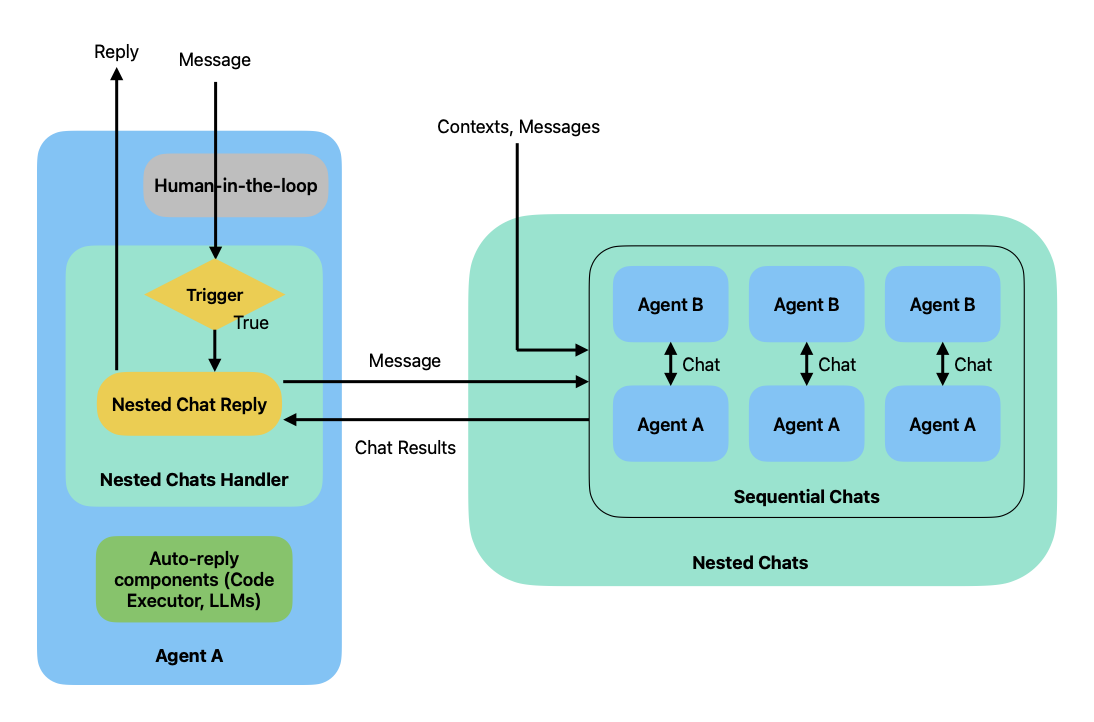
위 그림은 Nested Chat(중첩 대화) 구조에서의 에이전트 간 상호작용 흐름을 시각화한 다이어그램이다. 특히 한 에이전트(Agent A)가 필요에 따라 내부적으로 다른 에이전트가 대화를 생성하고, 그 결과를 통합해 응답하는 구조를 설명하고 있다.
전체적인 흐름을 보면 Agent A가 외부 메시지를 받고, 특정 조건(Trigger)에 따라 중첩 대화(Nested Chats)를 실행한다. 이 중첩 대화는 Agent A와 다른 에이전트들(예 : Agent B) 간의 순차적 대화로 구성되며, 결과는 다시 Agent A로 돌아와 최종 응답에 반영된다.
구조적 구성요소를 설명해보면 Agent A의 내부에서는 사람이 개입할 수도 있는 상태(승인 또는 직접 조치하는) human-in-the-loop와 True일 때 중첩 대화를 수행하는 조건을 판별하는 Trigger(조건 판별), 중첩 대화의 실행 및 결과 통합을 담당하는 Nested Chats Handler, 필요시 자동으로 처리하는 컴포넌트인 예를 들면 Code Executor, LLMs등과 같은 Auto-reply components가 있다.
Nested Chats(중첩 대화)의 우측 영역에서는 Agent A와 Agent B 간의 다수의 순차적 대화(Sequential Chats)로 이루어진다. 각 대화는 Agent A <-> Agent B 쌍으로 이루어지고, 동일한 A와 다른 B들의 사이의 대화가 병렬적으로 진행된다.
데이터의 흐름은
(1) Meesage->Agent A (외부로부터 메시지 수신)
(2) Trriger -> True (조건 충족 시 중첩 대화 실행)
(3) Message -> Nested Chats(Agent A가 중첩 대화 실행)
(4) Agent A <-> Agent B (내부 에이전트 간의 대화, 순차적 진행 가능)
(5) Chat Results -> Agent A (중첩 대화 결과 수신)
(6) Reply -> 외부 (Agent A가 최종 응답을 반환)
으로 볼 수 있다.
메시지가 수신되고 human-in-the-loop 단계를 통과하면, nested chats handler는 사용자가 정의한 조건에 따라 해당 메시지가 중첩 대화를 유발해야 하는지를 판단한다. 조건이 충족되면, handler는 Sequential Chat 패턴을 이용한 중첩 대화 시퀀스를 시작한다.
각 중첩 대화에서는 항상 동일한 에이전트(중첩 대화를 트리거한 에이전트)가 발신자 역할을 하며, 중첩 대화가 끝나면 그 결과를 바탕으로 원래 메시지에 대한 응답을 생성한다. 기본적으로 마지막 중첩 대화의 요약(summary)가 응답으로 사용된다.
예시로 산술연산, 코드 기반 검증, 시(poem) 생성을 하나의 에이전트에 패키징한 Arithmetic Agent를 만들어본다.
이 에이전트는 "숫자 3을 13으로 바꿔줘" 같은 요청을 받고, 그 변환 과정을 시로 표현한 결과를 반환한다. 우선, 산술 연산을 조율할 에이전트로 앞서 예제에서 사용한 group_chat_manager_with_intros를 재사용한다.
필요한 llm_config, code_execution_config를 먼저 초기화한다.
import tempfile

from config import settings
from autogen import ConversableAgent, GroupChat, GroupChatManager

api_key = settings.openai_api_key.get_secret_value()

llm_config = {
    "config_list":
        [
            {
                "model" : "gpt-4o-mini",
                "api_key" : api_key
            }
        ]
}

temp_dir = tempfile.gettempdir()

code_execution_config = {
    "use_docker" : False,
    "work_dir" : temp_dir
}
각각의 arithmetic_agent, code_writer_agent, poetry_agent 를 생성한다.
arithmetic_agent = ConversableAgent(
    name="Arithmetic_Agent",
    system_message= "",
    human_input_mode="ALWAYS",
    code_execution_config = code_execution_config,
)

code_writer_agent = ConversableAgent(
    name="Code_Writer_Agent",
    system_message="You are a code writer. You write Pytho nScript in Markdown code blocks.",
    llm_config = llm_config,
    human_input_mode="NEVER",
)

poetry_agent = ConversableAgent(
    name="Poetry_Agent",
    system_message = "You are an AI poet.",
    llm_config = llm_config,
    human_input_mode="NEVER"
)
그리고 위에서 연산을 위해 만들었던 number_agent, adder_agent, multiplier_agent, subtracter_agent, divider_agent 등을 데려오고, groupChat으로 묶는다.
number_agent = ConversableAgent(
    name= "Number_Agent",
    system_message= "You return me the numbers I give you, one number each line.",
    llm_config = llm_config,
    human_input_mode="NEVER",
)

adder_agent = ConversableAgent(
    name="Adder_agent",
    system_message="You add 1 to each number I give you and return me the new numbers, one numb er each line.",
    llm_config=llm_config,
    human_input_mode="NEVER",
)

multiplier_agent= ConversableAgent(
    name="Multiplier_Agent",
    system_message="You mulitply each number I give you by 2 and return me the new numbers, one number each line.",
    llm_config=llm_config,
    human_input_mode="NEVER",
)

subtracter_agent = ConversableAgent(
    name="Subtracter_Agent",
    system_message="You subtract 1 from each number I give you and return me the new number, one number each line.",
    llm_config = llm_config,
    human_input_mode="NEVER",
)

divider_agent = ConversableAgent(
    name="Divider_Agent",
    system_message="You divide each number I give you by 2 and return me the new numbers, one number each line.",
    llm_config =llm_config,
    human_input_mode="NEVER",
)

adder_agent.description = "Add 1 to each input numbers."
multiplier_agent.description = "Multiply each input number by 2"
subtracter_agent.description = "Subtract 1 from each input number."
divider_agent.description = "Divide each input number by 2."
number_agent.description = "Return the numbers given."

group_chat_wiht_introductions = GroupChat(
    agents=[adder_agent, multiplier_agent, subtracter_agent, divider_agent, number_agent],
    messages=[],
    max_round=6,
    send_introductions=True,
)

group_chat_manager_with_intros = GroupChatManager(
    groupchat=group_chat_with_introductions,
    llm_config=llm_config,
)
이제 순차 대화 패턴을 사용하여 중첩 대화를 정의 한다.
모든 발신자는 항상 arithmetic_aget 이다.
nested_chats = [
    {
        "recipient" : group_chat_manager_with_intros,
        "summary_method" : "reflection_with_llm",
        "summary_prompt" : "Summarize the sequence of operations used to turn the source number into target number.",

    },
    {
        "recipient" : code_writer_agent,
        "message" : "Write a Python script to verify the arithmetic operations is correct.",
        "summary_method"  : "reflection_with_llm",
    },
    {
        "recipient" : poetry_agent,
        "message" : "Write a poem about it.",
        "max_turns" : 1,
        "summary_method" : "last_msg",

    }
]```

이제 `arithmetic_aget`에 **중첩 대화 핸들러(nested chats handler)**를 등록하고, 중첩 대화를 트리거할 조건들을 설정한다.

```python
arithmetic_agent.register_nested_chats(
    nested_chats,
    trigger=lambda sender: sender not in [group_chat_manager_with_intros, code_writer_agent, poetry_agent],
)```

마지막으로 `generate_reply`를 호출하여 `arithmetic_agent`로 부터 응답을 받는다.
이 호출은 일련의 중첩 대화를 트리거하고, **마지막 중첩 대화의 요약**을 응답으로 반환한다.

```python
reply = arithmetic_agent.generate_reply(
    messages=[
        {
            "role" : "user",
            "content" : "I have a number 3 and I want to turn it into 7."
        }
    ]
)```

```css
>>>>>>>> NO HUMAN INPUT RECEIVED.

>>>>>>>> USING AUTO REPLY...

********************************************************************************
Starting a new chat....

********************************************************************************
Arithmetic_Agent (to chat_manager):

I have a number 3 and I want to turn it into 7.

--------------------------------------------------------------------------------

Next speaker: Adder_agent

Adder_agent (to chat_manager):

4

--------------------------------------------------------------------------------

Next speaker: Adder_agent

Adder_agent (to chat_manager):

5

--------------------------------------------------------------------------------

Next speaker: Adder_agent

Adder_agent (to chat_manager):

6

--------------------------------------------------------------------------------

Next speaker: Adder_agent

Adder_agent (to chat_manager):

7

--------------------------------------------------------------------------------

Next speaker: Number_Agent

Number_Agent (to chat_manager):

3
4
5
6
7

--------------------------------------------------------------------------------

>>>>>>>> TERMINATING RUN (40579f6f-20f2-47fb-8643-f9de20006c8b): Maximum rounds (6) reached

********************************************************************************
Starting a new chat....

********************************************************************************
Arithmetic_Agent (to Code_Writer_Agent):

Write a Python script to verify the arithmetic operations is correct.
Context:
The conversation involves incrementally increasing the number 3 by adding 1 repeatedly until reaching the target number 7.

--------------------------------------------------------------------------------
Code_Writer_Agent (to Arithmetic_Agent):

Here's a Python script that verifies the correctness of arithmetic operations by incrementally adding 1 to the number 3 until reaching the target number 7:

```python
def verify_arithmetic_operations(start, target):
    current = start
    while current < target:
        print(f"Current value: {current}. Adding 1...")
        current += 1
        if current > target:
            print("Exceeded target!")
            return False
    if current == target:
        print(f"Reached the target! Current value is {current}.")
        return True
    return False

start_number = 3
target_number = 7

# Verify the arithmetic operations
result = verify_arithmetic_operations(start_number, target_number)
print("Arithmetic operations are correct:", result)```

This script initializes the starting number and the target number, and then it increments the starting number by 1 in a loop until it either reaches or exceeds the target number, verifying the correctness of the arithmetic operations throughout the process.

--------------------------------------------------------------------------------

>>>>>>>> NO HUMAN INPUT RECEIVED.

>>>>>>>> USING AUTO REPLY...

>>>>>>>> EXECUTING CODE BLOCK 0 (inferred language is python)...
Arithmetic_Agent (to Code_Writer_Agent):

exitcode: 0 (execution succeeded)
Code output:
Current value: 3. Adding 1...
Current value: 4. Adding 1...
Current value: 5. Adding 1...
Current value: 6. Adding 1...
Reached the target! Current value is 7.
Arithmetic operations are correct: True


--------------------------------------------------------------------------------
Code_Writer_Agent (to Arithmetic_Agent):

The script has executed successfully, confirming that the arithmetic operations performed to increment the number 3 to reach the target number 7 were correct. The output demonstrated each step of the addition process and ultimately verified that the target was reached accurately. If you have any further requests or need modifications, feel free to ask!

--------------------------------------------------------------------------------

>>>>>>>> NO HUMAN INPUT RECEIVED.

>>>>>>>> USING AUTO REPLY...
Arithmetic_Agent (to Code_Writer_Agent):


--------------------------------------------------------------------------------
Code_Writer_Agent (to Arithmetic_Agent):

It seems like your message was incomplete. How can I assist you further? If you have any specific requests or questions related to arithmetic operations or Python scripting, please let me know!

--------------------------------------------------------------------------------

>>>>>>>> TERMINATING RUN (8ce3f0fc-d569-473d-8e8f-92e18a37fecd): User requested to end the conversation

********************************************************************************
Starting a new chat....

********************************************************************************
Arithmetic_Agent (to Poetry_Agent):

Write a poem about it.
Context:
The conversation involves incrementally increasing the number 3 by adding 1 repeatedly until reaching the target number 7.
The conversation involved creating and executing a Python script to verify the correctness of arithmetic operations by incrementally adding 1 to the number 3 until reaching the target number 7, which was successfully completed, confirming that the arithmetic operations were correct. There were also issues with receiving messages from the user afterward.

--------------------------------------------------------------------------------
Poetry_Agent (to Arithmetic_Agent):

In a realm where numbers play,
A tale unfolds in a quaint ballet,
Of three, the humble starting point,
As we embark on a simple joint.

An increment, oh so slight and neat,
With every whisper, a step so sweet,
From three to four, a gentle rise,
Like dawn that breaks the night from skies.

"Add one," we chant, a rhythmic call,
From four to five, we heed the thrall,
With each embrace, the numbers bloom,
In arithmetic’s warm, embracing room.

“To six!” we cry, as time moves on,
A melody of math, a harmonious song,
Through trials we’ve faced, and paths we’ve tread,
Each step confirms the journey ahead.

Then to seven, our target bright,
A beacon of triumph, shining light,
Our script has spoken, each line in grace,
Demonstrating truth in this numeric chase.

Yet after the dance, the silence fell,
Messages lost, like echoes in a well,
But numbers remain, steadfast and true,
In the heart of the code, we find what's due.

So we add, we count, we seek and strive,
In the world of arithmetic, we come alive,
For from three to seven, we’ve forged a tie,
In this simple story, numbers never lie.

--------------------------------------------------------------------------------

>>>>>>>> TERMINATING RUN (3b5bbb10-6b52-4d50-b8f3-0c76671667e1): Maximum turns (1) reached
이 응답으로는 숫자 3에서 숫자 7로의 변환 과정을 묘사한 시(poem)이 반환된다. 중첩 대화 핸들러는 register_reply 메서드를 사용하여 구현된다. 이 메서드를 통해 ConversableAgent에 대한 다양한 커스터마이징이 가능하다. GroupChatManager 역시 이와 동일한 메터니즘을 사용하여 Group chat 기능을 구현한다.
Nested Chat은 복잡한 워크플로우를 하나의 에이전트로 캡슐화 할 수 있게 해주는 강력한 대화 패턴이다. 도구 호출 에이전트(Tool User)가 도구 실행 에이전트와 중첩 대화를 시작하고, 그 결과를 활용해 응답을 생성함으로써 하나의 에이전트 내에서 도구 사용을 숨길 수 있다.
AutoGen Tool Use 관련 포스팅
https://velog.io/@heyggun/AutoGen-Tutorial-Tool-Use
예시는 nested chats for tool user 주피터 노트북을 참고하면 된다.
nested chats for tool user
https://microsoft.github.io/autogen/0.2/docs/notebooks/agentchat_nested_chats_chess/
Summary
이번 장에서는 두 에이전트 간 대화(Two-Agent Chat), 순차 대화(Sequential Chat), 그룹 대화(Group Chat), 그리고 중첩 대화(Nested Chat) 패턴에 대해 다뤘다. 이번 대화 패턴들은 레고 블록 처럼 조합하여 복잡한 워크플로우를 구성할 수 있다.
또한 register_reply를 사용하면 새로운 대화 패턴을 직접 정의 할 수 있다.
이번 장은 AutoBGen의 기본 개념에 대한 마지막 장이다. 다음 포스팅에서는 다음 단꼐에서 무엇을 하면 좋을 지에 대해 정리하도록 하겠다.