AutoGen - Use Cases (Multi-agent Conversation Framework, 멀티 에이전트 프레임워크)
AutoGen
AutoGen > Use Cases > Multi-agent Conversation Framework
https://microsoft.github.io/autogen/0.2/docs/Use-Cases/agent_chat
Multi-agent Conversation Framework
AutoGen은 파운데이션 모델 사용을 위한 고수준 추상화로서 통합된 다중 에이전트 대화 프레임워크를 제공한다. 이 프레임워크는 LLM, 도구(Tools), 자동화된 에이전트 대화가 통합된 강력하고 사용자 정의가 가능한 Conversable(대화 가능) 에이전트를 특징으로 한다. 여러 유능한 에이전트 간의 대화를 자동화함으로써, 도구 사용을 포함한 작업을 인간 피드백이 있거나 없는 상황에서도 자율적으로 수행하도록 쉽게 구성할 수 있다.
이 프레임 워크는 복잡한 LLM 워크플로우의 orchestration(조율), automation(자동화), optimization(최적화)를 단순화한다. 또한 LLM 모델의 성능을 극대화하고 기존의 한계를 극복할 수 있게 해준다.
이를 통해, 다중 에이전트 대화를 기반으로 한 차세대 LLM 애플리케이션을 최소한의 노력으로 구축할 수 있다.
Agents
AutoGen은 대화 기반으로 과제를 해결하는 conversable agent를 추상화하고 구현한다.
특히 AutoGen의 에이전트들은 다음과 같은 특성을 갖는다.
Conversable(대화 가능) : AutoGen의 에이전트는 서로 메시지를 주고받을 수 있다. 즉, 어떤 에이전트든 다른 에이전트와의 대화를 시작하거나 이어갈 수 있는 능력을 가진다.Customizable(사용자 정의 가능) : AutoGen의 에이전트는 LLM, 인간, 도구(Tools), 또는 이들의 조합을 통합하도록 유연하게 커스터마이징할 수 있다.
아래 그림은 AutoGen에 내장된 에이전트들을 보여준다.
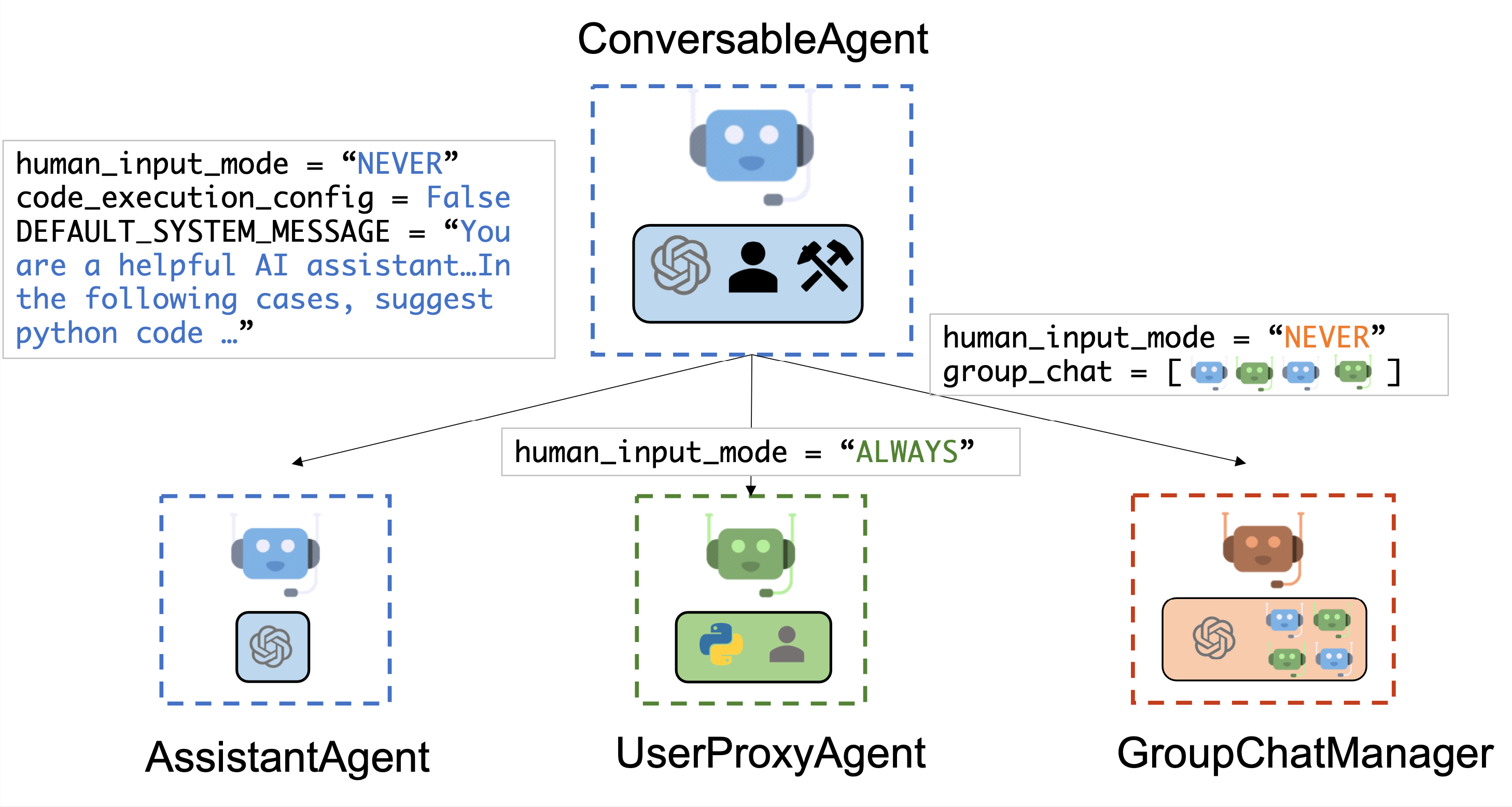
이 구조는 하나의 메인 에이전트가 복잡한 질의에 대해 내부적으로 다중 에이전트와 협업하여 하위 질의 처리를 수행하고 있다. AutoGen 프레임워크 기반의 에이전트 구성도로 ConversableAgent를 기반으로 다양한 타입의 하위 에이전트들이 어떻게 정의되고 연결되는지 보여준다.
핵심 구성요소는 ConversableAgent로, 이 모든 에이전트들은 공통적으로 ConversableAgent 클래스르 기반으로 확장된다. human_input_mode, code_execute_config, DEFAULT_SYSTEM_MESSAGE 등의 설정이 가능하다.
하위 에이전트 타입으로 AssisantAgent가 있어 AI 어시스턴트 역할을 수행하여 `human_input_mode="NEVER", "code_execution_config=False"로 되어 있어, 사람의 직접 입력 없이 완전히 자동화되고 코드 실행 기능이 비활성화된 LLM 만을 사용해서 답변하는 에이전트 이다.
UserProxyAgent는 실제 사용자와 인터페이스하고 `human_input_mode="ALWAYS"로 되어 있어 사용자 입력을 항상 요청한다. 코드 실행 환경 및 사용자 피드백을 통해 상호작용하는 에이전트이다.
GroupChatManager는 여러 에이전트를 묶어 그룹 대화를 수행하고, human_input_mode="NEVER"로 자동화 되어 있다. 현재 위 그림에서는 group_chat=[🟦, 🟩, 🟦, 🟩]로 되어있는데 AssistantAgent 2개 + UserProxyAgent가 2개로 구성되어 있는 것을 볼 수 있다. LLM 에이전트들 간의 협업 과정 조율과 중재를 한다.
모두 ConversableAgent의 서브 클래스로 각 에이전트는 독립적인 역할을 갖고 있다. 여기서 GroupChatManager가 복수의 에이전트를 조합해 대화의 흐름을 만들 수 있는 구조라고 이해하면 된다.
Autogen에서는 ConversableAgent 라는 설계된 범용 클래스가 있다. 이 클래스는 메시지를 주고받으며 서로 대화할 수 있는 에이전트를 정의한 것으로, 공동으로 작업을 수행할 수 있도록 설계되어 있다. 에이전트는 다른 에이전트와 통신하며 작업을 수행할 수 있으며, 메시지를 받은 뒤 어떤 행동을 취할지는 에이전트마다 다르게 설정할 수 있다. 대표적인 하위 클래스는 다음 두 가지이다.
[1] AssistantAgent
- AssistantAgent는 AI 어시스턴트 역할을 하도록 설계되었다.
- 기본적으로 LLM을 사용하지만, 사람의 입력이나 코드 실행은 요구하지 않는다.
- 사용자가 어떤 작업을 수행해야 한다는 설명을 포함한 메시지를 보내면, 이 에이전트는 Python 코드 블록을 작성하여 응답할 수 있다.
- 코드 작성은 GPT-4 등의 LLM이 자동으로 수행하며, 실행 결과를 받아 버그 수정이나 보완 제안도 할 수 있다.
- 에이전트의 행동은 새로운 system message를 전달함으로써 변경 가능하며, LLM 추론 구성은
llm_config를 통해 설정 가능하다.
[2] UserProxyAgent
- UserProxyAgent는 인간 사용자의 대리자 역할을 하는 개념적 에이전트이다.
- 기본적으로 각 대화 턴마다 사람의 입력을 요청하지만, 코드 실행 및 함수/도구 호출도 수행할 수 있는 기능을 가지고 있다.
- 메시지에 실행 가능한 코드 블록이 포함되어 있고, 사용자의 일벽이 없는 경우에는 자동으로 코드 실행을 트리거한다.
- 코드 실행을 원하지 않을 경우,
code_execution_config를False로 설정하면 비활성화할 수 있다. - LLM 기반의 응답은 기본적으로 비활성화되어 있으나,
llm_config에 추론 설정 딕셔너리(dict)을 지정하면 LLM을 이용한 응답이 가능해진다. - 이 설정이 적용되면, 코드 실행이 수행되지 않은 경우에는 LLM을 사용해 답변을 생성한다.
ConversableAgent은 자동 응답 기능(auto-reply) 기능을 제공하여, 보다 자율적인 다중 에이전트 커뮤니케이션을 가능하게 하면서도 사람의 개입 여지를 남겨둔다.
또한 register_reply() 메서드를 사용하면 사용자 정의 응답 함수를 쉽게 등록하여 확장할 수 있다.
다음 코드에서는 assistant 라는 이름의 AssisatntAgent를 생성하여 어시스턴트 역할을 하도록 하고 user_proxy라는 이름의 UserProxyAgent를 사용하여 사용자 대리 역할을 하도록 한다.
이후, 두 에이전트를 활용해 하나의 과제를 함께 해결하는 예제를 다룬다.
from config import settings
from autogen import AssistantAgent, UserProxyAgent
from autogen.coding import DockerCommandLineCodeExecutor

openAI_api_key = settings.openai_api_key.get_secret_value()
anthropic_api_key = settings.anthropic_api_key.get_secret_value()

config_list = [
    {
        "model" : "gpt-4o-mini",
        "api_key" : openAI_api_key,
    },
    {
        "model" : "claude-3-5-haiku-20241022",
        "api_key": anthropic_api_key,
    }
]


llm_config={
    "config_list" : config_list
}

code_executor = DockerCommandLineCodeExecutor()

code_execution_config={
    "executor": code_executor
}

assistant = AssistantAgent(
    name="assistant",
    llm_config=llm_config,
)


user_proxy = UserProxyAgent(
    name="user_proxy",
    code_execution_config=code_execution_config
)

assistant
"""
<autogen.agentchat.assistant_agent.AssistantAgent at 0x11715acd0>
"""

user_proxy
"""
<autogen.agentchat.user_proxy_agent.UserProxyAgent at 0x11762e9d0>
"""
Multi-agent Conversations
A Basic Two-Agent Conversation Example
참여하는 에이전트들이 제대로 구성되면, 다음 코드에 나와있는 초기화 단계를 통해 다중 에이전트 대화 세션을 시작할 수 있다.
user_proxy.initiate_chat(
    assistant,
    message="""What date is today? Which bit texth stock has the largest year-to-date gain this year?
How much is the gain?"""
)
user_proxy (to assistant):
What date is today? Which bit texth stock has the largest year-to-date gain this year?
How much is the gain?
--------------------------------------------------------------------------------
assistant (to user_proxy):
To answer your questions, I will first get the current date. Then I will find the bit text stock with the largest year-to-date gain and provide the gain amount.
### Step 1: Get the current date
I will execute Python code to obtain today's date.
```python
from datetime import datetime
# Get today's date
today = datetime.now().date()
print(today)Step 2: Find the bit text stock with the largest year-to-date gain
I will retrieve the stock data to determine which stock has the largest year-to-date gain this year. I will use the yfinance library to fetch relevant stock data.
To do this, please ensure you have the yfinance library installed. You can install it using the command:
pip install yfinanceAfter installing the library, I will provide the code to find the stock with the largest gain.
# filename: largest_gain_stock.py
import yfinance as yf
import datetime

# Get today's date
today = datetime.datetime.now().date()

# Define the list of stocks in the bit text sector (for example purposes, using a few stocks)
stocks = ["AAPL", "MSFT", "GOOGL", "AMZN", "TSLA"]  # Replace with actual 'bit text' stocks

# Retrieve year-to-date gain for each stock
ytd_gains = {}

for stock in stocks:
    data = yf.download(stock, start=f"{today.year}-01-01", end=today)
    if not data.empty:
        start_price = data.iloc[0]['Close']
        end_price = data.iloc[-1]['Close']
        gain = (end_price - start_price) / start_price * 100  # Gain in percentage
        ytd_gains[stock] = gain

# Find the stock with the largest gain
largest_gain_stock = max(ytd_gains, key=ytd_gains.get)
largest_gain_value = ytd_gains[largest_gain_stock]

print(f"Today's date: {today}")
print(f"Largest year-to-date gain: {largest_gain_stock} with a gain of {largest_gain_value:.2f}%")```

Please run the first block of code to get today's date, and then install `yfinance` if needed, followed by executing the second block of code to get the stock data.

--------------------------------------------------------------------------------

>>>>>>>> TERMINATING RUN (1bb74a80-59d4-43ba-85ee-ba6944be10a0): User requested to end the conversation
ChatResult(chat_id=None, chat_history=[{'content': 'What date is today? Which bit texth stock has the largest year-to-date gain this year?\nHow much is the gain?', 'role': 'assistant', 'name': 'user_proxy'}, {'content': 'To answer your questions, I will first get the current date. Then I will find the bit text stock with the largest year-to-date gain and provide the gain amount.\n\n### Step 1: Get the current date\n\nI will execute Python code to obtain today\'s date.\n\n```python\nfrom datetime import datetime\n\n# Get today\'s date\ntoday = datetime.now().date()\nprint(today)\n```\n\n### Step 2: Find the bit text stock with the largest year-to-date gain\n\nI will retrieve the stock data to determine which stock has the largest year-to-date gain this year. I will use the `yfinance` library to fetch relevant stock data.\n\nTo do this, please ensure you have the `yfinance` library installed. You can install it using the command:\n```sh\npip install yfinance\n```\n\nAfter installing the library, I will provide the code to find the stock with the largest gain.\n\n```python\n# filename: largest_gain_stock.py\nimport yfinance as yf\nimport datetime\n\n# Get today\'s date\ntoday = datetime.datetime.now().date()\n\n# Define the list of stocks in the bit text sector (for example purposes, using a few stocks)\nstocks = ["AAPL", "MSFT", "GOOGL", "AMZN", "TSLA"] # Replace with actual \'bit text\' stocks\n\n# Retrieve year-to-date gain for each stock\nytd_gains = {}\n\nfor stock in stocks:\n data = yf.download(stock, start=f"{today.year}-01-01", end=today)\n if not data.empty:\n start_price = data.iloc[0][\'Close\']\n end_price = data.iloc[-1][\'Close\']\n gain = (end_price - start_price) / start_price * 100 # Gain in percentage\n ytd_gains[stock] = gain\n\n# Find the stock with the largest gain\nlargest_gain_stock = max(ytd_gains, key=ytd_gains.get)\nlargest_gain_value = ytd_gains[largest_gain_stock]\n\nprint(f"Today\'s date: {today}")\nprint(f"Largest year-to-date gain: {largest_gain_stock} with a gain of {largest_gain_value:.2f}%")\n```\n\nPlease run the first block of code to get today\'s date, and then install `yfinance` if needed, followed by executing the second block of code to get the stock data.', 'role': 'user', 'name': 'assistant'}], summary='To answer your questions, I will first get the current date. Then I will find the bit text stock with the largest year-to-date gain and provide the gain amount.\n\n### Step 1: Get the current date\n\nI will execute Python code to obtain today\'s date.\n\n```python\nfrom datetime import datetime\n\n# Get today\'s date\ntoday = datetime.now().date()\nprint(today)\n```\n\n### Step 2: Find the bit text stock with the largest year-to-date gain\n\nI will retrieve the stock data to determine which stock has the largest year-to-date gain this year. I will use the `yfinance` library to fetch relevant stock data.\n\nTo do this, please ensure you have the `yfinance` library installed. You can install it using the command:\n```sh\npip install yfinance\n```\n\nAfter installing the library, I will provide the code to find the stock with the largest gain.\n\n```python\n# filename: largest_gain_stock.py\nimport yfinance as yf\nimport datetime\n\n# Get today\'s date\ntoday = datetime.datetime.now().date()\n\n# Define the list of stocks in the bit text sector (for example purposes, using a few stocks)\nstocks = ["AAPL", "MSFT", "GOOGL", "AMZN", "TSLA"] # Replace with actual \'bit text\' stocks\n\n# Retrieve year-to-date gain for each stock\nytd_gains = {}\n\nfor stock in stocks:\n data = yf.download(stock, start=f"{today.year}-01-01", end=today)\n if not data.empty:\n start_price = data.iloc[0][\'Close\']\n end_price = data.iloc[-1][\'Close\']\n gain = (end_price - start_price) / start_price * 100 # Gain in percentage\n ytd_gains[stock] = gain\n\n# Find the stock with the largest gain\nlargest_gain_stock = max(ytd_gains, key=ytd_gains.get)\nlargest_gain_value = ytd_gains[largest_gain_stock]\n\nprint(f"Today\'s date: {today}")\nprint(f"Largest year-to-date gain: {largest_gain_stock} with a gain of {largest_gain_value:.2f}%")\n```\n\nPlease run the first block of code to get today\'s date, and then install `yfinance` if needed, followed by executing the second block of code to get the stock data.', cost={'usage_including_cached_inference': {'total_cost': 0.00036779999999999994, 'gpt-4o-mini-2024-07-18': {'cost': 0.00036779999999999994, 'prompt_tokens': 492, 'completion_tokens': 490, 'total_tokens': 982}}, 'usage_excluding_cached_inference': {'total_cost': 0.00036779999999999994, 'gpt-4o-mini-2024-07-18': {'cost': 0.00036779999999999994, 'prompt_tokens': 492, 'completion_tokens': 490, 'total_tokens': 982}}}, human_input=['exit'])초기화 단계 이후에는, 대화가 자동으로 진행될 수 있다.
아래는 user_proxy 와 assistant 가 위의 과제를 자율적으로 협업하여 해결하는 과정이다.
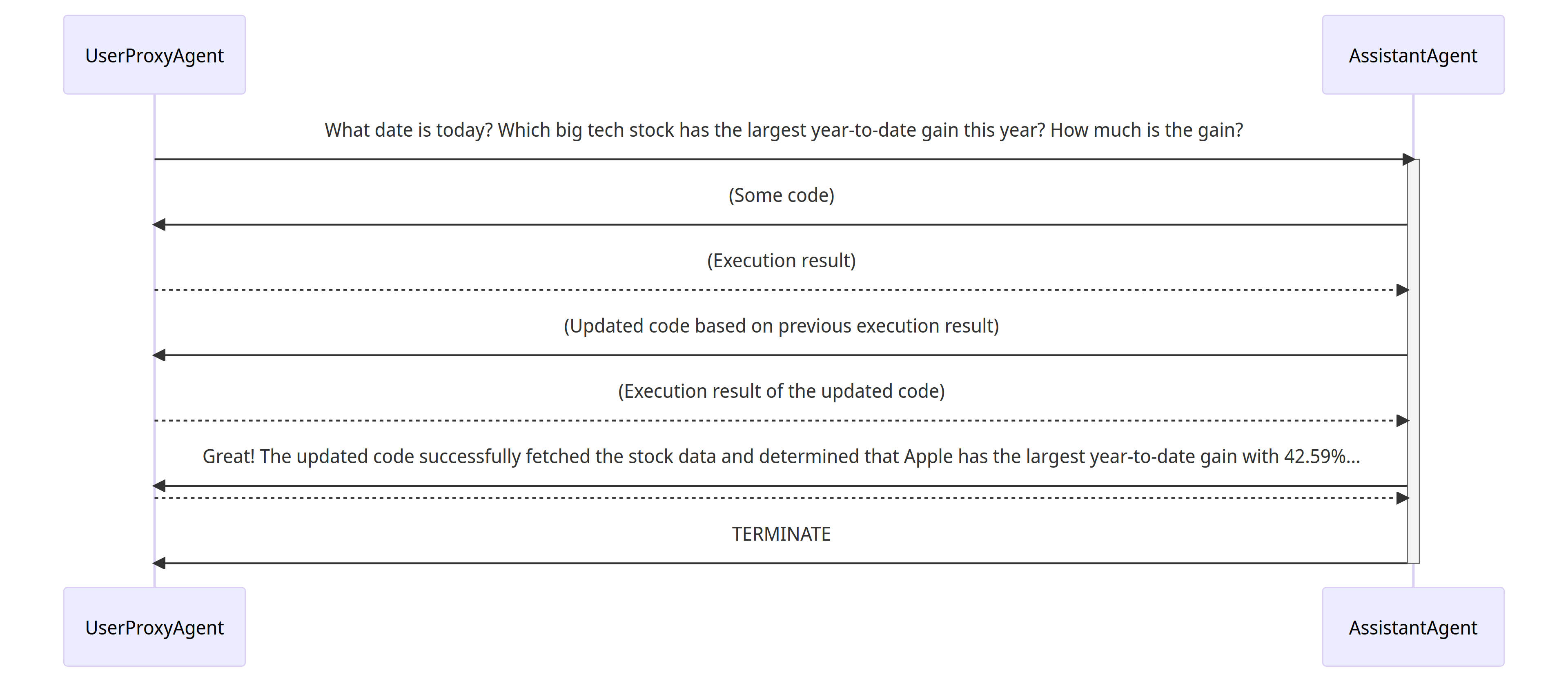
그림을 위주로 상세하게 설명하자면, 이 그림은 AugoGen 기반 멀티 에이전트 시스템에서 UserProxyAgent와 AssistantAgent가 협력하여 질문에 대한 코드를 작성하고 실행하며, 결과를 기반으로 응답을 업데이트하는 대화 흐름을 보여주는 시퀀스 다이어그램(Sequence Diagram) 이다.
UserProxyAgent : 사용자의 질문을 대신 처리하는 프록시 에이전트, 사람자의 질의를 받아 에이전트에 전달하고 응답을 다시 사용자에게 전한다.
AssistantAgent: LLM 기반 AI 어시스턴트로 요청에 따라 코드 생성, 결과 분석, 로직 수정 등을 수행한다.
대화의 흐름을 요약하자면
(1) UserProxyAgent가 AssistantAgent에게 "오늘 날짜가 뭐야? 올해 가장 높은 수입률을 기록한 빅테크 주식은 무엇이고, 수익률은 얼마나 돼?" 라고 사용자의 질문을 전달한다.
(2) 그러면 AssistantAgent가 초기 코드를 생성한다. 예를 들면 주가 API에서 데이터를 가져오는 코드일 수 있다.
(3)코드 실행 후에 결과를 수신하는데 AssistantAgent가 UserProxyAgent 에게 Execution result 데이터 수집 결과를 전달한다.
(4) AssistantAgent가 이전 결과에 기반에 코드를 수정한다. 예를 들면 특정 종목들의 수익률을 비교해서 랭킹을 매기는 코드로 업데이트 하는 것이다.
(5) AssistantAgent가 UserProxyAgent에게 Execution result of the updated code 즉, 업데이트된 코드를 실행하거나 결과를 반환한다.
(6) AssistantAgent가 UserProxyAgent*에게 "Apple이 올해 들어 가장 높은 수익률 42.59%를 기록했습니다." 라는 최종 응답을 전달한다.
(7) 그리고 TERMINATE 종료된다.
(1) assistant는 user_proxy로 부터 메시지를 받는다.
이 메시지에는 해결해야 할 과제의 설명이 포함되어 있다.
(2) assistant는 해당 과제를 해결하기 위한 python 코드를 작성하려고 시도하고, 그 응답을 user_proxy에게 전송한다.
(3) user_proxy는 assistant로 부터 응답을 받으면, 사람의 입력을 요청하거나 자동으로 생성된 응답을 준비하는 방식 중 하나로 답변하려고 한다.
만약 사람의 입력이 제공되지 않으면, user_proxy는 코드를 실행하고, 그 실행 결과를 자동 응답(auto-reply)로 사용한다.
(4) assistant는 user_proxy를 위한 후속 응답을 생성한다. user_proxy는 이후 대화를 종료할지 여부를 결정한다. 종료하지 않는 경우, 3번과 4번의 과정이 반복된다.
Supporting Diverse Conversation Patterns
(다양한 대화 패턴 지원)
Conversations with different levels of autonomy, and human-involvement patterns (자율성 수준 및 인간 개입의 패턴이 다른 대화)
- 한편으로는, 초기화 단계 이후 완전히 자율적인 대화를 구현할 수 있다.
다른 한편으로는 AutoGen을 사용해 사람의 개입이 필요한 문제 해결(human-in-loop)을 구현할 수 도 있다.
이때human_input_mode를ALWAYS로 설정하는 등 인간 개인 수준과 패턴을 설정할 수 있다.
이는 사람의 개입이 예상되거나 바람직한 다양한 응용 분야에서 매우 유용하다.
Static and dynamic conversations(정적 및 동적 대화)
- AutoGen은 프로그래밍과 자연어를 함께 활용한 대화 중심의 제어 방식을 통합함으로써 본질적으로 동적인(dynamic) 대화를 지원한다.
이러한 동적 특성 덕분에, 에이전트 topology(구조)는 입력 문제 시나리오에 따라 실제 대화 흐름에 맞춰 적응할 수 있다. - 반대로 정적인 대화는 미리 정의된 topology를 따른다.
동적 대화는 대화 구조를 사전에 예측할 수 없는 복잡한 상황에서 특히 유용하다.
[1] Registed auto-reply (등록된 자동 응답)
플러그인 방식의 자동 응답 함수를 통해, 현재 메시지의 내용과 문맥에 따라 다른 에이전트와의 대화를 호출할지를 선택적으로 결정할 수 있다.
예를 들어 다음과 같은 사례가 있다.
-
Hierarchical chat(계층적 대화) - OptiGuide에서 사용된 구조
OptiGuide
https://github.com/microsoft/optiguide -
Dynamic Group Chat(동적 그룹 대화) : 이 대화 패턴은 계층적 대화의 특수한 형태로, 시스템 내에서
group chat manager에reply함수를 등록해 메시지를 브로드캐스트하고 다음 발화자를 결정한다.Dynamic Group Chat
https://github.com/microsoft/autogen/blob/0.2/notebook/agentchat_groupchat.ipynb -
Finite State Machine graphs to set speaker transition constraints(유한 상태 머신,FSM) 기반 대화 흐름 : 이 대화 패턴은 Dynamic Group Chat의 또 다른 특수한 형태로, 방향성 전이 행렬(directed ransition matrix)을
group chat에 입력하여허용된 전이(legal transitions)또는금지된 전이(Disalllowed transitions)을 명시한다.Finited State Machine graphs to set speaker transition constraints
https://microsoft.github.io/autogen/0.2/docs/notebooks/agentchat_groupchat_finite_state_machine/ -
Nested Chat (중첩 대화) - 예를 들어 체스 게임을 모델링한 대화 방식(conversational chess)
Nested Chat
https://github.com/microsoft/autogen/blob/0.2/notebook/agentchat_nested_chats_chess.ipynb
[2] LLM-Based Function Call (LLM 기반 함수 호출)
또 다른 방식은 LLM 기반의 함수 호출입니다. 이 방식에서는 각 추론(inference) 단계에서 LLM이 현재 대화 상태에 따라 특정 함수를 호출할지를 결정한다.
이 접근 방식은 동적인 다중 에이전트 대화를 가능하게 하며, 예를 들어 여러 사용자가 함께 수학 문제를 해결하는 시나리오처럼, 학생 보조 에이전트(studente assistant)가 자동으로 전문가 에이전트(expertise via)를 호출(function call) 하는 구조에서 활용된다.
multi-user math problem solving scenario
https://github.com/microsoft/autogen/blob/0.2/notebook/agentchat_two_users.ipynb
Diverse Applications Implemented with AutoGen
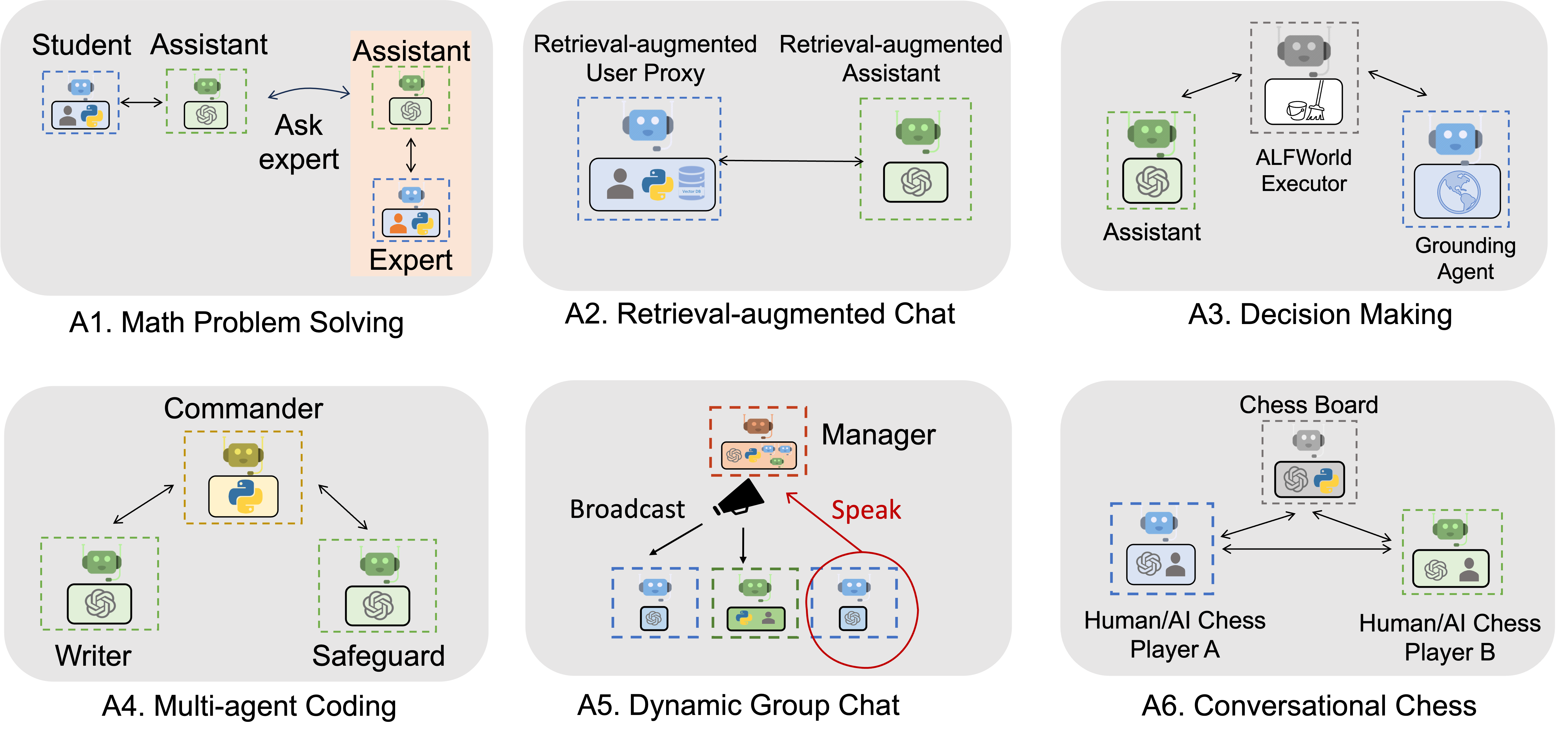
아래 그림은 AutoGen을 사용해 구축된 6가지 애플리케이션 예시이다.
-
그림의 A1의 Math Problem Solving의 경우
Student-Assistant-Expert(학생-조수-전문가) 구조 이다. Student가 질문을 던지고 Assistant는 답변을 시도하다가 어려운 경우 Expert에게 질문을 전달한다. Expert는 보다 심화된 답변을 생성해 다시 Assistant에게 전달하고, 이를 다시 Student에게 전달한다.
이 사례는 교육용 AI 튜터나 단계적 도움 구조에서 사용하면 좋다. -
그림 A2의 Retrieval-augmented Chat의 경우
Retrieval-Augmented User Proxy / Assistant조합으로, 검색 기반 보장 구조이다. User Proxy는 외부 데이터베이스(Vector DB)와 연결돼 사용자 질의에 기반한 문서 검색을 수행한다. Assistant는 검색된 문서들을 활용해 보다 정확한 응답을 생성한다.
이 사례는 RAG(Retrieval-Augmented Generation), 기업 내부 문서 기반 QA 시스템에서 사용하면 좋다. -
그림 A3의 Decision Making은
ALFWolrd Executor + Assisant + Grounding Agent)로 시뮬레이션 연동 구조이다. Assistnat는 자연어 명령을 받고, Grounding Agent는 명령을 환경에 맞게 구체화, ALFWorld Executor는 실제 가상환경에서 행동을 실행한다.
적용 사례로는 로봇 제어, 시뮬레이션 환경 학습니다. -
그림 A4의 Multi-agent Coding은
Commander-Writer-Safeguard책임 분산 구조로 Commander는 작성 명령을 내리고,Writer는 작성, Safeguard는 작성된 결과물을 검토보안 체크한다.
적용 사례로는 콘텐츠 생성 자동화 시스템에서 책임 분산시 사용한다. -
그림 A5의 Dynamic Group Chat은
GroupChatManager-Broadcast & Speaker)로 토론 에이전트 구조 이다. Manager가 발언자를 선택하고 메시지를 전송(boardcast) 하고, 선택된 Agent가 다시 speak(말함) 하고 다자 간 대화를 조율하는 구조이다. -
그림 A6의 Conversational Chess는
Human/AI Chess Playar A/B with Chess Board Agent)로, 두 명의 플레이어가 AI 또는 사람일 수 있으며 Chess Board Agent가 게임의 상태를 관리하고 규칙에 따라 응답을 처리할 때 사용한다.
적용 사례로는 협력 또는 경쟁 기반 게임 AI, 전략 시뮬레이션에 사용 할 수 있다.
예시 목록은 아래의 페이지에서 확인 할 수 있다.
Automated Agent Chat Examples
https://microsoft.github.io/autogen/0.2/docs/Examples/#automated-multi-agent-chat
For Further Reading
이 패키지의 기반이 된 연구에 관심이 있다면 아래의 논문을 참고하면 된다
- AutoGen: Enabling Next-Gen LLM Applications via Multi-Agent Conversation Framework. Qingyun Wu, Gagan Bansal, Jieyu Zhang, Yiran Wu, Shaokun Zhang, Erkang Zhu, Beibin Li, Li Jiang, Xiaoyun Zhang and Chi Wang. ArXiv 2023.
AutoGen : Enabling Next-Gen LLM Application via Multi-Agent Conversation
https://arxiv.org/abs/2308.08155
- An Empirical Study on Challenging Math Problem Solving with GPT-4. Yiran Wu, Feiran Jia, Shaokun Zhang, Hangyu Li, Erkang Zhu, Yue Wang, Yin Tat Lee, Richard Peng, Qingyun Wu, Chi Wang. ArXiv preprint arXiv:2306.01337 (2023).
MathChat: Converse to Tackle Challenging Math Problems with LLM Agents
https://arxiv.org/abs/2306.01337