질문 내용
- 다음을 프로그래밍 하시오.(금일 Pencil 소스코드 참고)
- interface Shape 작성
- 클래스 Rectangle ,Triangle ,Circle 작성
- 스프링 생성후 Bean 생성시 위의 3가지 도형 설정에 따른 넓이가 나오도록 하시오.
	    ctx = new GenericXmlApplicationContext("classpath:appCTX6.xml");
	    Shape pencil = (Shape) ctx.getBean("Shape");
	    Shape.getArea();
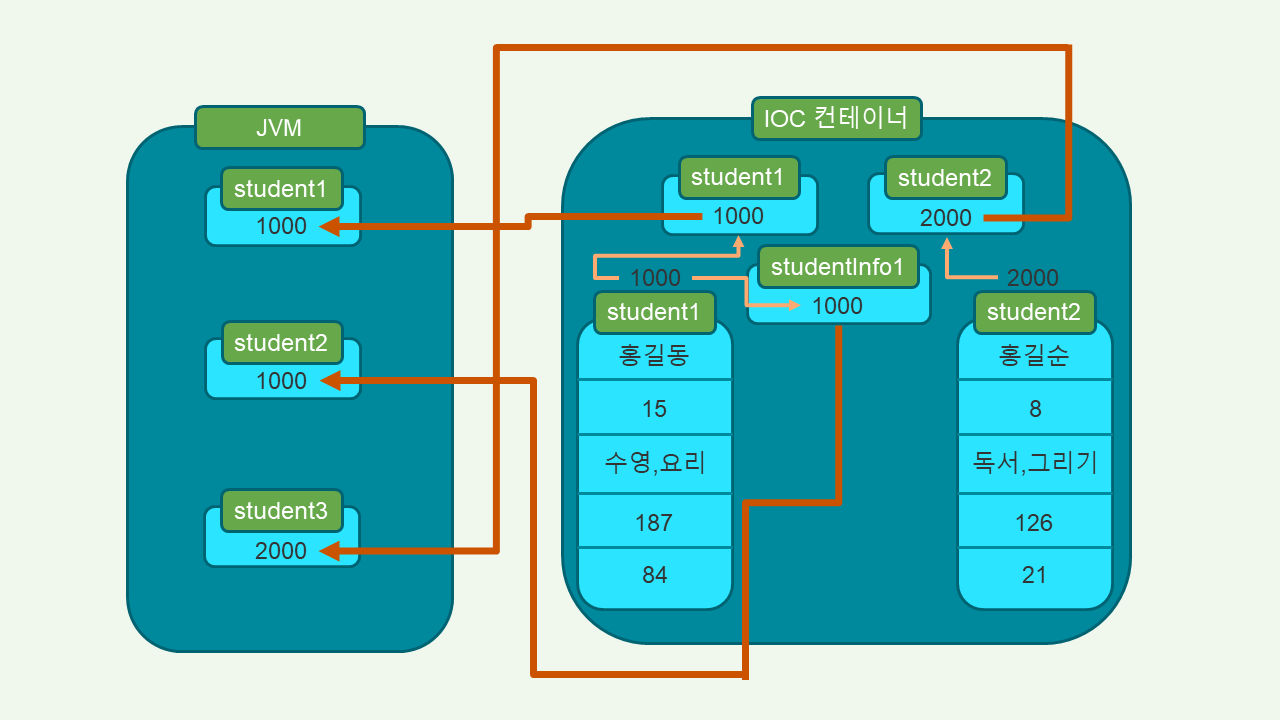
- 아래의 메모리를 그리시오.(칠판 참고, xml은 수업시 했던 내용 참고 )
  		ctx = new GenericXmlApplicationContext("classpath:appCTX4.xml","classpath:appCTX5.xml");
	    Student student1 = (Student) ctx.getBean("student1");
	    System.out.println(student1.getName());
	    System.out.println(student1.getHobbys());
	    StudentInfo studentInfo = (StudentInfo) ctx.getBean("studentInfo1");
	    Student student2 = studentInfo.getStudent();
	    if( student1 == student2) {
	    	System.out.println(" 같습니다. ");
	    }
	    Student student3 =(Student) ctx.getBean("student2");
	    if( student2 == student3) {
	    	System.out.println(" 같습니다. ");
	    }else {
	    	System.out.println("안 같습니다. ");
	    }
개인 작성
- Rectangle ,Triangle ,Circle 내 필요한 값을 각 클래스에 일일히 설정하는 방식으로 진행하겠다.
appCTX6.xml
- class 부분이 달라짐에 따라, 결과가 다르게 나온다.
- Shape를 구현한 클래스를 넣으면 그에 따라 결과가 바뀐다는 것을 이용.
<?xml version="1.0" encoding="UTF-8"?>
<beans xmlns="http://www.springframework.org/schema/beans"
	xmlns:xsi="http://www.w3.org/2001/XMLSchema-instance"
	xsi:schemaLocation="http://www.springframework.org/schema/beans http://www.springframework.org/schema/beans/spring-beans.xsd">

	<bean id="Shape" class="edu.sejong.ex.Shape"></bean>
	<!-- edu.sejong.ex.Rectangle -->
  	<!-- edu.sejong.ex.Triangle -->
  	<!-- edu.sejong.ex.Circle -->
</beans>
Shape.java
- return 값을 주는 방식으로 하지 않고, 콘솔창에 결과를 출력하는 함수로 만들 생각임.
package edu.sejong.ex;
public interface Shape{
	public void getArea();
}
Rectangle.java
package edu.sejong.ex;
public class Rectangle implements Shape {
	private double width = 6;
    private double height = 10;
	public void getArea() {
		System.out.println("사각형의 넓이는 " + (width*height) + "입니다.");
	}
}
Triangle.java
package edu.sejong.ex;
public class Triangle implements Shape {
	private double width = 6;
    private double height = 10;
	public void getArea() {
		System.out.println("삼각형의 넓이는 " + (width*height/2) + "입니다.");
	}
}
Circle.java
package edu.sejong.ex;
public class Circle implements Shape {
    private double radius = 10;
	public void getArea() {
		System.out.println("원의 넓이는 " + (Math.PI * Math.pow(radius,2)) + "입니다.");
	}
}- PPT 활용하여 그린 그림. - 훨씬 편해서 좋네..
- 조건문 내 student1 == student2 는 각 변수에 담긴 주소값의 일치여부를 비교하는 것.
- java 파일 내 student1은, IOC 컨테이너에서 만들어진 student1의 주소값을 가져온다.
- java 파일 내 student2는, IOC 컨테이너에서 만들어진 studentInfo1에 할당되어 있는 student의 주소값을 가져온다.
- java 파일 내 student3은, IOC 컨테이너에서 만들어진 student2의 주소값을 가져온다.

두리둥둥