질문 내용
- 아래의 기능은?
- @Component
- @Configuration
- @Bean
- @ImportResource("classpath:appCTX.xml")
- 스프링의 생명주기는?
- 아래의 함수에 대하여 설명하시오.
- afterPropertiesSet()
- destroy()
- Bean 생성시 scope 옵션 prototype 과 "singleton" 의 차이는?
- 스프링 부트 와 레거시의 차이는?
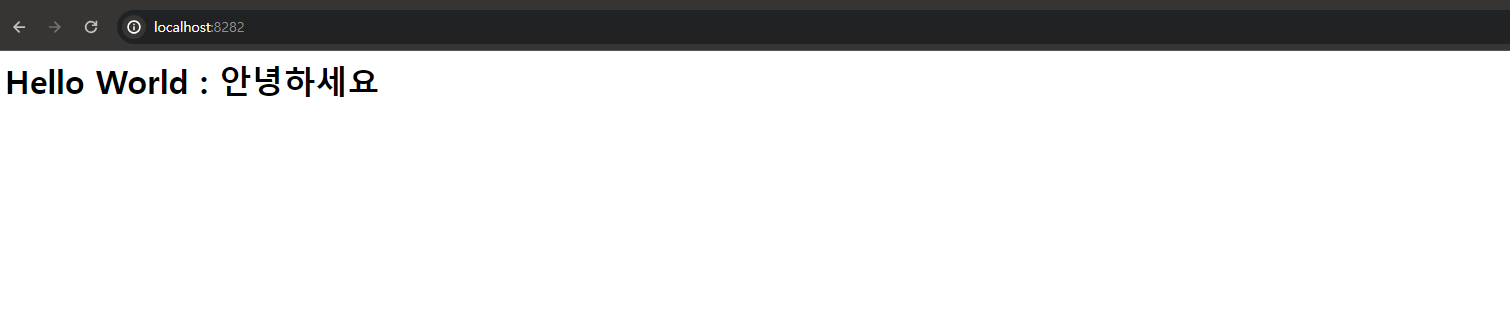
- 스프링 부트로 헬로월드가 출력 되도록 처음 부터 프로젝트를 생성하여 보시오.
개인작성
- @Component
- 해당 클래스를 컴포넌트로 지정하여 Spring의 컨테이너가 빈으로 등록할 수 있도록 함. - @Configuration
- 해당 클래스를 스프링의 설정 클래스로 지정하여 애플리케이션 컨텍스트를 설정하는 역할
- html의 시멘틱 태그처럼, 기존 @Component에 설정을 추가한 느낌이라고 봐도 된다.
-> @Component로 해도 해당 파일은 실행되어 결과를 뽑아내기 때문. - @Bean
- 해당 메서드가 빈을 생성하고 컨테이너에 등록하는 역할 - @ImportResource("classpath:appCTX.xml")
- XML 설정 파일을 JavaConfig와 함께 사용할 수 있도록 함.
- 스프링 애플리케이션 컨텍스트의 생명주기는 다음과 같습니다:
- 초기화: 애플리케이션 컨텍스트가 생성되고 설정이 로드.
- 빈 생성: 설정에 정의된 빈들이 생성.
- 설정
- 의존성 주입: 빈들 간의 의존성이 주입.
- 초기화 콜백: 빈이 초기화되는 콜백 메서드가 호출. - 애플리케이션 실행: 애플리케이션이 실행되고 요청을 처리.
- 종료: 애플리케이션 컨텍스트가 종료되고 자원이 정리.
- afterPropertiesSet()
- InitializingBean 인터페이스의 메서드로, 빈의 모든 프로퍼티가 설정된 후에 호출되는 메서드
- 주로 빈 초기화 시 필요한 작업을 수행하는 데 사용 - destroy()
- DisposableBean 인터페이스의 메서드로, 빈이 소멸되기 직전에 호출되는 메서드
- 주로 빈 소멸 시 자원을 정리하는 데 사용
- prototype: 매번 요청할 때마다 새로운 빈 인스턴스가 생성
- singleton: 디폴트로 지정된 스코프. 애플리케이션 컨텍스트 내에서 하나의 인스턴스만 생성되고 이를 모든 요청이 공유
- Spring webprogramming 방식
-
스프링 레거시
- 현업은 여전히 해당 방식이 대세
- 아직까지 유지보수해야 하는 프로젝트가 많다. -
스프링 부트
- 신규 프로젝트의 경우에는 무조건 레거시보다는 부트로 진행한다.
- 시작할 경우에는 무조건 스프링 부트로 한다. -
설정 부분에서만 차이난다.
그 밖의 부분은 100% 똑같다고 한다.
참조 링크 : 스트링 부트 - 헬로우 월드 찍기
new - Spring Starter Project 생성
-> type : maven
-> group, artifact, package(group + artifact) 설정
-> 버전 선택 후 Spring Boot DevTools, Lombok, Spring Web(기본적으로 여기에 MVC model이 있다고 함)을 선택.
-> 끝내기
-> 3.2.4버전은 최신버전이라 프로젝트 생성시 에러가 발생하고 있다.
-> 안정화된 다른 버전이 적혀있는 pom.xml의 내용을 가져옴.(배포받았다.)
-> 프로젝트 우클릭 : maven - update project -> force update of snapshots/releases 체크 후 OK.(현재 프로젝트가 체크됐는지까지 확인한 후 OK를 누른다.)
-> 프로젝트 업데이트가 강제로 진행되면서 프로젝트가 안정화될 것이다...
<?xml version="1.0" encoding="UTF-8"?>
<project xmlns="http://maven.apache.org/POM/4.0.0"
	xmlns:xsi="http://www.w3.org/2001/XMLSchema-instance"
	xsi:schemaLocation="http://maven.apache.org/POM/4.0.0 https://maven.apache.org/xsd/maven-4.0.0.xsd">
	<modelVersion>4.0.0</modelVersion>
	<parent>
		<groupId>org.springframework.boot</groupId>
		<artifactId>spring-boot-starter-parent</artifactId>
      <version>2.6.8</version>
      <relativePath/> <!-- lookup parent from repository -->
   </parent>
   <groupId>edu.sejong</groupId>
   <artifactId>ex</artifactId>
   <version>0.0.1-SNAPSHOT</version>
   <name>spring_boot_hjs_example</name>
   <description>spring_boot example</description>
   <properties>
      <java.version>11</java.version>
   </properties>
   <dependencies>
      <dependency>
         <groupId>org.springframework.boot</groupId>
         <artifactId>spring-boot-starter-web</artifactId>
      </dependency>

      <dependency>
         <groupId>org.springframework.boot</groupId>
         <artifactId>spring-boot-devtools</artifactId>
         <scope>runtime</scope>
         <optional>true</optional>
      </dependency>
      <dependency>
         <groupId>org.projectlombok</groupId>
         <artifactId>lombok</artifactId>
         <optional>true</optional>
      </dependency>
      <dependency>
         <groupId>org.springframework.boot</groupId>
         <artifactId>spring-boot-starter-test</artifactId>
         <scope>test</scope>
      </dependency>
   </dependencies>

   <build>
      <plugins>
         <plugin>
            <groupId>org.springframework.boot</groupId>
            <artifactId>spring-boot-maven-plugin</artifactId>
            <configuration>
               <excludes>
                  <exclude>
                     <groupId>org.projectlombok</groupId>
                     <artifactId>lombok</artifactId>
                  </exclude>
               </excludes>
            </configuration>
         </plugin>
      </plugins>
   </build>

</project>
이후 src/main/resources에 있는 application.properties 내부 내용 바꾸기
server.port=8282이후 src/main/java 폴더에 파일 추가
HelloController.java
package edu.sejong.ex.controller;

import org.springframework.web.bind.annotation.GetMapping;
import org.springframework.web.bind.annotation.RestController;

@RestController
public class HelloController{

	@GetMapping("/")
	public String hello() {
		return "<h1>Hello World : 안녕하세요</h1>";
	}
}
Run As - Spring Boot App 을 클릭하여 실행