개발일지 33일차
팀별 프로젝트 진행 상황 및 업무
개발계획서 작성
오늘 강의를 통해 프로젝트에 적용한 부분
학습내용
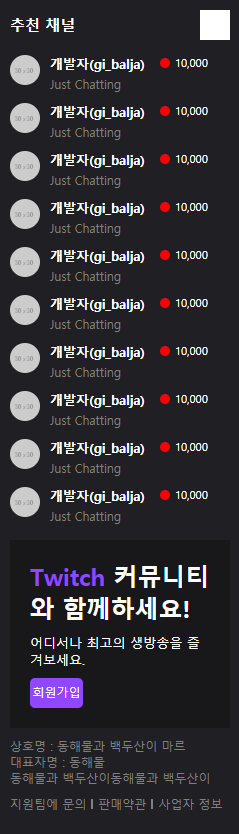
- 트위치 왼쪽영역
twitch.html
<div class="main-container">

		<div class="left-area">
			<div class="channel-wrap">
				<div class="channel-header">
					<h3>추천 채널</h3>
					<i class="icon-arrow"></i>
				</div>
				<div class="channel-body">
					<ul>
						<li>
							<a href="#">
								<img src="https://via.placeholder.com/30">
								<div class="txt-wrap">
									<h4>개발자(gi_balja)</h4>
									<span class="source">Just Chatting</span>
								</div>
								<span class="count">10,000</span>
							</a>
						</li>
						<li>
							<a href="#">
								<img src="https://via.placeholder.com/30">
								<div class="txt-wrap">
									<h4>개발자(gi_balja)</h4>
									<span class="source">Just Chatting</span>
								</div>
								<span class="count">10,000</span>
							</a>
						</li>
						<li>
							<a href="#">
								<img src="https://via.placeholder.com/30">
								<div class="txt-wrap">
									<h4>개발자(gi_balja)</h4>
									<span class="source">Just Chatting</span>
								</div>
								<span class="count">10,000</span>
							</a>
						</li>
						<li>
							<a href="#">
								<img src="https://via.placeholder.com/30">
								<div class="txt-wrap">
									<h4>개발자(gi_balja)</h4>
									<span class="source">Just Chatting</span>
								</div>
								<span class="count">10,000</span>
							</a>
						</li>
						<li>
							<a href="#">
								<img src="https://via.placeholder.com/30">
								<div class="txt-wrap">
									<h4>개발자(gi_balja)</h4>
									<span class="source">Just Chatting</span>
								</div>
								<span class="count">10,000</span>
							</a>
						</li>
						<li>
							<a href="#">
								<img src="https://via.placeholder.com/30">
								<div class="txt-wrap">
									<h4>개발자(gi_balja)</h4>
									<span class="source">Just Chatting</span>
								</div>
								<span class="count">10,000</span>
							</a>
						</li>
						<li>
							<a href="#">
								<img src="https://via.placeholder.com/30">
								<div class="txt-wrap">
									<h4>개발자(gi_balja)</h4>
									<span class="source">Just Chatting</span>
								</div>
								<span class="count">10,000</span>
							</a>
						</li>
						<li>
							<a href="#">
								<img src="https://via.placeholder.com/30">
								<div class="txt-wrap">
									<h4>개발자(gi_balja)</h4>
									<span class="source">Just Chatting</span>
								</div>
								<span class="count">10,000</span>
							</a>
						</li>
						<li>
							<a href="#">
								<img src="https://via.placeholder.com/30">
								<div class="txt-wrap">
									<h4>개발자(gi_balja)</h4>
									<span class="source">Just Chatting</span>
								</div>
								<span class="count">10,000</span>
							</a>
						</li>
						<li>
							<a href="#">
								<img src="https://via.placeholder.com/30">
								<div class="txt-wrap">
									<h4>개발자(gi_balja)</h4>
									<span class="source">Just Chatting</span>
								</div>
								<span class="count">10,000</span>
							</a>
						</li>
					</ul>
				</div>
			</div>

			<div class="join-wrap">
				<div class="txt-wrap">
					<h2><span class="font-purple">Twitch</span> 커뮤니티와 함께하세요!</h2>
					<p>어디서나 최고의 생방송을 즐겨보세요.</p>
					<button type="button" class="btn-purple">회원가입</button>
				</div>
			</div>

			<div class="info-wrap">
				<p>상호명 : 동해물과 백두산이 마르</p>
				<p>대표자명 : 동해물</p>
				<p>동해물과 백두산이동해물과 백두산이</p>

				<ul>
					<li><a href="#">지원팀에 문의</a></li>
					<li><a href="#">판매약관</a></li>
					<li><a href="#">사업자 정보</a></li>
				</ul>
			</div>
		</div>

		<div class="content">

		</div>

	</div>
style.css
.main-container {
	width: 100%;
	min-width: 1340px;
	/*padding-top: 50px;*/
}
.left-area {
	position: fixed;
	width: 240px;
	background-color: #202024;
	/* height값을 풀사이즈로 유지 */
	top: 50px;
	bottom: 0;
	left: 0;
	/* 왼쪽 영역에만 스크롤 생성 */
	overflow-y: auto;
}
.left-area .channel-wrap {
}
.left-area .channel-wrap .channel-header {
	display: flex;
	flex-wrap: wrap;
	justify-content: space-between;
	align-items: center;
	padding: 10px;
}
.left-area .channel-wrap .channel-header h3 {
	font-size: 15px;
}
.left-area .channel-wrap .channel-header .icon-arrow {
	display: inline-block;
	width: 30px;
	height: 30px;
	background-color: #ffffff;
}
.left-area .channel-wrap .channel-body {
}
.left-area .channel-wrap .channel-body ul {
}
.left-area .channel-wrap .channel-body li {
}
.left-area .channel-wrap .channel-body a {
	display: flex;
	flex-wrap: wrap;
	align-items: flex-start;
	padding: 5px 10px;
}
.left-area .channel-wrap .channel-body img {
	width: 30px;
	height: 30px;
	border-radius: 50%;
}
.left-area .channel-wrap .channel-body .txt-wrap {
	width: 110px;
	margin-left: 10px;
}
.left-area .channel-wrap .channel-body .txt-wrap h4 {
	font-size: 13px;
}
.left-area .channel-wrap .channel-body .txt-wrap .source {
	font-size: 12px;
	color: grey;
}
.left-area .channel-wrap .channel-body .count {
	display: block;
	width: 53px;
	font-size: 11px;
}
.left-area .channel-wrap .channel-body .count:before {
	display: inline-block;
	position: relative;
	content: '';
	width: 10px;
	height: 10px;
	background-color: red;
	border-radius: 50%;
	margin-right: 5px;
	top: 1px;
}
.left-area .join-wrap {
	margin: 10px;
}
.left-area .join-wrap .txt-wrap {
	background-color: #18181a;
	padding: 20px;
}
.left-area .join-wrap .txt-wrap h2 {
	font-size: 24px;
}
.left-area .join-wrap .txt-wrap h2 span {
}
.left-area .join-wrap .txt-wrap p {
	font-size: 13px;
	margin-top: 10px;
}
.left-area .join-wrap .txt-wrap .btn-purple {
	width: 53px;
	height: 30px;
	border-radius: 5px;
	text-align: center;
	line-height: 30px;
	font-size: 12px;
	margin-top: 10px;
}
.left-area .info-wrap {
	font-size: 12px;
	margin: 0 10px 10px 10px;
}
.left-area .info-wrap p {
	color: grey;
}
.left-area .info-wrap ul {
	display: flex;
	flex-wrap: wrap;
	align-items: center;
	margin-top: 10px;
}
.left-area .info-wrap li {
}
.left-area .info-wrap li a {
	color: grey;
}
.left-area .info-wrap li a:after {
	position: relative;
	display: inline-block;
	content: '';
	width: 2px;
	height: 10px;
	background-color: grey;
	margin: 0 5px;
}
.left-area .info-wrap li:last-child a:after {
	content: none;
}
결과
어려웠던 점과 해결방법
왼쪽 영역의 height값을 풀사이즈로 유지하는 법이 이해하기 어려웠다.
해결방법 : bottom값을 0으로 설정
아쉬웠던 점

I'm Closer