개발일지 34일차
팀별 프로젝트 진행 상황 및 업무
스토리보드 디자인 토의
오늘 강의를 통해 프로젝트에 적용한 부분
학습내용
- 트위치 오른쪽 영역
twitch.html
<div class="content">
			<div id="content-banner">
				<div class="layer">
					<div class="txt-wrap">
						<h2>Hello</h2>
						<p>Niteacldjksadjkjkjk</p>
					</div>
				</div>
			</div>

			<div class="content-container">
				<div class="video-section">
					<div class="title-wrap">
						<h2>취향 저격 생방송 채널</h2>
					</div>

					<div class="video-wrap">
						<ul>
							<li>
								<a href="#">
									<div class="image-wrap">
										<img src="https://via.placeholder.com/333x186">
										<span class="mark">생방송</span>
									</div>

								<div class="video-bottom">
										<img class="thumbnail" src="https://via.placeholder.com/40">
										<div class="txt-wrap">
											<h3>2021 LCK Summer Split</h3>
											<p class="source">LCK_Korea</p>
											<p class="game">League of Legends</p>

											<div class="tag-wrap">
												<span class="tag">e스포츠</span>
												<span class="tag">한국어</span>
												<span class="tag">독일어</span>
												<span class="tag">후원 열차</span>
											</div>
										</div>
									</div>
								</a>
							</li>
						</ul>
					</div>
				</div>

				<h1>helo worldhelo worldhelo worldhelo world</h1>
				<h1>helo worldhelo worldhelo worldhelo world</h1>
				<h1>helo worldhelo worldhelo worldhelo world</h1>
				<h1>helo worldhelo worldhelo worldhelo world</h1>
				<h1>helo worldhelo worldhelo worldhelo world</h1>
				<h1>helo worldhelo worldhelo worldhelo world</h1>
				<h1>helo worldhelo worldhelo worldhelo world</h1>
				<h1>helo worldhelo worldhelo worldhelo world</h1>
				<h1>helo worldhelo worldhelo worldhelo world</h1>
				<h1>helo worldhelo worldhelo worldhelo world</h1>
				<h1>helo worldhelo worldhelo worldhelo world</h1>
				<h1>helo worldhelo worldhelo worldhelo world</h1>
				<h1>helo worldhelo worldhelo worldhelo world</h1>
				<h1>helo worldhelo worldhelo worldhelo world</h1>
				<h1>helo worldhelo worldhelo worldhelo world</h1>
				<h1>helo worldhelo worldhelo worldhelo world</h1>
			</div>
		</div>
style.css
.content {
	overflow-y: auto;
	position: absolute;
	background-color: darkblue;
	top: 50px;
	left: 240px;
	bottom: 0;
	right: 0;
}
.content h1 {
	font-size: 40px;
}
.content #content-banner {
	position: relative;
	width: 100%;
	height: 350px;
	background: url('../img/notebook.jpg') no-repeat center;
	background-size: cover;
}
.content #content-banner .layer {
	position: absolute;
	width: 100%;
	height: 100%;
	background-color: rgba(0, 0, 0, 0.5);
	top: 0;
	left: 0;
}
.content #content-banner .layer .txt-wrap {
	position: absolute;
	right: 200px;
	top: 170px;
}
.content .content-container {
	width: 1240px;
	margin: 0 auto;
}
/* 태그 디폴트 */
.content-container .tag-wrap {
	display: flex;
	flex-wrap: wrap;
	align-items: center;
}
.content-container .tag-wrap .tag {
	font-size: 10px;
	color: #fff;
	background-color: grey;
	border-radius: 8px;
	padding: 2px 4px;
	margin-right: 5px;
}
.content-container .tag-wrap .tag:last-child {
	margin-right: 0;
}
.content-container .txt-wrap {
}
.content-container .txt-wrap h2 {
	font-size: 16px;
}
/* 비디오 섹션 */
.video-section {
}
.video-section .title-wrap {
	padding-bottom: 10px;
}
.video-section .title-wrap h2 {
	font-size: 20px;
}
.video-section .video-wrap {
}
.video-section .video-wrap ul {
}
.video-section .video-wrap li {
	width: 333px;
}
.video-section .video-wrap a {
}
.video-section .video-wrap .image-wrap {
	position: relative;
	width: 333px;
	height: 186px;
}
.video-section .video-wrap .image-wrap img {
	width: 100%;
	height: 100%;
}
.video-section .video-wrap .image-wrap .mark {
	position: absolute;
	top: 15px;
	left: 15px;
	border-radius: 5px;
	background-color: darkred;
	padding: 2px 4px 0;
	font-size: 14px;
}
.video-section .video-wrap .video-bottom {
	display: flex;
	flex-wrap: wrap;
	justify-content: space-between;
	align-items: flex-start;
	margin-top: 10px;
}
.video-section .video-wrap .video-bottom .thumbnail {
	width: 40px;
	height: 40px;
}
.video-section .video-wrap .video-bottom .txt-wrap {
	width: calc(100% - 50px);
}
.video-section .video-wrap .video-bottom .txt-wrap .source,
.video-section .video-wrap .video-bottom .txt-wrap .game {
	font-size: 14px;
	color: grey;
}
결과
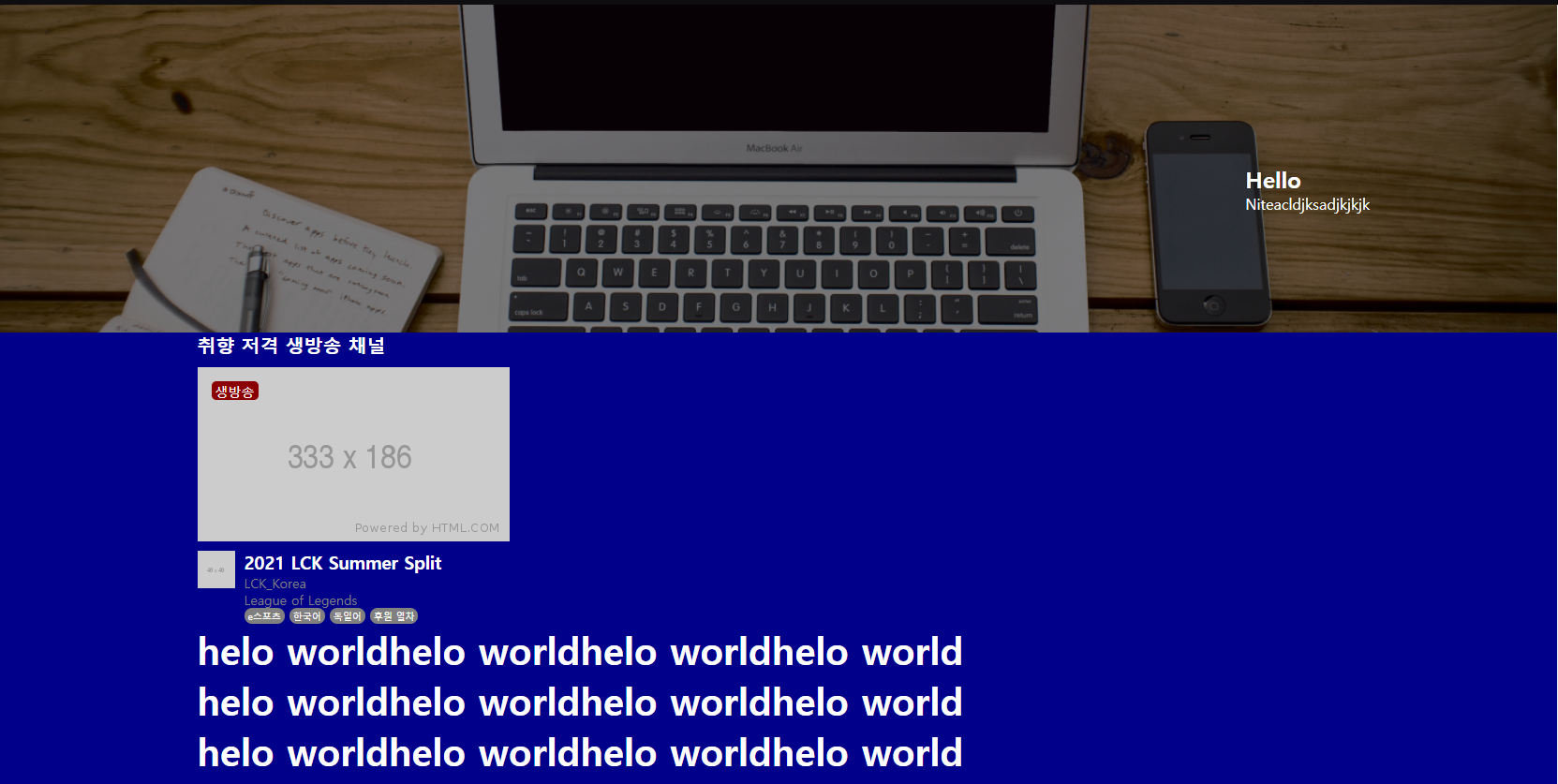
어려웠던 점과 해결방법
왼쪽 영역과 오른쪽 영역의 높이값이 다르고 2차원 영역이어서 layer가 틀어지는 현상이 발생하였다.
해결방법으로 이 두 영역의 부모격인 .main-container에 3차원의 position:relative를 주고 왼쪽과 오른쪽 영역에 각각 position:absolute를 줘서 자식값이 부모값에 각각 영향을 주도록하여 해결하였다.
아쉬웠던 점

I'm Closer