GSAP에서 텍스트 효과를 사용하려면 유로 플러그인을 사용해야 한다.
따라서, 텍스트를 분리하는 작업은 자바스크립트로 작업하거나 글씨만 분리해주는 플러그인을 사용해야 한다.
document.querySelectorAll(".split").forEach(text => {
    let theText = text.innerText;
    let newText = "";

    for(let i=0; i<text.innerText.length; i++){
        newText += "<span aria-hidden='true'>";
        if (text.innerText[i] == " "){
            newText += " "
        } else {
            newText += text.innerText[i];
        }
        newText += "</span>";
    }
    text.innerHTML = newText;
    text.setAttribute("aria-label", theText);
});
위의 코드와 같이 분리하고 싶은 텍스트 클래스를 .split으로 지정한 후 다중 선택자로 반복문을 지정한다.
그 후 한 글자씩 span 태그를 앞 뒤로 넣어준다.
분리된 글씨는 접근성을 위해 aria-hidden으로 숨겨 두고 부모 박스 속성에 aria-label을 추가한다.
.split > span {
    display: inline-block;
}
글씨(span 태그)는 인라인 구조이기 때문에 애니메이션을 주기 위해서는 inline-block 구조로 바꾸어 준다.
gsap.utils.toArray(".split").forEach((text) => {
    gsap.from(text.querySelectorAll("span"), {
        yPercent: 100,
        outoAlpha: 0,
        duration: 1,
        ease: "circ.out",
        stagger: {
            amount: 1,
            from: "random"
        },

        scrollTrigger: {
            trigger: text,
            start: "top bottom",
            end: "+=400",
            markers: true,
        }
    });
});
그 후 나누어준 텍스트에 gsap의 여러 스크롤 애니메이션을 추가하면 된다.


다음과 같은 플러그인을 사용하면 좀 더 쉽게 텍스트 효과를 구현할 수 있다.
<script src="https://unpkg.com/split-type"></script>
targets.forEach((target) => {
    let SplitClient = new SplitType(target, { type: "lines, words, chars" });

    let lines = SplitClient.lines;
    let words = SplitClient.words;
    let chars = SplitClient.chars;

    gsap.from(words, {
    ...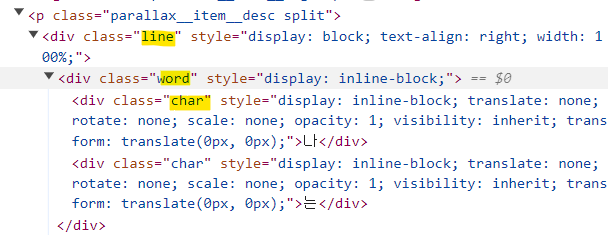
=>이렇게 설정해주면 라인 효과, 단어 효과, 글씨 효과, 반응형까지 구현이 가능하다.
출처: https://webstoryboy.co.kr/1914 [WEBSTORYBOY:티스토리]

Frontend로 향해가는 Web Publisher입니다.