📖 학습 주제
- Airflow 환경 설정
- Summary 테이블 구현
- Slack 연동하기
✏️ 주요 메모 사항 소개
airflow 환경설정
이제 다시 한번 docker 기반으로 Airflow를 실행해보자. curl -LfO 'https://airflow.apache.org/docs/apache-airflow/2.9.1/docker-compose.yaml' 명령어를 사용해서 docker-compose.yaml 파일을 내려받은 뒤 up 명령어를 사용하여 실행해 주면 되는데, 그 전에 yaml 파일을 살짝 수정해보자. 다음 코드를 변경 혹은 수정하면 된다.
...

  environment:
    AIRFLOW_VAR_DATA_DIR: /opt/airflow/data
    _PIP_ADDITIONAL_REQUIREMENTS: ${_PIP_ADDITIONAL_REQUIREMENTS:- yfinance pandas numpy oauth2client gspread}

  volumes:
    ...
    -${AIRFLOW_PROJ_DIR:-.}/data:/opt/airflow/data

  airflow-init:
    ...
    mkdir -p /sources/logs /sources/dags /sources/plugins /sources/data
    chown -R "${AIRFLOW_UID}:0" /sources/{logs,dags,plugins,data}

...- Requirements를 수정해서 필요한 라이브러리를 미리 설치
- data 폴더를 호스트 폴더에서 만들고 volume으로 공유 (임시 데이터를 저장할 폴더)
- 이를 docker volume으로 지정해서 나중에 디버깅에 사용
수정 후 docker compose up 명령어를 실행해 컨테이너를 실행시키고 Web UI에서 잘 작동하는지 확인해 보자.
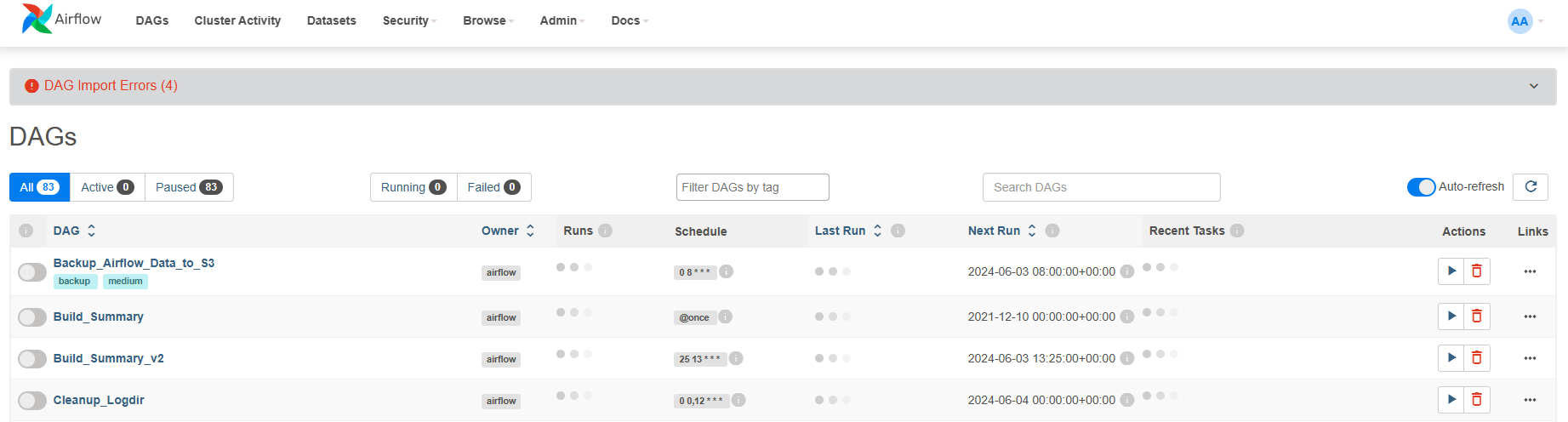
yml 파일에서 환경변수로 설정한 DATA_DIR와 같은 변수는 Web UI에서는 안 보이지만 프로그램에서는 사용가능 하다. 실제로 Admin => Variables 탭에서 우리가 만든 DATA_DIR 변수는 안보이지만 터미널에서 docker exec -it airflow-docker-airflow-scheduler-1 airflow variables get DATA_DIR 명령어를 실행하면 DATA_DIR로 설정한 path가 출력되는 것을 확인할 수 있다.

우리는 Variables/Connections와 같은 설정을 어떻게 관리하는 것이 좋을지 고민해봐야 한다. docker-compose.yaml 파일에 environment 항복에 변수를 추가할지, Web UI에서 추가할 지 선택해야 한다. 보통 전자를 더 추천한다.
그리고 또한 어디까지 Airflow 이미지로 관리하고 무엇은 docker-compose.yaml에서 관리할 지도 생각해보아야 한다. yml 파일에 직접 환경 변수를 설정하는 것 말고도 환경 변수를 Airflow 자체 이미지에 넣고 이를 docker-compose.yaml 파일에서 사용하는 방법도 있다.
x-airflow-common:
  &airflow-common
image: ${AIRFLOW_IMAGE_NAME:-apache/airflow:2.9.1}- AIRFLOW_IMAGE_NAME 환경변수가 정의되어 있다면 그걸 사용하고 아니면 기본값으로 apache/airflow:2.9.1 사용
DAG 코드도 마찬가지로 Airflow image로 DAG 코드를 복사하여 만드는 것이 좀더 깔끔한 방법이다. 아니면 docker-compose에서 host volume 형태로 설정하는 것도 있는데, 이는 개발/테스트용에 좀더 적합한 방법이다.
Summary 테이블 구현
예전에 SQL 실습할 때 만들었던 Summary 테이블들(mau_summary, nps_summary, channel_summary)을 DAG 형식으로 만들어서 구현해보자.
dags/Build_Summary.py: mau_summary 테이블 생성 DAG 코드
from airflow import DAG
from airflow.operators.python import PythonOperator
from airflow.models import Variable
from airflow.hooks.postgres_hook import PostgresHook
from datetime import datetime
from datetime import timedelta

from airflow import AirflowException

import requests
import logging
import psycopg2

from airflow.exceptions import AirflowException

def get_Redshift_connection():
    hook = PostgresHook(postgres_conn_id = 'redshift_dev_db')
    return hook.get_conn().cursor()


def execSQL(**context):

    schema = context['params']['schema']
    table = context['params']['table']
    select_sql = context['params']['sql']

    logging.info(schema)
    logging.info(table)
    logging.info(select_sql)

    cur = get_Redshift_connection()

    sql = f"""DROP TABLE IF EXISTS {schema}.temp_{table};CREATE TABLE {schema}.temp_{table} AS """
    sql += select_sql
    cur.execute(sql)

    cur.execute(f"""SELECT COUNT(1) FROM {schema}.temp_{table}""")
    count = cur.fetchone()[0]
    if count == 0:
        raise ValueError(f"{schema}.{table} didn't have any record")

    try:
        sql = f"""DROP TABLE IF EXISTS {schema}.{table};ALTER TABLE {schema}.temp_{table} RENAME to {table};"""
        sql += "COMMIT;"
        logging.info(sql)
        cur.execute(sql)
    except Exception as e:
        cur.execute("ROLLBACK")
        logging.error('Failed to sql. Completed ROLLBACK!')
        raise AirflowException("")


dag = DAG(
    dag_id = "Build_Summary",
    start_date = datetime(2021,12,10),
    schedule = '@once',
    catchup = False
)

execsql = PythonOperator(
    task_id = 'mau_summary',
    python_callable = execSQL,
    params = {
        'schema' : 'jwa4610',
        'table': 'mau_summary',
        'sql' : """SELECT
  TO_CHAR(A.ts, 'YYYY-MM') AS month,
  COUNT(DISTINCT B.userid) AS mau
FROM raw_data.session_timestamp A
JOIN raw_data.user_session_channel B ON A.sessionid = B.sessionid
GROUP BY 1
;"""
    },
    dag = dag
)
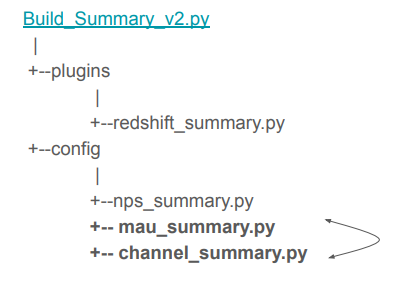
위와 같이 PythonOperator를 만든 뒤 parmas 파라미터를 이용해서 구현하는 방법이 있는가 하면, CTAS 부분을 아예 별도의 환경설정 파일로 떼어내서 구현하는 방법도 있다. config 폴더를 생성한 뒤 안에 summary 테이블 별로 하나의 환경설정 파일을 생성해서 구현하면, 비개발자들이 사용할 때 어려움을 덜 느낄 수 있고, 더 다양한 테스트를 추가할 수 있다.
dags/Build_Summary_v2.py
from airflow import DAG
from airflow.macros import *

import os
from glob import glob
import logging
import subprocess

from plugins import redshift_summary
from plugins import slack


DAG_ID = "Build_Summary_v2"
dag = DAG(
    DAG_ID,
    schedule_interval="25 13 * * *",
    max_active_runs=1,
    concurrency=1,
    catchup=False,
    start_date=datetime(2021, 9, 17),
    default_args= {
        'on_failure_callback': slack.on_failure_callback,
        'retries': 1,
        'retry_delay': timedelta(minutes=1),
    }
)

# this should be listed in dependency order (all in analytics)
tables_load = [
    'nps_summary'
]

dag_root_path = os.path.dirname(os.path.abspath(__file__))
redshift_summary.build_summary_table(dag_root_path, dag, tables_load, "redshift_dev_db")
dags/config/nps_summary.py
{
          'table': 'nps_summary',
          'schema': 'jwa4610',
          'main_sql': """
SELECT LEFT(created_at, 10) AS date,
  ROUND(SUM(CASE
    WHEN score >= 9 THEN 1
    WHEN score <= 6 THEN -1 END)::float*100/COUNT(1), 2)
FROM raw_data.nps
GROUP BY 1
ORDER BY 1;""",
          'input_check':
          [
            {
              'sql': 'SELECT COUNT(1) FROM keeyong.nps',
              'count': 150000
            },
          ],
          'output_check':
          [
            {
              'sql': 'SELECT COUNT(1) FROM {schema}.temp_{table}',
              'count': 12
            }
          ],
}
dags/plugins/redshift_summary.py
from airflow import DAG
from airflow.macros import *

from airflow.utils.decorators import apply_defaults
from airflow.exceptions import AirflowException
from airflow.hooks.postgres_hook import PostgresHook
from airflow.operators.python_operator import PythonOperator

import logging
from glob import glob
"""
Build a summary table under analytics schema in Redshift
- Check the input tables readiness first
- Run the SQL using a temp table
- Before swapping, check the size of the temp table
- Finally swap
"""
def load_all_jsons_into_list(path_to_json):

    configs = []
    for f_name in glob(path_to_json+ '/*.py'):
        # logging.info(f_name)
        with open(f_name) as f:
            dict_text = f.read()
            try:
                dict = eval(dict_text)
            except Exception as e:
                logging.info(str(e))
                raise
            else:
                configs.append(dict)

    return configs


def find(table_name, table_confs):
    """
    scan through table_confs and see if there is a table matching table_name
    """
    for table in table_confs:
        if table.get("table") == table_name:
            return table

    return None


def build_summary_table(dag_root_path, dag, tables_load, redshift_conn_id, start_task=None):
    logging.info(dag_root_path)
    table_confs = load_all_jsons_into_list(dag_root_path + "/config/")

    if start_task is not None:
        prev_task = start_task
    else:
        prev_task = None

    for table_name in tables_load:

        table = find(table_name, table_confs)
        summarizer = RedshiftSummaryOperator(
            table=table["table"],
            schema=table["schema"],
            redshift_conn_id=redshift_conn_id,
            input_check=table["input_check"],
            main_sql=table["main_sql"],
            output_check=table["output_check"],
            overwrite=table.get("overwrite", True),
            after_sql=table.get("after_sql"),
            pre_sql=table.get("pre_sql"),
            attributes=table.get("attributes", ""),
            dag=dag,
            task_id="anayltics"+"__"+table["table"]
        )
        if prev_task is not None:
            prev_task >> summarizer
        prev_task = summarizer
    return prev_task


def redshift_sql_function(**context):
    """this is a main Python callable function which runs a given SQL
    """

    sql=context["params"]["sql"]
    print(sql)
    hook = PostgresHook(postgres_conn_id=context["params"]["redshift_conn_id"])
    hook.run(sql, True)


class RedshiftSummaryOperator(PythonOperator):
    """
    Create a summary table in Redshift
    :param input_check: a list of input tables to check to make sure
                        they are fully populated. the list is composed
                        of sql (select) and minimum count
    :type input_check: a list of sql and count
    :param main_sql: a main sql to create a summary table. this should
                     use a temp table. this sql can have more than one
                     statement
    :type main_sql: string
    :input output_check: output validation. It is a list of sql (select)
                         and minimum count
    :type output_check: a list of sql and count
    :input overwrite: Currently this only supports overwritting (True)
                      Once False is supported, it will append to the table
    :type overwrite: boolean
    """

    @apply_defaults
    def __init__(self,
                 schema,
                 table,
                 redshift_conn_id,
                 input_check,
                 main_sql,
                 output_check,
                 overwrite,
                 params={},
                 pre_sql="",
                 after_sql="",
                 attributes="",
                 *args,
                 **kwargs
                 ):
        self.schema = schema
        self.table = table
        self.redshift_conn_id = redshift_conn_id
        self.input_check = input_check
        self.main_sql = main_sql
        self.output_check = output_check

        # compose temp table creation, insert into the temp table as params
        if pre_sql:
            main_sql = pre_sql
            if not main_sql.endswith(";"):
                main_sql += ";"
        else:
            main_sql = ""

        main_sql += "DROP TABLE IF EXISTS {schema}.temp_{table};".format(
            schema=self.schema,
            table=self.table
        )
        # now we are using "CREATE TABLE ... AS SELECT" syntax
        # we used to create a temp table with the same schema as the main table and then insert into the temp table
        main_sql += "CREATE TABLE {schema}.temp_{table} {attributes} AS ".format(
            schema=self.schema,
            table=self.table,
            attributes=attributes
        ) + self.main_sql

        if after_sql:
            self.after_sql = after_sql.format(
                schema=self.schema,
                table=self.table
            )
        else:
            self.after_sql = ""

        super(RedshiftSummaryOperator, self).__init__(
            python_callable=redshift_sql_function,
            params={
                "sql": main_sql,
                "overwrite": overwrite,
                "redshift_conn_id": self.redshift_conn_id
            },
            provide_context=True,
            *args,
            **kwargs
        )

    def swap(self):
        sql = """BEGIN;
        DROP TABLE IF EXISTS {schema}.{table} CASCADE;
        ALTER TABLE {schema}.temp_{table} RENAME TO {table};
        GRANT SELECT ON TABLE {schema}.{table} TO GROUP analytics_users;
        END
        """.format(schema=self.schema,table=self.table)
        self.hook.run(sql, True)

    def execute(self, context):
        """Do input_check first
        - input_check should be a list of dictionaries
        - each item in the dictionary contains "sql" and "count"
        """
        self.hook = PostgresHook(postgres_conn_id=self.redshift_conn_id)
        for item in self.input_check:
            (cnt,) = self.hook.get_first(item["sql"])
            if cnt < item["count"]:
                raise AirflowException(
                    "Input Validation Failed for " + str(item["sql"]))

        """
        - create a temp table using create table like
        - run insert into the temp table
        """
        return_value = super(RedshiftSummaryOperator, self).execute(context)

        """Do output_check using self.output_check
        """
        for item in self.output_check:
            (cnt,) = self.hook.get_first(item["sql"].format(schema=self.schema, table=self.table))
            if item.get("op") == 'eq':
                if int(cnt) != int(item["count"]):
                    raise AirflowException(
                        "Output Validation of 'eq' Failed for " + str(item["sql"]) + ": " + str(cnt) + " vs. " + str(item["count"])
                    )
            else:
                if cnt < item["count"]:
                    raise AirflowException(
                        "Output Validation Failed for " + str(item["sql"]) + ": " + str(cnt) + " vs. " + str(item["count"])
                    )
        """Now swap the temp table name
        """
        self.swap()

        if self.after_sql:
            self.hook.run(self.after_sql, True)

        return return_value
Slack 연동하기
DAG가 실패했을 때 개발자가 바로 알 수 있도록 Slack을 연동해서 Slack 채널에 에러 메세지를 보내는 방법을 알아보자.
Slack Channel 설정
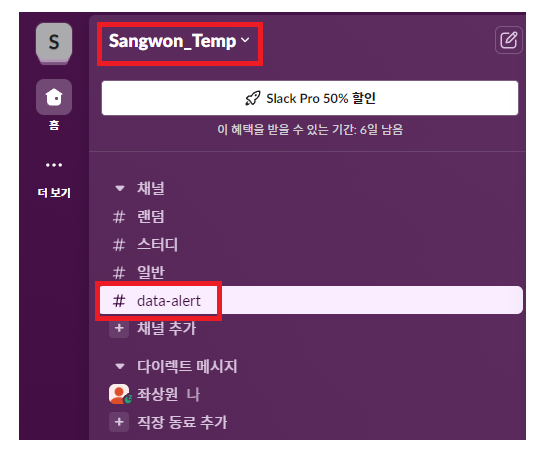
자신이 알림을 받을 Workspace를 정하고 에러 메시지를 받을 channel을 만들어 주자.
DataAlert App 만들기
https://api.slack.com/messaging/webhooks 링크를 따라가서 우리의 Workspace에 App을 추가해 주자.

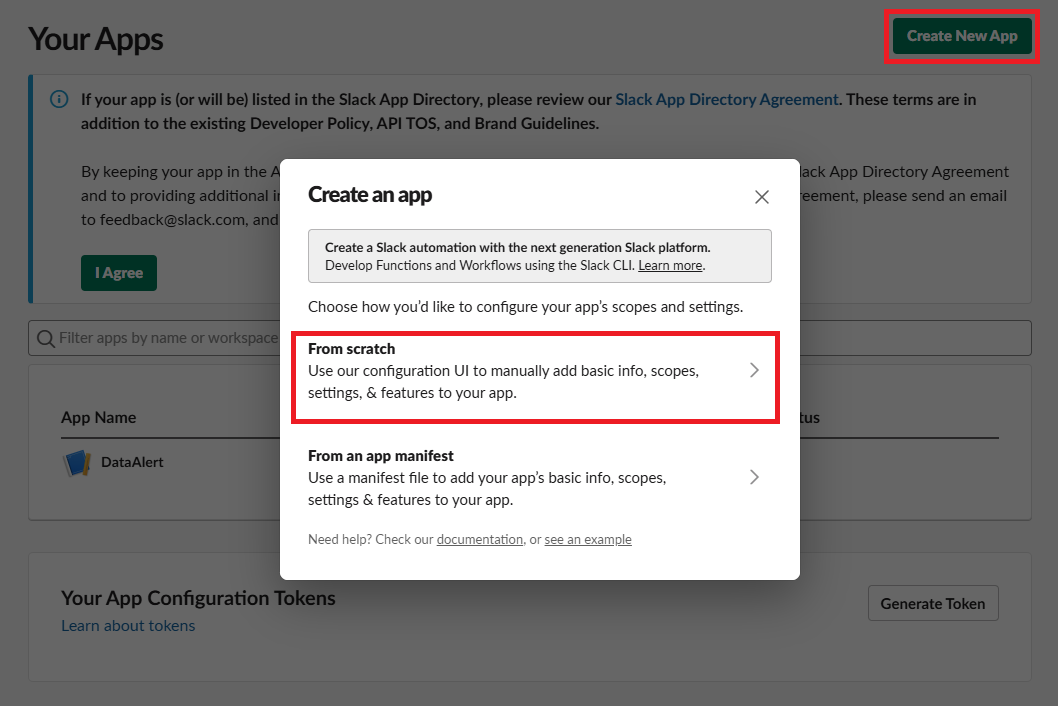
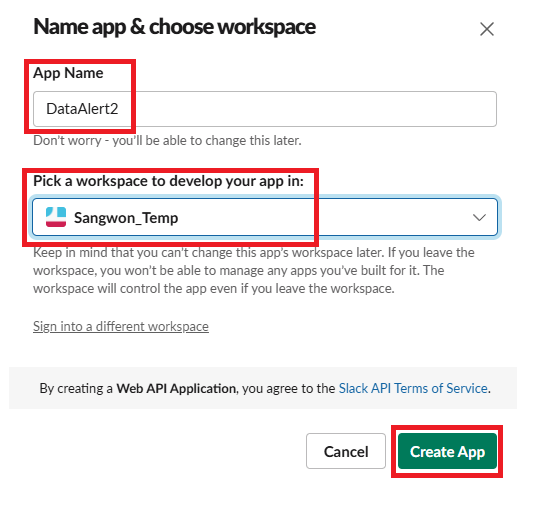
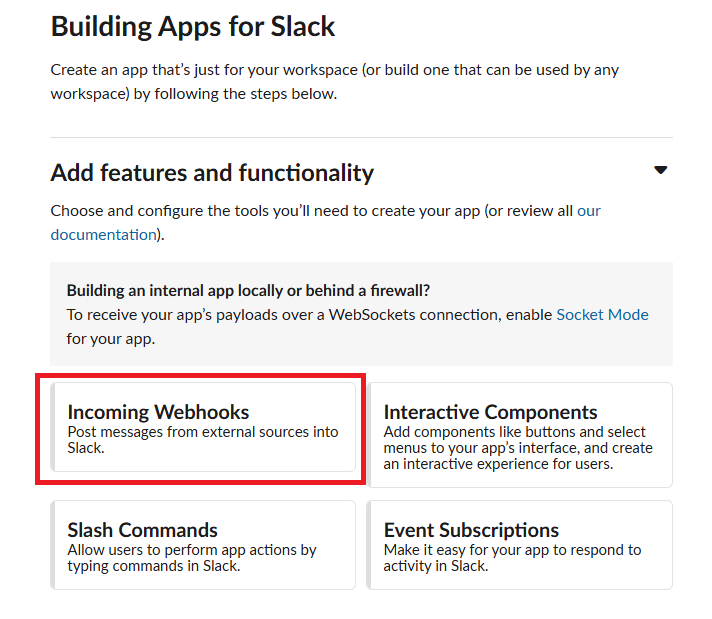
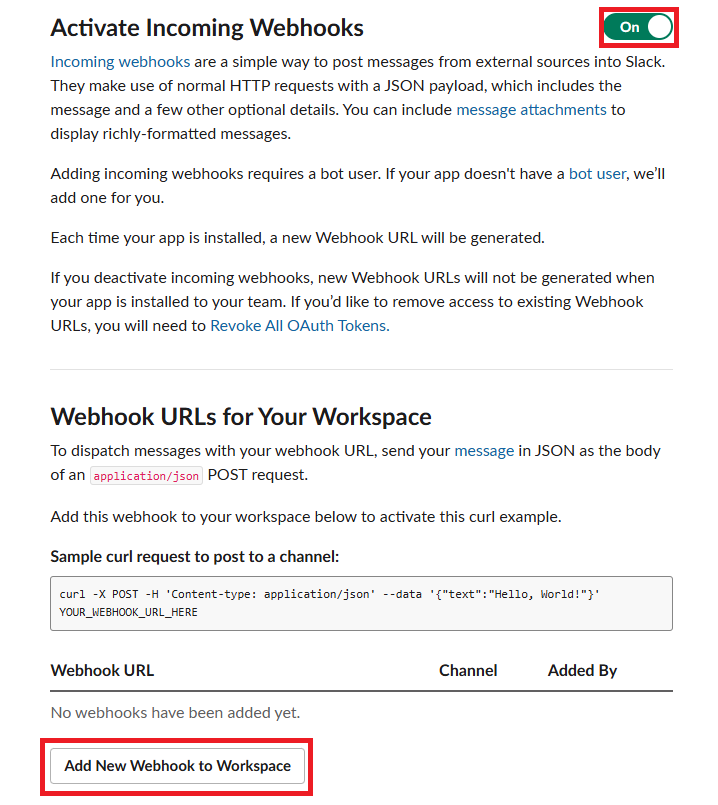
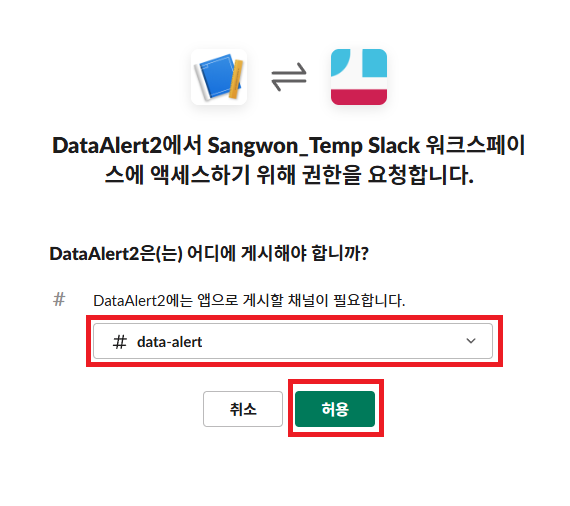
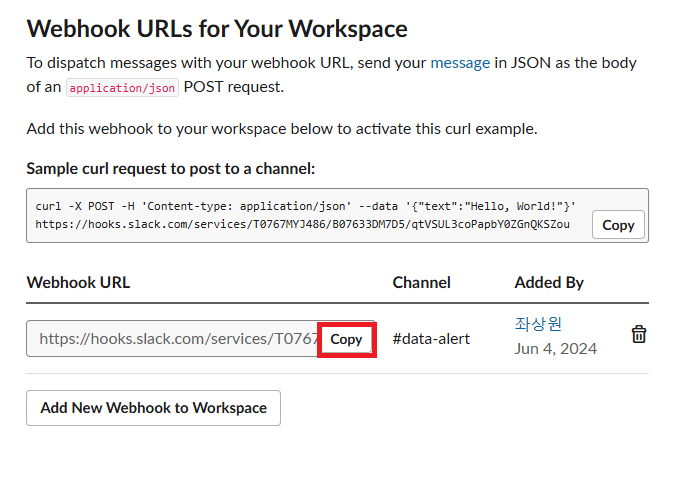
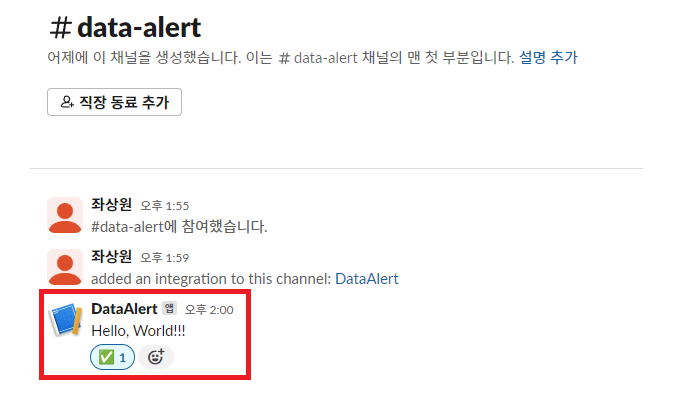
여기 까지 했다면 Workspace에 성공적으로 App이 만들어졌을 것이다. 우의 Sample curl requeest를 터미널해서 실행해보면 data-alert 채널에 Hello, World 메세지가 전송되는 것을 확인할 수 있다.
모듈 생성
이제 이 app을 통해서 DAG에서 에러가 발생했을 때 메세지를 보내는 모듈을 만들어 보자. 그리고 이를 DAG 인스턴스를 만들 때 에러 콜백으로 지정하면 된다.
일단, 위에 COPY한 Webhook URL의 services 뒷 부분의 값을 slack_url 이라는 Variable로 저장하자.
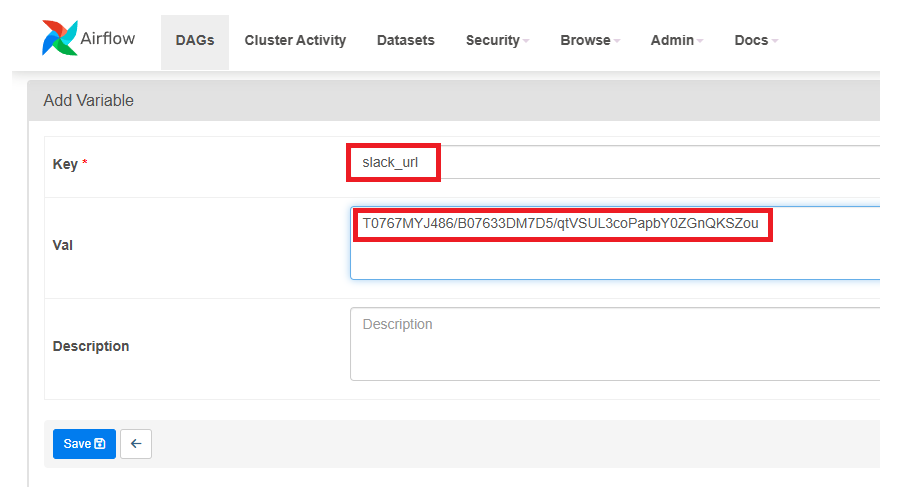
그 후, slack.py라는 에러 메세지를 발송하는 모듈을 dags/plugins에 만들어주고, 테스트해볼 DAG의 default_args에서 on_failure_callback을 설정해 주자. 에러가 나야하기 때문에 SQL문에서 문법 오류가 나게 살짝 건드려 주자.
dags/plugins/slack.py
from airflow.models import Variable

import logging
import requests

def on_failure_callback(context):
    """
    https://airflow.apache.org/_modules/airflow/operators/slack_operator.html
    Define the callback to post on Slack if a failure is detected in the Workflow
    :return: operator.execute
    """
    text = str(context['task_instance'])
    text += "```" + str(context.get('exception')) +"```"
    send_message_to_a_slack_channel(text, ":scream:")


# def send_message_to_a_slack_channel(message, emoji, channel, access_token):
def send_message_to_a_slack_channel(message, emoji):
    # url = "https://slack.com/api/chat.postMessage"
    url = "https://hooks.slack.com/services/"+Variable.get("slack_url")
    headers = {
        'content-type': 'application/json',
    }
    data = { "username": "Data GOD", "text": message, "icon_emoji": emoji }
    r = requests.post(url, json=data, headers=headers)
    return r
dags/NameGenderCSVtoRedshift_v4.py
...

# slack 모듈 import
from plugins import slack

...

dag = DAG(
    dag_id = 'name_gender_v4',
    start_date = datetime(2023,4,6), # 날짜가 미래인 경우 실행이 안됨
    schedule = '0 2 * * *',  # 적당히 조절
    max_active_runs = 1,
    catchup = False,
    default_args = {
        'retries': 1,
        'retry_delay': timedelta(minutes=3),
        # 에러 발생 시 실행할 코드 설정
        'on_failure_callback': slack.on_failure_callback,
    }
)

...
이 NameGenderCSVtoRedshift_v4 파일의 DAG를 이제 실행해보면 에러가 발생하고 에러 메시지가 우리가 만든 slack 채널에 전송되는 것을 볼 수 있다.