
📖 학습 주제
- 구글 시트 연동하기
- API & Airflow 모니터링
✏️ 주요 메모 사항 소개
Google Sheet 연동
Google Sheet -> Redshift
구글 시트의 내용을 Redshift 테이블로 복사해보자. (Google Sheet link : https://docs.google.com/spreadsheets/d/1hW-_16OqgctX-_lXBa0VSmQAs98uUnmfOqvDYYjuE50/edit#gid=1555071985)
dags/plugins/gsheet.py
from airflow.hooks.postgres_hook import PostgresHook
from airflow.models import Variable
from oauth2client.service_account import ServiceAccountCredentials

import base64
import gspread
import json
import logging
import os
import pandas as pd
import pytz


def write_variable_to_local_file(variable_name, local_file_path):
    content = Variable.get(variable_name)
    f = open(local_file_path, "w")
    f.write(content)
    f.close()


def get_gsheet_client():
    data_dir = Variable.get("DATA_DIR")
    scope = ['https://spreadsheets.google.com/feeds', 'https://www.googleapis.com/auth/drive']
    gs_json_file_path = data_dir + 'google-sheet.json'

    write_variable_to_local_file('google_sheet_access_token', gs_json_file_path)
    credentials = ServiceAccountCredentials.from_json_keyfile_name(gs_json_file_path, scope)
    gc = gspread.authorize(credentials)

    return gc


def p2f(x):
    return float(x.strip('%'))/100


def get_google_sheet_to_csv(
    sheet_uri,
    tab,
    filename,
    header_line=1,
    remove_dollar_comma=0,
    rate_to_float=0):
    """
    Download data in a tab (indicated by "tab") in a spreadsheet ("sheet_uri") as a csv ("filename")
    - if tab is None, then the records in the first tab of the sheet will be downloaded
    - if tab has only one row in the header, then just use the default value which is 1
    - setting remove_dollar_comma to 1 will remove any dollar signs or commas from the values in the CSV file
      - dollar sign might need to be won sign instead here
    - setting rate_to_float to 1 will convert any percentage numeric values to fractional values (50% -> 0.5)
    """

    data, header = get_google_sheet_to_lists(
        sheet_uri,
        tab,
        header_line,
        remove_dollar_comma=remove_dollar_comma)

    if rate_to_float:
        for row in data:
            for i in range(len(row)):
                if str(row[i]).endswith("%"):
                    row[i] = p2f(row[i])

    data = pd.DataFrame(data, columns=header).to_csv(
        filename,
        index=False,
        header=True,
        encoding='utf-8'
    )


def get_google_sheet_to_lists(sheet_uri, tab=None, header_line=1, remove_dollar_comma=0):
    gc = get_gsheet_client()

    # no tab is given, then take the first sheet
    # here tab is the title of a sheet of interest
    if tab is None:
        wks = gc.open_by_url(sheet_uri).sheet1
    else:
        wks = gc.open_by_url(sheet_uri).worksheet(tab)

    # list of lists, first value of each list is column header
    print(wks.get_all_values())
    print(int(header_line)-1)
    data = wks.get_all_values()[header_line-1:]

    # header = wks.get_all_values()[0]
    header = data[0]
    if remove_dollar_comma:
        data = [replace_dollar_comma(l) for l in data if l != header]
    else:
        data = [l for l in data if l != header]
    return data, header


def add_df_to_sheet_in_bulk(sh, sheet, df, header=None, clear=False):
    records = []
    headers = list(df.columns)
    records.append(headers)

    for _, row in df.iterrows():
        record = []
        for column in headers:
            if str(df.dtypes[column]) in ('object', 'datetime64[ns]'):
                record.append(str(row[column]))
            else:
                record.append(row[column])
        records.append(record)

    if clear:
        sh.worksheet(sheet).clear()
    sh.values_update(
        '{sheet}!A1'.format(sheet=sheet),
        params={'valueInputOption': 'RAW'},
        body={'values': records}
    )


def update_sheet(filename, sheetname, sql, conn_id):
    client = get_gsheet_client()
    hook = PostgresHook(postgres_conn_id=conn_id)
    sh = client.open(filename)
    df = hook.get_pandas_df(sql)
    print(sh.worksheets())
    sh.worksheet(sheetname).clear()
    add_df_to_sheet_in_bulk(sh, sheetname, df.fillna(''))


def replace_dollar_comma(lll):
    return [ ll.replace(',', '').replace('$', '') for ll in lll ]
dags/Gsheet_to_Redshift.py
"""
 - 구글 스프레드시트에서 읽기를 쉽게 해주는 모듈입니다. 아직은 쓰는 기능은 없습니다만 쉽게 추가 가능합니다.

 - 메인 함수는 get_google_sheet_to_csv입니다.
  - 이는 google sheet API를 통해 구글 스프레드시트를 읽고 쓰는 것이 가능하게 해줍니다.
  - 읽으려는 시트(탭)가 있는 스프레드시트 파일이 구글 서비스 어카운트 이메일과 공유가 되어있어야 합니다.
  - Airflow 상에서는 서비스어카운트 JSON 파일의 내용이 google_sheet_access_token이라는 이름의 Variable로 저장되어 있어야 합니다.
    - 이 이메일은 iam.gserviceaccount.com로 끝납니다.
    - 이 Variable의 내용이 매번 파일로 쓰여지고 그 파일이 구글에 권한 체크를 하는데 사용되는데 이 파일은 local_data_dir Variable로 지정된 로컬 파일 시스템에 저장된다. 이 Variable은 보통 /var/lib/airflow/data/로 설정되며 이를 먼저 생성두어야 한다 (airflow 사용자)
  - JSON 기반 서비스 어카운트를 만들려면 이 링크를 참고하세요: https://denisluiz.medium.com/python-with-google-sheets-service-account-step-by-step-8f74c26ed28e

 - 아래 2개의 모듈 설치가 별도로 필요합니다.
  - pip3 install oauth2client
  - pip3 install gspread

 - get_google_sheet_to_csv 함수:
  - 첫 번째 인자로 스프레드시트 링크를 제공. 이 시트를 service account 이메일과 공유해야합니다.
  - 두 번째 인자로 데이터를 읽어올 tab의 이름을 지정합니다.
  - 세 번째 인자로 지정된 test.csv로 저장합니다.
gsheet.get_google_sheet_to_csv(
    'https://docs.google.com/spreadsheets/d/1hW-_16OqgctX-_lXBa0VSmQAs98uUnmfOqvDYYjuE50/',
    'Test',
    'test.csv',
)

 - 여기 예제에서는 아래와 같이 테이블을 만들어두고 이를 구글스프레드시트로부터 채운다
CREATE TABLE jwa4610.spreadsheet_copy_testing (
    col1 int,
    col2 int,
    col3 int,
    col4 int
);
"""
from airflow import DAG
from airflow.operators.python import PythonOperator
from airflow.providers.amazon.aws.transfers.s3_to_redshift import S3ToRedshiftOperator
from airflow.models import Variable

from datetime import datetime
from datetime import timedelta
from plugins import gsheet
from plugins import s3

import requests
import logging
import psycopg2
import json


def download_tab_in_gsheet(**context):
    url = context["params"]["url"]
    tab = context["params"]["tab"]
    table = context["params"]["table"]
    data_dir = Variable.get("DATA_DIR")

    gsheet.get_google_sheet_to_csv(
        url,
        tab,
        data_dir+'{}.csv'.format(table)
    )


def copy_to_s3(**context):
    table = context["params"]["table"]
    s3_key = context["params"]["s3_key"]

    s3_conn_id = "aws_conn_id"
    s3_bucket = "grepp-data-engineering"
    data_dir = Variable.get("DATA_DIR")
    local_files_to_upload = [ data_dir+'{}.csv'.format(table) ]
    replace = True

    s3.upload_to_s3(s3_conn_id, s3_bucket, s3_key, local_files_to_upload, replace)


dag = DAG(
    dag_id = 'Gsheet_to_Redshift',
    start_date = datetime(2021,11,27), # 날짜가 미래인 경우 실행이 안됨
    schedule = '0 9 * * *',  # 적당히 조절
    max_active_runs = 1,
    max_active_tasks = 2,
    catchup = False,
    default_args = {
        'retries': 1,
        'retry_delay': timedelta(minutes=3),
    }
)

sheets = [
    {
        "url": "https://docs.google.com/spreadsheets/d/1hW-_16OqgctX-_lXBa0VSmQAs98uUnmfOqvDYYjuE50/",
        "tab": "SheetToRedshift",
        "schema": "jwa4610",
        "table": "spreadsheet_copy_testing"
    }
]

for sheet in sheets:
    download_tab_in_gsheet = PythonOperator(
        task_id = 'download_{}_in_gsheet'.format(sheet["table"]),
        python_callable = download_tab_in_gsheet,
        params = sheet,
        dag = dag)

    s3_key = sheet["schema"] + "_" + sheet["table"]

    copy_to_s3 = PythonOperator(
        task_id = 'copy_{}_to_s3'.format(sheet["table"]),
        python_callable = copy_to_s3,
        params = {
            "table": sheet["table"],
            "s3_key": s3_key
        },
        dag = dag)

    run_copy_sql = S3ToRedshiftOperator(
        task_id = 'run_copy_sql_{}'.format(sheet["table"]),
        s3_bucket = "grepp-data-engineering",
        s3_key = s3_key,
        schema = sheet["schema"],
        table = sheet["table"],
        copy_options=['csv', 'IGNOREHEADER 1'],
        method = 'REPLACE',
        redshift_conn_id = "redshift_dev_db",
        aws_conn_id = 'aws_conn_id',
        dag = dag
    )

    download_tab_in_gsheet >> copy_to_s3 >> run_copy_sql
Redshift (SELECT) -> Google Sheet
Redshift에서 구글 시트로 데이터를 복사하는 작업은 위의 plugins/gsheet.py의 update_sheet 메소드를 사용
dags/SQL_to_Sheet.py
from airflow import DAG
from airflow.operators.python import PythonOperator

from plugins import gsheet
from datetime import datetime

def update_gsheet(**context):
    sql = context["params"]["sql"]
    sheetfilename = context["params"]["sheetfilename"]
    sheetgid = context["params"]["sheetgid"]

    gsheet.update_sheet(sheetfilename, sheetgid, sql, "redshift_dev_db")


with DAG(
    dag_id = 'SQL_to_Sheet',
    start_date = datetime(2022,6,18),
    catchup=False,
    tags=['example'],
    schedule = '@once'
) as dag:

    sheet_update = PythonOperator(
        dag=dag,
        task_id='update_sql_to_sheet1',
        python_callable=update_gsheet,
        params = {
            "sql": "SELECT * FROM analytics.nps_summary",
            "sheetfilename": "spreadsheet-copy-testing",
            "sheetgid": "RedshiftToSheet"
        }
    )
API & Airflow 모니터링
Airflow가 제공해주는 API에 대해서 알아보고 이를 이용해 모니터링하는 방법에 대해 알아보자.
이번 섹션에서는 다음 두가지를 해보고자 한다.
- Airflow의 건강 여부 체크(health check)를 어떻게 할지
- Airflow API로 외부에서 Airflow를 조작해보는 방법
먼저 Airflow의 API를 활성화하려면, airflow.cfg의 api 섹션에서 auth_backend의 값을 airflow.api.auth.backend.basic_auth와 같은 것으로 변경해야 한다. 아마 docker-compose.yaml 파일에는 이미 설정이 되어 있을 것이다 (environments)
docker exec -it learn-airflow-airflow-scheduler-1 airflow config get-value api auth_backend 명령어를 실행해보면 환경 변수 값이 이미 설정되어 있을 것이다.

Health API 호출
health API를 호출하는 방법은 curl -X GET --user "monitor:MonitorUser1" http://localhost:8080/health 명령어를 실행해 보면 된다.
- 정상의 경우 응답
{
  "metadatabase": {
    "status": "healthy"
  },
  "scheduler": {
    "status": "healthy",
    "latest_scheduler_heartbeat": "2022-03-12T06:02:38.067178+00:00"
  }
}
특정 DAG를 API로 트리거
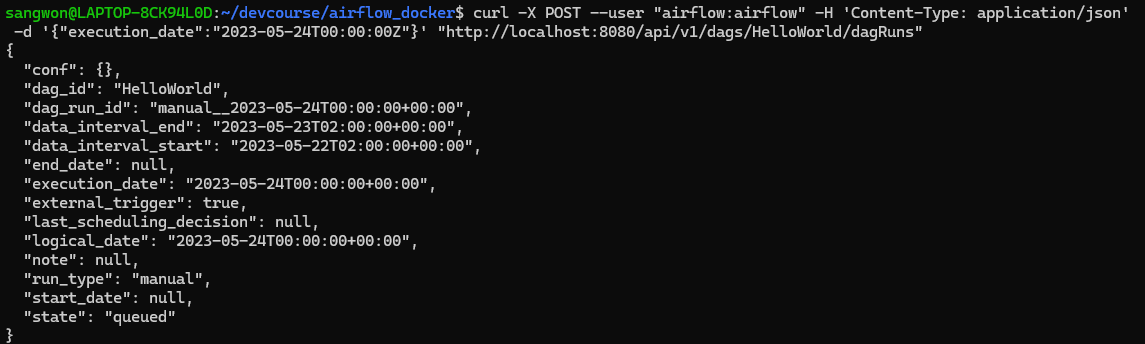
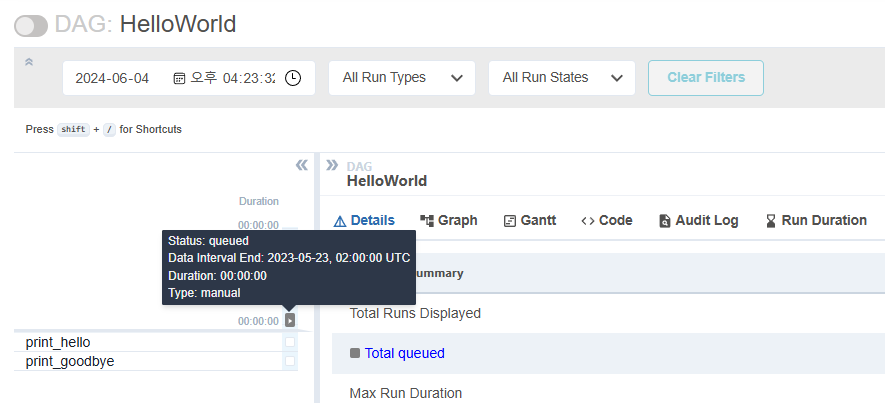
curl -X POST --user "airflow:airflow" -H 'Content-Type: application/json' -d '{"execution_date":"2023-05-24T00:00:00Z"}' "http://localhost:8080/api/v1/dags/HelloWorld/dagRuns"
활성화된 dag만 볼려면 뒤에 ?paused=false를 붙여주자.
모든 DAG 리스트
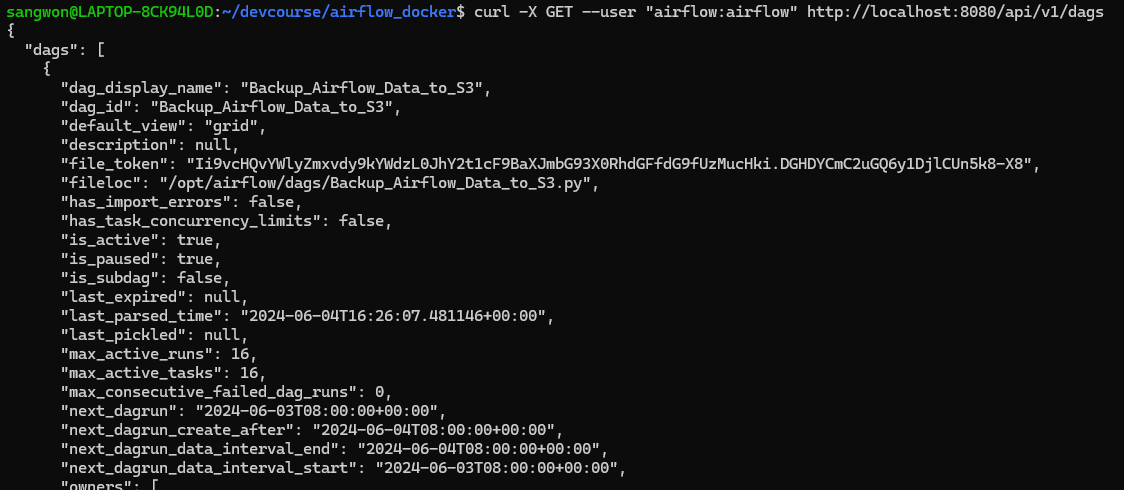
curl -X GET --user "airflow:airflow" http://localhost:8080/api/v1/dags
모든 Variable 리스트
curl -X GET --user "airflow:airflow" http://localhost:8080/api/v1/variables

모든 Config 리스트
curl -X GET --user "airflow:airflow" http://localhost:8080/api/v1/config

config는 기본적으로 볼 수 없게 막혀있다. airflow.cfg의 설정 파일에서 해당 키를 찾아서 바꿔줘야 볼 수 있다.