Intro
React로 개발하다 보면 여러 단계의 컴포넌트를 거쳐 props를 전달해야 하는 상황을 만난다. 중간 컴포넌트에서 값을 사용하지 않는다면 이 구조에 대해서 생각해봐야한다. 트리 구조가 변경될 때마다 여러 파일을 수정해야하기 때문에 유지보수가 취약해지기 때문이다. 그리고 이러한 현상을 Props Drilling이라고 부른다.
이를 해결하기 위한 대안으로 흔히 Context API가 소개된다. 하지만 Context API를 제대로 활용하려면 단순히 "props 안 넘겨도 되는 방법" 이상으로 이해할 필요가 있다.
이 포스팅에서는 Context API의 본질이 무엇인지 살펴보고, 그 바탕에 있는 의존성 주입(Dependency Injection)이라는 설계 원칙까지 연결해보면 좋을 것 같다.
1. Context API
1-1. 언제 필요한가
Context API가 필요한 상황은 보통 두 가지로 정리된다.
1-1-1. 여러 곳에서 같은 값을 사용하는 경우
로그인한 사용자 정보, 언어 설정, 테마(dark/light),처럼 앱 전반에서 참조해야 하는 값이 있는 경우이다.
1-1-2. 컴포넌트 트리가 깊은 경우
A → B → C → D로 이어지는 구조에서 A의 값을 D만 쓴다고 해도, B와 C가 중간 다리 역할을 해야 한다. B, C 입장에서는 자신과 무관한 props를 선언하고 전달해야 하는 부담이 생긴다. 트리가 깊어질수록 이 부담은 커진다.
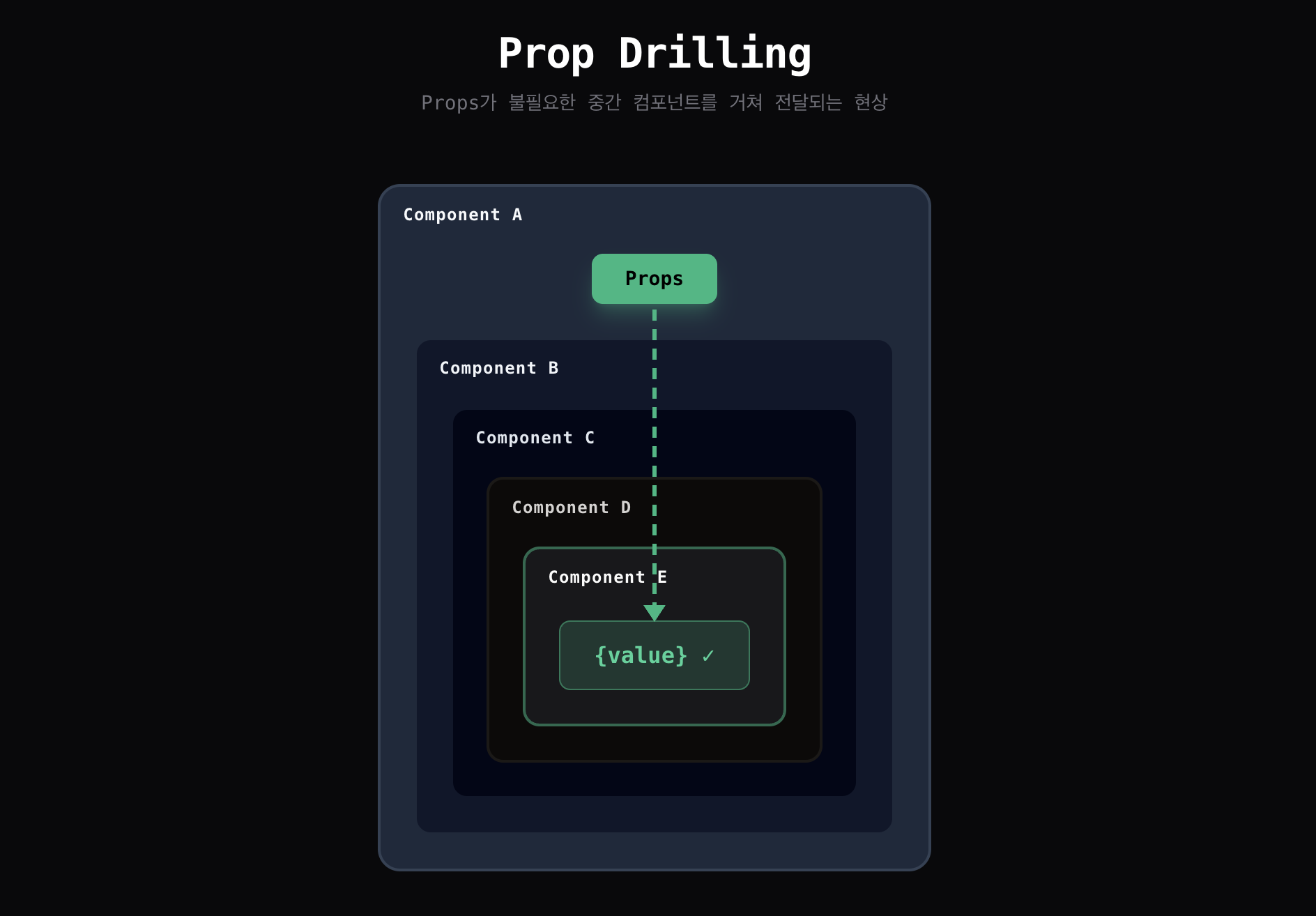
Context API는 이 두 문제를 "중간 단계를 건너뛰는 전달"로 해결한다.
1-2. Context API vs 상태관리 라이브러리
두 가지 문제라면 Jotai나 Zustand와 같은 상태관리 라이브러리로도 커버할 수 있다는 생각이 든다.
Context API는 어떻게 다를까 같은 기능을 두방식으로 구현해보자
1-2-1. Context API 코드
// 1. 선언 : Context 생성
const ThemeContext = createContext<'light' | 'dark'>('light');

// 2. 범위 지정 : Provider로 값 제공
function App() {
  const [theme, setTheme] = useState<'light' | 'dark'>('dark');

  return (
    <ThemeContext.Provider value={theme}>
      <Header />
      <Content />
    </ThemeContext.Provider>
  );
}

// 3. 사용 : useContext로 값 사용
function Header() {
  const theme = useContext(ThemeContext);
  return <View style={theme === 'dark' ? styles.dark : styles.light} />;
}
1-2-2. Jotai 코드
// 1. 선언
const themeAtom = atom<'light' | 'dark'>('dark');

// 2. 사용
function Header() {
  const [theme] = useAtom(themeAtom);
  return <View style={theme === 'dark' ? styles.dark : styles.light} />;
}

function App() {
  return <Header />;  // Provider 없음 (기본 store 사용)
}| Context API | Jotai | |
|---|---|---|
| 선언 | createContext | atom / create |
| 사용 | useContext | useAtom / useStore |
| 적용 범위 | Provider가 감싼 영역만 | 전역 (앱 어디서든) |
| 비유 | 무전기 - 채널을 맞춘 사람 모두에게 전달 | 중앙 관제탑 - 한곳에서 상태 관리 필요한 곳에 내려보냄 |
선언과 사용 방식은 비슷하다.
주요 차이점은 Context API는 Provider로 범위를 명시적으로 지정함으로 지역을 설정할 수 있다는 점이다.
Provider 바깥의 컴포넌트는 해당 Context에 접근할 수 없다.
이 "범위 지정"이 Context API만의 특징이다.
2.실제 예시로 보는 Context API
Context API가 실제로 어떻게 동작하는지, 예시를 통해 살펴보자.
A에서 E까지 중첩된 깊은 트리 구조가 있고, 새로운 기획이 추가됐다.
기획 추가
기존에 마감 날짜(ComponentE)가 표기되던 곳,
마감이 임박했을때는 "기한 연장" 버튼(ComponentF)이 노출 될 수 있도록 조정 부탁드려요
2-1. props로 전달하는 방식
1-1-2 와 같이 컴포넌트 트리가 깊고, Props로 값을 전달하고 있는 상황이라면 props를 추가해줘야한다.
2-1-1. 기존
function ComponentA() {
  const date = "2024-01-15";
  return <ComponentB date={date} />;
}
function ComponentB({ date }) { return <ComponentC date={date} />; }
function ComponentC({ date }) { return <ComponentD date={date} />; }
function ComponentD({ date }) { return <ComponentE date={date} />; }
function ComponentE({ date }) {
  return <div>{date}</div>;
}
2-1-2. 수정
- 조건 전달용 props driling
- 버튼 이벤트 전달용 props driling
- E component 삼항 처리하여 1조건에 2가 활성화 될 수 있도록 처리
// ComponentA.jsx - 상태 소유
function ComponentA() {
  const date = "2024-01-15";
  const isDeadlineNear = true;
  const handleExtend = () => console.log("기한 연장");

  return (
    <ComponentB
      date={date}
      isDeadlineNear={isDeadlineNear}
      onExtend={handleExtend}
    />
  );
}

// ComponentB.jsx - 전달만
function ComponentB({ date, isDeadlineNear, onExtend }) {
  return (
    <ComponentC
      date={date}
      isDeadlineNear={isDeadlineNear}
      onExtend={onExtend}
    />
  );
}

// ComponentC.jsx - 전달만
function ComponentC({ date, isDeadlineNear, onExtend }) {
  return (
    <ComponentD
      date={date}
      isDeadlineNear={isDeadlineNear}
      onExtend={onExtend}
    />
  );
}

// ComponentD.jsx - 전달만
function ComponentD({ date, isDeadlineNear, onExtend }) {
  return (
    <ComponentE
      date={date}
      isDeadlineNear={isDeadlineNear}
      onExtend={onExtend}
    />
  );
}

// ComponentE.jsx - 실제 사용
function ComponentE({ date, isDeadlineNear, onExtend }) {
  return (
    <div>
      <span>{date}</span>
      {isDeadlineNear && <button onClick={onExtend}>기한 연장</button>}
    </div>
  );
}
2-2. Context API 적용한 방식
2-2-1. 기존
// Context 생성
const DeadlineContext = createContext(null);

// ComponentA.jsx - Provider
function ComponentA() {
  const date = "2024-01-15";

  return (
    <DeadlineContext.Provider value={{ date }}>
      <ComponentB />
    </DeadlineContext.Provider>
  );
}

// ComponentB, C, D - props 전달 불필요
function ComponentB() { return <ComponentC />; }
function ComponentC() { return <ComponentD />; }
function ComponentD() { return <ComponentE />; }

// ComponentE.jsx - Context에서 직접 가져옴
function ComponentE() {
  const { date } = useContext(DeadlineContext);

  return <div>{date}</div>;
}
2-2-2. 수정
componentA 에서 상태를 주입하여 componentE에서 값을 사용하는 방식
// Context 생성
const DeadlineContext = createContext(null);

// ComponentA.jsx - Provider
function ComponentA() {
  const date = "2024-01-15";
  const isDeadlineNear = true;
  const handleExtend = () => console.log("기한 연장");

  return (
    <DeadlineContext.Provider value={{ date, isDeadlineNear, onExtend: handleExtend }}>
      <ComponentB />
    </DeadlineContext.Provider>
  );
}

// ComponentB, C, D - props 전달 불필요
function ComponentB() { return <ComponentC />; }
function ComponentC() { return <ComponentD />; }
function ComponentD() { return <ComponentE />; }

// ComponentE.jsx - Context에서 직접 가져옴
function ComponentE() {
  const { date, isDeadlineNear, onExtend } = useContext(DeadlineContext);

  return (
    <div>
      <span>{date}</span>
      {isDeadlineNear && <button onClick={onExtend}>기한 연장</button>}
    </div>
  );
}
중간 정리
여기까지 정리하면 Context API는 "범위를 지정할 수 있는 상태관리"처럼 보인다.
그런데 Context API를 "상태관리"라고 표현하는 경우는 거의 없다. 왜일까?
Context API의 본질은 의존성 주입(Dependency Injection)에 더 가깝기 때문이다.
3. 의존성 주입 (Dependency Injection)
낯선 표현 같지만, 개발하면서 이미 일상적으로 사용하고 있는 개념이다.
props, navigation params, 함수의 파라미터처럼 필요한 값을 외부에서 전달하는 것.
이 모두가 의존성을 주입하는 방식이다.
3-1. React에서 의존성 주입을 구현하는 방법
3-1-1 .Props로 함수/객체 주입
가장 직관적인 방법이다.
트리가 깊어지면 Props Drilling 이 발생할 수 있다.
function Button({ onPress, theme }: { onPress: () => void; theme: Theme }) {
  return (
    <Pressable
      onPress={onPress}
      style={{ backgroundColor: theme.primary }}
    >
      <Text>클릭</Text>
    </Pressable>
  );
}
3-1-2 .Context API
Props Drilling 없이 의존성을 주입한다.
단, 암묵적이라 추적이 어려울 수 있다
// 1. 선언 : Context 생성
const ThemeContext = createContext<Theme>(defaultTheme);

// 2. 범위 지정 : Provider로 값 제공
function App() {
  return (
    <ThemeContext.Provider value={darkTheme}>
      <DeepNestedComponent />
    </ThemeContext.Provider>
  );
}

// 3. 사용 : useContext로 값 사용
function DeepNestedComponent() {
  const theme = useContext(ThemeContext);  // 의존성 주입받음
  return <View style={{ backgroundColor: theme.primary }} />;
}
3-1-3 .커스텀 훅
의존성 주입 로직을 훅으로 캡슐화할 수 도 있다.
function useTheme() {
  // 3. 사용 : useContext로 값 사용
  const context = useContext(ThemeContext);
  if (!context) {
    throw new Error('useTheme must be used within ThemeProvider');
  }
  return context;
}

function DeepNestedComponent() {
  // 3. 사용 : useContext로 값 사용
  const theme = useTheme();  // 더 깔끔한 인터페이스
  return <View style={{ backgroundColor: theme.primary }} />;
}
3-2. Context API와 의존성 주입
다시 돌아가서 Context API는 왜 상태관리가 아닌 "의존성 주입(DI)" 이라고 표현하는 걸까 ?
Q1 : "범위 지정"이 의존성 주입과 어떤 관련이 있는걸까?
A1 : 범위가 지정된다는 건, 다르게 말하면 "같은 컴포넌트가 다른 의존성을 받을 수 있다"는 의미다.
// Context API - Provider마다 다른 값 주입 가능
<ThemeContext.Provider value="dark">
  <Header />  {/* dark */}
</ThemeContext.Provider>

<ThemeContext.Provider value="light">
  <Footer />  {/* light */}
</ThemeContext.Provider>
Q2 : 왜 상태관리라이브러리는 "의존성 주입"이라고 표현하지 않는 걸까 ?
A2 : 의존성 주입의 핵심은 "컴포넌트가 무엇을 받을지 스스로 결정하지 않는다"는 점이다.
import { themeAtom } from './store'

function Header() {
  const [theme] = useAtom(themeAtom);  // themeAtom을 쓰겠다고 컴포넌트가 결정
}
Q3 : 상태관리 라이브러리로 관리되는 값을 props나 context API로 넘긴다면 그것은 "의존성 주입"?
A3 : YES. 어디서 온 값이든 외부에서 전달받으면 의존성 주입이다.
4. 정리
Context API는 범위를 지정해서 의존성을 전달하는 도구이다.
상태를 다루지만, 외부에서 값을 주입한다는 점에서 상태관리 라이브러리와는 구분된다.
하지만 여전히 의문이 남는다.
범위를 제한하면서 상태를 전달할 일이 실제로 얼마나 있을까?
Context API가 진짜 빛을 발하는 건 컴파운드 패턴에서다.
다음 글에서 다뤄보자