Intro
이전 포스팅에서 Context API는 "범위를 지정해서 의존성을 전달하는 도구"라고 정리했다.
그리고 의문이 남았다. 범위를 제한하면서 상태를 전달할 일이 실제로 얼마나 있을까? 상태관리 라이브러리로도 구현이 가능한 사항이기에,Context API가 꼭 필요한지 체감이 되지 않았다.
이 포스팅에서는 Compound Pattern을 통해서 그 답을 찾아보려고 한다. Compound Pattern이 무엇인지, 그리고 어떻게 사용하는지 살펴보자
1. Compound Pattern
1-1. Compound Pattern이란
여러 컴포넌트가 하나의 그룹처럼 동작하도록 설계하는 패턴이다.
1-1-1.Compound Pattern 예시
Accordion과 Accordion.Item은 함께 동작한다.
Item은 props로 "열림 상태"를 받지 않아도, 자신이 속한 Accordion의 상태를 알 수 있다.
Compound Pattern 예시가 낯설다면, HTML의 <select>와 <option>을 떠올려보자
  <Accordion>
  <Accordion.Item title="섹션 1">내용 1</Accordion.Item>
  <Accordion.Item title="섹션 2">내용 2</Accordion.Item>
</Accordion>
1-1-2.HTML 예시
<select>와 <option>은 따로 쓰면 의미가 없다.
둘이 함께 있어야 "드롭다운 선택"이라는 기능이 완성된다.
<option>은 자신이 속한 <select>의 상태를 암묵적으로 공유한다.
<select>
  <option value="apple">사과</option>
  <option value="banana">바나나</option>
</select>
1-2.Context API + Compound Pattern 조합
그렇다면 Item은 어떻게 부모의 상태를 알 수 있을까?
Compound Pattern의 핵심은 "부모의 상태를 자식이 암묵적으로 공유한다"는 것이다.
이걸 가능하게 하는 게 바로 Context API이다.
┌─ Accordion ─────────────────────────┐
│                                     │
│   Context.Provider (상태 제공)       │
│         │                           │
│    ┌────┴────┐                      │
│    ▼         ▼                      │
│  Item      Item                     │
│  (useContext로 상태 접근)            │
│                                     │
└─────────────────────────────────────┘
2.Compound Pattern 의 구현
이전 글에서 다뤘던 예시를 Compound Pattern으로 바꿔보자.
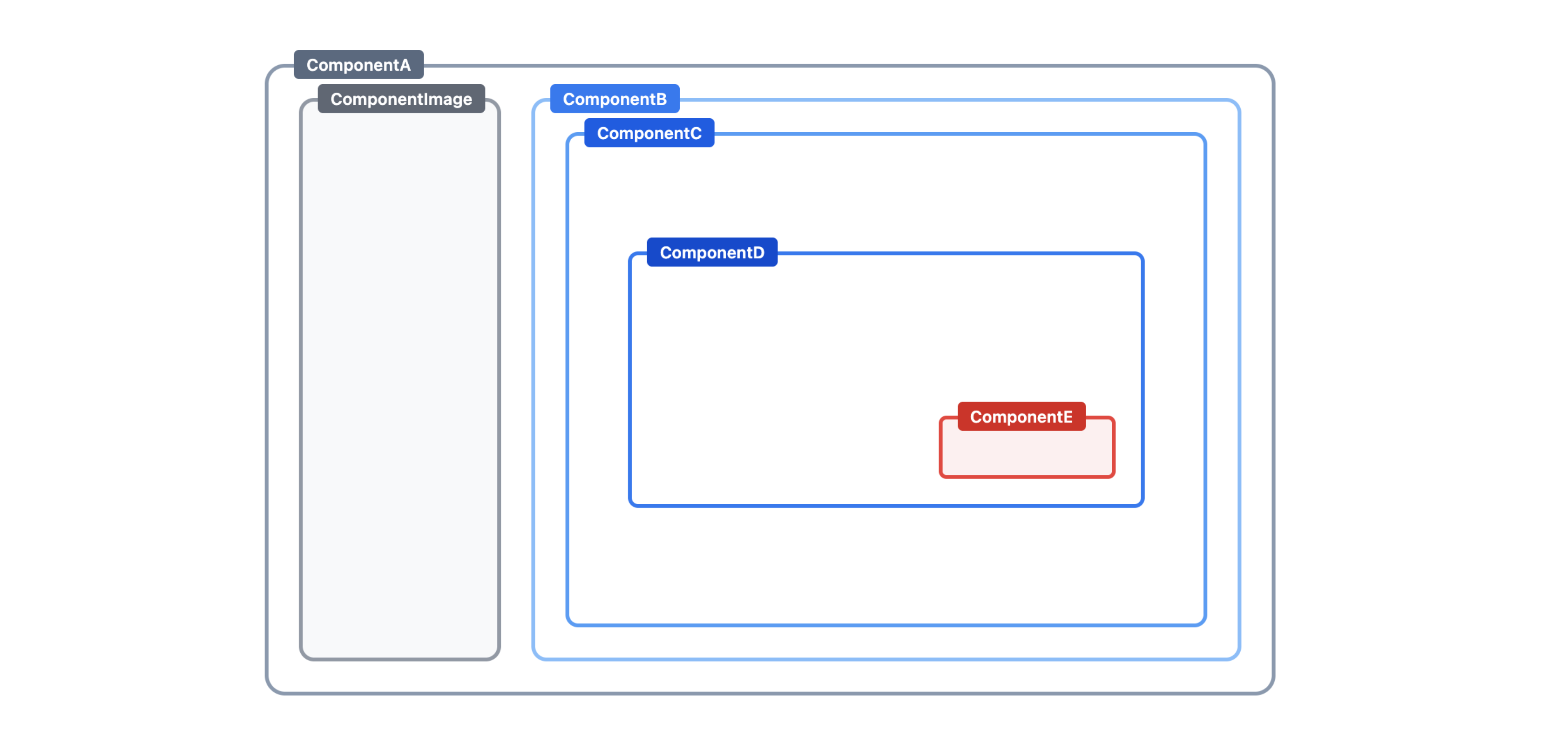
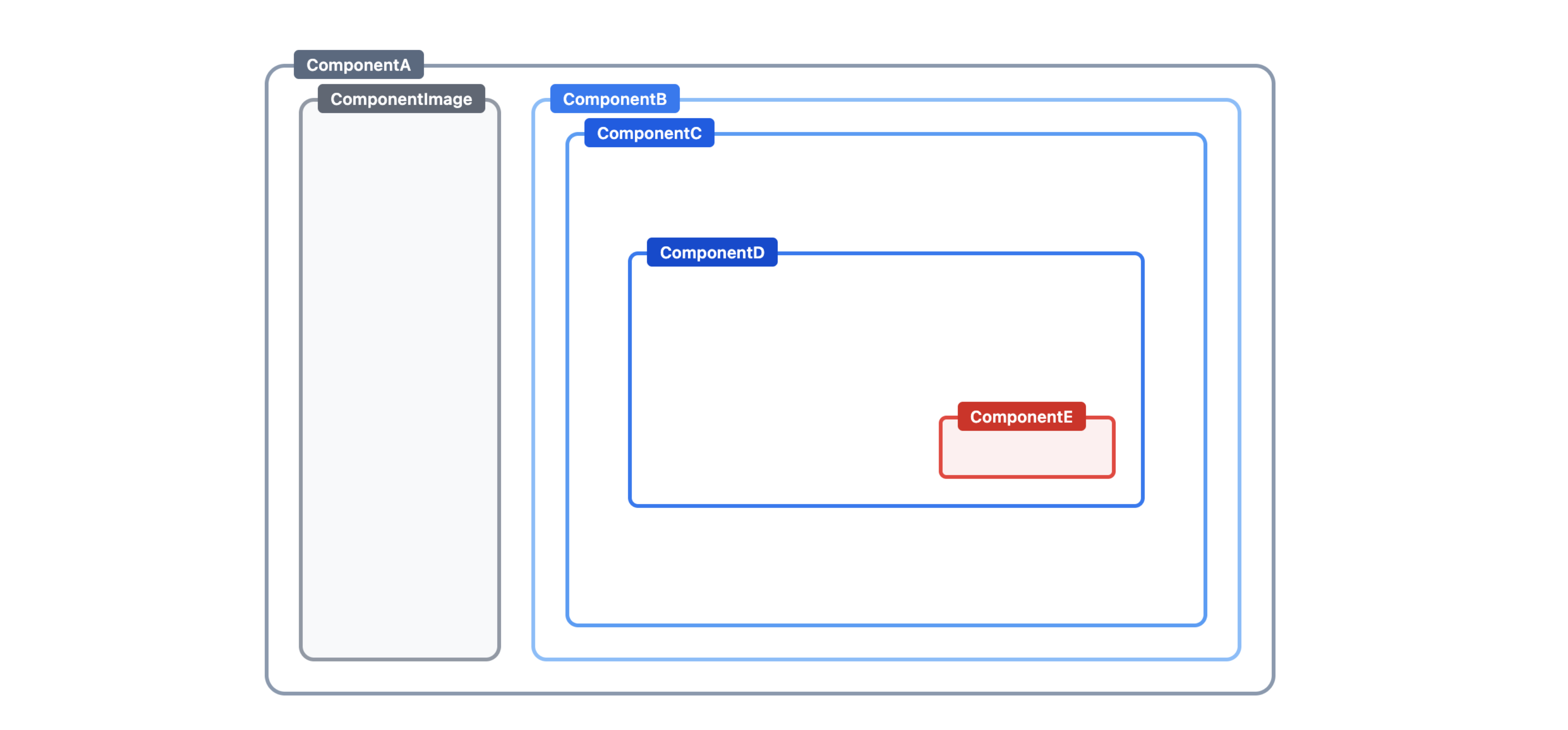
리팩토링 하고자하는 UI의 구조는 다음과 같다.
목표는 동일하다, 조건에 따라 ComponentE or ComponentF로 표시할 수 있도록 조정하면 된다.
기획 추가
기존에 마감 날짜(ComponentE)가 표기되던 곳,
마감이 임박했을때는 "기한 연장" 버튼(ComponentF)이 노출 될 수 있도록 조정 부탁드려요
2-1.기존 Props 구조
function ComponentA() {
  const date = "2024-01-15";
  return <ComponentB date={date} />;
}
function ComponentB({ date }) { return <ComponentC date={date} />; }
function ComponentC({ date }) { return <ComponentD date={date} />; }
function ComponentD({ date }) { return <ComponentE date={date} />; }
function ComponentE({ date }) {
  return <div>{date}</div>;
}
2-2. Compound Pattern 로 리팩토링
2-2-1. 선언
const ComponentContext = createContext(null);

// Component - Provider 역할 (기존 ComponentA)
function Component({ children, data }) {
  const handleExtend = () => console.log("기한 연장");

  return (
    <ComponentContext.Provider value={{ ...data, onExtend: handleExtend }}>
      {children}
    </ComponentContext.Provider>
  );
}

// 중간 컴포넌트들 - children 렌더링
function ComponentB({ children }) {
  return <div>{children}</div>;
}
function ComponentC({ children }) {
  return <div>{children}</div>;
}
function ComponentD({ children }) {
  return <div>{children}</div>;
}

// ComponentE - 날짜만 표시
function ComponentE() {
  const { date } = useContext(ComponentContext);
  return <span>{date}</span>;
}

// ComponentF - 버튼만 표시
function ComponentF() {
  const { onExtend } = useContext(ComponentContext);
  return <button onClick={onExtend}>기한 연장</button>;
}

// 서브 컴포넌트로 연결
Component.B = ComponentB;
Component.C = ComponentC;
Component.D = ComponentD;
Component.E = ComponentE;
Component.F = ComponentF;
2-2-2. 사용
export default function App() {
  const data = {
    date: "2024-01-15",
    isDeadlineNear: false,
  };

  return (
    <Component data={data}>
      <Component.B>
        <Component.C>
          <Component.D>
            {data.isDeadlineNear ? <Component.F /> : <Component.E />}
          </Component.D>
        </Component.C>
      </Component.B>
    </Component>
  );
}
중간 정리 (비유)
새로운 데이터가 추가될 때를 도로 배관을 공사 과정에 비유하자면
Props 방식은 포장을 뜯고, 추가 배관 후 다시 덮는 과정이 필요하다
Compound Pattern은 Context와 Children 으로 미리 큰 통로를 뚫어두는 것과 같다.
만들어둔 통로에 새로운 데이터를 밀어넣는 방식이라 중간 컴포넌트의 수정없이 구조 변경이 가능해진다통로
- Context : 새로운 데이터
- Children : 구조 변경
3.Compound Pattern의 한계
컴파운드 패턴은 강력하지만, 몇 가지 한계가 있다.
3-1. 암묵적 관계의 양면성
코드만 봐서는 Component.E가 어떤 데이터를 쓰는지 바로 알기 어렵다.
암묵적 연결이 "깔끔함"을 주지만, 동시에 "불투명함"이 되기도 한다.
// 사용하는 쪽에서는 깔끔해 보이지만...
<Component data={data}>
  <Component.B>
    <Component.E />  {/* date를 쓰는지, onExtend를 쓰는지 안 보임 */}
  </Component.B>
</Component>

// 선언부를 봐야 알 수 있다
function ComponentE() {
  const { date } = useContext(ComponentContext);  // 여기서야 알 수 있음
  return <span>{date}</span>;
}
3-2. 구조 강제
Component.E는 반드시 Component 안에서만 사용해야 한다.
Provider 바깥에서 사용하면 에러가 발생한다.
즉, Component외에서 사용할 컴포넌트가 필요하다면 UI 가 같더라도 다시 만들어야한다.
// ✅ 정상 동작 - Provider 내부
<Component data={data}>
  <Component.E />
</Component>

// ❌ 에러 - Provider 바깥
<Component.E />
// Error: Cannot read properties of null (reading 'date')
3-3. 리렌더링 이슈
Context API는 Provider의 value가 바뀌면, 해당 Context를 구독하는 모든 컴포넌트가 리렌더링된다.
컴파운드 패턴은 이미 children 패턴을 사용하고 있으므로 자연스럽게 완화된다.
Context API 단독으로 사용할때는 이점에 주의가 필요하다 ⚠️
// ❌ Context API 단독 사용 - 리렌더링 발생
function Component({ data }) {
  return (
    <ComponentContext.Provider value={data}>
      <ComponentB />  {/* data 바뀌면 리렌더링 */}
      <ComponentC />  {/* data 바뀌면 리렌더링 */}
      <ComponentE />  {/* data 바뀌면 리렌더링 */}
    </ComponentContext.Provider>
  );
}

// ✅ Compound Pattern (children 패턴) - 리렌더링 최소화
function Component({ children, data }) {
  return (
    <ComponentContext.Provider value={data}>
      {children}  {/* children은 리렌더링되지 않음 */}
    </ComponentContext.Provider>
  );
}

// 사용
<Component data={data}>
  <Component.B>
    <Component.E />  {/* 부모가 리렌더링되어도 영향 없음 */}
  </Component.B>
</Component>
4. 언제 무엇을 선택해야할까
4-1. 선택 흐름
의존성 전달이 필요한가?
│
├─ 1~2단계만 전달 → Props
│
└─ 3단계 이상 or 여러 곳에서 사용
    │
    ├─ 앱 전역에서 하나의 상태 → 상태관리 라이브러리
    │
    └─ 특정 범위 내에서만 공유
        │
        ├─ 독립적인 컴포넌트들 → Context API
        │
        └─ 함께 동작하는 그룹 → Compound Pattern
4-2.비교
| Props | Context API | Compound Pattern | |
|---|---|---|---|
| 전달 방식 | 명시적 | 암묵적 | 암묵적 |
| 중간 컴포넌트 수정 | 필요 | 불필요 | 불필요 |
| 구조 변경 | 코드 수정 | 코드 수정 | JSX만 변경 |
| 적합한 상황 | 1~2단계 | 깊은 트리 | 함께 동작하는 그룹 |