VRRP
개념정리
- 오픈 스택 neutron은 기본적으로 포트 별로 보안을 적용하여, 포트에 속하지 않은 ip/mac으로 트래픽 통신이 불가하다.
- IP Anti-spoofing: Neutron 포트는 할당된 Fixed IP 외의 다른 IP(즉, VIP)가 소스 주소로 찍힌 패킷을 버림.
- MAC Anti-spoofing: VRRP가 생성하는 가상 MAC 주소 역시 포트 보안 정책에 어긋나므로 차단.
- 따라서, --disable-port-security를 사용해서 네트워크를 생성하거나, allow address pair 기능을 사용해야 한다.
- allow address pair는 설정한 ip/mac이 특정 포트에서 트래픽 통신이 가능하도록 허용해주는 설정이다.
VRRP (Virtual Router Redundancy Protocol)란?
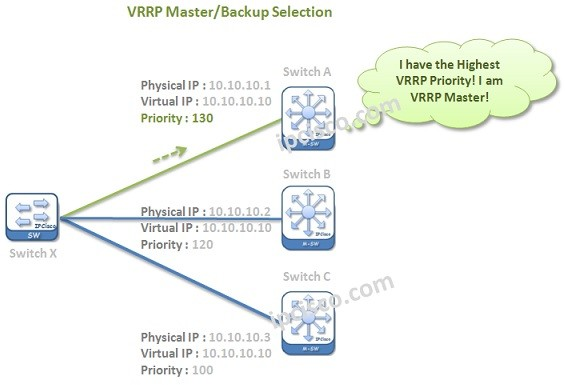
VRRP는 네트워크 장비(라우터, L4 스위치 등)의 고가용성(High Availability)을 보장하기 위한 프로토콜.
- 동작 방식: 여러 대의 서버(Master 1대, Backup 1대 이상)를 하나의 그룹으로 묶고, 사용자에게는 하나의 VIP(Virtual IP)를 제공.
- 장점: Master 서버에 장애가 발생하면 Backup 서버가 즉시 VIP를 승계받아 서비스를 중단 없이 유지.
- 식별: VRRP 그룹은 VRID(Virtual Router ID)를 사용하며, 이에 대응하는 가상 MAC 주소(00:00:5E:00:01:XX)를 생성.
설정
- 네트워크
- 네트워크는 기존 네트워크 사용.
- internal network : int_net
- external network : ext-private-net1
- 인스턴스 생성
- test01
- test02
- port 생성
- 네트워크 > int_net > 포트 > 포트 생성
[root@control1 ~]# neutron port-list | grep USER
neutron CLI is deprecated and will be removed in the future. Use openstack CLI instead.
| ********-b6b9-4b2c-951d-cc5f609756ea | USER-vip- 플로팅 IP 생성
- 플로팅 IP 와 2에서 생성한 port 와 연동
- 네트워크 > 플로팅 IP > 특정 플로팅 IP 연결 > 포트에 할당된 fixed ip 선택 (192.168.100.196)
[root@control1 ~]# neutron floatingip-list | grep 192.168.100.196
neutron CLI is deprecated and will be removed in the future. Use openstack CLI instead.
| ********-05e2-4123-9199-a5897ee7071e | 9d5f741f938d4a638ed5cf848a1f3289 | 192.168.100.196 | 99.88.128.171 | ********-b6b9-4b2c-951d-cc5f609756ea |- 포트와 생성된 인스턴스 인터페이스간 IP 페어링 설정.
- 인스턴스의 각 포트에 USER-vip(192.168.100.196) 를 페어링
- 인스턴스 > 인터페이스 > 인터페이스 이름 클릭 > 허용된 주소 쌍 (192.168.100.196)
[root@control1 ~]# neutron port-list | grep USER
neutron CLI is deprecated and will be removed in the future. Use openstack CLI instead.
| ********-a36d-4007-812e-3bb0c7580778 | USER-vip                                           | 9d5f741f938d4a638ed5cf848a1f3289 | **:**:3e:d8:62:3d | {"subnet_id": "********-5f2e-4292-a3ef-4ef782fb4da1", "ip_address": "192.168.100.227"} |

[root@control1 ~]# nova interface-list test01
+------------+--------------------------------------+--------------------------------------+-----------------+-------------------+-----+
| Port State | Port ID                              | Net ID                               | IP addresses    | MAC Addr          | Tag |
+------------+--------------------------------------+--------------------------------------+-----------------+-------------------+-----+
| ACTIVE     | 6bf25fa1-****-49bc-b329-95f5ec18dbe1 | 3cb48dac-8632-4631-92ec-802016438b4f | 192.168.100.131 | **:**:3e:fc:eb:f5 | -   |
+------------+--------------------------------------+--------------------------------------+-----------------+-------------------+-----+
[root@control1 ~]# nova interface-list test02
+------------+--------------------------------------+--------------------------------------+----------------+-------------------+-----+
| Port State | Port ID                              | Net ID                               | IP addresses   | MAC Addr          | Tag |
+------------+--------------------------------------+--------------------------------------+----------------+-------------------+-----+
| ACTIVE     | 8d067056-****-4dcd-9fc8-4886baecf603 | 3cb48dac-8632-4631-92ec-802016438b4f | 192.168.100.67 | **:**:3e:a4:ff:2b | -   |
+------------+--------------------------------------+--------------------------------------+----------------+-------------------+-----+

## 인스턴스의 인터페이스 상세 현황을 보면
[root@control1 ~]# neutron port-show 6bf25fa1-****-49bc-b329-95f5ec18dbe1
neutron CLI is deprecated and will be removed in the future. Use openstack CLI instead.
+-----------------------+----------------------------------------------------------------------------------------+
| Field                 | Value                                                                                  |
+-----------------------+----------------------------------------------------------------------------------------+
| admin_state_up        | True                                                                                   |
| allowed_address_pairs | {"ip_address": "192.168.100.196", "mac_address": "**:**:3e:fc:eb:f5"}                  |
| binding:host_id       | cbt-gov-compute2                                                                       |
| binding:profile       | {}                                                                                     |
| binding:vif_details   | {"connectivity": "l2", "port_filter": true}                                            |
| binding:vif_type      | bridge                                                                                 |
| binding:vnic_type     | normal                                                                                 |
| created_at            | 2021-11-24T07:35:34Z                                                                   |
| description           |                                                                                        |
| device_id             | 463cd41a-19f7-4d79-9b57-406cec3d2149                                                   |
| device_owner          | compute:nova                                                                           |
| extra_dhcp_opts       |                                                                                        |
| fixed_ips             | {"subnet_id": "********-5f2e-4292-a3ef-4ef782fb4da1", "ip_address": "192.168.100.131"} |
| id                    | 6bf25fa1-****-49bc-b329-95f5ec18dbe1                                                   |
| mac_address           | **:**:3e:fc:eb:f5                                                                      |
| name                  |                                                                                        |
| network_id            | 3cb48dac-8632-4631-92ec-802016438b4f                                                   |
| port_security_enabled | True                                                                                   |
| project_id            | 9d5f741f938d4a638ed5cf848a1f3289                                                       |
| revision_number       | 8                                                                                      |
| security_groups       | f3a47f50-d9ec-4c3f-aacc-fbad2a5bae4a                                                   |
| status                | ACTIVE                                                                                 |
| tags                  |                                                                                        |
| tenant_id             | 9d5f741f938d4a638ed5cf848a1f3289                                                       |
| updated_at            | 2021-11-24T07:50:50Z                                                                   |
+-----------------------+----------------------------------------------------------------------------------------+- 인스턴스에 접속을 위해 floating ip 할당
- 인스턴스에 httpd와 keepalived 설치 및 설정
## source.list 업데이트
root@test01:/etc/apt# cat /etc/apt/sources.list
deb http://repoip/ubuntu/ bionic main restricted
deb-src http://repoip/ubuntu/ bionic main restricted
deb http://repoip/ubuntu/ bionic-updates main restricted
deb-src http://repoip/ubuntu/ bionic-updates main restricted
deb http://repoip/ubuntu/ bionic universe
deb-src http://repoip/ubuntu/ bionic universe
deb http://repoip/ubuntu/ bionic-updates universe
deb-src http://repoip/ubuntu/ bionic-updates universe
deb http://repoip/ubuntu/ bionic multiverse
deb-src http://repoip/ubuntu/ bionic multiverse
deb http://repoip/ubuntu/ bionic-updates multiverse
deb-src http://repoip/ubuntu/ bionic-updates multiverse
deb http://repoip/ubuntu/ bionic-backports main restricted universe multiverse
deb-src http://repoip/ubuntu/ bionic-backports main restricted universe multiverse
deb http://repoip/ubuntu bionic-security main restricted
deb-src http://repoip/ubuntu bionic-security main restricted
deb http://repoip/ubuntu bionic-security universe
deb-src http://repoip/ubuntu bionic-security universe
deb http://repoip/ubuntu bionic-security multiverse
deb-src http://repoip/ubuntu bionic-security multiverse
deb http://repoip/ubuntu bionic-proposed main universe multiverse restricted
deb-src http://repoip/ubuntu bionic-proposed main universe multiverse restricted

## 설치
root@test01:/etc/apt# apt -y install keepalived
root@test01:/etc/apt# apt -y install lighttpd lighttpd-doc

root@test01:/etc/apt# cat /etc/keepalived/keepalived.conf
vrrp_instance vrrp_group_1 {
     state MASTER
     interface eth0
     virtual_router_id 1
     priority 100
     authentication {
         auth_type PASS
         auth_pass password
     }
     virtual_ipaddress {
         192.168.100.196/24 brd 192.168.100.255 dev eth0
     }
}

root@test02:/etc/apt# cat /etc/keepalived/keepalived.conf
vrrp_instance vrrp_group_1 {
		 state BACKUP
     interface eth0
     virtual_router_id 1
     priority 50
     authentication {
         auth_type PASS
         auth_pass password
     }
     virtual_ipaddress {
         192.168.100.196/24 brd 192.168.100.255 dev eth0
     }
}

root@test01:/var/www/html# echo $(hostname) > /var/www/html/index.html
root@test02:/etc/apt# echo $(hostname) > /var/www/html/index.html

root@test01:/var/www/html# curl -s http://99.88.128.203/index.html
test01
root@test02:/etc/apt# curl -s http://99.88.128.33/index.html
test02

## 01,02 서버에서 모두 keepalived, lighttpd 서비스 enable 및 start

root@test01:/var/www/html# ip a
1: lo: <LOOPBACK,UP,LOWER_UP> mtu 65536 qdisc noqueue state UNKNOWN group default qlen 1000
    link/loopback 00:00:00:00:00:00 brd 00:00:00:00:00:00
    inet 127.0.0.1/8 scope host lo
       valid_lft forever preferred_lft forever
2: eth0: <BROADCAST,MULTICAST,UP,LOWER_UP> mtu 1450 qdisc fq_codel state UP group default qlen 1000
    link/ether **:**:3e:fc:eb:f5 brd ff:ff:ff:ff:ff:ff
    inet 192.168.100.131/24 brd 192.168.100.255 scope global dynamic eth0
       valid_lft 81090sec preferred_lft 81090sec
    inet 192.168.100.196/24 brd 192.168.100.255 scope global secondary eth0
       valid_lft forever preferred_lft forever
    inet6 fe80::f816:3eff:fefc:ebf5/64 scope link
       valid_lft forever preferred_lft forever

root@test02:/etc/apt# ip a
1: lo: <LOOPBACK,UP,LOWER_UP> mtu 65536 qdisc noqueue state UNKNOWN group default qlen 1000
    link/loopback 00:00:00:00:00:00 brd 00:00:00:00:00:00
    inet 127.0.0.1/8 scope host lo
       valid_lft forever preferred_lft forever
2: eth0: <BROADCAST,MULTICAST,UP,LOWER_UP> mtu 1450 qdisc fq_codel state UP group default qlen 1000
    link/ether **:**:3e:a4:ff:2b brd ff:ff:ff:ff:ff:ff
    inet 192.168.100.67/24 brd 192.168.100.255 scope global dynamic eth0
       valid_lft 81231sec preferred_lft 81231sec
    inet6 fe80::f816:3eff:fea4:ff2b/64 scope link
valid_lft forever preferred_lft forever- VRRP Test
root@test02:/etc/apt# curl -s http://99.88.128.171/index.html
test01

root@test01:/var/www/html# shutdown -h now
Connection to 99.88.128.203 closed by remote host.
Connection to 99.88.128.203 closed.

root@test02:/etc/apt# ip a
1: lo: <LOOPBACK,UP,LOWER_UP> mtu 65536 qdisc noqueue state UNKNOWN group default qlen 1000
    link/loopback 00:00:00:00:00:00 brd 00:00:00:00:00:00
    inet 127.0.0.1/8 scope host lo
       valid_lft forever preferred_lft forever
2: eth0: <BROADCAST,MULTICAST,UP,LOWER_UP> mtu 1450 qdisc fq_codel state UP group default qlen 1000
    link/ether **:**:3e:a4:ff:2b brd ff:ff:ff:ff:ff:ff
    inet 192.168.100.67/24 brd 192.168.100.255 scope global dynamic eth0
       valid_lft 80215sec preferred_lft 80215sec
    inet 192.168.100.196/24 brd 192.168.100.255 scope global secondary eth0
       valid_lft forever preferred_lft forever
    inet6 fe80::f816:3eff:fea4:ff2b/64 scope link
       valid_lft forever preferred_lft forever

root@test02:/etc/apt# curl -s http://99.88.128.171/index.html
test02
- 동작 확인
root@test02:/var/log# journalctl -u keepalived.service
-- Logs begin at Mon 2021-07-26 18:31:19 KST, end at Wed 2021-11-24 18:28:01 KST. --
Nov 24 17:59:48 test02 systemd[1]: Starting Keepalive Daemon (LVS and VRRP)...
Nov 24 17:59:48 test02 Keepalived[16564]: Starting Keepalived v1.3.9 (10/21,2017)
Nov 24 17:59:48 test02 Keepalived[16564]: Opening file '/etc/keepalived/keepalived.conf'.
Nov 24 17:59:48 test02 Keepalived[16565]: Starting Healthcheck child process, pid=16566
Nov 24 17:59:48 test02 Keepalived_healthcheckers[16566]: Opening file '/etc/keepalived/keepalived.conf'.
Nov 24 17:59:48 test02 Keepalived[16565]: Starting VRRP child process, pid=16567
Nov 24 17:59:48 test02 Keepalived_vrrp[16567]: Registering Kernel netlink reflector
Nov 24 17:59:48 test02 Keepalived_vrrp[16567]: Registering Kernel netlink command channel
Nov 24 17:59:48 test02 Keepalived_vrrp[16567]: Registering gratuitous ARP shared channel
Nov 24 17:59:48 test02 Keepalived_vrrp[16567]: Opening file '/etc/keepalived/keepalived.conf'.
Nov 24 17:59:48 test02 systemd[1]: Started Keepalive Daemon (LVS and VRRP).
Nov 24 17:59:48 test02 Keepalived_vrrp[16567]: Using LinkWatch kernel netlink reflector...
Nov 24 17:59:48 test02 Keepalived_vrrp[16567]: VRRP_Instance(vrrp_group_1) Entering BACKUP STATE
Nov 24 18:21:28 test02 Keepalived_vrrp[16567]: VRRP_Instance(vrrp_group_1) Transition to MASTER STATE
Nov 24 18:21:29 test02 Keepalived_vrrp[16567]: VRRP_Instance(vrrp_group_1) Entering MASTER STATE
Nov 24 18:24:56 test02 Keepalived_vrrp[16567]: VRRP_Instance(vrrp_group_1) Received advert with higher priority 100, ours
Nov 24 18:24:56 test02 Keepalived_vrrp[16567]: VRRP_Instance(vrrp_group_1) Entering BACKUP STATE

두 노드는 224.0.0.18 multicast request를 통해 health check를 진행.
tcpdump로 224.0.0.18을 필터로 걸어 패킷 확인.

root@test01:~# tcpdump -vv -i eth0 -Ann host 224.0.0.18
tcpdump: listening on eth0, link-type EN10MB (Ethernet), capture size 262144 bytes
18:48:03.706388 IP (tos 0xc0, ttl 255, id 1387, offset 0, flags [none], proto VRRP (112), length 40)
    192.168.100.131 > 224.0.0.18: vrrp 192.168.100.131 > 224.0.0.18: VRRPv2, Advertisement, vrid 1, prio 100, authtype simple, intvl 1s, length 20, addrs: 192.168.100.196 auth "password"
E..(.k...p....d.....!.d.......d.password
18:48:04.707485 IP (tos 0xc0, ttl 255, id 1388, offset 0, flags [none], proto VRRP (112), length 40)
    192.168.100.131 > 224.0.0.18: vrrp 192.168.100.131 > 224.0.0.18: VRRPv2, Advertisement, vrid 1, prio 100, authtype simple, intvl 1s, length 20, addrs: 192.168.100.196 auth "password"
E..(.l...p....d.....!.d.......d.password
18:48:05.708586 IP (tos 0xc0, ttl 255, id 1389, offset 0, flags [none], proto VRRP (112), length 40)
    192.168.100.131 > 224.0.0.18: vrrp 192.168.100.131 > 224.0.0.18: VRRPv2, Advertisement, vrid 1, prio 100, authtype simple, intvl 1s, length 20, addrs: 192.168.100.196 auth "password"
E..(.m...p....d.....!.d.......d.password
...

root@test02:/var/log# tcpdump -vv -i eth0 -Ann host 224.0.0.18
tcpdump: listening on eth0, link-type EN10MB (Ethernet), capture size 262144 bytes
18:48:12.716891 IP (tos 0xc0, ttl 255, id 1396, offset 0, flags [none], proto VRRP (112), length 40)
    192.168.100.131 > 224.0.0.18: vrrp 192.168.100.131 > 224.0.0.18: VRRPv2, Advertisement, vrid 1, prio 100, authtype simple, intvl 1s, length 20, addrs: 192.168.100.196 auth "password"
E..(.t...p....d.....!.d.......d.password
18:48:13.718071 IP (tos 0xc0, ttl 255, id 1397, offset 0, flags [none], proto VRRP (112), length 40)
    192.168.100.131 > 224.0.0.18: vrrp 192.168.100.131 > 224.0.0.18: VRRPv2, Advertisement, vrid 1, prio 100, authtype simple, intvl 1s, length 20, addrs: 192.168.100.196 auth "password"
E..(.u...p....d.....!.d.......d.password
18:48:14.719226 IP (tos 0xc0, ttl 255, id 1398, offset 0, flags [none], proto VRRP (112), length 40)
    192.168.100.131 > 224.0.0.18: vrrp 192.168.100.131 > 224.0.0.18: VRRPv2, Advertisement, vrid 1, prio 100, authtype simple, intvl 1s, length 20, addrs: 192.168.100.196 auth "password"
E..(.v...p....d.....!.d.......d.password
18:48:15.720396 IP (tos 0xc0, ttl 255, id 1399, offset 0, flags [none], proto VRRP (112), length 40)
    192.168.100.131 > 224.0.0.18: vrrp 192.168.100.131 > 224.0.0.18: VRRPv2, Advertisement, vrid 1, prio 100, authtype simple, intvl 1s, length 20, addrs: 192.168.100.196 auth "password"
E..(.w...p....d.....!.d.......d.password

## arp
- backup 서버에서 master 서버의 local ip, 서비스 ip로 ping 을 친 후 arp table 을 확인
- 2개 ip의 mac이 동일한 것을 확인.
root@test02:/var/log# arp -n
Address                  HWtype  HWaddress           Flags Mask            Iface
192.168.100.1            ether   **:**:3e:49:b0:97   C                     eth0
192.168.100.131          ether   **:**:3e:fc:eb:f5   C                     eth0
192.168.100.196          ether   **:**:3e:fc:eb:f5   C                     eth0

root@test01:~# arp -n
Address                  HWtype  HWaddress           Flags Mask            Iface
192.168.100.67           ether   **:**:3e:a4:ff:2b   C                     eth0
192.168.100.1            ether   **:**:3e:49:b0:97   C                     eth0

root@test01:~# systemctl stop keepalived.service

root@test02:/var/log# ping 192.168.100.131
PING 192.168.100.131 (192.168.100.131) 56(84) bytes of data.
64 bytes from 192.168.100.131: icmp_seq=1 ttl=64 time=0.359 ms
64 bytes from 192.168.100.131: icmp_seq=2 ttl=64 time=0.355 ms
^C
--- 192.168.100.131 ping statistics ---
2 packets transmitted, 2 received, 0% packet loss, time 1002ms
rtt min/avg/max/mdev = 0.355/0.357/0.359/0.002 ms
root@test02:/var/log# ping 192.168.100.196
PING 192.168.100.196 (192.168.100.196) 56(84) bytes of data.
64 bytes from 192.168.100.196: icmp_seq=1 ttl=64 time=0.052 ms
64 bytes from 192.168.100.196: icmp_seq=2 ttl=64 time=0.033 ms
64 bytes from 192.168.100.196: icmp_seq=3 ttl=64 time=0.033 ms
^C
--- 192.168.100.196 ping statistics ---
3 packets transmitted, 3 received, 0% packet loss, time 2054ms
rtt min/avg/max/mdev = 0.033/0.039/0.052/0.010 ms

root@test02:/var/log# ip -s -s neigh flush all
192.168.100.1 dev eth0 lladdr **:**:3e:49:b0:97 ref 1 used 0/0/0 probes 1 DELAY
192.168.100.131 dev eth0 lladdr **:**:3e:fc:eb:f5 used 131/128/100 probes 1 STALE
192.168.100.196 dev eth0 lladdr **:**:3e:fc:eb:f5 used 1876/1876/1838 probes 4 STALE

*** Round 1, deleting 3 entries ***
*** Flush is complete after 1 round ***
root@test02:/var/log# arp -n
Address                  HWtype  HWaddress           Flags Mask            Iface
192.168.100.1            ether   **:**:3e:49:b0:97   C                     eth0

root@test01:~# arping 192.168.100.196
ARPING 192.168.100.196
42 bytes from **:**:3e:a4:ff:2b (192.168.100.196): index=0 time=332.335 usec
42 bytes from **:**:3e:a4:ff:2b (192.168.100.196): index=1 time=256.291 usec
42 bytes from **:**:3e:a4:ff:2b (192.168.100.196): index=2 time=278.033 usec
42 bytes from **:**:3e:a4:ff:2b (192.168.100.196): index=3 time=267.058 usec
42 bytes from **:**:3e:a4:ff:2b (192.168.100.196): index=4 time=253.807 usec

root@test01:~# ping 192.168.100.196
PING 192.168.100.196 (192.168.100.196) 56(84) bytes of data.
64 bytes from 192.168.100.196: icmp_seq=1 ttl=64 time=0.535 ms
64 bytes from 192.168.100.196: icmp_seq=2 ttl=64 time=0.316 ms
64 bytes from 192.168.100.196: icmp_seq=3 ttl=64 time=0.330 ms
^C
--- 192.168.100.196 ping statistics ---
3 packets transmitted, 3 received, 0% packet loss, time 2043ms
rtt min/avg/max/mdev = 0.316/0.393/0.535/0.102 ms
root@test01:~#
root@test01:~# arp -n
Address                  HWtype  HWaddress           Flags Mask            Iface
192.168.100.67           ether   **:**:3e:a4:ff:2b   C                     eth0
192.168.100.1            ether   **:**:3e:49:b0:97   C                     eth0
192.168.100.196          ether   **:**:3e:a4:ff:2b   C                     eth0
참고

Whatever you're not changing, you're choosing