openstack gpu 노드 추가
Knowlege Base
- PCI Passthrough는 NIC, 디스크 컨트롤러, HBA, USB 컨트롤러와 사운드 카드 등의 PCI 장치를 직접적으로 Guest에게 할당하여 바로 제어하고 접근 할 수 있도록 하는 방법
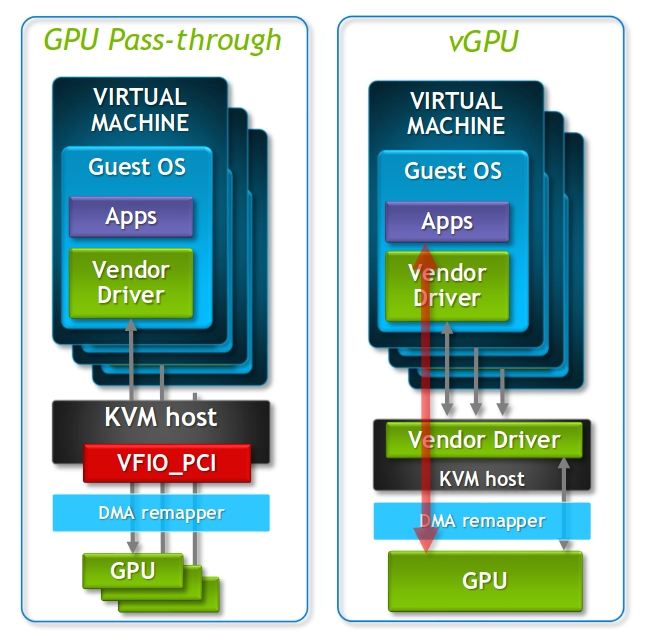
- vfio-pci는 가상환경의 userspace에서 직접 하드웨어 장치 접근을 하기 위한 프레임워크로 PCI Passthrough를 통해 Guest에서 하드웨어 장치에 접근하기 위해서는 대상 장치에서 vfio-pci 드라이버를 사용해야 함.
- PCI passthrough 지원을 위해서는 IOMMU 활성화가 필수.
- intel의 옵션은 VT-d(virtualization Technology for Directed I/O), AMD는 IOMMU (I/O Memory Management Unit)
- Intel의 경우 시스템을 부팅한 후 grub 설정 파일의 GRUB_CMDLINE_LINUX행 끝에 intel_iommu=on 추가.
- AMD의 경우 시스템을 부팅한 후 grub 설정 파일의 GRUB_CMDLINE_LINUX행 끝에 amd_iommu=on를 추가.
Preparation
- 하드웨어가 하드웨어 가상화 및 IOMMU를 지원해야 함.
- BIOS네서 VT-d 활성화 필요.
- 장비에서 GPU가 정상적으로 인식되는 상태일 것.
Configuration
GRUB 설정
IOMMU enable
- GRUB_CMDLINE_LINUX 설정에
intel_iommu=on(intel 기준) 추가. - update-grub
그 외 GRUB 설정
iommu=pt nouveau.modeset=0 rd.driver.pre=bnxt_en,ixgbe rd.driver.post=tg3,igb modprobe.blacklist=nvidiafb,nouveau
- reboot 필요 (모든 설정 완료 후 진행할 것)
Driver 설정
드라이버 설정 시 3가지 정보가 필요함. 정보는 lspci 명령어를 통해 확인 가능.
- Vendor ID
- Product ID
- PCI Bus ID
[root@v100-gpu1 ~]# lspci -nn | grep -i nvidia
18:00.0 3D controller [0302]: NVIDIA Corporation GV100GL [Tesla V100 SXM2 32GB] [10de:1db5] (rev a1)
3b:00.0 3D controller [0302]: NVIDIA Corporation GV100GL [Tesla V100 SXM2 32GB] [10de:1db5] (rev a1)
86:00.0 3D controller [0302]: NVIDIA Corporation GV100GL [Tesla V100 SXM2 32GB] [10de:1db5] (rev a1)
af:00.0 3D controller [0302]: NVIDIA Corporation GV100GL [Tesla V100 SXM2 32GB] [10de:1db5] (rev a1
위 예시에서 PCI bus ID 는 18:00.0, Vendor ID는 10de, project ID는 1db5 임.
아무 설정을 하지 않은 상태에서 GPU의 커널 Driver를 확인해보면 CentOS에서 기본적으로 제공하는 비디오 Driver인 nouveau가 활성화 되어 있을 것이다. GPU의 기본 드라이버로 비디오 드라이버가 바인딩 되어 있으면 GPU passthrough가 정상 동작하지 않으므로 적절한 드라이버를 재설정 해줘야 한다.
[root@v100-gpu1 default]# lspci -s af:00.0 -nk
af:00.0 0302: 10de:1db5 (rev a1)
        Subsystem: 10de:1249
        Kernel driver in use: nouveau
        Kernel modules: nouveau
Blacklist
- passthrough에서 사용될 드라이버와 cent에서 기본 온보드 그래픽 드라이버로 탑재되는 모듈인 nouveau 간 충돌 방지를 nouveau를 disable 처리.
[root@v100-gpu1 ~]# cat /etc/modprobe.d/blacklist-nouveau.conf
blacklist nouveau
options nouveau modeset=0
Whitelist(vfio)
- passthrough 사용을 위해 vfio-pci 드라이버 활성화.
- 설정 파일의 ids 값은 GPU의 vendor id:product id로 구성.
[root@v100-gpu1 ~]# cat /etc/modprobe.d/vfio.conf
options vfio-pci ids=10de:1db5

[root@v100-gpu1 ~]# cat /etc/modules-load.d/vfio-pci.conf
vfio-pci
Nova change
nova-compute service
- VM에 PCI 디바이스를 제공하기 위한 nova-compute 설정
- /etc/nova/nova/conf에 passthrough_whitelist 설정
[root@v100-gpu1 ~]# cat /etc/nova/nova.conf
...
# Add GPU PCI Address whitelist V100
[pci]
passthrough_whitelist = { "vendor_id": "10de", "product_id": "1db5" }
nova-API service
- /etc/nova/nova.conf
- enabled_filters에
PciPassthroughFilter,IsolatedHostsFilter추가 - isolated_hosts에 신규로 추가된 nova-compute node 추가
- pci alias 옵션 추가
- alias 설정은 flavor의 property extra spec 설정을 통해 VM 생성 시 PCI 장치를 요청하는데 사용됨.
- 아래 예시는 nova-compute node로 NVIDIA T4, V100가 모두 사용 중인 상태.
- enabled_filters에
[root@controller1 ~]# cat /etc/nova/nova.conf
...
[filter_scheduler]
...
enabled_filters = AvailabilityZoneFilter,ComputeFilter,AggregateNumInstancesFilter,AggregateIoOpsFilter,ComputeCapabilitiesFilter,ImagePropertiesFilter,ServerGroupAntiAffinityFilter,ServerGroupAffinityFilter,NUMATopologyFilter,PciPassthroughFilter,IsolatedHostsFilter
host_subset_size = 10
tracks_instance_changes = True

# GPU Isolated Hosts
isolated_hosts = gov-t4-gpu1, gpu-t4-gpu2, gpu-t4-gpu3, gpu-t4-gpu4, gpu-t4-gpu5, gpu-t4-gpu6, gpu-t4-gpu7, gpu-t4-gpu8, gpu-t4-gpu9, gpu-t4-gpu10, gov-t4-gpu11, gov-t4-gpu12,v100-gpu1
isolated_images = 5029452f-4cb1-4cb9-bb05-8494b7e84223, a838c826-a9a4-40bd-a1d2-a92397d8a9ed

[pci]
alias = { "vendor_id":"10de", "product_id":"1eb8", "device_type":"type-PF", "name":"T4" }
alias = { "vendor_id":"10de", "product_id":"1db5", "device_type":"type-PCI", "name":"V100" }
...
Check Configuration
IOMMU enable check
[root@v100-gpu1 ~]# dmesg -T| grep -i dmar | grep -i iommu | grep -i enable
[Mon Aug  1 14:30:59 2022] DMAR: IOMMU enabled

or

if compgen -G "/sys/kernel/iommu_groups/*/devices/*" > /dev/null; then
    echo "AMD's IOMMU / Intel's VT-D is enabled in the BIOS/UEFI."
else
    echo "AMD's IOMMU / Intel's VT-D is not enabled in the BIOS/UEFI"
fi

or

[root@v100-gpu1 ~]# virt-host-validate | grep -i iomm
  QEMU: Checking for device assignment IOMMU support                         : PASS
  QEMU: Checking if IOMMU is enabled by kernel                               : PASS
Blacklist/whitelist check
- loading된 모듈 확인
[root@v100-gpu1 ~]# lsmod | grep -i vfio_pci
vfio_pci               41993  4
irqbypass              13503  10 kvm,vfio_pci
vfio                   32657  12 vfio_iommu_type1,vfio_pci
[root@v100-gpu1 ~]# lsmod | grep -i nouveau- GPU pci bus에서 vfio_pci를 driver로 사용하고 있는지 확인
[root@v100-gpu1 ~]# lspci -nn | grep -i nvidia
18:00.0 3D controller [0302]: NVIDIA Corporation GV100GL [Tesla V100 SXM2 32GB] [10de:1db5] (rev a1)
3b:00.0 3D controller [0302]: NVIDIA Corporation GV100GL [Tesla V100 SXM2 32GB] [10de:1db5] (rev a1)
86:00.0 3D controller [0302]: NVIDIA Corporation GV100GL [Tesla V100 SXM2 32GB] [10de:1db5] (rev a1)
af:00.0 3D controller [0302]: NVIDIA Corporation GV100GL [Tesla V100 SXM2 32GB] [10de:1db5] (rev a1)

# lspci -s [pci bus ID] -nnk 로 확인
[root@v100-gpu1 ~]# lspci -s 18:00.0 -nnk
18:00.0 3D controller [0302]: NVIDIA Corporation GV100GL [Tesla V100 SXM2 32GB] [10de:1db5] (rev a1)
        Subsystem: NVIDIA Corporation Device [10de:1249]
        Kernel driver in use: vfio-pci
        Kernel modules: nouveau
create flavor
- flavor의 property의 pci_passthrough:alias 설정과 nova-api의 pci alias 값 기준으로 인스턴스가 생성된 호스트가 결정됨.
- alias값은 nova-API service의 nova.conf pci 섹션에서 alias 설정의 name 값, 뒤에 숫자 2는 해당 flavor를 사용하는 인스턴스에 gpu 할당 스펙을 의미.
[root@controller1 ~]# openstack flavor create \
> --vcpus 16 \
> --ram 65536 \
> --disk 100 \
> --property "pci_passthrough:alias"="V100:2" \
> v100_test_flavor
+----------------------------+--------------------------------------+
| Field                      | Value                                |
+----------------------------+--------------------------------------+
| OS-FLV-DISABLED:disabled   | False                                |
| OS-FLV-EXT-DATA:ephemeral  | 0                                    |
| disk                       | 100                                  |
| id                         | 8f5f540e-1000-4311-846c-aa89ae56b8e0 |
| name                       | v100_test_flavor                     |
| os-flavor-access:is_public | True                                 |
| properties                 | pci_passthrough:alias='V100:2'       |
| ram                        | 65536                                |
| rxtx_factor                | 1.0                                  |
| swap                       |                                      |
| vcpus                      | 16                                   |
+----------------------------+--------------------------------------+
check instance
- pci aliasing한 host에 정상적으로 인스턴스가 생성되었는지.
- flavor의 property에 설정한 스펙만큼 gpu가 assign 되었는지.
- 예시에서는 2장이 매핑되게 설정 하였으므로 vm에서는 2개가 노출되어야 함.
root@v100-test2:~# lspci -nn | grep -i nvidia
00:06.0 3D controller [0302]: NVIDIA Corporation GV100GL [Tesla V100 SXM2 32GB] [10de:1db5] (rev a1)
00:07.0 3D controller [0302]: NVIDIA Corporation GV100GL [Tesla V100 SXM2 32GB] [10de:1db5] (rev a1)

root@v100-test2:~# lspci -s 00:06.0 -nnk
00:06.0 3D controller [0302]: NVIDIA Corporation GV100GL [Tesla V100 SX
M2 32GB] [10de:1db5] (rev a1)
Subsystem: NVIDIA Corporation Device [10de:1249]
Kernel modules: nvidiafb
Reference

Whatever you're not changing, you're choosing