이번 주에 한 일: 백엔드 환경 설정
이미 한 번 팀프로젝트를 진행해본 React와는 달리,
Spring은 이번에 처음 접해보는 프레임워크라 공부하는 시간이 좀 걸렸다. 아니 지금도 공부 중이다.
그래서 이번 주에는 진도를 많이 나가지는 못했고,
- 스프링 연습용으로 간단한 게시판 만들어보기
- DB 구조 설계하기
- Spring 프로젝트 만들고 model, repository, service, controller initialize하기
이 정도 했다.
스프링 연습 : 간단한 게시판 구현
DB 구조 설계하기

dbdiagram.io 를 처음 써봤는데 굉장히 편하다!
MySQL workbench 이용해서 GUI로 간단하게 테이블을 만들고, 쿼리문을 내보낸 다음, 그걸 dbdiagram.io에서 import해서 몇 가지 문법 다른 것만 좀 수정하면 이렇게 그림으로 보여준다.
이 과정도 블로그에 포스팅했다 dbdiagram.io에 MySQL import하기
데이터베이스로 MySQL 선택한 이유
사용해본 MySQL과 PostgreSQL 중 고민했는데, 찾아보니 PostgreSQL은 복잡한 쿼리와 대용량 데이터에서 성능이 좋고 MySQL은 간단한 쿼리에서 더 성능이 좋다고 한다. 나는 복잡한 쿼리가 필요한 프로젝트가 아니니 MySQL을 선택하기로 한다.
진짜 Spring 서버 만들기
GitHub Repository: https://github.com/SihyeonHong/EasiestCV
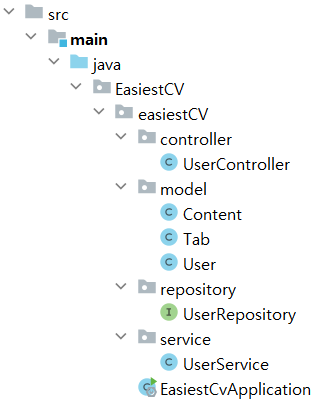
Model
User
package EasiestCV.easiestCV.model;

import jakarta.persistence.*;
import java.util.ArrayList;
import java.util.List;

@Entity
@Table(name="users")
public class User {

    @Id
    @Column(name = "userid", nullable = false, unique = true)
    private String userid;

    @Column(name = "username", nullable = false)
    private String username;

    @Column(name = "email", nullable = false, unique = true)
    private String email;

    // will be encoded later
    @Column(name = "password", nullable = false)
    private String password;

    @Column(name = "img", nullable = true)
    private String img;

    @Column(name = "pdf", nullable = true)
    private String pdf;

    @OneToMany(mappedBy = "user", cascade = CascadeType.ALL)
    private List<Tab> tabs = new ArrayList<>();

    public User() {
    }

	/* Getters and Setters */
}
Tab
@Entity
@Table(name="tabs")
public class Tab {
    @Id
    @Column(name = "idtabs", nullable = false, unique = true)
    private String idtabs;

    @Column(name = "tabsorder", nullable = false)
    private String tabsorder;

    @Column(name = "tabsname", nullable = false)
    private String tabsname;

    @ManyToOne
    @JoinColumn(name="fk_tabs_userid")
    private User user;

    @OneToMany(mappedBy = "tab", cascade = CascadeType.ALL)
    private List<Content> contents = new ArrayList<>();

    public Tab(){}
    ...
}
Content
@Entity
@Table(name = "contents")
public class Content {
    @Id
    @Column(name = "idcontents", nullable = false, unique = true)
    private String idcontents;

    @Column(name = "contentsorder", nullable = false)
    private String contentsorder;

    @Column(name = "contentstype", nullable = false)
    private String contentstype;

    @Column(name = "contentscol", nullable = false)
    private String contentscol;

    @ManyToOne
    @JoinColumn(name="fk_tabs_userid")
    private User user;

    @ManyToOne
    @JoinColumn(name="idtabs")
    private Tab tab;

	public Content() {
	}
	...

}
Repository
@Repository
public interface UserRepository extends JpaRepository<User, String> {
}
Service
@Service
public class UserService {
    private final UserRepository userRepository;

    @Autowired
    public UserService(UserRepository userRepository) {
        this.userRepository = userRepository;
    }

    // 비즈니스 로직 메서드들
}
Controller
@RestController
@RequestMapping("/users")
public class UserController {
    private final UserService userService;

    @Autowired
    public UserController(UserService userService) {
        this.userService = userService;
    }

    // 웹 요청 처리 메서드들
}
이번주 총평
배운점
- model, repository, service, controller 로 이루어진 계층 구조에 대해 좀 이해하게 된 것 같다.
- foreign key는
@OneToMany(mappedBy = "user", cascade = CascadeType.ALL),@ManyToOne @JoinColumn(name="fk_tabs_userid")로 설정한다는 것. Model 패키지의 코드들 참고. @RestController와@Controller의 차이@Controller: 주로 View를 반환. JSP나 Thymeleaf 등 사용할 때.@RestController:@Controller+@ResponseBody. 주로 RESTful 웹 서비스를 개발할 때, 클라이언트에게 JSON 또는 XML 형태로 HTTP Response Body에 직접 데이터를 return할 때 사용된다.
- img랑 pdf는 Amazon S3에 저장해두고 DB에는 경로 저장할 예정.
- 처음에 이미지랑 파일 저장 어떻게 하나 찾아봤을 때 blob으로 한다길래 그렇게 해서 ChatGPT한테 물어봤는데 걔가 말리더라고. 일반적으로는 파일 시스템에 저장하거나 Amazon S3나 구글 클라우드 스토리지 같은 서비스에 저장한 뒤에 이 경로를 DB에 저장한다고. 하긴 이미지랑 pdf를 다 바이너리로 변환해서 저장하려면 처리 비용이 장난 아니겠다 싶긴 함.
- 이외에는 API 문서 자동화하는 법을 좀 찾아봤다. 저번 팀플에서 FastAPI를 썼다보니 Swagger가 내장되어 있어서 편했거든. 아직 적용해보지는 않았다. 다음주에 해볼 예정.

웹프론트엔드