
📌 PyMySQL (파이썬 연동)
pymysql은 파이썬을 활용하여 MySQL 에서 데이터베이스를 조작했던 것처럼 사용할 수 있도록 하는 라이브러리다.- PyMySQL Docs
- PyMySQL Github
1️⃣ PyMySQL 라이브러리 설치 및 임포트
PyMySQL라이브러리 설치
!pip install pymysqlPyMySQL라이브러리 임포트
import pymysqlPyMySQL라이브러리 버전 확인
pymysql.__version__2️⃣ MySQL 연결
pymysql.connect(host=서버IP주소, user=사용자,
				password=암호, db=데이터베이스, charset=문자세트)
연결자 = pymysql.connect(연결옵션)
- 연결자는 파이썬에서 MySQL의 DB를 연결
- 연결이 성공해도 메시지가 나오지 않는다.
- PyMySQL Connections Docs
conn = pymysql.connect(host='127.0.0.1',
					   user='crawluser'
                       password='********',
                       db='crawlDB',
charset='utf8')conn- 출력
<pymysql.connections.Connection at 0x1f205e05730>3️⃣ Cursor 생성
cursor이름 = 연결자.cursor()
- cursor는 데이터베이스에 SQL문을 실행하거나 실행된 결과를 돌려받는 통로이다.
- PyMySQL Cursor Docs
cur = conn.cursor()cur- 출력
<pymysql.cursors.Cursor at 0x1f205f24ec0>4️⃣ 테이블 생성 (CREATE)
- SQL 문을
커서이름.execute()함수의 매개변수로 넘겨주면 SQL문이 데이터베이스에서 실행 cursor이름.execute(SQL문): 한개 행의 데이터 처리cursor이름.executemany(SQL문): 여러 행의 데이터 처리- 실행결과는 0 또는 임의의 다른 번호 출력
# 테이블 생성 SQL
sql1 = 'DROP TABLE IF EXISTS customer;'
sql2 = '''
    CREATE TABLE customer (
        id INT NOT NULL PRIMARY KEY,
        name VARCHAR(20) NOT NULL,
        tel CHAR(13),
        birth DATE
    );
'''cur.execute(sql1)
cur.execute(sql2)- 출력
05️⃣ 테이블 데이터 삽입 (INSERT)
cursor이름.execute(삽입SQL문)- 실행결과는 삽입한 데이터 수 출력
sql = '''
    INSERT INTO customer (id, name, tel, birth)
        VALUES (1, '김바람', '010-123-1111', '2000-01-01'),
               (2, '남구름', '010-222-1111', '2010-01-01'),
               (3, '서바다', '010-321-2111', '2001-05-01'),
               (4, '홍하늘', '010-123-1311', '2010-02-01');
''' cur.execute(sql)- 출력
4- 위 코드를 실행하고 MySQL Workbench 에서 확인해보면 테이블은 생성되었으나 데이터는 삽입되지 않은 것으로 보인다. 이때 저장 기능을 하는 코드 실행이 필요하다.
6️⃣ 데이터베이스 변경사항 저장
연결자.commit()- 데이터베이스에 삽입한 데이터를 확실하게 저장: 변경 내용 확정
conn.commit()- 이후 다시 확인해보면 데이터가 삽입되었음을 확인할 수 있다.
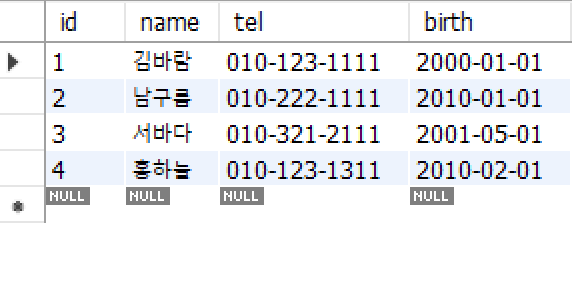
with문과%s를 활용해서 데이터를 삽입할 수도 있다. 이때는cur.execute(sql, data)를 실행한다.
# 한 행을 삽입하는 경우
data = (5, '이방', '010-443-1111', '1981-10-10')

with conn.cursor() as cur:
    sql = 'INSERT INTO customer (id, name, tel, birth) VALUES (%s, %s, %s, %s);'
    cur.execute(sql, data)
conn.commit()
# 여러 행을 삽입하는 경우 (executemany)
data_list = [(6, '성춘향', '010-123-3333', '2010-10-10'),
(7, '이몽룡', '010-444-7777', '2009-05-10')]
with conn.cursor() as cur:
sql = 'INSERT INTO customer (id, name, tel, birth) VALUES (%s, %s, %s, %s);'
cur.executemany(sql, data_list)
conn.commit()- 여러 행 삽입을
execute를for문 으로 반복하여 삽입할 수 있다.
# 여러 행을 삽입하는 경우 (for 문)
cur = conn.cursor()
data_list = [(8, '강하늘', '010-777-3333', '2011-10-10'),
             (9, '최장군', '010-555-7777', '2019-05-10')]
sql = 'INSERT INTO customer (id, name, tel, birth) VALUES (%s, %s, %s, %s);'

for dt in data_list:
    cur.execute(sql, dt)
conn.commit()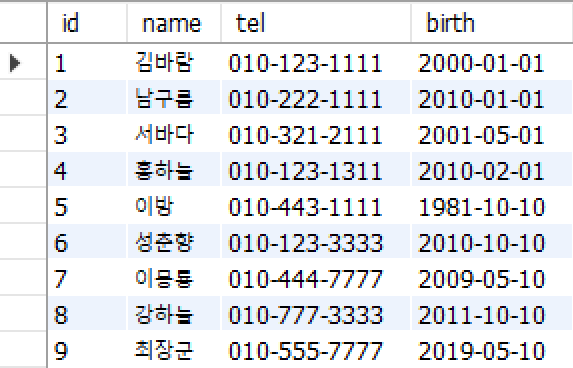
7️⃣ MySQL 연결 종료
연결자.close()
conn.close()8️⃣ 트랙잭션 처리
- 성공적으로 반영시
commit(), 오류발생시rollback() - DB연결 후 SQL문 수행하는 커서(cursor) 생성 및 데이터 삽입 수행
# DB연결객체 생성
conn = pymysql.connect(host='127.0.0.1',
                       user='crawluser',
                       password='********',
                       db='crawlDB',
                       charset='utf8')
# 데이터 준비
data_list = [(10, '성자', '010-123-0099', '2001-03-10'),
             (11, '방식', '010-444-7788', '2008-12-10')]
sql = 'INSERT INTO customer (id, name, tel, birth) VALUES (%s, %s, %s, %s);'

# 데이터 삽입
try:
    with conn.cursor() as cur:
        cur.executemany(sql, data_list)
    conn.commit()
    print(f'{len(data_list)}행 삽입 완료')
except Exception as e:
    conn.rollback()
    print(f'{e}: 오류 발생, 롤백 진행')
finally:
    conn.close()
- 출력
2행 삽입 완료