세션(Session)
- 서버와의 관계를 유지하기 위한 수단
- 서버상에 객체형태로 존재
- 서버당 하나의 세션 객체를 가질 수 있음(브라우저 별 서로 다른 세션 사용)
- 브라우저 창을 종료하면 삭제
- 서버에서만 접근이 가능하여 보안이 좋고 저장할 수 있는 데이터에 한계가 없음
- 클라이언트의 요청이 발생하면 자동생성되어 고유한 ID값을 클라이언트에 넘겨주며 이것을 쿠키에 저장
➿7_session.jsp
<%@ page contentType="text/html;charset=UTF-8" language="java" %>
<html>
<head>
    <title>session</title>
</head>
<body>
<form method="post" action="7_session_ok.jsp">
    <p>아이디: <input type="text" name="userid"></p>
    <p>비밀번호: <input type="password" name="userpw"></p>
    <p><button type="submit">로그인</button></p>
</form>
</body>
</html>
➿7_session_fail.jsp
<%@ page contentType="text/html;charset=UTF-8" language="java" %>
<html>
<head>
    <title>session</title>
</head>
<body>
<h2>로그인 실패!</h2>
<p>아이디 또는 비밀번호를 확인해주세요!</p>
</body>
</html>
➿7_session_logout.jsp
<%@ page contentType="text/html;charset=UTF-8" language="java" %>
<%
    session.invalidate();
    response.sendRedirect("7_session.jsp");
%>
<html>
<head>
    <title>Title</title>
</head>
<body>

</body>
</html>
➿7_session_ok.jsp
<%@ page contentType="text/html;charset=UTF-8" language="java" %>
<%
    String userid = request.getParameter("userid");
    String userpw = request.getParameter("userpw");

    if(userid.equals("admin") && userpw.equals("1234")){
        session.setAttribute("userid", userid);
        response.sendRedirect("7_session_success.jsp");
    }else{
        response.sendRedirect("7_session_fail.jsp");
    }
%>
<html>
<head>
    <title>session</title>
</head>
<body>

</body>
</html>
➿7_session_success.jsp
<%@ page contentType="text/html;charset=UTF-8" language="java" %>
<%
    if(session.getAttribute("userid") == null){
        response.sendRedirect("7_session.jsp");
    }
    String userid = (String)session.getAttribute("userid");
%>
<html>
<head>
    <title>session</title>
</head>
<body>
<h2>환영합니다.</h2>
<p><%=userid%>님 로그인되었습니다.</p>
<p>[<a href="7_session_logout.jsp">로그아웃</a>]</p>
</body>
</html>
Application 객체
- 특정 웹 어플리케이션에 포함된 모든 JSP 페이지는 하나의 application 기본 객체를 공유
- application 객체는 웹 어플리케이션 전반에 걸쳐서 사용되는 정보를 담고 있음
➿8_application.jsp
<%@ page import="java.util.Arrays" %>
<%@ page contentType="text/html;charset=UTF-8" language="java" %>
<%
    int total = 0;

    if(application.getAttribute("total_count") != null){
        total = (int)application.getAttribute("total_count");
    }

    application.setAttribute("menu", Arrays.asList("홈", "등록", "구매", "마이페이지"));
    application.setAttribute("total_count", ++total);
%>
<html>
<head>
    <title>application</title>
</head>
<body>
<p><a href="8_application_home.jsp">다음 페이지로</a></p>
<p>누적된 총계: <%=total%></p>
</body>
</html>
➿8_application_home.jsp
<%@ page import="java.util.List" %>
<%@ page contentType="text/html;charset=UTF-8" language="java" %>
<%
    List<String> list = (List)application.getAttribute("menu");
    int total = (int)application.getAttribute("total_count");
%>
<html>
<head>
    <title>application</title>
</head>
<body>
<ul>
    <% for(String menu:list){ %>
        <li><%=menu%></li>
    <%}%>
</ul>
<p><%=total%></p>
</body>
</html>
생명주기
- request 객체는 요청영역마다 생성
- session 객체는 브라우저 별로 생성
- application 객체는 프로그램 전체에서 딱 한 번 최초 가동 시 생성
예외 페이지
- 예외 상황이 발생했을 경우 웹 컨테이너(톰켓)에서 제공하는 기본적인 예외페이지
- 개발 과정에서는 예외 페이지 또는 에러 코드로 오류를 수정하는데 도움을 받음
- 직접 예외 처리
try{} catch() {} - 에러를 처리할 페이지를 따로 지정
<%@ page errorPage="에러가 발생했을 때 보여줄 페이지"%> - web.xml
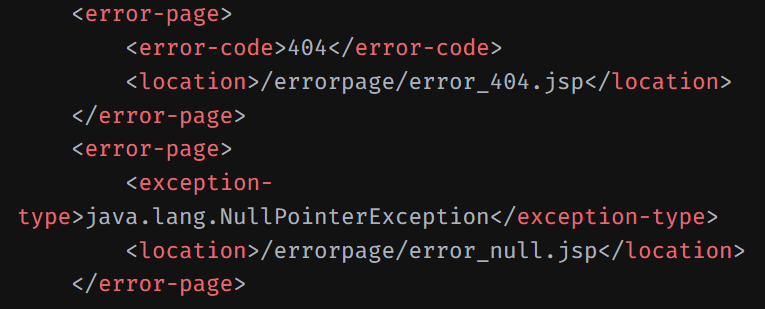
에러 페이지의 우선순위
- 페이지 지시자 태그의 errorPage 속성에 지정한 페이지
- web.xml에 지정한 에러 타입에 따른 페이지
- web.xml에 지정한 응답 상태 코드에 따른 페이지
- 톰켓이 제공하는 에러 페이지
➿9_errorpage.jsp
<%@ page contentType="text/html;charset=UTF-8" language="java" %>
<%@ page errorPage="9_errorpage_error.jsp" %>
<html>
<head>
    <title>error page</title>
</head>
<body>
<h2>errorpage</h2>
<p>의도치 않게 에러가 발생했습니다.</p>
<%
    String abc = (String)session.getAttribute("ABC");
    abc.charAt(3); // 에러 발생!
%>
</body>
</html>
➿9_errorpage_error.jsp
<%@ page contentType="text/html;charset=UTF-8" language="java" %>
<%@ page isErrorPage="true"%> <!-- 에러 페이지로 사용함 -->
<html>
<head>
    <title>error</title>
</head>
<body>
<h2>에러 발생!!</h2>
<p>에러가 발생했습니다. 이동해주세요.</p>
<p><a href="./7_session.jsp">이동</a></p>
</body>
</html>
Action Tag
- JSP 페이지 내에서 동작을 지시하는 태그
- 이동을 강제하는 forward, 페이지를 삽입하는 include, 값을 지정하는 param, 자바의 클래스와 연동하는 useBean 등
1. forward
- 요청 받은 요청 객체(request)를 위임하는 컴포넌트에 요청 객체값을 동일하게 전달
- 요청을 처리함과 동시에 해당 결과를 바로 보여줘야 하는 경우
2. sendRedirect
- 요청 받은 요청 객체를 위임하는 컴포넌트에 전달하는 것이 아닌, 새로운 요청 객체를 생성
➿10_forward.jsp
<%@ page contentType="text/html;charset=UTF-8" language="java" %>
<html>
<head>
    <title>forward</title>
</head>
<body>
<form method="post" action="10_forward_ok.jsp">
    <p>아이디: <input type="text" name="userid"></p>
    <p><button type="submit">확인</button></p>
</form>
</body>
</html>
➿10_forward_ok.jsp
<%@ page contentType="text/html;charset=UTF-8" language="java" %>
<jsp:forward page="10_forward_result.jsp"/>
<html>
<head>
    <title>Title</title>
</head>
<body>

</body>
</html>
➿10_forward_result.jsp
<%@ page contentType="text/html;charset=UTF-8" language="java" %>
<%
    String userid = request.getParameter("userid");
%>
<html>
<head>
    <title>forward</title>
</head>
<body>
    <p>전달받은 userid: <%=userid%></p>
</body>
</html>
➿10_redirect.jsp
<%@ page contentType="text/html;charset=UTF-8" language="java" %>
<html>
<head>
    <title>redirect</title>
</head>
<body>
<form method="post" action="10_redirect_ok.jsp">
    <p>아이디: <input type="text" name="userid"></p>
    <p><button type="submit">확인</button></p>
</form>
</body>
</html>
➿10_redirect_ok.jsp
<%@ page contentType="text/html;charset=UTF-8" language="java" %>
<%
    String userid = request.getParameter("userid");
//    request.setAttribute("userid", userid); // 적용 안됨!
//    response.sendRedirect("10_redirect_result.jsp");
%>
<html>
<head>
    <title>Title</title>
    <script>
        window.onload=function (){
            document.getElementById("hiddenValue").value = "<%=userid%>"
            document.getElementById("redirectForm").submit();
        }

        //location.href = '10_redirect_result.jsp?userid=' + "userid" // get
    </script>
</head>
<body>
<form id="redirectForm" method="post" action="10_redirect_result.jsp">
    <input type="hidden" id="hiddenValue" name="userid" value="<%=userid%>">
</form>
</body>
</html>
➿10_redirect_result.jsp
<%@ page contentType="text/html;charset=UTF-8" language="java" %>
<%
    String userid = request.getParameter("userid");
%>
<html>
<head>
    <title>redirect</title>
</head>
<body>
    <p>전달받은 userid: <%=userid%></p>
</body>
</html>
✨ pom.xml에 다음을 추가
<!-- Servlet API -->
    <dependency>
      <groupId>jakarta.servlet</groupId>
      <artifactId>jakarta.servlet-api</artifactId>
      <version>6.0.0</version>
      <scope>provided</scope>
    </dependency>
<dependencies>이 사이에 추가했다.</dependencies>
그리고 동기화 한다. 오른쪽 상단 조그만 아이콘 클릭!
➿11_dispatcher.jsp
<%@ page contentType="text/html;charset=UTF-8" language="java" %>
<html>
<head>
    <title>dispatcher</title>
</head>
<body>
<p><a href="11_dispatcher_ok.jsp?userid=apple">이동</a></p>
</body>
</html>
➿11_dispatcher_ok.jsp
<%@ page contentType="text/html;charset=UTF-8" language="java" %>
<%
    String userid = request.getParameter("userid");

    request.setAttribute("userid", userid);
    request.setAttribute("name", "김사과");
    request.setAttribute("age", 20);
    request.setAttribute("gender", "여자");

    RequestDispatcher rd = request.getRequestDispatcher("11_dispatcher_result.jsp");
    rd.forward(request, response);
%>
<html>
<head>
    <title>dispatcher</title>
</head>
<body>

</body>
</html>
➿11_dispatcher_result.jsp
<%@ page contentType="text/html;charset=UTF-8" language="java" %>
<%
    String userid = (String)request.getAttribute("userid");
    String name = (String)request.getAttribute("name");
    String gender = (String)request.getAttribute("gender");
    int age = (Integer) request.getAttribute("age");
%>
<html>
<head>
    <title>dispatcher</title>
</head>
<body>
<h2>포워드로 넘어온 값</h2>
<p>userid: <%=userid%></p>
<p>name: <%=name%></p>
<p>gender: <%=gender%></p>
<p>age: <%=age%></p>
</body>
</html>
The light shines in the darkness.