1. 비동기 프로그래밍(asynchronous programming)
시간이 오래 걸리는 작업을 기다리는 동안 다른 작업을 동시에 진행할 수 있도록 해주는 프로그래밍 방식.
→ 비동기를 쓰면, 하나의 요청을 기다리는 동안 다른 요청을 처리할 수 있다.
1. 동기(Synchronous)
작업이 순차적으로 실행된다. 하나의 작업이 끝날 때까지 다음 작업이 대기한다.
# def 키워드로 선언하는 모든 함수는 파이썬에서 기본적으로 동기 방식으로 동작
def sync_func():
    print("동기 함수 시작")
    time.sleep(2)  # 2초간 멈춤
    print("동기 함수 끝")
2. 비동기(Asynchronous)
작업이 독립적으로 실행되며, 대기 시간이 발생하면 다른 작업을 처리할 수 있다.
# def 키워드 앞에 async 키워드를 붙이면 함수는 비동기 처리됨
# 이러한 비동기 함수를 파이썬에서는 코루틴(coroutine)이라고 함
async def async_func():
    print("비동기 함수 시작")
    await asyncio.sleep(2)  # 2초 기다림, 다른 작업은 계속 가능
    print("비동기 함수 끝")
3. 동기와 비동기 비교
import asyncio
import time

# 일반(동기) 함수
def sync_func():
    print("동기 함수 시작")
    time.sleep(2)  # 2초간 멈춤
    print("동기 함수 끝")

# 비동기 함수
async def async_func():
    print("비동기 함수 시작")
    await asyncio.sleep(2)  # 2초 기다림, 다른 작업은 계속 가능
    print("비동기 함수 끝")

# 비교 실행
async def main():
    print("동기 함수 시작:")
    sync_func()
    sync_func()

    print("\n 비동기 함수 시작:")
    await asyncio.gather(  # 동시에 실행
        async_func(),
        async_func()
    )

# 실행
asyncio.run(main())
실행 결과
동기 함수 시작:
동기 함수 시작
동기 함수 끝
동기 함수 시작
동기 함수 끝
비동기 함수 시작:
비동기 함수 시작
비동기 함수 시작
비동기 함수 끝
비동기 함수 끝
2. 비동기 프로그래밍을 사용하는 이유
1. 응답성(Responsiveness)
비동기 작업은 여러 작업을 동시에 처리하고, 작업이 완료되기를 기다리는 동안 다른 작업을 처리할 수 있다.
2. 확장성(Scalability)
비동기 프로그래밍은 많은 수의 동시 요청 또는 작업을 처리할 때 유용하다.
여러 작업을 동시에 실행하고 완료될 때까지 기다리지 않아도 되므로, 처리량과 처리 속도를 향상시킬 수 있다.
3. 자원 효율성(Resource Efficiency)
비동기 작업은 작업의 대기 시간 동안 자원을 효율적으로 활용할 수 있다.
대기 시간 동안 CPU나 메모리 등의 자원을 다른 작업에 할당하여 더 많은 작업을 처리할 수 있다.
4. 병렬성(Concurrency)
비동기 프로그래밍은 여러 작업이 동시에 실행될 수 있으며, 멀티코어 프로세서를 활용하여 작업을 분산 처리할 수 있다.
→ 병렬성을 높여 전체적인 처리 시간 단축
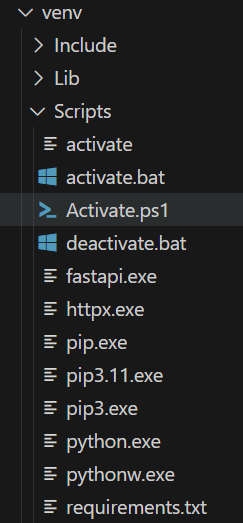
3. 파이썬 가상환경 만들기
vscode
가상환경 만들기
python -m venv venv
윈도우
cd venv
cd Scripts
activate (가상환경 실행)
맥
source venv/bin/activate
가상환경 비활성
deactivate
현재 가상환경에 설치된 모듈 확인
pip list
패키지 설치
pip install 패키지명
패키지 설치되어 있는지 확인
pip show 패키지명
패키지 제거
pip uninstall 패키지명
pip 버전 확인
pip --version
pip 업그레이드
python -m pip install --upgrade pip
현재 설치된 패키지 버전 저장
pip freeze > requirements.txt
저장된 패키지 모두 설치
pip install -r requirements.txt
from fastapi import FastAPI
import asyncio
import httpx

app = FastAPI()

# 뉴스 URL 목록
NEWS_URLS: list[str] = [
    "https://jsonplaceholder.typicode.com/posts/1",
    "https://jsonplaceholder.typicode.com/posts/2",
    "https://jsonplaceholder.typicode.com/posts/3"
]

# 요약 결과와 오류 타입을 dict로 타입힌트
async def fetch_and_summarize(url: str) -> dict[str, str]:
    timeout = httpx.Timeout(5.0)
    async with httpx.AsyncClient(timeout=timeout) as client:
        try:
            response = await client.get(url)
            data = await response.json()
            return {
                "url": url,
                "title": data.get("title", "No Title"),
                "summary": data.get("body", "")[:50] + "..."
            }
        except Exception as e:
            return {
                "url": url,
                "error": str(e)
            }

@app.get("/summaries")
async def get_summaries() -> dict[str, list[dict[str, str]]]:
    tasks = [fetch_and_summarize(url) for url in NEWS_URLS]
    results = await asyncio.gather(*tasks)
    return {"results": results}
venv 폴더