1. 필요성
부스트 캠프에서 제공하는 서버는 디스크 용량이 총 100G 정도 되는데 이게 허깅페이스에서 모델 몇번 다운 받다보면 터질... 수가 있다..
그래서 참사를 막고자 10분 정도 간격으로 디스크 용량에 변화가 있을 때만 채널에 알람을 주는 봇을 하나 만들기로 결정...
2. 그래서 어떻게 하나요?
1. https://api.slack.com/ 접속
가장 먼저 https://api.slack.com
요기 접속을 해주고
아래 화면에서

우측 상단에 Your Apps를 클릭해준다.
그리고 다시 아래 화면에서
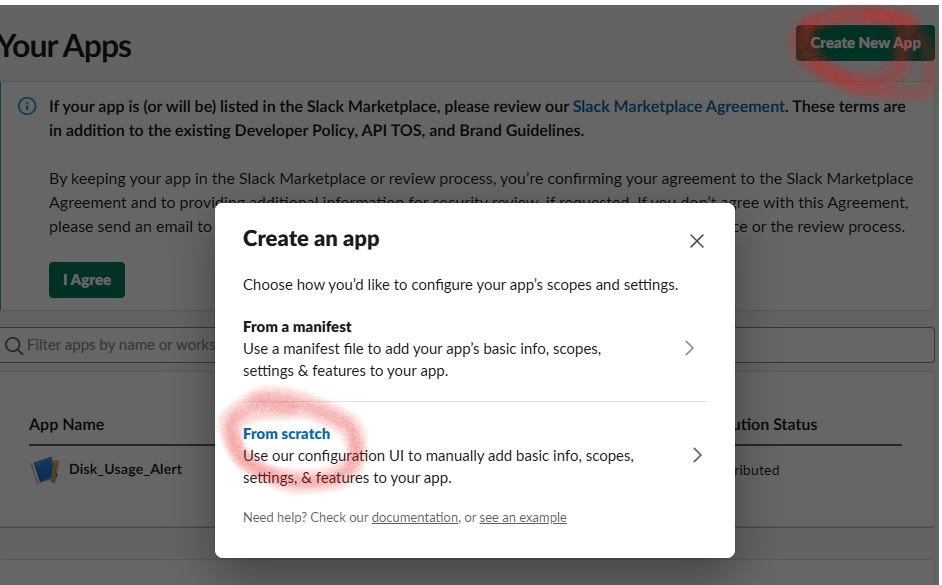
Create New App을 누르고
다시 또 From scratch를 누르면
아래와 같은 화면이 나올텐데
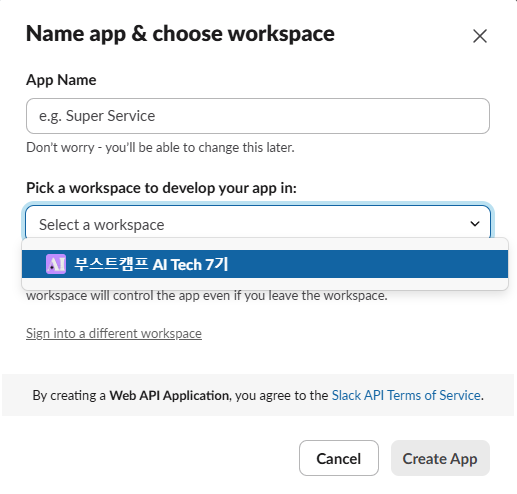
여기서 자기가 만들 슬랙 봇 이름을
App Name에 넣어주고
Pick a workspace to develop your app in 이 부분에는 자기 슬랙 봇을 넣어줄 workspace를 지정해준다.
그리고 Create App을 눌러주면
아래와 같은 화면으로 넘어가는데
다른거 신경쓰지 말고
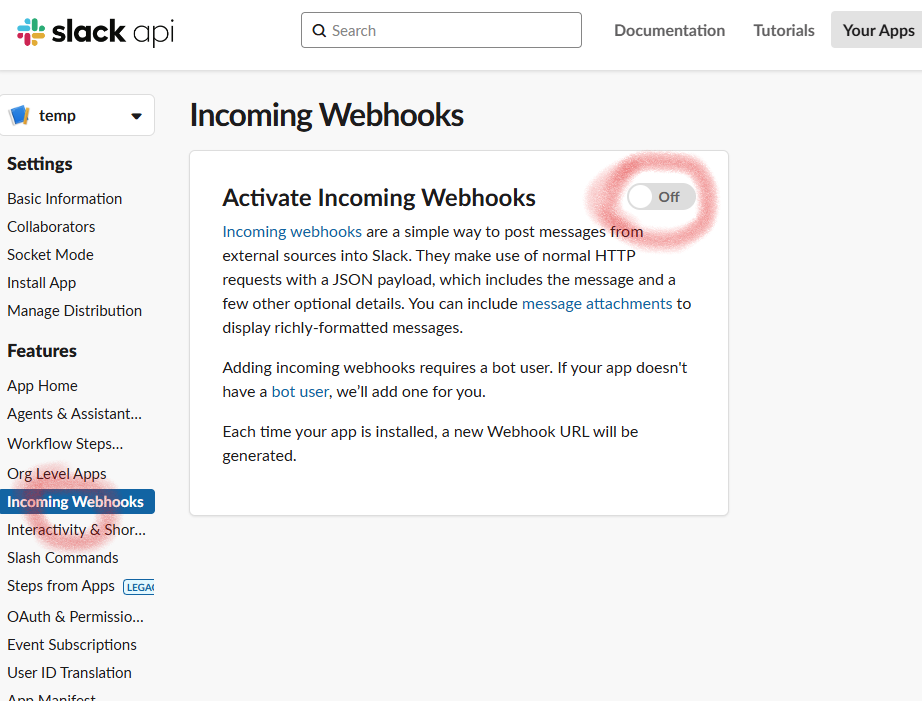
Incoming Webhooks클릭해서
아래와 같은 Activate Incoming Webhooks 화면이 나오면
Off로 되어 있던 것을 On으로 바꿔주면 된다.
그러면 이제 아래 화면처럼
Webhook URLs for Your WorkSpace
가 보일텐데
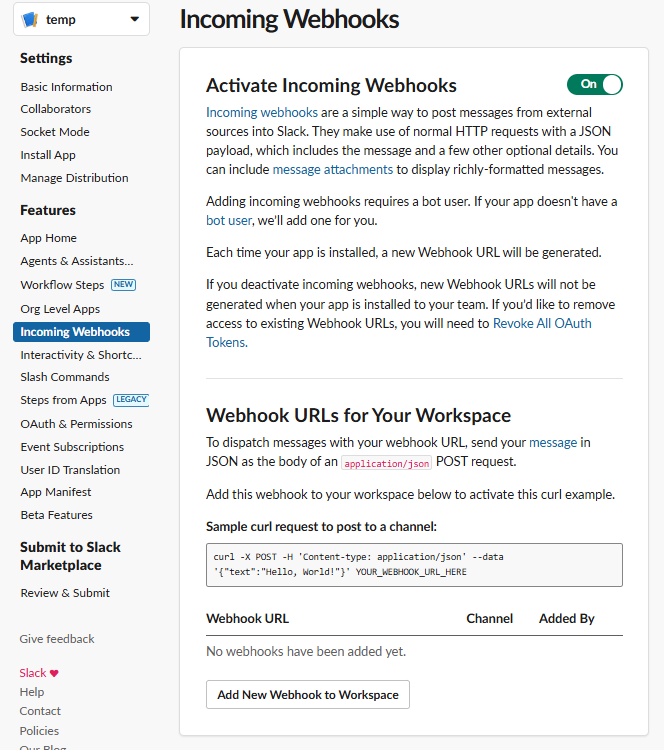
여기서 하단에 보이는
Add New Webhook to Workspace를 클릭해주고
아래 화면으로 전환되면
자기 팀의 용량 체크 알림을 띄울 채널을 선택해서
허용 버튼을 눌러주면 된다.
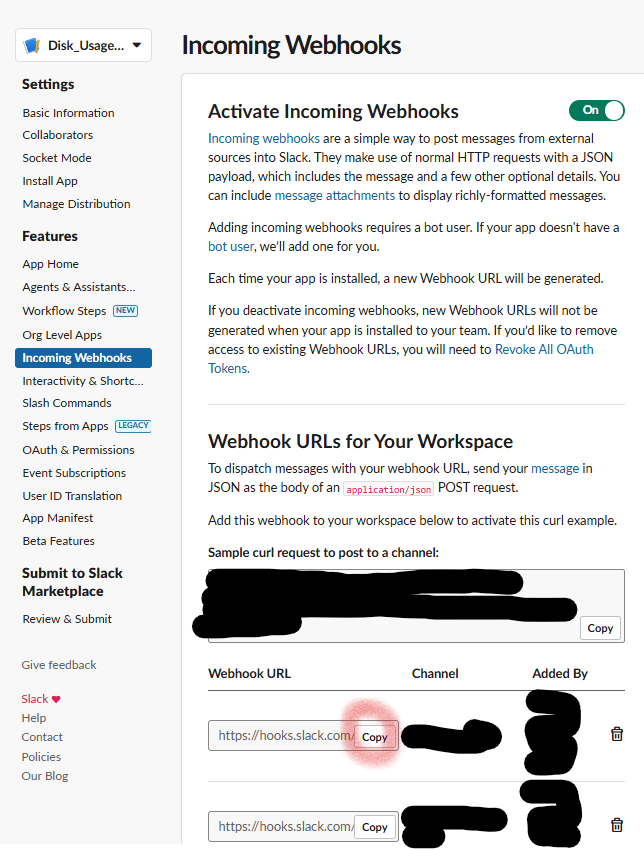
이후에는 이전에 봤었던
Incoming Webhooks 목차에서 아래처럼
자기 채널에 속하는 Webhook URL을 Copy 해서 잘 보관해두면 된다.
2. 스크립트 작성
이제 설정은 다 해줬으니까 실질적으로 실행할 코드를 작성하면 되는데
해당 내용은 이하를 참고하면 된다.
import subprocess
import time
import json
import requests
from pathlib import Path
import os

class DiskMonitor:
    def __init__(self):
        # Slack Webhook URL
        self.slack_webhook_url = "아까 copy한 Webhook URL"

        # 서버 정보 딕셔너리
        # ssh -i [키파일 경로] -p [포트넘버] root@[서버주소]
        self.servers = {
            "server1": ["키파일 경로", "포트 넘버", "서버주소"],
            "server2": ["키파일 경로", "포트 넘버", "서버주소"],
            "server3": ["키파일 경로", "포트 넘버", "서버주소"],
            "server4": ["키파일 경로", "포트 넘버", "서버주소"]
        }

        # Windows 환경에 맞는 파일 경로 설정
        self.data_dir = Path(os.path.expanduser("~")) / "disk_monitor_data"
        self.data_dir.mkdir(exist_ok=True)  # 디렉토리가 없으면 생성

        self.prev_values_file = self.data_dir / "disk_usage_prev.txt"
        self.current_values_file = self.data_dir / "disk_usage_current.txt"

        # 초기 실행 여부를 확인하기 위한 플래그 파일
        self.initial_run_file = self.data_dir / "initial_run.txt"

    def check_disk_usage(self):
        """각 서버의 디스크 사용량을 확인하고 저장"""
        current_values = {}

        for server_name, server_info in self.servers.items():
            key_path, port, ip = server_info

            try:
                # SSH 명령어 구성 (StrictHostKeyChecking=no 추가)
                ssh_command = [
                    "ssh",
                    "-i", key_path,
                    "-p", port,
                    "-o", "StrictHostKeyChecking=no",  # 호스트 키 검증 건너뛰기
                    "-o", "UserKnownHostsFile=/dev/null",  # known_hosts 파일 무시
                    f"root@{ip}",
                    "df -h | grep '/data/ephemeral' | awk '{print $4}'"
                ]

                # 명령어 실행
                result = subprocess.run(
                    ssh_command,
                    capture_output=True,
                    text=True,
                    timeout=30  # 타임아웃 설정
                )

                if result.returncode == 0:
                    avail = result.stdout.strip()
                    if avail:
                        current_values[server_name] = avail
                else:
                    print(f"Error on {server_name}: {result.stderr}")

            except subprocess.TimeoutExpired:
                print(f"Timeout while connecting to {server_name}")
            except Exception as e:
                print(f"Error checking {server_name}: {e}")

        return current_values

    def send_slack_message(self, message):
        """Slack으로 메시지 전송"""
        try:
            payload = {"text": message}
            response = requests.post(
                self.slack_webhook_url,
                json=payload,
                timeout=10  # 타임아웃 설정
            )
            if response.status_code != 200:
                print(f"Error sending Slack message: {response.status_code}")
        except Exception as e:
            print(f"Error sending Slack message: {e}")

    def send_initial_status(self, current_values):
        """모든 서버의 초기 상태를 Slack으로 전송"""
        message = "📊 현재 모든 서버의 디스크 사용량 현황\n\n"
        for server_name, value in current_values.items():
            message += f"• {server_name}: {value}\n"
        self.send_slack_message(message)

    def run(self):
        """메인 모니터링 로직"""
        # 현재 값 확인
        current_values = self.check_disk_usage()

        # 초기 실행 체크
        if not self.initial_run_file.exists():
            # 초기 상태 전송
            self.send_initial_status(current_values)
            # 초기 실행 표시
            with open(self.initial_run_file, 'w') as f:
                f.write('done')
            # 현재 값을 이전 값으로 저장
            with open(self.prev_values_file, 'w') as f:
                json.dump(current_values, f)
            return

        try:
            # 이전 값 로드
            with open(self.prev_values_file, 'r') as f:
                prev_values = json.load(f)
        except (json.JSONDecodeError, FileNotFoundError) as e:
            print(f"Error reading previous values: {e}")
            prev_values = {}

        # 변경사항 확인 및 알림
        for server_name, current_value in current_values.items():
            prev_value = prev_values.get(server_name)

            if current_value != prev_value:
                # 변화량 계산 (숫자로 변환하여 비교)
                try:
                    current_num = float(current_value.rstrip('G'))
                    prev_num = float(prev_value.rstrip('G')) if prev_value else 0
                    change = current_num - prev_num
                    change_str = f"({'증가' if change > 0 else '감소'}: {abs(change):.1f}G)"
                except (ValueError, AttributeError):
                    change_str = ""

                message = (
                    f"💾 디스크 사용량 변동 알림\n"
                    f"• 서버: {server_name}\n"
                    f"• 현재 가용량: {current_value}\n"
                    f"• 이전 가용량: {prev_value if prev_value else '정보 없음'}\n"
                    f"• 변동사항: {change_str}"
                )
                self.send_slack_message(message)

        # 현재 값을 이전 값으로 저장
        with open(self.prev_values_file, 'w') as f:
            json.dump(current_values, f)

def main():
    monitor = DiskMonitor()

    while True:
        try:
            monitor.run()
            print(f"모니터링 실행 완료: {time.strftime('%Y-%m-%d %H:%M:%S')}")  # 타임스탬프 추가
            time.sleep(600)  # 10분 대기
        except Exception as e:
            print(f"Error in main loop: {e}")
            time.sleep(600)  # 에러 발생시에도 10분 대기 후 재시도

if __name__ == "__main__":
    main()
3. 실행
python monitor.py위와 같이 실행해주면
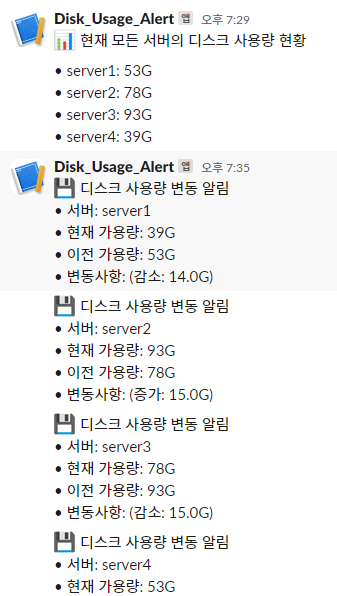
이제 슬랙 채널로 아래와 같이 알림이 갈 것이다