오늘 프로젝트 진행 내용
- 새로운 매개변수 추가해서 모델(LightGBM, XGBoost) 학습시키기
- Optuna를 이용해서 하이퍼 파라미터 튜닝하기
- 분류 threshold를 조절하면서 recall-precision 확인하기
# 확률값 예측
xgb_proba = final_model.predict_proba(X_test)[:, 1]  # 양성 클래스 확률값 가져오기

# 기본 임계값(0.5)으로 예측
xgb_pred = (xgb_proba >= 0.5).astype(int)

get_score('xgb with best params, threshold 0.5 |', y_test, xgb_pred)

# 최적의 threshold 찾기 - ROC Curve
from sklearn.metrics import roc_curve

fpr, tpr, thresholds = roc_curve(y_test, xgb_proba)
optimal_idx = (tpr - fpr).argmax()
optimal_threshold = thresholds[optimal_idx]

print(f"최적 임계값: {optimal_threshold}")
# 최적 임계값: 0.21580682694911957

# 최적의 threshold 찾기 - Recall-Precision Curve
from sklearn.metrics import precision_recall_curve

precisions, recalls, thresholds = precision_recall_curve(y_test, xgb_proba)
optimal_idx = (precisions * recalls).argmax()
optimal_threshold = thresholds[optimal_idx]

print(f"최적 임계값: {optimal_threshold}")
# 최적 임계값: 0.3881194591522217

# threshold 1
threshold = 0.22
xgb_pred_adjusted1 = (xgb_proba >= threshold).astype(int)

get_score('xgb with best params, threshold 0.22 |', y_test, xgb_pred_adjusted1)
# xgb with best params, threshold 0.22 | accuracy:  0.8378 f1_score:  0.6824 AUC:  0.8325 recall:  0.8234 precision:  0.5826

# threshold 2
threshold = 0.39
xgb_pred_adjusted2 = (xgb_proba >= threshold).astype(int)

get_score('xgb with best params, threshold 0.39 |', y_test, xgb_pred_adjusted2)
# xgb with best params, threshold 0.39 | accuracy: 0.8793 f1_score: 0.7105 AUC: 0.8137 recall: 0.7001 precision: 0.7211- 최종 결과물 비교
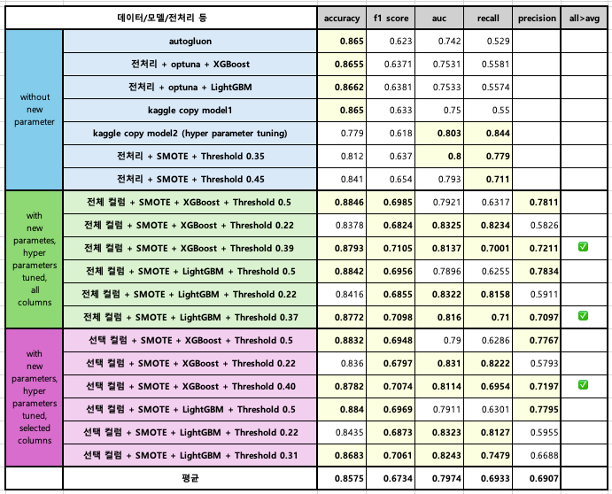
회고
잘한 점
- 맡은 일을 성실히 수행하였다.
- 적극적으로 팀플에 임하였다.
개선점
- 코드를 짤 때, 하나의 변수에 여러 결과를 덮어쓰지 말아야 겠다. 간단한 코드는 괜찮을지 모르지만 모델명이나 성능 지표의 경우 앞선 모델 및 결과가 사라져서 시간을 들여 다시 학습 시켜야 하는 불상사가 발생할 수 있다...
배운 점
- GBM, XGBoost, LightGBM 등의 부시팅 모델은 랜덤 포레스트 기반의 모델임에도 특정 클래스로 분류될 확률을 구할 수 있다! <- why? how? 프로젝트 끝나고 더 공부해보자.
To Dare is To Do