
1. 클래스 상속
- 기존의 클래스의 변수와 함수 그대로 이어받고 새로운 내용만 추가해서 클래스 생성
- 객체지향 프로그래밍의 주요 특징 중 하나
- 자식이 부모의 형질을 이어받는 관계와 유사하기 때문에 부모자식과의 관계로 표현
- 부모 클래스(parent class) : 상위클래스(up class), 기초클래스(base class)
- 자식 클래스(child class) : 하위클래스(sub class), 파생클래스(derived class)
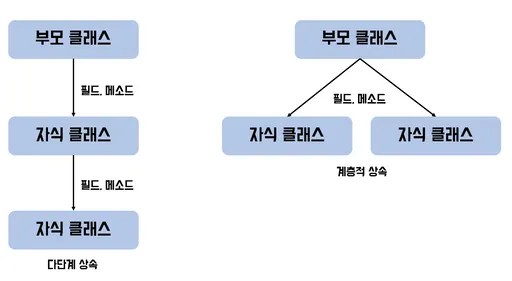
(1) 자식클래스 기본구조
- 클래스를 선언할때 소괄호() 안에 부모클래스 이름을 추가하여 선언
super.함수명()또는부모클래스명.함수명()을 사용해 부모클래스의 함수 호출
class 자식클래스명(부모클래스명):
    super().__init__([부모클래스의 속성값])
    [변수명]

    def 함수명(self, 인자1, 인자2, ..):
        [코드블록]
(2) 메서드 오버라이딩 (다형성)
- 부모클래스에서 정의된 메서드를 자신에 맞게 수정하여 사용 가능
- 자식클래스에서 메서드를 재정하므로 메서드 오버라이딩이라고 함
- 같은 이름의 메서드가 다양한 방법으로 동작하여 유연한 코드 작성 및 확장에 용이
class Animal:
    def sound(self):
        return "동물이 소리를 낸다"

class Dog(Animal):
    pass

class Cat(Animal):
    def sound(self):
        return "야옹"

dog = Dog()
cat = Cat()

dog.sound(), cat.sound()
(3) 연습문제
Shape라는 부모클래스가 있을때 Retangle, Circle, Triangle이라는 자식클래스를 구현
- Shape의 속성 : shape (도형의 형태)
- area()메서드를 오버라이드하여 각 도형의 형태에 따라 넓이를 구한다.
import math
class Rectangle(Shape):
    def __init__(self, width, height):
        super().__init__("rectangle")
        self.width = width
        self.height = height

    def area(self):
        return self.width * self.height

    # def display(self):
    #     print(f"The area of the {self.shape} is {self.area()}.")

class Circle(Shape):
    def __init__(self, r):
        super().__init__("circle")
        self.r = r

    def area(self):
        return math.pi * (self.r**2)

    # def display(self):
    #     print(f"The area of the {self.shape} is {self.area()}.")

class Triangle(Shape):
    def __init__(self, width, height):
        super().__init__("triangle")
        self.width = width
        self.height = height

    def area(self):
        return (self.width * self.height)/2

    # def display(self):
    #     super().display()
    #     print(f"The area of the {self.shape} is {self.area()}.")

shapes = [Rectangle(5, 10), Circle(7), Triangle(5,8)]

for shape in shapes:
    shape.display()
    print("Area:", shape.area())
Person 클래스를 만들고, 이를 상속받아 Teacher 클래스를 만들고, 또 이를 상속받아 Student 클래스를 구현
Person의 속성 :name(이름),job_title(직업)Teacher의 추가 속성 :subject(과목)Student의 추가 속성 :grade(학년)display()메소드를 오버라이드하여 직업에 따라 다음과 같이 출력해보자.- Person : "My name is {name} and I am a {job_title}"
- Teacher : "My name is {name} and I am a {job_title} of {subject}."
- Student : "My name is {name} and I am a {job_title} studying {subject} in {grade}."
class Person:
    def __init__(self, name, job_title='job seeker'):
        self.name = name
        self.job_title = job_title

    def display(self):
        print(f"My name is {self.name} and I am a {self.job_title}.")

class Teacher(Person):
    def __init__(self, name, subject):
        # super().__init__(name, "teacher")
        super().__init__(name)
        self.job_title = "teacher"
        self.subject = subject

    def display(self):
        print(f"My name is {self.name} and I am a {self.job_title} of {self.subject}")

class Student(Teacher):
    def __init__(self, name, subject, grade):
        super().__init__(name, subject)
        self.job_title = "student"
        self.grade = grade

    def display(self):
        print(f"My name is {self.name} and I am a {self.job_title} studying {self.subject} in {self.grade}.")

s1 = Student("Lee", "math", 3)
s1.display()
t1 = Teacher("Kim", "math")
t1.display()
p1 = Person("Park")
p1.display()
2. 모듈 & 패키지 & 라이브러리
- 모듈(module) : 함수나, 변수, 클래스, 다른 모듈 등을 모아놓은 파일
- 패키지(package) : 여러 모듈을 모아놓은 디렉토리
- 라이브러리(Library) : 모듈과 패키지의 집합
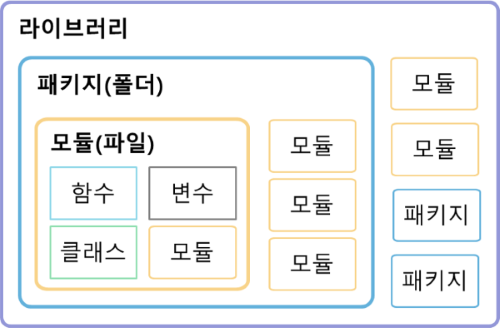
- import 패키지명.모듈명 또는 from 패키지명 import 모듈명를 통해 호출
- import 모듈명 as 별칭의 형태로 별칭을 지정하여 모듈 호출 가능
3. 예외 처리
- 예외(exception) : 프로그램 실행 중 만날 수 있는 예기치 못한 상황
(1) 예외 종류
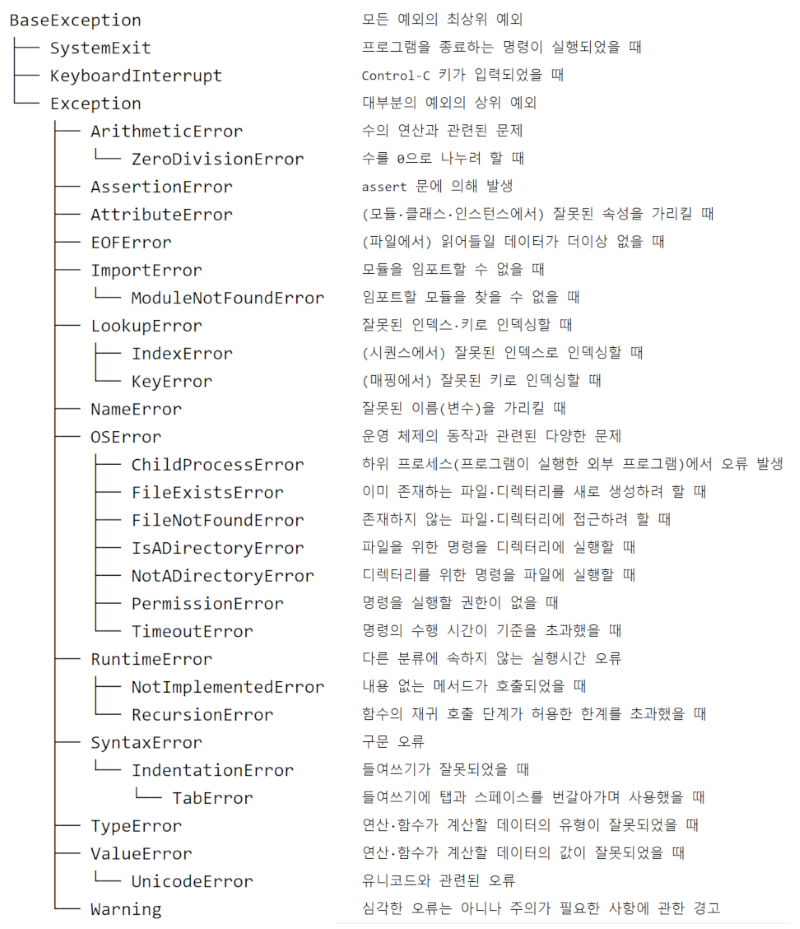
(2) 예외 발생시 처리하는 구문
try:
    예외 발생 가능한 실행문
except:
    예외 종류에 상관없이 발생만 하면 except 블록 실행문
except 예외:
    예외 발생시 실행할 명령문
except (예외1, 예외2):
    예외 발생시 실행힐 명령문
except 예외 as e:
    예외 발생시 실행할 명령문과 오류 메시지 내용 확인
else:
    예외가 발생하지 않을 경우 실행할 명령문
finally:
    예외 발생 여부와 상관없이 실행할 명령문(주로 리소스 반납)
(3) 모든 예외들은 BaseException 상속
class OperException(Exception):
    def __init__(self, msg):
        self.msg = msg
    def __str__(self):
        return "error message : {}".format(self.msg)

def printGugudan(dan):
    if dan < 2 or dan > 9:
        raise OperException("2~9단만 가능")
    for i in range(1,10):
        print("{} * {} = {}".format(dan, i, dan*i))

try:
    print("구구단 시작")
    printGugudan(1)
    print("구구단 끝")
except OperException as e:
    print("구구단 오류", e)
(4) 연습문제
calculator함수를 만드는데 다음와 같은 예외에 대하여 예외처리를 해보자.
- 인자 :
num1, num2, operation - 예외
- TypeError : num1과 num2가 숫자 아닌 경우의 에러
- ValueError : operation이 "+, -, *, /"중에 없을 경우의 에러
- ZeroDivisionError : 0으로 나눌 경우의 에러
def calculator(num1, num2, operation):
    try:
        if not isinstance(num1, (int,float)) or not isinstance(num2, (int,float)):
            raise TypeError("숫자를 입력해주세요.")

        if operation == "+":
            result = num1+num2
        elif operation == "-":
            result = num1-num2
        elif operation == "*":
            result = num1*num2
        elif operation == "/":
            if num2 ==0:
                raise ZeroDivisionError("0으로 나눌 수 없습니다.")
            else:
                result = num1/num2
        else:
            raise ValueError("해당 연산자는 계산할 수 없습니다.")
    except TypeError as te:
        print("Error :", te)
    except ZeroDivisionError as ze:
        print('Error:', ze)
    except ValueError as ve:
        print('Error:', ve)
    else:
        print("계산 결과 =", result)
    finally:
        print("계산기를 종료합니다.")


calculator(10, 2, "+")  	# 정상 입력
calculator(10, "a", "+")  	# TypeError: num2가 숫자가 아님
calculator(10, 0, "/") 		# ZeroDivisionError: 0으로 나누기
calculator(10, 2, "^") 		# ValueError : operation이 사칙연산자가 아님
3. 입력과 출력
(1) 화면 출력
- 기본 출력
print()
(2) 형식 지정 출력
-
나머지연산자(%)를 이용한 형식 및 위치지정
- %type : %s, %d(%i), %f, %o, %x
- %f : 소수점 6자리까지만 출력
- %.nf : 소수점 n자리까지만 출력
r = 3
PI = 3.14159265358979
print("반지름: %d, 원주율: %f" % (r, PI)) 	# 지정된 위치에 데이터 출력

print("반지름: %d, 원주율: %.2f" % (r, PI)) #소수점 2자리까지 출력- string.format(0을 이용한 형식 및 위치 지정
print("{0}, {1},{2},...{n}".format(data0, data1, data2,...datan))
animal_0 = "cat"
animal_1 = "dog"
animal_2 = "fox"

print("Animal: {0}".format(animal_0))
print("Animal: {0},{1},{2}".format(animal_0, animal_1, animal_2))- 포맷지정라를 통해 출력 형식 지정
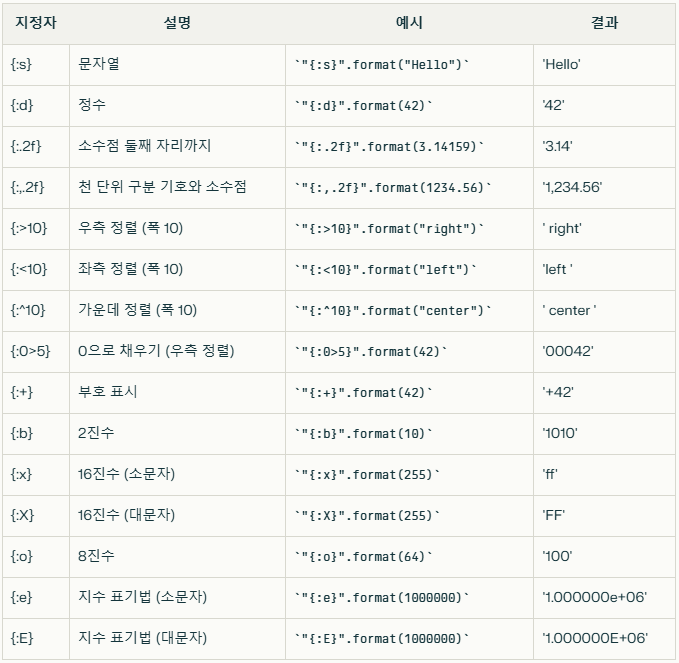
(3) 키보드 입력
- input()을 이용해 키보드로 데이터를 입력받아서 처리
data = input("문자열")
# 정사각형의 변의 길이를 입력받아 넓이를 구하는 예제
a = input("정사각형 한 변의 길이는?: (정수로 입력)")
area = int(a) ** 2                          # 입력데이터를 'int'로 변환하여 계산
print("정사각형의 넓이: {}".format(area))

# 숫자형의 입력의 경우, 입력되는 숫자가 정수인지 실수인지 모를때 `float()`를 이용
b = float(input("정사각형 한 변의 길이는?: (숫자로 입력하세요)"))
area = b ** 2                        # 입력데이터를 'float'로 변환하여 계산
print("정사각형의 넓이: {}".format(area))
hyeeun-techlog