
1. 파일 읽고 쓰기
(1) 파일 열기
- 내장함수 open(0 이용하여 파일을 열기
f = open('file_name', 'mode')
(2) 파일열기 속성 (mode)
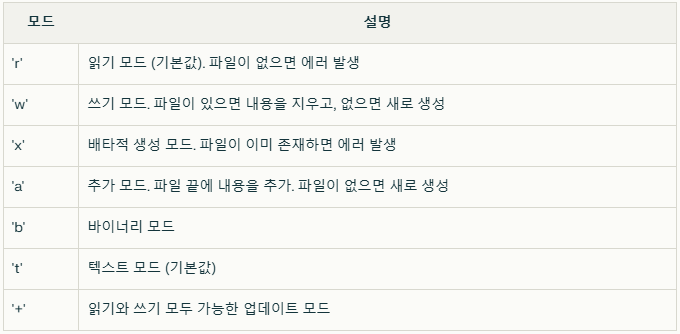
(3) 파일 쓰기
- 파일을 쓰기모드로 열기
- write() : print()에서 사용하는 출력방식 동일하게 이용 가능
- close() : 파일을 열고 지정한 내용을 쓴 후에 파일 닫기
f= = open('file_name', 'w')
f.write(str)
f.close()
(3) 파일 읽기
- 파일을 읽기모드로 열기
- 해당 파일이 없을 경우 에러 발생(FileNotFoundError)
- read() : 파일의 모든 내용을 읽기
- close() : 파일 닫기
f = open('newFile.txt','a')         # 파일을 추가 모드로 열기
for i in range(6,11):               # for문: i가 6~10까지 반복
    data = "%d번째 줄입니다.\n"%i
    f.write(data)
f.close()
(4) 반복문을 이용해 파일 읽고 쓰기
- 파일에 문자열 한 줄씩 쓰기
for문을 이용해 반복하여 문자열 쓰기
try:
    f = open('myFile.txt', 'r') # 'myFile.txt' 파일 읽기 모드로 열기
    file_text = f.read()        # 파일 내용 읽은 후에 변수에 저장
    f.close()                   # 파일 닫기
except FileNotFoundError as e:
    print(e)
else:
print(file_text) # 변수에 저장된 내용 출력- 파일에서 문자열 한 줄씩 읽기
readline(): 파일에서 한줄을 읽고 반환readlines(): 모든 줄을 읽어들인 후 리스트로 반환- 문자열을 한줄씩 읽으면 "\n"이 포함되어 있음
# while문을 이용하여 파일 한줄씩 읽기
f = open("newFile.txt", 'r')  # 파일을 읽기 모드로 열기
line = f.readline()              # 문자열 한 줄 읽기
while line:                      # line이 공백인지 검사해서 반복 여부 결정
    print(line, end="")          # 문자열 한 줄 출력(줄 바꿈 안 함)
    line = f.readline()          # 문자열 그 다음 한 줄 읽기
f.close() # 파일 닫기
(5) with문을 이용해 파일 읽고 쓰기
- 파일을 읽고 쓴 후
close()로 파일 닫기가 필요 - with문을 사용할 경우 파일을 자동을 닫음
with open('file_name', 'mode') as f:
    [명령문]

with open('file_name', 'w') as f:
    f.write(str)

with open('file_name', 'r') as f:
    data = f.read()
(6) 연습문제
'gugudan9.txt' 파일의 내용을 한줄씩 출력
9 x 1 = 9
9 x 2 = 18
...
9 x 9 = 81
with open("gugudan9.txt", 'r') as f:
    for line in f.readlines():
        print(line, end="")
(7) 웹페이지를 통해 파일 생성
requests라이브러리 사용
import requests
# requests로 획득한 데이터를 txt파일로 저장
url = "https://docs.python.org/3.12/whatsnew/3.12.html#math"
response = requests.get(url)
if response.status_code == 200: #상태코드 확인 200이 성공
    with open('python_doc.txt', 'w') as f:
f.write(response.text)wget사용
# !wget을 이용하여 파일 저장
!wget https://docs.python.org/3.12/whatsnew/3.12.html#math -O python_math.txtgdown라이브러리 사용
import gdown
gdown.download("<파일 다운로드 URL>", "<파일명>")
(8) 파일의 인코딩 형식
# 인코딩 형식 확인하기
import chardet
chardet.detect(data)

# 인코딩 형식지정하여 파일 읽기
with open(<파일명>, encoding=<인코딩형식>) as f:
	data = f.read()
(9) 다른 경로의 파일 열기
- 동일한 경로에 있지 않는 경우 파일 열기 불가
- 폴더 위치 지정 및 파일명을 통해 파일 열기
# 폴더위치 지정
folder = "폴더명"
# 파일명 지정
file = "파일명"
# 경로결합
file_path = os.path.join(folder, file)

folder = "/content/drive/MyDrive/LikeLion/!수업자료"
for file in os.listdir(folder):
    file_path = os.path.join(folder, file)
    print(f"{file} :{file_path}")
2. CSV 파일
(1) CSV 파일 열기
# "\n"문자열 제거, 각 행의 콤마(,)를 기준으로 문자열 분할
with open('sample_data.csv', 'r') as c:
    for line in c:
        line = line.rstrip("\n")
        print(line.split(','))
(2) csv모듈을 이용한 파일 읽기/쓰기
import csv
# `csv.reader`메서드를 활용한 읽기
with open('sample_data.csv', 'r') as c:
    csvrows = csv.reader(c)

    header = next(csvrows) # 첫번째줄을 읽어서 header에 저장
    print("header", header)

    for row in csvrows:
        print(row)

# `csv.DictReader`메서드를 활용한 읽기
with open('sample_data.csv', 'r') as c:
    rows = csv.DictReader(c)

    for row in rows:
        print(row)

#  `csv.writer`메서드를 활용한 쓰기
with open('output.csv', 'w') as c:
    rows = csv.writer(c)

    # 헤더 작성
    rows.writerow(['Name', 'Age', 'City'])

    # 데이터 작성
    rows.writerow(['Alice', 30, 'New York'])
    rows.writerow(['Bob', 25, 'Los Angeles'])

# `csv.DictWriter`메서드를 활용한 쓰기
with open('outputDict.csv', 'w') as c:
    fieldnames = ['Name', 'Age', 'City']
    rows = csv.DictWriter(c, fieldnames=fieldnames)

    # 헤더 작성
    rows.writeheader()

    # 데이터 작성
    rows.writerow({'Name': 'Alice', 'Age': 30, 'City': 'New York'})
    rows.writerow({'Name': 'Bob', 'City': 'Los Angeles'})
3. Numpy
- Python을 사용한 과학 컴퓨팅의 기본 패키지 (벡터의 산술연산 가능)
- 반복문 없이 전체 데이터 배열 일괄 연산기능 제공
- 선형대수, 난수 생성, 푸리에 변환 등을 제공
- 모든 요소가 동일한 데이터 타입이어야 함
(1) Array 생성
- Numpy에서 Array를 만들기 위한 방법
- 순서형 데이터 (list, tuple)로 부터의 변환
- array 함수 이용
- Numpy Array 생성 함수 이용
- arange, ones, zeros, linspace 함수 이용
- 순서형 데이터 (list, tuple)로 부터의 변환
# 2차원 배열 생성
np.array([[1,2,3],
          [4,5,6],
[7,8,9]])- arange 함수를 이용한 배열 생성
numpy.arange(start, stop, step)- 수의 범위를 만들어 주는 함수로, range와 다르게 실수 범위도 생성 가능
- step이 존재한다면 start도 존재해야 함
np.arange(0.1, 1.1, 0.1)- linspace 함수를 이용한 배열 생성
- 수의 범위를 균일하네 나누고자 할 때 사용
numpy.linspace(start, stop, num, endpoint=True)
- 수의 범위를 균일하네 나누고자 할 때 사용
np.linspace(1, 10, 3)- 기타 함수를 이용한 배열 생성
ones(shape): 1로 채워진 배열zeros(shape): 0으로 채워진 배열full(shape,value): value로 채워진 배열eye(N),indentity(N): N차원 단위행렬
(2) Numpy Array 속성
ndim: ndarray의 차원shape: 각 차원의 ndarray 크기를 튜플 형태로 나타냄size: ndarray에 있는 요소의 총 수dtype: ndarray의 데이터 유형T: 전치행렬, ndarray의 전치된 결과 반환(행열 바꾸기)
(3) 배열 형태 변경
- Numpy Array의 가장 큰 장점은 형태(shape)를 자유자재로 변경 가능
- 단, 변경 전 데이터 개수와 변경 후 데이터의 개수(size)는 같아야 함
reshape(shape)함수를 이용- -1은 딱 한번만 사용할 수 있으며, 자동으로 적절한 형태를 계산
array.reshape(shape)
numpy.reshape(array, shape)
(4) 데이터 유형 변경
- Numpy Array를 생성시 dtype 지정을 생략하는 경우 자동으로 데이터 타입 결정
- 이미 만들어진 배열의 데이터 유형 변경하기 위해서는
astype함수 또는 특정 데이터 유형의 이름을 가진 함수 사용
array.astype(nupmy.datatype)
numpy.datatype(array)
array.astype('datatype')
(5) Numpy Array 인덱싱
- 인덱스(index)는 배열에서도 활용가능하며, 특정 요소를 빠르게 참조 가능
- 순서형 자료에서 사용한 것과 동일하게 대괄호([])를 사용
- Numpy에서는 대괄호 한번만 사용됨
- list[0][1]
- array[0,1]
- 인덱싱, 조건인덱싱, 팬시(Fancy)인덱싱 지원
(5)-1 인덱싱
[행 인덱스, 열 인덱스]
array[-1,-1]
(5)-2 조건 인덱싱
- Boolean Array를 이용하여 인덱싱하는 방법
- Boolean Array의 값이 True값을 가지는 위치의 값을 선택
- 항상 1차원 Array를 출력
- 배열의 조건을 비교하는 경우, element wise연산으로 인해 각 요소별 결과(True, False)값을 가지게 됨
array[boolean array]
array[<조건문>]

array[array % 2 ==0]
array[array > 5]
(5)-3 팬시 인덱싱
- 다른 Array를 이용하여 인덱싱하는 방법
- 선택하고자 하는 위치를 Array로 묶어서 데이터 접근 가능
row = [0,1]
col = [2,1]
a1 =array[row,col]
array[0,2] =10
array,a1
(6) Numpy Array 슬라이싱
- 콜론(:)을 사용하여 특정 범위의 값에 접근 가능
- 슬라이싱 시 고려사항
- Numpy는 다차원배열(ndarray)을 염두하고 설계되었기 때문에 데이터의 복사를 남발하지 않음
- 원본 배열을 슬라이싱하여 새로운 배열을 만든 경우, 새로운 배열은 원본과 값을 공유하고 속성은 별도로 관리함
- 슬라이싱한 새 배열을 수정하면 원본 배열도 수정됨
- 값은 복사하여 저장하고 싶은 경우 copy() 함수를 이용 또는 팬시 인덱싱 사용
4. Numpy 주요 함수
(1) np.where(조건, [,x,y])
- 조건을 만족하는 요소의 위치를 반환 (row, col)
- x,y를 지정하는 경우, 값이 대체된 배열을 반환
- x : 요소의 조건이 True인 경우 지정할 값
- y : 요소의 조건이 False인 겨우 지정할 값
(2) 난수 배열 생성 np.random
numpy.random.rand(shape)
numpy.random.randint(low, high, size=shape)
numpy.random.normal(loc=평균, scale=표준편차, size=shape)
(3) 통계함수
- Numpy는 배열의 주어진 요소로부터, 최소, 최대, 백분위수, 표준편차, 분산 등을 찾는 통계함수가 존재
- 통계 함수는 배열에서 요소별로 작동하며, axis옵션을 통해 연산 방향을 지정할 수 있음
- axis 지정이 안된 경우 모든 요소의 연산 결과가 반환
- axis=0 : 행과 행의 연산 결과를 반환
- axis=1 : 열과 열의 연산 결과를 반환
- min, max, sum, mean, std, var
argmin, argmax, prod, cumsum, cumprod 등
(4) Numpy 입출력
- Numpy 배열을 파일로 저장 또는 저장된 파일에서 Numpy배열을 불러올수 있음
- Numpy배열을 파일로 저장하기 위해
savesavez함수 이용 - 파일에서 불러오기 위해
load함수 이용
- Numpy배열을 파일로 저장하기 위해
numpy.save(<파일명>, array)
numpy.savez(<파일명>, **arrays)
numpy.load(<파일명>)
(5) 연습문제
- 아래의 배열에서 대각선의 값을 모두 선택
five =np.array([[28,  2, 11],
				[27, 27, 21],
 				[11,  5, 24]])

five[[0,1,2],[0,1,2]]- 아래의 배열에 대하여 다음을 값을 출력
- 행별 평균
- 축별 표준편차
- 행별 누적합
- 축별 누적곱
seven= np.array([[ 7, 47, 84,  6, 46],
				 [17, 28,  4, 62, 27],
				 [77, 85, 64, 73,  4]])

seven.sum()

s1 = [ 7, 47, 84,  6, 46]
sum(s1)/len(s1)

seven.mean(axis=1)

seven.std(axis=0)

seven.cumsum(axis=1)

seven.cumprod(axis=0)
hyeeun-techlog