
Button 🛠
React Native에서는 기본적으론 Button 컴포넌트를 제공해주는데요, 프론트 개발자 분들이 Web 개발에서 사용하는 button의 요소와는 다소 차이가 있습니다.
✅ 특징
- 필수
props로title과onPress를 요구합니다. - 사용자 정의 스타일링에 제한이 있습니다.
color prop으로 스타일링을 할 수 있지만,iOS와Android에서 다르게 적용되는 이슈가 있습니다.
이러한 제한으로 인해, 우리는 더 유연한 Button 컴포넌트 구현을 위한 대안이 필요합니다.
import { Button } from 'react-native';

<Button
	title="Press me"
    onPress={() => console.log('pressed')}
/>
"모든 플랫폼에서 멋지게 렌더링 되어야 하는 기본 버튼 구성 요소입니다.
최소한의 사용자 정의 수준을 지원합니다.
이 버튼이 앱에 적합하지 않은 경우Pressable을 사용하여 직접 버튼을 빌드 할 수 있습니다."
-React Native 공식문서-
TouchableOpacity 🛠
TouchableOpacity는 터치 이벤트에 반응하여 불투명도를 변경함으로써 시각적 피드백을 제공하는 컴포넌트입니다.
✅ 특징
- 간단한 클릭 이벤트 처리에 적합합니다.
iOS와Android에서 동일한 동작이 보장됩니다.- 커스텀 스타일링이 가능합니다.
🚨 But, 터치 이벤트의 세부적인 제어(ex: onPressIn, onPressOut, onLongPress 등)가 Pressable 보다 부족합니다.
import { TouchableOpacity, Text } from 'react-native';

<TouchableOpacity onPress={() => console.log('Clicked!')} activeOpacity={0.7}>
  <Text>Click Me</Text>
</TouchableOpacity>
Pressable (React Native 0.63+) 🛠
Pressable 은 React Native 0.63 버전부터 도입된 새로운 컴포넌트로, 더욱 세밀한 터치 이벤트 제어를 가능하게 합니다. 기존의 TouchableOpacity 보다 더 광범위하게 사용자 상호 작용을 처리하도록 설계되었습니다.
✅ 특징
- 유연한 터치 이벤트 관리가 가능합니다(onPress, onPressIn, onPressOut, onLongPress 등)
- 터치 영역 및 z-index 조정이 용이합니다.
- style을 함수로 전달 가능하여 상태별 동적 스타일 적용 가능
- iOS와 Android 간 일관된 동작을 제공합니다.
- 성능 최적화가 개선되었습니다.
✅ Touch Event
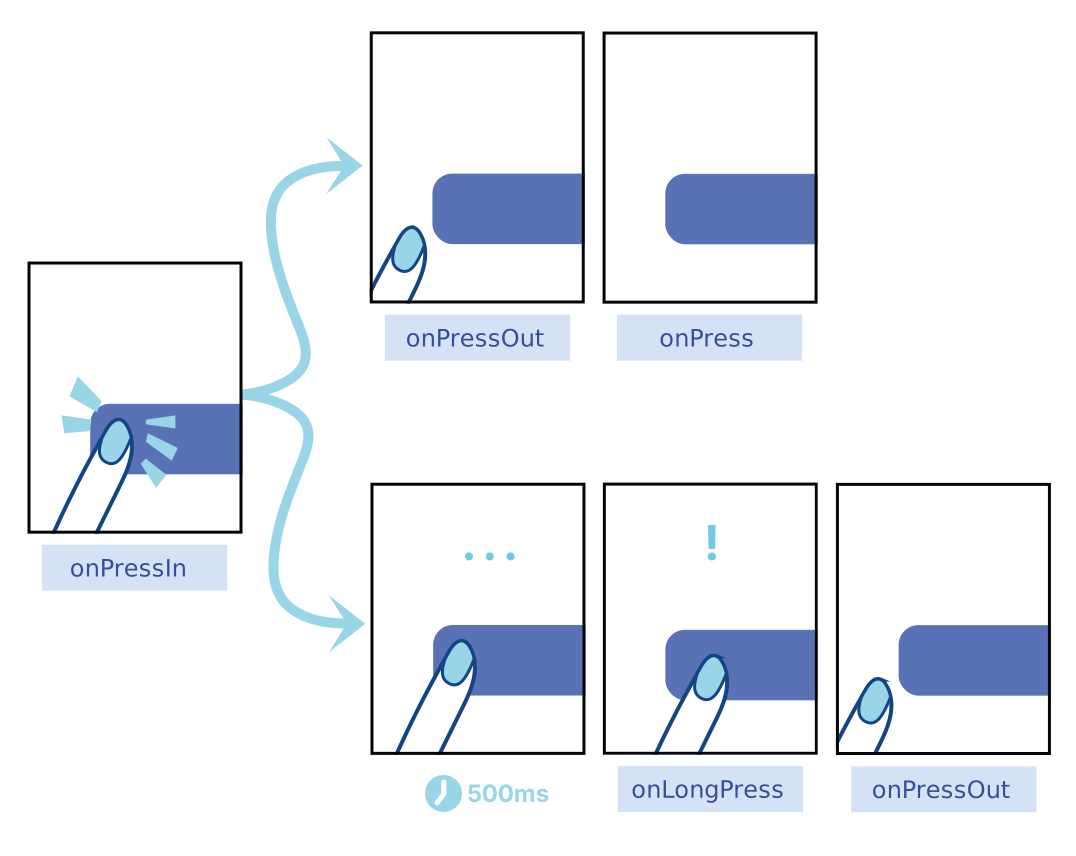
import { Pressable, Text } from 'react-native';

<Pressable
  onPress={() => console.log('Pressed!')}
  onPressIn={() => console.log('Pressed In')}
  onPressOut={() => console.log('Pressed Out')}
  // style={({ pressed }) => ...} → 터치 상태에 따라 스타일 동적 적용 가능
  style={({ pressed }) => ({
    backgroundColor: pressed ? 'lightgray' : 'white',
    padding: 10,
    borderRadius: 5,
  })}
>
  <Text>Press Me</Text>
</Pressable>;
React Native 팀은 대부분의 경우 Pressable의 사용을 권장하고 있습니다.
TouchableOpacity vs Pressable 🥊
-
기본 클릭 이벤트 :
✅ TouchableOpacity
✅ Pressable -
터치 시 투명도 조절 :
✅ TouchableOpacity(기본 제공)
🔺 Pressable(직접 스타일 적용 필요) -
유연한 터치 이벤트 제어(onPressIn, onLongPress 등) :
🔺 TouchableOpacity(제한적)
✅ Pressable -
동적 스타일 적용(pressed 상태) :
❌ TouchableOpacity
✅ Pressable -
React Native 최신 권장 :
❌ TouchableOpacity
✅ Pressable
✔ 간단한 버튼 → TouchableOpacity
✔ 터치 이벤트를 세밀하게 관리할 경우 → Pressable (추천!) 🚀
reference 📝
https://reactnative.dev/docs/button
https://reactnative.dev/docs/touchableopacity
https://reactnative.dev/docs/pressable