
📂안다르 모바일 클론 코딩
- 사이트명: 애슬래저 1위, 안다르
- 사용언어: HTML5, CSS3, js
- 라이브러리: Swiper, jquery
- 유형: mobile
- 💻 https://hyesukhan.github.io/230920_andar/
✅ Check Point
✔ 사이드네비게이션 dimmed처리와 스크롤 막기
✔ 이미지 색상 반전
✔ 스크롤바 숨기기
✔ 선택영역 만들기
✔ skipNav
✔ grid swiper
1.사이드네비게이션 dimmed처리와 스크롤 막기
jquery
     $('.header-top .menu').click(function(){
      $('.side-nav').addClass('on');
      $('body').addClass('hidden');
    })
menu버튼 클릭시 body에 hidden 클래스 추가한다.
CSS
.hidden{
    overflow: hidden;
}
.hidden .dimmed{
    position: fixed;
    width: 100%;
    height: 100%;
    top: 0;
    left: 0;
    right: 0;
    bottom: 0;
    background: rgba(0, 0, 0, 0.5);
    z-index: 80;
}
hidden일때 overflow hidden을 주어서 스크롤을 막고, dimmed를 꾸민다.
2.이미지 색상 반전
SVG는 Scalable Vector Graphics의 약자로, 확장 가능한 벡터 그래픽스를 나타낸다. 이는 XML 기반의 벡터 이미지 형식으로, 정적 및 동적 그래픽을 표현하는 데 사용된다. SVG 이미지는 크기를 조절하거나 확대/축소해도 이미지의 품질이 손상되지 않는 벡터 형식을 사용하며, 웹 브라우저에서 지원되므로 웹 페이지에서도 효과적으로 사용할 수 있다.
header.on .header-top svg{
    filter:invert(1);  //이미지 색상 반전
}
header.on .header-top svg{
    fill:#fff;  //svg 이미지라면 fill값을 통해 색상을 변경 할 수 있다.
}
3.스크롤바 숨기기
.header-inner .header-bottom .menu-list{
    overflow-x: scroll;
    -ms-overflow-style: none;
    scrollbar-width: none;
}
.header-inner .header-bottom .menu-list::-webkit-scrollbar {
	display:none
}
모든 브라우저에서 스크롤바를 없애려면 두가지 코드가 필요하다.
.클래스명::-webkit-scrollbar {
display:none
}
-ms-overflow-style: none;
scrollbar-width: none;
속성을 사용해 스크롤바를 없앨 수 있다.
4.선택영역 만들기
html
 <li class="prd-item">
    <a href="" class="link"></a> //클릭영역으로 만들 a태그
    <div class="thumb-box">
    	<em class="rank">4</em>
  	 	<img class="img" src="./assets/images/best4.jpg" alt="[워셔블]드림니트 맨즈 롱슬리브" />
 	   <div class="icons">
    		<img src="./assets/images/icon-new.png" alt="">
    	</div>
    </div>
    <div class="text-area">
       <button class="review">리뷰 4,717</button> //인덱스로 위로 올려줄 button 태그
       <p class="name">[워셔블]드림니트 맨즈 롱슬리브</p>
       <div class="price-area">
      	 <em class="percent">38%</em>
       	 <em class="price">89,000</em>
      	 <del class="regular">144,000원</del>
   	   </div>
   	  <div class="tag-area">
    	 <span class="tag">가을 페스티벌 한정혜택(~9/25)</span>
   	  </div>
   </div>
 </li>
css
.prd-list .link{
    position: absolute;
    top: 0;
    left: 0;
    right: 0;
    bottom: 0;
    z-index: 2;
}
.prd-list .text-area .review{
    position: relative;
    margin-top: 6px;
    color: #8e1f29;
    font-size: 13px;
    font-weight: 600;
    z-index: 3;
}
.link영역을 absolute로 띄우고 펼친다. 그리고 button태그는 더 위에 있어야하므로 z인덱스값을 더 높게 준다.
5.skipNav
html
 <div id="skipNav">
     <a href="#main">본문내용 바로가기</a>
 </div>
css
#skipNav{
    position: absolute;
}
#skipNav a{
    position: absolute;
    width: 150px;
    top: 0;
    left: 0;
    background: #000;
    color: #fff;
    text-align: center;
    transform: translateY(-100%);
}
#skipNav a:focus,#skipNav a:active{
    transform: translateY(0);
}
탭했을때 본문으로 바로 갈 수 있도록 하는 역할
5. grid swiper
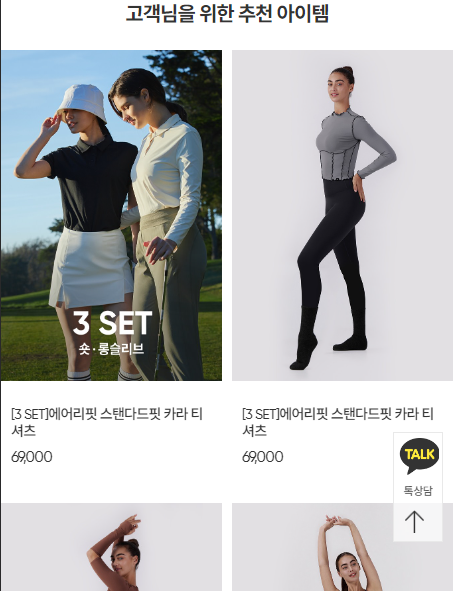
    var swiper2 = new Swiper(".sc-recomm .swiper", {
      slidesPerView: 2,
      grid:{
        rows:2,
      },
      spaceBetween: 10,
      pagination: {
          el: ".swiper-pagination",
        },

     });
.sc-recomm .swiper{
    height: calc(149.92vw + 240px);
}
.sc-recomm .swiper-slide{
    height: calc((100% - 30px) / 2);
}
.sc-recomm .swiper-slide .text-area{
    height: 120px;
}
스와이퍼 grid를 쓸때는 높이가 잡혀야한다. 그런데 스와이퍼 높이가 가변적이여야하므로 스와이퍼는 텍스트 영역 두개를 더한 240px + 높이/넓이*100의 크기를 갖는다.
