1. Reset CSS?
- 웹 브라우저마다 각각 다른 default 스타일이 지정되어 있다. 이는 단락에 대한 텍스트 크기, 제목의 글꼴 무게, 목록의 여백, 테두리 스타일 등을 포함한다. 이러한 기본적인 스타일은 웹 브라우저에 따라 상이할 수 있어, 디자이너나 개발자가 의도한 스타일과 충돌할 수 있다. 이러한 기본 스타일 때문에, 동일한 HTML코드가 서로 다른 웹 브라우저에서 다르게 보일 수 있다.
- Reset CSS를 사용하면, 이러한 브라우저간 스타일 차이를 최소화하고, 웹 사이트가 일관된 외관을 유지하도록 도와준다.
- 즉, 각각의 다른 스타일을 초기화함으로써 다양한 웹브라우저에서도 동일한 스타일이 적용되도록 하는 설정이다.
- 공식적인 기법은 아니고, 실무에서 편의에 의해 임의로 지정하는 설정이다.
2. justify-content
justify-content 속성은 CSS Flexbox에서 항목들을 어떻게 수평선상에 배치할 것인지 정의한다. 이 속성은 flex 컨테이너의 주 축(main axis)을 따라 요소들을 정렬한다. 주 축의 방향은 flex-direction 속성에 의해 결정되며, 기본적으로 왼쪽에서 오른쪽이다.
justify-content 속성은 다음의 값들을 가질 수 있다
- flex-start: 항목들을 컨테이너의 시작선에 정렬합니다.
- flex-end: 항목들을 컨테이너의 끝선에 정렬합니다.
- center: 항목들을 컨테이너의 중심에 정렬합니다.
- space-between: 항목들 사이에 균등한 간격을 둡니다.
- space-around: 항목들 주위에 균등한 간격을 둡니다.
- space-evenly: 항목들 사이, 그리고 항목들과 컨테이너 경계 사이에 균등한 간격을 둡니다.
header {
    display: flex;
    justify-content: space-between;
}
헤더 영역에 있는 요소들이, 주 축(main axis)를 따라 균등한 간격으로 정렬되었다.
실습 -2-
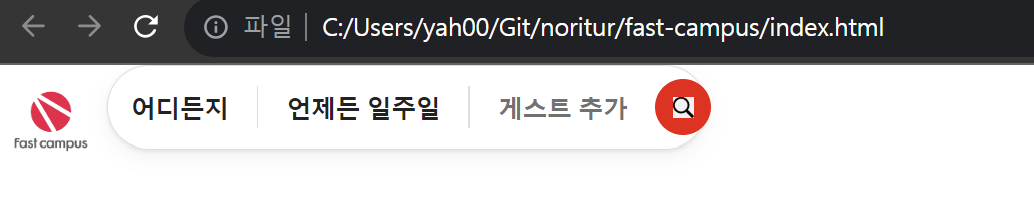
Reset CSS를 적용한 CSS코드.
적용하고 보니, 주소창에 요소들이 좀 더 붙은 모습이 되었다.
/* http://meyerweb.com/eric/tools/css/reset/
   v2.0 | 20110126
   License: none (public domain)
*/

html, body, div, span, applet, object, iframe,
h1, h2, h3, h4, h5, h6, p, blockquote, pre,
a, abbr, acronym, address, big, cite, code,
del, dfn, em, img, ins, kbd, q, s, samp,
small, strike, strong, sub, sup, tt, var,
b, u, i, center,
dl, dt, dd, ol, ul, li,
fieldset, form, label, legend,
table, caption, tbody, tfoot, thead, tr, th, td,
article, aside, canvas, details, embed,
figure, figcaption, footer, header, hgroup,
menu, nav, output, ruby, section, summary,
time, mark, audio, video {
	margin: 0;
	padding: 0;
	border: 0;
	font-size: 100%;
	font: inherit;
	vertical-align: baseline;
}
/* HTML5 display-role reset for older browsers */
article, aside, details, figcaption, figure,
footer, header, hgroup, menu, nav, section {
	display: block;
}
body {
	line-height: 1;
}
ol, ul {
	list-style: none;
}
blockquote, q {
	quotes: none;
}
blockquote:before, blockquote:after,
q:before, q:after {
	content: '';
	content: none;
}
table {
	border-collapse: collapse;
	border-spacing: 0;
}

header {
    display: flex;
}

button {
    border: none;
    background: transparent;
}

#logo{
    height: 64px;
    cursor: pointer;
}

#little-search {
    display: flex;
    padding: 0 8px;
    justify-content: center;
    align-items: center;
    border: 1px solid #DDDDDD; /*1픽셀 실선 하얀색*/
    border-radius: 40px;
    height: 48px;
    box-sizing: border-box;
    min-width: 330px;
    box-shadow: 0 1px 2px rgb(0 0 0 / 8%), 0 4px 12px rgb(0 0 0/ 5%);
}

.little-search_button {
    display: block;
    flex-shrink: 0;
    padding: 0 16px; /*상하 0px, 좌우 16px*/
    white-space: nowrap; /*줄바꿈 막기*/
    font-size: 14px;
    font-weight: 600; /*글자의 두께 지정. 100~900까지의 값을 가지며, 400은 보통, 700은 bold이다.*/
    color: rgb(34, 34, 34)
}

.little-search_button:nth-of-type(3) {
    color: #717171;
}

.divider {
    display: block;
    flex-basis: 1px;
    flex-shrink: 0;
    background-color: #DDDDDD;
    height: 24px;
}

#magnifying-glass-wrapper {
    display: flex;
    justify-content: center;
    align-items: center;
    background-color: red;
    border-radius: 50%;
    flex-basis: 32px;
    flex-shrink: 0;
    height: 32px;
}

#magnifying-glass-icon{
    height: 12px;
}
어디든지/언제든 일주일/게스트 추가에 적용되는 커서 포인터를 입력하고, 새로운 div id="do-airbnb"에 '당신의 강의를 패스트캠퍼스하세요.'를 입력한다.
<!DOCTYPE html>
<html lang="en">
<head>
    <meta charset="UTF-8">
    <meta http-equiv="X-UA-Compatible" content="IE=edge">
    <meta name="viewport" content="width=device-width, initial-scale=1.0">
    <link rel="stylesheet" href="./index.css">
    <title>Clone coding</title>
</head>
<body>
    <header>
        <img id="logo" src="./imgs/comp.jpg" alt="fast campus logo">
        <div id="little-search">
            <button class="little-search_button">어디든지</button><span class="divider"></span>
            <button class="little-search_button">언제든 일주일</button><span class="divider"></span>
            <button class="little-search_button">게스트 추가</button>
            <div id="magnifying-glass-wrapper">
                <img id="magnifying-glass-icon" src="./imgs/magnifying-glass-icon.png" alt="magnifying glass icon">
            </div>
        </div>
        <div id="header-right-section">
            <div id="do-airbnb">
                당신의 강의를 패스트캠퍼스하세요.
            </div>
        </div>
    </header>
</body>
</html>
/* http://meyerweb.com/eric/tools/css/reset/
v2.0 | 20110126
License: none (public domain)
*/
html, body, div, span, applet, object, iframe,
h1, h2, h3, h4, h5, h6, p, blockquote, pre,
a, abbr, acronym, address, big, cite, code,
del, dfn, em, img, ins, kbd, q, s, samp,
small, strike, strong, sub, sup, tt, var,
b, u, i, center,
dl, dt, dd, ol, ul, li,
fieldset, form, label, legend,
table, caption, tbody, tfoot, thead, tr, th, td,
article, aside, canvas, details, embed,
figure, figcaption, footer, header, hgroup,
menu, nav, output, ruby, section, summary,
time, mark, audio, video {
margin: 0;
padding: 0;
border: 0;
font-size: 100%;
font: inherit;
vertical-align: baseline;
}
/* HTML5 display-role reset for older browsers */
article, aside, details, figcaption, figure,
footer, header, hgroup, menu, nav, section {
display: block;
}
body {
line-height: 1;
}
ol, ul {
list-style: none;
}
blockquote, q {
quotes: none;
}
blockquote:before, blockquote:after,
q:before, q:after {
content: '';
content: none;
}
table {
border-collapse: collapse;
border-spacing: 0;
}
header {
display: flex;
}
button {
border: none;
background: transparent;
}
#logo{
height: 64px;
cursor: pointer;
}
#little-search {
display: flex;
padding: 0 8px;
justify-content: center;
align-items: center;
border: 1px solid #DDDDDD; /*1픽셀 실선 하얀색*/
border-radius: 40px;
height: 48px;
box-sizing: border-box;
min-width: 330px;
box-shadow: 0 1px 2px rgb(0 0 0 / 8%), 0 4px 12px rgb(0 0 0/ 5%);
cursor: pointer;
}
/*리틀 서치 모든 항목에 커서 포인터를 적용시키는 코드.*/
#little-search * {
cursor: pointer;
}
.little-search_button {
display: block;
flex-shrink: 0;
padding: 0 16px; /*상하 0px, 좌우 16px*/
white-space: nowrap; /*줄바꿈 막기*/
font-size: 14px;
font-weight: 600; /*글자의 두께 지정. 100~900까지의 값을 가지며, 400은 보통, 700은 bold이다.*/
color: rgb(34, 34, 34)
}
.little-search_button:nth-of-type(3) {
color: #717171;
}
.divider {
display: block;
flex-basis: 1px;
flex-shrink: 0;
background-color: #DDDDDD;
height: 24px;
}
#magnifying-glass-wrapper {
display: flex;
justify-content: center;
align-items: center;
background-color: red;
border-radius: 50%;
flex-basis: 32px;
flex-shrink: 0;
height: 32px;
}
#magnifying-glass-icon{
height: 12px;
}
#do-airbnb {
font-size: 14px;
color: #222222;
font-weight: 600;
cursor: pointer;
}
이제 주축을 따라 각 요소들을 정렬하는 코드를 넣는다.
header에 'justify-content: space-between;'를 넣어 각 요소들이 동일한 간격을 갖도록 한다.
또한, do-airbnb:hover를 넣어, 해당 id에 마우스가 위로 올라왔을때, 배경색이 바뀌도록 코드를 짜본다.
/* http://meyerweb.com/eric/tools/css/reset/
   v2.0 | 20110126
   License: none (public domain)
*/

html, body, div, span, applet, object, iframe,
h1, h2, h3, h4, h5, h6, p, blockquote, pre,
a, abbr, acronym, address, big, cite, code,
del, dfn, em, img, ins, kbd, q, s, samp,
small, strike, strong, sub, sup, tt, var,
b, u, i, center,
dl, dt, dd, ol, ul, li,
fieldset, form, label, legend,
table, caption, tbody, tfoot, thead, tr, th, td,
article, aside, canvas, details, embed,
figure, figcaption, footer, header, hgroup,
menu, nav, output, ruby, section, summary,
time, mark, audio, video {
	margin: 0;
	padding: 0;
	border: 0;
	font-size: 100%;
	font: inherit;
	vertical-align: baseline;
}
/* HTML5 display-role reset for older browsers */
article, aside, details, figcaption, figure,
footer, header, hgroup, menu, nav, section {
	display: block;
}
body {
	line-height: 1;
}
ol, ul {
	list-style: none;
}
blockquote, q {
	quotes: none;
}
blockquote:before, blockquote:after,
q:before, q:after {
	content: '';
	content: none;
}
table {
	border-collapse: collapse;
	border-spacing: 0;
}

header {
    display: flex;
    justify-content: space-between;
}

button {
    border: none;
    background: transparent;
}

#logo{
    height: 64px;
    cursor: pointer;
}

#little-search {
    display: flex;
    padding: 0 8px;
    justify-content: center;
    align-items: center;
    border: 1px solid #DDDDDD; /*1픽셀 실선 하얀색*/
    border-radius: 40px;
    height: 48px;
    box-sizing: border-box;
    min-width: 330px;
    box-shadow: 0 1px 2px rgb(0 0 0 / 8%), 0 4px 12px rgb(0 0 0/ 5%);
    cursor: pointer;
}

#little-search * {
    cursor: pointer;
}

.little-search_button {
    display: block;
    flex-shrink: 0;
    padding: 0 16px; /*상하 0px, 좌우 16px*/
    white-space: nowrap; /*줄바꿈 막기*/
    font-size: 14px;
    font-weight: 600; /*글자의 두께 지정. 100~900까지의 값을 가지며, 400은 보통, 700은 bold이다.*/
    color: rgb(34, 34, 34)
}

.little-search_button:nth-of-type(3) {
    color: #717171;
}

.divider {
    display: block;
    flex-basis: 1px;
    flex-shrink: 0;
    background-color: #DDDDDD;
    height: 24px;
}

#magnifying-glass-wrapper {
    display: flex;
    justify-content: center;
    align-items: center;
    background-color: red;
    border-radius: 50%;
    flex-basis: 32px;
    flex-shrink: 0;
    height: 32px;
}

#magnifying-glass-icon{
    height: 12px;
}

#do-airbnb {
    padding: 12px;
    font-size: 14px;
    color: #222222;
    font-weight: 600;
    cursor: pointer;
    border-radius: 22px;
}

/*마우스를 올렸을때 작동*/
#do-airbnb:hover {
    background-color: #f7f7f7;
}
header에 padding, height, align-items 속성 값을 넣어서 잘 정렬해준다.
/* http://meyerweb.com/eric/tools/css/reset/
   v2.0 | 20110126
   License: none (public domain)
*/

html, body, div, span, applet, object, iframe,
h1, h2, h3, h4, h5, h6, p, blockquote, pre,
a, abbr, acronym, address, big, cite, code,
del, dfn, em, img, ins, kbd, q, s, samp,
small, strike, strong, sub, sup, tt, var,
b, u, i, center,
dl, dt, dd, ol, ul, li,
fieldset, form, label, legend,
table, caption, tbody, tfoot, thead, tr, th, td,
article, aside, canvas, details, embed,
figure, figcaption, footer, header, hgroup,
menu, nav, output, ruby, section, summary,
time, mark, audio, video {
	margin: 0;
	padding: 0;
	border: 0;
	font-size: 100%;
	font: inherit;
	vertical-align: baseline;
}
/* HTML5 display-role reset for older browsers */
article, aside, details, figcaption, figure,
footer, header, hgroup, menu, nav, section {
	display: block;
}
body {
	line-height: 1;
}
ol, ul {
	list-style: none;
}
blockquote, q {
	quotes: none;
}
blockquote:before, blockquote:after,
q:before, q:after {
	content: '';
	content: none;
}
table {
	border-collapse: collapse;
	border-spacing: 0;
}

header {
    display: flex;
    padding: 0 80px;
    height: 80px;
    justify-content: space-between;
    align-items: center;
}

button {
    border: none;
    background: transparent;
}

#logo{
    height: 64px;
    cursor: pointer;
}

#little-search {
    display: flex;
    padding: 0 8px;
    justify-content: center;
    align-items: center;
    border: 1px solid #DDDDDD; /*1픽셀 실선 하얀색*/
    border-radius: 40px;
    height: 48px;
    box-sizing: border-box;
    min-width: 330px;
    box-shadow: 0 1px 2px rgb(0 0 0 / 8%), 0 4px 12px rgb(0 0 0/ 5%);
    cursor: pointer;
}

#little-search * {
    cursor: pointer;
}

.little-search_button {
    display: block;
    flex-shrink: 0;
    padding: 0 16px; /*상하 0px, 좌우 16px*/
    white-space: nowrap; /*줄바꿈 막기*/
    font-size: 14px;
    font-weight: 600; /*글자의 두께 지정. 100~900까지의 값을 가지며, 400은 보통, 700은 bold이다.*/
    color: rgb(34, 34, 34)
}

.little-search_button:nth-of-type(3) {
    color: #717171;
}

.divider {
    display: block;
    flex-basis: 1px;
    flex-shrink: 0;
    background-color: #DDDDDD;
    height: 24px;
}

#magnifying-glass-wrapper {
    display: flex;
    justify-content: center;
    align-items: center;
    background-color: red;
    border-radius: 50%;
    flex-basis: 32px;
    flex-shrink: 0;
    height: 32px;
}

#magnifying-glass-icon{
    height: 12px;
}

#do-airbnb {
    padding: 12px;
    font-size: 14px;
    color: #222222;
    font-weight: 600;
    cursor: pointer;
    border-radius: 22px;
}

/*마우스를 올렸을때 작동*/
#do-airbnb:hover {
    background-color: #f7f7f7;
}
이제, 프로필 아이콘과 리스트 아이콘을 넣어보자.
<!DOCTYPE html>
<html lang="en">
<head>
    <meta charset="UTF-8">
    <meta http-equiv="X-UA-Compatible" content="IE=edge">
    <meta name="viewport" content="width=device-width, initial-scale=1.0">
    <link rel="stylesheet" href="./index.css">
    <title>Clone coding</title>
</head>
<body>
    <header>
        <img id="logo" src="./imgs/comp.jpg" alt="fast campus logo">
        <div id="little-search">
            <button class="little-search_button">어디든지</button><span class="divider"></span>
            <button class="little-search_button">언제든 일주일</button><span class="divider"></span>
            <button class="little-search_button">게스트 추가</button>
            <div id="magnifying-glass-wrapper">
                <img id="magnifying-glass-icon" src="./imgs/magnifying-glass-icon.png" alt="magnifying glass icon">
            </div>
        </div>
        <div id="header-right-section">
            <div id="do-airbnb">
                당신의 강의를 패스트캠퍼스하세요.
            </div>
            <div id="profile-section">
                <img width="25" src="./imgs/list.png" alt="list icon">
                <img width="30" src="./imgs/profile.avif" alt="profile icon">
            </div>
        </div>
    </header>
</body>
</html>
이제, header-right-section에 display: flex를 적용하여, 요소들을 정렬시킨다.
/* http://meyerweb.com/eric/tools/css/reset/
   v2.0 | 20110126
   License: none (public domain)
*/

html, body, div, span, applet, object, iframe,
h1, h2, h3, h4, h5, h6, p, blockquote, pre,
a, abbr, acronym, address, big, cite, code,
del, dfn, em, img, ins, kbd, q, s, samp,
small, strike, strong, sub, sup, tt, var,
b, u, i, center,
dl, dt, dd, ol, ul, li,
fieldset, form, label, legend,
table, caption, tbody, tfoot, thead, tr, th, td,
article, aside, canvas, details, embed,
figure, figcaption, footer, header, hgroup,
menu, nav, output, ruby, section, summary,
time, mark, audio, video {
	margin: 0;
	padding: 0;
	border: 0;
	font-size: 100%;
	font: inherit;
	vertical-align: baseline;
}
/* HTML5 display-role reset for older browsers */
article, aside, details, figcaption, figure,
footer, header, hgroup, menu, nav, section {
	display: block;
}
body {
	line-height: 1;
}
ol, ul {
	list-style: none;
}
blockquote, q {
	quotes: none;
}
blockquote:before, blockquote:after,
q:before, q:after {
	content: '';
	content: none;
}
table {
	border-collapse: collapse;
	border-spacing: 0;
}

header {
    display: flex;
    padding: 0 80px;
    height: 80px;
    justify-content: space-between;
    align-items: center;
}

button {
    border: none;
    background: transparent;
}

#logo{
    height: 64px;
    cursor: pointer;
}

#little-search {
    display: flex;
    padding: 0 8px;
    justify-content: center;
    align-items: center;
    border: 1px solid #DDDDDD; /*1픽셀 실선 하얀색*/
    border-radius: 40px;
    height: 48px;
    box-sizing: border-box;
    min-width: 330px;
    box-shadow: 0 1px 2px rgb(0 0 0 / 8%), 0 4px 12px rgb(0 0 0/ 5%);
    cursor: pointer;
}

#little-search * {
    cursor: pointer;
}

.little-search_button {
    display: block;
    flex-shrink: 0;
    padding: 0 16px; /*상하 0px, 좌우 16px*/
    white-space: nowrap; /*줄바꿈 막기*/
    font-size: 14px;
    font-weight: 600; /*글자의 두께 지정. 100~900까지의 값을 가지며, 400은 보통, 700은 bold이다.*/
    color: rgb(34, 34, 34)
}

.little-search_button:nth-of-type(3) {
    color: #717171;
}

.divider {
    display: block;
    flex-basis: 1px;
    flex-shrink: 0;
    background-color: #DDDDDD;
    height: 24px;
}

#magnifying-glass-wrapper {
    display: flex;
    justify-content: center;
    align-items: center;
    background-color: red;
    border-radius: 50%;
    flex-basis: 32px;
    flex-shrink: 0;
    height: 32px;
}

#magnifying-glass-icon{
    height: 12px;
}

#header-right-section {
    display: flex;
}

#do-airbnb {
    padding: 12px;
    font-size: 14px;
    color: #222222;
    font-weight: 600;
    cursor: pointer;
    border-radius: 22px;
}

/*마우스를 올렸을때 작동*/
#do-airbnb:hover {
    background-color: #f7f7f7;
}
이제, profile-section에 적용되는 CSS코드를 작성해보자.
#profile-section {
    display: flex;
    padding: 5px 5px 5px 12px;
    align-items: center;
    border: 1px solid #DDDDDD;
    border-radius: 21px;
    gap: 12px; /*아이템간의 간격을 조절한다.*/
}
마우스가 올라갔을때 적용되는 hover코드를 적용시켜, 마우스가 올라갔을 시에 그림자가 생기도록 만들어준다.
#little-search:hover {
    box-shadow: 0 2px 4px rgba(0,0,0,0.18);
}

#profile-section:hover {
    box-shadow: 0 2px 4px rgba(0,0,0,0.18);
}
이제, header영역 밑에 실선을 만들기 위해, header에 box-shadow를 적용시켜 보자.
header {
    display: flex;
    padding: 0 80px;
    height: 80px;
    justify-content: space-between;
    align-items: center;
    box-shadow: rgb(0 0 0 / 8%) 0 1px 0; /*실선을 위한 box-shadow*/
}
실습-2- 전체 코드
<!DOCTYPE html>
<html lang="en">
<head>
    <meta charset="UTF-8">
    <meta http-equiv="X-UA-Compatible" content="IE=edge">
    <meta name="viewport" content="width=device-width, initial-scale=1.0">
    <link rel="stylesheet" href="./index.css">
    <title>Clone coding</title>
</head>
<body>
    <header>
        <img id="logo" src="./imgs/comp.jpg" alt="fast campus logo">
        <div id="little-search">
            <button class="little-search_button">어디든지</button><span class="divider"></span>
            <button class="little-search_button">언제든 일주일</button><span class="divider"></span>
            <button class="little-search_button">게스트 추가</button>
            <div id="magnifying-glass-wrapper">
                <img id="magnifying-glass-icon" src="./imgs/magnifying-glass-icon.png" alt="magnifying glass icon">
            </div>
        </div>
        <div id="header-right-section">
            <div id="do-airbnb">
                당신의 강의를 패스트캠퍼스하세요.
            </div>
            <div id="profile-section">
                <img width="25" src="./imgs/list.png" alt="list icon">
                <img width="30" src="./imgs/profile.avif" alt="profile icon">
            </div>
        </div>
    </header>
</body>
</html>
/* http://meyerweb.com/eric/tools/css/reset/
v2.0 | 20110126
License: none (public domain)
*/
html, body, div, span, applet, object, iframe,
h1, h2, h3, h4, h5, h6, p, blockquote, pre,
a, abbr, acronym, address, big, cite, code,
del, dfn, em, img, ins, kbd, q, s, samp,
small, strike, strong, sub, sup, tt, var,
b, u, i, center,
dl, dt, dd, ol, ul, li,
fieldset, form, label, legend,
table, caption, tbody, tfoot, thead, tr, th, td,
article, aside, canvas, details, embed,
figure, figcaption, footer, header, hgroup,
menu, nav, output, ruby, section, summary,
time, mark, audio, video {
margin: 0;
padding: 0;
border: 0;
font-size: 100%;
font: inherit;
vertical-align: baseline;
}
/* HTML5 display-role reset for older browsers */
article, aside, details, figcaption, figure,
footer, header, hgroup, menu, nav, section {
display: block;
}
body {
line-height: 1;
}
ol, ul {
list-style: none;
}
blockquote, q {
quotes: none;
}
blockquote:before, blockquote:after,
q:before, q:after {
content: '';
content: none;
}
table {
border-collapse: collapse;
border-spacing: 0;
}
header {
display: flex;
padding: 0 80px;
height: 80px;
justify-content: space-between;
align-items: center;
box-shadow: rgb(0 0 0 / 8%) 0 1px 0; /*실선을 위한 box-shadow*/
}
button {
border: none;
background: transparent;
}
#logo{
height: 64px;
cursor: pointer;
}
#little-search {
display: flex;
padding: 0 8px;
justify-content: center;
align-items: center;
border: 1px solid #DDDDDD; /*1픽셀 실선 하얀색*/
border-radius: 40px;
height: 48px;
box-sizing: border-box;
min-width: 330px;
box-shadow: 0 1px 2px rgb(0 0 0 / 8%), 0 4px 12px rgb(0 0 0/ 5%);
cursor: pointer;
}
#little-search:hover {
box-shadow: 0 2px 4px rgba(0,0,0,0.18);
}
#little-search * {
cursor: pointer;
}
.little-search_button {
display: block;
flex-shrink: 0;
padding: 0 16px; /*상하 0px, 좌우 16px*/
white-space: nowrap; /*줄바꿈 막기*/
font-size: 14px;
font-weight: 600; /*글자의 두께 지정. 100~900까지의 값을 가지며, 400은 보통, 700은 bold이다.*/
color: rgb(34, 34, 34)
}
.little-search_button:nth-of-type(3) {
color: #717171;
}
.divider {
display: block;
flex-basis: 1px;
flex-shrink: 0;
background-color: #DDDDDD;
height: 24px;
}
#magnifying-glass-wrapper {
display: flex;
justify-content: center;
align-items: center;
background-color: red;
border-radius: 50%;
flex-basis: 32px;
flex-shrink: 0;
height: 32px;
}
#magnifying-glass-icon{
height: 12px;
}
#header-right-section {
display: flex;
gap: 8px;
}
#do-airbnb {
padding: 12px;
font-size: 14px;
color: #222222;
font-weight: 600;
cursor: pointer;
border-radius: 22px;
}
/*마우스를 올렸을때 작동*/
#do-airbnb:hover {
background-color: #f7f7f7;
}
#profile-section {
display: flex;
padding: 5px 5px 5px 12px;
align-items: center;
border: 1px solid #DDDDDD;
border-radius: 21px;
gap: 12px; /*아이템간의 간격을 조절한다.*/
}
#profile-section:hover {
box-shadow: 0 2px 4px rgba(0,0,0,0.18);
}