CSS연습사이트 : https://www.w3schools.com/cssref/pr_background-image.php

<block tag>
-div : 한 줄 끝까지 영역을 잡는다.

<inline tag>
-span : 자기자신까지만 영역을 잡는다.

・block tag
・inline tag
・박스모델
・float + hidden
[url()]
[계산]
<!DOCTYPE html>
<html lang="en" xmlns="http://www.w3.org/1999/xhtml">
<head>
    <meta charset="utf-8" />
    <title></title>
    <style>
        #wrap {
            width:70%; /* 바디 크기 기준으로 넓이 70% | 800px;*/
            height:30%; /*바디 크기 기준으로 높이 30% | 500px;*/
            margin:0 auto;
            border:1px solid #cccccc;
        }
        #content {
            width:80%; /*부모 기준(#wrap 800px)으로 넓이 80%*/
            height:100%;
            margin:0 auto;
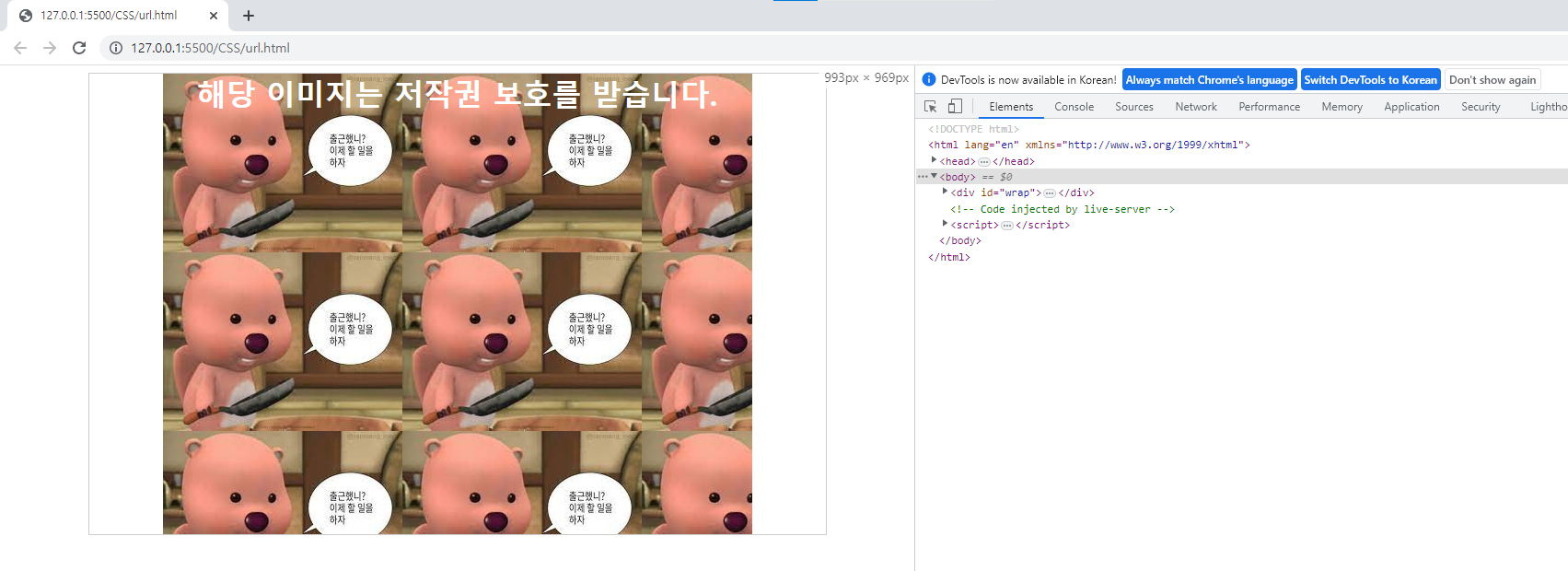
            background-image:url('https://encrypted-tbn0.gstatic.com/images?q=tbn:ANd9GcTgMeWpX2yRnNPcjpyq03LXgMgoWVRXeElLhGtIDCf-_Uy0dAoCbLCoFCdmu25niJr4jy0&usqp=CAU');
            font-size:2em;
            color:#ffffff;
            font-weight:bold;
            text-align:center;
        }
    </style>
</head>
<body>
    <div id="wrap">
        <div id="content">
            해당 이미지는 저작권 보호를 받습니다.
        </div>
    </div>
</body>
</html>
[결과값]
[display]
[계산]
<!DOCTYPE html>
<html lang="en" xmlns="http://www.w3.org/1999/xhtml">
<head>
    <meta charset="utf-8" />
    <title></title>
    <style> /*block tag*/
        body div:nth-child(1) { /*body와 div를 띄어쓰기함 ⇒ div가 후손이다*/
            width:100px;
            height:100px;
            background-color:#ff0000; /*배경색*/
            color:#ffffff; /*글자색*/
            font-weight:bold; /*글자스타일*/
            text-align:center; /*글자 가운데 정렬*/
        }
        body div:nth-child(2) {
            width:100px;
            height:100px;
            background-color:#00ff00;
            color:#ffffff;
            font-weight:bold;
            text-align:center;
        }
        body div:nth-child(3) {
            width:100px;
            height:100px;
            background-color:#0000ff;
            color:#ffffff;
            font-weight:bold;
            text-align:center;
        }
        body div:nth-child(4) {
            width:100px;
            height:100px;
            background-color:#ff0000;
            color:#ffffff;
            font-weight:bold;
            text-align:center;
        }
        body div:nth-child(5) {
            width:100px;
            height:100px;
            background-color:#00ff00;
            color:#ffffff;
            font-weight:bold;
            text-align:center;
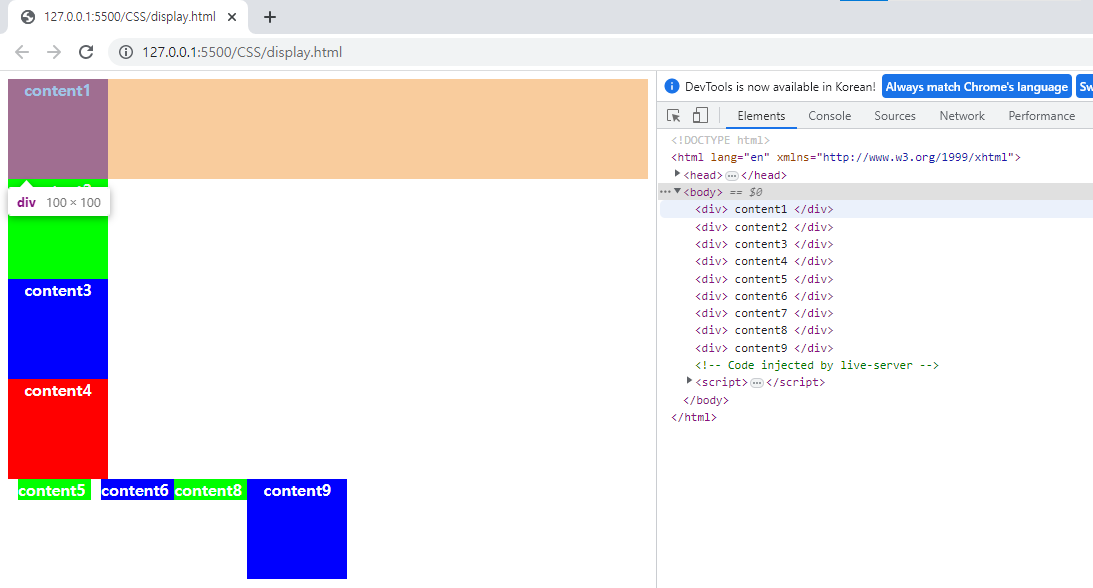
            display:inline; /*자기 자신까지만 영역을 잡는다 | width와 height를 무시하고 자기자신만 잡음*/
            margin:10px 10px 10px 10px;
        }
        body div:nth-child(6) {
            width:100px;
            height:100px;
            background-color:#0000ff;
            color:#ffffff;
            font-weight:bold;
            text-align:center;
            display:inline;
        }
        body div:nth-child(7) {
            width:100px;
            height:100px;
            background-color:#ff0000;
            color:#ffffff;
            font-weight:bold;
            text-align:center;
            display:none; /*none으로 설정하면 화면에 나오지 않는다*/
        }
        body div:nth-child(8) {
            width:100px;
            height:100px;
            background-color:#00ff00;
            color:#ffffff;
            font-weight:bold;
            text-align:center;
            display:inline;
        }
        body div:nth-child(9) {
            width:100px;
            height:100px;
            background-color:#0000ff;
            color:#ffffff;
            font-weight:bold;
            text-align:center;
            display:inline-block; /*inline과 block 속성 모두 가진 것 | width와 height를 갖지만 자기 자신까지만 영역을 잡는다 */
        }
    </style>
</head>
<body>
    <div>
        content1
    </div>
    <div>
        content2
    </div>
    <div>
        content3
    </div>

    <div>
        content4
    </div>
    <div>
        content5
    </div>
    <div>
        content6
    </div>
    <div>
        content7
    </div>
    <div>
        content8
    </div>
    <div>
        content9
    </div>
</body>
</html>
[결과값]
[visibility]
[계산]
<!DOCTYPE html>
<html lang="en" xmlns="http://www.w3.org/1999/xhtml">
<head>
    <meta charset="utf-8" />
    <title></title>
    <style> /*block tag*/
        body div:nth-child(1) { /*body와 div를 띄어쓰기함 ⇒ div가 후손이다*/
            width:100px;
            height:100px;
            background-color:#ff0000; /*배경색*/
            color:#ffffff; /*글자색*/
            font-weight:bold; /*글자스타일*/
            text-align:center; /*글자 가운데 정렬*/
        }
        body div:nth-child(2) {
            width:100px;
            height:100px;
            background-color:#00ff00;
            color:#ffffff;
            font-weight:bold;
            text-align:center;
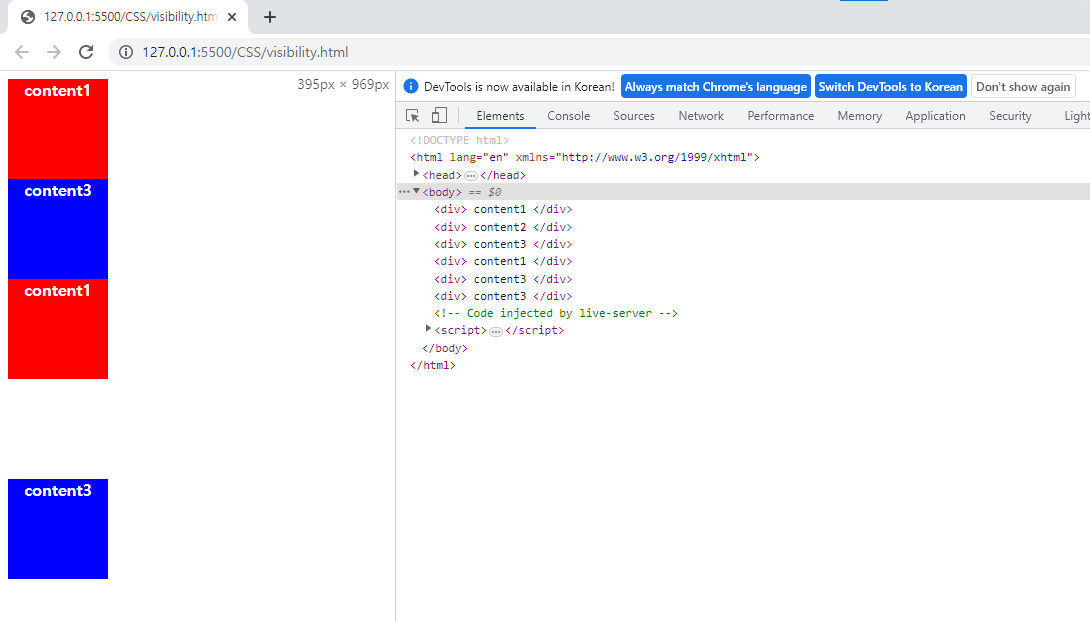
            display:none;
        }
        body div:nth-child(3) {
            width:100px;
            height:100px;
            background-color:#0000ff;
            color:#ffffff;
            font-weight:bold;
            text-align:center;
        }
        body div:nth-child(4) {
            width:100px;
            height:100px;
            background-color:#ff0000;
            color:#ffffff;
            font-weight:bold;
            text-align:center;
        }
        body div:nth-child(5) {
            width:100px;
            height:100px;
            background-color:#ff0000;
            color:#ffffff;
            font-weight:bold;
            text-align:center;
            visibility: hidden;
        }
        body div:nth-child(6) {
            width:100px;
            height:100px;
            background-color:#0000ff;
            color:#ffffff;
            font-weight:bold;
            text-align:center;
        }
    </style>
</head>
<body>
    <div>
        content1 /*1박스*/
    </div>
    <div>
        content2 /*2박스*/
    </div>
    <div>
        content3 /*3박스*/
    </div>
    <div>
        content1 /*4박스*/
    </div>
    <div>
        content3 /*5박스*/
    </div>
    <div>
        content3 /*6박스*/
    </div>
</body>
</html>
[결과값] body div:nth-child(1){} : 첫번째 박스에 해당 body div:nth-child(2){} : 두번째 박스에 해당 body div:nth-child(3){} : 세번째 박스에 해당
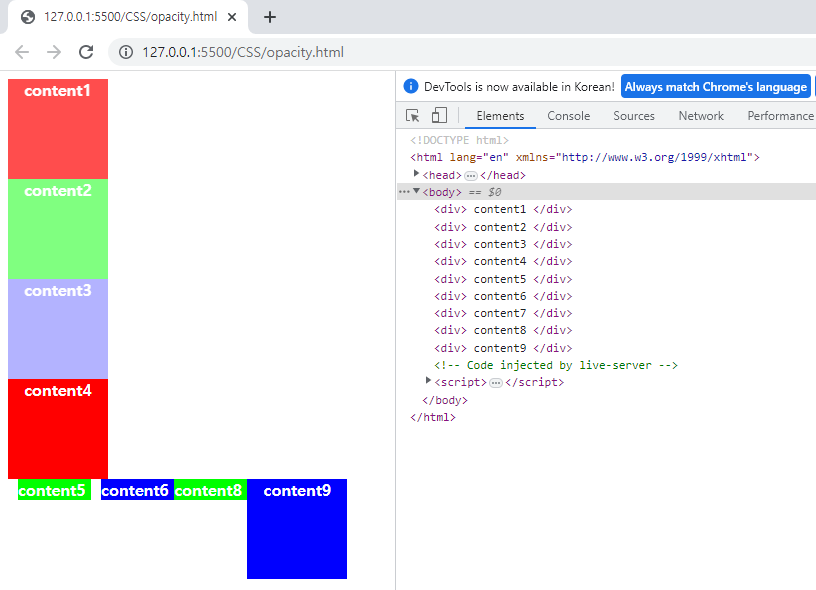
[opacity : 투명도]
[계산]
<!DOCTYPE html>
<html lang="en" xmlns="http://www.w3.org/1999/xhtml">
<head>
    <meta charset="utf-8" />
    <title></title>
    <style> /*block tag*/
        body div:nth-child(1) { /*body와 div를 띄어쓰기함 ⇒ div가 후손이다*/
            width:100px;
            height:100px;
            background-color:#ff0000; /*배경색*/
            color:#ffffff; /*글자색*/
            font-weight:bold; /*글자스타일*/
            text-align:center; /*글자 가운데 정렬*/
            opacity:0.7;/*투명도*/
        }
        body div:nth-child(2) {
            width:100px;
            height:100px;
            background-color:#00ff00;
            color:#ffffff;
            font-weight:bold;
            text-align:center;
            opacity:0.5;
        }
        body div:nth-child(3) {
            width:100px;
            height:100px;
            background-color:#0000ff;
            color:#ffffff;
            font-weight:bold;
            text-align:center;
            opacity:0.3;
        }
        body div:nth-child(4) {
            width:100px;
            height:100px;
            background-color:#ff0000;
            color:#ffffff;
            font-weight:bold;
            text-align:center;
        }
        body div:nth-child(5) {
            width:100px;
            height:100px;
            background-color:#00ff00;
            color:#ffffff;
            font-weight:bold;
            text-align:center;
            display:inline; /*자기 자신까지만 영역을 잡는다 | width와 height를 무시하고 자기자신만 잡음*/
            margin:10px 10px 10px 10px;
        }
        body div:nth-child(6) {
            width:100px;
            height:100px;
            background-color:#0000ff;
            color:#ffffff;
            font-weight:bold;
            text-align:center;
            display:inline;
        }
        body div:nth-child(7) {
            width:100px;
            height:100px;
            background-color:#ff0000;
            color:#ffffff;
            font-weight:bold;
            text-align:center;
            display:none; /*none으로 설정하면 화면에 나오지 않는다*/
        }
        body div:nth-child(8) {
            width:100px;
            height:100px;
            background-color:#00ff00;
            color:#ffffff;
            font-weight:bold;
            text-align:center;
            display:inline;
        }
        body div:nth-child(9) {
            width:100px;
            height:100px;
            background-color:#0000ff;
            color:#ffffff;
            font-weight:bold;
            text-align:center;
            display:inline-block; /*inline과 block 속성 모두 가진 것 | width와 height를 갖지만 자기 자신까지만 영역을 잡는다 */
        }
    </style>
</head>
<body>
    <div>
        content1
    </div>
    <div>
        content2
    </div>
    <div>
        content3
    </div>
    <div>
        content4
    </div>
    <div>
        content5
    </div>
    <div>
        content6
    </div>
    <div>
        content7
    </div>
    <div>
        content8
    </div>
    <div>
        content9
    </div>
</body>
</html>
[결과값]
[CSS와 박스모델]
블록 레벨 요소
・요소를 삽입했을 때 혼자 한 줄을 차지하는 요소
・요소의 너비가 100%
・예)<div>, <p> 등
박스 모델
실제 콘텐츠 영역, 패딩(padding), 박스의 테두리(border), 그리고 마진(margin)등의 요소로 구성됨

개발자 도구 창에서 박스 모델 확인 가능

・콘텐츠 : 글이나 이미지, 비디오 등 요소의 실제 내용을 포함
・패딩 : 콘텐츠 영역을 요소의 안쪽 여백까지 포함하는 크기로 확장(내부 여백)
・마진 : 테두리 요소를 확장해 요소와 인근 요소 사이의 빈 공간까지 포함하도록 만든다(외부 여백)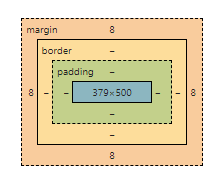
[margin 및 padding 속성]
[계산]
<!DOCTYPE html>
<html lang="en" xmlns="http://www.w3.org/1999/xhtml">
<head>
    <meta charset="utf-8" />
    <title></title>
    <style>
        body {
            margin:0;
        }
        div {
            width:200px; height:200px;
            color:#ffffff;
            font-weight:bold;
            text-align:center;
        }
        #content1 {
            background-color:red;
        }
        #content2 {
            background-color:green;
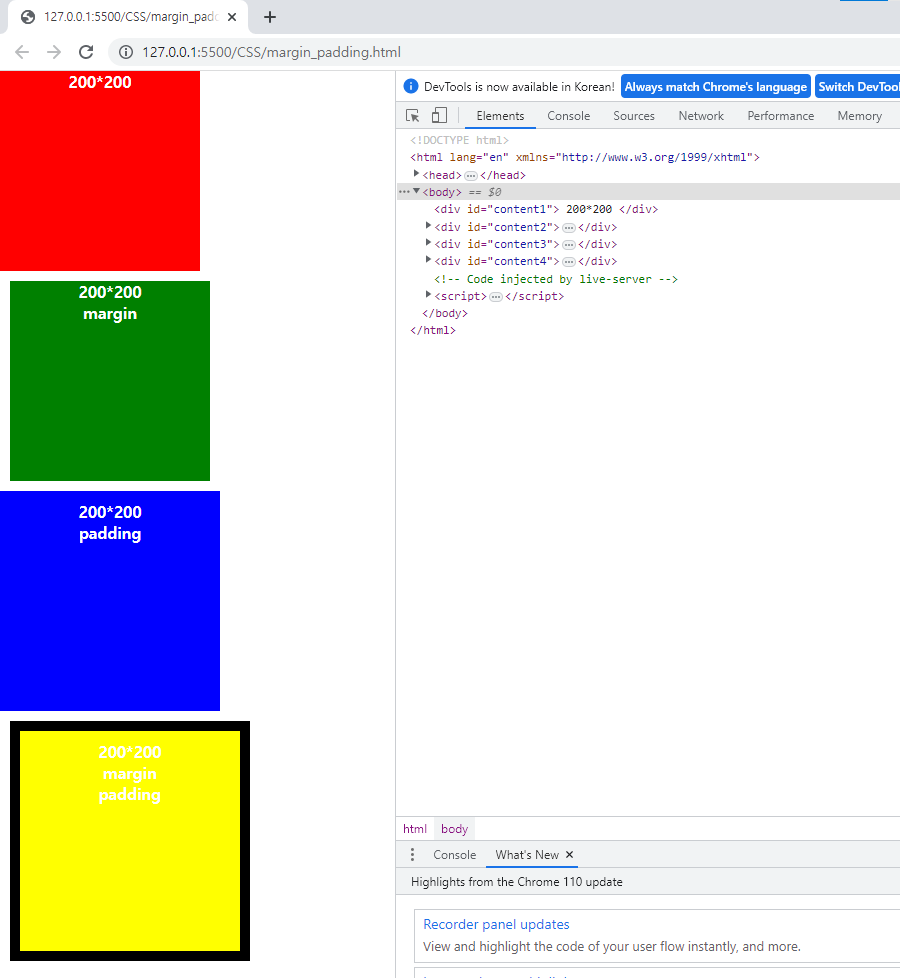
            margin:10px 10px 10px 10px; /*상우하좌 시계방향으로 돌아간다*/
        }
        #content3 {
            background-color:blue;
            padding:10px 10px 10px 10px;
        }
        #content4 {
            background-color:yellow;
            margin:10px 10px 10px 10px;/*외부이기 때문에 크기가 확장되지 않는다.*/
            padding:10px 10px 10px 10px;/*내부 크기 확장 +20*/
            border: 10px solid black; /*border : 내부 테두리 +10*/
        }
    </style>
</head>
<body>
    <div id="content1"> 200*200 </div>
    <div id="content2"> 200*200 <br /> margin </div>
    <div id="content3"> 200*200 <br /> padding </div>
    <div id="content4"> 200*200 <br /> margin <br /> padding</div>
</body>
</html>
[결과값]
[계산]
<!DOCTYPE html>
<html lang="en" xmlns="http://www.w3.org/1999/xhtml">
<head>
    <meta charset="utf-8" />
    <title></title>
    <style>
        body {
            margin:0; /*디폴트 값*/
            background-color:#dddddd;
        }
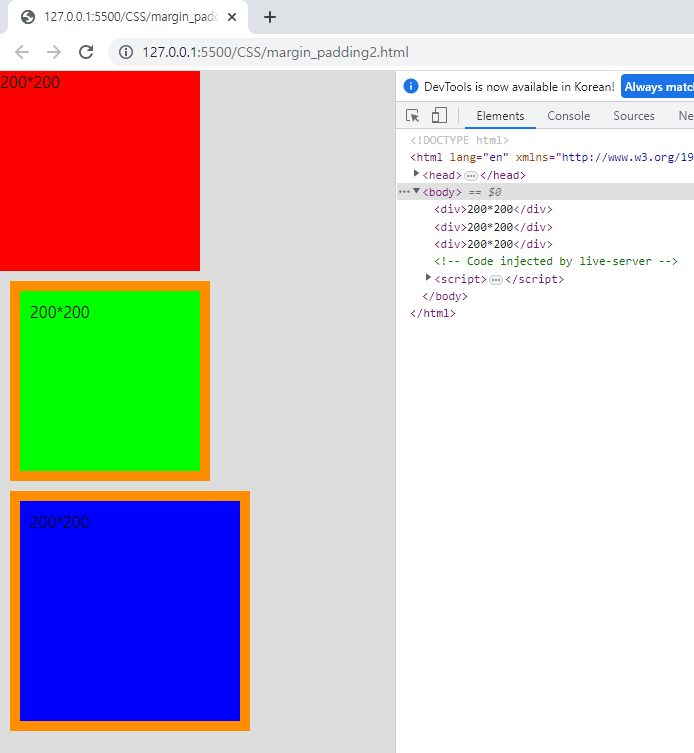
        div { /*230x230의 박스 생성*/
            width:200px;
            height:200px;
            margin:10px;
            padding:10px;
            border:10px solid #ff8d00;
        }
        div:nth-child(1) { /*width와 height는 200px*/
            margin:0;
            border:0;
            padding:0;
            background-color:#ff0000;
        }
        div:nth-child(2) {
            background-color:#00ff00;
            box-sizing:border-box; /*테두리를 기준으로 크기를 정한다 | 테두리를 확장하지말고 width와 height 안에 넣어라(크기 200x200)*/
        }
        div:nth-child(3) {

            background-color:#0000ff;
            box-sizing:content-box; /*콘텐트 영역을 기준으로 크기를 정한다 | 디폴트와 동일*/
        }
    </style>
</head>
<body>
    <div>200*200</div>
    <div>200*200</div>
    <div>200*200</div>
</body>
</html>
[결과값]
[border]
[계산]
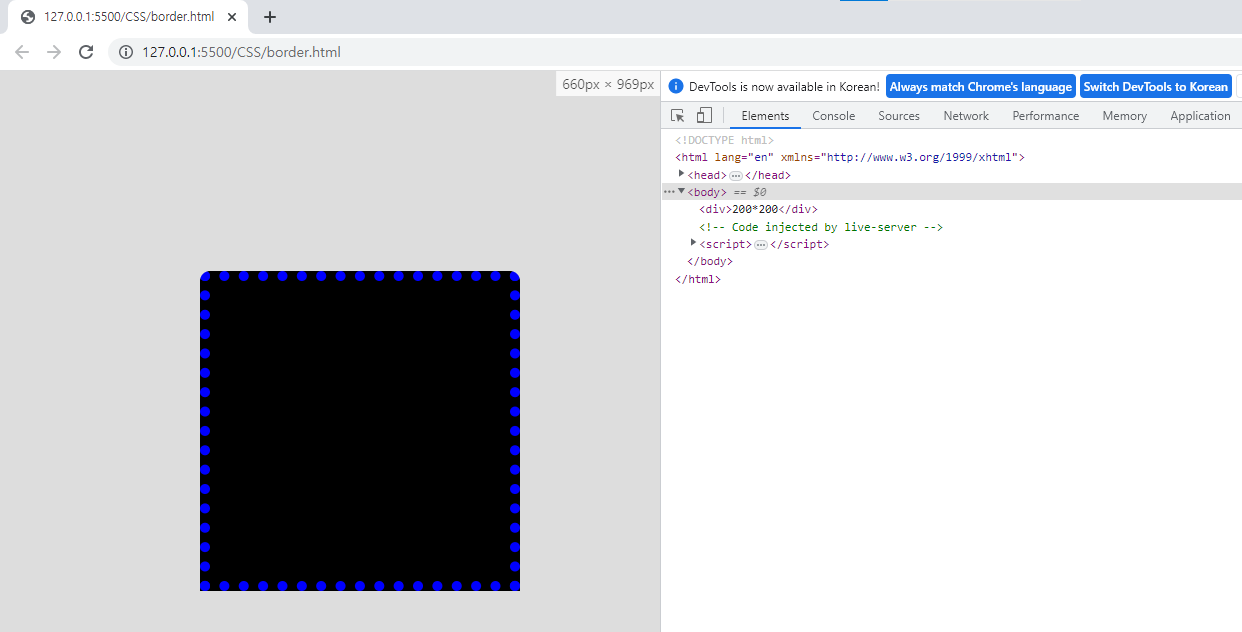
<!DOCTYPE html>
<html lang="en" xmlns="http://www.w3.org/1999/xhtml">
<head>
    <meta charset="utf-8" />
    <title></title>

    <style>
        body {
            margin:0; /*디폴트 값*/
            background-color:#dddddd;
        }

        div { /*230x230의 박스 생성*/
            width:200px;
            height:200px;
            margin:10px;
            padding:10px;
            border:10px solid #ff8d00;
        }

        div:nth-child(1) { /*width와 height는 200px*/
            width:200px;
            height:200px;
            margin:200px;
            padding:50px;

            border-width: 10px;
            border-radius: 10px 10px 0 0; /*시계반향*/
            border-style: dotted;
            background-color: #000000;
            border-color: #0000ff;
        }
    </style>
</head>
<body>
    <div>200*200</div>
</body>
</html>
[결과값]
[background-image 속성]
[계산]
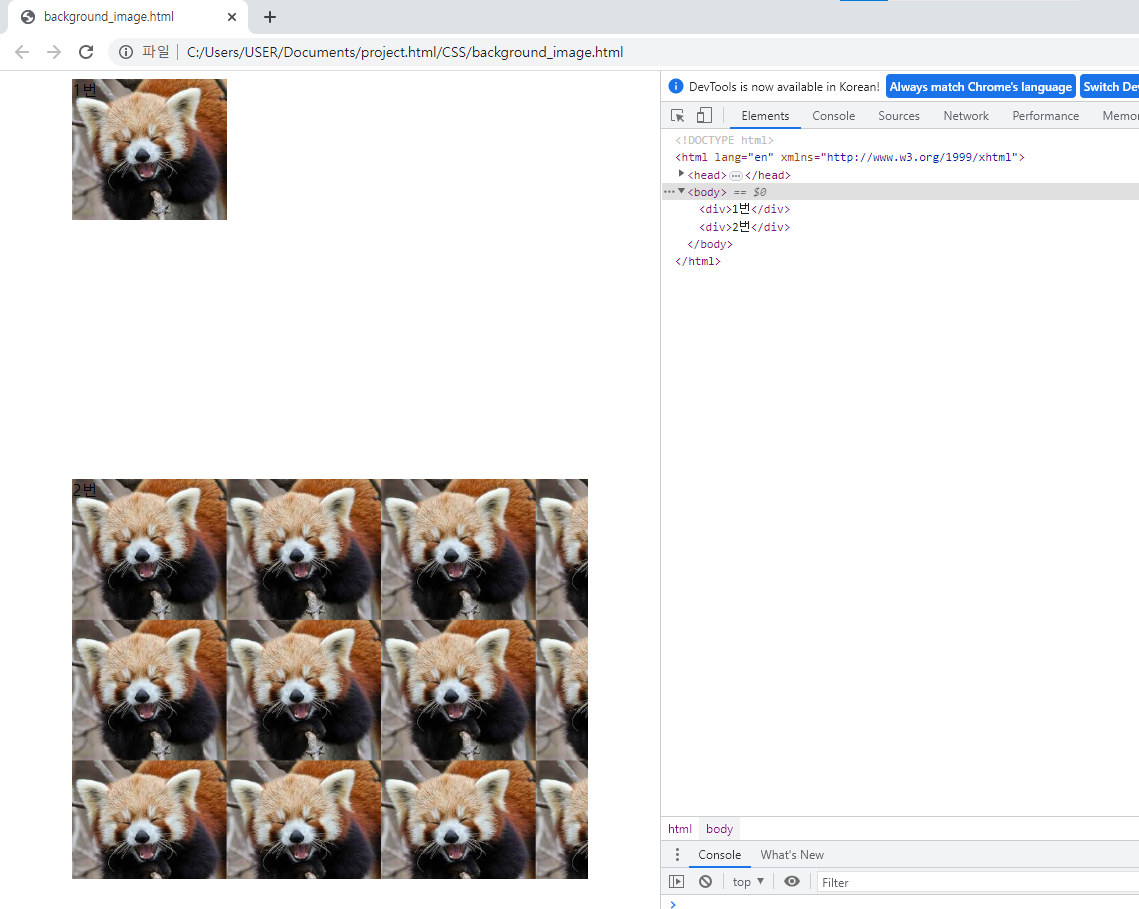
<!DOCTYPE html>
<html lang="en" xmlns="http://www.w3.org/1999/xhtml">
<head>
    <meta charset="utf-8" />
    <title></title>
    <style>
        div:first-child {
            width:80%;
            margin:0 auto; /*중앙 정렬*/
            height:400px;
            background-image: url('https://encrypted-tbn0.gstatic.com/images?q=tbn:ANd9GcQj3QLkWKGRVNKpkzcJLq_M1BXiXZT2eFmfsA&usqp=CAU');
            background-size:30%; /*background-size:100%; 이미지 1장으로 꽉 채움*/
            background-repeat: no-repeat;
        }
        div:last-child {
            width:80%;
            margin:0 auto;
            height:400px;
            background-image: url('https://encrypted-tbn0.gstatic.com/images?q=tbn:ANd9GcQj3QLkWKGRVNKpkzcJLq_M1BXiXZT2eFmfsA&usqp=CAU');
            background-size:30%; /*background-size:50%; = width 50%, height 50%로 줄여서 4장 출력됨*/
        }
    </style>
</head>
<body>
    <div>1번</div>
    <div>2번</div>
</body>
</html>
[결과값]
[계산]
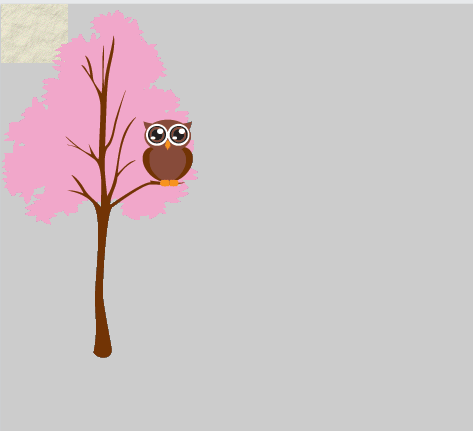
<!DOCTYPE html>
<html>
<head>
<style>
body {
  background-image: url("img_tree.gif"), url("paper.gif");
  background-repeat: no-repeat;
  background-color: #cccccc;
}
</style>
</head>
<body>

</body>
</html>
[결과값]
[font]
[계산]
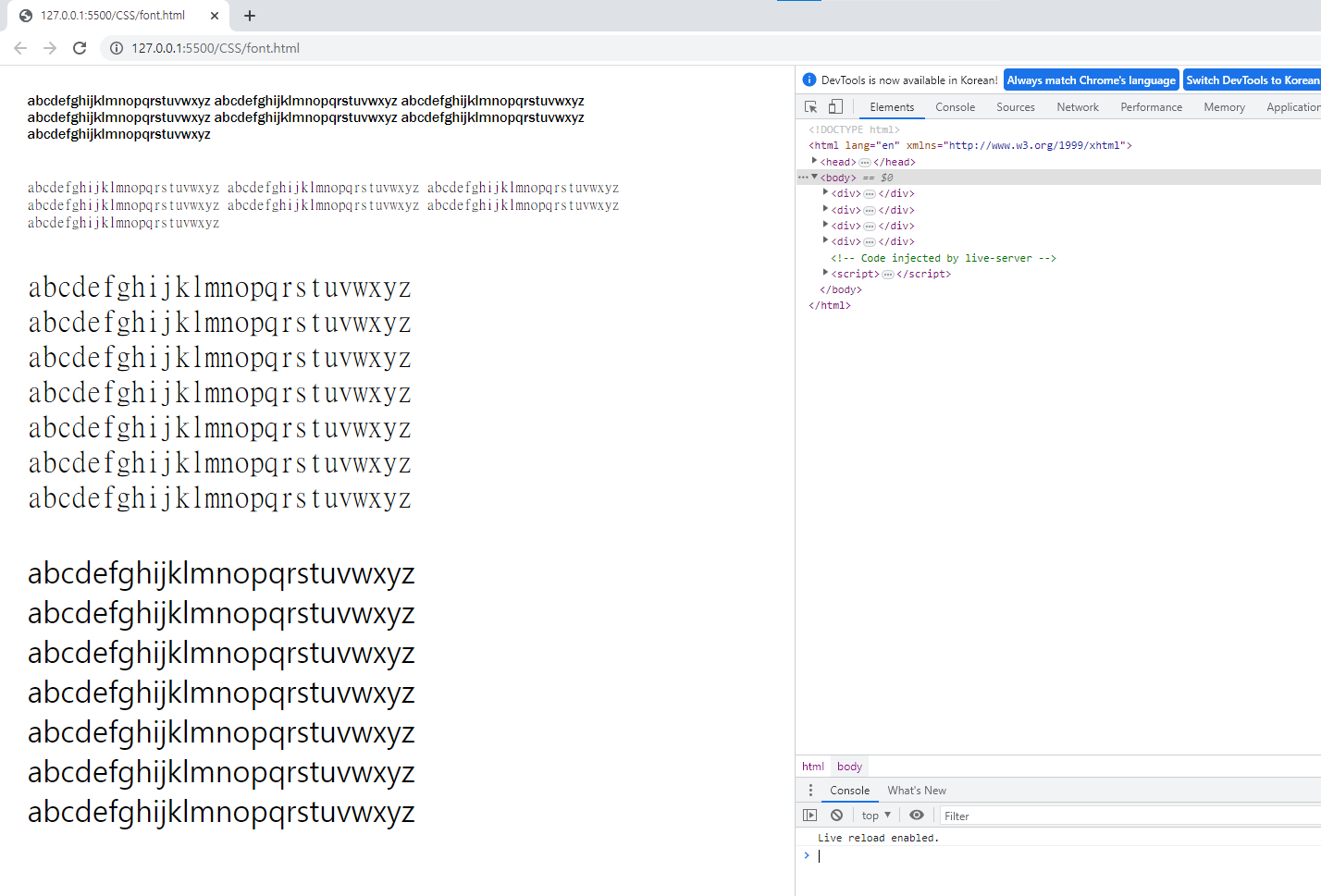
<!DOCTYPE html>
<html lang="en" xmlns="http://www.w3.org/1999/xhtml">
<head>
    <meta charset="utf-8" />
    <title></title>
    <style>
        div {
            width:800px;
            margin:0 auto;
            padding:20px;
        }
        div:nth-child(1) {
            font-family:'Franklin Gothic Medium', 'Arial Narrow', Arial, sans-serif;
        }
        div:nth-child(2) {
            font-family:MingLiU_HKSCS-ExtB;
        }
        div:nth-child(3) {
            font-family:'MingLiU_HKSCS-ExtB';
            font-size:32px;
        }
        div:nth-child(4) {
            font-family:'Bernard MT';
            font-size:2.0em;
        }
    </style>
</head>
<body>
    <div>
        abcdefghijklmnopqrstuvwxyz abcdefghijklmnopqrstuvwxyz abcdefghijklmnopqrstuvwxyz abcdefghijklmnopqrstuvwxyz abcdefghijklmnopqrstuvwxyz abcdefghijklmnopqrstuvwxyz abcdefghijklmnopqrstuvwxyz
    </div>

    <div>
        abcdefghijklmnopqrstuvwxyz abcdefghijklmnopqrstuvwxyz abcdefghijklmnopqrstuvwxyz abcdefghijklmnopqrstuvwxyz abcdefghijklmnopqrstuvwxyz abcdefghijklmnopqrstuvwxyz abcdefghijklmnopqrstuvwxyz
    </div>

    <div>
        abcdefghijklmnopqrstuvwxyz abcdefghijklmnopqrstuvwxyz abcdefghijklmnopqrstuvwxyz abcdefghijklmnopqrstuvwxyz abcdefghijklmnopqrstuvwxyz abcdefghijklmnopqrstuvwxyz abcdefghijklmnopqrstuvwxyz
    </div>

    <div>
        abcdefghijklmnopqrstuvwxyz abcdefghijklmnopqrstuvwxyz abcdefghijklmnopqrstuvwxyz abcdefghijklmnopqrstuvwxyz abcdefghijklmnopqrstuvwxyz abcdefghijklmnopqrstuvwxyz abcdefghijklmnopqrstuvwxyz
    </div>
</body>
</html>
[결과값]
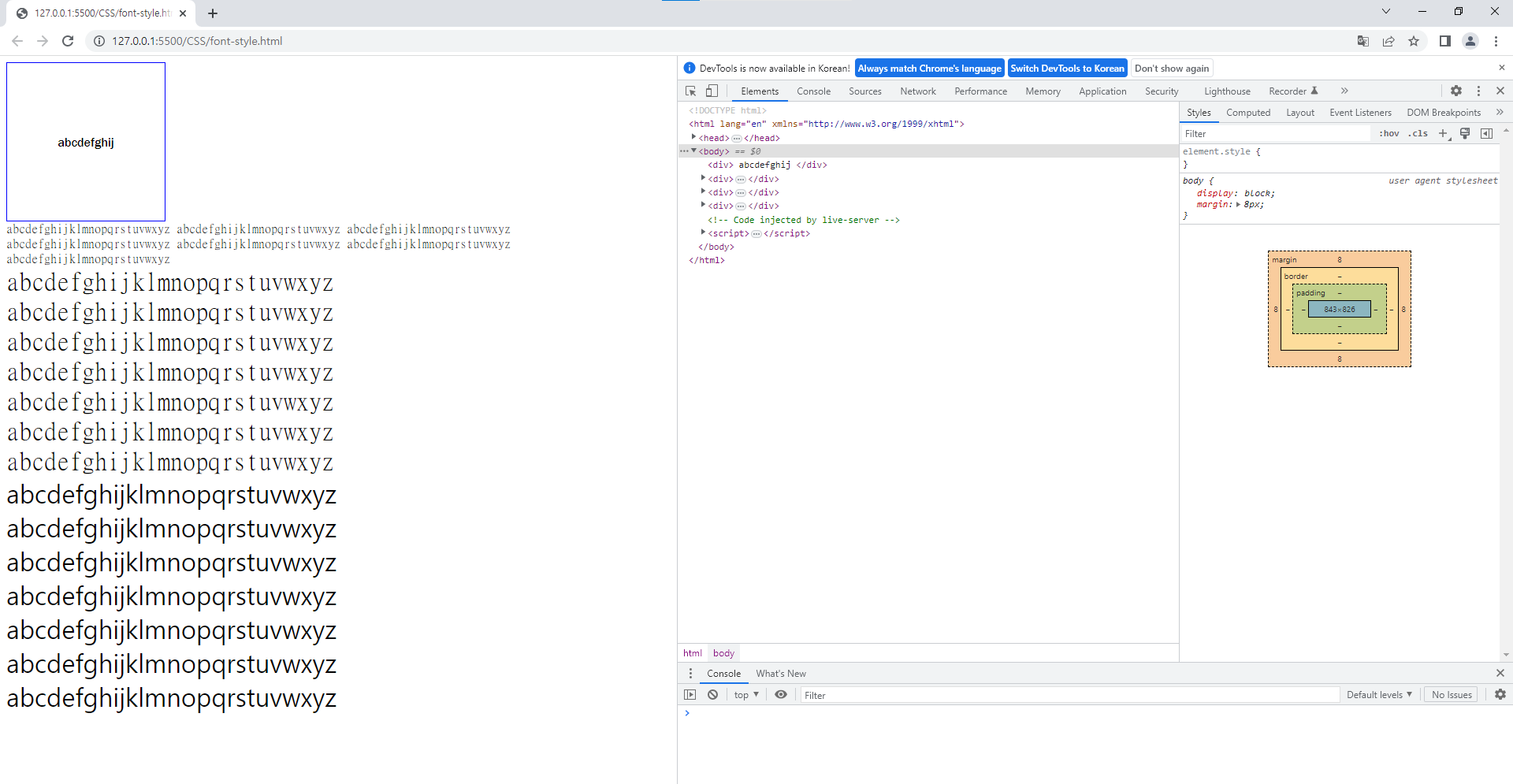
[계산]
<!DOCTYPE html>
<html lang="en" xmlns="http://www.w3.org/1999/xhtml">
<head>
    <meta charset="utf-8" />
    <title></title>
    <style>
        div:nth-child(1) {
            font-family:'Franklin Gothic Medium', 'Arial Narrow', Arial, sans-serif;
            width:200px;
            height:200px;
            border:1px solid blue;
            text-align: center;
            line-height: 200px; /*height와 line-height 값을 동일하게 할 시 중앙에 표시*/
        }
        div:nth-child(2) {
            font-family:'MingLiU_HKSCS-ExtB';
        }
        div:nth-child(3) {
            font-family:'MingLiU_HKSCS-ExtB';
            font-size:32px;
        }
        div:nth-child(4) {
            font-family:'Bernard MT';
            font-size:2.0em;
        }
    </style>
</head>
<body>
    <div>
        abcdefghij
    </div>

    <div>
        abcdefghijklmnopqrstuvwxyz abcdefghijklmnopqrstuvwxyz abcdefghijklmnopqrstuvwxyz abcdefghijklmnopqrstuvwxyz abcdefghijklmnopqrstuvwxyz abcdefghijklmnopqrstuvwxyz abcdefghijklmnopqrstuvwxyz
    </div>

    <div>
        abcdefghijklmnopqrstuvwxyz abcdefghijklmnopqrstuvwxyz abcdefghijklmnopqrstuvwxyz abcdefghijklmnopqrstuvwxyz abcdefghijklmnopqrstuvwxyz abcdefghijklmnopqrstuvwxyz abcdefghijklmnopqrstuvwxyz
    </div>

    <div>
        abcdefghijklmnopqrstuvwxyz abcdefghijklmnopqrstuvwxyz abcdefghijklmnopqrstuvwxyz abcdefghijklmnopqrstuvwxyz abcdefghijklmnopqrstuvwxyz abcdefghijklmnopqrstuvwxyz abcdefghijklmnopqrstuvwxyz
    </div>
</body>
</html>
[결과값]
[float]
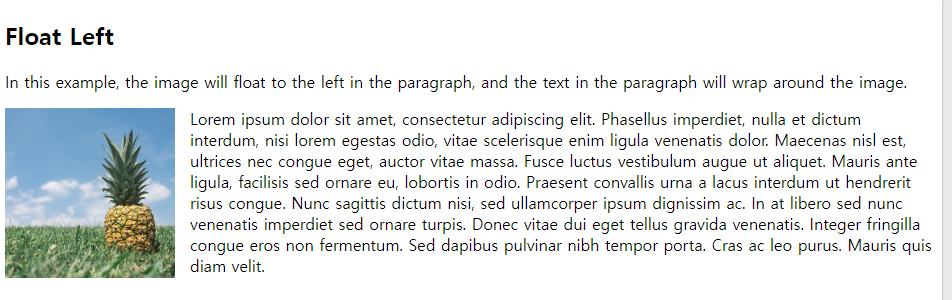
float : img를 왼쪽 or 오른쪽으로 보낸다(고정)
[계산]
<!DOCTYPE html>
<html>
<head>
<style>
img {
  float: left;
}
</style>
</head>
<body>
<h2>Float Left</h2>

<p>In this example, the image will float to the left in the paragraph, and the text in the paragraph will wrap around the image.</p>

<p><img src="pineapple.jpg" alt="Pineapple" style="width:170px;height:170px;margin-right:15px;">
Lorem ipsum dolor sit amet, consectetur adipiscing elit. Phasellus imperdiet, nulla et dictum interdum, nisi lorem egestas odio, vitae scelerisque enim ligula venenatis dolor. Maecenas nisl est, ultrices nec congue eget, auctor vitae massa. Fusce luctus vestibulum augue ut aliquet. Mauris ante ligula, facilisis sed ornare eu, lobortis in odio. Praesent convallis urna a lacus interdum ut hendrerit risus congue. Nunc sagittis dictum nisi, sed ullamcorper ipsum dignissim ac. In at libero sed nunc venenatis imperdiet sed ornare turpis. Donec vitae dui eget tellus gravida venenatis. Integer fringilla congue eros non fermentum. Sed dapibus pulvinar nibh tempor porta. Cras ac leo purus. Mauris quis diam velit.</p>
</body>
</html>
[결과값]
[계산]
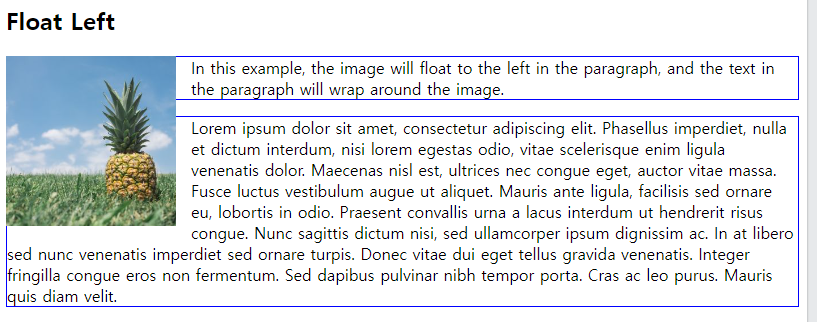
<!DOCTYPE html>
<html>
<head>
<style>
img {
  float: left;
}
p{
border:1px solid blue
}
</style>
</head>
<body>
<h2>Float Left</h2>
<img src="pineapple.jpg" alt="Pineapple" style="width:170px;height:170px;margin-right:15px;">
<p>In this example, the image will float to the left in the paragraph, and the text in the paragraph will wrap around the image.</p>
<p>
Lorem ipsum dolor sit amet, consectetur adipiscing elit. Phasellus imperdiet, nulla et dictum interdum, nisi lorem egestas odio, vitae scelerisque enim ligula venenatis dolor. Maecenas nisl est, ultrices nec congue eget, auctor vitae massa. Fusce luctus vestibulum augue ut aliquet. Mauris ante ligula, facilisis sed ornare eu, lobortis in odio. Praesent convallis urna a lacus interdum ut hendrerit risus congue. Nunc sagittis dictum nisi, sed ullamcorper ipsum dignissim ac. In at libero sed nunc venenatis imperdiet sed ornare turpis. Donec vitae dui eget tellus gravida venenatis. Integer fringilla congue eros non fermentum. Sed dapibus pulvinar nibh tempor porta. Cras ac leo purus. Mauris quis diam velit.</p>
</body>
</html>
[결과값]
[계산]
<!DOCTYPE html>
<html lang="en">
<head>
    <meta charset="UTF-8">
    <meta http-equiv="X-UA-Compatible" content="IE=edge">
    <meta name="viewport" content="width=device-width, initial-scale=1.0">
    <title>Document</title>
    <style>
        #nav {
            width:800px;
            margin:0 auto;
            border:1px solid #cccccc;
            overflow:hidden
        }
        #nav div {
            width:150px;
            height:100px;
            line-height:100px;
            float:left;
            text-align: center;
            font-size:1.5em;
            border-top:1px solid #cccccc;
            border-bottom:1px solid#cccccc;
            margin:5px;
        }
        a {
            text-decoration: none;
            color:#282828;
        }
    </style>
</head>
<body>
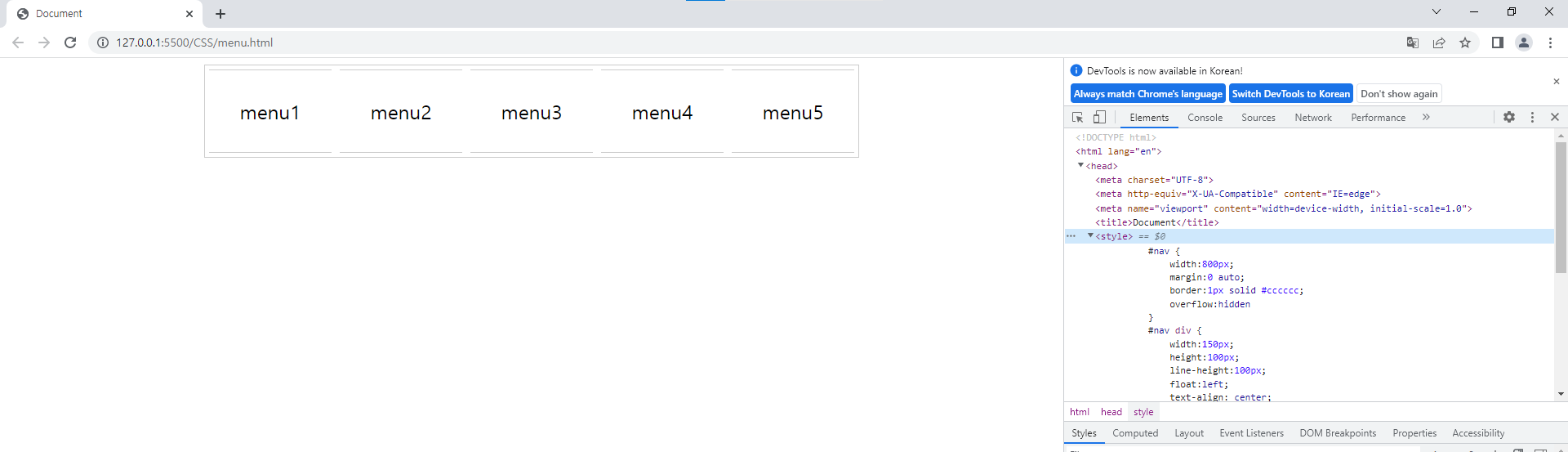
<div id="nav">
    <div>menu1</div>
    <div>menu2</div>
    <div>menu3</div>
    <div>menu4</div>
    <div>menu5</div>
</div>
</body>
</html>
[결과값]
[계산]
<!DOCTYPE html>
<html lang="en">
<head>
    <meta charset="UTF-8">
    <meta http-equiv="X-UA-Compatible" content="IE=edge">
    <meta name="viewport" content="width=device-width, initial-scale=1.0">
    <title>Document</title>
    <style>
        #wrap{
            width:700px;
            height:600px;
        }
        #wrap>div:nth-child(1){
            width:100%;
            height:20%;
            background-color: blue;
            font-size:30px;
            font-weight: bold;
            color: white;
        }
        #wrap > div:nth-child(2){
            width: 100%;
            height:60%;
            display: flex;
            color: black;
        }
        #wrap div:nth-child(2) div:nth-child(1){
            width:60%;
            height:100%;
            background-color: yellow;
        }
        #wrap div:nth-child(2) div:nth-child(2){
            width:40%;
            height:100%;
            background-color: green;
        }
        #wrap div:nth-child(3){
            width:100%;
            height: 20%;
            background-color: red;
        }
    </style>
</head>
<body>
    <div id="wrap">
        <div>고정 그리드 레이아웃</div>
        <div>
            <div>본문</div>
            <div>사이드바</div>
        </div>
        <div>푸터</div>
    </div>
</body>
</html>
[결과값]