https://ui.gorhom.dev/components/bottom-sheet/
Bottom-Sheet
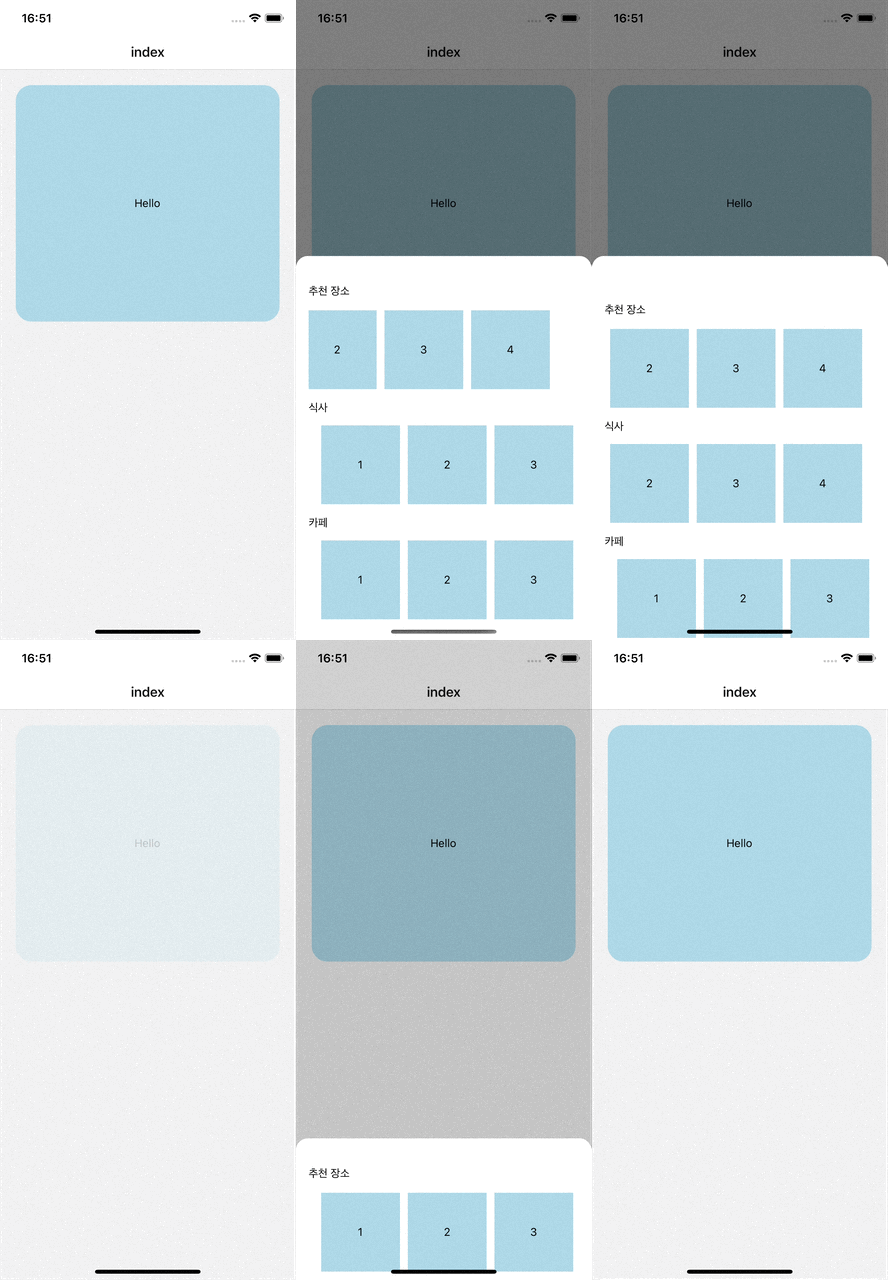
설치방법
npm i @gorhom/bottom-sheet@^4

npx expo install react-native-reanimated react-native-gesture-handler
의존성 파일도 같이 설치 해줘야한다.
_layout.tsx
<GestureHandlerRootView style={{ flex: 1 }}>
  <BottomSheetModalProvider>
    <Stack>
      <Stack.Screen name='index' />
      <Stack.Screen name='+not-found' />
    </Stack>
  </BottomSheetModalProvider>
</GestureHandlerRootView>
Provider를 이용해서 전체를 감싸주어야 사용이 가능
INFO
React Native Gesture Handler needs extra steps to finalize its installation, please follow their installation instructions. Please make sure to wrap your App with GestureHandlerRootView when you've upgraded to React Native Gesture Handler ^2.
React Native Reanimated v2 needs extra steps to finalize its installation, please follow their installation instructions.
리액트 네이티브 개발을 공부하면서 느낀건, 문서를 꼼꼼하게 읽어야 한다는 것이고,
의존성 설치를 주의해서 설정을 해줘야한다는 것.
공홈에서 확인을 하니 babel설정을 해주라는 것이다.
babel.config.js
  module.exports = {
      presets: [
        ... // don't add it here :)
      ],
      plugins: [
          ...
          'react-native-reanimated/plugin',
      ],
  };
index.tsx
const index = () => {
  const buttomModalRef = useRef<BottomSheetModal>(null);

  const openModal = () => {
    buttomModalRef.current?.present();
  };

  return (
    <SafeAreaView>
      <ButtonSheet ref={buttomModalRef} />
      <ScrollView contentContainerStyle={{ paddingBottom: 90 }}>
        <TouchableOpacity style={styles.box} onPress={openModal}>
          <Text>Hello</Text>
        </TouchableOpacity>
      </ScrollView>
    </SafeAreaView>
  );
};
부모 컴포넌트에서 실행시킬 것이기 때문에 useRef를 이용하여 컴포넌트 참조를 생성하고, onPress가 작동하면 ButtonSheet의 메서드를 호출 할 수 있습니다.
present()메서드는 BottomSheetModal의 메서드입니다. 이 메서드는 모달을 화면에 표시하는 역할을 하기때문에, 클릭을 하면 화면 하단에서 BottomSheet가 나오게됩니다.
ButtonSheet.tsx
const ButtonSheet = forwardRef<BottomSheetModal>((props, ref) => {
  const snapPoints = useMemo(() => ["60%"], []);
  const renderBackdrop = useCallback(
    (props: any) => (
      <BottomSheetBackdrop
        {...props}
        appearsOnIndex={0}
        disappearsOnIndex={-1}
      />
    ),
    []
  );
  return (
    <BottomSheetModal
      handleIndicatorStyle={{ display: "none" }}
      overDragResistanceFactor={1}
      ref={ref}
      backdropComponent={renderBackdrop}
      snapPoints={snapPoints}
      style={{ padding: 16 }}
    >
      <ScrollView showsVerticalScrollIndicator={false}>
        <View>
          <ScrollViewElm title='추천 장소' />
        </View>
        <View>
          <ScrollViewElm title='식사' />
        </View>
        <View>
          <ScrollViewElm title='카페' />
        </View>
      </ScrollView>
    </BottomSheetModal>
  );
});
ButtonSheet 컴포넌트를 살펴보겠습니다.
forwardRef는 함수형 컴포넌트에서 ref를 전달받을 수 있게 해주는 기능입니다. 한페이지에서 사용한다면 필요없겠지만, 지금 코드는 부모컴포넌트에서 받아오기 때문에 사용을 해서 ButtonSheet의 내부 인스턴스에 접근할 수 있습니다.
const snapPoints = useMemo(() => ["60%"], []);
const snapPoints = useMemo(() => ["30%","60%"], []);snapPoints는 하단에서 올라올때의 높이 올라올지 설정할 수 있으며, 2단계에 걸쳐서 제어할 수도 있습니다. 그리고 useMemo를 사용하여 메모이제이션을 해줍니다. 굳이 메모이제이션을 해줘야하나 생각했지만, 공식문서에서 사용하도록 되어있기 때문에 사용합니다.
const renderBackdrop = useCallback(
  (props: any) => (
    <BottomSheetBackdrop
      {...props}
      appearsOnIndex={0}
      disappearsOnIndex={-1}
      />
  ),
  []
);renderBackDrop함수는 모달이 열릴때 배경을 어둡게 처리 할 수 있는 함수 인데
appearsOnIndex와 disappearsOnIndex 속성으로 사용 가능합니다.
return (
  <BottomSheetModal
    handleIndicatorStyle={{ display: "none" }}
    overDragResistanceFactor={1}
    ref={ref}
    backdropComponent={renderBackdrop}
    snapPoints={snapPoints}
    style={{ padding: 16 }}
  >
    {/* 모달의 내용 */}
  </BottomSheetModal>
);
handleIndicatorStyle 은 말그대로 인디케이터를 제어할 수 있으며,
overDragResistanceFactor 이 속성은 모달을 드래그 했을 때의 바운스의 정도?라고 생각하시면됩니다. 숫자가 높을수록 끌어 당길수 있는 높이가 높아집니다.