12강
링크를 통해 다른 페이지로 이동하는 것은 GET 방식 예제에서는 create 버튼이 GET 방식이다
delete 버튼을 만들기 위해서는 form 형식으로 생성
def HTMLTemplate(articleTag):
    global topics
    ol = ''
    for topic in topics:
        ol += f'<li><a href="/read/{topic["id"]}">{topic["title"]}</a></li>'
    return f'''
    <html>
    <body>
        <h1><a href="/">Django</a><h1>
        <ul>
            {ol}
        </ul>
        {articleTag}
        <ul>
            <li><a href="/create/">create</a></li>
            <li> #추가 파트
                <form>
                    <input type="submit" value="delete">
                </form>
            </li>
        </ul>
    </body>
    </html>
    '''
이후 버튼을 누르면 /delete/로 이동하록 하기 위해서는 action 추가 설정 필요
			<li>
                <form action="/delete/" method="post">
                    <input type="submit" value="delete">
                </form>
            </li>
이후 몇번 read 값을 지울지 하기 위해 id 설정 필요
def HTMLTemplate(articleTag, id=None):
#id = None을 한 이유는 없는 경우 default 값으로 쓰기 위해서
    global topics
    ol = ''
    for topic in topics:
        ol += f'<li><a href="/read/{topic["id"]}">{topic["title"]}</a></li>'
    return f'''
    <html>
    <body>
        <h1><a href="/">Django</a><h1>
        <ul>
            {ol}
        </ul>
        {articleTag}
        <ul>
            <li><a href="/create/">create</a></li>
            <li>
                <form action="/delete/" method="post">
                    <input type="hidden" name="id" value={id}>
                    #type="hidden"은 눈에는 보이지 않지만 서버로 데이터를 전송하면 데이터는 전송되는 폼
                    <input type="submit" value="delete">
                </form>
            </li>
        </ul>
    </body>
    </html>
    '''
def read(request, id):
global topics
article =''
for topic in topics:
if topic['id'] == int(id):
article = f'<h2>{topic["title"]}</h2>{topic["body"]}'
return HttpResponse(HTMLTemplate(article,id))
#여기에도 id값을 추가함 read값이 들어올때 삭제할 대상을 알려주기 위해서 myapps > urls.py
from django.urls import path
from myapp import views

urlpatterns = [
    path('', views.index),
    path('create/', views.create),
    path('read/<id>/',views.read),
    path('delete', views.delete)
] #delete라는 새로운 것을 만들었기에 path 설정필요
새롭게 입력이 되거나 기존에 존재하던 read/에 들어가 delete 버튼을 누르면 해당 페이지는 삭제가 되고 홈으로 돌아간다(홈에서는 작동이 안됨)
@csrf_exempt
def delete(request):
    global topics
    if request.method == 'POST':
        id = request.POST['id']
        newTopics = []
        for topic in topics:
            if topic['id'] != int(id):
                newTopics.append(topic)
        topics = newTopics
        return redirect('/')
상세보기 페이지 안에서만 delete가 나오도록 하기위해서는 id값이 있으면 될 것이다
def HTMLTemplate(articleTag, id=None):
    global topics
    contextUI = ''
    if id != None:
        contextUI = f'''
            <li>
                <form action="/delete/" method="post">
                    <input type="hidden" name="id" value={id}>
                    <input type="submit" value="delete">
                </form>
            </li>
        '''
    ol = ''
    for topic in topics:
        ol += f'<li><a href="/read/{topic["id"]}">{topic["title"]}</a></li>'
    return f'''
    <html>
    <body>
        <h1><a href="/">Django</a></h1>
        <ul>
            {ol}
        </ul>
        {articleTag}
        <ul>
            <li><a href="/create/">create</a></li>
            {contextUI}
        </ul>
    </body>
    </htm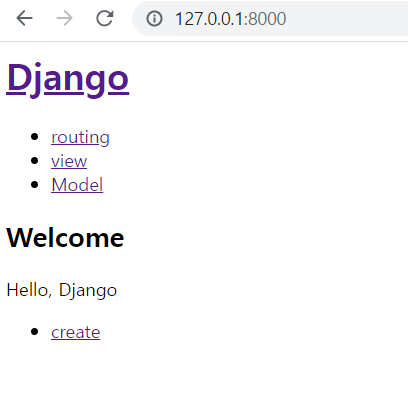
다음과 같이 홈에서는 delete가 보이지 않고 상세에서는 볼 수 있다
13강
먼저 버튼을 추가하고 url를 받을수 있도록 라우팅 설정 필요
def HTMLTemplate(articleTag, id=None):
    global topics
    contextUI = ''
    if id != None:
        contextUI = f'''
            <li>
                <form action="/delete/" method="post">
                    <input type="hidden" name="id" value={id}>
                    <input type="submit" value="delete">
                </form>
            </li>
            <li><a href="/update/{id}">update</a></li>
        '''
        #update 버튼 생성
myapps > url.py
from django.urls import path
from myapp import views

urlpatterns = [
    path('', views.index),
    path('create/', views.create),
    path('read/<id>/',views.read),
    path('update/<id>/',views.update),
    path('delete/', views.delete),
] #url path에도 추가
XD