인터넷에는 수많은 정보가 있지만, 이를 수작업으로 수집하기에는 너무 방대합니다. 이때 필요한 것이 바로 웹 크롤링(Web Crawling)입니다. 이 글에서는 웹 크롤링의 개념부터 실제 구현까지 모든 것을 알아보겠습니다!
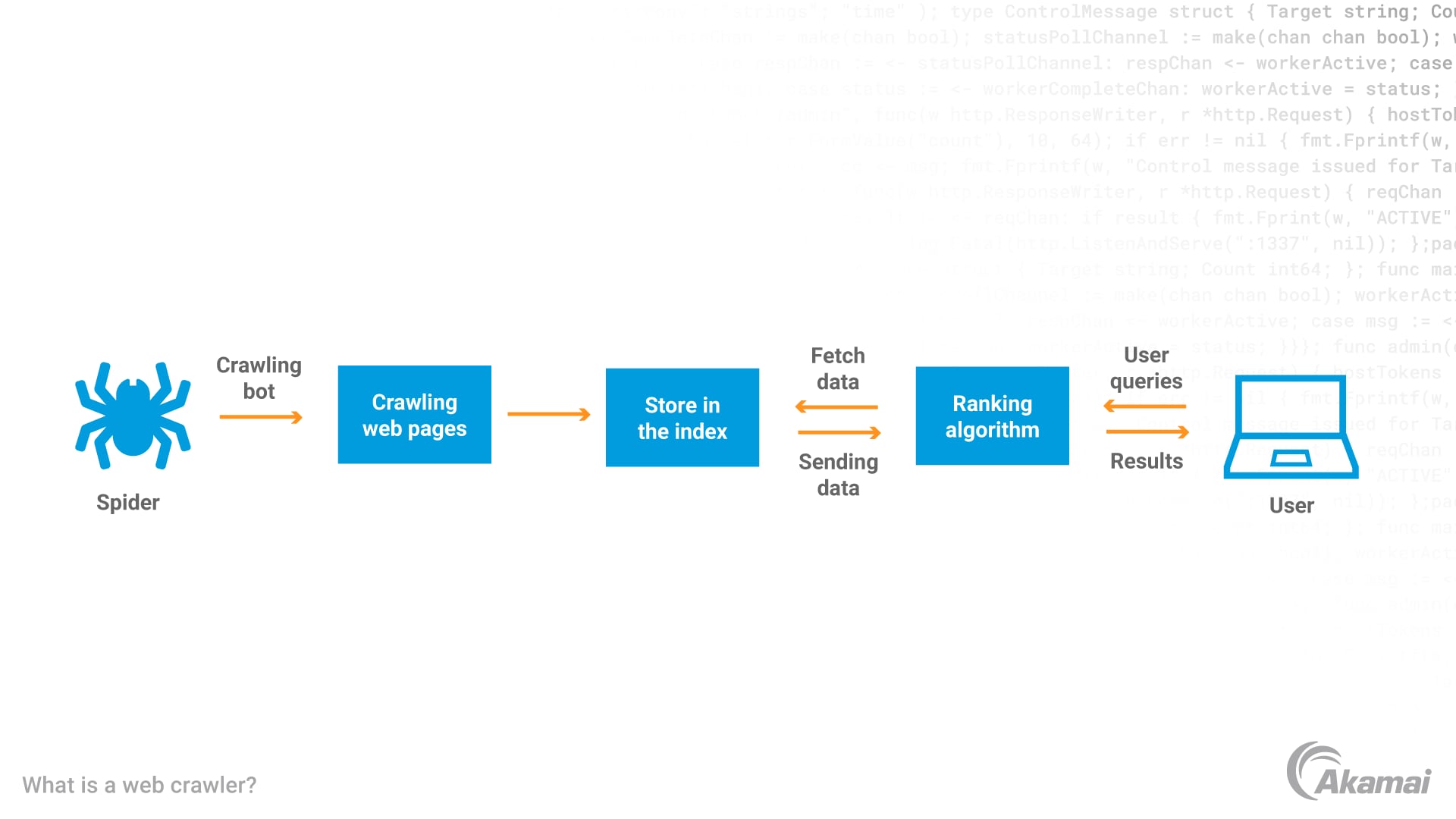
웹 크롤링이란? 🤔
- *웹 크롤링(Web Crawling)**은 인터넷상의 웹 페이지를 자동으로 탐색하고 정보를 수집하는 기술입니다. 마치 거미(Spider)가 거미줄을 타고 이동하듯이, 웹 크롤러는 웹 페이지의 링크를 따라가며 데이터를 수집합니다.
핵심 개념
- 자동화: 사람이 직접 하지 않고 프로그램이 자동으로 수행
- 체계적: 정해진 규칙에 따라 순서대로 페이지 방문
- 대규모: 수많은 웹 페이지를 빠르게 처리
- 지속적: 주기적으로 업데이트된 정보 수집
웹 크롤링 vs 웹 스크래핑 🔍
많은 사람들이 혼동하는 두 개념을 명확히 구분해보겠습니다:

웹 크롤링 (Web Crawling)
- 목적: 웹 페이지 발견 및 색인
- 범위: 광범위한 웹사이트 탐색
- 방법: 링크를 따라가며 페이지 간 이동
- 예시: 구글, 네이버 등 검색엔진
웹 스크래핑 (Web Scraping)
- 목적: 특정 데이터 추출
- 범위: 특정 웹페이지의 데이터
- 방법: HTML 파싱하여 원하는 정보 추출
- 예시: 쇼핑몰 가격 정보, 뉴스 기사 수집
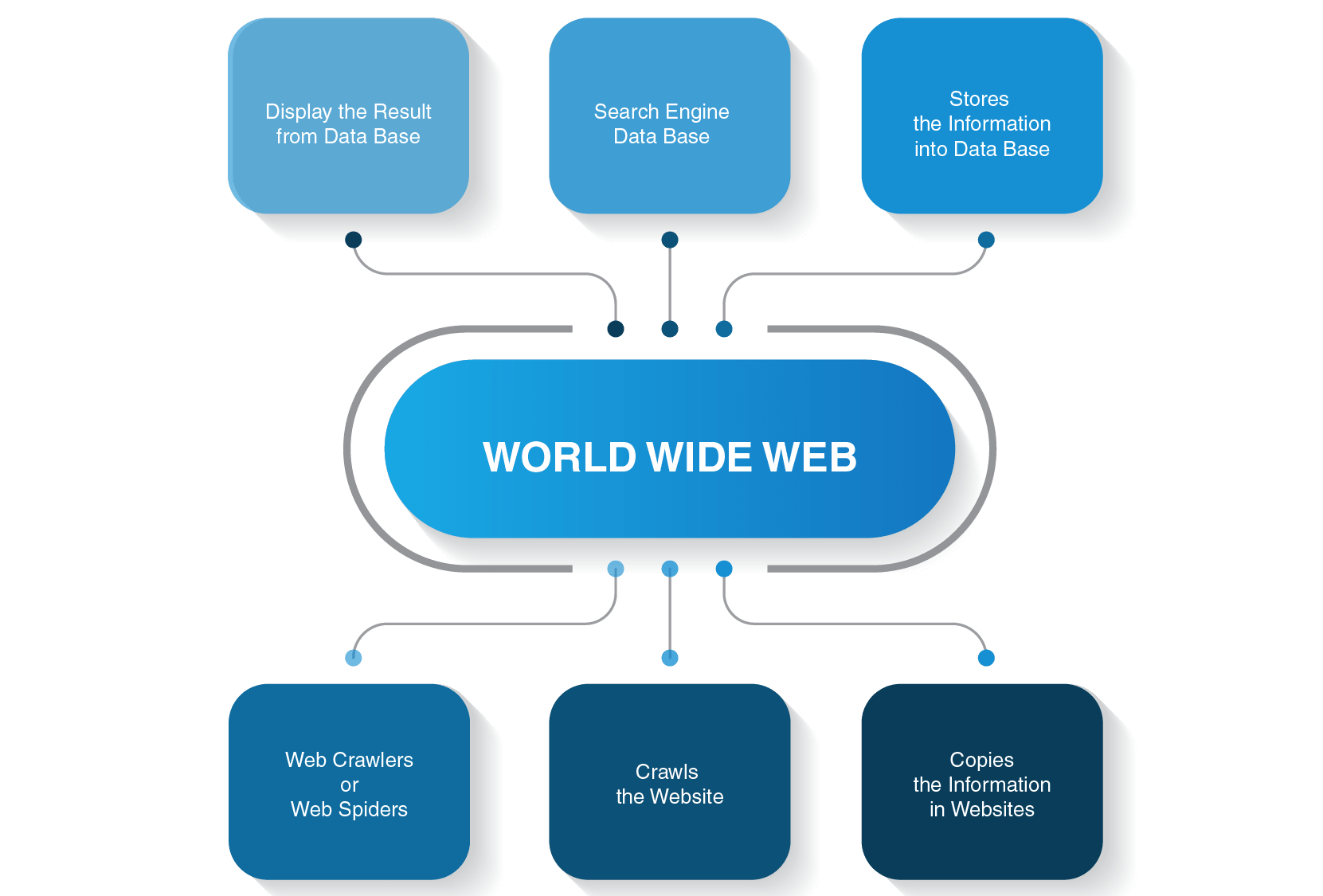
웹 크롤링의 작동 원리 ⚙️
1. 시드 URL 설정
Copyseed_urls = [
    "https://example.com",
    "https://news.example.com",
    "https://blog.example.com"
]
2. URL 큐 관리
Copyfrom collections import deque

url_queue = deque(seed_urls)
visited_urls = set()
3. 페이지 다운로드
Copyimport requests

def download_page(url):
    try:
        response = requests.get(url, timeout=10)
        return response.text
    except requests.RequestException as e:
        print(f"다운로드 실패: {e}")
        return None
4. 링크 추출
Copyfrom bs4 import BeautifulSoup
from urllib.parse import urljoin

def extract_links(html, base_url):
    soup = BeautifulSoup(html, 'html.parser')
    links = []

    for link in soup.find_all('a', href=True):
        absolute_url = urljoin(base_url, link['href'])
        links.append(absolute_url)

    return links
웹 크롤링의 활용 분야 🌟
1. 검색 엔진 🔍
- Google: 전 세계 웹페이지 색인
- Naver: 한국어 콘텐츠 전문 검색
- Bing: 마이크로소프트의 검색 서비스
2. 전자상거래 💰
- 경쟁사 가격 모니터링
- 상품 정보 수집
- 리뷰 및 평점 분석
3. 미디어 및 뉴스 📰
- 뉴스 기사 수집
- 소셜 미디어 트렌드 분석
- 콘텐츠 큐레이션
4. 학술 연구 📚
- 논문 및 연구 자료 수집
- 데이터 마이닝
- 텍스트 분석
5. 마케팅 및 SEO 📈
- 키워드 트렌드 분석
- 백링크 분석
- 브랜드 모니터링
웹 크롤링 도구와 기술 🛠️
1. Python 라이브러리
requests + BeautifulSoup
Copyimport requests
from bs4 import BeautifulSoup

def simple_crawler(url):
    response = requests.get(url)
    soup = BeautifulSoup(response.text, 'html.parser')

    # 제목 추출
    title = soup.find('title').text

    # 모든 링크 추출
    links = [a['href'] for a in soup.find_all('a', href=True)]

    return title, links

Scrapy 프레임워크
Copyimport scrapy

class NewsSpider(scrapy.Spider):
    name = 'news'
    start_urls = ['https://news.example.com']

    def parse(self, response):
        # 기사 링크 추출
        article_links = response.css('a.article-link::attr(href)').getall()

        for link in article_links:
            yield response.follow(link, self.parse_article)

        # 다음 페이지 링크 추출
        next_page = response.css('a.next-page::attr(href)').get()
        if next_page:
            yield response.follow(next_page, self.parse)

    def parse_article(self, response):
        yield {
            'title': response.css('h1::text').get(),
            'content': response.css('.article-content::text').getall(),
            'url': response.url
        }
Selenium (동적 페이지용)
Copyfrom selenium import webdriver
from selenium.webdriver.common.by import By
import time

def dynamic_crawler(url):
    driver = webdriver.Chrome()
    driver.get(url)

    # JavaScript 로딩 대기
    time.sleep(3)

    # 동적으로 생성된 콘텐츠 수집
    elements = driver.find_elements(By.CLASS_NAME, "dynamic-content")

    data = []
    for element in elements:
        data.append(element.text)

    driver.quit()
    return data
2. 상용 도구
Octoparse
- 코딩 없이 사용 가능한 GUI 도구
- 클라우드 기반 크롤링
- 스케줄링 기능
Parsehub
- 시각적 웹 크롤링 도구
- AJAX 지원
- API 제공
ScrapingBee
- API 기반 크롤링 서비스
- 프록시 로테이션 자동화
- JavaScript 렌더링 지원
실전 웹 크롤링 구현 💻
1. 기본 크롤러 구현
Copyimport requests
from bs4 import BeautifulSoup
from urllib.parse import urljoin, urlparse
from collections import deque
import time
import logging

class WebCrawler:
    def __init__(self, seed_urls, max_pages=100, delay=1):
        self.seed_urls = seed_urls
        self.max_pages = max_pages
        self.delay = delay
        self.visited_urls = set()
        self.url_queue = deque(seed_urls)
        self.session = requests.Session()

        # 로깅 설정
        logging.basicConfig(level=logging.INFO)
        self.logger = logging.getLogger(__name__)

        # User-Agent 설정
        self.session.headers.update({
            'User-Agent': 'Mozilla/5.0 (Windows NT 10.0; Win64; x64) AppleWebKit/537.36'
        })

    def is_valid_url(self, url):
        """URL 유효성 검사"""
        try:
            parsed = urlparse(url)
            return bool(parsed.netloc) and bool(parsed.scheme)
        except:
            return False

    def should_crawl(self, url):
        """크롤링 대상 URL인지 확인"""
        if url in self.visited_urls:
            return False

        if not self.is_valid_url(url):
            return False

        # 파일 확장자 제외
        excluded_extensions = ['.pdf', '.jpg', '.png', '.gif', '.mp4', '.zip']
        if any(url.lower().endswith(ext) for ext in excluded_extensions):
            return False

        return True

    def download_page(self, url):
        """페이지 다운로드"""
        try:
            response = self.session.get(url, timeout=10)
            response.raise_for_status()
            return response.text
        except requests.RequestException as e:
            self.logger.error(f"다운로드 실패 {url}: {e}")
            return None

    def extract_links(self, html, base_url):
        """링크 추출"""
        soup = BeautifulSoup(html, 'html.parser')
        links = []

        for link in soup.find_all('a', href=True):
            absolute_url = urljoin(base_url, link['href'])
            if self.should_crawl(absolute_url):
                links.append(absolute_url)

        return links

    def extract_data(self, html, url):
        """데이터 추출 (사용자 정의 가능)"""
        soup = BeautifulSoup(html, 'html.parser')

        # 기본 정보 추출
        title = soup.find('title')
        title = title.text.strip() if title else "제목 없음"

        # 메타 설명 추출
        meta_desc = soup.find('meta', attrs={'name': 'description'})
        description = meta_desc.get('content', '') if meta_desc else ''

        # 텍스트 추출 (간단한 예시)
        paragraphs = soup.find_all('p')
        text_content = ' '.join([p.text.strip() for p in paragraphs[:3]])

        return {
            'url': url,
            'title': title,
            'description': description,
            'content': text_content[:500] + '...' if len(text_content) > 500 else text_content
        }

    def crawl(self):
        """크롤링 실행"""
        crawled_data = []

        while self.url_queue and len(self.visited_urls) < self.max_pages:
            current_url = self.url_queue.popleft()

            if current_url in self.visited_urls:
                continue

            self.logger.info(f"크롤링 중: {current_url}")

            # 페이지 다운로드
            html = self.download_page(current_url)
            if not html:
                continue

            # 방문 표시
            self.visited_urls.add(current_url)

            # 데이터 추출
            page_data = self.extract_data(html, current_url)
            crawled_data.append(page_data)

            # 링크 추출 및 큐에 추가
            links = self.extract_links(html, current_url)
            for link in links:
                if link not in self.visited_urls:
                    self.url_queue.append(link)

            # 지연 시간
            time.sleep(self.delay)

        return crawled_data

# 사용 예시
if __name__ == "__main__":
    seed_urls = ["https://example.com"]
    crawler = WebCrawler(seed_urls, max_pages=50, delay=2)

    results = crawler.crawl()

    # 결과 출력
    for i, data in enumerate(results, 1):
        print(f"\n=== 페이지 {i} ===")
        print(f"URL: {data['url']}")
        print(f"제목: {data['title']}")
        print(f"설명: {data['description']}")
        print(f"내용: {data['content']}")
2. 뉴스 크롤러 예제
Copyimport requests
from bs4 import BeautifulSoup
import csv
from datetime import datetime
import time

class NewsCrawler:
    def __init__(self, base_url):
        self.base_url = base_url
        self.session = requests.Session()
        self.session.headers.update({
            'User-Agent': 'Mozilla/5.0 (Windows NT 10.0; Win64; x64) AppleWebKit/537.36'
        })

    def get_article_links(self, page_url):
        """기사 링크 수집"""
        try:
            response = self.session.get(page_url)
            soup = BeautifulSoup(response.text, 'html.parser')

            # 기사 링크 추출 (사이트별로 선택자 수정 필요)
            article_links = []
            for link in soup.find_all('a', class_='article-link'):
                href = link.get('href')
                if href:
                    full_url = urljoin(self.base_url, href)
                    article_links.append(full_url)

            return article_links
        except Exception as e:
            print(f"링크 수집 실패: {e}")
            return []

    def extract_article_data(self, article_url):
        """개별 기사 데이터 추출"""
        try:
            response = self.session.get(article_url)
            soup = BeautifulSoup(response.text, 'html.parser')

            # 제목 추출
            title_elem = soup.find('h1') or soup.find('h2')
            title = title_elem.text.strip() if title_elem else "제목 없음"

            # 본문 추출
            content_elem = soup.find('div', class_='article-content')
            content = content_elem.text.strip() if content_elem else "내용 없음"

            # 날짜 추출
            date_elem = soup.find('time') or soup.find('span', class_='date')
            date = date_elem.get('datetime') or date_elem.text if date_elem else datetime.now().isoformat()

            return {
                'title': title,
                'content': content,
                'date': date,
                'url': article_url
            }
        except Exception as e:
            print(f"기사 추출 실패 {article_url}: {e}")
            return None

    def crawl_news(self, max_pages=5):
        """뉴스 크롤링 실행"""
        all_articles = []

        for page in range(1, max_pages + 1):
            print(f"페이지 {page} 크롤링 중...")

            page_url = f"{self.base_url}/page/{page}"
            article_links = self.get_article_links(page_url)

            for link in article_links:
                article_data = self.extract_article_data(link)
                if article_data:
                    all_articles.append(article_data)

                # 서버 부하 방지를 위한 지연
                time.sleep(1)

        return all_articles

    def save_to_csv(self, articles, filename='news_articles.csv'):
        """CSV 파일로 저장"""
        with open(filename, 'w', newline='', encoding='utf-8') as csvfile:
            fieldnames = ['title', 'content', 'date', 'url']
            writer = csv.DictWriter(csvfile, fieldnames=fieldnames)

            writer.writeheader()
            for article in articles:
                writer.writerow(article)

        print(f"{len(articles)}개 기사를 {filename}에 저장했습니다.")

# 사용 예시
news_crawler = NewsCrawler("https://news.example.com")
articles = news_crawler.crawl_news(max_pages=3)
news_crawler.save_to_csv(articles)
3. 전자상거래 가격 모니터링
Copyimport requests
from bs4 import BeautifulSoup
import json
import time
from datetime import datetime

class PriceMonitor:
    def __init__(self):
        self.session = requests.Session()
        self.session.headers.update({
            'User-Agent': 'Mozilla/5.0 (Windows NT 10.0; Win64; x64) AppleWebKit/537.36'
        })

    def get_product_price(self, url, price_selector):
        """상품 가격 추출"""
        try:
            response = self.session.get(url)
            soup = BeautifulSoup(response.text, 'html.parser')

            price_elem = soup.select_one(price_selector)
            if price_elem:
                price_text = price_elem.text.strip()
                # 가격에서 숫자만 추출
                import re
                price = re.sub(r'[^\d]', '', price_text)
                return int(price) if price else None

            return None
        except Exception as e:
            print(f"가격 추출 실패 {url}: {e}")
            return None

    def monitor_products(self, products):
        """상품 가격 모니터링"""
        results = []

        for product in products:
            name = product['name']
            url = product['url']
            price_selector = product['price_selector']

            print(f"{name} 가격 확인 중...")

            price = self.get_product_price(url, price_selector)

            result = {
                'name': name,
                'url': url,
                'price': price,
                'timestamp': datetime.now().isoformat()
            }

            results.append(result)

            # 요청 간격
            time.sleep(2)

        return results

    def save_price_data(self, data, filename='price_data.json'):
        """가격 데이터 저장"""
        try:
            # 기존 데이터 로드
            with open(filename, 'r', encoding='utf-8') as f:
                existing_data = json.load(f)
        except FileNotFoundError:
            existing_data = []

        # 새 데이터 추가
        existing_data.extend(data)

        # 파일에 저장
        with open(filename, 'w', encoding='utf-8') as f:
            json.dump(existing_data, f, ensure_ascii=False, indent=2)

        print(f"가격 데이터를 {filename}에 저장했습니다.")

# 사용 예시
products_to_monitor = [
    {
        'name': '아이폰 15 Pro',
        'url': 'https://store.apple.com/kr/buy-iphone/iphone-15-pro',
        'price_selector': '.price'
    },
    {
        'name': '갤럭시 S24',
        'url': 'https://www.samsung.com/kr/smartphones/galaxy-s24/',
        'price_selector': '.price-display'
    }
]

monitor = PriceMonitor()
price_data = monitor.monitor_products(products_to_monitor)
monitor.save_price_data(price_data)
웹 크롤링 시 고려사항 ⚠️
1. 법적 및 윤리적 고려사항
robots.txt 준수
Copyimport urllib.robotparser

def can_crawl(url, user_agent='*'):
    """robots.txt 확인"""
    try:
        rp = urllib.robotparser.RobotFileParser()
        rp.set_url(url + '/robots.txt')
        rp.read()
        return rp.can_fetch(user_agent, url)
    except:
        return True  # robots.txt가 없으면 허용
이용약관 준수
- 웹사이트의 이용약관 확인
- 개인정보 수집 금지
- 저작권 보호 콘텐츠 주의
2. 기술적 고려사항
요청 빈도 제한
Copyimport time
from datetime import datetime, timedelta

class RateLimiter:
    def __init__(self, max_requests=10, time_window=60):
        self.max_requests = max_requests
        self.time_window = time_window
        self.requests = []

    def wait_if_needed(self):
        now = datetime.now()

        # 시간 윈도우 내의 요청만 유지
        self.requests = [req_time for req_time in self.requests
                        if now - req_time < timedelta(seconds=self.time_window)]

        # 요청 한도 초과 시 대기
        if len(self.requests) >= self.max_requests:
            sleep_time = self.time_window - (now - self.requests[0]).total_seconds()
            if sleep_time > 0:
                time.sleep(sleep_time)

        self.requests.append(now)
에러 처리 및 재시도
Copyimport time
from functools import wraps

def retry(max_attempts=3, delay=1, backoff=2):
    """재시도 데코레이터"""
    def decorator(func):
        @wraps(func)
        def wrapper(*args, **kwargs):
            attempts = 0
            current_delay = delay

            while attempts < max_attempts:
                try:
                    return func(*args, **kwargs)
                except Exception as e:
                    attempts += 1
                    if attempts == max_attempts:
                        raise e

                    print(f"시도 {attempts} 실패: {e}. {current_delay}초 후 재시도...")
                    time.sleep(current_delay)
                    current_delay *= backoff

            return None
        return wrapper
    return decorator

@retry(max_attempts=3, delay=2)
def robust_download(url):
    response = requests.get(url, timeout=10)
    response.raise_for_status()
    return response.text
세션 관리
Copyclass SessionManager:
    def __init__(self):
        self.session = requests.Session()
        self.session.headers.update({
            'User-Agent': 'Mozilla/5.0 (Windows NT 10.0; Win64; x64) AppleWebKit/537.36'
        })

    def login(self, login_url, username, password):
        """로그인 세션 유지"""
        login_data = {
            'username': username,
            'password': password
        }

        response = self.session.post(login_url, data=login_data)
        return response.status_code == 200

    def get_with_session(self, url):
        """세션을 유지하며 요청"""
        return self.session.get(url)
고급 크롤링 기법 🚀
1. 동적 콘텐츠 처리
Copyfrom selenium import webdriver
from selenium.webdriver.common.by import By
from selenium.webdriver.support.ui import WebDriverWait
from selenium.webdriver.support import expected_conditions as EC

class DynamicCrawler:
    def __init__(self, headless=True):
        options = webdriver.ChromeOptions()
        if headless:
            options.add_argument('--headless')
        options.add_argument('--no-sandbox')
        options.add_argument('--disable-dev-shm-usage')

        self.driver = webdriver.Chrome(options=options)
        self.wait = WebDriverWait(self.driver, 10)

    def scroll_and_load(self, url):
        """스크롤하여 동적 콘텐츠 로드"""
        self.driver.get(url)

        # 페이지 끝까지 스크롤
        last_height = self.driver.execute_script("return document.body.scrollHeight")

        while True:
            # 스크롤 다운
            self.driver.execute_script("window.scrollTo(0, document.body.scrollHeight);")

            # 로딩 대기
            time.sleep(2)

            # 새로운 높이 계산
            new_height = self.driver.execute_script("return document.body.scrollHeight")

            if new_height == last_height:
                break

            last_height = new_height

        return self.driver.page_source

    def handle_pagination(self, url, next_button_selector):
        """페이지네이션 처리"""
        self.driver.get(url)
        all_data = []

        while True:
            # 현재 페이지 데이터 수집
            page_data = self.extract_current_page_data()
            all_data.extend(page_data)

            try:
                # 다음 페이지 버튼 클릭
                next_button = self.wait.until(
                    EC.element_to_be_clickable((By.CSS_SELECTOR, next_button_selector))
                )
                next_button.click()

                # 페이지 로딩 대기
                time.sleep(2)

            except:
                # 더 이상 다음 페이지가 없음
                break

        return all_data

    def extract_current_page_data(self):
        """현재 페이지 데이터 추출"""
        # 구현 필요 (사이트별로 다름)
        pass

    def close(self):
        self.driver.quit()
2. 프록시 로테이션
Copyimport random
import requests
from itertools import cycle

class ProxyRotator:
    def __init__(self, proxy_list):
        self.proxy_cycle = cycle(proxy_list)
        self.current_proxy = None

    def get_next_proxy(self):
        """다음 프록시 선택"""
        self.current_proxy = next(self.proxy_cycle)
        return self.current_proxy

    def make_request(self, url, max_retries=3):
        """프록시를 사용한 요청"""
        for attempt in range(max_retries):
            proxy = self.get_next_proxy()

            try:
                proxies = {
                    'http': proxy,
                    'https': proxy
                }

                response = requests.get(url, proxies=proxies, timeout=10)
                response.raise_for_status()
                return response

            except Exception as e:
                print(f"프록시 {proxy} 실패: {e}")
                if attempt == max_retries - 1:
                    raise e
                continue

        return None

# 사용 예시
proxy_list = [
    'http://proxy1.example.com:8080',
    'http://proxy2.example.com:8080',
    'http://proxy3.example.com:8080'
]

rotator = ProxyRotator(proxy_list)
response = rotator.make_request('https://example.com')
3. 캐싱 시스템
Copyimport hashlib
import pickle
import os
from datetime import datetime, timedelta

class CrawlCache:
    def __init__(self, cache_dir='./cache', expire_hours=24):
        self.cache_dir = cache_dir
        self.expire_hours = expire_hours

        if not os.path.exists(cache_dir):
            os.makedirs(cache_dir)

    def _get_cache_key(self, url):
        """URL을 기반으로 캐시 키 생성"""
        return hashlib.md5(url.encode()).hexdigest()

    def _get_cache_path(self, cache_key):
        """캐시 파일 경로"""
        return os.path.join(self.cache_dir, f"{cache_key}.pkl")

    def get(self, url):
        """캐시에서 데이터 조회"""
        cache_key = self._get_cache_key(url)
        cache_path = self._get_cache_path(cache_key)

        if not os.path.exists(cache_path):
            return None

        try:
            with open(cache_path, 'rb') as f:
                cached_data = pickle.load(f)

            # 만료
AI를 꿈꾸는 BackEnd개발자