
🖼️레이아웃 스타일 3
배치 관련 스타일 (position)
position : relative; (상대적인)
- 지정된 요소 내부에 다른 요소가 상대적인 위치를 지정할 수 있도록 기준이 되게 만드는 속성.
- 내부에 작성되는 요소에 위치 지정 시 top, bottom, left, right 속성을 사용할 수 있다.
position : absolute; (절대적인)
- 기본 요소의 배치 순서를 무시하고 지정된 절대 위치에 요소를 배치함
position : fixed; (고정된)
- 항상 고정된 위치에 요소를 배치함.
(화면이 움직이든 말든 항상 같은 위치)
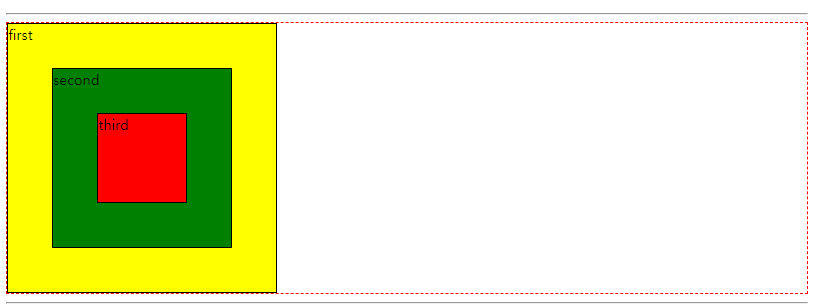
   <div class="container-1">
        <div class="first">first</div>
        <div class="second">second</div>
        <div class="third">third</div>
    </div>
div {
border: 1px solid black;
box-sizing: border-box;
}
.container-1 {
border: 2px dashed red;
position: relative
}
.first {
width: 300px;
height: 300px;
background-color: yellow;
}
.second {
width: 200px;
height: 200px;
background-color: green;
position: absolute ;
/* position : absolute;를 쓰는 순간 first가 무시됨 */
/* 빨간색 테두리를 기준으로 붙음 */
top: 50px;
left : 50px;
}
.third {
width: 100px;
height: 100px;
background-color: red;
position:absolute;
top: 100px;
left:100px;
}
요소를 정가운데에 배치하기
    <h2>요소를 영역 정가운데에 배치하기</h2>
    <div class="container-2">
        <div id="center"></div>
    </div>
.container-2 {
border:2px solid black;
width: 400px;
height: 400px;
position : relative ; /* container가 기준점이 되도록 한다 */
}
#center {
position : absolute ;
border :2px solid black;
width : 100px ;
height: 100px ;
background-color: pink;
/*
top : 100px;
bottom : 100px;
left: 100px;
*/
top: 0;
left: 0;
bottom : 0;
right : 0;
margin:auto;
}top: 0;
left: 0;
bottom : 0;
right : 0
margin:auto;
➡️상하좌우가 auto로 지정되면서 가운데 배치된다.
일종의 공식
fixed
    <div class="fixed-are">
        <a href="#body-top">위쪽으로 이동</a>
    </div>
.fixed-are {
width: 120px;
position : fixed;
/* 어디에 있어야 하나 위치 조정 해줘야 함 */
bottom : 50px;
right: 50px;
}ex) 웹사이트에서 구석에서 따라다니는 상단 바로가기 아이콘