[CycleTracker 1] HTML & CSS & JS
첫 번째 PWA 만들기 - CycleTracker 1
CycleTracker: HTML & CSS & JS
https://mdn.github.io/pwa-examples/cycletracker/
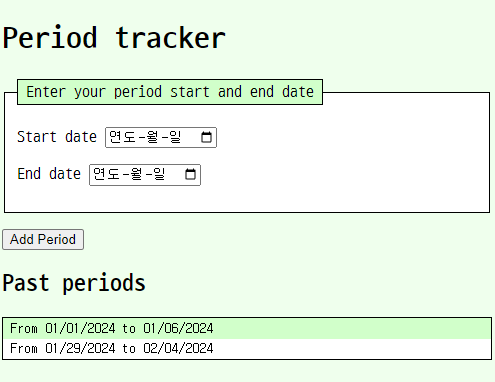
아래 파일들 한 폴더에 넣고 index.html을 GoLive로 실행
index.html
<!doctype html>
<html lang="en-US">
  <head>
    <meta charset="utf-8" />
    <meta name="viewport" content="width=device-width" />
    <title>Cycle Tracker</title>
    <link rel="stylesheet" href="style.css" />
  </head>
  <body>
    <h1>Period tracker</h1>
    <form id="new-period">
      <fieldset>
        <legend>Enter your period start and end date</legend>
        <p>
          <label for="start-date">Start date</label>
          <input type="date" id="start-date" required />
        </p>
        <p>
          <label for="end-date">End date</label>
          <input type="date" id="end-date" required />
        </p>
      </fieldset>
      <p>
        <button type="submit">Add Period</button>
      </p>
    </form>
    <section id="past-periods">
      <h2>Past periods</h2>
      <ul>
        <li>From 01/01/2024 to 01/06/2024</li>
        <li>From 01/29/2024 to 02/04/2024</li>
      </ul>
    </section>
    <script src="app.js" defer></script>
  </body>
</html>
style.css
body {
  margin: 1vh 1vw;
  background-color: #efe;
}
ul,
fieldset,
legend {
  border: 1px solid;
  background-color: #fff;
}
ul {
  padding: 0;
  font-family: monospace;
}
li,
legend {
  list-style-type: none;
  padding: 0.2em 0.5em;
  background-color: #cfc;
}
li:nth-of-type(even) {
  background-color: inherit;
}
app.js
// JS file for cycleTracker app

// -------------
// Variable declarations
// -------------
const newPeriodFormEl = document.getElementsByTagName("form")[0];
const startDateInputEl = document.getElementById("start-date");
const endDateInputEl = document.getElementById("end-date");
const pastPeriodContainer = document.getElementById("past-periods");

// Storage key is an app-wide constant
const STORAGE_KEY = "period-tracker";

// -------------
// Event Handlers
// -------------
newPeriodFormEl.addEventListener("submit", (event) => {
  event.preventDefault();
  const startDate = startDateInputEl.value;
  const endDate = endDateInputEl.value;
  if (checkDatesInvalid(startDate, endDate)) {
    return;
  }
  storeNewPeriod(startDate, endDate);
  renderPastPeriods();
  newPeriodFormEl.reset();
});

// -------------
// Functionality
// -------------

// 1. Form validation
function checkDatesInvalid(startDate, endDate) {
  if (!startDate || !endDate || startDate > endDate) {
    newPeriodFormEl.reset();
    return true;
  }
  return false;
}

// 2. Get, add, sort, and store data
function storeNewPeriod(startDate, endDate) {
  const periods = getAllStoredPeriods();
  periods.push({ startDate, endDate });
  periods.sort((a, b) => {
    return new Date(b.startDate) - new Date(a.startDate);
  });
  window.localStorage.setItem(STORAGE_KEY, JSON.stringify(periods));
}

// 3. Get and parse data
function getAllStoredPeriods() {
  const data = window.localStorage.getItem(STORAGE_KEY);
  const periods = data ? JSON.parse(data) : [];
  return periods;
}

// 4. Display data
function renderPastPeriods() {
  const pastPeriodHeader = document.createElement("h2");
  const pastPeriodList = document.createElement("ul");
  const periods = getAllStoredPeriods();
  if (periods.length === 0) {
    return;
  }
  pastPeriodContainer.innerHTML = "";
  pastPeriodHeader.textContent = "Past periods";
  periods.forEach((period) => {
    const periodEl = document.createElement("li");
    periodEl.textContent = `From ${formatDate(period.startDate)} to ${formatDate(period.endDate)}`;
    pastPeriodList.appendChild(periodEl);
  });

  pastPeriodContainer.appendChild(pastPeriodHeader);
  pastPeriodContainer.appendChild(pastPeriodList);
}

// 5. format dates for display
function formatDate(dateString) {
  const date = new Date(dateString);
  return date.toLocaleDateString("en-US", { timeZone: "UTC" });
}

// -------------
// Call render on page load
// -------------

renderPastPeriods();
더 오래하면 돼.