[Network/Security] The Ultimate Guide to IPsec for Developers: Protocols, Modes, and Packet Structure
Security
If you are studying AWS networking or preparing for a backend engineering interview, you will inevitably encounter the term IPsec (Internet Protocol Security). It is also a favorite topic for technical interviewers.
"What is the relationship between VPN and IPsec?"
"What is the difference between Tunnel Mode and Transport Mode?"
Today, let's skip the abstract textbook definitions. Instead, we will break down the working principles of IPsec using intuitive analogies (Packaging & Delivery) and analyze the actual packet structure from a developer's perspective.
1. Concept: VPN is the 'Interface', IPsec is the 'Implementation'
If you are a developer (e.g., Java, TS), this analogy will make perfect sense.
- VPN (Virtual Private Network):
Interface - It represents the Goal (Abstraction): "I want to build a private network over the public internet."
- IPsec:
Class(Implementation) - It is the Implementation of that goal using standard protocols at the OSI Layer 3 (Network Layer).
- (Note: SSL VPN and WireGuard are other implementations of the VPN interface.)
In short, studying IPsec means learning "how the OS kernel manipulates and packages packets to achieve the VPN goal."
2. Choice #1: The Container (Protocol - AH vs. ESP)
The first step is deciding what kind of "security container" to put your data (Payload) into.
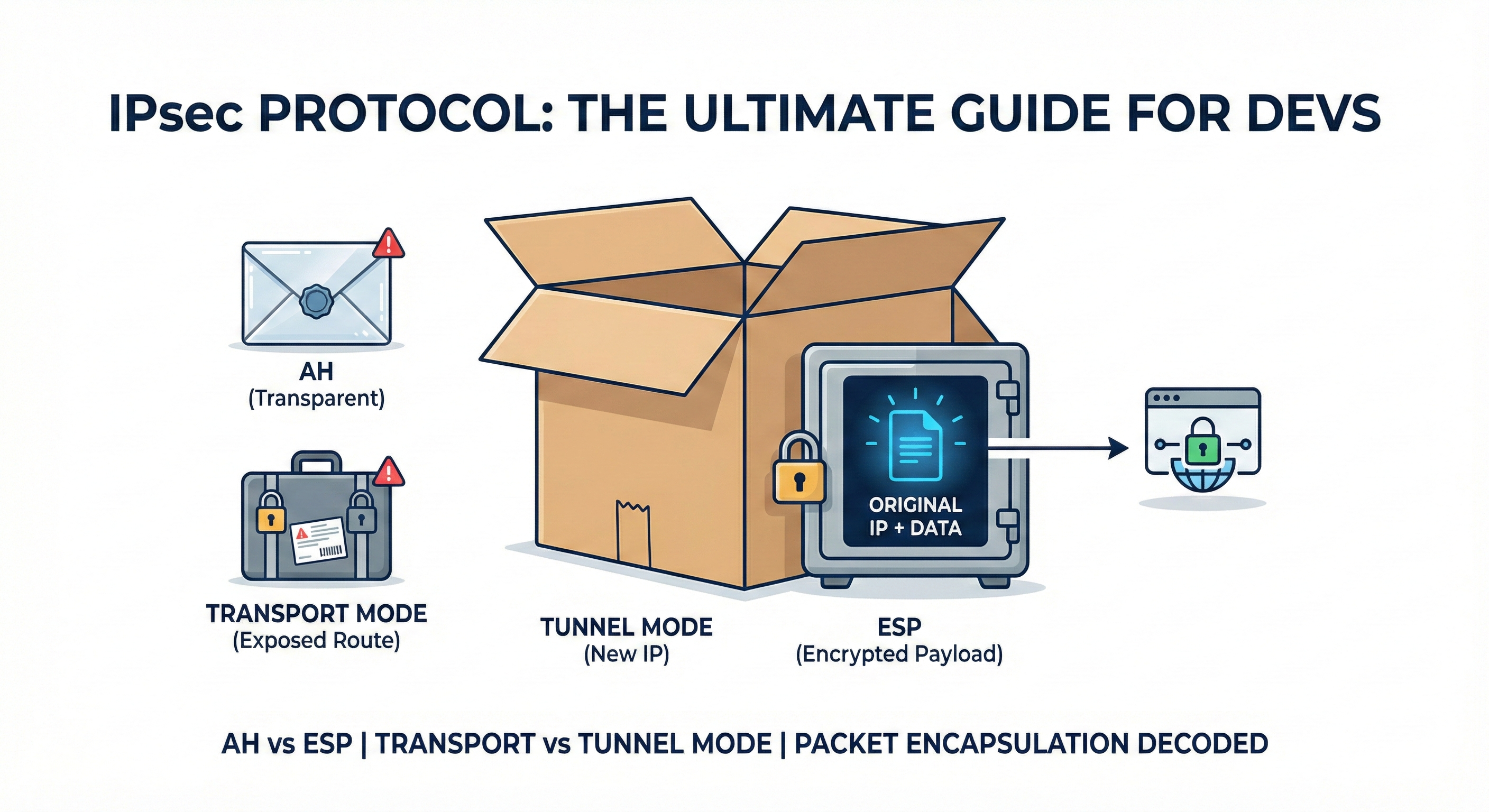
✉️ AH (Authentication Header): "The Transparent Envelope"
- Analogy: You put your letter in a transparent vinyl envelope and seal it with a wax stamp (Authentication).
- Features: You can verify who sent it and that it hasn't been tampered with (Integrity), but anyone can read the content because it is transparent. (No Encryption).
- Verdict: Rarely used in modern production environments. You wouldn't mail a password in a clear envelope, right?
🧳 ESP (Encapsulating Security Payload): "The Iron Safe"
- Analogy: You put your data inside a sturdy Iron Safe and lock it.
- Features: The data is Encrypted, making it unreadable to outsiders. It also provides Authentication and Integrity.
- Verdict: The Industry Standard. When we say "IPsec VPN," we almost always mean using ESP.
3. Choice #2: The Delivery Method (Transport vs. Tunnel)
Now that your data is inside the Safe (ESP), how will you ship it? This is the most crucial part.
🚗 Transport Mode: "The Locked Briefcase Delivery"
- Method: You slap the shipping label (Destination IP) directly onto the handle of the Safe (Encrypted Data).
- Structure:
[Original IP] + [ESP Header] + [Encrypted Data] - Downside: The content is secure, but the delivery guy (Hacker/Router) can see exactly who is talking to whom. Your traffic pattern is exposed.
- Use Case: Mostly used for Host-to-Host communication (e.g., Server to Server).
🚛 Tunnel Mode: "The Double Box Packaging"
- Method: You take the Safe and put it inside a larger, plain cardboard box. You then stick the label only on the outer box.
- Outer Label: "To: Logistics Center (VPN Gateway)"
- Structure:
[New IP] + [ESP Header] + [Encrypted Original IP + Data] - Upside: The delivery guy only knows this box is going to the Logistics Center. He has no idea who the final recipient is inside the box.
- Use Case: Essential for Site-to-Site connections (e.g., Corporate HQ to Branch Office). It completely hides the internal IP topology.
4. [Deep Dive] Packet Anatomy
As developers, we trust code and data structures. Here is how the actual packet bytes transform.
This example uses the standard [ESP + Tunnel Mode] combination.
Step 1: Original Packet (Plain Text)
[ Original IP Header ] + [ TCP Header ] + [ Data: "Hello" ]
- If a hacker sniffs this, they can read "Hello" and see your internal IP.
Step 2: After IPsec Encapsulation (Encrypted)
The OS Kernel wraps the entire Layer 3 packet inside the "Outer Box."
[ New IP Header ]           <-- 1. Outer Box Label (Source: Gateway A / Dest: Gateway B)
[ ESP Header ]              <-- 2. Safe ID (SPI, Sequence Number)
[ *********************** ]
[ * [ Original IP ]     * ] <-- 3. Encrypted Area Starts
[ * [ TCP Header ]      * ]     (The original address and data are all ciphertext)
[ * [ Data: "Hello" ]   * ]     (Hackers see nothing but garbage data here)
[ *********************** ]
[ ESP Trailer & Auth ]      <-- 4. Seal (HMAC)
Key Takeaways:
- New IP Header: Internet routers only look at this outer header to route the packet.
- Encrypted Payload: Since the
Original IPis encrypted, the final destination is hidden from the public internet.
5. FAQ: Myths and Truths
Q1. I already use HTTPS. Do I need IPsec VPN?
A. Yes, using both is better (Defense in Depth).
HTTPS protects the Content (Layer 7). IPsec protects the Path (Layer 3).
When combined, you get a structure like [ IPsec [ HTTPS [ Data ] ] ]. Even if the VPN administrator inspects the packet, they cannot see your HTTPS data. This enables a Zero Trust architecture.
Q2. Is IPsec Software or Hardware?
A. IPsec itself is a Protocol (Software).
However, enterprise "VPN Appliances" (like Cisco or Fortinet gear) are essentially Linux computers equipped with ASIC (Application-Specific Integrated Circuit) chips. These chips offload the heavy math of encryption (AES-256) from the CPU, allowing for high-speed throughput.
6. Conclusion
IPsec is not just a security tool; it is akin to civil engineering for the internet. It builds a private, secure highway on top of the public, chaotic road network.
The next time you configure an AWS Site-to-Site VPN or analyze packet logs, visualize this image: "My data is locked in an Iron Safe (ESP), placed inside a Plain Cardboard Box (Tunnel Mode), and shipped across the internet."
It makes the concept much easier to grasp.