VPN 실습
Static Routing 설정
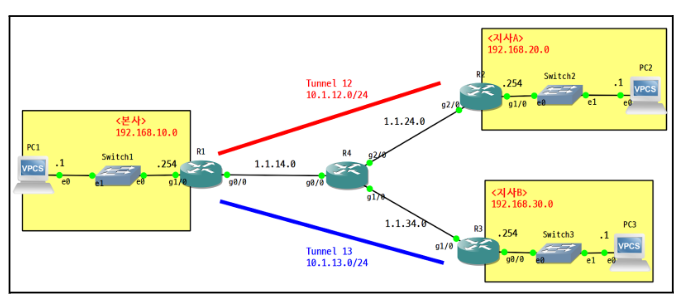
R1(config)#ip route 1.1.24.0 255.255.255.0 1.1.14.4
R1(config)#ip route 1.1.34.0 255.255.255.0 1.1.14.4

R2(config-if)#ip route 1.1.14.0 255.255.255.0 1.1.24.4
R2(config)#ip route 1.1.34.0 255.255.255.0 1.1.24.4

R3(config-if)#ip route 1.1.14.0 255.255.255.0 1.1.34.4
R3(config)#ip route 1.1.24.0 255.255.255.0 1.1.34.4
Tunnel 인터페이스 구성 (GRE)
R1(config-if)#do sh run int t12
interface Tunnel12
 ip address 10.1.12.1 255.255.255.0
 tunnel source GigabitEthernet0/0
 tunnel destination 1.1.24.2

R1(config-if)#do sh run int t13
interface Tunnel13
 ip address 10.1.13.1 255.255.255.0
 tunnel source GigabitEthernet0/0
 tunnel destination 1.1.34.3

R2(config-if)#do sh run int t12
interface Tunnel12
 ip address 10.1.12.2 255.255.255.0
 tunnel source GigabitEthernet2/0
 tunnel destination 1.1.14.1

R3#sh run int t13
interface Tunnel13
 ip address 10.1.13.3 255.255.255.0
 tunnel source GigabitEthernet1/0
 tunnel destination 1.1.14.1
OSPF 라우팅 설정 (Area 0)
R1(config-if)#router ospf 1
R1(config-router)#router-id 1.1.1.1
R1(config-router)#network 10.1.12.0 0.0.0.255 area 0
R1(config-router)#network 192.168.10.0 0.0.0.255 area 0
R1(config-router)#network 10.1.13.0 0.0.0.255 area 0

R2(config-if)#router ospf 1
R2(config-router)#router-id 2.2.2.2
R2(config-router)#network 10.1.12.0 0.0.0.255 area 0
R2(config-router)#network 192.168.20.0 0.0.0.255 area 0

R3(config)#router ospf 1
R3(config-router)#router-id 3.3.3.3
R3(config-router)#network 10.1.13.0 0.0.0.255 area 0
R3(config-router)#network 192.168.30.0 0.0.0.255 area 0
보안 문제 및 해결
아래와 같이 보안성이 구성되어 있지 않으며, 내부 정보가 그대로 노출되고 있어, IPsec 설정
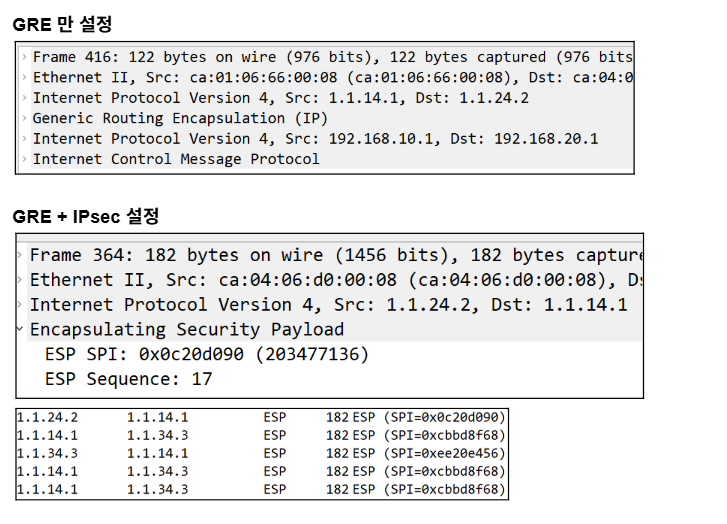
GRE over IPSec 구성 흐름 예시 (예: R1 ↔ R2)
- ISAKMP Phase 1 설정
crypto isakmp policy 10
 encr aes
 hash sha256
 authentication pre-share
 group 5
lifetime 86400- 사전 공유 키 설정
crypto isakmp key cisco address 1.1.24.2- IPSec Transform-Set 설정
crypto ipsec transform-set TS esp-aes esp-sha-hmac- Crypto Map 설정
crypto map VPN 10 ipsec-isakmp
 set peer 1.1.24.2
 set transform-set TS
match address 100- Access-list로 보호할 트래픽 정의
access-list 100 permit gre host 1.1.14.1 host 1.1.24.2- 인터페이스에 Crypto Map 적용
interface GigabitEthernet0/0
 crypto map VPN
VPN 실습 2
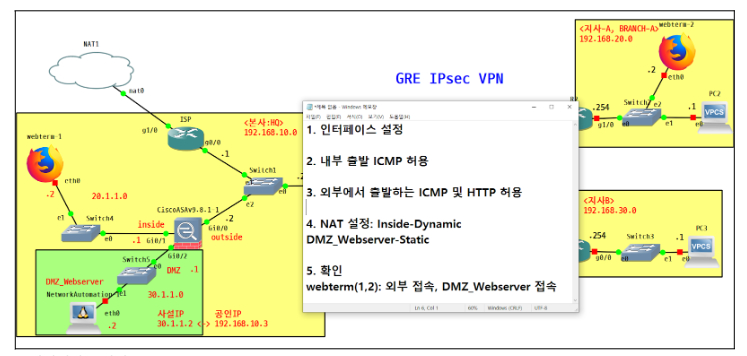
설정 순서
-
인터페이스 설정
-
내부 출발 ICMP 허용
-
외부에서 DMZ_Webserver를 목적지로 하는
ICMP 및 HTTP 허용 -
NAT 설정: Inside-Dynamic
DMZ_Webserver-Static -
확인
webterm(1,2): 외부 접속, DMZ_Webserver 접속
FW1(config)# int g0/0
FW1(config-if)# ip add 192.168.10.2 255.255.255.0
FW1(config-if)# no sh
FW1(config-if)# nameif outside
FW1(config-if)# security-level 0
FW1(config-if)# int g0/1
FW1(config-if)# ip add 20.1.1.1 255.255.255.0
FW1(config-if)# no sh
FW1(config-if)# nameif inside
FW1(config-if)# security-level 100
FW1(config-if)# int g0/2
FW1(config-if)# ip add 30.1.1.1 255.255.255.0
FW1(config-if)# no sh
FW1(config-if)# nameif DMZ
FW1(config-if)# security-level 50
FW1(config-if)# sh int ip br
방화벽의 라우팅 정보를 추가하기 위해 아래와 같이 설정함.
FW1(config-if)# route outside 0 0 192.168.10.1
//8.8.8.8 등 nat 외부망 접속

FW1(config)# route outside 192.168.20.0 255.255.255.0 192.168.10.254   //gre 터널 이 후의 지사A

FW1(config)# route outside 192.168.30.0 255.255.255.0 192.168.10.254  //gre 터널 이 후의 지사B

FW1(config)# sh route
FW1(config)# object network INSIDE
FW1(config-network-object)# subnet 20.1.1.0 255.255.255.0
FW1(config-network-object)# nat (inside,outside) dynamic interface
FW1(config)# fixup protocol icmpinside에서 출발하는 icmp, tcp 등의 프로토콜 은 허용이 된다.
지사, 본사 등의 사용자들이 외부 nat 접속을 하기 위하여 아래와 같이 설정
ISP(config)#router ospf 1
ISP(config-router)#router-id 5.5.5.5
ISP(config-router)#network 192.168.10.0 0.0.0.255 area 0
ISP(config-router)#default-information originate
FW1(config)# sh run object
object network INSIDE
subnet 20.1.1.0 255.255.255.0
object network DMZ_Webserver
host 30.1.1.2
FW1(config)# sh run access-list
access-list OUT2IN extended permit tcp any object DMZ_Webserver eq www
access-list OUT2IN extended permit icmp any object DMZ_Webserver
FW1(config)# sh run access-group
access-group OUT2IN in interface outsideDMZ 설정
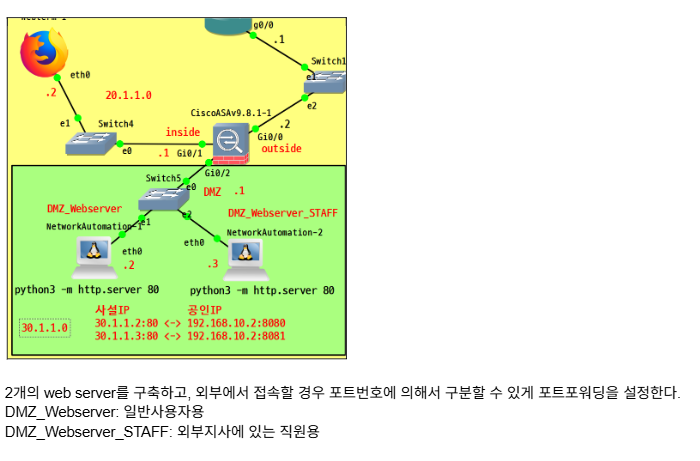
NAT 설정(참고)
object network INSIDE
nat (inside,outside) dynamic interface
object network DMZ-Webserver
nat (DMZ,outside) static 1.1.30.2 //외부 공인IP 역할을 하게 된다.
FW1(config-network-object)# sh run object
object network DMZ_Webserver
host 30.1.1.2
object network DMZ_Webserver_STAFF
host 30.1.1.3
FW1(config-network-object)# sh run nat
object network DMZ_Webserver
nat (DMZ,outside) static interface service tcp www 8080
object network DMZ_Webserver_STAFF
nat (DMZ,outside) static interface service tcp www 8081
FW1(config)# sh run access-list
access-list OUT2IN extended permit tcp any object DMZ_Webserver eq www
access-list OUT2IN extended permit tcp any object DMZ_Webserver_STAFF eq www
FW1(config)# sh run access-group
access-group OUT2IN in interface outside
많은 경험을 해보고자 하는