예제 설명
- 각 라우터에 루프백 인터페이스를 추가하시오.
(R1 : 1.1.1.1/32 , R2 : 2.2.2.2/32, R3 : 3.3.3.3/32, R4 : 4.4.4.4/32) - EIGRP를 이용한 라우팅 설정을 하시오. (자동 축약은 취소)
- 루프백 인터페이스도 EIGRP에 포함시키시오.
- 루프백 인터페이스는 passive 인터페이스로 설정하시오.
- R1에서 UCMP를 구현하시오. (목적지:192.168.4.0)
R1에서 R2와 R3방향의 경로를 함께 사용
각 라우터에 루프백 인터페이스를 추가
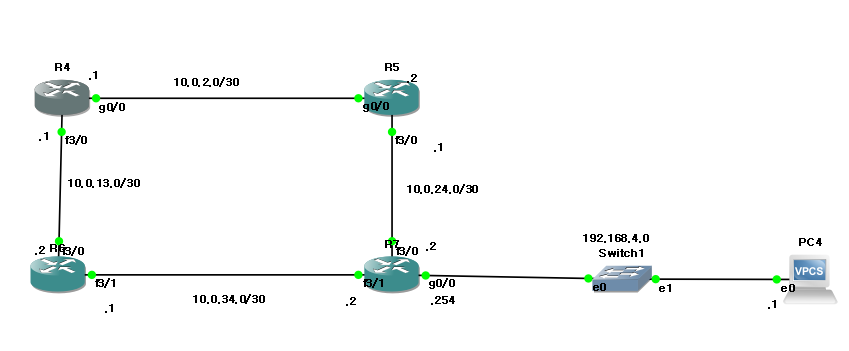
//기본 인터페이스 설정
R4#conf t
R4(config)#int g0/0
R4(config-if)#ip add 10.0.2.1 255.255.255.252
R4(config-if)#no sh
R4(config-if)#int f3/0
R4(config-if)#ip add 10.0.13.1 255.255.255.252
R4(config-if)#no sh
//루프백 설정
R4(config-if)#int l0
R4(config-if)#ip add 1.1.1.1 255.255.255.255
R4(config-if)#no sh
R4(config-if)#do wr
//기본 인터페이스 설정
R5#conf t
R5(config)#int g0/0
R5(config-if)#ip add 10.0.2.2 255.255.255.252
R5(config-if)#no sh
R5(config-if)#int f3/0
R5(config-if)#ip add 10.0.24.1 255.255.255.252
R5(config-if)#no sh
//루프백 설정
R5(config-if)#int l0
R5(config-if)#ip add 2.2.2.2 255.255.255.255
R5(config-if)#no sh
R5(config-if)#do wr//기본 인터페이스 설정
R6#conf t
R6(config)#int f3/0
R6(config-if)#ip add 10.0.13.2 255.255.255.252
R6(config-if)#no sh
R6(config-if)#int f3/1
R6(config-if)#ip add 10.0.34.1 255.255.255.252
R6(config-if)#no sh
//루프백 설정
R6(config-if)#int l0
R6(config-if)#ip add
R6(config-if)#ip add 3.3.3.3 255.255.255.255
R6(config-if)#no sh
R6(config-if)#do wr//기본 인터페이스 설정
R7#conf t
R7(config)#int f3/0
R7(config-if)#ip add 10.0.24.2 255.255.255.252
R7(config-if)#no sh
R7(config-if)#int f3/1
R7(config-if)#ip add 10.0.34.2 255.255.255.252
R7(config-if)#no sh
R7(config-if)#int g0/0
R7(config-if)#ip add 192.168.4.254 255.255.255.0
R7(config-if)#no sh
//루프백 설정
R7(config-if)#int l0
R7(config-if)#ip add
R7(config-if)#ip add 4.4.4.4 255.255.255.255
R7(config-if)#no sh
R7(config-if)#do wrEIGRP를 이용한 라우팅 설정(자동 축약은 취소)
- 루프백 인터페이스도 EIGRP에 포함시키시오.
- 루프백 인터페이스는 passive 인터페이스로 설정하시오.
R4(config)#router eigrp 100
R4(config-router)#variance 2 //UCMP를 구현을 위함
R4(config-router)#passive-interface Loopback0 //루프백 인터페이스 passive 인터페이스로 설정
R4(config-router)#network 10.0.2.0 0.0.0.3
R4(config-router)#network 10.0.13.0 0.0.0.3
R4(config-router)#network 1.1.1.1 0.0.0.0 //루프백 인터페이스 EIGRP에 포함
R4(config-router)#no auto-summary
R5(config)#router eigrp 100
R5(config-router)#passive-interface Loopback0 //루프백 인터페이스 passive 인터페이스로 설정
R5(config-router)#network 10.0.2.0 0.0.0.3
R5(config-router)#network 10.0.24.0 0.0.0.3
R5(config-router)#network 2.2.2.2 0.0.0.0 //루프백 인터페이스 EIGRP에 포함
R5(config-router)#no auto-summary R6(config)#router eigrp 100
R6(config-router)#passive-interface Loopback0 //루프백 인터페이스 passive 인터페이스로 설정
R6(config-router)#network 10.0.13.0 0.0.0.3
R6(config-router)#network 10.0.34.0 0.0.0.3
R6(config-router)#network 3.3.3.3 0.0.0.0 //루프백 인터페이스 EIGRP에 포함
R6(config-router)#no auto-summary R7(config)#router eigrp 100
R7(config-router)#passive-interface Loopback0 //루프백 인터페이스 passive 인터페이스로 설정
R7(config-router)#network 10.0.24.0 0.0.0.3
R7(config-router)#network 10.0.34.0 0.0.0.3
R7(config-router)#network 192.168.4.0 0.0.0.255
R7(config-router)#network 4.4.4.4 0.0.0.0 //루프백 인터페이스 EIGRP에 포함
R7(config-router)#no auto-summary R1에서 UCMP를 구현하시오. (목적지:192.168.4.0)
- R1에서 R2와 R3방향의 경로를 함께 사용
R4(config-router)#variance 2 //UCMP를 구현을 위함
위 설정으로 UCMP 구현
R4#sh ip route 192.168.4.0
Routing entry for 192.168.4.0/24
  Known via "eigrp 100", distance 90, metric 28672, type internal
  Redistributing via eigrp 100
  Last update from 10.0.13.2 on FastEthernet3/0, 00:03:13 ago
  Routing Descriptor Blocks:
    10.0.13.2, from 10.0.13.2, 00:03:13 ago, via FastEthernet3/0
      Route metric is 30976, traffic share count is 37
      Total delay is 210 microseconds, minimum bandwidth is 100000 Kbit
      Reliability 255/255, minimum MTU 1500 bytes
      Loading 1/255, Hops 2
  * 10.0.2.2, from 10.0.2.2, 00:03:13 ago, via GigabitEthernet0/0
      Route metric is 28672, traffic share count is 40
      Total delay is 120 microseconds, minimum bandwidth is 100000 Kbit
      Reliability 255/255, minimum MTU 1500 bytes
      Loading 1/255, Hops 2
R4#sh ip route 192.168.4.0
R4#sh ip eigrp topology 192.168.4.0
IP-EIGRP (AS 100): Topology entry for 192.168.4.0/24
  State is Passive, Query origin flag is 1, 1 Successor(s), FD is 28672
  Routing Descriptor Blocks:
  10.0.2.2 (GigabitEthernet0/0), from 10.0.2.2, Send flag is 0x0
      Composite metric is (28672/28416), Route is Internal
      Vector metric:
        Minimum bandwidth is 100000 Kbit
        Total delay is 120 microseconds
        Reliability is 255/255
        Load is 1/255
        Minimum MTU is 1500
        Hop count is 2
  10.0.13.2 (FastEthernet3/0), from 10.0.13.2, Send flag is 0x0
      Composite metric is (30976/28416), Route is Internal
      Vector metric:
        Minimum bandwidth is 100000 Kbit
        Total delay is 210 microseconds
        Reliability is 255/255
        Load is 1/255
        Minimum MTU is 1500
        Hop count is 2
sh ip eigrp topology 192.168.4.0
UCMP 동작 조건
metric(대체 경로) ≤ 최소 metric × variance 값
10.0.2.2(주 경로): 28672
10.0.13.2(보조 경로): 30976
-
variance 1일 경우
30976 ≤ (28672 × 1) → 30976 ≤ 28672 ✖️ (조건 불충족) -
variance 2일 경우
30976 ≤ (28672 × 2) → 30976 ≤ 57344 ✅ (조건 만족)
- variance 값이 2 이상이면 UCMP 조건을 만족하여 EIGRP가 두 경로를 동시에 사용
많은 경험을 해보고자 하는