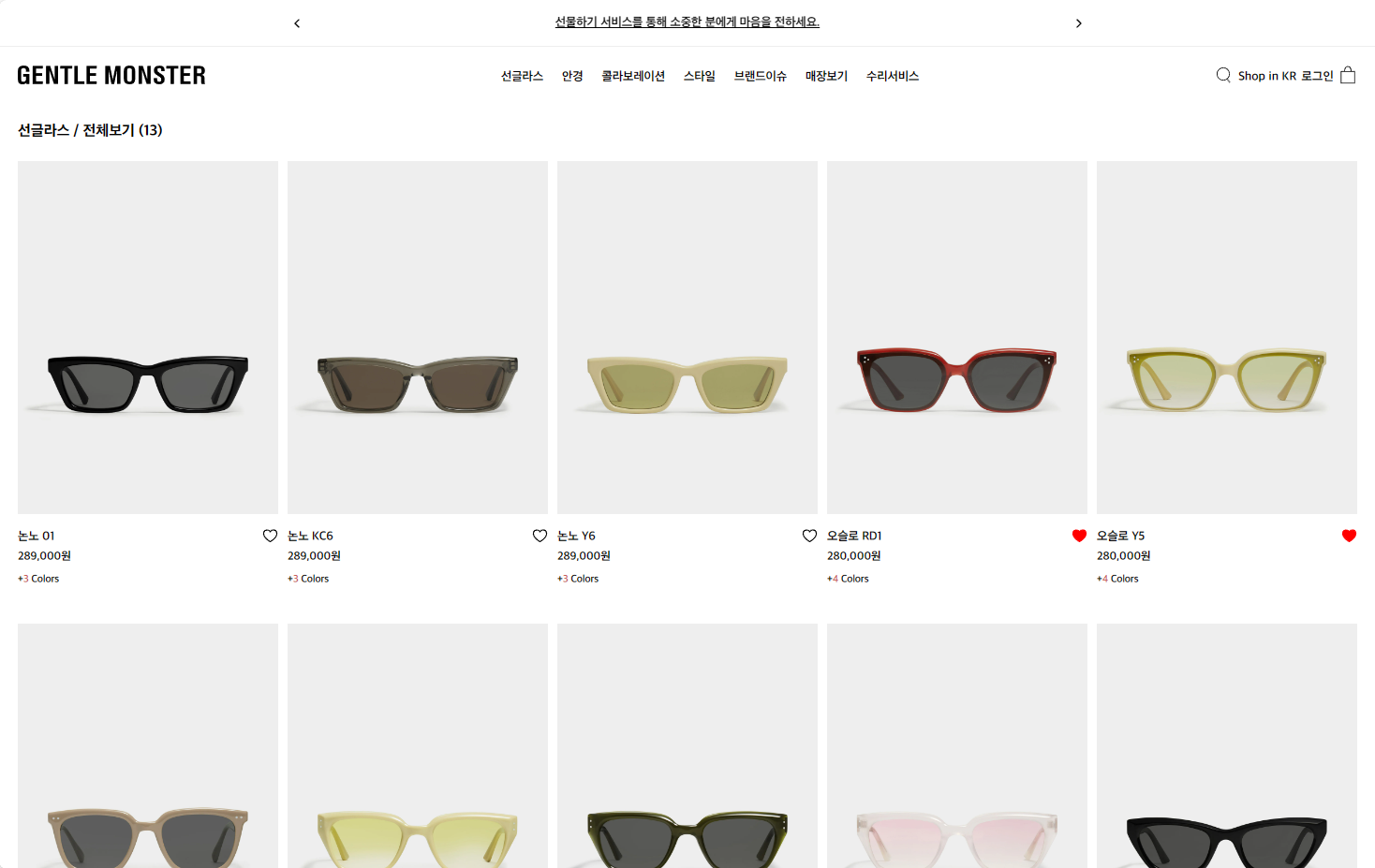
데이터는 json 형식으로 만들어놓음
[
    {"id: 1","name":"논노 01", "price": 289000, "color":"3", "imgUrl":""}
]
1 상단배너
1-1 swiper.js

젠몬도 swiper.js를 사용해서 나도 사용했다
https://www.svgbackgrounds.com/tools/svg-to-css/
기존 svg 태그를 css data:image어쩌구 형식으로 바꿔줘서 background-image로 사용가능하게 해줌
<template>
  <div class="top-banner">
    <div class="wrap">
      <swiper
        :slidesPerView="1"
        :spaceBetween="30"
        :loop="true"
        :navigation="true"
        :modules="modules"
        class="mySwiper"
        :autoplay="{
          delay: 1500,
          disableOnInteraction: false
        }"
      >
        <swiper-slide>나에게 어울리는 제품을 찾으세요? 실시간 라이브 채팅으로 제품 추천을 받아보세요.</swiper-slide>
        <swiper-slide>무료 배송/반품 서비스로 젠틀몬스터를 경험해보세요.</swiper-slide>
        <swiper-slide>선물하기 서비스를 통해 소중한 분에게 마음을 전하세요.</swiper-slide>
      </swiper>
    </div>
  </div>
</template>

  <script>
import { Swiper, SwiperSlide } from 'swiper/vue'
import 'swiper/css'
import 'swiper/css/navigation'
import { Autoplay, Navigation } from 'swiper/modules';

export default {
  components: {
    Swiper,
    SwiperSlide
  },
  setup() {
    return {
      modules: [Navigation, Autoplay]
    }
  }
}
</script>

 <style lang="scss">
.top-banner {
  width: 100%;
  height: 50px;
  border-bottom: 1px solid #eee;
  display: flex;
  align-items: center;

  .wrap {
    width: 60%;
    margin: 0 auto;
    display: flex;
    align-items: center;

    .swiper {
      .swiper-slide {
        font-size: 13px;
        text-align: center;
        text-decoration: underline;
      }

      .swiper-button-next {
        position: absolute;
        z-index: 999;
        background: url('data:image 어쩌구')
          no-repeat;
        background-size: 50% auto;
        background-position: center;

        &::after {
          display: none;
        }
      }

      .swiper-button-prev {
        position: absolute;
        right: 0;
        background: url('')
          no-repeat;
        background-size: 50% auto;
        background-position: center;

        &::after {
          display: none;
        }
      }
    }
  }
}
</style>
2 메인
2-1 가격에 콤마 찍기
shop.js
pinia 사용
import { ref, computed } from 'vue'
import { defineStore } from 'pinia'

export const useShopStore = defineStore('shop', () => {
  const amount = ref(0)

  const formattedAmount = computed(() => {
    return amount.value.toLocaleString('ko-KR');
  })

  const setAmount = (newAmount) => {
    amount.value = newAmount;
  }

  return { amount, formattedAmount, setAmount }
})
Product.js
import { ref, onMounted, reactive } from 'vue'
import { useShopStore } from '../stores/shop.js'

const store = useShopStore()
const products = ref(data)

const productsList = () => {
  products.value.forEach((item) => {
    store.setAmount(item.price)
    item.price = store.formattedAmount
  })
}

onMounted(() => {
  productsList()
})
2-2 찜하기
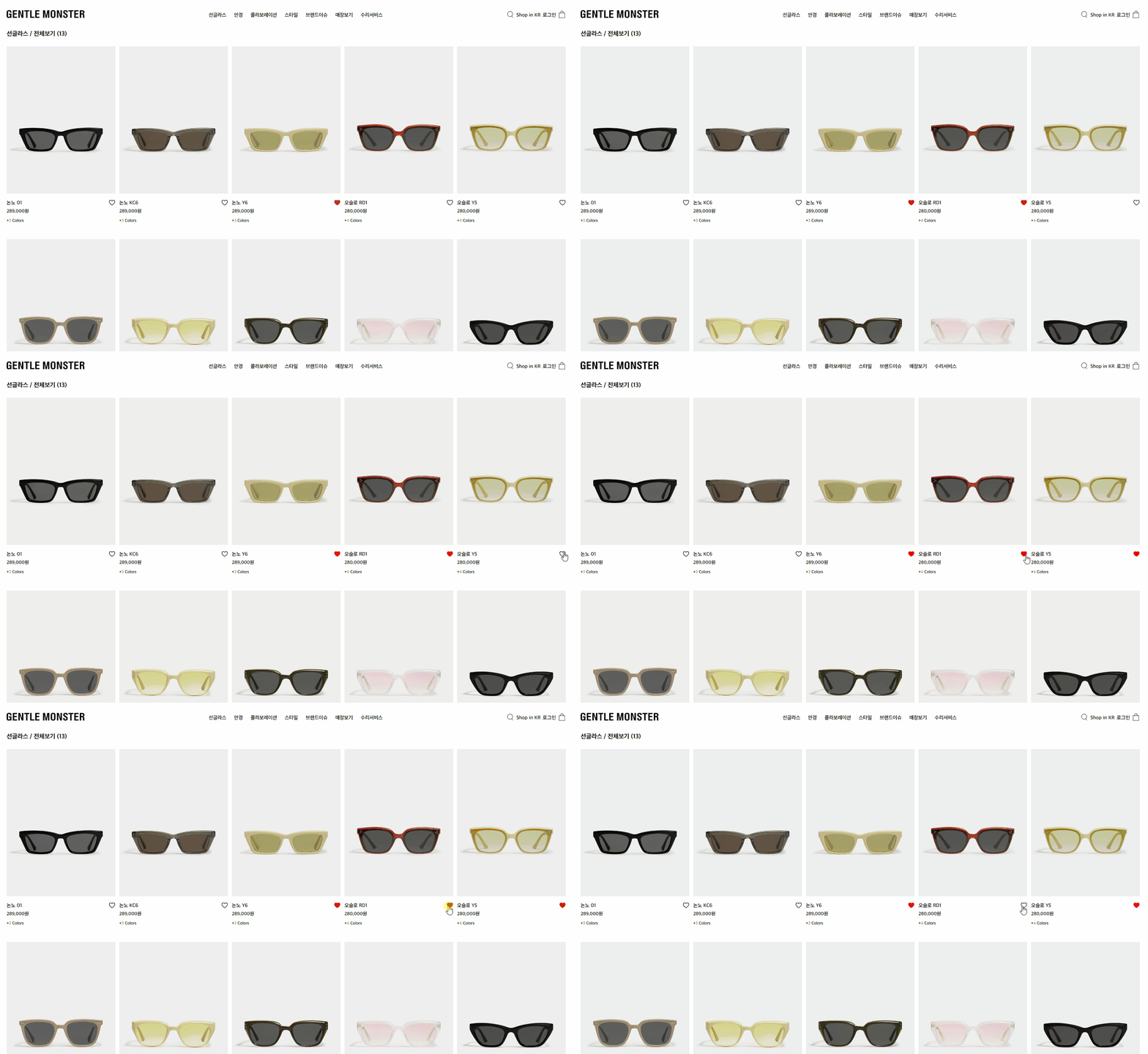
localstorage를 이용했다
svg태그는 길어서 지움
기존 배열을 있으면 가져와 내가 찜한 객체를 다시 배열에 추가하고 localstorage에 저장
<div class="heart-icon" @click="SaveWishList(item)">
    <svg>
       <path
          :fill="item.isFavorite ? '#ff0000' : 'none'"
          :stroke="item.isFavorite ? '#ff0000': 'black'"
          stroke-width="2px"
          stroke-miterlimit="20"></path>
    </svg>
</div>
const store = useShopStore()
const products = ref(data)
const wishList = reactive([]) // 추가
const productsList = () => {
const wishListNames = wishList.value.map((item) => item.name) // 추가
products.value.forEach((item) => {
store.setAmount(item.price)
item.price = store.formattedAmount
item.isFavorite = !item.isFavorite && wishListNames.includes(item.name) ? true : false; // 추가
})
}
const SaveWishList = (item) => {
item.isFavorite = !item.isFavorite;
if (item.isFavorite) {
wishList.value.push(item);
} else {
wishList.value = wishList.value.filter(ele => ele.name !== item.name);
}
localStorage.setItem('wishlist', JSON.stringify(wishList.value))
} // 추가
onMounted(() => {
wishList.value = JSON.parse(localStorage.getItem('wishlist')) || [] // 추가
productsList()
})
3 상세페이지
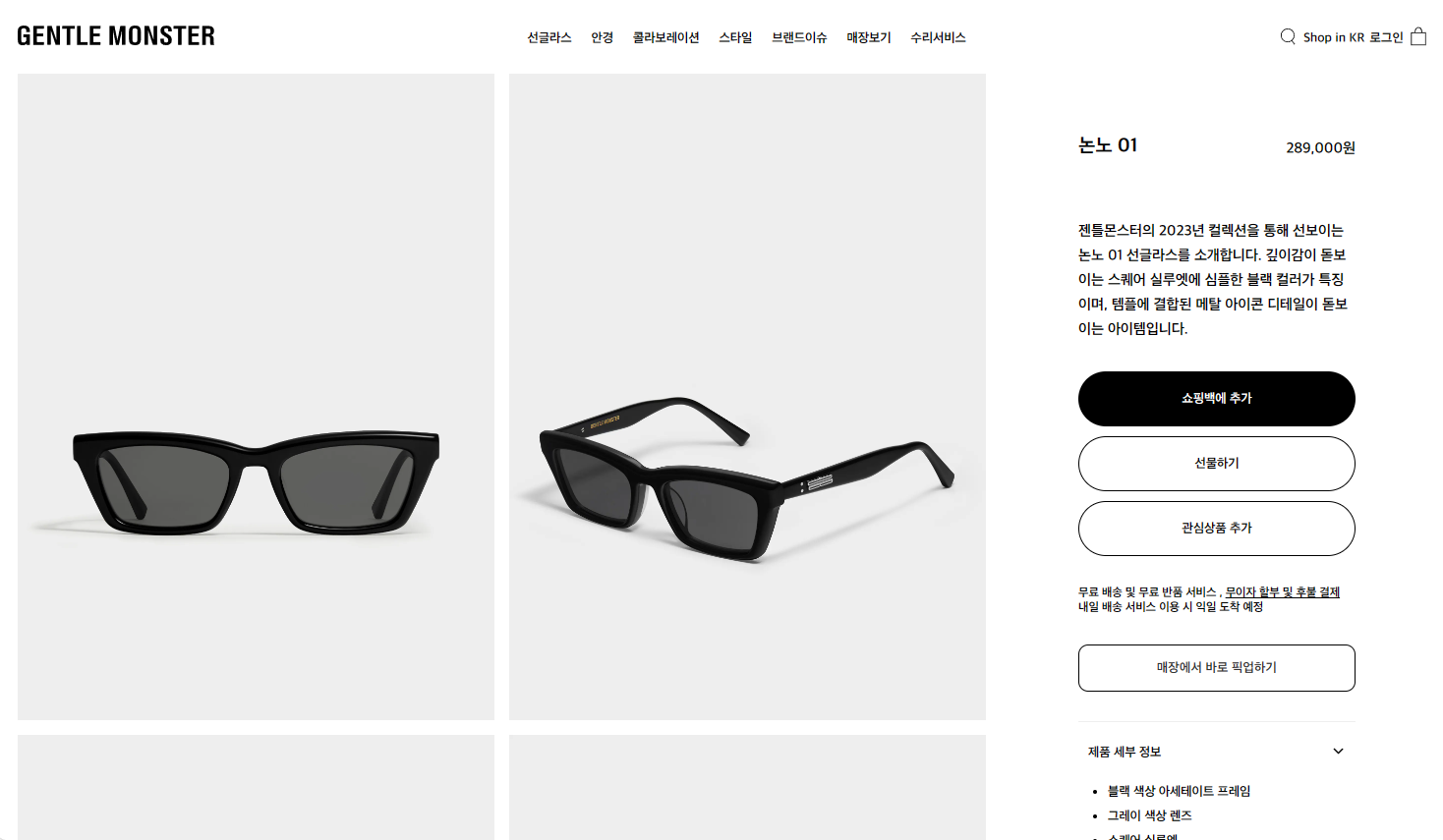
3-1 데이터
info.json 파일을 만듦
[
    {
        "id": "1",
        "name": "논노 01",
        "price": 289000,
        "content": "젠틀몬스터의 2023년 컬렉션을 통해 선보이는 논노 01 선글라스를 소개합니다. 깊이감이 돋보이는 스퀘어 실루엣에 심플한 블랙 컬러가 특징이며, 템플에 결합된 메탈 아이콘 디테일이 돋보이는 아이템입니다.",
        "detail": [
            "블랙 색상 아세테이트 프레임",
        ],
        "imgUrl": [
            "",
            "",
        ]
    },
]
-메인페이지
클릭시 params로 id값을 줌
  <li v-for="(item, index) in products" :key="index">
      <router-link :to="{ name: 'shopDetail', params: { id: `${item.id}` } }">
      <div class="imageList">
      <img />
      </div>
    </router-link>
</li>
shop.js / pinia
id 값을 받아와서 info.json 데이터와 비교 후 데이터 추출
import detailItem from '../../info.json'
const list = reactive(detailItem)

  const setDetail = (newId) => {
    filteredList.value = list.find((item) => item.id === newId);
    const prefix = filteredList.value.name.indexOf(' ');
    relatedLinksList.value = list.filter(item => item.name.substring(0, prefix) === filteredList.value.name.substring(0, prefix));

 return { amount, formattedAmount, filteredList, setAmount, setDetail }
-상세페이지
shopDetailView.vue
store에서 불러와줌
<template>
  <div class="shop-detail">
    <div class="img-wrap">
      <div class="img" v-for="(ele,index) in store.filteredList.imgUrl" :key="index">
      <img :src="ele" lazy="loading"/>
    </div>
 </div>
</div>
</template>
<script setup>
onMounted(()=>{
  store.setDetail(props.id);
  store.setAmount(store.filteredList.price)
})
</script>
3-2 아코디언 메뉴
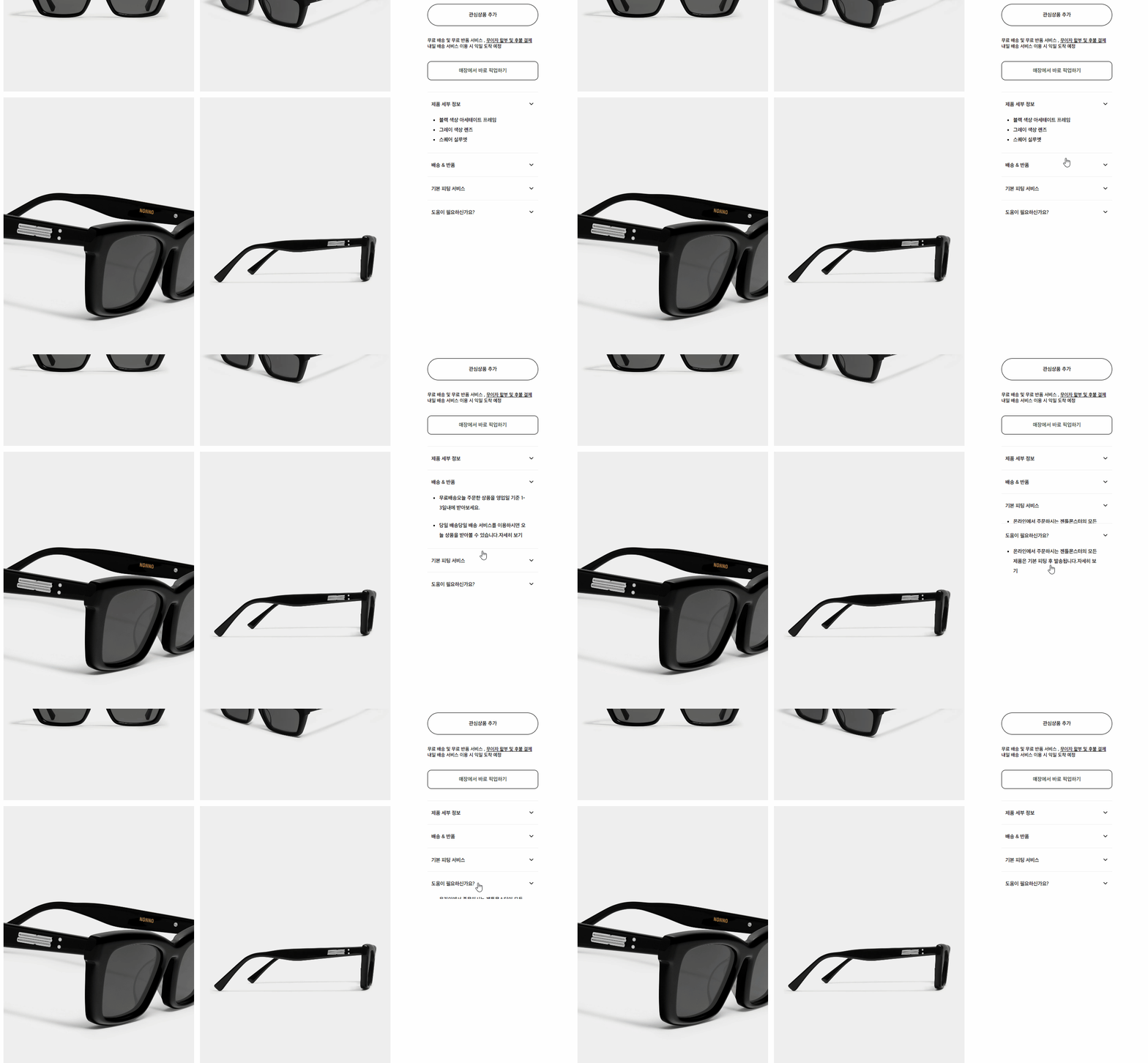
<div class="detail-info-box" v-for="(title,index) in infoList" :key="index" @click="toggle(index)" :style="[currentIdx === index ? {height: infoHeight} : {height: '60px'}]">
     <div class="detail-info-top">
         <span>{{ title.name }}</span> <span><svg width="15px" xmlns=""/></svg></span>
     </div>
      <div class="detail-info-content" ref="myElement">
         <ul v-if="title.name === '제품 세부 정보'">
            <li v-for="(detail,index) in store.filteredList.detail" :key="index">
               {{ detail }}
            </li>
         </ul>
         <ul v-else v-for="(ele,index) in title.content" :key="index">
         <li v-html="ele.sub"></li>
       </ul>
    </div>
</div>
.detail-info-box{
overflow: hidden;
cursor: pointer;
height:60px;
transition: 0.3s ease-out;
.detail-info-top{
border-top:1px solid #eee;
display: flex;
justify-content:space-between;
height:60px;
align-items: center;
padding:0 10px;
font-size: 13px;
line-height: 18px;
span{
display: block;
height: 15px;
}
}
.detail-info-content{
ul{
padding:0 0 20px;
li{
font-size:13px;
list-style:disc;
margin: 0 30px;
}
}
}
}<script setup>
const currentIdx = ref(0);
const myElement = ref([]);
const infoHeight = ref(0);
const infoList = ref([
{ name: '제품 세부 정보'},
{
name: '배송 & 반품',
content: [
{ sub: '<span>무료배송</span><span>오늘 주문한 상품을 영업일 기준 1-3일내에 받아보세요.</span>'},
{ sub: '<span>당일 배송</span><span>당일 배송 서비스를 이용하시면 오늘 상품을 받아볼 수 있습니다.<a>자세히 보기</a></span>'}
]
},
{ name: '기본 피팅 서비스',
content: [
{ sub: '<span>온라인에서 주문하시는 젠틀몬스터의 모든 제품은 기본 피팅 후 발송됩니다.<a>자세히 보기</a></span>'}
] },
{ name: '도움이 필요하신가요?', content: [
{ sub: '<span>온라인에서 주문하시는 젠틀몬스터의 모든 제품은 기본 피팅 후 발송됩니다.<a>자세히 보기</a></span>'}
] }
]);
const toggle = (index) => {
currentIdx.value = currentIdx.value === index ? -1 : index;
infoHeight.value = currentIdx.value === -1 ? '60px' : `${myElement.value[index].scrollHeight + 60}px`;
}
const getInfoHeight = (index) =>{
infoHeight.value = `${myElement.value[index].scrollHeight + 60}px`;
}
onMounted(()=>{
store.setDetail(props.id);
nextTick(() => {
getInfoHeight(0)
});
})
</script>3-3 같은 상품 페이지 이동
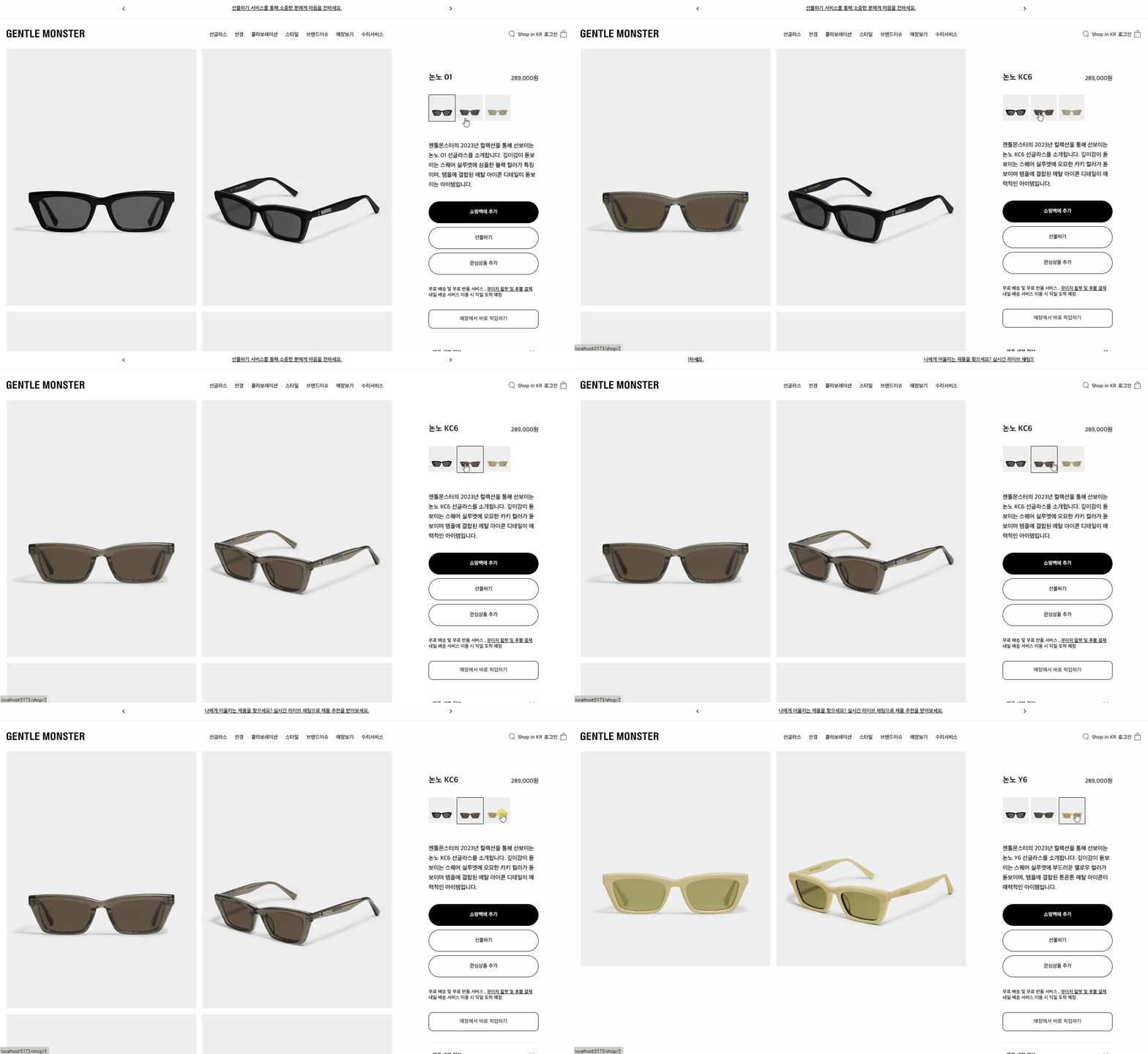
shop.js
이름 띄어쓰기 전만 가져와 비교해서 같은 값 가져옴
  const setDetail = (newId) => {
    const filteredItem = list.find((item) => item.id === newId);
    const updatedItem = { ...filteredItem, price: filteredItem.price.toLocaleString('ko-KR') };
    filteredList.value = updatedItem;

    const prefix =  filteredList.value.name.indexOf(' ');
    const relatedLinksItem = list.filter(item => item.name.substring(0,prefix) === updatedItem.name.substring(0, prefix));
    relatedLinksList.value = relatedLinksItem;
  }

  return { amount, formattedAmount, filteredList, relatedLinksList, setAmount, setDetail }
shopDetailView.vue
<template>
      <div class="link">
          <router-link v-for="(ele, index) in store.relatedLinksList" :key="index" :to="{ name: 'shopDetail', params: { id: `${ele.id}` } }" :style="{ backgroundImage: `url('${ele.imgUrl[0]}')`,  border: props.id === ele.id ? '1px solid #000' : 'none' }">
          </router-link>
        </div>
</template>
<script setup>
const route = useRoute();

watch(route, () => {
  store.setDetail(props.id);
});
</script>
정사각형 유지를 위해 background-image 사용
.link{
   width: 60%;
   margin: 0 auto 50px auto;
   display: grid;
   grid-template-columns: repeat(4,1fr);
   gap:5px;
      a{
        display: block;
        width: 0;
        height: 0;
        padding: 100% 100% 0 0;
        background-repeat: no-repeat;
        background-position: center;
        background-size: 100% auto;
        border-radius: 2px;
      }
 }
4 장바구니
4-1 메뉴 토글
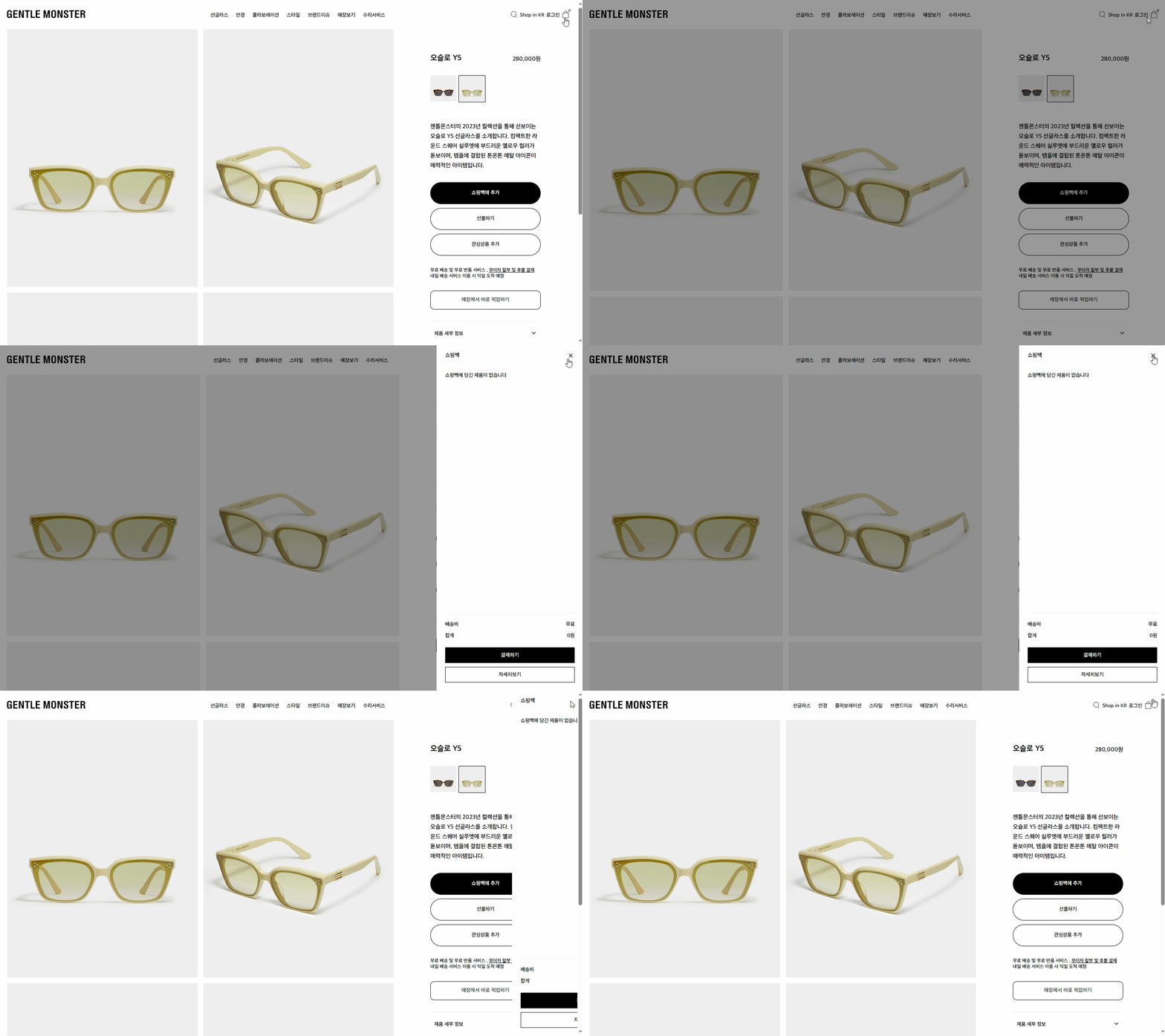
난 헤더 레이아웃을 app.vue에 해놔서 저 부분도 app.vue에 넣음
<button @click="store.toggleCart" class="cart-btn">
   <span>{{ store.cartList.length }}</span>
   아이콘
</button>
cartItem.vue
<div class="cart" :class="[store.isCartOpen ? 'open' : '']">
    <div class="bg" @click="store.toggleCart"></div>
    <div class="cart-wrap">

      </div>
    </div>
  </div>

<style lang="scss">
.cart {
  .bg {
    position: fixed;
    background-color: rgba(0, 0, 0, 0.4);
    width: 100%;
    height: 100%;
    left: 0;
    top: 0;
    z-index: 998;
    visibility: hidden;
  }

  &.open {
    .cart-wrap {
      transform: translateX(0);
    }

    .bg {
      visibility: visible;
    }
  }

  .cart-wrap {
    width: 375px;
    position: fixed;
    right: 0;
    top: 0;
    min-height: 100%;
    background: #fff;
    transform: translateX(100vw);
    transition: 0.3s ease-in-out;
    z-index: 999;
    height: 100%;
</style>
shop.js / pinia
장바구니 목록은 서버에서 관리한다고 하지만 서버 없어서 localstorage에 저장
각각 x아이콘 검은색 배경에도 store.toggleCart 넣어주면 끝
const isCartOpen = ref(false);
const cartList = ref([]);

const loadCartList = () =>{
  cartList.value = JSON.parse(localStorage.getItem('cartList')) || [];
}

const toggleCart = () => {
   isCartOpen.value = !(isCartOpen.value);
   loadCartList();
   document.body.style.overflow = isCartOpen.value ? 'hidden' : 'auto';
}
4-2 상품 추가
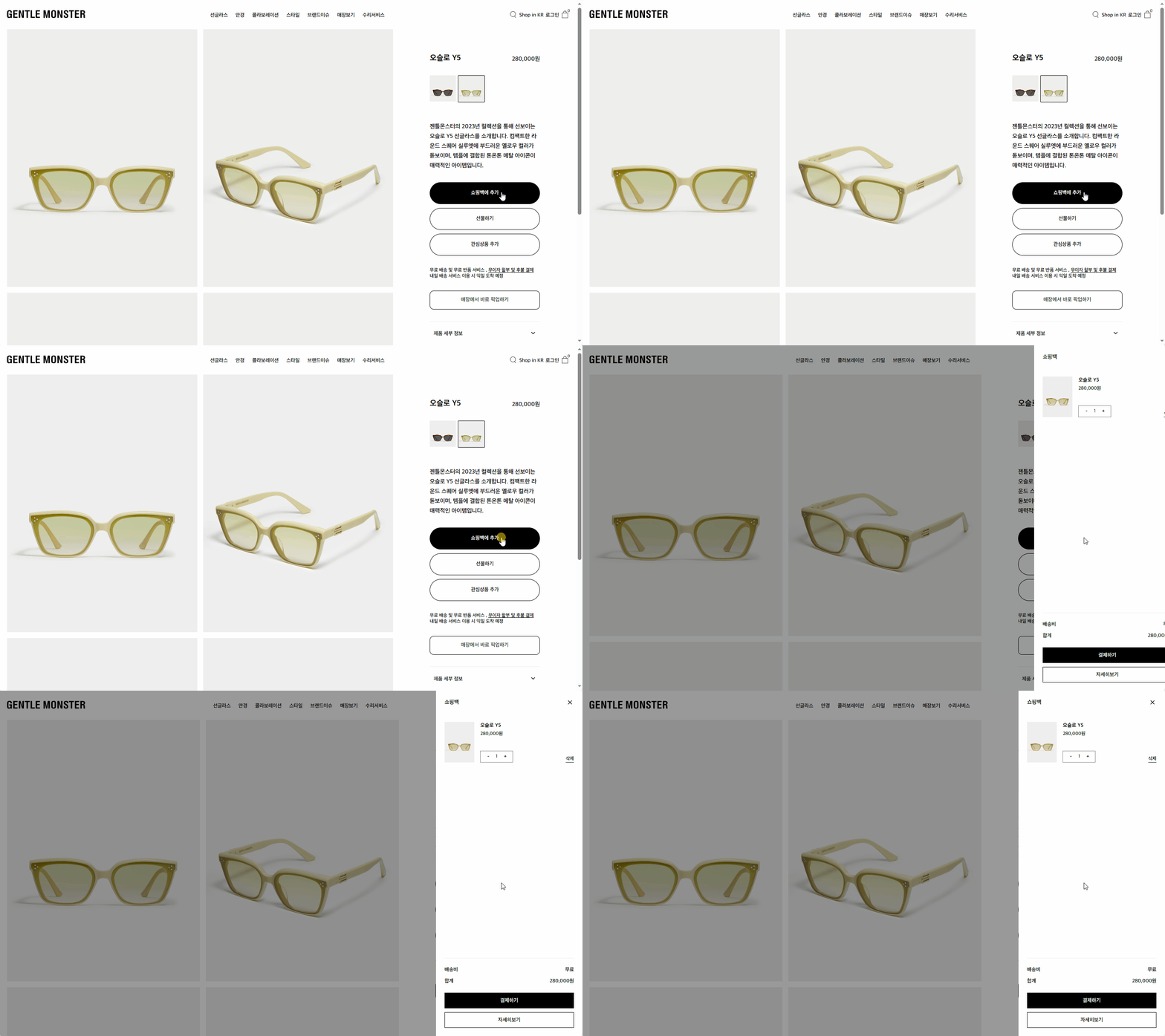
shpDetailView.vue
<button @click="store.setaddItemToCart(store.filteredList.id)">쇼핑백에 추가</button>CartItem.vue
<span>합계</span><span>{{ store.getTotalPrice() }}원</span>shop.js / pinia
수량도 같이 로컬스토리지 배열에 저장
  const setaddItemToCart = (id) => {
    let cartItem = cartList.value.find(item => item.id === id);
    if (cartItem) {
      cartItem.amount += 1;
    } else {
      cartItem = data.find(item => item.id === id);
      cartItem = { ...cartItem, amount: 1 };
      cartList.value.push(cartItem);
    }
    cartItem.total = (cartItem.price * cartItem.amount).toLocaleString('ko-KR');
    getTotalPrice()
    localStorage.setItem('cartList', JSON.stringify(cartList.value));
    toggleCart();
  }

  const getTotalPrice = () => {
    let total = 0;

    for (const item of cartList.value) {
      const itemTotal = item.amount * item.price;
      total += itemTotal;
    }

    return total.toLocaleString('ko-KR');
  }
4-3 상품 삭제
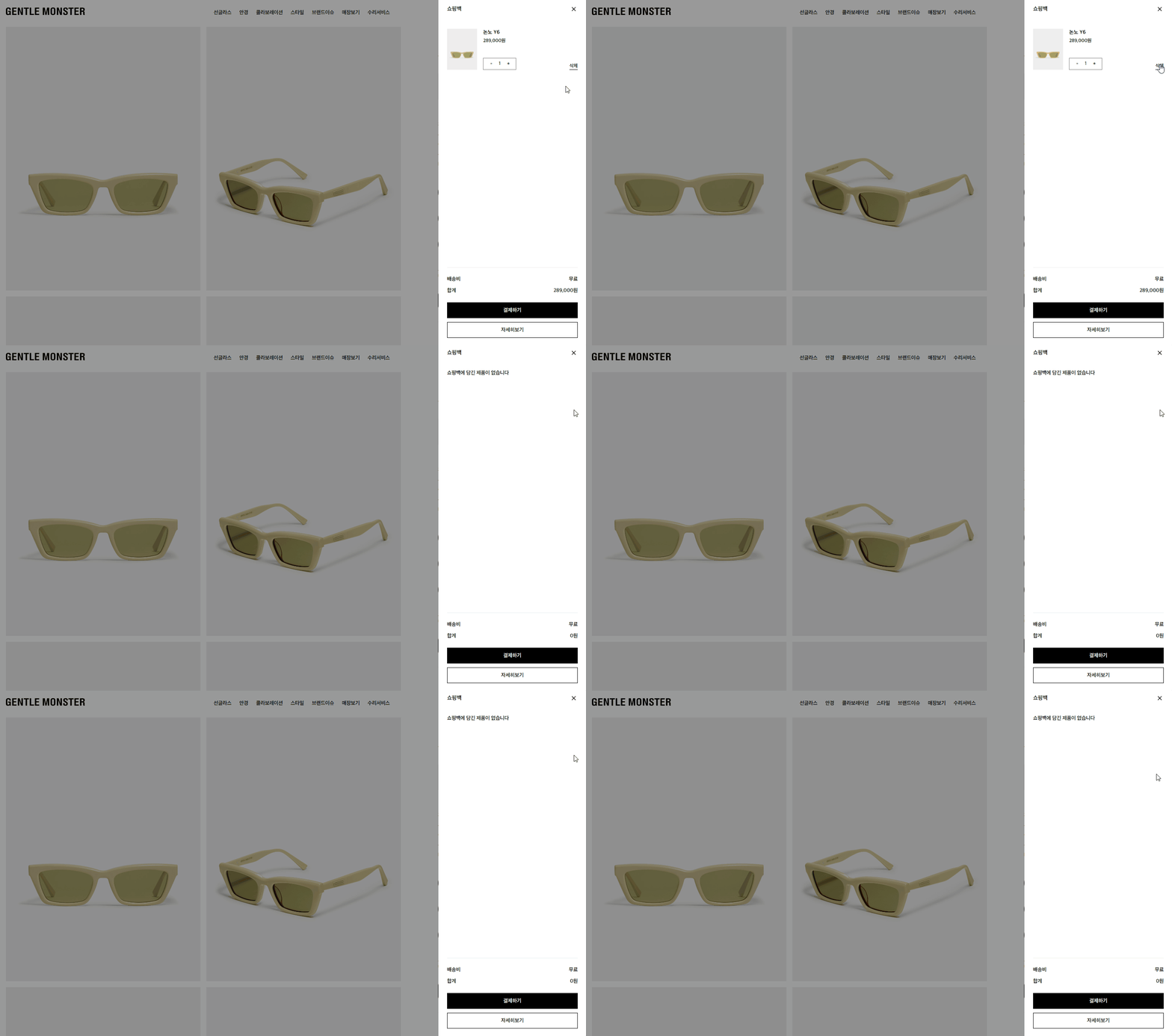
shop.js / pinia
클릭한 값 빼고 재배열 후 저장
  const removeItemFromCart = (id) => {
    cartList.value = cartList.value.filter(item => item.id !== id);
    localStorage.setItem('cartList', JSON.stringify(cartList.value));
  }
4-4 상품 수량
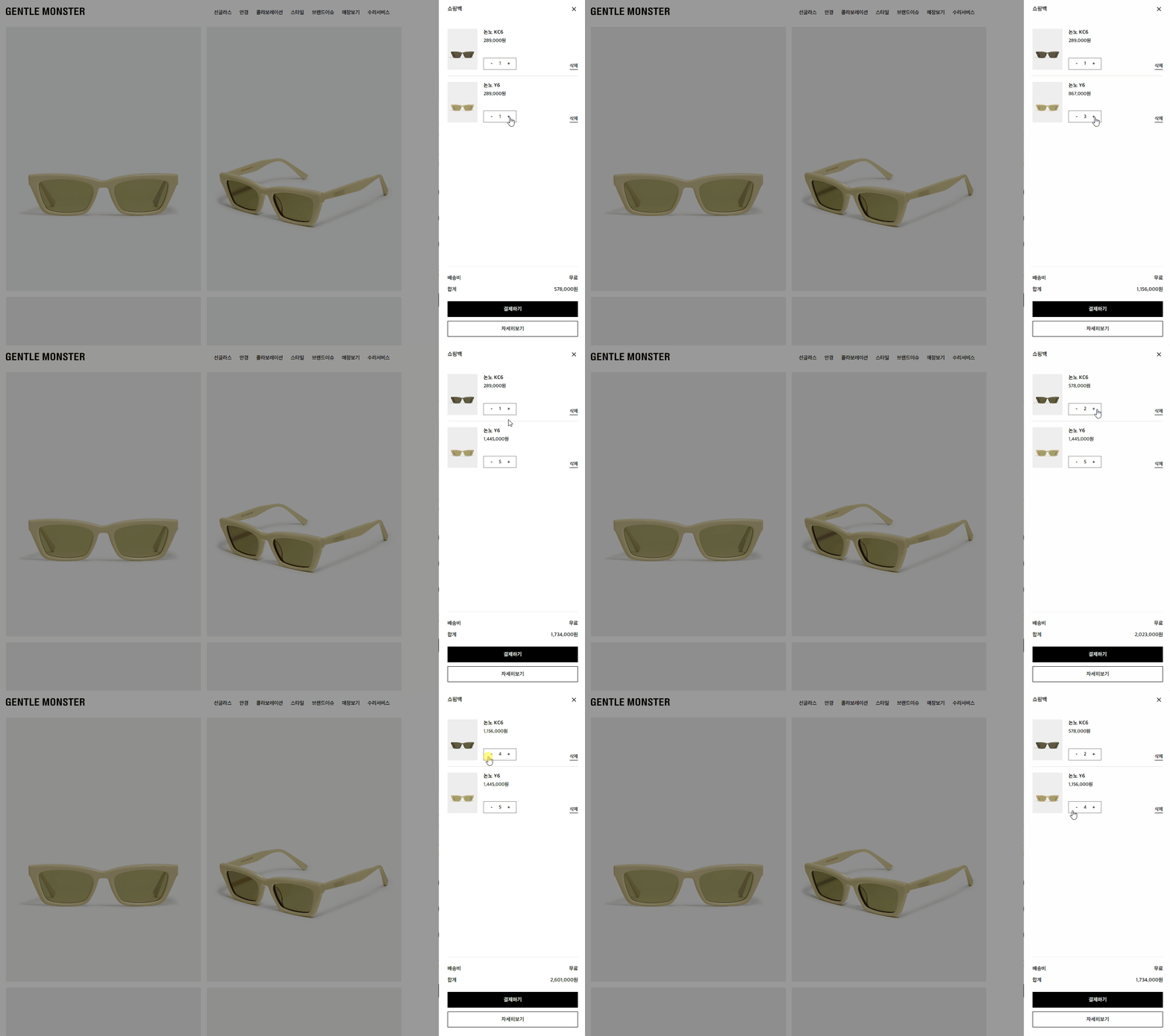
shop.js / pinia
total은 특정 id 수량 * 가격 값
 const modifyQuantity = (symbol, id) => {
    let cartItem = cartList.value.find(item => item.id === id);
    if (symbol === '+') {
      if (cartItem.amount >= 10) {
        alert('최대수량은 10개 까지 입니다.');
      } else {
        cartItem.amount += 1;
      }
    } else if (symbol === '-') {
      if (cartItem.amount > 1) {
        cartItem.amount -= 1;
      } else {
        cartItem.amount = 1;
      }
    }


    cartItem.total = (cartItem.price * cartItem.amount).toLocaleString('ko-KR');

    const index = cartList.value.findIndex(item => item.id === id);
    if (index !== -1) {
      cartList.value.splice(index, 1, cartItem);
    }
    localStorage.setItem('cartList', JSON.stringify(cartList.value));

  };
CartItem.vue
<button @click="store.modifyQuantity('-', item.id)">-</button>5 검색
5-1 검색바
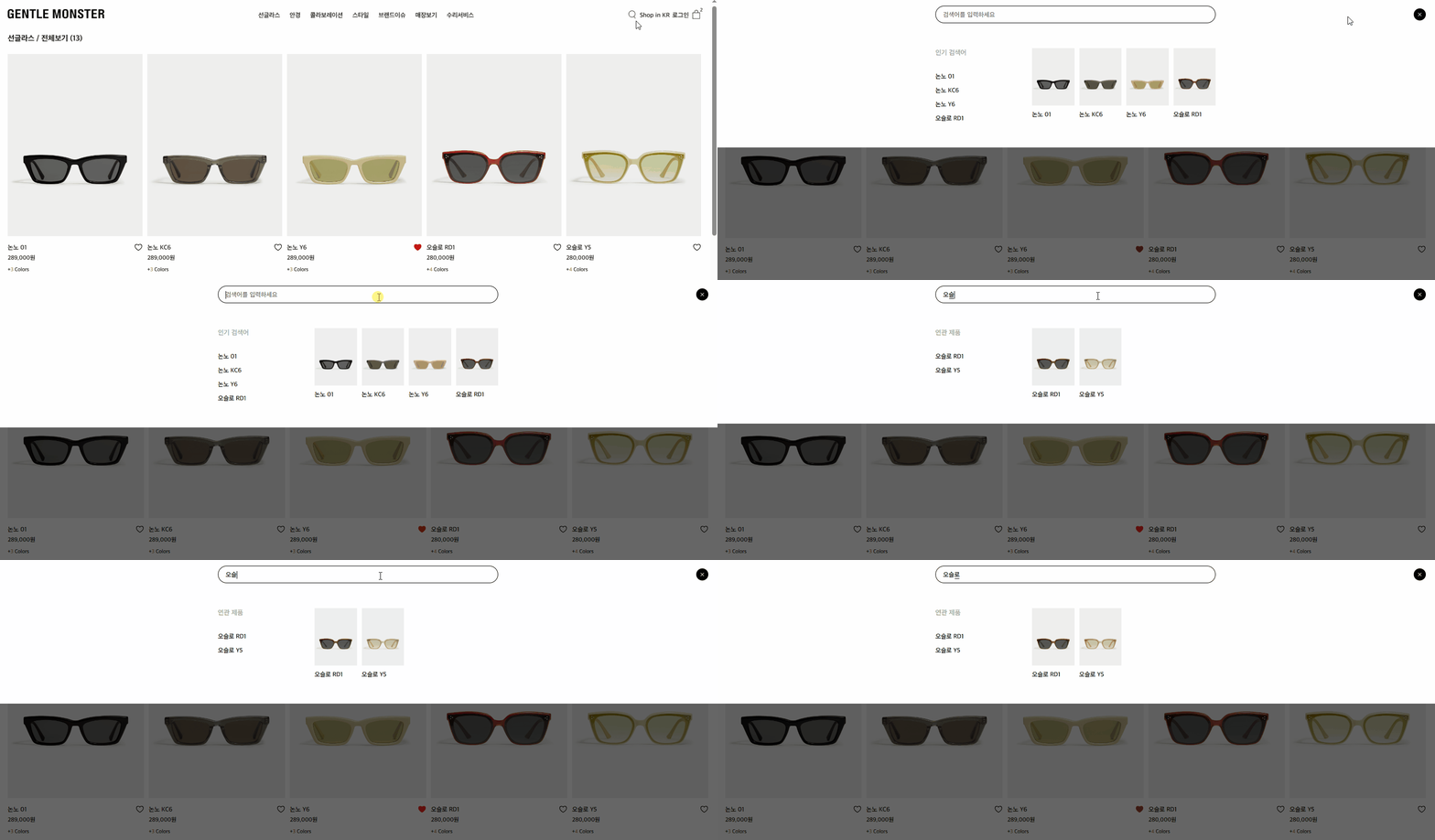
<template>
  <div class="search" :class="[store.isSrhOpen ? 'open' : '']">
    <div class="search-wrap">
      <div class="x-icon" @click="store.toggleSearchBar">
        <svg
          width="15px"
          height="15px"
        >
        </svg>
      </div>
      <div class="search-bar">
        <form>
          <input type="text" placeholder="검색어를 입력하세요" @input="getSearchList" />
        </form>
      </div>
      <div class="search-list">
       <div class="product">
        <h5 v-if="searchResults.length > 10">인기 검색어</h5>
        <h5 v-else>연관 제품</h5>
        <template v-for="(item, index) in searchResults" :key="index">
          <span v-if="index < 4">
          {{ item.name }}
        </span>
        </template>
       </div>
       <ul class="img-product">
        <template v-for="(item, index) in searchResults" :key="index">
          <li v-if="index < 4">
        <span><img :src="item.imgUrl" /></span>
        <span>{{  item.name }}</span>
      </li>
        </template>
       </ul>
      </div>
    </div>
    <div class="bg"></div>
  </div>
</template>
  <script setup>
import { ref } from 'vue'
import { useShopStore } from '../stores/shop.js'

const store = useShopStore()
const searchValue = ref('')
const searchResults = ref(store.allList)

const getSearchList = (e) => {
  searchValue.value = e.target.value;
  searchResults.value = store.allList.filter((item) => {
  return item.name.includes(searchValue.value);
});
};

</script>
  <style lang="scss">
.search {
  z-index: -99;
  position: fixed;
  width: 100%;

  .bg {
    display: none;
    z-index: -1;
  }

  .search-wrap {
    visibility: hidden;
    position: relative;
    z-index: 999;
    width: 100%;

    .search-list {
        width: 580px;
        margin: 30px auto 50px auto;
        display: flex;

        .product{

            h5{
                font-size:14px;
                color:#acacac;
                margin:0 0 20px 0;
            }
            width:200px;
            display: flex;
            gap:10px;
            flex-direction: column;
            justify-content: flex-start;
            align-items: flex-start;
            font-size:13px;
        }

        .img-product{
            flex:1;
            display: grid;
            grid-template-columns: repeat(4,1fr);
            gap:10px;

            span{
                font-size:13px;
                display: block;

                &:last-child{
                    margin:10px 0 0 0;
                }
            }
        }
    }

    .search-bar {
      width: 580px;
      margin: 0 auto;
      height: 80px;
      position: relative;

      form {
        width: 181px;
        position: absolute;
        top: 50%;
        left: 50%;
        transform: translate(-50%, -50%);

        input {
          width: 100%;
          border: 1px solid #000;
          border-radius: 18px;
          height: 36px;
          padding: 2px 15px 0 15px;
        }
      }
    }

    .x-icon {
      position: absolute;
      right: 20px;
      top: 40px;
      transform: translate(0, -50%);
      background: #000;
      width: 25px;
      height: 25px;
      border-radius: 50%;
      display: flex;
      align-items: center;
      justify-content: center;
      cursor: pointer;

      svg {
        color: #fff;
      }
    }
  }

  &.open {
    z-index: 10;

    .bg {
      display: block;
      width: 100%;
      position: fixed;
      top: 0;
      left: 0;
      height: 100%;
      background: rgba(0, 0, 0, 0.6);
      z-index: 99;
    }

    .search-wrap {
      visibility: visible;
      position: fixed;
      background: #fff;
      left: 0;
      top: 0;

      .search-bar {
        form {
          width: 100%;
          transition: 0.3s ease-in;
        }

        input {
          width: 100%;
        }
      }
    }
  }
}
</style>
5-2 클릭시 페이지 이동
  <li v-if="index < 4">
    <router-link :to="{ name: 'shopDetail', params: { id: `${item.id}` } }" @click="store.toggleSearchBar">
      <span><img :src="item.imgUrl" /></span>
      <span>{{  item.name }}</span>
   </router-link>
</li>
끗