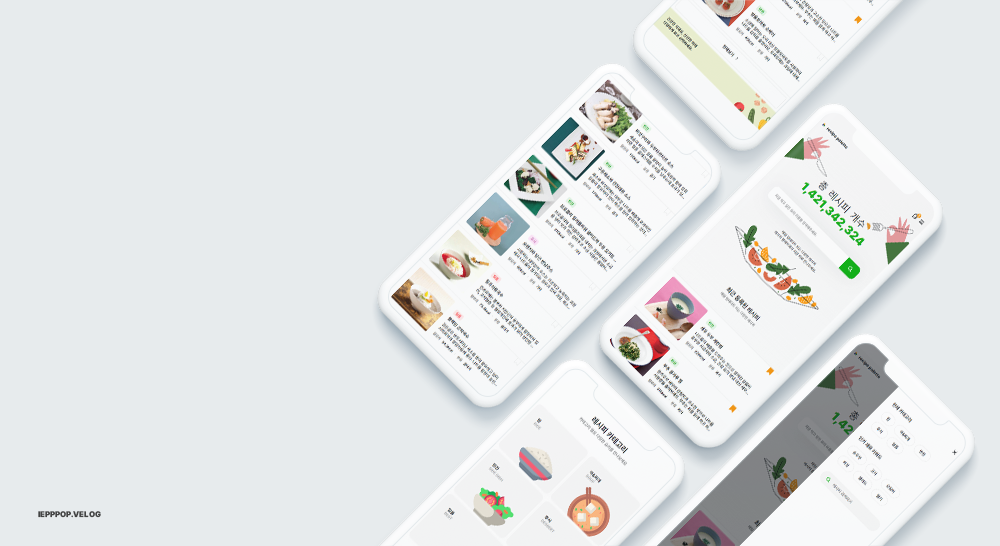
1/25 수정완료
vue3, scss, composition api, pinia
axios, gsap, baffle.js
1 구상 + 디자인
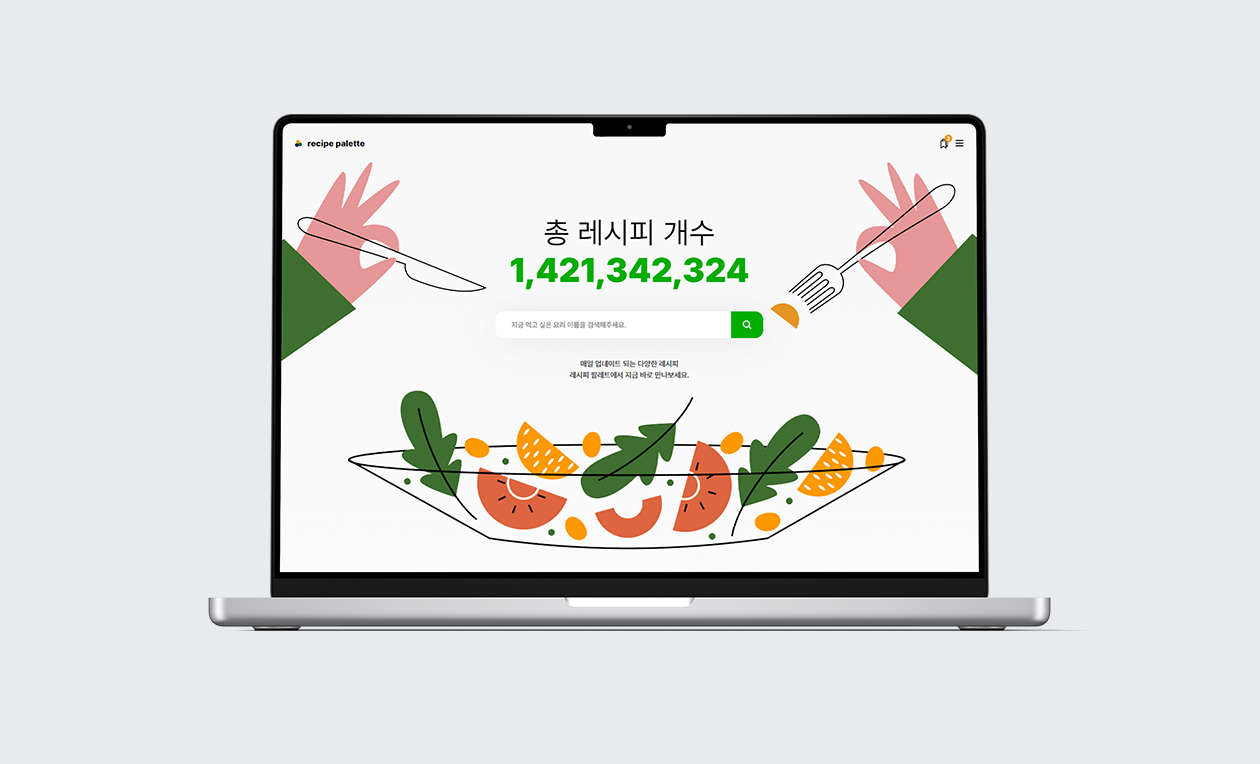
일단 어떤 식으로 어떤 것을 나타낼 지 생각한 후에 디자인 작업함
개인 프로젝트는 광고가 없기 때문에 검색창을 크게 배치했고 레시피 검색이 주인 것과 잘 맞는다고 생각함
일러스트 출처
https://kr.freepik.com/
2 구현
2-1 세팅
조리식품 DB 사용
https://www.foodsafetykorea.go.kr/api/newDatasetDetail.do
기본 설정
env.development
VITE_BASE_URL=https://openapi.foodsafetykorea.go.kr/api/
VITE_SOME_KEY=key값
vite는 자동으로 실행할 때는 development로 실행
build 할때는 production으로 실행
plugins/axios.js
import axios from 'axios';

const instance = axios.create({
  baseURL: import.meta.env.VITE_BASE_URL + import.meta.env.VITE_SOME_KEY
});
export default instance;
main.js
import './assets/main.scss'

import { createApp } from 'vue'
import { createPinia } from 'pinia'
import axios from '@/plugins/axios'

import App from './App.vue'
import router from './router'

const app = createApp(App)

app.use(createPinia())
app.use(router)
app.provide('$axios', axios);
app.mount('#app')
stores/common.js
import { ref, inject } from 'vue'
import { defineStore } from 'pinia'
import { useRoute } from 'vue-router';

export const useCommonStore = defineStore('common', () => {
  const axios = inject('$axios');
  return { }
})
2-2 데이터 요청
데이터는 HomeView.vue, ListView.vue 두 곳에서 사용할 것이기 때문에 pinia 사용
import { ref, inject } from 'vue'
import { defineStore } from 'pinia'
import { useRoute } from 'vue-router';

export const useCommonStore = defineStore('common', () => {
  const axios = inject('$axios');
  const route = useRoute();

  const dataList = ref([]);
  const isLoading = ref(false);
  const totalPage = ref(1);
  const totalCount = ref(0);
  const perPage = 20; // 보여질 갯수
  const currentPage = ref(1); // 현재 페이지
  const start = ref(1);
  const end = ref(10);

  const getDataList = async () => {
    try {
      // 로딩화면 시작
      isLoading.value = true;

      // 데이터 요청
      let url = `COOKRCP01/json/${start.value}/${end.value}`;
      const response = await axios.get(url);
      dataList.value = response.data.COOKRCP01.row;

      // 페이지네이션
      totalCount.value = response.data.COOKRCP01.total_count
      totalPage.value = Math.ceil(totalCount.value / 20)
      currentPage.value = parseInt(route.query.page);
      start.value = (currentPage.value - 1) * perPage + 1
      end.value = currentPage.value * perPage

      // 로딩화면 끝
      isLoading.value = false;
    } catch (err) {
      console.log(err);
    }
  }
  // 리턴에 내가 사용할 것을 써줘야 다른 vue페이지에서 store.dataList로 사용 가능
  return { dataList, getDataList }
})
2-3 데이터 로드
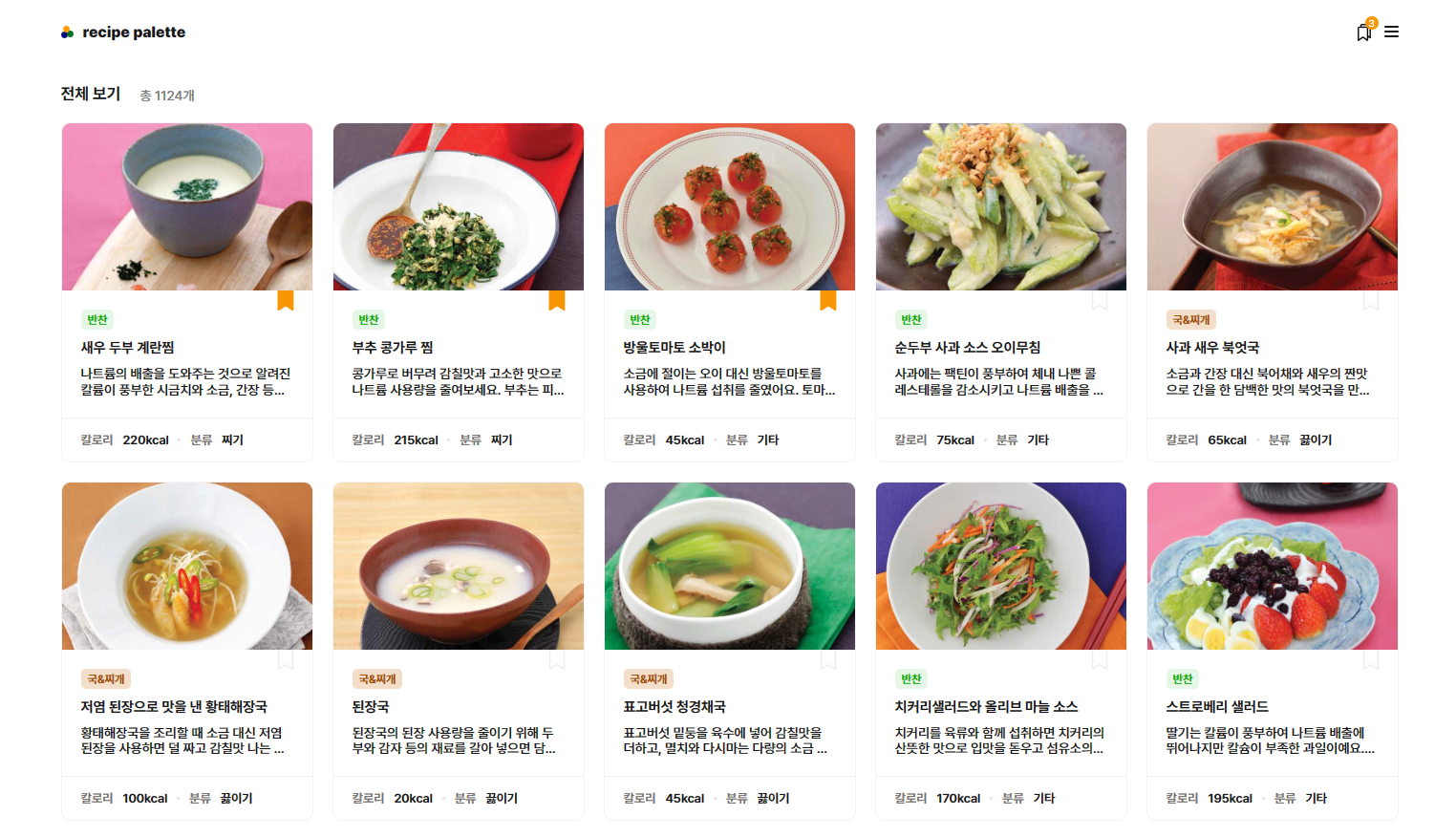
ListItem.vue 라는 컴포넌트를 생성함
동일한 레이아웃이기 때문
HomeView.vue
<template>
  //나머지 생략
   <ListItem/>
</template>
<script setup>
import ListItem from "@/components/ListItem.vue";
import { onMounted } from "vue";
import { useRouter } from "vue-router";
import { useCommonStore } from '../stores/common.js'

const router = useRouter();
const store = useCommonStore();

onMounted(()=>{
    store.getDataList();
})
</script>
ListView.vue
<template>
  <div>
      //나머지 생략
     <ListItem />
  </div>
</template>
<script setup>
import ListItem from '@/components/ListItem.vue'
import { onMounted, ref, watch } from 'vue'
import { seRouter } from 'vue-router'
import { useCommonStore } from '../stores/common.js'

const store = useCommonStore();
const router = useRouter()

onMounted(() => {
// 주소창에 /list만 불러오게 되면 오류가 나기 때문에 /list?page=1 로 변환 시켜줘야함
if(!route.query.page){
    router.push({
      query: { page: 1 }
   })
  }
  store.getDataList()
})

watch(route,()=>{
  store.getDataList()
},)
</script>
ListItem.vue
<template>
  <div class="list-item">

    // 최상단
    <div class="srh-view" v-show="store.dataList && $route.path !== '/'">
      <span v-if="$route.query.search">'{{ $route.query.search }}' 검색 결과 </span>
      <span v-else-if="$route.query.keyword">'{{ $route.query.keyword }}' 키워드 결과 </span>
      <span v-else>전체 보기</span>
      <span v-show="store.totalCount && store.totalCount !== 0">총 {{ store.totalCount }}개</span>
    </div>

      // 데이터 없을 시 표시 문구
    <div class="content" v-if="store.dataList.MSG === '해당하는 데이터가 없습니다.'">
      <NoDataMessage />
    </div>

    // 데이터 있을 때 보여짐
    <div class="content" v-else>

      // isLoading = true
      <ul v-if="store.isLoading" class="skeleton">
        <li v-for="index in 10" :key="index">
           // *생략*
        </li>
      </ul>

       // isLoading = false
      <ul v-else>
        <li v-for="(item, index) in store.dataList" :key="index">
          // *생략*
        </li>
      </ul>

    </div>
</template>
<script setup>
import { useCommonStore } from '../stores/common.js'

const store = useCommonStore();
</script>
- 페이지네이션
ListView.vue
<template>
  <div>
     <ListItem />

    // 페이지네이션 들어갈 부분
      <div class="pagination" v-show="store.dataList.length > 0">
        <button @click="changePage(route.query.page,0)" :disabled="isPrevPageDisabled" class="prev">
           이전
        </button>
        <ul>
          <li
            v-for="page in pageNumbers()"
            :key="page"
            @click="changePage(page,2)"
            :style="[
              page === store.currentPage
                ? { fontWeight: 700, color: 'var(--black)' }
                : { fontWeight: 400, color: '#787878' }
            ]"
          >
            {{ page }}
          </li>
        </ul>
        <button @click="changePage(route.query.page,1)" :disabled="isNextPageDisabled">
          다음
        </button>
      </div>
  </div>
</template>
<script setup>
import ListItem from '@/components/ListItem.vue'
import { computed,onMounted, ref, watch } from 'vue'
import { useRoute, useRouter } from 'vue-router'
import { useCommonStore } from '../stores/common.js'

const store = useCommonStore();
const route = useRoute()
const router = useRouter()

const currentPageStart = () => {
  return Math.max(store.currentPage - 2, 1)
}

const currentPageEnd = () => {
  return Math.min(currentPageStart() + 4, store.totalPage)
}

const pageNumbers = () => {
  const start = currentPageStart()
  const end = currentPageEnd()
  return Array.from({ length: end - start + 1 }, (_, i) => start + i)
}

// num = 0  이전 페이지
// num = 1  다음 페이지
// num = 2  누른 숫자 페이지 이동
const changePage = (page,num) => {
    const queryKey  = Object.keys(route.query)[0];
    let pagenNm;
    if(num === 2) pagenNm = page;
    else pagenNm = num === 1 ? parseInt(page) + 1 : parseInt(page) - 1;
    router.push({
     query: { [queryKey] : Object.values(route.query)[0] , page: pagenNm}
    })
}

const isNextPageDisabled = computed(() => {
  return store.currentPage >= store.totalPage
})

const isPrevPageDisabled = computed(() => {
  return  store.currentPage  <= 1
})

onMounted(() => {
if(!route.query.page){
    router.push({
      query: { page: 1 }
   })
  }
  store.totalCount = 0;
  store.getDataList()
})

watch(route,(nv,ov)=>{
  store.totalCount = 0;
  store.getDataList()
},)
</script>
2-3 메뉴
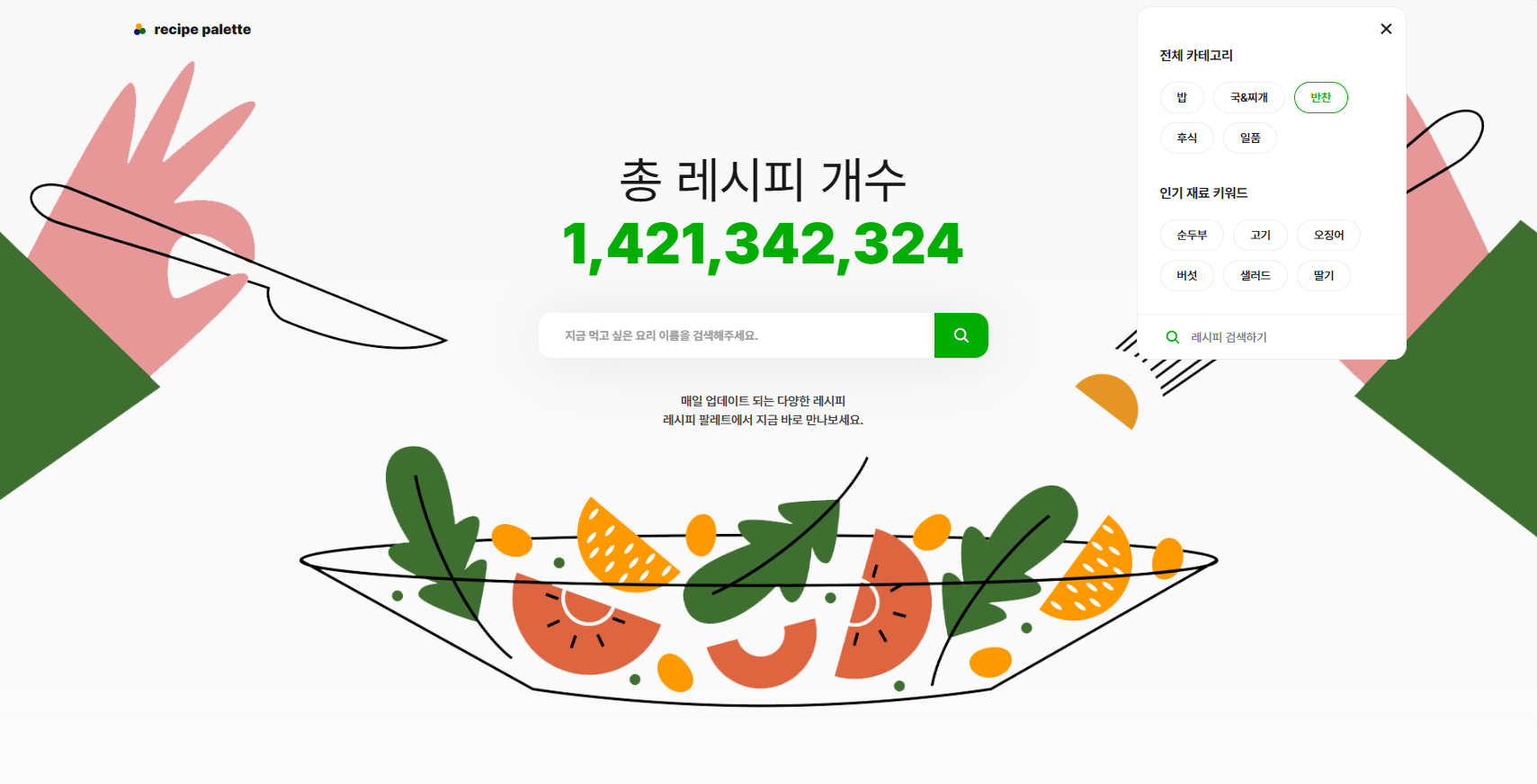
기본
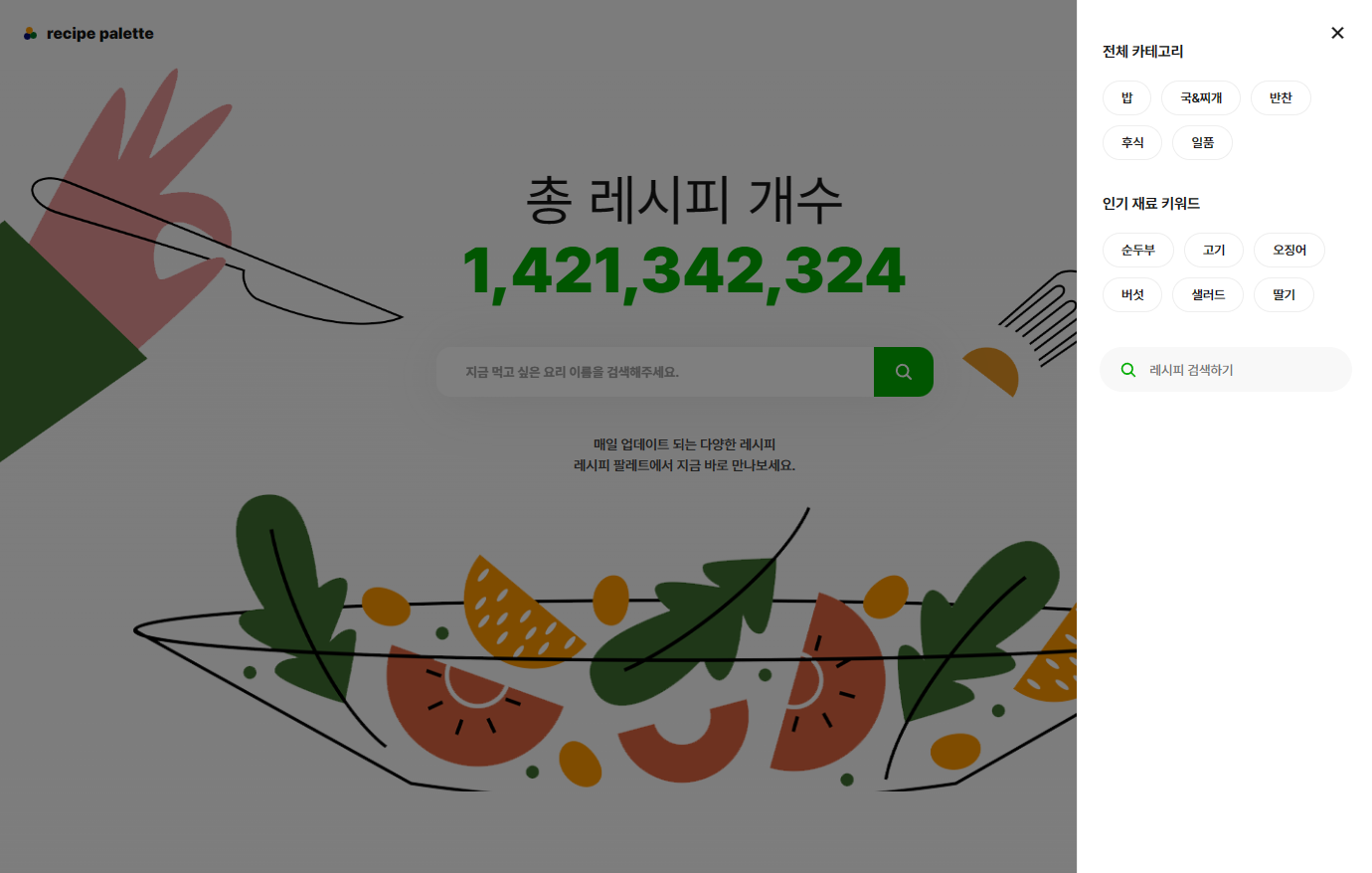
넓이가 줄었을 때
<template>
   <li v-for="cate in categoryList"
       :key="cate.name"
       @click="router.push({ path: 'list', query: { category: cate.link, page: 1 } })">
       {{ cate.name }}
   </li>
</template>
<script setup>
const isOpen = ref(false)
const categoryList = ref([
  { name: '밥', link: '밥' },
  { name: '국&찌개', link: '국' },
  { name: '반찬', link: '반찬' },
  { name: '후식', link: '후식' },
  { name: '일품', link: '일품' }
])

// 페이지 이동 시 메뉴창 true이면 false 시켜주기
watch(route, () => {
  isOpen.value = false;
  document.body.style.overflow = isOpen.value ? 'hidden'  : 'auto'
})
</script>
주소에 따라 다른 데이터를 불러오기 위해 common.js 수정해야함
common.js
  const getDataList = async () => {
    try {
      isLoading.value = true;
      currentPage.value = parseInt(route.query.page);
      start.value = currentPage.value ? (currentPage.value - 1) * perPage + 1 : 1
      end.value = currentPage.value ? currentPage.value * perPage : 10

      let url;

      if (route.query.search) {
        url = `COOKRCP01/json/${start.value}/${end.value}/RCP_NM=${route.query.search}`;
      }else if(route.query.category){
        url =  `COOKRCP01/json/${start.value}/${end.value}/RCP_PAT2=${route.query.category}`;
      }else if(route.query.keyword){
        url =  `COOKRCP01/json/${start.value}/${end.value}/RCP_PARTS_DTLS=${route.query.keyword}`;
      }else {
        url = `COOKRCP01/json/${start.value}/${end.value}`;
      }

      const response = await axios.get(url);
      totalCount.value = response.data.COOKRCP01.total_count
      totalPage.value = Math.ceil(totalCount.value / 20)
      dataList.value = response.data.COOKRCP01.row ? response.data.COOKRCP01.row.map((ele) => {
        return {
          ...ele,
          // 스크랩한 레시피인지 확인하기 위해 넣음
          isDuplicate: recipeArr.value.map((nm) => nm.RCP_NM).includes(ele.RCP_NM)
        };
      }) : response.data.COOKRCP01.RESULT

      isLoading.value = false;
    } catch (err) {
      console.log(err);
    }
  }
2-4 스크랩 표시
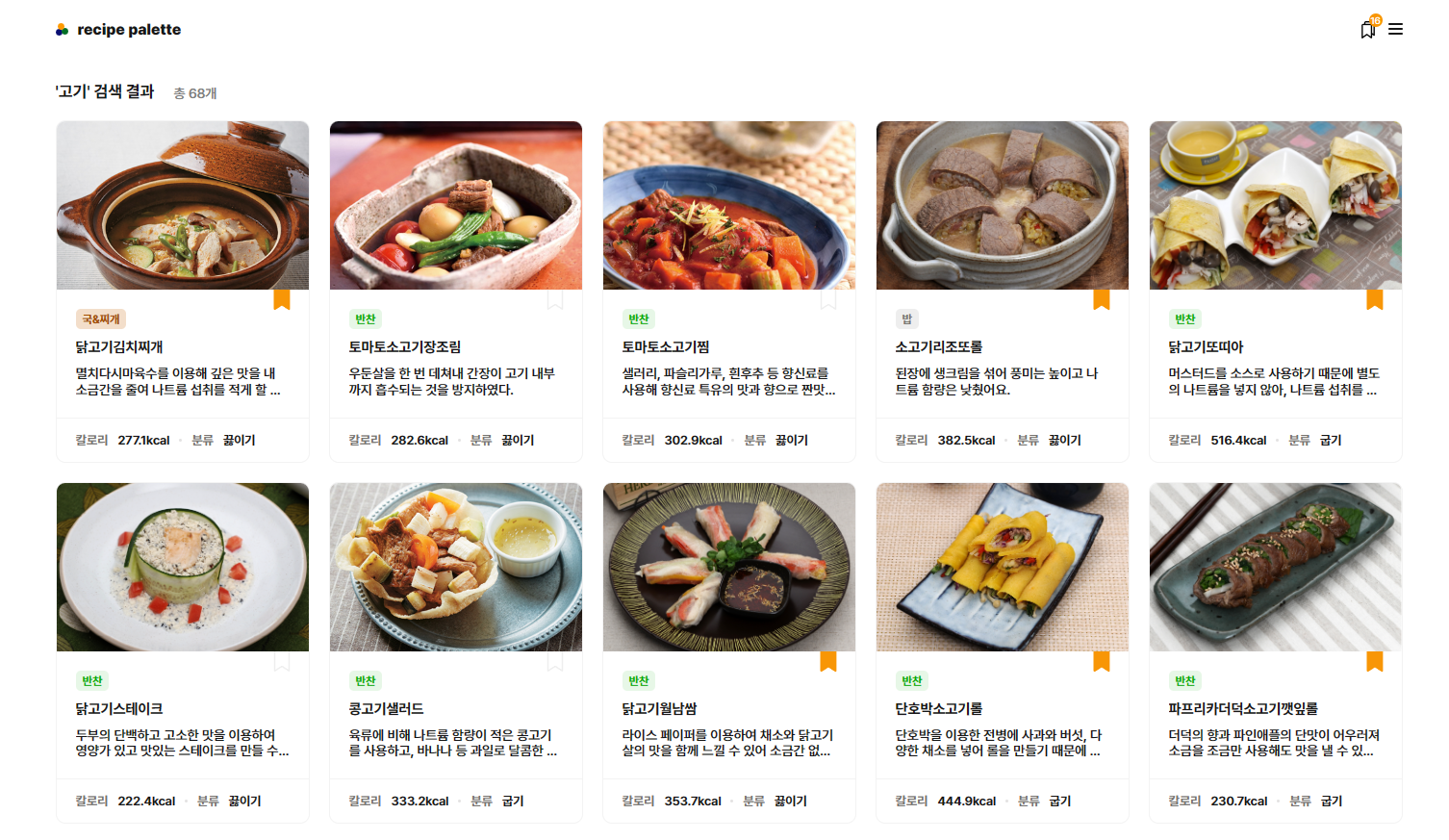
<li>
   <div class="scrap" @click.stop="store.saveRecipe(item)" v-if="!item.isDuplicate">
    <svg>
    </svg>
</div>
<div class="scrap" @click.stop="store.removeRecipe(item)" v-else>
    <svg>
    </svg>
</div>
</li>
같이 해도 되지만 어쩌다보니 따로 함
common.js
  const saveRecipe = (item) => {
    item.isDuplicate = true
    item.date = new Date();
    recipeArr.value.push(item)
    window.localStorage.setItem('my-recipe', JSON.stringify(recipeArr.value))
  }

  const removeRecipe = (item) => {
    item.isDuplicate = false
    recipeArr.value = recipeArr.value.filter((ele) => !item.RCP_NM.includes(ele.RCP_NM))
    window.localStorage.setItem('my-recipe', JSON.stringify(recipeArr.value))
}localstorage에 저장했고 최신순, 오래된 순을 구분하기 위해 날짜도 추가해서 넣어줌
2-5 스크랩함
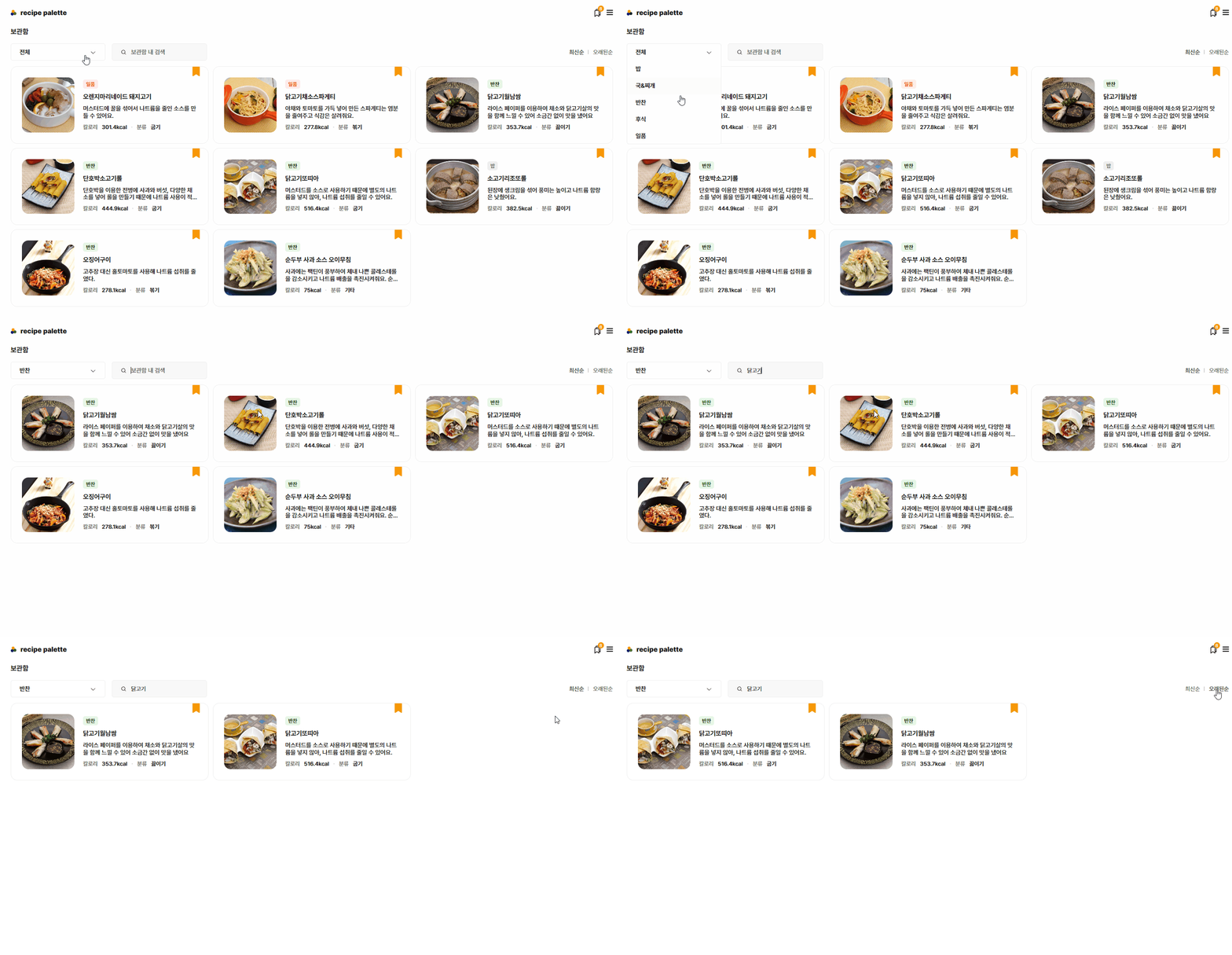
카테고리 별
최신순, 오래된순
보관함 내 검색
세가지로 항목을 나눠 주었고 최신순과 오래된순은, 검색은 카테고리 선택한 리스트에서 또 분류가 되도록 설정
카테고리 별 리스트
   <ul class="scrap-cate" ref="cateList" >
     <li @click="toggleMenu">{{ activeButton }}<span></span></li>
        <li v-for="item in updatedCategoryList" :key="item" @click="clickMenu(item)" v-show="activeButton !== item.name">
          {{ item.name }}
  		</li>
   </ul>
최신순/오래된순
검색 결과
  <div class="order">
      <button @click="reverseArray('최신순')" :class="arrayTypeBtn === '최신순' && 'active'">최신순</button>
      <span></span>
      <button @click="reverseArray('오래된순')" :class="arrayTypeBtn === '오래된순' && 'active'">오래된순</button>
 </div>
검색
<input type="text" placeholder="보관함 내 검색" :value="inputValue" @keyup.enter="handleInputChange"/><script setup>
import { onMounted, ref, watch } from 'vue'
import { useRoute, useRouter } from 'vue-router'
import { useCommonStore } from '../stores/common.js'
const store = useCommonStore()
const categoryList = ref([
{ name: '전체', link: '전체' },
{ name: '밥', link: '밥' },
{ name: '국&찌개', link: '국' },
{ name: '반찬', link: '반찬' },
{ name: '후식', link: '후식' },
{ name: '일품', link: '일품' }
])
const router = useRouter();
const route = useRoute()
const updatedCategoryList = ref([]);
const cateList = ref(null)
const isOPenMenu = ref(false)
// 기본 카테고리 메뉴 height px
const menuHeight = ref(40);
// 현재 카테고리
const activeButton = ref(route.query.category || '전체');
// 스크랩 배열 리스트
const updatedList = ref([])
// 최신순, 오래된순
const arrayTypeBtn = ref(route.query.orderBy || '최신순');
// 검색
const inputValue = ref('');
// 검색 기록이 있을 때 없을 때 표시
const isEmptyResult = ref(false)
const movePage = (item) => {
window.sessionStorage.setItem('info', JSON.stringify(item))
router.push({ name: 'food', params: { idx: item.RCP_SEQ } });
}
const toggleMenu = () => {
isOPenMenu.value = !isOPenMenu.value;
if(isOPenMenu.value) menuHeight.value = `${cateList.value.clientHeight}px`;
else menuHeight.value = '40px'
}
const clickMenu = (item) => {
activeButton.value = item.name
if(activeButton.value === '전체') router.push({ name: 'scrap', query:{ orderBy: '최신순'}})
else router.push({ name: 'scrap', query: { orderBy: '최신순', category: item.name}})
toggleMenu()
updateList()
inputValue.value = ''
isEmptyResult.value = false
}
const changeName = () => {
if(activeButton.value !== '전체') updatedCategoryList.value = categoryList.value.filter((x)=> x.name !== route.query.category)
else updatedCategoryList.value = categoryList.value.filter((x)=> x.name !== '전체')
}
const updateList = () =>{
if(activeButton.value !== '전체'){
activeButton.value = route.query.category;
updatedList.value = store.recipeArr.filter((x)=> x.RCP_PAT2 === route.query.category);
}
else {
updatedList.value = store.recipeArr
};
changeName()
}
const reverseArray = (name) => {
if(!route.query.search) updateList()
arrayTypeBtn.value = name;
if (name === '오래된순') {
updatedList.value.sort((a, b) => new Date(a.date) - new Date(b.date));
} else {
updatedList.value.sort((a, b) => new Date(b.date) - new Date(a.date));
}
const query = {
orderBy: route.query.orderBy,
...(route.query.category && { category: route.query.category }),
...(route.query.search && { search: route.query.search }),
};
router.push({ name: 'scrap', query });
};
const handleInputChange = (e) => {
inputValue.value = e.target.value
addSearch()
}
const addSearch = () => {
updatedList.value = route.query.category ?
store.recipeArr.filter((item)=> item.RCP_NM.includes(inputValue.value) && item.RCP_PAT2.includes(route.query.category))
:
store.recipeArr.filter((item)=> item.RCP_NM.includes(inputValue.value))
isEmptyResult.value = updatedList.value.length < 1 ? true : false;
const query = {
...(route.query.orderBy && { orderBy: route.query.orderBy }),
...(route.query.category && { category: route.query.category }),
search: inputValue.value,
};
router.push({ name: 'scrap', query });
}
onMounted(()=>{
const query = {
...(route.query.orderBy && { orderBy: route.query.orderBy }),
...(route.query.category && { category: route.query.category }),
...(route.query.search && { search: route.query.search })
};
router.push({ name: 'scrap', query });
if(!route.query.search){
reverseArray(arrayTypeBtn.value)
}
else {
inputValue.value = route.query.search;
addSearch()
changeName()
}
})
watch(route,()=>{
if(!route.query.search) reverseArray(route.query.orderBy)
})
</script>스크랩 재로드
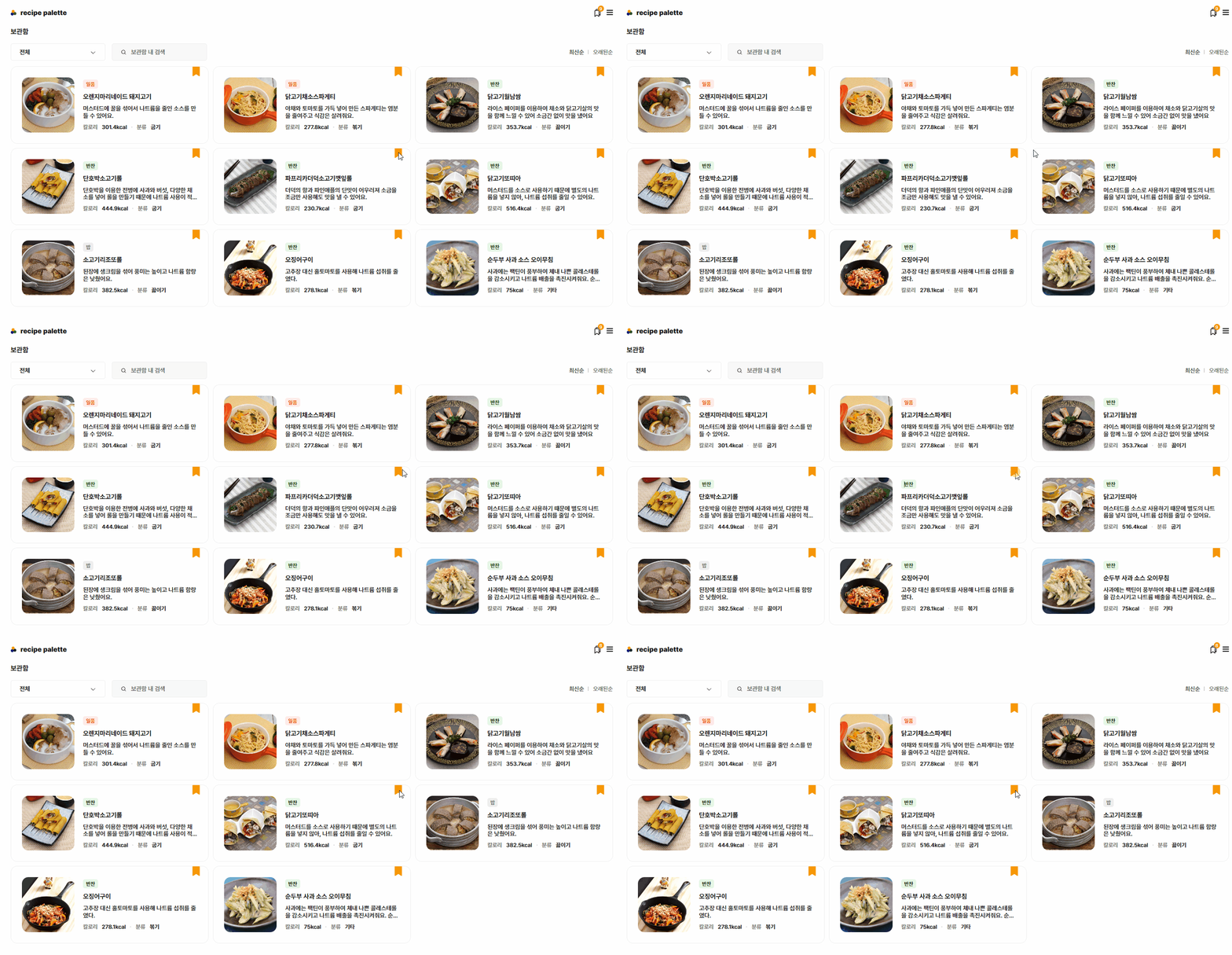
watch(() => store.recipeArr.length, () => {
  reverseArray(route.query.orderBy);
}, { deep: true });
deep 옵션을 true로 설정함으로써 배열의 내용이 아닌 길이 변화에 반응
length가 변화했을 때 재로드