
16장 프로퍼티 어트리뷰트
16-1 내부 슬롯과 내부 메서드
ECMAScript 사양에 등장하는 이중 대괄호([[ ... ]])로 감싼 이름들이 내부 슬롯과 내부 메서드
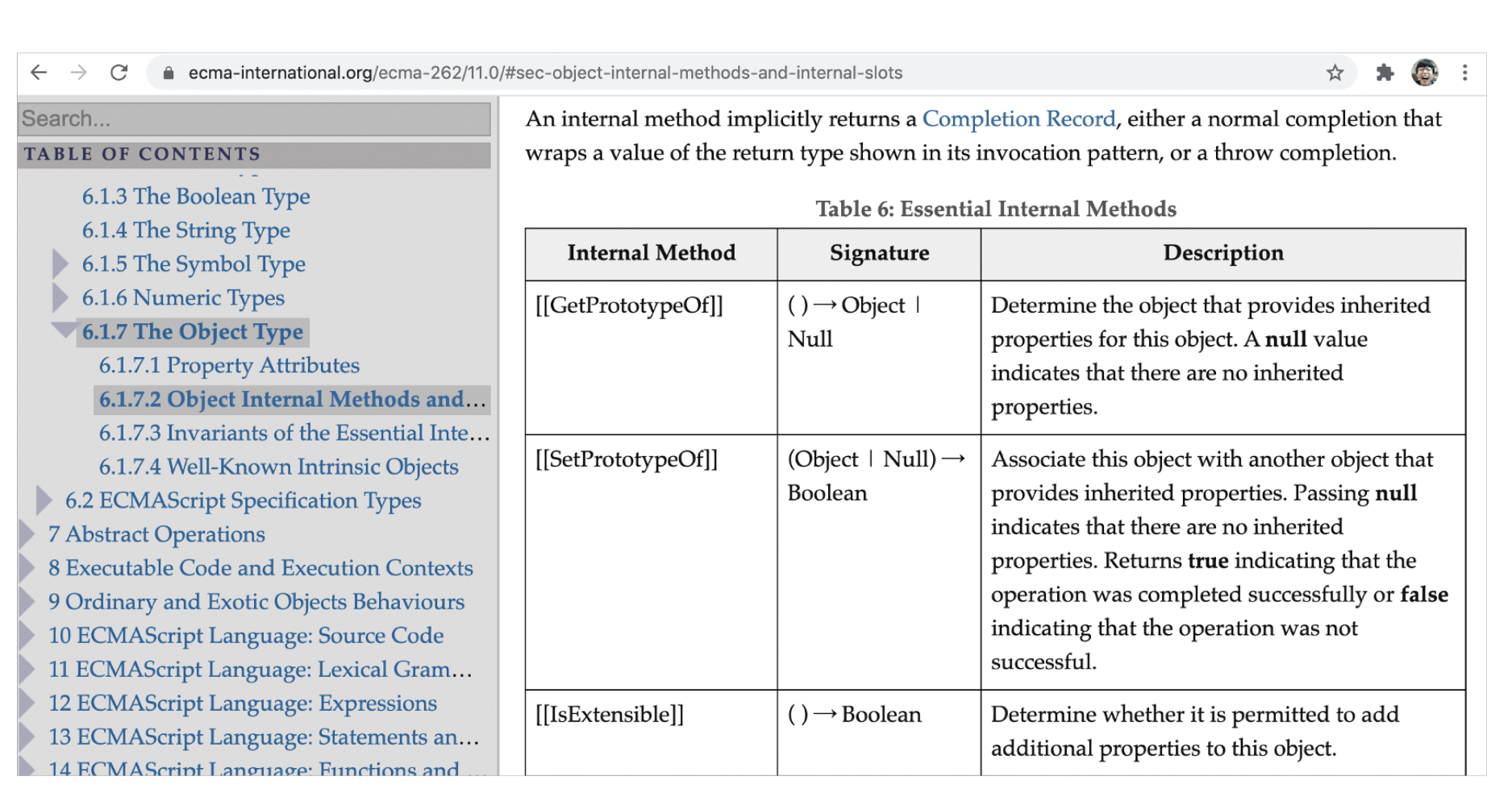
일부 내부 슬롯과 내부 메서드를 제외하고는 원칙적으로 자바스크립트 엔진의 내부 로직이므로 직접적으로 접근하거나 호출 불가능
const o = {};

o.[[Prototype]]	// Uncaught SyntaxError: Unexpected token '['
// 일부 내부 슬롯과 내부 메서드에 한하여 간접적으로 접근 가능하다.
o.__proto__		// Object.prototype
16-2 프로퍼티 어트리뷰트와 프로퍼티 디스크립터 객체
자바스크립트 엔진은 프로퍼티를 생성할 때 프로퍼티의 상태를 나타내는 프로퍼티 어트리뷰트를 기본값으로 자동 정의
프로퍼티 상태
- 프로퍼티의 값 (value)
- 값의 갱신 가능 여부 (writable)
- 열거 가능 여부 (enumerable)
- 재 정의 가능 여부 (configurable)
프로퍼티 어트리뷰트는 자바스크립트 엔진이 관리하는 내부 상태 값(meta-property)인 내부 슬롯이므로 직접 접근할 수 없지만 간접 적으로 확인할 수는 있다.
const person = {
  name: 'YEJUN',
}

// 프로퍼티 어트리뷰트 정보를 제공하는 프로퍼티 디스크립터 객체 반환
console.log(Object.getOwnPropertyDescriptor(person, 'name');
// {value: "YEJUN", writable: true, enumerable: true, configurable: true}
ES8에서 도입된 Object.getOwnPropertyDescriptors 메서드는 모든 프로퍼티의 프로퍼티 어트리뷰트 정보 제공하는 디스크립터 객체 반환
const person = {
  name: 'YEJUN',
}

person.age = 21;

console.log(Object.getOwnPropertyDescriptors(person));
/*
{
	name: {value: "YEJUN", writable: true, enumerable: true, configurable: true}
    age: {value: 21, writable: true, enumerable: true, configurable: true}
}
*/
16-3 데이터 프로퍼티와 접근자 프로퍼티
- 데이터 프로퍼티
키와 값으로 구성된 일반적인 프로퍼티- [[Value]]
- 프로퍼티 키를 통해 프로퍼티 값에 접근하면 반환되는 값
- 프로퍼티 키를 통해 프로퍼티 값을 변경하면 [[Value]]에 값을 재할당 이때 프로퍼티가 없으면 프로퍼티를 동적 생성하고 생성된 프로퍼티의 [[Value]]에 값을 저장
- [[Writable]]
- 프로퍼티 값의 변경 가능 여부, 불리언 값
- [[Writable]]값이 false인 경우 [[Value]]의 값을 변경할 수 없는 읽기 전용 프로퍼티가 됨
- [[Enumerable]]
- 프로퍼티 열거 가능 여부, 불리언 값
- [[Enumerable]]값이 false인 경우 해당 프로퍼티는 for...in문이나 Object.keys 메서드 등으로 열거 불가능
- [[Configurable]]
- 프로퍼티 재정의 가능 여부, 불리언 값
- [[Configurable]]의 값이 false 인 경우 해당 프로퍼티 삭제, 프로퍼티 어트리뷰트 값 변경 금지
- 단,[[Writable]] true인 경우 [[Value]]의 변경과 [[Writable]]을 false로 변경하는 것은 허용
- [[Value]]
- 접근자 프로퍼티
자체적으로는 값을 갖지 않고 다른 데이터 프로퍼티의 값을 읽거나 저장할 때 호출되는 접근자 함수로 구성된 프로퍼티
- [[Get]]- 접근자 프로퍼티를 통해 데이터 프로퍼티의 값을 읽을 때 호출되는 접근자 함수
- 접근자 프로퍼티 키로 프로퍼티 값에 접근하면 프로퍼티 어트리뷰트[[Get]]의 값, 즉 getter 함수 호출되고 그 결과가 프로퍼티 값으로 반환
- [[Set]]
- 접근자 프로퍼티를 통해 데이터 프로퍼티의 값을 저장할 때 호출되는 접근자 함수
- 접근자 프로퍼티 키로 프로퍼티 값을 저장하면 프로퍼티 어트리뷰트 [[Set]]의 값, 즉 setter 함수가 호출되고 그 결과가 프로퍼티 값으로 저장
- [[Enumerable]]
- 데이터 프로퍼티의 [[Enumerable]]과 같다
- [[Configurable]]
- 데이터 프로퍼티의 [[Configurable]]과 같다
- 접근자 프로퍼티를 통해 데이터 프로퍼티의 값을 읽을 때 호출되는 접근자 함수
프로토타입
어떤 객체의 상위(부모) 객체의 역할을 하는 객체
프로토타입은 하위 객체에게 자신의 프로퍼티와 메서드를 상속함
프로토타입 객체의 프로퍼티나 메서드를 사옥받은 하위 객체는 자신의 프로퍼티 또는 메서드인 것처럼 자유롭게 사용
접근자 프로퍼티와 데이터 프로터티 구별하는 방법
// 일반 객체의 __proto__는 접근자 프로퍼티다.
Object.getOwnPropertyDescriptor(Object.prototype, '__proto__');
// {get: f, set: f, enumerable: false, configurable: true}

// 함수 객체의 prototype은 데이터 프로퍼티다.
Object.getOwnPropertyDescriptor(function(){}, 'prototype');
// {value: {...}, writable: true, enumerable: false, configurable: false}
16-4 프로퍼티 정의
새로운 프로퍼티를 추가하면서 프로퍼티 어트리뷰트를 명시적으로 정의하거나, 기존 프로퍼티의 프로퍼티 어트리뷰트를 재정의 하는 것
const person = {};

// 데이터 프로퍼티 정의
Object.defineProperty(person, 'firstName', {
  value: 'Ungmo',
  writable: true,
  enumerable: true,
  configurable: true
});

// 디스크립트 객체의 프로퍼티를 누락시키면 undefined, false가 기본값이다.
Object.defineProperty(person, 'lastName', {
  value: 'Lee'
});

// [[Enumerable]]의 값이 false인 경우 해당 프로퍼티는 for...in 문이나 Object.keys 등으로 열거할 수 없다.
console.log(Object.keys(person));	// ["firstName"]

// [[Writable]]의 값이 false인 경우 해당 프로퍼티의 [[Value]]의 값을 변경 불가능
// 이때 값을 변경하면 에러는 발생하지 않고 무시됨
person.lastName = 'Kim';

// [[Configurable]]의 값이 false인 경우 해당 프로퍼티를 삭제하거나 재정의 할 수 없다.
// 이때 프로퍼티를 삭제하면 에러는 발생하지 않고 무시됨
delete person.lastName;

let descriptor = Object.getOwnPropertyDescriptor(person, 'lastName');
console.log('lastName', descriptor);
//LastName {value:"Lee", writable:false, enumerable: false, configureable: false}
프로퍼티 디스크립터 객체에서 생략된 어트리뷰트는 다음과 같이 기본값이 적용
| 프로퍼티 디스크립터 객체의 프로퍼티 | 대응하는 프로퍼티 어트리뷰트 | 생략했을 때의 기본값 |
|---|---|---|
| value | [[Value]] | undefined |
| get | [[Get]] | undefined |
| set | [[Set]] | undefined |
| writable | [[Writable]] | false |
| enumerable | [[Enumerable]] | false |
| configurable | [[Configurable]] | false |
Object.defineProperty 한 번에 하나의 프로퍼티만 정의
Object.defineProperties 여러 개의 프로퍼티를 한 번에 정의
const person = {};

Object.defineProperties(person, {
  // 데이터 프로퍼티 정의
  firstName: {
    value: 'Ungmo',
    writable: true,
    enumerable: true,
    configurable: true
  },
   lastName: {
    value: 'Lee',
    writable: true,
    enumerable: true,
    configurable: true
  },
  // 접근자 프로퍼티 정의
  fullName: {
    get() {
      return `${this.firstName} ${this.lastName}`;
    },
    set(name){
      [this.firstName, this.lastName] = name.split(' ');
    },
    enumerable: true,
    configurable: true
  }
});

person.fullName = 'Heegun Lee';
console.log(person)// {firstName:"Heegun", lastName:"Lee"}
16-4 객체 변경 방지
| 구분 | 메서드 | 프로퍼티 추가 | 프로퍼티 삭제 | 프로퍼티 값 읽기 | 프로퍼티 값 쓰기 | 프로퍼티 어트리뷰트 재정의 |
|---|---|---|---|---|---|---|
| 객체 확장 금지 | Object.preventExtensions | X | O | O | O | O |
| 객체 밀봉 | Object.seal | X | X | O | O | X |
| 객체 동결 | Object.freeze | X | X | O | X | X |
- 객체 확장 금지
Object.preventExtensions 객체 확장 금지함
확장이 금지된 객체는 프로퍼티 추가가 금지
const person = {name: 'Lee'};

// Object.isExtensible 확장 가능한 객체인지 여부 판별
console.log(Object.isExtensible(person));	// true

// person 객체의 확장을 금지하여 프로퍼티 추가를 금지
Object.preventExtensions(person);

console.log(Object.isExtensible(person));	// false

delete person.name;
console.log(person);	// {}

// 추가는 금지되지만 삭제는 가능
Object.defineProperty(person, 'age', {value: 20}); // TypeError: Cannot define property age, object is not extensible
- 객체 밀봉
Object.seal 객체 밀봉
밀봉된 객체는 읽기와 쓰기만 가능
const person = {name: 'Lee'};

// Object.isSealed 메서드로 밀봉된 객체인지 여부 판별
console.log(Object.isSealed(person));	// false

// person 객체를 밀봉하여 프로퍼티 추가, 삭제, 재정의를 금지
Object.seal(person);

console.log(Object.isSealed(person));	// true

//밀봉(seal)된 객체는 congifurable이 false다
console.log(Object.getOwnPeropertyDescriptors(person))
/*
{
  name: { value: "Lee", writable: true, enumerable: true, configurable: flase},
}
*/

// 무시
person.age = 20;
console.log(person) // { name: 'Lee' }

// 프로퍼티 값 갱신은 가능
person.name = 'Kim';
console.log(person) // { name: 'Kim' }
- 객체 동결
Object.freeze 객체 동결
동결된 객체는 읽기만 가능
const person = { name: 'Lee' }

// Object.isFrozen 메서드로 동결된 객체 여부 판별
console.log(Object.isFrozen(person)) //false

Object.freeze(person)

console.log(Object.isFrozen(person)) //true

//동결된 객체는 writable과 configurable이 false
console.log(Object.getOwnPeropertyDescriptors(person))
/*
{
  name: { value: "Daniel", writable: false, enumerable: true, configurable: flase},
}
*/

// 프로퍼티 추가 금지
person.age = 20
console.log(person) // { name: 'Lee' }

// 프로퍼티 삭제 금지
delete person.name
console.log(person) // { name: 'Lee' }

// 프로퍼티 갱신 금지
person.name = 'yejun'
console.log(person) // { name: 'Lee' }
- 불변 객체
객체를 동결하여도 중첩 객체까지 동결 x
17장 생성자 함수에 의한 객체 생성
17-1 Object 생성자 함수
new 연산자와 함께 Object 생성자 함수를 호출하면 빈 객체를 생성하여 반환
빈 객체를 생성한 이후 프로퍼티 또는 메서드를 추가하여 객체 완성
const person = new Object();

//프로퍼티 추가
person.name = 'Lee';
person.sayHello = function(){
	console.log('Hi My name is' + this.name)l
}

console.log(person); // {name: "Lee", sayHello: f}
person.sayHello(); // Hi! My name is Lee
인스턴스
생성자 함수에 의해 생성된 객체
자바스크립트는 Object 생성자 함수 이외 빌트인 생성자 함수 제공
// String 생성자 함수에 의한 String 객체 생성
const strObj = new String('Lee');
console.log(typeof strObj); // object
console.log(strObj);        // String {"Lee"}

// Number 생성자 함수에 의한 Number 객체 생성
const numObj = new Number(123);
console.log(typeof numObj); // object
console.log(numObj);        // Number {123}

// Boolean 생성자 함수에 의한 Boolean 객체 생성
const boolObj= new Boolean(true);
console.log(typeof boolObj); // object
console.log(boolObj);        // Boolean {true}

// Function 생성자 함수에 의한 Function 객체(함수) 생성
const func = new Function('x', 'return x * x');
console.log(typeof func); // function
console.dir(func);        // ƒ anonymous(x)

// Array 생성자 함수에 의한 Array 객체(배열) 생성
const arr = new Array(1, 2, 3);
console.log(typeof arr); // object
console.log(arr);        // [1, 2, 3]

// RegExp 생성자 함수에 의한 RegExp 객체(정규 표현식) 생성
const regExp = new RegExp(/ab+c/i);
console.log(typeof regExp); // object
console.log(regExp);        // /ab+c/i

// Date 생성자 함수에 의한 Date 객체 생성
const date = new Date();
console.log(typeof date); // object
console.log(date);        // Mon May 04 2020 08:36:33 GMT+0900 (대한민국 표준시)
17-2 생성자 함수
- 객체 리터럴에 의한 객체 생성 방식의 문제점
단 하나의 객체만 생성하기 때문에, 객체 재사용이 불가능
const circle1 = {
  radius: 5,
  getDiameter() {
    return 2 * this.radius;
  }
};

console.log(circle1.getDiameter()); // 10

const circle2 = {
  radius: 10,
  getDiameter() {
    return 2 * this.radius;
  }
};

console.log(circle2.getDiameter()); // 20
- 생성자 함수에 의한 객체 생성 방식의 장점
구조 동일한 객체 여러 개 간편하게 생성 가능
// 생성자 함수
function Circle(radius) {
  // 생성자 함수 내부의 this는 생성자 함수가 생성할 인스턴스를 가리킨다.
  this.radius = radius;
  this.getDiameter = function () {
    return 2 * this.radius;
  };
}

// 인스턴스의 생성
const circle1 = new Circle(5);  // 반지름이 5인 Circle 객체를 생성
const circle2 = new Circle(10); // 반지름이 10인 Circle 객체를 생성

console.log(circle1.getDiameter()); // 10
console.log(circle2.getDiameter()); // 20
new연산자와 생성자 함수를 호출하지 않으면 일반 함수로 동작
// new 연산자와 함께 호출하지 않으면 생성자 함수로 동작 x
// 즉, 일반 함수로서 호출
const circle3 = Circle(15);

// 일반 함수로서 호출된 Circle은 반환문이 없으므로 암묵적으로 undefined를 반환
console.log(circle3); // undefined

// 일반 함수로서 호출된 Circle내의 this는 전역 객체를 가리킴
console.log(radius); // 15this가 가리키는 값 (바인딩)은 함수 호출 방식에 따라 결정
1. 일반 함수로서의 호출 - 전역객체function foo() { console.log(this); } foo(); // window
- 메서드로서 호출 - 메서드를 호출한 객체(마침표 앞의 객체)
const obj = {foo};
obj.foo(); // obj
- 생성자 함수로서 호출
const inst = new foo(); //inst
- 생성자 함수의 인스턴스 생성 과정
생성자 함수가 인스턴스를 생성하는 것은 필수
// 생성자 함수
function Circle(radius) {
  // 인스턴스 초기화
  this.radius = radius;
  this.getDiameter = function () {
    return 2 * this.radius;
  };
}

// 인스턴스 생성
const circle1 = new Circle(5);  // 반지름이 5인 Circle 객체를 생성
인스턴스 생성과 this바인딩
function Circle(radius) {
  // 1. 암묵적으로 빈 객체가 생성되고 this에 바인딩됨
  console.log(this); // Circle {}

  this.radius = radius;
  this.getDiameter = function () {
    return 2 * this.radius;
  };
}

const circle1 = new Circle(5);
바인딩
식별자와 값을 연결하는 과정
인스턴스 초기화
function Circle(radius) {
  // 1. 암묵적으로 인스턴스가 생성되고 this에 바인딩됨

  // 2. this에 바인딩되어 있는 인스턴스를 초기화
  this.radius = radius;
  this.getDiameter = function () {
    return 2 * this.radius;
  };
}

const circle1 = new Circle(5);
인스턴스 반환
function Circle(radius) {
  // 1. 암묵적으로 인스턴스가 생성되고 this에 바인딩됨

  // 2. this에 바인딩되어 있는 인스턴스를 초기화
  this.radius = radius;
  this.getDiameter = function () {
    return 2 * this.radius;
  };

  // 3. 완성된 인스턴스가 바인딩된 this가 암묵적으로 반환
}

// 인스턴스 생성. Circle 생성자 함수는 암묵적으로 this를 반환
const circle = new Circle(1);
console.log(circle); // Circle {radius: 1, getDiameter: ƒ}
- 내부 메서드 [[Call]]과 [[Construct]]
함수는 생성자 함수로서 호출 가능
//함수는 객체
function foo() {}
// 함수는 객체이므로 프로퍼티를 소유 가능
foo.prop = 10;
// 메서드를 소유 가능
foo.method = function () {
  console.log(this.prop);
};
foo.method(); // 10
내부 메서드 [[Call]]을 갖는 함수 객체는 callable이라 하며, 내부 메서드 [[Construct]]를 갖는 함수 객체를 constructor, [[Construct]]를 갖지 않는 함수 객체를 non-constructor라고 부름
callable 호출할 수 있는 객체, 즉 함수
constructor 생성자 함수로서 호출할 수 있는 함수
non-constructor 객체를 생성자 함수로서 호출할 수 없는 함수
모든 함수 객체를 호출할 수 있지만 모든 함수 객체를 생성자 함수로서 호출할 수 있는 것은 아님
function foo() {}
// 일반적인 함수로서 호출: [[Call]]이 호출
foo();
// 생성자 함수로서 호출: [[Construct]]가 호출
new foo();
- constructor와 non-constructor의 구분
- constructor 함수 선언문, 함수 표현식, 클래스(클래스도 함수다)
- non-constructor 메서드(ES6 메서드 축약 표현), 화살표 함수
- new 연산자
new 연산자 없이 생성자 함수를 호출하면 일반 함수로 호출
function Circle(radius) {
  this.radius = radius;
  this.getDiameter = function () {
    return 2 * this.radius;
  };
}

// new 연산자 없이 생성자 함수 호출하면 일반 함수로서 호출된다.
const circle = Circle(5);
console.log(circle);	// undefined
// 일반 함수 내부의 this는 전역 객체 window를 가리킨다.
console.log(radius);	// 5
console.log(getDiameter());	// 10

circle.getDiameter();	// TypeError: Cannot read property 'getDiameter' of undefined
- new.target
생성자 함수가 new 연산자 없이 호출되는 것을 방지하기 위해 ES6에서는 new.target을 지원함 (IE에서는 지원x)
new 연산자와 함께 생성자 함수로서 호출되면 함수 내부의 new.target은 함수 자신을 가리킴 (일반 함수 내부의 new.target은 undefined)
function Circle(radius) {
  // 이 함수가 new 연산자와 함께 호출되지 않았다면 new.target은 undefined다.
  if(!new.target){
    // new 연산자와 함께 생성자 함수를 재귀 호출하여 생성된 인스턴스를 반환한다.
    return new Circle(radius);
  }

  // 생략
}

// new 연산자 없이 생성자 함수를 호출하여도 new.target을 통해 생성자 함수로서 호출된다.
const circle = Circle(5);
18장 함수와 일급 객체
18-1 일급 객체
- 무명의 리터럴로 생성 가능 (런타임 생성 가능)
- 변수나 자료구조(객체, 배열 등)에 저장
- 함수의 매개변수에 전달 가능
- 함수의 반환값으로 사용
자바스크립트 함수는 위 조건을 모두 만족하므로 일급 객체임
// 1. 무명의 리터럴로 생성 가능
// 2. 변수에 저장 가능
// 런타임에 함수 리터럴이 평가되어 함수 객체가 생성되고 변수에 할당된다.
const increase = function (num) {
  return ++num;
};
const decrease = function (num) {
  return --num;
};
// 2. 함수는 객체에 저장할 수 있다.
const auxs = { increase, decrease };
// 3. 함수의 매개변수에 전달할 수 있다.
// 4. 함수의 반환값으로 사용할 수 있다.
function makeCounter(aux) {
  let num = 0;

  return function () {
    num = aux(num);
    return num;
  };
}

// 3. 함수는 매개변수에게 함수를 전달할 수 있다.
const increaser = makeCounter(auxs.increase);
console.log(increaser());	// 1
console.log(increaser());	// 2
const decreaser = makeCounter(auxs.decrease);
console.log(decreaser());	// -1
console.log(decreaser());	// -2
함수가 일급 객체라는 것은 객체와 동일하게 사용할 수 있다는 의미
객체는 값이므로 함수는 값과 동일하게 취급 가능
함수의 반환값으로도 사용가능
이는 함수형 프로그래밍을 가능케 하는 자바스크립트의 장점 중 하나
18-2 함수 객체의 프로퍼티
함수는 객체이므로 프로퍼티 가질 수 있음
function square(number) {
  return number * number;
}

console.dir(square);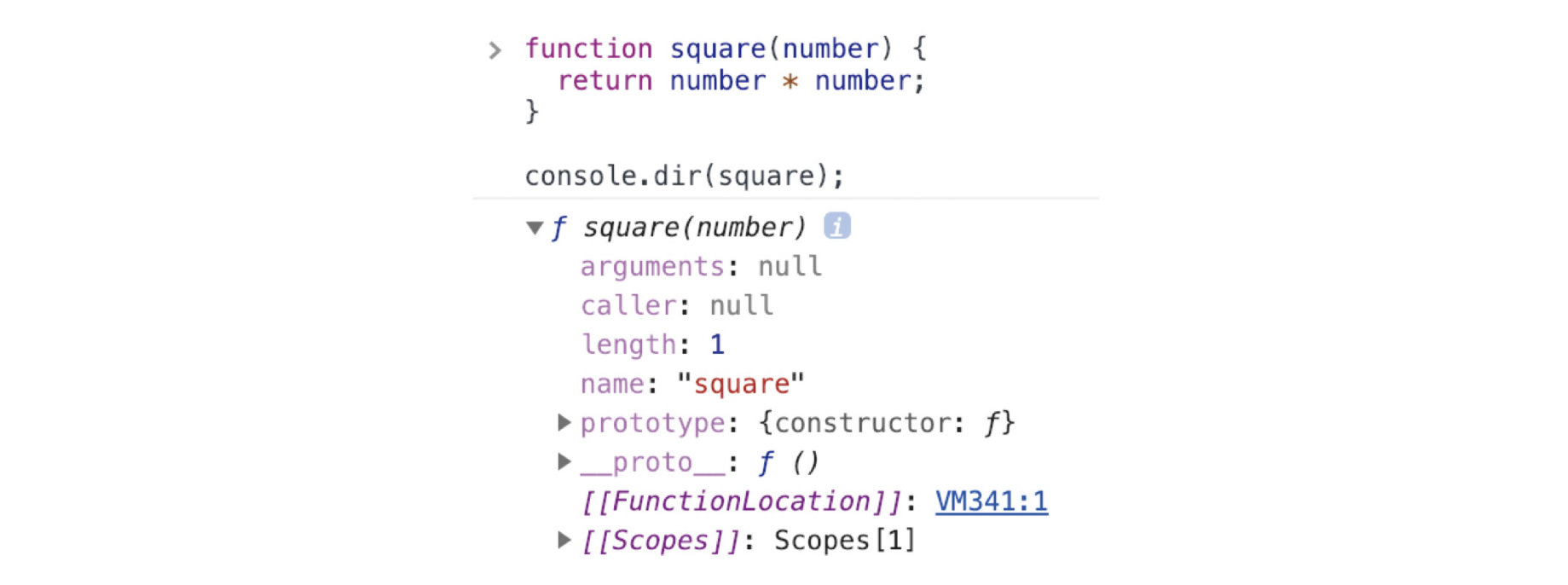
- arguments 프로퍼티
function multiply(x, y) {
  console.log(arguments);
  return x * y;
}
console.log(multiply()); // NaN
console.log(multiply(1)); // NaN
console.log(multiply(1,2)); // 2
console.log(multiply(1,2,3)); // 2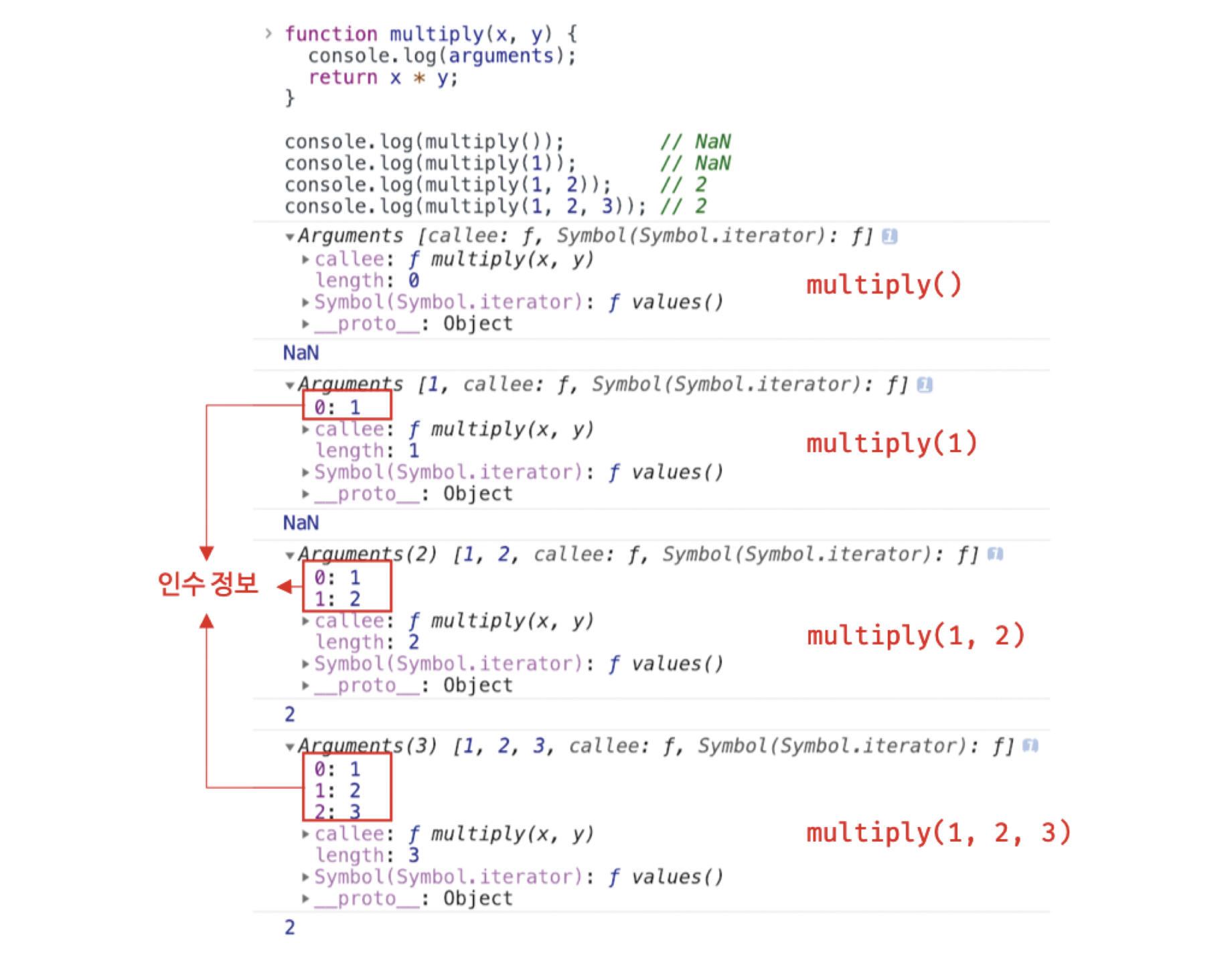
초과된 인수는 arguments 객체의 프로퍼티로 보관됨
프로퍼티 키는 인수의 순서
calle는 호출되어 arguments 객체를 생성한 함수, 함수 자신
length는 인수의 개수
가변인자함수를 구현할때 유용
가변인자함수
함수가 임의의 개수의 인자를 받을 수 있는 함수를 의미function sum() { let res = 0; for (let i = 0; i < arguments.length; i++){ res += arguments[i]; } return res; } console.log(sum(1, 2)); // 3
arguments 객체는 실제 배열이 아닌 유사 배열 객체
유사 배열 객체
length 프로퍼티를 가진 객체로 for 문으로 순회 할 수 있는 객체
즉, arguments 객체는 ES6부터 유사 배열 객체이면서 이터러블
이터러블
반복 가능한 객체const myArray = [1, 2, 3]; // 배열은 이터러블이다. const iterator = myArray[Symbol.iterator](); // 반복자의 next 메서드 호출 console.log(iterator.next()); // { value: 1, done: false } console.log(iterator.next()); // { value: 2, done: false } console.log(iterator.next()); // { value: 3, done: false } console.log(iterator.next()); // { value: undefined, done: true }
유사 배열 객체는 배열이 아니므로 배열 메서드 사용시 에러 발생
Function.prototype.call, Function.prototype.apply를 사용해 간접 호출해야 하는 번거로움이 있음
function sum1() {
  // arguments 객체를 배열로 변환
  const array = Array.prototype.slice.call(arguments);
  return array.reduce(function (pre, cur) {
    return pre + cur;
  }, 0);
}

console.log(sum1(1, 2));	// 3
이러한 번거로움을 해결하기 위해 ES6에서는 Rest 파라미터를 도입
(Rest 도입 이후 arguments 중요성 떨어짐)
function sum2(...args) {
  return args.reduce((pre, cur) => pre + cur, 0);
}

console.log(sum2(1, 2, 3));	// 6
- caller 프로퍼티
비표준 프로퍼티로 사용하지 않음
참고로만 알아두기
function foo(func) {
  return func();
}
function bar() {
  return 'caller : ' + bar.caller;
}

// 브라우저에서 실행한 결과
console.log(foo(bar));	// caller : function foo(func) {...}
console.log(bar());		// caller : null
- length 프로퍼티
함수를 정의할 때 선언한 매개변수의 개수
function foo() {}
console.log(foo.length);	// 0

function baz(x, y){
  return x * y;
}

console.log(baz.length);	// 2
- name 프로퍼티
ES6에서 정식 표준
ES5에서 name 프로퍼티는 빈 문자열을 값으로 갖지만
ES6에서는 함수 객체를 가리키는 식별자를 값으로 갖음
// 기명 함수 표현식
var namedFunc = function foo() {};
console.log(namedFunc.name);	// foo

// 익명 함수 표현식
var anonymousFunc = function() {};
// ES5에서 name 프로퍼티는 빈 문자열을 값으로 갖는다.
console.log(anonymousFunc.name);	// anonymousFunc

// 함수 선언문
function bar() {}
console.log(bar.name);	// bar
- proto 접근자 프로퍼티
모든 객체는 [[Prototype]]이라는 내부 슬롯을 갖음
proto 프로퍼티는 [[Prototype]] 내부 슬롯과 [[Prototype]] 내부 슬롯이 가리키는 프로토타입 객체에 접근하기 이해 사용하는 접근자 프로퍼티
const obj = { a: 1 };

// 객체 리터럴 방식으로 생성한 객체의 프로토타입 객체는 Object.prototype이다.
console.log(obj.__proto__ === Object.prototype);	// true

// 객체 리터럴 방식으로 생성한 객체는 프로토타입 객체인 Object.prototype의 프로퍼티를 상속받는다.
// hasOwnProperty 메서드는 Object.prototype의 메서드다.
console.log(obj.hasOwnProperty('a'));			// true
console.log(obj.hasOwnProperty('__proto__'));	// false
- prototype 프로퍼티
prototype 프로퍼티는 constructor만이 소유하는 프로퍼티
// 함수 객체는 prototype 프로퍼티를 소유한다.
(function () {}).hasOwnProperty('prototype');	// true

// 일반 객체는 prototype 프로퍼티를 소유하지 않는다.
({}).hasOwnProperty('prototype');				// false
prototype 프로퍼티는 함수가 생성자 함수로 호출될 때 생성자 함수가 생성할 인스턴스의 프로토타입 객체를 가리킴