
44장 REST API
REST
기본 HTTP 기반으로 클라이언트가 서버 리소스에 접근하는 방식을 규정한 아키텍쳐
REST API
REST를 기반으로 서비스 API를 구현한 것
RESTful
REST의 기본 원칙을 성실히 지킨 서비스 디자인
44-1 REST API 구성
| 구성요소 | 내용 | 표현방법 |
|---|---|---|
| 자원 | 자원 | 엔드포인트(URI) |
| 행위 | 자원에 대한 행위 | HTTP 요청 메서드 |
| 표현 | 자원에 대한 행위의 구체적 내용 | 페이로드 |
44-2 REST API 설계 원칙
- URI는 리소스를 표현하는데 집중
리소스를 식별할 수 있는 이름은 동사보다 명사 사용
이름에 get 같은 행위 표현 들어가면 안됨
bad
GET /getTodos/1
GET /todos/show/1

good
GET /todos/1- 행위에 대한 정의는 HTTP 요청 메서드 통해 하는 것
| HTTP 요청 메서드 | 종류 | 목적 | 페이로드 |
|---|---|---|---|
| GET | index/retrieve | 모든/특정 리소스 취득 | X |
| POST | create | 리소스 생성 | O |
| PUT | replace | 리소스의 전체 교체 | O |
| PATCH | modify | 리소스의 일부 수정 | O |
| DELETE | delete | 모든/특정 리소스 삭제 | X |
리소스에 대한 행위는 http 요청 메서드를 통해 표현하며 URI 에 표현 x
bad
GET /todos/delete/1

goood
DELETE /todos/1
45장 프로미스
es6 도입
전통적인 콜백 패턴이 가진 단점 보완하며 비동기 처리 시점 명확하게 표현
45-1 비동기 처리를 위한 콜백 패턴의 단점
콜백헬
콜백 함수를 통해 비동기 처리결과에 대한 후속 처리를 수행하는 비동기 함수가 비동기 처리 결과를 가지고 또다시 비동기 함수를 호출해야 한다면 콜백 함수 호출이 중첩되어 복잡도가 노파지는 현상이 발생한는 것
get('/step1', a => {
   get(`/step2/${a}`, b => {
      get(`/step3/${b}`, c => {
         get(`/step4/${c}`, d => {
             console.log(d);
			});
		});
   });
});
에러 처리의 한계
 try{
 	setTimeout(()=> { throw new Error('Error:'); }, 1000);
 } catch (e){
 	//에러를 캐치하지 못한다.
console.error('캐치한 에러', e);- 비동기 함수인
setTimeout이 호출되면setTimeout함수의 실행 컨텍스트가 생성되어 콜 스택에 푸시되어 실행 setTimeout는 비동기 함수이므로 콜백 함수가 호출되는 것을 기다리지 않고 즉시 종료되어 콜 스택에서 제거됨- 이후 타이머가 만료되면
setTimeout함수의 콜백 함수는 태스크 큐로 푸시되고 콜 스택이 비어졌을 때 이벤트 루프에 의해 콜 스택으로 푸시되어 실행 setTimeout함수의 콜백 함수가 실행될 때setTimeout함수는 이미 콜 스택에서 제거된 상태 (이것은setTimeout함수의 콜백함수를 호출한 것이setTimeout함수가 아니라는 것을 의미)- 따라서
setTimeout함수의 콜백 함수가 발생시킨 에러는 catch 블록에서 캐치 되지 않음
45-2 프로미스의 생성
promise 생성자 함수를 new 연산자와 함께 호출하면 프로미스 생성
표준 빌트인 객체
const promise = new Promise((resolve,reject)=> {
  // Promise 함수의 콜백 함수 내부에서 비동기 처리 수행
	if(/*비동기 처리 성공*/){
       resolve('result');
	}else{ // 비동기 처리 실패
      reject('failure reason')
    }
})
get을 이용한 프로미스
// GET 요청을 위한 비동기 함수
const promiseGet = url => {
    return new Promise((resolve, reject) => {
        const xhr = new XMLHttpRequest();
        xhr.open('GET', url);
        xhr.send();

        xhr.onload = () => {
            if (xhr.status === 200) {
                // 성공적으로 응답을 전달받으면 resolve 함수를 호출한다.
                resolve(JSON.parse(xhr.response));
            } else {
                // 에러 처리를 위해 reject 함수를 호출한다.
                reject(new Error(xhr.status));
            }
        };
    });
};

promiseGet('https://jsonplaceholder.typicode.com/posts/1');
프로미스는 다음과 같이 현재 비동기 처리가 어떻게 진행되고 있는지를 나타내는 상태 정보 갖음
| 프로미스의 상태정보 | 의미 | 상태 변경 조건 |
|---|---|---|
| pending | 비동기 처리가 아직 수행하지 않은 상태 | 프로미스가 생성된 직후 기본상태 |
| fulfilled | 비동기 처리가 수행된 상태(성공) | resolve 함수 호출 |
| rejected | 비동기 처리가 수행된 상태(실패) | reject 함수 호출 |
// fulfilled된 프로미스
const fullfilled = new Promise(resolve => resolve(1))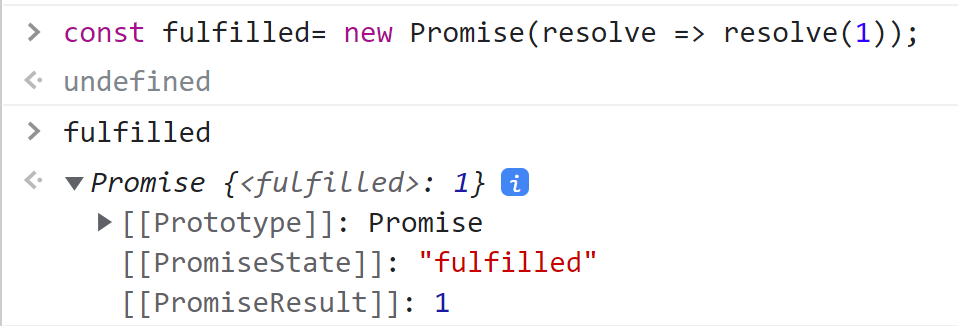
45-3 프로미스의 후속 처리 메서드
프로미스의 비동기 처리 상태가 변화하면 후속 처리 메서드에 인수로 전달한 콜백함수가 선택적으로 호출
Promise.prototype.then
- 첫 번째 골백 함수는 프로미스가 fulfilled 상태가 되면 호출, 이때 콜백 함수는 프로미스의 비동기 처리 결과를 인수로 전달 받음
- 두 번째 콜백 함수는 프로미스가 rejected 상태가 되면 호출, 이때 콜백 함수는 프로미스의 에러를 인수로 전달 받음
// fulfilled
new Promise(resolve => resolve('fulfilled'))
    .then(v => console.log(v), e => console.log(e)); // fulfilled

// rejected
new Promise((_, reject) => reject(new Error('rejected')))
    .then(v => console.log(v), e => console.error(e)); // Error: rejected
Promise.prototype.catch
한 개의 콜백 함수를 인수로 전달 받음
rejected 상태인 경우만 호출
// rejected
new Promise((_, reject) => reject(new Error('rejected')))
  .catch(e => console.log(e)); // Error: rejected
Promise.prototype.finally
한 개의 콜백 함수를 인수로 전달 받음
프로미스 성공 또는 실패에 상관없이 무조건 한 번 호출
상태와 상관없이 공통적으로 수행해야 할 때 사용
new Promise(() => {})
  .finally(() => console.log('finally')); // finally
45-4 프로미스의 에러 처리
비동기 처리에서 발생한 에러는 then 메서드의 두 번째 콜백 함수로 처리 가능
const wrongUrl = 'https://jsonplaceholder.typicode.com/XXX/1';

// 부적절한 URL이 지정되었기 때문에 에러가 발생
promiseGet(wrongUrl).then(
  res => console.log(res),
  err => console.error(err)
); // Error: 404
catch 사용
catch를 사용하는 것이 가독성이 좋고 명확
const wrongUrl = 'https://jsonplaceholder.typicode.com/XXX/1';

// 부적절한 URL이 지정되었기 때문에 에러가 발생한다.
promiseGet(wrongUrl)
  .then(res => console.log(res))
  .catch(err => console.error(err)); // Error: 404
45-5 프로미스 체이닝
const url = 'https://jsonplaceholder.typicode.com';

// id가 1인 post의 userId를 취득
promiseGet(`${url}/posts/1`)
  // 취득한 post의 userId로 user 정보를 취득
  .then(({userId}) => promiseGet(`${url}/users/${userId}`))
  .then(userInfo => console.log(userInfo))
  .catch(err => console.error(err));
위 예제는 then-> then-> catch 순서
이를 프로미스 체이닝이라 함
| 후속 처리 메서드 | 콜백 함수의 인수 | 후속 처리 메서드의 반환값 |
|---|---|---|
| then | promiseGet 함수가 반환한 프로미스가 resolve한 값(id가 1인 post) | 콜백 함수가 반환한 프로미스 |
| then | 첫 번째 then 메서드가 반환한 프로미스가 resolve한 값(post의 userId로 취득한 user 정보) | 콜백 함수가 반환한 값(undefined)을 resolve한 프로미스 |
| catch | promiseGet 함수 또는 앞선 후속 처리 메서드가 반환한 프로미스가 reject한 값 | 콜백 함수가 반환한 값(undefined)을 resolve한 프로미스 |
프로미스는 콜백헬이 발생하지는 않으나 가독성이 좋지 않음
대안-> es8에서 나온 async/await 쓰자
45-6 프로미스의 정적 메서드
생성자 함수로 사용되지만 함수도 객체이므로 메서드 가질 수 있음
- Promise.resolve / Promise.reject
이미 존재하는 값을 래핑하여 프로미스를 사용하기 위해 사용
// 배열을 resolve하는 프로미스를 생성
const resolvePromise = Promise.resolve([1, 2, 3]);
// 위 코드가 아래와 같음
const resolvePromise = new Promise(resolve => resolve([1, 2, 3]));
resolvePromise.then(console.log); // [1, 2, 3]
// 배열을 resolve하는 프로미스를 생성
const rejectedPromise = Promise.reject(new Error('Error!'));
// 위 코드가 아래와 같다.
const rejectedPromise = new Promise((_, reject) => reject(new Error('Error!')));
rejectedPromise.catch(console.log); // Error: Error!- Promise.all
여러 개의 비동기 처리를 모두 병렬 처리할 때 사용
const requestData1 = () =>
  new Promise(resolve => setTimeout(() => resolve(1), 3000));
const requestData2 = () =>
  new Promise(resolve => setTimeout(() => resolve(2), 2000));
const requestData3 = () =>
  new Promise(resolve => setTimeout(() => resolve(3), 1000));

// 세 개의 비동기 처리를 순차적으로 처리
const res = [];
requestData1()
  .then(data => {
    res.push(data);
    return requestData2();
  })
  .then(data => {
    res.push(data);
    return requestData3();
  })
  .then(data => {
    res.push(data);
    console.log(res); // [1, 2, 3] => 약 6초 소요
  })
  .catch(console.error);
위 예제는 세 개의 비동기 처리를 순차적으로 처리 -> 총 6초 이상이 소요
그러나 위 예제의 경우 세 개의 비동기 처리는 서로 의존하지 않고 개별적으로 수행됨 -> 순차적으로 처리할 필요 없음
const requestData1 = () =>
  new Promise(resolve => setTimeout(() => resolve(1), 3000));
const requestData2 = () =>
  new Promise(resolve => setTimeout(() => resolve(2), 2000));
const requestData3 = () =>
  new Promise(resolve => setTimeout(() => resolve(3), 1000));

// 세 개의 비동기 처리를 순차적으로 처리
Promise.all([requestData1(), requestData2(), requestData3()])
  .then(console.log) // [1, 2, 3] => 약 3초 소요
  .catch(console.error);
모든 프로미스가 모두 fulfilled 상태가 되면 모든 처리 결과를 배열에 저장해 새로운 프로미스 반환
하나라도 reject 상태가 되면 즉시 종료
- Promise.race
Promise.all처럼 모든 프로미스가 fulfilled 상태가 되는 것을 기다리는 것이 아니라 가장 먼저 fulfilled 상태가 된 프로미스의 처리 결과를 resolve하는 새로운 프로미스 반환
Promise.race([
  new Promise(resolve => setTimeout(() => resolve(1), 3000)), // 1
  new Promise(resolve => setTimeout(() => resolve(2), 2000)), // 2
  new Promise(resolve => setTimeout(() => resolve(3), 1000))  // 3
])
  .then(console.log) // 3
  .catch(console.log);
하나라도 reject 상태가 되면 에러를 reject하는 새로운프로미스 즉시 반환
- Promise.allSettled
전달받은 프로미스가 모두 settled 상태가 되면 처리 결과를 배열로 반환 (es11 도입)
Promise.allSettled([
  new Promise(resolve => setTimeout(() => resolve(1), 2000)),
  new Promise((_, reject) => setTimeout(() => reject(new Error('Error!')), 1000))
]).then(console.log);

/*
[
 {status:"fulfilled", value: 1},
 {status:"rejected", reason: Error: Error! at <anoymous>}
]
*/
fulfilled 또는 rejected 상태와는 상관없이 처리 결과 모두 담겨짐
45-7 마이크로태스크 큐
setTimeout(() => console.log(1), 0);

Promise.resolve()
  .then(() => console.log(2))
  .then(() => console.log(3));
프로미스의 후속 처리 메서드도 비동기로 동작하므로 1 -> 2 -> 3의 순으로 출력될 것처럼 보이지만 2 -> 3 -> 1 의 순으로 출력됨
그 이유는 프로미스의 후속 처리 메서드의 콜백 함수는 태스크 큐가 아니라 마이크로태스크 큐에 저장되기 때문
마이크로태스크 큐에는 프로미스의 후속 처리 메서드의 콜백 함수가 일시 저장된다. 마이크로태스크 큐는 태스크 큐보다 우선순위가 높음
45-8 fetch
fetch 함수는 http요청 전송 기능을 제공하는 클라이언트 사이드 Web API (XMLHttpRequest보다 사용법 간단 & 프로미스 지원 )
HTTP 응답을 나타내는 Response 객체를 래핑한 Promise 객체 반환
fetch('https://jsonplaceholder.typicode.com/todos/1')
  .then(response => console.log(response));
fetch 함수 통해 HTTP 요청 전송하기
const request = {
  get(url) {
    return fetch(url);
  },
  post(url, payload) {
    return fetch(url, {
      method: 'POST',
      headers: {'content-Type' : 'application/json'},
      body: JSON.stringify(payload)
    });
  },
  patch(url, payload) {
    return fetch(url, {
      method: 'PATCH',
      headers: {'content-Type' : 'application/json'},
      body: JSON.stringify(payload)
    });
  },
  delete(url) {
    return fetch(url, {method: 'DELETE'});
  }
};
get 요청
request.get('https://jsonplaceholder.typicode.com/todos/1')
  .then(response => response.json())
  .then(todos => console.log(todos))
  .catch(err => console.error(err));
post 요청
request.post('https://jsonplaceholder.typicode.com/todos', {
  userId: 1,
  title: 'Javascript',
  completed: false
}).then(response => response.json())
  .then(todos => console.log(todos))
  .catch(err => console.error(err));
patch 요청
request.patch('https://jsonplaceholder.typicode.com/todos', {
    completed: true
}).then(response => response.json())
  .then(todos => console.log(todos))
  .catch(err => console.error(err));
delete 요청
request.delete('https://jsonplaceholder.typicode.com/todos/1')
  .then(response => response.json())
  .then(todos => console.log(todos))
  .catch(err => console.error(err));
46장 제너레이터와 async/await
46-1 제네레이터란?
es6도입
코드 블록의 실행을 일시 중지했다가 필요한 시점에 재개할 수 있는 특수한 함수
제네레티어톼 일반 함수의 차이
- 제너레이터 함수는 함수 호출자에게 함수 실행의 제어권을 양도 가능
- 제너레이터 함수는 함수 호출자와 함수의 상태 주고받을 수 있음
- 제너레이터 함수를 호출하면 제너레이터 객체 반환
46-2 제너레이터 함수 정의
// 제너레이터 함수 선언문
function* genDecFunc() {
  yield 1;
}

// 제너레이터 함수 표현식
const genExpFunc = function* () {
  yield 1;
};

// 제너레이터 메서드
const obj = {
  * genObjMethod() {
    yield 1;
  }
};

// 제너레이터 클래스 메서드
class MyClass {
  * genClsMethod() {
    yield 1;
  }
}
애스터리스크(*)의 위치는 function 키워드와 함수 이름 사이라면 어디든 상관 없음
하지만 일관성 유지 위해 function 키워드 바로 뒤에 붙이는 것 권장
function* getFunc() { yield 1; }
function * getFunc() { yield 1; }
function *getFunc() { yield 1; }
function*getFunc() { yield 1; }

// 제네레이터 함수는 화살표 함수로 정의불가능
const genArrowFunc = * () => {
  yield 1;
}; // SyntaxError: Unexpected token '*'

// new 연산자와 호출 불가능
function* genFunc() {
  yield 1;
}

new getFunc(); // TypeError: getFunc is not a constructor
46-3 제너레이터 객체
제너레이터 함수를 호출하면 일반 함수처럼 함수 코드 블록을 실행하는 것이 아니라 제너레이터 객체를 생성해 반환
제너레이터 함수가 반환한 제너레이터 객체는 이터러블이면서 동시에 이터레이터
// 제너레이터 함수
function* genFunc() {
  yield 1;
  yield 2;
  yield 3;
}

// 제너레이터 함수를 호출하면 제너레이터 객체를 반환
const generator = genFunc();

// 제너레이터 객체는 이터러블이면서 동시에 이터레이터
// 이터러블은 Symbol.iterator 메서드를 직접 구현하거나 프로토타입 체인을 통해 상속받은 객체
console.log(Symbol.iterator in generator); // true
// 이터레이터는 next 메서드를 갖음
console.log('next' in generator); // true
제너레이터 객체는 next 메서드를 갖는 이터레이터이지만 이터레이터에는 없는 return, throw 메서드를 갖고 세 개의 메서드를 호출하면 다음과 같이 동작함
function* genFunc() {
  try {
    yield 1;
    yield 2;
    yield 3;
  } catch (e) {
    console.error(e);
  }
}

const generator = genFunc();

console.log(generator.next()); // {value: 1, done: false}
console.log(generator.return('End!')); // {value: "End!", done: true}
console.log(generator.throw('Error!')); // {value: undefined, done: true}- next 메서드를 호출하면 제너레이터 함수의 yield 표현식까지 코드 블록을 실행하고 yield된 값을 value 프로퍼티 값으로, false를 done 프로퍼티 값으로 갖는 이터레이터 리절트 객체를 반환
- return 메서드를 호출하면 인수로 전달받은 value 프로퍼티 값으로, true를 done 프로퍼티 값으로 갖는 이터레이터 리절트 객체를 반환
- throw 메서드를 호출하면 인수로 전달받은 에러를 발생시키고 undefined를 value 프로퍼티 값으로, true를 done 프로퍼티 값을 갖는 이터레이터 리절트 객체를 반환
46-4 제너레이터 일시 중지와 재개
제네레이터는 yield 키워드와 next 메서드를 통해 실행을 일시 중지했다가 필요한 시점에 다시 재개할 수 있음
일반 함수는 호출 이후 제어권을 함수가 독점하지만 제너레이터는 함수 호출자에게 제어권을 양도하여 필요한 시점에 함수 실행 재개
46-5 제너레이터의 활용
이터러블의 구현
이터레이션 프로토콜 준수해 이터러블 생성하는 방식보다 간단히 이터러블 구현 가능
46-6 async/await
async/await는 프로미스 기반으로 동작
프로미스의 후속 처리 메서드 없이 마치 동기 처리처럼 처리 결과 반환 하도록 구현 가능
const fetch = require('node-fetch');

async function fetchTodo() {
  const url = 'https://jsonplaceholder.typicode.com/todos/1';

  const response = await fetch(url);
  const todo = await response.json();
  console.log(todo);
  // {userId: 1, id: 1, title: 'delectus aut autem', completed: false}  }

fetchTodo();
- async 함수
await 키워드는 반드시 async 함수 내부에서 사용해야함
// async 함수 선언문
async function foo(n) { return n;}
foo(1).then(v => console.log(v)); // 1

// async 함수 표현식
const bar = async function (n) { return n;};
bar(2).then(v => console.log(v)); // 2

// async 화살표 함수
const baz = async n => n;
baz(3).then(v => console.log(v)); // 3

// async 메서드
const obj = {
  async foo(n) {return n;}
};
obj.foo(4).then(v => console.log(v)); // 4

// async 클래스 메서드
class MyClass {
  async bar(n) {return n;}
}

const myClass = new MyClass();
myClass.bar(5).then(v => console.log(v)); // 5
- await 키워드
await 키워드는 프로미스가 settled 상태(비동기 처리가 수행된 상태)가 될 때까지 대기하다가 settled 상태가 되면 프로미스가 resolve한 처리 결과를 반환
const fetch = require('node-fetch');

const getGithubUserName = async id => {
  const res = await fetch(`https://api.github.com/users/${id}`);   // 1
  const {name} = await res.json();  // 2
  console.log(name); //yejun
}

getGithubUserName('yejun');
1의 fetch 함수가 수행한 http 요청에 대한 서버의 응답이 도착해서 fetch 함수가 반환한 프로미스가 setteld 상태가 될 때까지 1은 대기
이후 프로미스가 settled 상태가 되면 resolve한 결과 res 변수 할당
async function foo() {
  const a = await new Promise(resolve => setTimeout(() => resolve(1), 3000));
  const b = await new Promise(resolve => setTimeout(() => resolve(2), 2000));
  const c = await new Promise(resolve => setTimeout(() => resolve(3), 1000));
  console.log([a, b, c]); // [1, 2, 3]
}

foo(); // 6초소요
프로미스에 await 키워드 사용하는 것 주의
위 예제는 서로 연관이 없이 개발적 수행인데 await를 사용하게 되면 총 6초가 소요
- 에러 처리
const fetch = require('node-fetch');

const foo = async () => {
  try {
    const wrongUrl = 'https://wrong.url';

    const response = await fetch(wrongUrl);
    const data = await response.json();
    console.log(data);
  } catch (e) {
    console.error(e); //TypeError: Failed to fetch
  }
};

foo();
위는 http통신 에러 뿐 아니라 try 코드 블록 내의 모든 문에서 발생한 일반적인 에러까지 캐치 가능
47장 에러 처리
47-1 에러 처리의 필요성
에러에 대해 대처하지 않고 방치하면 프로그램은 강제 종료됨
console.log('[Start]');

foo(); // ReferenceError

// 에러에 의해 프로그램이 강제 종료되어 이 코드는 실행 x
console.log('[End]');
try...catch문을 사용해 발생한 에러에 적절하게 대응하면 프로그램이 강제 종료되지 않고 계속해서 코드를 실행 가능
console.log('[Start]');

try {
  foo(); // ReferenceError
} catch (error) {
  console.error('[에러 발생]', error);
}

console.log('[End]');
47-2 try...catch...finally문
try {
  // 실행할 코드(에러가 발생할 가능성이 있는 코드)
} catch (err) {
  // try 코드 블록에서 에러가 발생하면 이 코드 블록의 코드가 실행된다.
  // err에는 try 코드 블록에서 발생한 Error 객체가 전달된다.
} finally {
  // 에러 발생과 상관없이 반드시 한 번 실행한다.
}
47-3 Error 객체
const error = new Error('invalid');error 생성자 함수가 생성한 에러 message 프로퍼티와 stack 프로퍼티 갖음
| 생성자 함수 | 인스턴스 |
|---|---|
| Error | 일반적 에러 |
| SyntaxError | 문법 에러 |
| ReferenceError | 참조할 수 없는 식별자 참조했을 때 발생하는 에러 |
| TypeError | 피연산자 또는 인수의 데이터 타입이 유효하지 않을 때 발생하는 에러 |
| RangeError | 숫자값의 허용 범위를 벗어났을 때 발생하는 에러 |
| URIError | encodeURI 또는 decodeURI 함수에 부적잘한 인수를 전달했을 때 발생하는 에러 |
| EvalError | eval 함수에서 발생하는 에러 |
47-4 throw문
try {
  // 에러 객체를 생성한다고 에러가 발생하는 것은 아니다.
  new Error('something wrong');
} catch (error) {
  console.log(error);
}
에러를 발생시키려면 try 코드 블록에서 throw문으로 에러 객체 던져야함
try {
  // 에러 객체를 던지면 catch 코드 블록이 실행되기 시작한다.
  throw new Error('something wrong');
} catch (error) {
  console.log(error);
}
47-5 에러의 전파
에러는 호출자(caller) 방향으로 전파됨
즉, 콜 스택의 아래 방향으로 전파됨
const foo = () => {
  throw Error('foo에서 발생한 에러');
};

const bar = () => {
  foo();
};

const baz = () => {
  bar();
};

try {
  baz();
} catch (err) {
  console.error(err);
}
foo -> bar -> baz -> 전역 실행 컨텍스트 방향으로 전파됨
throw된 에러를 어디에서도 캐치하지 않으면 프로그램은 강제 종료