A Practical Desktop Storage Plan for Messaging Downloads Cache and Shared Files
|
A simple method for distinguishing cache, downloads, project copies, and backups so that teams can control disk usage without deleting files that still have operational or legal value. |
Messaging clients can become large storage consumers without looking like traditional file repositories. A few active groups can generate thousands of images, videos, PDFs, compressed archives, voice messages, and duplicated project files across a Mac or Windows computer.
The important question is not only how much space the app uses. Teams need to know which copy is temporary, which copy is a working file, which copy is protected by backup, and which copy can be removed without disrupting a project.
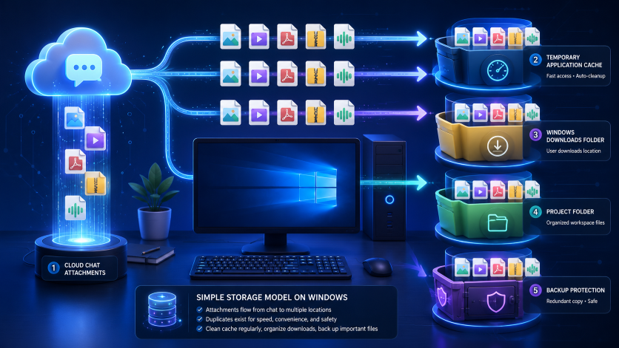
Figure 1. A single attachment can move through cloud access, application cache, downloads, project folders, and backups.
Map the Four Common Storage States
|
Storage state |
Purpose |
Typical risk |
|
Cloud-accessible message file |
Available through the account or conversation |
Availability may depend on account access and retention |
|
Application cache |
Speeds previews and recently opened media |
Can grow silently and may be recreated |
|
Downloads folder copy |
User-controlled local file |
Easy to duplicate or forget |
|
Project or archive copy |
Approved working or retained record |
Must follow naming, access, and retention rules |
A cleanup decision should be based on the file’s state rather than its extension. Two identical PDFs may have different value if one is a disposable cache item and the other is the approved contract stored in a project folder.
Establish a Measurable Baseline
Measure storage before changing settings. Record the application’s reported cache size, the operating-system storage view, the Downloads folder, and the largest project directories. The values may not match because each view counts different categories.
- Total application data reported by the operating system.
- Cache size reported inside the client, if available.
- Number and size of files in the Downloads folder.
- Largest media types: video, archive, image, audio, and documents.
- Age of files and date of last access.
- Whether a protected project or backup copy already exists.
Users who refer to a messaging client as 纸飞机 should still apply the same storage model: the familiar app label does not reveal whether a visible attachment is cached, permanently downloaded, or copied into another folder.

Figure 2. A monthly storage dashboard can reveal which media types and folders are driving growth.
Estimate Monthly Growth
A practical estimate can be built from four variables: number of active conversations, attachments received per day, average attachment size, and retention time. The goal is not a perfect forecast; it is an early warning before low disk space disrupts updates or file handling.
|
Workload |
Typical growth pattern |
Recommended control |
|
Text-heavy support |
Small files, many thumbnails |
Limit cache age and review weekly |
|
Field photography |
Large image volume |
Disable unnecessary auto-downloads |
|
Training channels |
Video and presentation files |
Download only on demand |
|
Engineering exchange |
Archives and logs |
Move approved items into project storage |
|
Executive groups |
Low volume, high sensitivity |
Apply stricter access and retention rules |
Separate Cache Cleanup from Record Deletion
Cache cleanup is usually a performance and capacity action. Record deletion is an information-governance decision. Do not combine them in a single instruction that tells users to “delete old files” without checking project, legal, customer, or backup requirements.
- Confirm whether the file can be downloaded again.
- Check whether an approved project copy exists.
- Check whether the file is subject to retention or evidence requirements.
- Close the file in other applications before cleanup.
- Remove the lowest-value temporary copy first.
- Remeasure storage and verify the client still behaves normally.
Use a Cleanup Priority Score
A simple review score can combine file size, age, duplicate count, and business value. Large, old, duplicated, low-value items should be reviewed first. Small or recent files with high project value should remain low priority even if they are easy to delete.
|
Factor |
Higher cleanup priority |
Lower cleanup priority |
|
Size |
Large video or archive |
Small document or thumbnail |
|
Age |
Not accessed for months |
Recently used |
|
Duplicates |
Several identical local copies |
Only approved copy |
|
Recoverability |
Can be downloaded or recreated |
Cannot be recovered |
|
Business value |
No current project purpose |
Contract, evidence, or active work |

Figure 3. A review dashboard can rank files by size, age, duplicate status, recoverability, and business value.
Document Feature Behavior Before Automating Cleanup
Storage controls can vary across desktop versions and operating systems. A maintained 纸飞机功能介绍 can be used as a starting reference, but the team should verify actual cache, download, auto-save, and retention behavior on its current Windows and Mac builds before creating scripts or scheduled cleanup jobs.
Automation should begin with reporting rather than deletion. Generate a list of large and old files, ask the responsible owner to review it, and only then apply a documented removal rule.
|
Desktop storage checklist · Cache, downloads, project copies, and backups are treated as different states. · Current storage use is measured before cleanup. · Auto-download settings match the team’s media workload. · Project and retention requirements are checked before deletion. · Cleanup targets temporary or duplicated copies first. · Storage is remeasured and client behavior is tested afterward. |
Conclusion
Messaging storage becomes manageable once files are classified by state and value. Measuring growth, controlling auto-downloads, and separating cache cleanup from record deletion allows teams to recover disk space without turning routine maintenance into a data-loss incident.