A Safer Invitation Role and Moderation Workflow for Small Online Communities
|
A practical operating model for invitations, onboarding, permissions, moderation, and incident response as a small community grows beyond personal trust. |
Small communities often begin with one invitation link and a few trusted administrators. That informal model is efficient at first, but it becomes fragile when the link is forwarded, former volunteers retain access, fake support accounts appear, or moderators apply different rules.
The platform can provide roles and links, but the community still needs an operating model. Safer growth comes from controlling how people enter, what each role can do, and how moderators document decisions.

Figure 1. Invitation paths should match the trust level and purpose of the community.
Match the Invitation Method to the Risk Level
A public discussion group and a private customer-support group should not use the same entry method. Choose the least restrictive method that still protects the community’s purpose and members.
|
Entry method |
Best use |
Primary control |
|
Public link |
Open-interest community |
Monitoring, rate limits, and clear rules |
|
Limited campaign link |
Event or temporary onboarding |
Expiration date and usage review |
|
Member referral |
Moderate-trust community |
Referrer accountability |
|
Administrator approval |
Customer, partner, or internal group |
Identity and eligibility check |
|
Direct invitation |
High-trust working group |
Named owner and documented purpose |
When publishing a Potato群组加入与邀请指南, explain not only how a person joins but also who is allowed to create links, whether links expire, and what happens when a link is shared outside the intended audience.
Use Role Design Instead of Shared Administrator Access
Do not solve every operational problem by granting full administrator rights. Break responsibilities into the smallest practical roles and review them on a schedule.
|
Role |
Typical responsibilities |
Should not automatically receive |
|
Owner |
Policy, emergency control, final decisions |
Daily moderation workload |
|
Operations admin |
Settings, integrations, member workflow |
Content-policy discretion without review |
|
Moderator |
Warnings, removals, incident triage |
Billing or ownership controls |
|
Content manager |
Announcements and scheduled posts |
Member removal authority |
|
Support member |
Answers and escalation |
Broad administrative access |
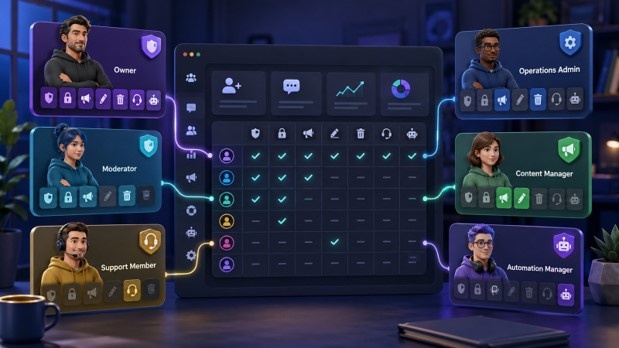
Figure 2. A role matrix makes permissions visible and reduces reliance on full administrator access.
Build an Onboarding Sequence
- Confirm the community purpose and eligibility.
- Use the approved invitation path.
- Present the rules before the first post.
- Explain how official administrators identify themselves.
- Point members to the reporting and appeal process.
- Record acceptance when the community handles sensitive work.
The onboarding message should be short enough to read on a phone. It should state what the group is for, what content is prohibited, how moderators communicate, and where members should report suspicious private messages.
Control the Invitation-Link Lifecycle
Treat every invitation link as an access credential. Record its owner, purpose, creation date, expected audience, and review date. Revoke links that are no longer required instead of allowing an unlimited collection of active links to accumulate.
- Create separate links for separate campaigns or partners.
- Do not reuse a public link for a private support group.
- Revoke a link after suspicious membership spikes.
- Review links when an administrator leaves the team.
- Keep a record of emergency revocation authority.
Standardize Moderation Decisions
Moderation is easier to defend when similar incidents receive similar treatment. Create a small decision ladder: reminder, warning, temporary restriction, removal, and permanent ban. Not every community needs every step, but moderators should know when they can skip directly to emergency action.
|
Incident |
Initial action |
Escalation trigger |
|
Off-topic post |
Reminder or move content |
Repeated disruption |
|
Spam or mass promotion |
Remove content and review account |
Coordinated or automated activity |
|
Impersonation |
Restrict account and preserve evidence |
Targeted fraud or credential request |
|
Suspicious file or link |
Remove, warn members, review logs |
Malware or account compromise suspected |
|
Harassment or threats |
Protect affected member and escalate |
Credible safety concern |
Prepare an Incident-Response Playbook
When a community experiences a compromised invite link, fake administrator, or malicious file, moderators should not invent a response in real time. The playbook should identify who can revoke links, remove administrators, preserve screenshots, notify members, and communicate with the platform.
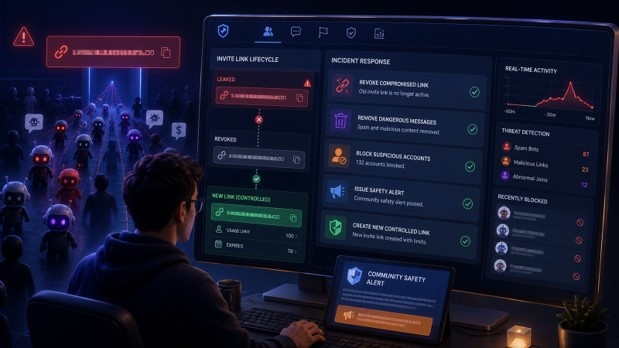
Figure 3. Invitation control, evidence capture, member notification, and role review should be part of one incident workflow.
Keep Official Product and Community References Clear
Members may search for the platform using a short name such as Potato. The community should publish one official reference location and repeatedly warn that administrators will not request passwords or verification codes through private messages.
|
Community operations checklist · Invitation methods are selected by community risk level. · Every active link has an owner and review date. · Roles follow least privilege instead of shared full-admin access. · New members receive rules and official-support identification guidance. · Moderators use a consistent decision ladder. · Incident responders can revoke links, preserve evidence, and notify members. · Administrator access is reviewed when responsibilities change. |
Conclusion
A safe community does not need to make every interaction bureaucratic. It needs visible ownership, limited permissions, controlled invitations, and a predictable response when something goes wrong. Those controls preserve the speed and openness that made the community valuable in the first place.