문자 다루기
package chap53.io.text;

public class TextConst {
      public static final String FILE_NAME = "temp/hello.txt";
}
package chap53.io.text;

import java.io.FileInputStream;
import java.io.FileOutputStream;
import java.io.IOException;
import java.nio.charset.StandardCharsets;
import java.util.Arrays;

import static chap53.io.text.TextConst.FILE_NAME;

public class ReaderWriterMainV1 {
    public static void main(String[] args) throws IOException {
        String writeString = "ABC";

        //문자 -> byte UTF-8 인코딩
        byte[] writeBytes = writeString.getBytes(StandardCharsets.UTF_8); //문자를 byte 숫자로 변경 -> 문자 집합을 지정
        System.out.println(writeString);
        System.out.println("writeBytes = " + Arrays.toString(writeBytes));

        //파일 쓰기
        FileOutputStream fos = new FileOutputStream(FILE_NAME);
        fos.write(writeBytes);
        fos.close();

        //파일 읽기
        //읽을때도 바이트 배열이 저장
        FileInputStream fis = new FileInputStream(FILE_NAME);
        byte[] readBytes = fis.readAllBytes();
        fis.close();

        //byte -> String 디코딩
        String readString = new String(readBytes, StandardCharsets.UTF_8);

        System.out.println("readBytes = " + Arrays.toString(readBytes));
        System.out.println("readString = " + readString);
    }
}
byte[] writeBytes = writeString.getBytes(UTF_8)
String -> byte 로 변환시 String.getByte()을 사용
문자를 byte 숫자로 변환, 문자 집합을 지정
String readString = new String(readBytes, UTF_8)
String 객체를 생성, byte[]와 디코딩할 문자 집합을 전달
byte[] -> String
스트림을 문자로
package chap53.io.text;

import java.io.*;
import java.nio.charset.StandardCharsets;
import java.util.Arrays;

import static chap53.io.text.TextConst.FILE_NAME;

public class ReaderWriterMainV2 {
    public static void main(String[] args) throws IOException {
        String writeString = "ABC";
        System.out.println("writeString = " + writeString);

        //파일 쓰기
        FileOutputStream fos = new FileOutputStream(FILE_NAME);
        //Stream에 byte 대신 문자를 저장 (OutputStream은 바이트 단위, writer은 문자로)
        //OutputStream을 상속 받는 것이 아닌 write를 상속 받고 있다.
        OutputStreamWriter osw = new OutputStreamWriter(fos, StandardCharsets.UTF_8);
        //바이트 코드로 변경된다.
        osw.write(writeString);
        osw.close();

        //파일 읽기
        //읽을때도 바이트 배열이 저장
        FileInputStream fis = new FileInputStream(FILE_NAME);
        //스트림에 byte대신 문자를 읽을 수 있게 지원 (byte stream -> read)
        InputStreamReader isr = new InputStreamReader(fis, StandardCharsets.UTF_8);

        StringBuilder content = new StringBuilder();
        int ch;
        while ((ch = isr.read()) != -1) { //character를 하나씩 읽어서 2byte씩 읽어서 반환
            content.append((char) ch);
        }
        isr.close();

        System.out.println("String reader = " + content);
    }
}
OutputStreamWriter
OutputStreamWriter는 문자를 입력 받고 문자를 인코딩 -> byte
두 정보가 OutputStreamWriter에게 전달 되어야 함 fos, UTF-8
osw.write(writeString)을 보면 String 문자를 직접 전달
InputStreamReader
int ch = read()를 제공하는데, 여기서는 문자 하나인 char 형으로 데이터를 받게 된다. 그런데 실제 반환 타입은 int 형이므로 char 형으로 캐스팅해서 사용
OutputStreamWriter 의 write() 는 byte 가 아니라 String 이나 char 를 사용??
Reader, Writer
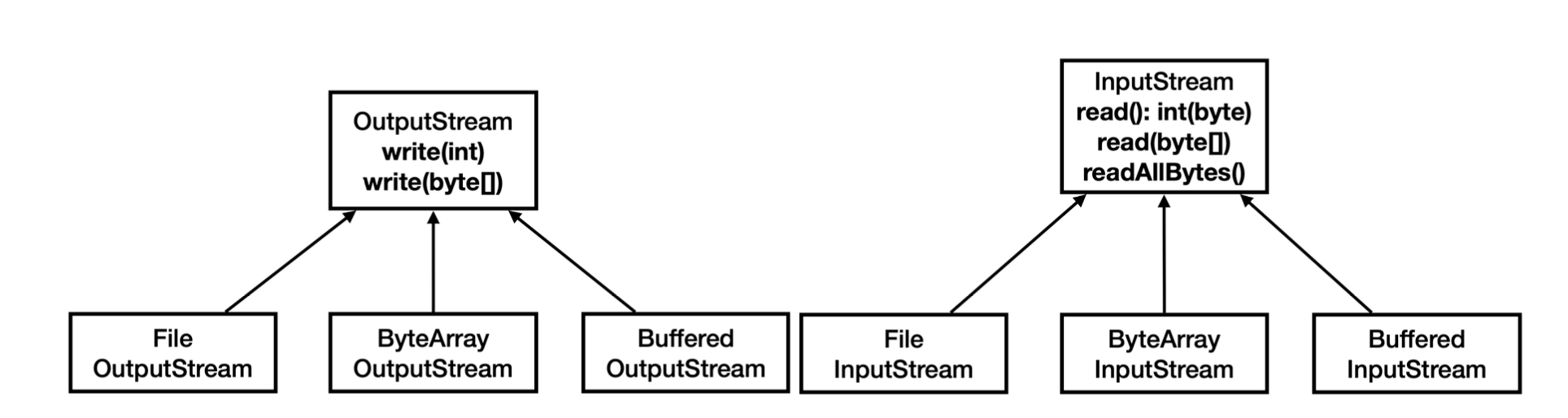
byte를 다루는 클래스
문자를 다루는 클래스
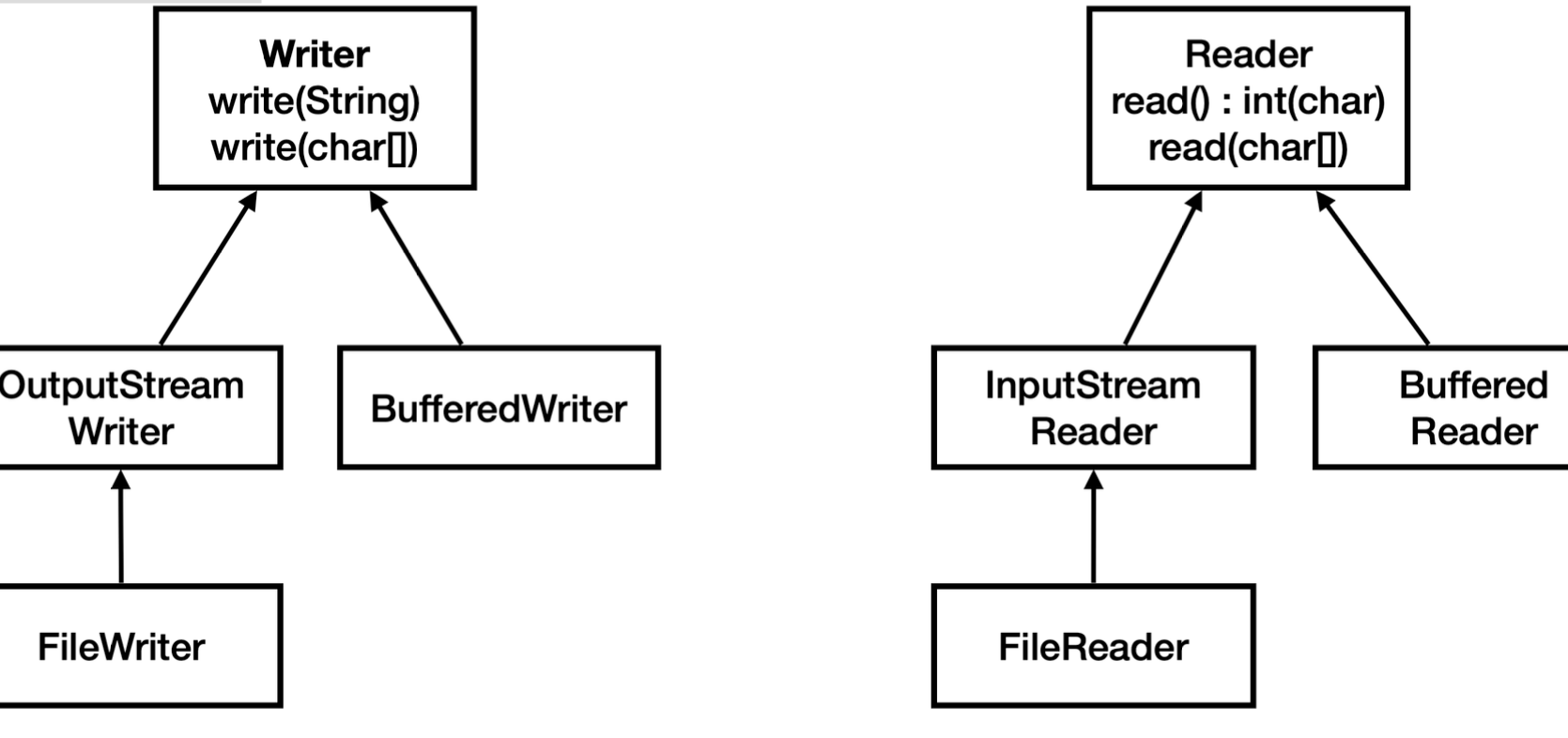
OutputStreamWriter은 Write의 자식, InputStreamReader Reader의 자식
FileWriter, FileReader
package chap53.io.text;

import java.io.*;

import static chap53.io.text.TextConst.FILE_NAME;
import static java.nio.charset.StandardCharsets.*;

public class ReaderWriterMainV3 {
    public static void main(String[] args) throws IOException {
        String writeString = "ABC";
        System.out.println("writeString = " + writeString);

        //파일 쓰기
        FileWriter fw = new FileWriter(FILE_NAME, UTF_8);
        fw.write(writeString);
        fw.close();

        //파일 읽기
        StringBuilder content = new StringBuilder();
        FileReader fr = new FileReader(FILE_NAME, UTF_8);
        int ch;
        while ((ch = fr.read()) != -1) { //character를 하나씩 읽어서 2byte씩 읽어서 반환
            content.append((char) ch);
        }
        fr.close();

        System.out.println("String reader = " + content);
    }
}
FileWriter를 보면
public FileReader(String fileName, Charset charset) throws IOException {
super(new FileInputStream(fileName), charset);
}
FileIntputStream이 있는 것을 볼 수 있다. 생성자 내부에서 FileOutpuStream을 생성.
BufferedReader
문자를 다룰때 한줄 단위로 다룰때가 많음
BufferedReader는 한줄 단위로 문자를 읽는 기능 추가로 제공
package chap53.io.text;

import java.io.*;
import java.nio.charset.StandardCharsets;

import static chap53.io.text.TextConst.FILE_NAME;

public class BufferWriterMainV4 {
    private static final int BUFFER_SIZE = 8192;

    public static void main(String[] args) throws IOException {
        String writeString = "ABC\n가나다";
        System.out.println("== Write String ==");
        System.out.println(writeString);

        //파일 쓰기
        FileWriter fw = new FileWriter(FILE_NAME, StandardCharsets.UTF_8);
        BufferedWriter bw = new BufferedWriter(fw, BUFFER_SIZE);
        bw.write(writeString);
        bw.close();

        //읽기
        StringBuilder sb = new StringBuilder();
        FileReader fr = new FileReader(FILE_NAME, StandardCharsets.UTF_8);
        BufferedReader br = new BufferedReader(fr, BUFFER_SIZE);

        String line;
        while ((line = br.readLine()) != null) { //반환 타입이 String이기 때문에 null
            sb.append(line).append("\n");
        }

        br.close();

        System.out.println("== Read String ==");
        System.out.println(sb);
    }
}
br.readLine()
한줄 단위로 문자를 읽고 String 반호나
반환 타입이 String이기 때문에 -1을 반환 할 수 없음 => Null 사용
기타 스트림
PrintStream
package chap53.io.text;

import java.io.FileNotFoundException;
import java.io.FileOutputStream;
import java.io.PrintStream;

public class PrintStreamEtcMain {
    public static void main(String[] args) throws FileNotFoundException {
        FileOutputStream fos = new FileOutputStream("temp/print.txt");
        PrintStream printStream = new PrintStream(fos);
        printStream.println("Hello World");
        printStream.println(10);
        printStream.println(true);
        printStream.printf("hello %s", "world");
        printStream.close();
    }
}
DataOutputStream
package chap53.io.text;

import java.io.*;

public class DataStreamEtcMain {
    public static void main(String[] args) throws IOException {
        FileOutputStream fos = new FileOutputStream("temp/data.dat");
        DataOutputStream dos = new DataOutputStream(fos);

        dos.writeUTF("회원 A");
        dos.writeInt(20);
        dos.writeDouble(10.5);
        dos.writeBoolean(true);
        dos.close();

        FileInputStream fis = new FileInputStream("temp/data.dat");
        DataInputStream dis = new DataInputStream(fis);
        System.out.println(dis.readUTF());
        System.out.println(dis.readInt());
        System.out.println(dis.readDouble());
        System.out.println(dis.readBoolean());
        dis.close();
    }
}
순세대로 출력값을 맞게 적어줘야 함 안그러면 읽어내지를 못함!